An export timeout is when a data export stops partway through because the server ran out of allowed time. You click export, the progress bar crawls, and then you get an error or a half-finished file. It happens most often with big order, customer, or product exports. The data is fine; the request simply took longer than the server would wait.
An export timeout works by hitting a time limit somewhere between your browser and the database. When you start an export, your store has to read thousands of records, format them, and write a file. All of that happens inside one request. If the request runs past any limit along the way, it gets cut off.
Think of a parking meter. You can park as long as you like, but only while the meter has time on it. Once it expires, it doesn’t matter how close you were to leaving. Your server treats each request the same way.
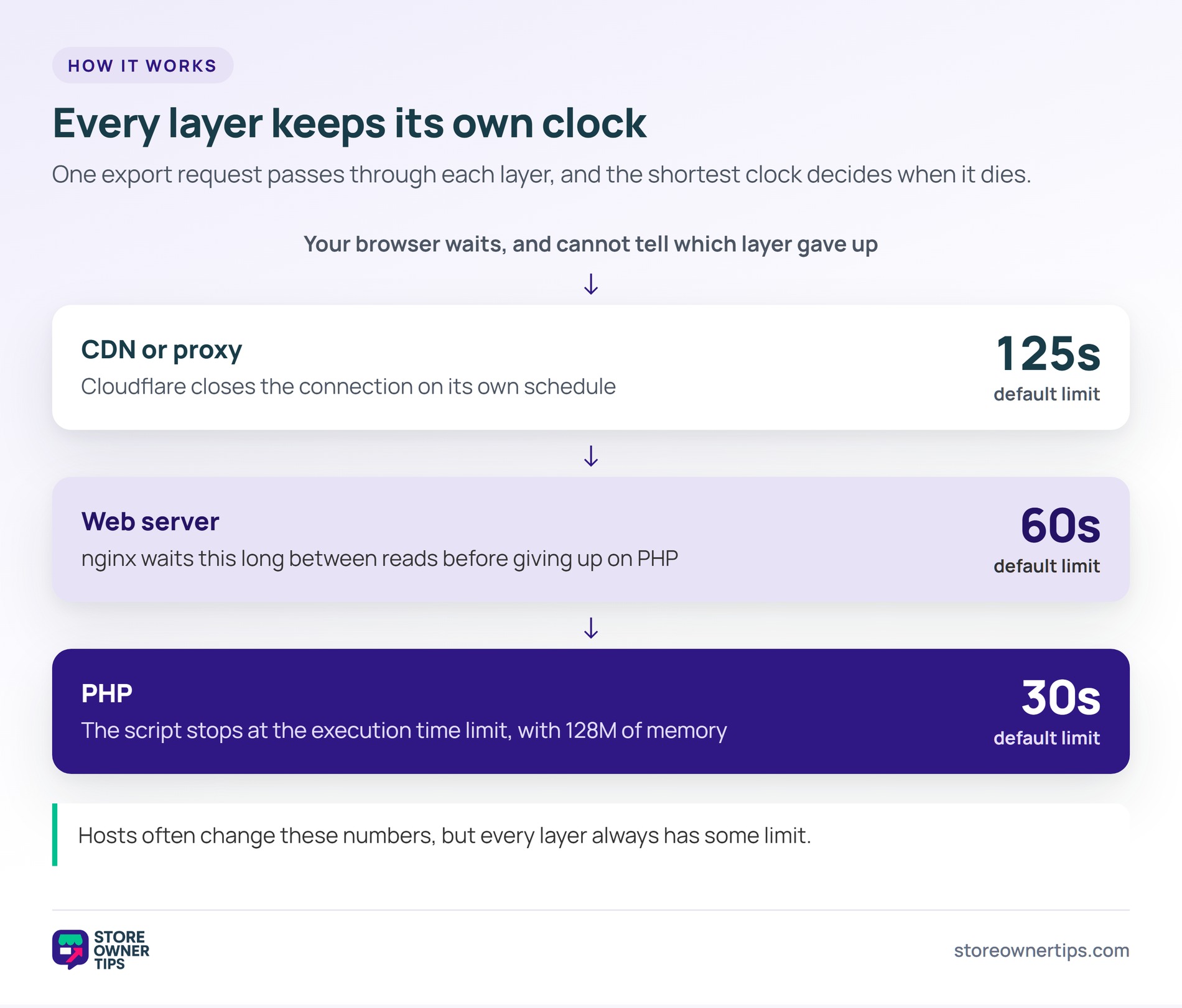
PHP, the language WordPress and WooCommerce run on, has its own meter. By default, a PHP script may run for 30 seconds before it’s stopped. Many hosts change that number, but there is always some limit.
An export request usually passes through three layers, and each one keeps its own clock:
Your browser adds one more twist. It waits for the server to answer, and it can’t tell which layer gave up. So the same root cause can show up as a blank page, a spinning loader, or a cryptic error code.
The layer with the shortest clock decides when the export dies. That’s why raising the PHP limit alone often changes nothing. If a proxy gives up first, you see a 504 Gateway Timeout instead of a PHP error.
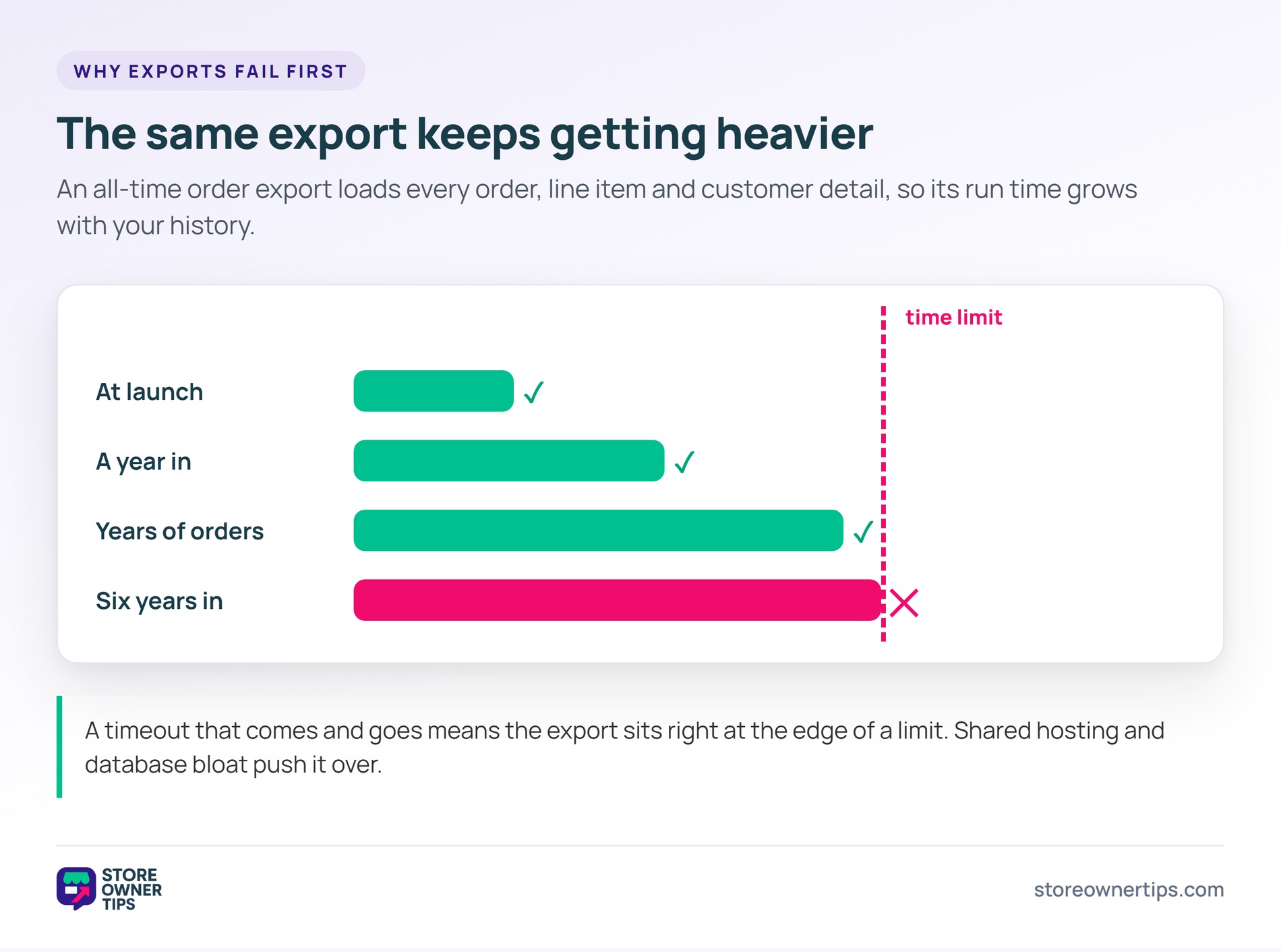
Exports hit time limits before most other store tasks because their workload keeps growing. A product page loads a handful of records. An all-time order export loads every order, plus line items, customer details, and meta data for each one.
Shared hosting makes the problem harder to predict. Your site shares the server’s processor with other sites. So the same export can finish on a quiet morning and fail at lunchtime. A timeout that comes and goes often means the export sits right at the edge of a limit.
Older stores feel this the most. Years of orders, a slow shared host, and a crowded database all stretch the run time. A store carrying database bloat takes longer on every query, so exports get slower even when sales stay flat.
Export timeouts are common enough that infrastructure vendors name them directly. Cloudflare’s documentation says its proxy waits 125 seconds by default for a response. It also lists large data exports as a typical cause of its timeout error.
Memory is the other ceiling. PHP’s default memory limit is 128M per script, and a big export can fill it. Meanwhile, nginx’s proxy module also defaults to 60s between reads. On a busy host, a heavy export has very little room before one of these limits trips.
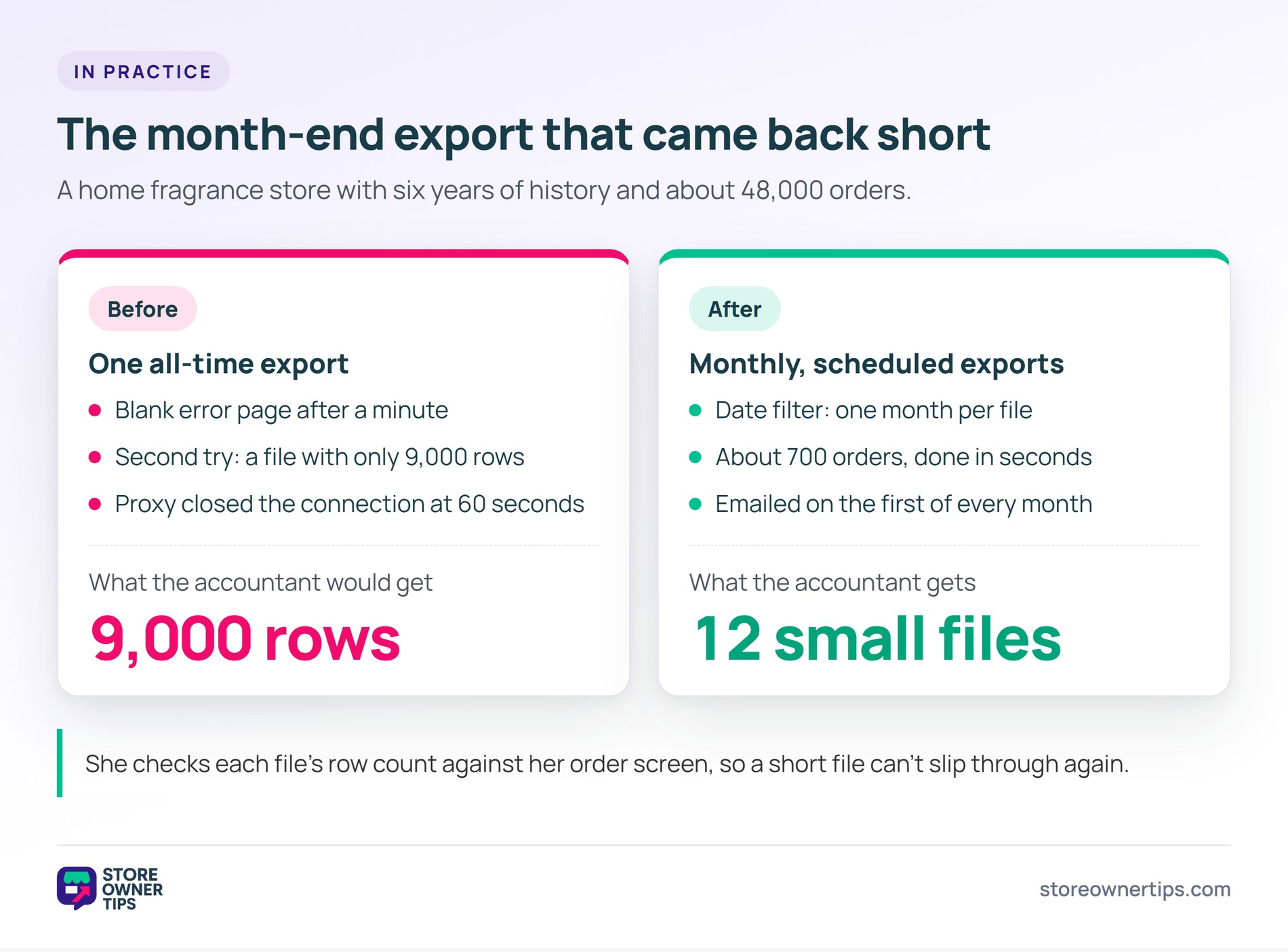
An export timeout in practice usually shows up at the worst possible moment, like month-end. Here’s a hypothetical example. Imagine a home fragrance store that has sold candles on WooCommerce for six years.
The owner needs a full order export for her accountant before a tax deadline. The store holds about 48,000 orders. She clicks export, waits a minute, and gets a blank error page. A second try produces a file with only 9,000 rows.
The partial file is the dangerous part. It opens normally and looks complete at a glance. Had she sent it, her accountant would have worked from less than a fifth of the year’s sales.
Her host’s support team checks the logs and finds the cause. The export ran past the server’s 60-second limit, and the proxy closed the connection. PHP kept working for a while, but the browser had already given up.
Raising the limit to five minutes would only buy time. Next year the store will have more orders, and the same export will fail again. So she needs exports that stay small no matter how big the store grows.
She switches to monthly exports filtered by date. Each file now holds around 700 orders and finishes in seconds. Then she sets up a scheduled export for her accountant. It emails last month’s orders on the first of every month.
The result is twelve small files instead of one giant one. None of them comes close to the time limit. As a bonus, she checks each file’s row count against her order screen. That way, a short file can’t slip through again.
You prevent export timeouts by shrinking each export, moving it out of your browser, or giving the server more room. The first two hold up as your store grows. The third is a short-term patch.
An export plugin makes the first three habits easy. Visser’s Store Exporter Deluxe is trusted on 20,000+ stores for this kind of recurring job. It filters orders by preset periods, like last month, or a manual date range. It also runs scheduled exports and delivers files by email, FTP/SFTP, or a fixed file path.
Visser’s guide to data automation workflows shows how stores set those recurring jobs up.
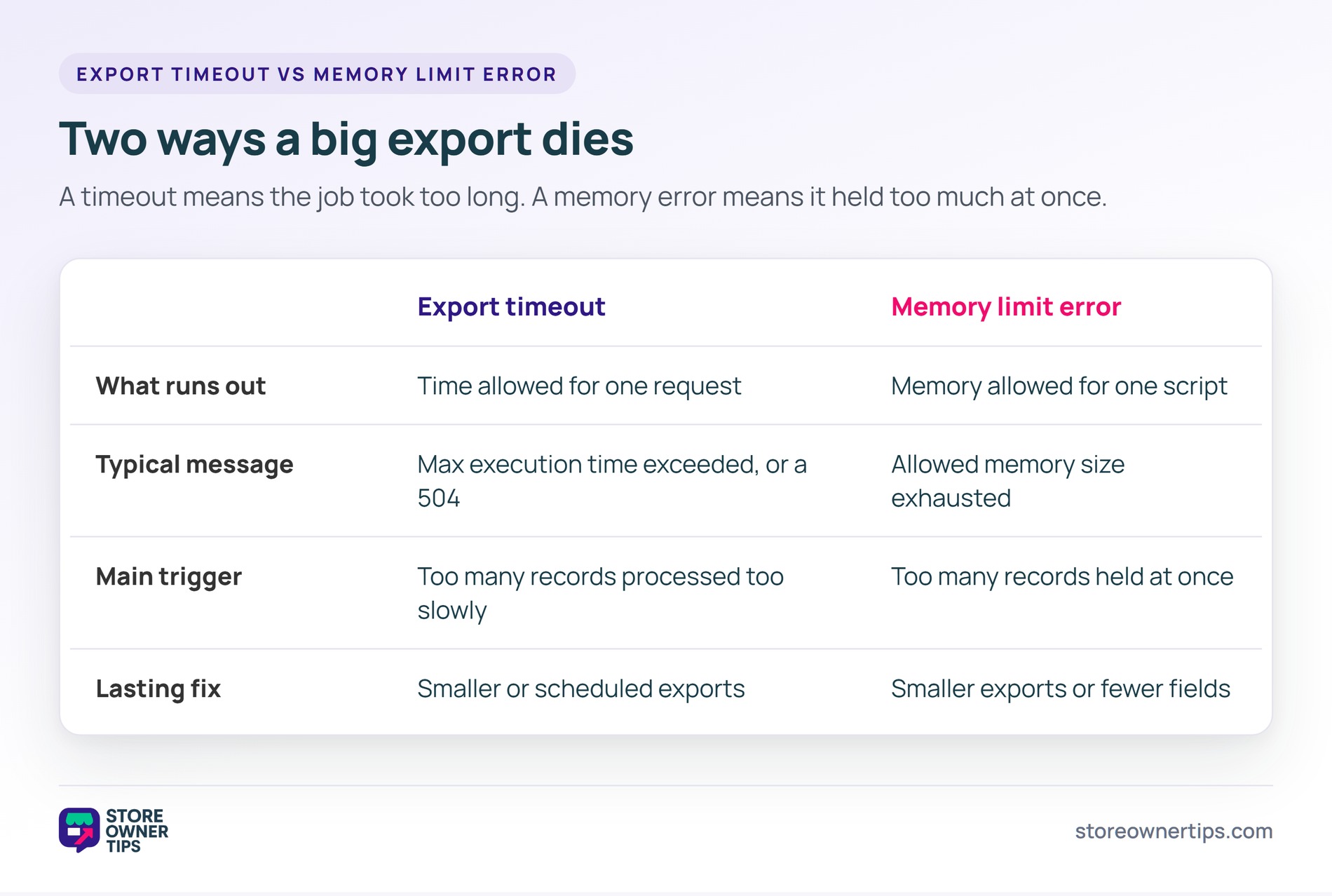
| What you’re comparing | Export timeout | Memory limit error |
|---|---|---|
| What runs out | Time allowed for one request | Memory allowed for one script |
| Typical message | Max execution time exceeded, or a 504 | Allowed memory size exhausted |
| Main trigger | Too many records processed too slowly | Too many records held at once |
| Lasting fix | Smaller or scheduled exports | Smaller exports or fewer fields |
An export timeout and a memory limit error both kill big exports, but they run out of different things. A timeout means the job took too long, while a memory error means it held too much at once. The error message tells you which one you hit. Either way, splitting the export into smaller date ranges fixes both.
Product feeds hit the same wall, which is why AdTribes builds large feeds in batches.
A WooCommerce export usually times out because it’s trying to process too many records in one request. The server stops the job when it passes a time limit set in PHP, the web server, or a CDN. Try exporting a shorter date range first. If that works, the export size is the problem, not your data.
Increasing max_execution_time can help for a one-off export, but it rarely fixes the problem for good. Your web server or CDN may still cut the request off sooner. Many shared hosts also cap the setting, so your change may not apply. Smaller, scheduled exports are the fix that keeps working as your store grows.
Yes, a timed-out export can leave you with a file that looks normal but is missing rows. That happens when the server stops partway through writing. Always compare the row count with the number of orders or products you expected. A short file is easy to miss and causes problems later in reports or a store migration.
An export timeout matters because your store’s data only helps you if you can get it out reliably. Accounting, backups, supplier updates, and migrations all depend on complete exports. Keeping exports small and scheduled means they keep working as your order history grows.
Copyright © StoreOwnerTips.com. All Rights Reserved.
