Weekly ecommerce tips, deals & news.
Platform lock-in is when leaving your ecommerce platform costs so much time, money, or data that you feel stuck. It usually happens because your orders, customers, and products can’t be exported cleanly. Your store still works fine. You just can’t walk away from it without losing something important.
Platform lock-in works by making your store data easy to put in and hard to take out. Adding products, customers, and orders is simple on almost any platform. Getting all of that back out, in a format another system can read, is often a different story.
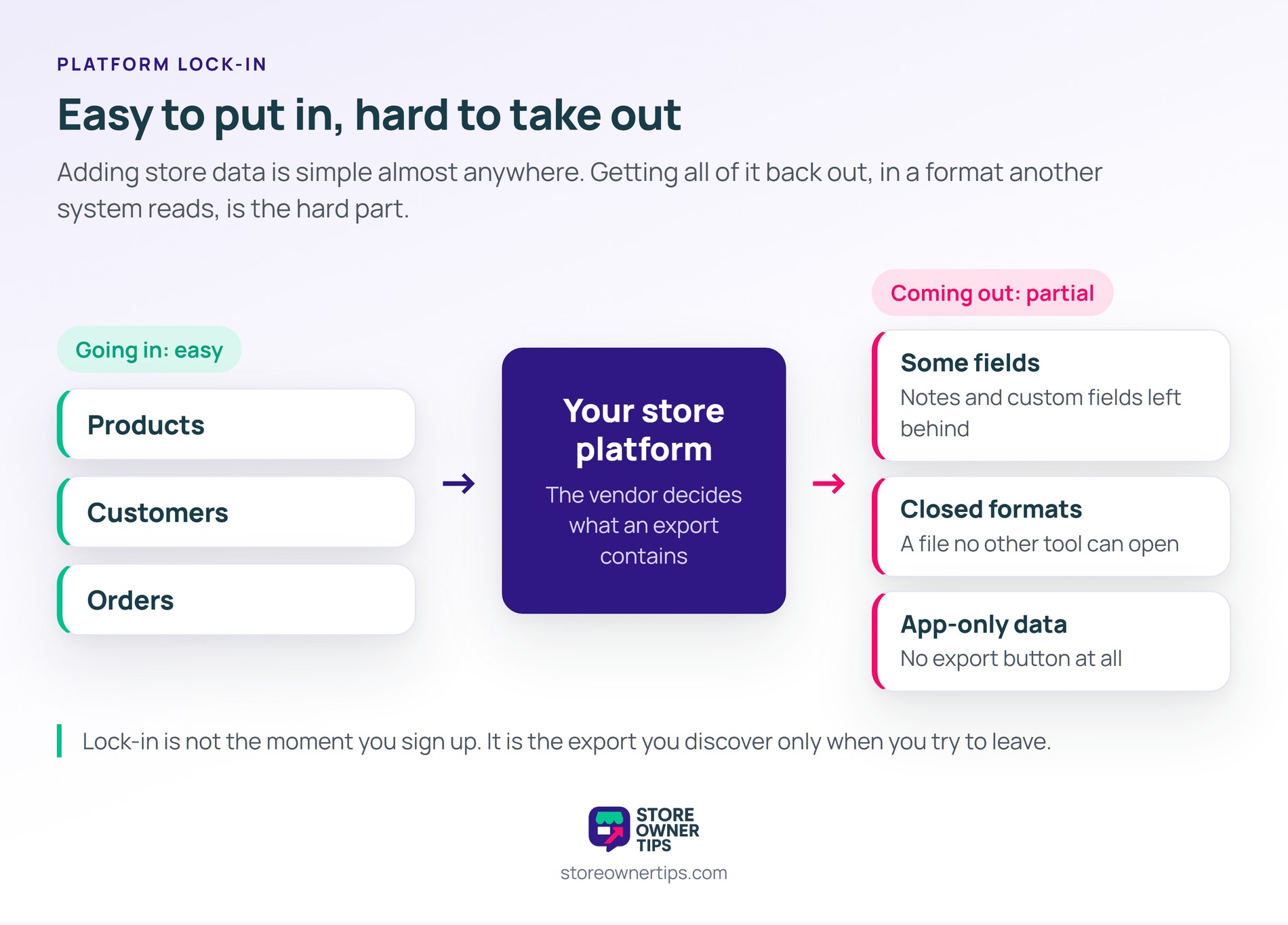
Think of platform lock-in like renting a furnished apartment for years. At first, you own almost nothing there. Then you add shelves, paint the walls, and fill every closet. By the time you want to move, half your life is bolted to someone else’s walls.
Stores drift into lock-in the same way. You install a reviews app, then a subscriptions app, then a loyalty app. Each tool stores its own data in its own place. After a few years, your store history is spread across tools you don’t fully control.
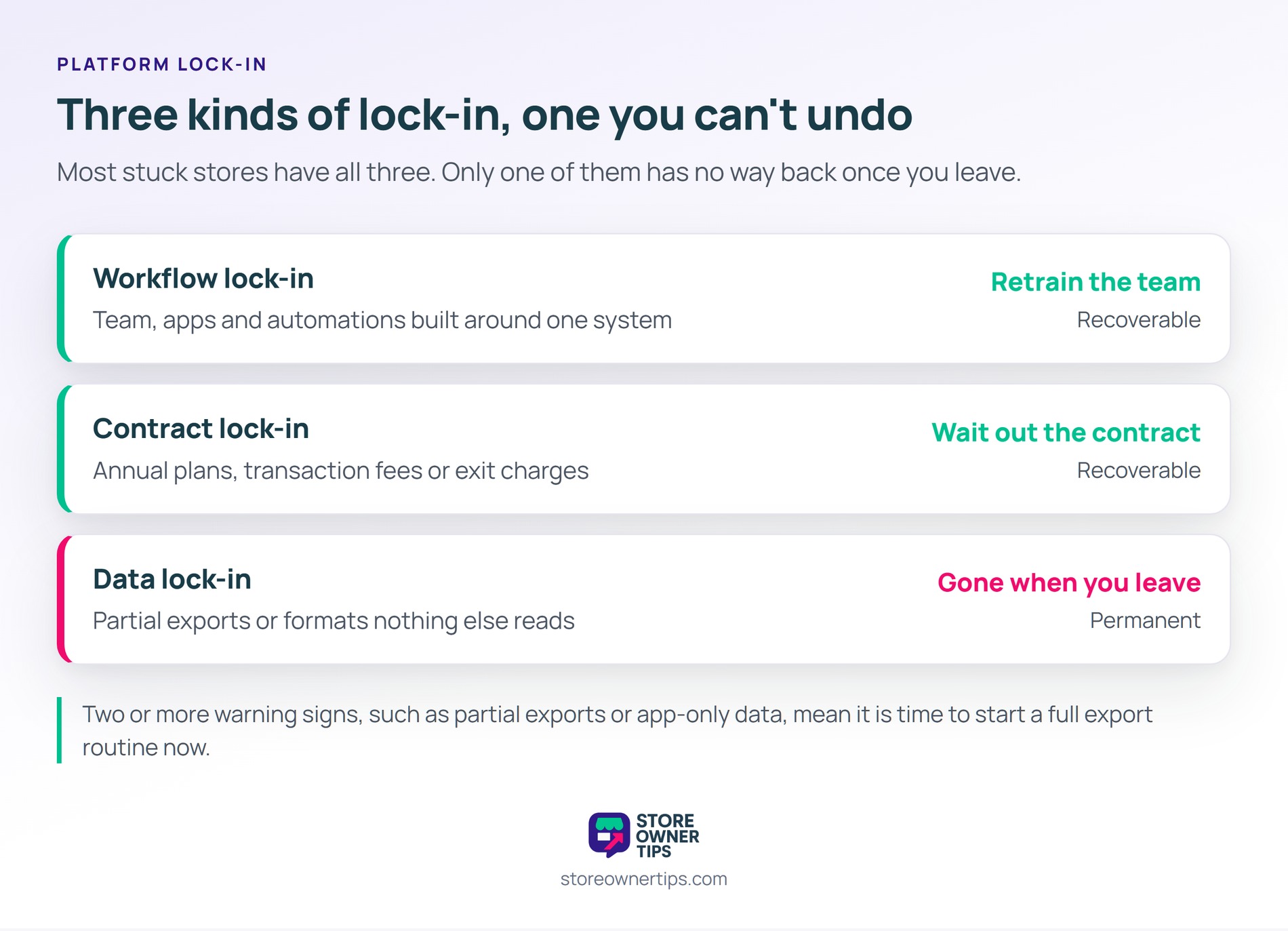
Platform lock-in usually shows up in three forms, and most stuck stores have all of them:
Data lock-in is the most dangerous of the three. You can retrain a team and wait out a contract. However, order history and customer records you can’t export are simply gone when you leave.
Platform lock-in is stronger on hosted SaaS store builders than on self-hosted stores. On a hosted platform, you rent the software and the database. The vendor decides which fields appear in an export and how often you can run one.
A self-hosted WooCommerce store works differently. Your products, orders, and customers sit in a database you own on a server you choose. That doesn’t make WooCommerce lock-in free, though. Plugin data can still be scattered, and the built-in export tools don’t cover everything.
Platform lock-in rarely announces itself, but a few warning signs show up early. Watch for these:
If you spot two or more of these signs, start a full export routine now. It costs far less today than in the middle of a rushed move.
Platform lock-in worries businesses more than most of them can explain. A peer-reviewed survey of UK organizations, published in the Journal of Cloud Computing, asked about vendor lock-in directly. There, 71% of participants said lock-in risks would deter them from adopting more cloud services.
The same study shows where the pain actually lands. The top practical challenge was a lack of integration points between tools, named by 47.7% of participants. Meanwhile, only 28.8% flagged the difficulty of moving data to another provider as a barrier. In other words, most businesses notice the data problem only when they finally try to leave.
Platform lock-in in practice looks like a store that wants to move but can’t afford what it would leave behind. Here’s a hypothetical example.
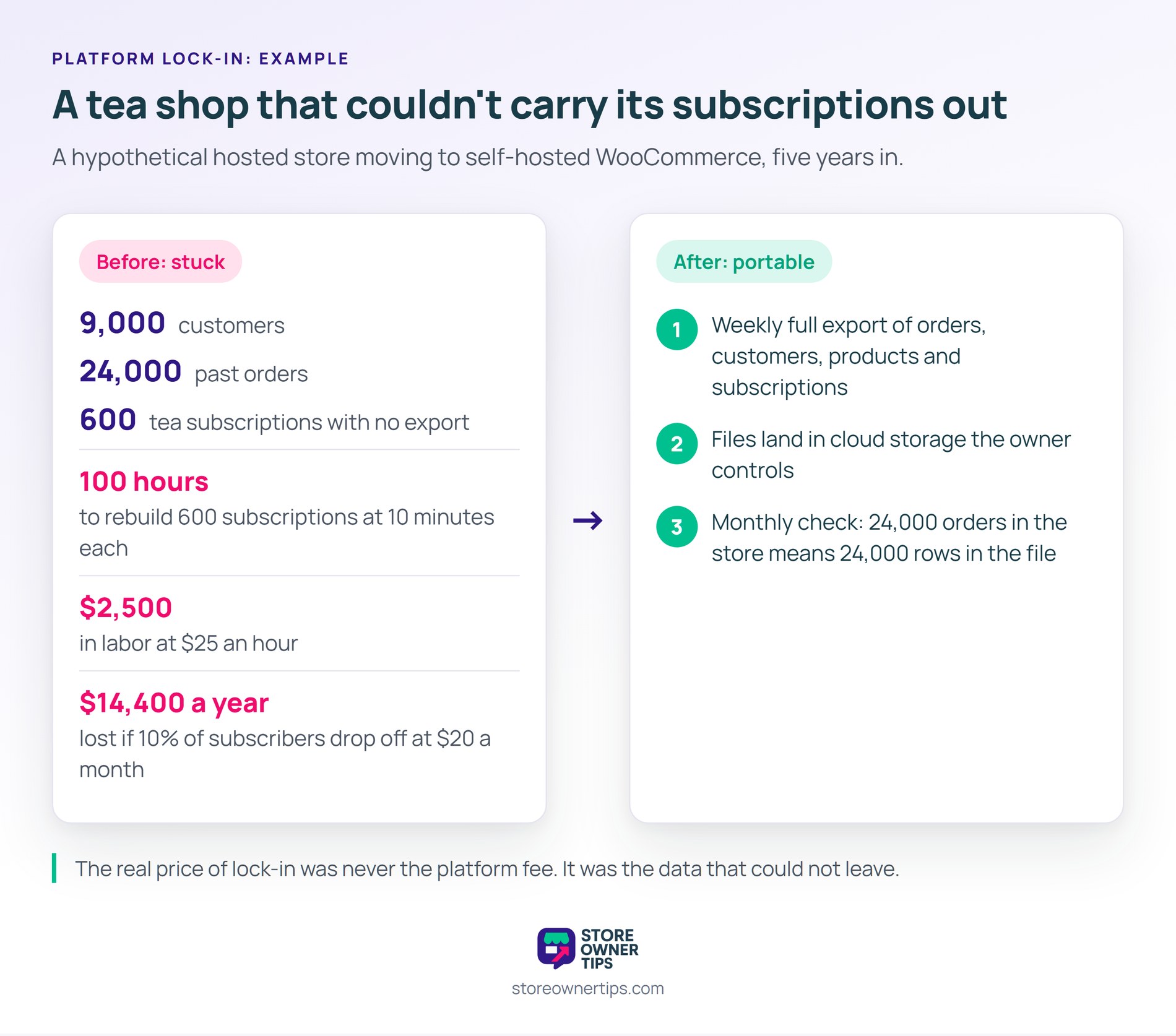
Imagine a small tea shop that has sold on a hosted store builder for five years. It has 9,000 customers, 24,000 past orders, and 600 active tea subscriptions. Monthly fees and transaction charges keep rising. So the owner decides to move to a self-hosted WooCommerce store.
Then the owner runs the platform’s export tool. Products and customers come out fine. Yet the order export skips custom fields, and the subscriptions app offers no export at all. The owner now faces a choice: rebuild 600 subscriptions by hand or stay put.
Say each subscription takes 10 minutes to recreate and confirm with the customer. That’s 100 hours of work. At $25 an hour, the move costs $2,500 in labor before anything else. On top of that, any subscriber who doesn’t respond is lost revenue.
If 10% of those 600 subscribers drop off, that’s 60 lost customers. At $20 a month each, the shop loses $14,400 a year. That’s the real price of lock-in. It isn’t the platform fee, it’s the data you can’t carry out.
After the move, the owner sets one rule: never get stuck again. A weekly full export of orders, customers, products, and subscriptions now runs automatically. Each file lands in cloud storage the owner controls. If the shop ever needs to switch again, the whole history is already sitting outside the store.
Next, the owner checks the export once a month. A quick test is to compare row counts. If the store shows 24,000 orders, the order file should hold 24,000 rows too. A mismatch means something is being left behind, and it gets fixed before it matters.
You avoid platform lock-in by keeping a complete, readable copy of your store data outside the platform at all times. A few habits do most of the work:
On WooCommerce, an export plugin like Store Exporter Deluxe covers most of this list. It exports orders, products, customers, and subscriptions to CSV, TSV, XLS, XLSX, or XML. Exports can run on a schedule and land on FTP, email, or cloud storage.
Regulators are also pushing back on lock-in. The EU Data Act has applied since 12 September 2025 and sets switching rules for cloud and data processing services. Under it, switching charges, including data egress fees, disappear entirely from 12 January 2027. Still, a law can’t rebuild data you never exported, so your own copy matters most.
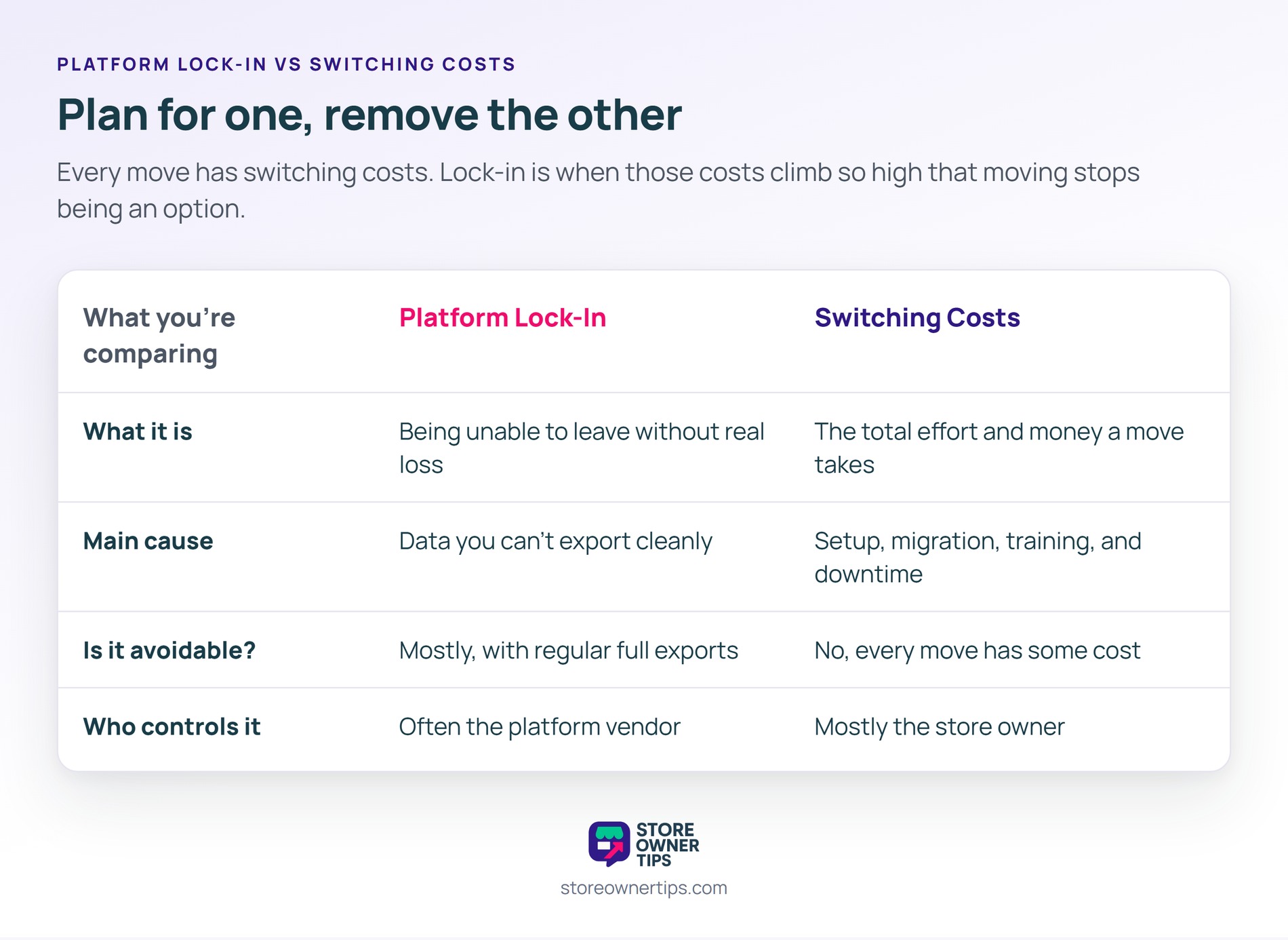
| What you’re comparing | Platform Lock-In | Switching Costs |
|---|---|---|
| What it is | Being unable to leave without real loss | The total effort and money a move takes |
| Main cause | Data you can’t export cleanly | Setup, migration, training, and downtime |
| Is it avoidable? | Mostly, with regular full exports | No, every move has some cost |
| Who controls it | Often the platform vendor | Mostly the store owner |
Platform lock-in and switching costs are related, but they aren’t the same thing. Every store pays switching costs when it moves, even with perfect data. Lock-in is when those costs climb so high, usually from missing data, that moving stops being a real option.
So plan for switching costs, and work to remove lock-in. A careful store migration is affordable when your data is already portable.
Run a full export of orders, customers, and products, then open the files in a spreadsheet. If fields are missing, or some apps offer no export, you have lock-in. The harder that test feels, the more locked in you are.
WooCommerce has less lock-in than hosted store builders because you own the database. Still, plugin data can end up as a data silo, and the built-in tools don’t export everything. A full export routine closes that gap.
Export your orders, customers, products, coupons, reviews, and subscriptions. Keep the files in an open format like CSV or XML. Then store them somewhere you control, such as your own cloud drive, and refresh them on a schedule.
Platform lock-in matters because it takes away your ability to say no. A store that can’t leave has to accept every price rise and policy change. A store with portable data keeps its options open, and that freedom is worth protecting from day one.
Copyright © StoreOwnerTips.com. All Rights Reserved.
