Weekly ecommerce tips, deals & news.

Every December, shoppers search for gifts, compare stores, and buy fast. The stores that stand out usually start with a plan, and the right holiday marketing ideas give you one.
Small touches like themed bundles, gift guides, and shipping countdowns can lift traffic and sales. Plus, they make your store easier to shop, which brings customers back after the season ends.
Below, I’ll walk you through 15 holiday marketing ideas for WooCommerce stores. You’ll also get a 2026 holiday calendar and a way to measure what worked.
Jump to:
The holiday season is one of the biggest selling windows of the year for online stores. Shoppers expect to spend more between November and December, so a clear plan pays off.
Here’s what the latest numbers show:

In short, the holiday season is one of the biggest spending periods of the year. And it now runs for weeks. A plan for each part of it helps you catch more of those shoppers.
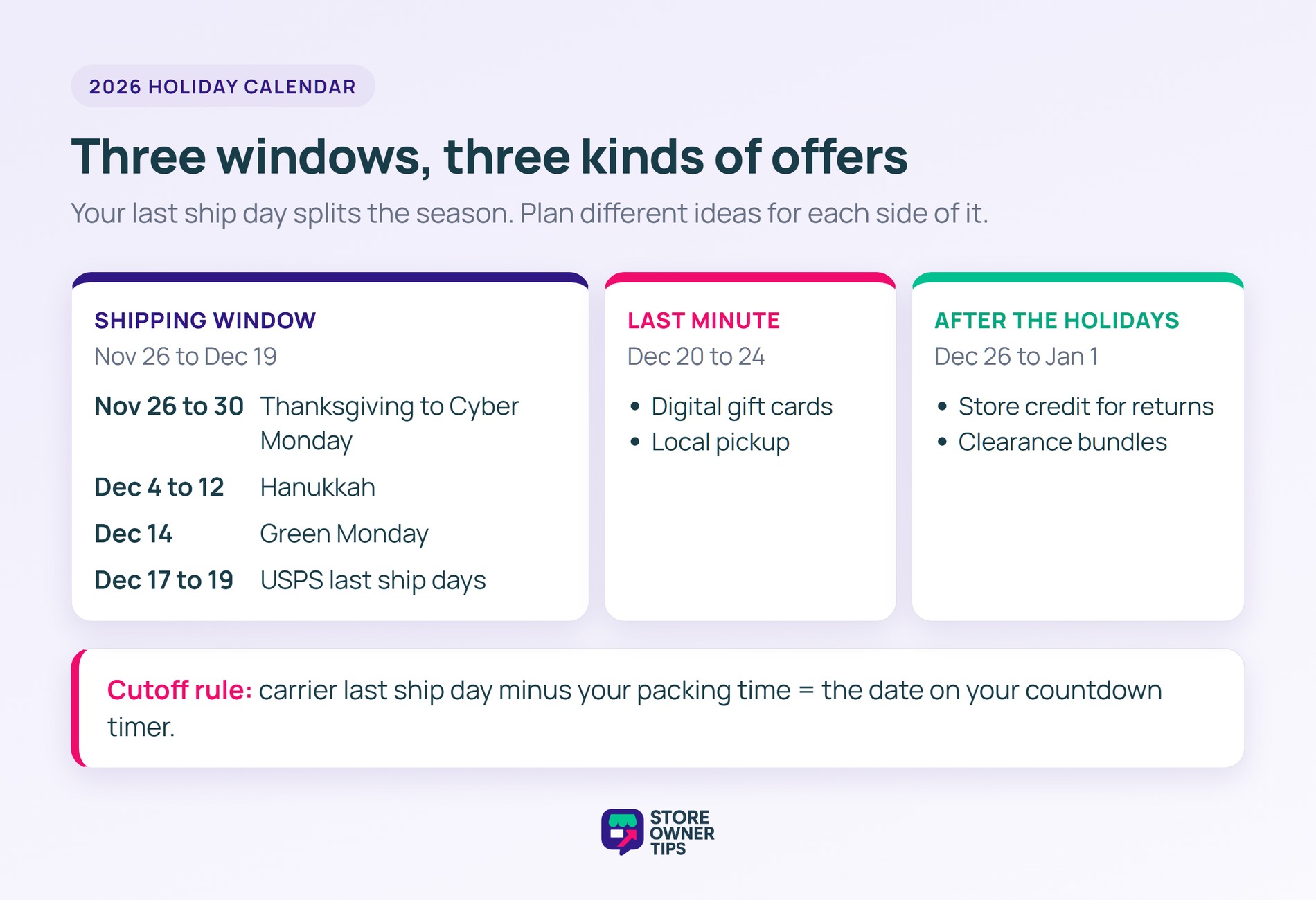
The holiday season is really a run of shorter events, and each one suits different ideas below. Here are the 2026 dates to plan around:
| DATE | EVENT | IDEAS THAT FIT |
|---|---|---|
| Nov 26 to 30 | Thanksgiving to Cyber Monday | Early bird discounts, bundles, popups |
| Dec 4 to 12 | Hanukkah | Gift guides, gift lists, themed photos |
| Dec 14 | Green Monday | Segmented emails, homepage picks |
| Dec 17 to 19 | USPS recommended last ship days (Lower 48) | Shipping cutoff timers, gift wrapping |
| Dec 20 to 24 | Last-minute shopping | Digital gift cards, local pickup |
| Dec 25 | Christmas Day | Gift card reminders |
| Dec 26 to Jan 1 | Boxing Day, Kwanzaa, and New Year | Store credit for returns, clearance bundles |
The shipping dates matter most. USPS recommends shipping Ground Advantage by December 17 and Priority Mail by December 18. Priority Mail Express can wait until December 19. Carriers can update these, so check their holiday pages in early December.
If your audience is outside the US, swap in your own local dates. Boxing Day, for example, is a major sale day in the UK, Canada, and Australia.
🔍️ What we’ve seen: Stores often plan one big push for Black Friday, then run out of ideas by mid-December. Mapping an idea to each date keeps your emails and homepage fresh through New Year.
Here are 15 practical holiday marketing ideas to attract more visitors, lift sales, and give your store a festive edge this season:
Limited time bundles group products your customers already want into themed sets. As a result, shopping gets faster and easier.
During the holidays, shoppers often feel overwhelmed by choices. In our experience, bundles simplify those decisions and can encourage people to buy more. For example, try “buy two, get one free,” a percentage off the set, or tiered discounts for adding extra items.
Adding a time limit also creates urgency, so customers act before the deal ends. Small extras, like free gift wrapping or a bonus item, make bundles even more appealing.
Done right, limited time bundles can lift average order value and move inventory during the busiest season.

Early bird discounts reward customers who plan ahead. They also spread your orders out, so you can manage stock and shipping before the rush.
These offers can take many forms, such as percentage-off coupons, limited-time BOGO deals, or “buy X, get Y” promotions. You can also try tiered discounts, where spending a certain amount unlocks a bigger reward.

Highlight these deals in emails, banners, or popups, because shoppers need a clear reason to act early. In fact, what we consistently notice is that early bird discounts make customers feel they’re getting a special deal. Meanwhile, your store gets steady sales before December.
Advanced Coupons extends the coupon screen WooCommerce already gives you. As a result, you can run holiday deals that go beyond a simple percentage off. The free version covers BOGO deals for specific products, cart conditions, URL coupons, and store credit.


Featuring your top picks is one of the simplest holiday marketing ideas, because it shows shoppers what’s popular. Also, featuring bestsellers or seasonal favorites builds trust, since many buyers look at what others are choosing.
We recommend organizing picks by category, price range, or recipient type. That way, shoppers can quickly find something for everyone on their list.
Small touches like festive banners or themed displays make these picks feel special. For these reasons, a homepage spotlight is one of the easiest holiday marketing ideas to start with.

Gift lists let customers save items they plan to buy later. So they help shoppers keep track of what caught their eye, and they bring those shoppers back to your store.
Lists also remind shoppers of products they were interested in, which can raise the chance they buy. Plus, when shoppers share a list, friends and family can see exactly what someone wants.
Some stores even allow multiple lists for different occasions or recipients. That makes holiday shopping more organized and personal.
SaveTo Wishlist is a WooCommerce wishlist plugin with a free Lite version. It lets customers save products they like and come back to buy them later.

For example, Mark might create a “Gift Ideas for Jenny” wishlist and add the items his wife likes. Then, when her birthday or the holidays come around, he can return and buy them.

A shipping cutoff timer shows customers the last day they can order for holiday delivery. As a result, it creates a gentle, honest sense of urgency.
From what we’ve seen, a cutoff timer helps shoppers plan their holiday purchases. It also reduces last-minute stress for both buyers and your team.
Display the timer on product pages, in the cart, or at checkout, so shoppers see it before they decide. You can also pair it with a promotion, such as free shipping for orders placed before the cutoff. Some stores add the countdown to emails and banners too.
WooCommerce doesn’t include a countdown timer. So most stores use a popup or floating bar tool, like the one in idea 6. Set the deadline from your carrier’s last ship date, minus your own packing time. For example, if you need a day to pack orders, your Priority Mail cutoff is December 17, not December 18.
Popups draw attention to deals shoppers might otherwise miss. For example, they can show discounts, bundle offers, BOGO promotions, or limited-time coupons.
Placement and timing matter, though. A popup can appear when someone is about to leave or returns to a product. It can also wait until they’ve browsed for a few minutes.
You can also use popups to collect email signups or promote free shipping over a set order amount. When done thoughtfully, they guide shoppers instead of interrupting them.
OptinMonster is a popup and campaign builder for growing email lists and sales. In fact, we’ve used it for years on our own sites.


Gift wrapping makes a purchase feel special. It adds a festive touch and extra value, and simple ribbons, themed paper, or stickers go a long way.
Personalized notes add a warm, human touch too. They turn a simple product into a thoughtful gift, and they can encourage repeat visits.
In WooCommerce, the simplest setup is a low-cost “Gift wrap” product that shoppers add to their cart. Shoppers can then type their gift message in the order notes field at checkout. Want a gift wrap checkbox and message box on each product page instead? WooCommerce’s Product Add-Ons extension adds those options.

Partnering with other small businesses helps you reach customers you might not find on your own. Both stores get extra exposure, so it’s a fair trade.
You can share each other’s products, run joint promotions, or feature one another in emails. For example, a candle store could team up with a mug shop on a joint holiday bundle. Then both stores promote it on their websites and social media.
Based on our observations, collaborations like this create fresh content and attract new shoppers, all without a big budget.
AffiliateWP is a WordPress plugin for running your own affiliate or referral program. Partners promote your products, and you only pay commission when their referral leads to a sale.

Segmented emails let you send the right message to the right shopper. After all, shoppers notice when a message feels made for them.
For example, target past buyers, window shoppers, or people who abandoned carts. A shopper who viewed a winter sweater might get an email with matching accessories. Seasonal tips and limited-time offers make these emails even more useful.
To build those segments, go to WooCommerce > Customers. You can filter customers by number of orders, total spend, or last active date. Then download the list as a CSV for your email tool. Shoppers who saved items to a wishlist make another strong segment, since they’ve already told you what they want.
Giveaways create excitement around your store. As a result, people visit, explore your products, and share the contest with friends.
To make giveaways effective, keep the rules simple, such as asking followers to like, comment, or tag someone. You can also tie the prize to the season, like a holiday bundle or a seasonal favorite.
Well-planned giveaways can grow engagement and attract new customers without a big budget.
RafflePress is a WordPress plugin for running online giveaways and contests. It’s built to grow your email list, traffic, and social following.


Check which plan includes the entry actions you want before you build your holiday giveaway.
Holiday themed photos make your products feel festive, so shoppers can picture them as gifts.
Small touches, like winter backgrounds, props, or seasonal colors, make a big difference. Moreover, lifestyle shots of products in a holiday setting help customers imagine giving them to someone.
Even simple updates, like ornaments, gift boxes, or string lights, help. Thoughtful visuals grab attention and make products more memorable.
Gift guide blog posts help shoppers find the right present. For example, you can organize products by price, interest, or recipient, so buyers can decide faster.
Gift guides also suggest ideas shoppers might not have considered. Grouping gifts for coworkers, friends, or family can encourage bigger orders. SaveTo Wishlist also shows how to turn your bestsellers into a saveable gift guide.
Plus, linking to your products sends readers straight to the pages where they can buy. Short descriptions and seasonal tips make your picks feel personal and helpful.
AIOSEO (All in One SEO) is a WordPress SEO plugin that helps blog posts, like your gift guides, show up in search. We use it on our own sites.


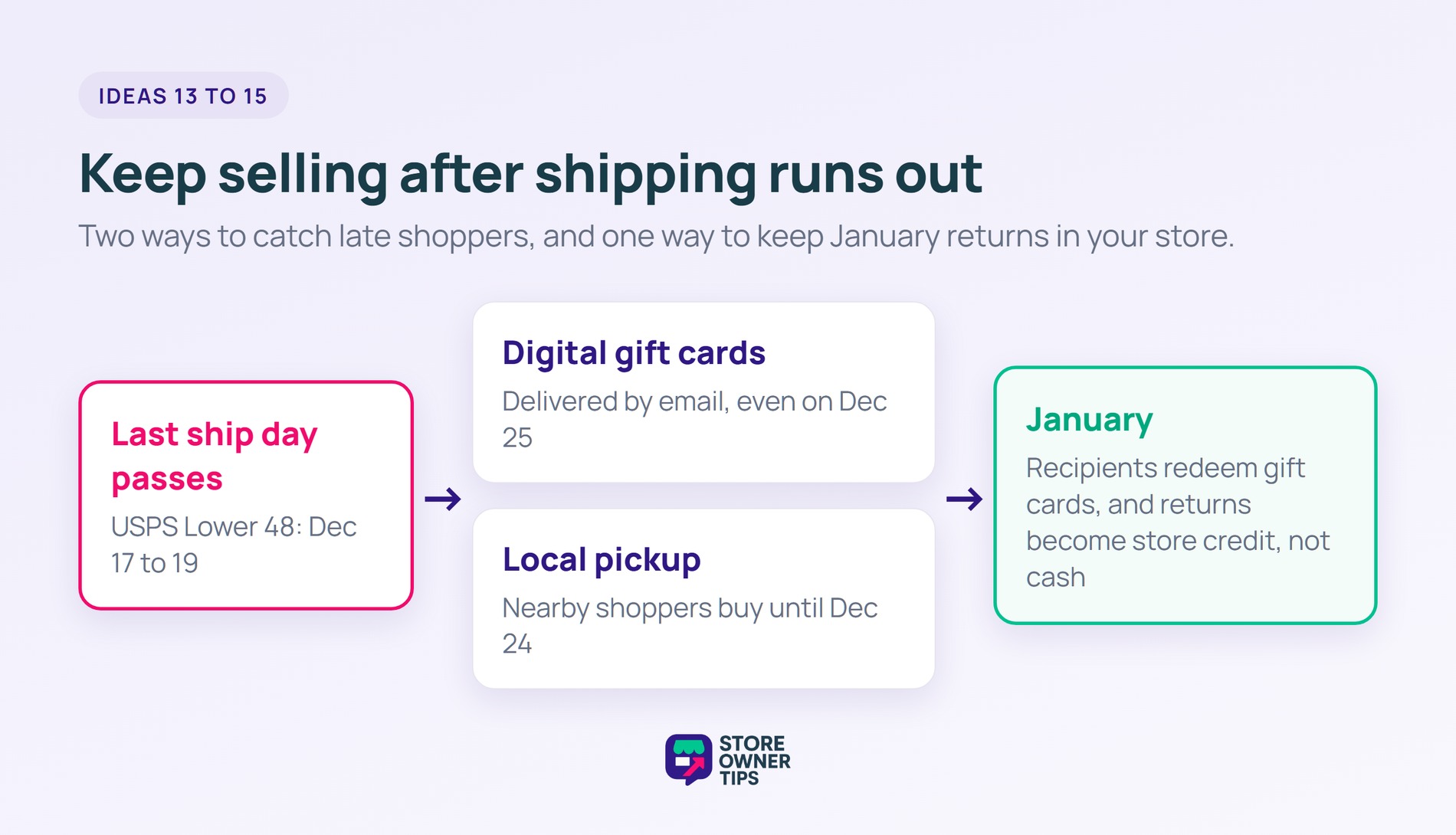
After your last shipping day, physical gifts can’t arrive in time. A digital gift card can, because it arrives by email, even on Christmas morning.
That makes gift cards your best offer for the final week. Promote them on your homepage and in a “too late to ship?” email once your shipping cutoff passes.
Gift cards also bring the recipient to your store in January, often for the first time. So they can turn one holiday sale into a new customer.
Advanced Gift Cards is a WooCommerce gift card plugin from the Advanced Coupons team. It lets you sell gift cards as products, so they work with your existing checkout.
For a full setup walkthrough, Advanced Coupons explains how to sell gift cards in WooCommerce.
Do customers live near your shop, studio, or warehouse? Then local pickup extends your selling window past the last shipping day. Nearby shoppers can still buy a physical gift on December 23.
WooCommerce has a built-in Local pickup option under WooCommerce > Settings > Shipping. It lets shoppers choose a pickup location at checkout, and you can add pickup details like opening hours.
Promote it once your shipping cutoff passes, alongside your gift cards. A simple “Order by noon, pick up today” banner tells local shoppers you can still help.
Returns rise after the holidays, and every cash refund is revenue that leaves your store. Offering store credit instead keeps that money with you, and it brings the customer back to shop again.
The free version of Advanced Coupons can refund an order as store credit. You open the order, click Refund, and choose the store credit option. One limit to know: the order must belong to a registered customer, not a guest.
Store credit works best as a choice, not a rule. Many shoppers will happily take a small bonus, like an extra 10% in credit, over a cash refund. Make sure your return policy states both options clearly.
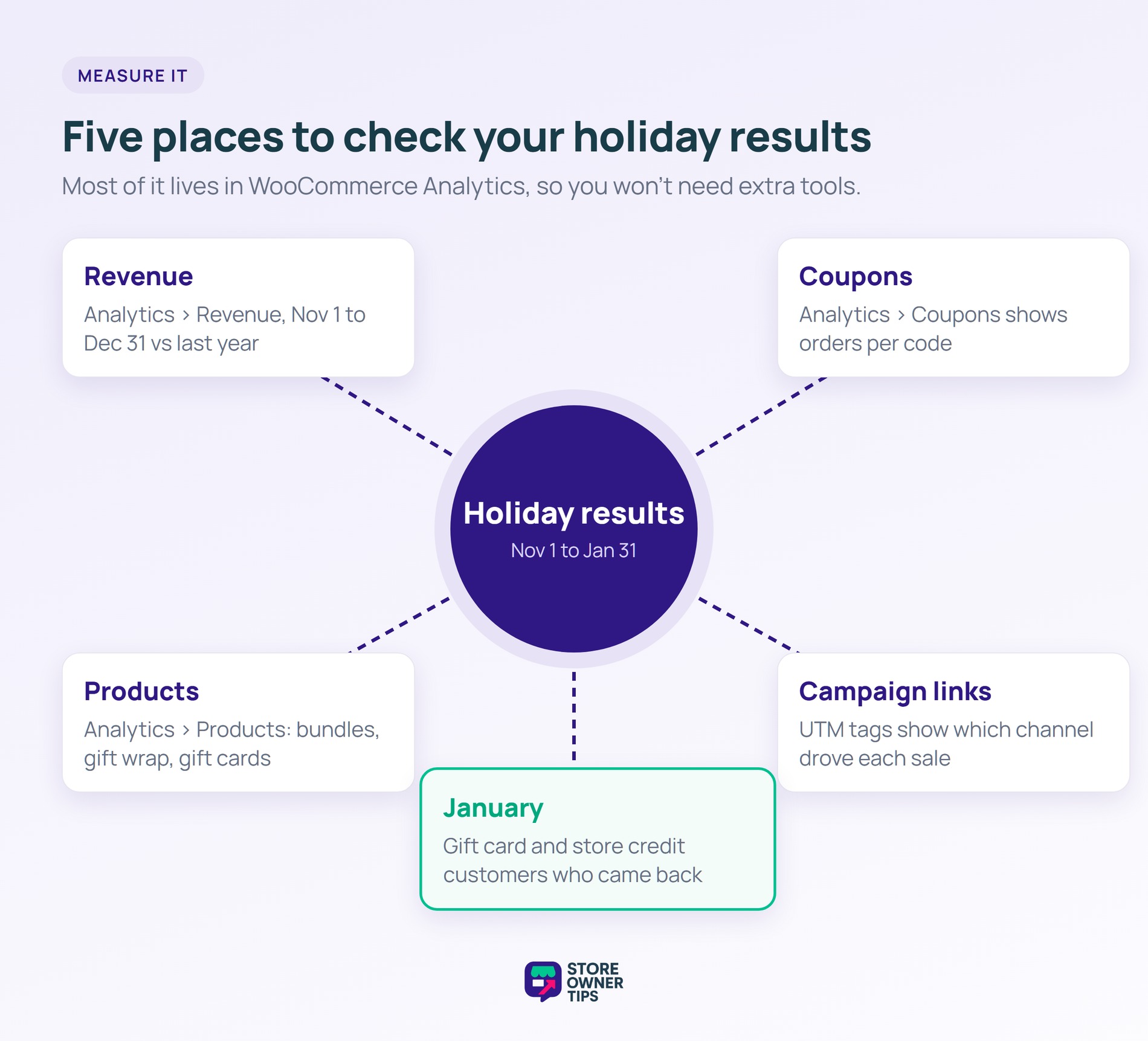
Measuring each idea tells you what to repeat next year. WooCommerce Analytics covers most of it without extra tools:
Then look past December. Check how many gift card recipients and store credit customers came back in January. That’s where much of the holiday value shows up.
🔍️ What we’ve seen: Stores often judge the season on December revenue alone. The ideas that bring customers back, like gift cards and store credit, usually look better once January is included.
The right holiday marketing ideas can give your WooCommerce store a real lift this season. And when you plan them around the calendar, each one gets its moment.
To summarize, this article explored the following 15 holiday marketing ideas:
Plan them against the 2026 holiday calendar, then use the measurement steps to see what worked. Pick two or three ideas to start with this week, and add more as the season builds. Running a Black Friday sale too? Our Black Friday checklist covers the prep.
Shoppers spend more online during the holidays than at almost any other time. Adobe expects US online holiday spending to reach a record $275.1 billion in 2026, up 6.7%.
Popular holiday marketing ideas include limited time bundles, early bird discounts, homepage gift picks, gift lists, and shipping cutoff timers. Digital gift cards, local pickup, and segmented emails help too, especially late in the season.
Holiday bundles group popular products into themed sets with a time limit. They simplify gift decisions and add urgency, so shoppers often buy more per order.
Early bird discounts reward shoppers who buy before the rush. They spread your orders out, so you can manage stock and shipping before December gets busy.
Gift lists let shoppers save and share the items they want. That brings them back to your store and helps friends and family buy the right gift.

Copyright © StoreOwnerTips.com. All Rights Reserved.
