Weekly ecommerce tips, deals & news.
Of the best AI tools for WooCommerce in 2026, StoreAgent comes out on top. It combines an AI chatbot for customer support with AI content generation for product descriptions and more, all within your WooCommerce dashboard. Other top AI tools include Tidio for live chat automation, Uncanny Automator for workflow automation, GetGenie AI for SEO content, and WriteText.ai for product copywriting.
Two years ago, when I first started recommending AI tools for WooCommerce to store owners, the response was usually some version of “that sounds complicated.” Now I get a different question: “Which ones should I actually use?”
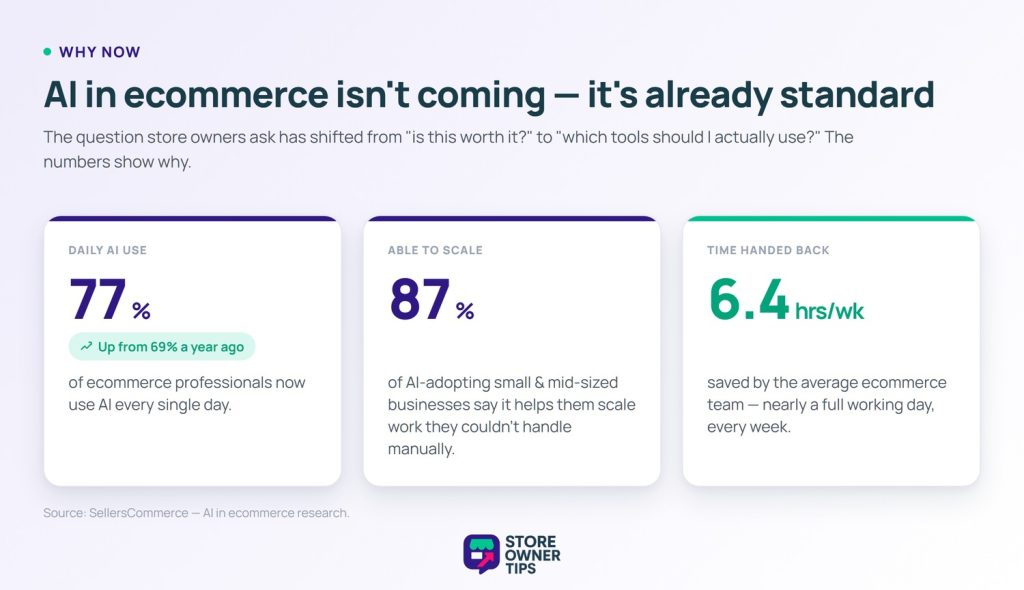
The shift has been remarkable. According to SellersCommerce’s AI in ecommerce research, 77% of ecommerce professionals now use AI daily, up from 69% just a year earlier. Among small and medium-sized businesses that have adopted AI, 87% say it helps them scale operations they couldn’t handle manually.
For WooCommerce store owners specifically, the practical benefits are concrete: writing product descriptions in seconds instead of hours, answering customer questions automatically at 2 am, and spotting which products need better content before they lose rankings. AI saves ecommerce teams an average of 6.4 hours per week. That’s nearly a full day back!
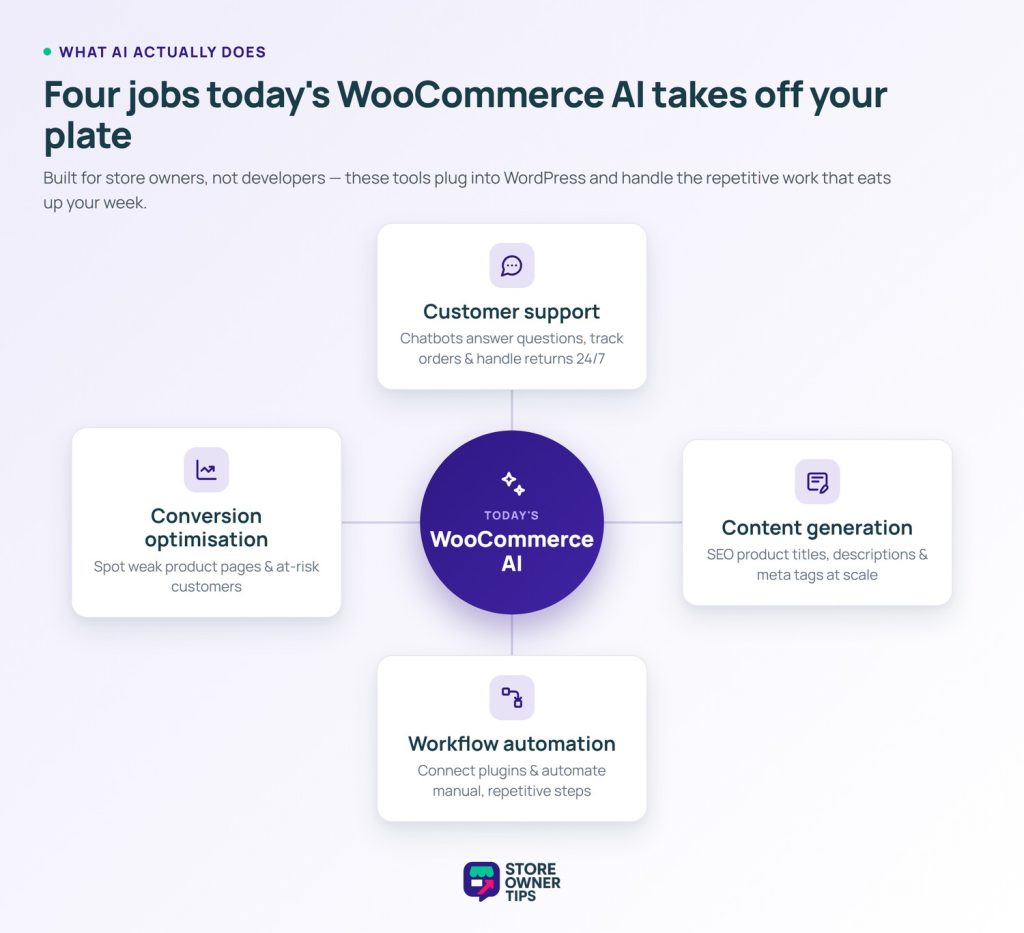
But the WooCommerce AI landscape is also cluttered with tools that overpromise and underdeliver. In this guide, we’ve cut through the noise and identified the five AI tools that consistently deliver real results for WooCommerce store owners, covering customer support, content generation, workflow automation, and conversion optimisation.
AI tools for ecommerce used to be either too expensive, too technical, or both. That’s changed fast.
Today’s WooCommerce AI tools are designed for store owners, not developers. They integrate directly with WordPress, understand your product catalog, and handle the repetitive tasks that eat up hours every week: answering the same customer questions, writing product descriptions for 200 SKUs, following up on abandoned carts, and more.
The stores that are moving quickly on AI aren’t necessarily larger or better funded. They’re just freeing up time that competitors are still spending on manual work and reinvesting it in growth.
Here’s what these tools actually help with:
Let’s look at the tools that do this best.
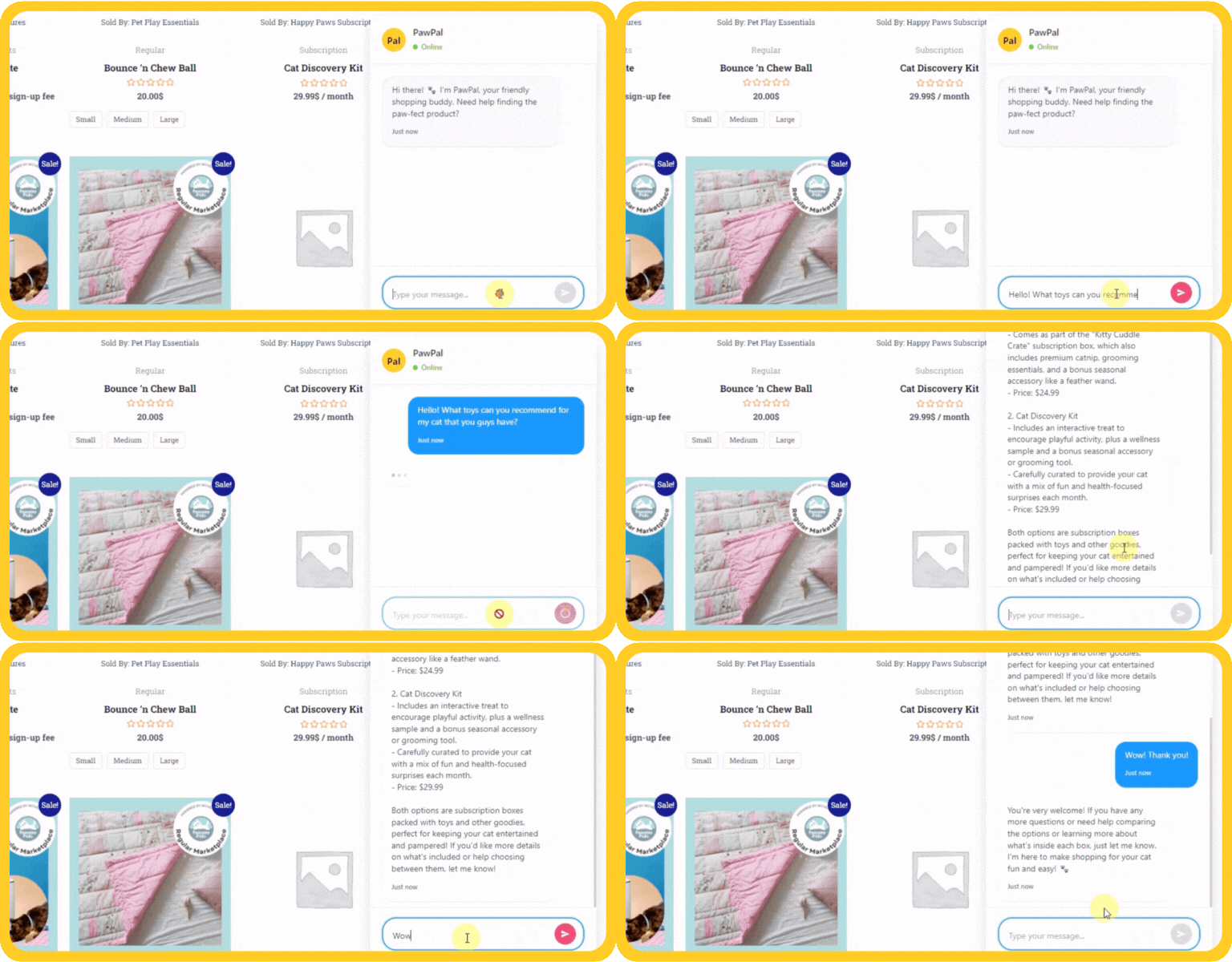
Typically, StoreAgent is the first AI tool we recommend to most WooCommerce store owners. After all, it’s the only one on this list built specifically and exclusively for WooCommerce. It understands your product catalog, speaks your inventory’s language, and handles the two tasks that consume the most time for most stores: customer support and product content.
StoreAgent has three core modules:
StoreAgent Chat:
This is an AI chatbot that lives on your WooCommerce store and answers customer questions in real time. What makes it genuinely useful is that it’s product-aware. In other words, it pulls answers directly from your product titles, specifications, attributes, categories, and reviews. For example, when a customer asks “Does this come in size 10?” or “Is this compatible with X?”, StoreAgent answers correctly and can even recommend related products because it actually knows your catalog.
StoreAgent Content:
Store Agent comes with an AI product content generator, available even on the free plan. You provide a few details about the product, and StoreAgent generates optimised titles, descriptions, and key selling points. This is useful for stores with large catalogs where writing each description manually simply isn’t feasible.
StoreAgent Insights:
This scans your store for content improvement opportunities, like product pages with weak descriptions, missing attributes, or conversion gaps. Then, it surfaces these opportunities as actionable recommendations in your dashboard.
🚀 Power Tip: First, use StoreAgent Insights to identify your lowest-converting product pages. Then, use StoreAgent Content to rewrite those descriptions. Fixing the bottom 20% of your product pages often produces the biggest conversion gains, and AI makes the rewriting fast enough to actually get it done.
Pricing: A free tier is available (limited AI chat + content generation). Paid plans provide additional volume and full chat history. Visit the current deals on StoreAgent for the latest pricing.
Best For: WooCommerce store owners who want AI customer support and product content generation in a single tool built natively for their platform.
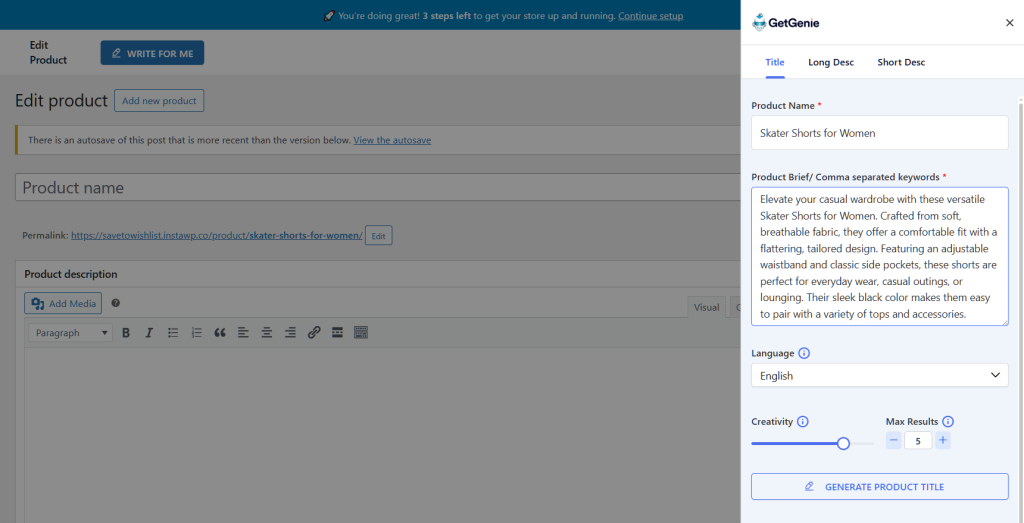
When a store’s primary AI need is content at scale, we recommend the AI content generator GetGenie AI. If you have 50, 200, or 500 product pages that need proper descriptions, and you don’t have the time or budget to write them all manually, GetGenie is designed exactly for this.
🚀 Power Tip: Don’t just accept the first output. Use GetGenie to generate three variations of each product description, then pick the one that best matches your brand voice or blend elements from two versions. AI is fastest when you treat it as a first draft, not a final copy.
Pricing: From $19/month
Best For: Stores with large catalogs that need to produce or refresh product descriptions efficiently, without the per-tool cost of enterprise content platforms.
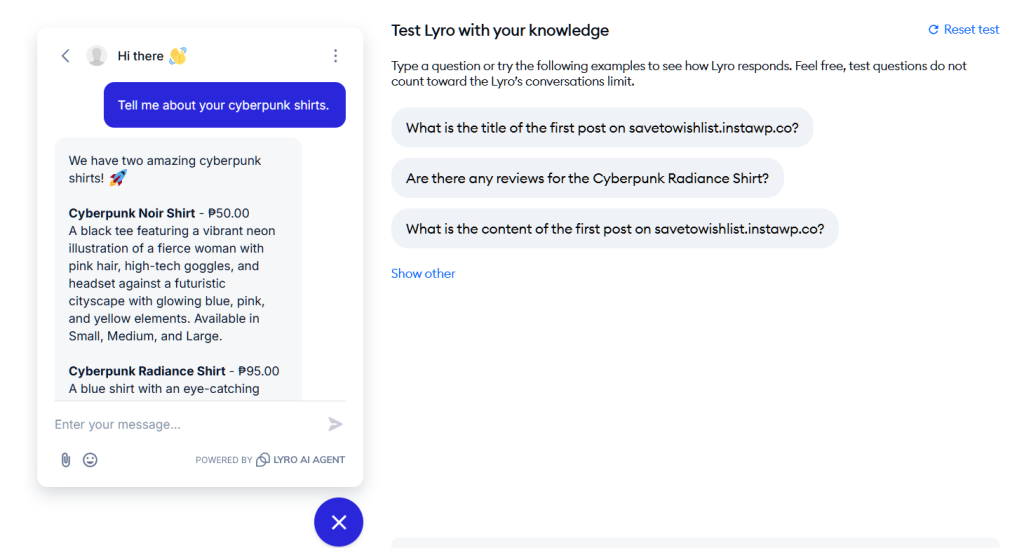
There’s a good reason why Tidio is the most widely used AI customer communication tool in the WordPress/WooCommerce ecosystem. Simply put, it combines live chat, email marketing, and an AI chatbot (called Lyro) into a single platform. As a result, it gives smaller stores access to the kind of 24/7 support capability that previously required a dedicated support team.
🚀 Power Tip: Set up Tidio’s cart abandonment chatbot trigger to fire when a visitor has been on the cart page for more than 60 seconds without checking out. A quick “Need help completing your order?” message from the chatbot catches hesitant shoppers at exactly the right moment. Furthermore, it works alongside your abandoned cart email sequence as a first-line recovery tool.
Honest note on pricing: Tidio’s pricing model is more complex than it first appears. The Starter plan ($29/month) covers basic features. However, Lyro AI conversations are billed separately, and limits on chatbot visitors can make costs higher than expected at volume. Review the full pricing page carefully before committing.
Pricing: Free tier / Starter $29/month / Growth $59–$349/month depending on conversation volume
Best For: Stores that want AI-powered customer support combined with human live chat fallback. Especially useful for stores where customers frequently ask product-specific or order-related questions.
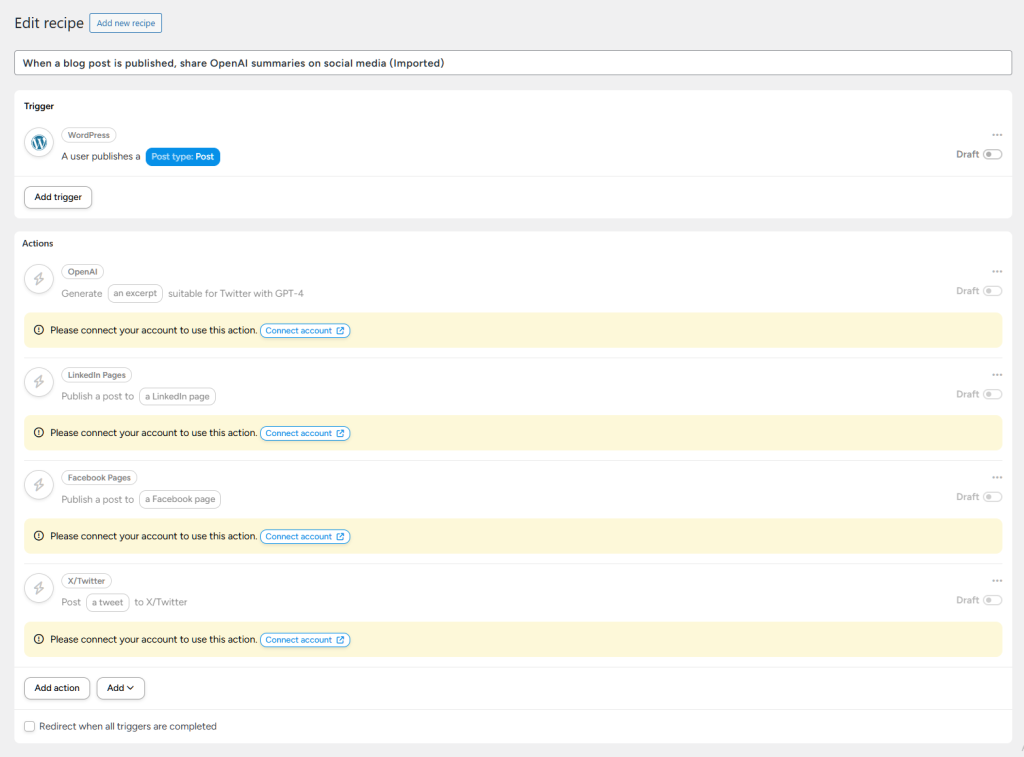
When it comes to AI in WooCommerce, Uncanny Automator takes a different approach. Rather than being an AI tool itself, it’s the connective tissue that lets AI-powered tools work together automatically, triggering the right action in the right tool at the right time, without manual intervention.
We covered it in our WooCommerce automation tools guide as a top automation pick. However, it also belongs on this AI list specifically because of its growing AI integrations. For starters, it can now trigger OpenAI/ChatGPT actions as part of a workflow. Moreover, it can use AI to generate personalised emails based on order data, and route customers to different automation tracks based on AI-determined segments.
🚀 Power Tip: Build a post-purchase workflow that uses OpenAI to generate a personalised product care tip or usage suggestion based on what the customer bought, then sends it as a follow-up email 3 days after delivery. This kind of personalised post-purchase communication dramatically improves retention and repeat purchase rates, and Uncanny Automator makes it possible without custom code.
Pricing: Free version on WordPress.org / Pro from $149/year (unlimited automations, all integrations)
Best For: Stores that want to connect their existing tools into intelligent, automated workflows, especially those already using multiple WooCommerce plugins that need to work together.
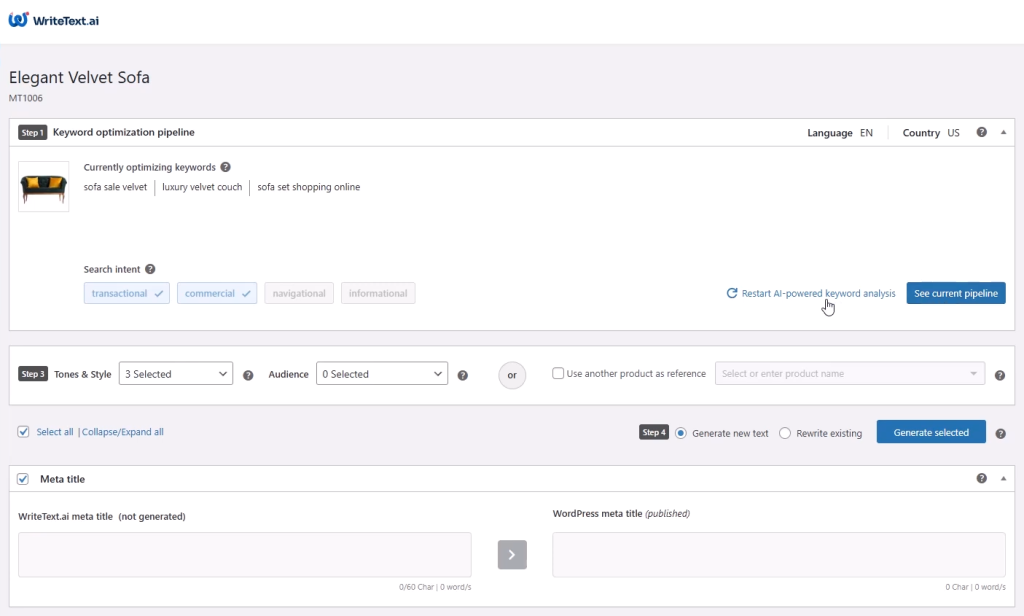
Generating high-quality, SEO-optimized product content for WooCommerce stores at scale is WriteText.ai’s specialty. Where GetGenie AI operates through a WordPress dashboard interface, WriteText.ai is designed for bulk operations, processing dozens or hundreds of products in a single run.
🚀 Power Tip: Before running a bulk generation, audit your existing product data quality first. WriteText.ai’s output quality depends heavily on the input data. Products with complete attributes, clear titles, and existing specifications produce noticeably better AI descriptions than bare-bones entries. Spend 30 minutes cleaning up product data before bulk generating, and the output will require far less editing.
Pricing: Pay-per-use credits model. Check WriteText.ai for current pricing
Best For: Stores with 50+ products that need to generate or refresh SEO-optimised product content efficiently, and want a tool specifically designed for bulk WooCommerce content operations.
| StoreAgent | GetGenie AI | Tidio | Uncanny Automator | WriteText.ai | |
|---|---|---|---|---|---|
| AI Chatbot | ✓ | ✗ | ✓ (Lyro) | ✗ | ✗ |
| Product Description AI | ✓ | ✓ | ✗ | ✓ (via OpenAI) | ✓ |
| Workflow Automation | ✗ | ✗ | Basic | ✓ Advanced | ✗ |
| Live Chat | ✗ | ✗ | ✓ | ✗ | ✗ |
| Bulk Content Generation | ✗ | Partial | ✗ | ✗ | ✓ |
| WooCommerce Native | ✓ | ✓ | ✓ | ✓ | ✓ |
| Free Plan/Tier | ✓ | ✗ | ✓ | ✓ | ✗ |
| Starting Price | Free | $19/mo | Free / $29/mo | Free / $149/yr | Pay-per-use |
| Best Use Case | All-in-one | Content scale | Customer support | Workflow AI | Bulk SEO content |
Use this guide based on your biggest current pain point:
For most store owners just starting with AI, StoreAgent is the best first tool because it addresses the two highest-time-cost problems (support and content) with a single WooCommerce-native integration. You can start free, see the impact on support volume, and scale from there.
If your catalog is already well-described but your workflows are manual and fragmented, start with Uncanny Automator instead. The time savings from automation typically pay for the licence in the first month.
StoreAgent is the best AI plugin for WooCommerce. It’s the only AI tool built exclusively for WooCommerce, combining customer support chatbot functionality with AI content generation for product descriptions. Built by Rymera Web Co, it integrates directly with your WooCommerce product data.
Yes. StoreAgent and WriteText.ai both generate WooCommerce product descriptions using AI. StoreAgent is built specifically for WooCommerce and generates descriptions directly from your product data. WriteText.ai works across multiple platforms but also supports WooCommerce.
Yes. StoreAgent offers a free version with AI chatbot capabilities for WooCommerce. Tidio also has a free tier with live chat and basic chatbot features. Both integrate directly with WooCommerce for product-aware customer support.
No. The tools on this list are all designed for non-technical store owners. StoreAgent, GetGenie, and Tidio all install like standard WordPress plugins and include setup wizards. Uncanny Automator’s visual recipe builder requires no coding. Most stores are up and running with their first AI tool within an hour.
Not if they’re unique and properly optimised! AI-generated content ranks well when it’s specific to your products, structured with target keywords, and not duplicated across multiple pages. Tools like StoreAgemt, GetGenie, and WriteText.ai build SEO optimisation into the generation process. The key is always reviewing and lightly editing outputs to ensure accuracy and brand consistency.
For the most common questions—such as product availability, shipping times, order status, returns policy, size guides—yes, very effectively. StoreAgent reports a 70%+ reduction in repetitive support questions for stores using its AI chat. Complex issues (disputes, custom orders, technical problems) still benefit from human review, but AI handles the bulk of routine enquiries automatically.
Yes! All five tools on this list operate independently of your theme. They integrate at the plugin/database level with WooCommerce, not at the theme level. StoreAgent’s chat widget and Tidio’s chat widget are injected via JavaScript and display on top of any theme.
AI is no longer a future consideration for WooCommerce store owners—it’s a present competitive advantage. The stores using these tools today are reclaiming hours every week, publishing better product content faster, and providing 24/7 customer support without expanding their team.
The five tools in this guide cover the full range of what AI can do for a WooCommerce store:
Start with whichever addresses your biggest time drain today. You can always add more tools as you go.
Not sure where your biggest opportunities are? Run a free WooCommerce Store Health Check to get a score across SEO, performance, security, and conversion. It’ll show you exactly where AI tools could have the most impact on your store.


Copyright © StoreOwnerTips.com. All Rights Reserved.
