Weekly ecommerce tips, deals & news.
Live chat increases ecommerce conversions 20-40%, but only if someone’s actually there to answer. Most small stores install live chat, get overwhelmed by after-hours messages, and let it die within weeks.
AI chat has changed the math. Now a single small store can offer 24/7 live chat without hiring a team.
This guide walks through setting up WooCommerce live chat. We cover which plugin fits your staff size. We also share configurations that actually drive conversions.
Table of Contents
Three flavors of “live chat” exist, and they solve different problems.
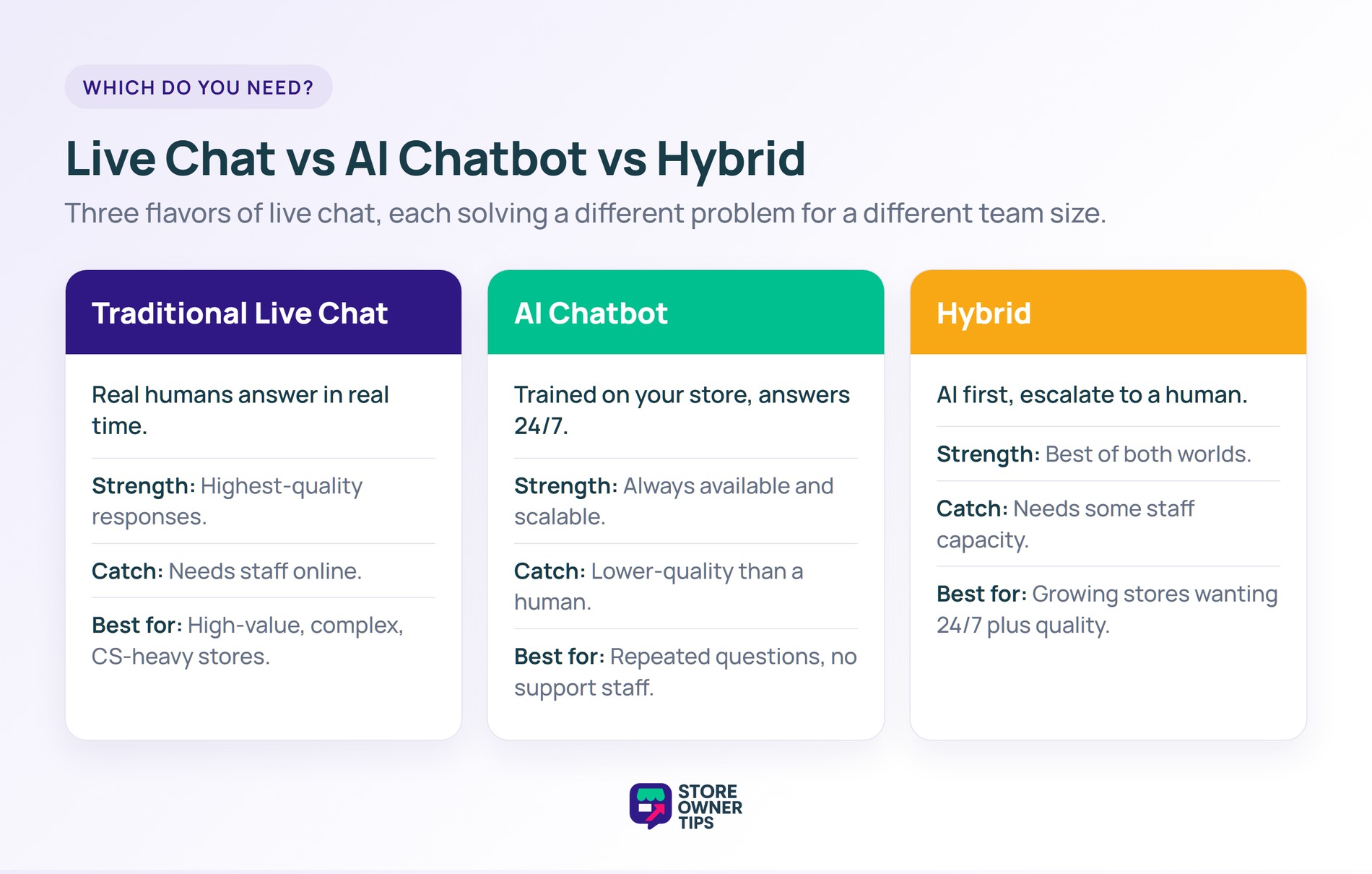
Real humans answer customer questions in real time. While this provides the highest-quality live chat support, it requires staff to be online. It works for stores with dedicated customer service teams or owner-operators during business hours.
Best for: High-value products, complex purchases, customer service-intensive stores.
AI (usually trained on your store’s content) answers customer questions 24/7. Lower-quality responses than humans but always available and scalable.
Best for: Stores with common repeated questions (shipping, returns, product specifications), stores without dedicated support staff.
AI handles initial questions, escalates to human agents for complex issues. Best of both worlds for stores that can staff live chat during business hours.
Best for: Growing stores with some staff capacity that want 24/7 coverage plus human quality for complex issues.
The stores we see succeed with live chat either have a dedicated agent or use AI chat for 24/7 coverage. Small teams often install traditional live chat and fall behind. As a result, unanswered messages pile up. Ultimately, this hurts customer trust more than having no chat at all.
Five main options for WooCommerce live chat, each suited to different situations.
| Plugin | Starting Price | AI Built-in | 24/7 Capable | Best For |
|---|---|---|---|---|
| StoreAgent AI | Free plan / from $19/mo | Yes (core) | Yes | Small WooCommerce stores |
| Tidio | Free / $29/mo Starter | Yes (add-on) | With AI | Mid-size stores |
| LiveChat | $24/mo/agent | Via integration | No (needs staff) | Teams with dedicated CS |
| Intercom | Custom (enterprise) | Yes | Yes | Enterprise stores |
| Olark | $29/mo/agent | No | No | Budget chat for teams |
Pricing shown is approximate as of early 2026.
When a shopper has a question on your website, getting an answer quickly can make the difference between them buying a product or leaving empty-handed.
However, picking the right chat tool can be tricky. After all, not all plugins do the same job. Some are made for teams of real people who sit and answer messages all day, while others use smart AI to answer questions for you even when you are asleep.

Whether you’re running your store by yourself or managing a full customer service team, finding a live chat WordPress integration that works for your specific setup is key. Here are the five best tools to help you connect with your shoppers.
StoreAgent AI is purpose-built for WooCommerce stores. It uses AI trained on your store’s product catalog, content, and FAQs to answer customer questions in real time, 24/7.
What I noticed in practice:
Pros:
Cons:
Best for: Small-to-mid WooCommerce stores that want AI-powered 24/7 chat without hiring a team.
StoreAgent AI, a WooCommerce AI plugin, offers a free Lite plan. It’s worth testing if you’re evaluating AI chat options.
Tidio combines live chat, chatbots, and email marketing into one platform. The free tier is generous, and paid tiers add AI features and more sophisticated automation.
What I noticed in practice:
Pros:
Cons:
Best for: Stores that want one platform for chat, chatbots, and email marketing.
LiveChat is the enterprise live chat platform. Focused purely on human-agent live chat with strong ticket management, queueing, and team collaboration features.
What I noticed in practice:
Pros:
Cons:
Best for: Established stores with dedicated customer service teams.
Intercom is the enterprise messaging platform. Live chat is one of many features alongside help center, customer data, and marketing automation.
What I noticed in practice:
Pros:
Cons:
Best for: Enterprise WooCommerce stores or those with CS teams managing 1000+ tickets/day.
Olark is one of the oldest live chat platforms. Simple, no-frills, agent-focused. No AI, no complex automation—just clean live chat.
What I noticed in practice:
Pros:
Cons:
Best for: Small teams that want straightforward chat without feature complexity.
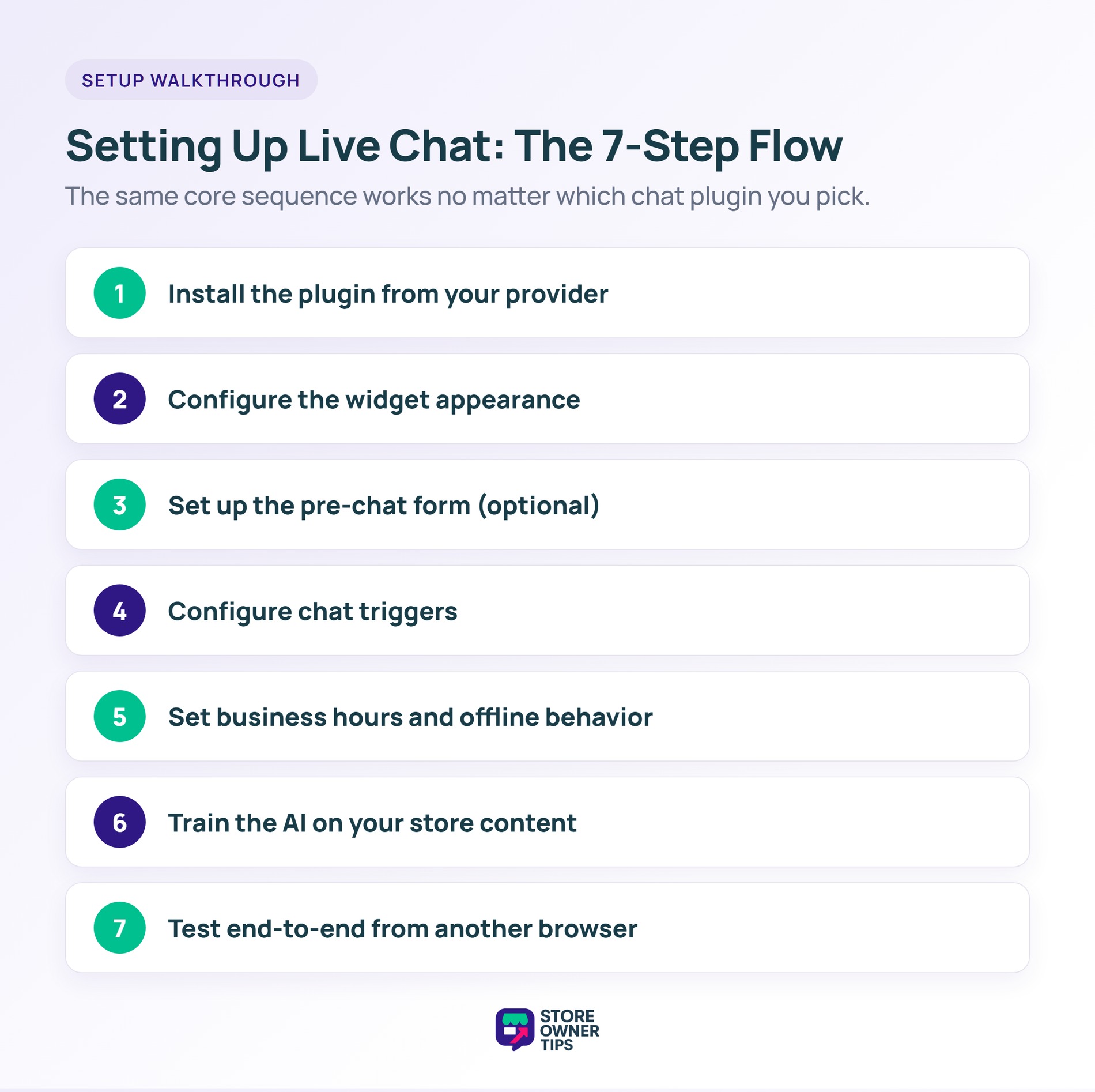
Regardless of live chat plugin choice, the basic setup flow is:
Consider showing chat proactively after 30 seconds on product pages or when cart abandonment seems imminent. Don’t show aggressive proactive chat, as it creates frustration, not conversions.
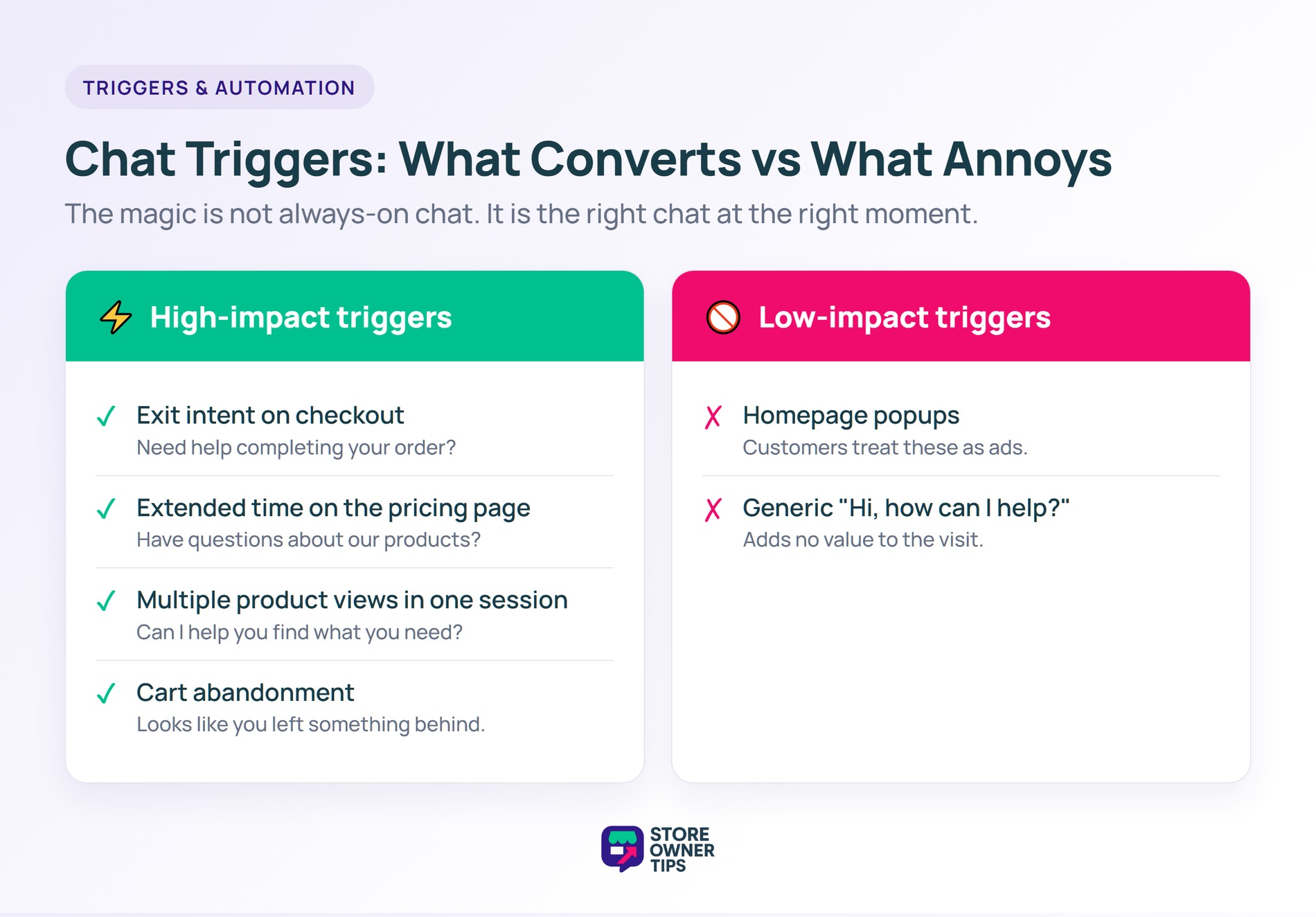
The magic of chat isn’t always-on chat; it’s the right chat at the right time.
High-impact triggers:
Lower-impact triggers:
No. WooCommerce doesn’t include live chat natively. You install a third-party WordPress live chat plugin like StoreAgent AI, Tidio, or LiveChat to add chat functionality.
Tidio’s free tier is the most capable free option, including basic chatbot functionality. StoreAgent AI has a free Lite plan worth testing for AI-powered chat.
If you can staff live chat 16+ hours/day, human-only chat works. If you can’t cover nights and weekends, AI chat catches the 40-60% of conversations that happen outside business hours. For example, if your target audience is in the United States but your team is located in a different time zone, AI easily bridges that gap while you sleep.
Yes, when done right. Industry studies show a 20-40% conversion lift from well-configured live chat for WooCommerce, and helping shoppers find exactly what they need in real time can even increase average order sizes. Poorly configured chat (slow responses, bad AI, pushy triggers) can decrease conversion instead.
Free options exist (Tidio free, LiveChat trial). Paid plans typically start $20-50/month. AI-powered chat (StoreAgent, Tidio+, Intercom) ranges $20-500+/month depending on features and scale.
Most WooCommerce live chat plugins integrate with major email platforms (Mailchimp, Klaviyo, ActiveCampaign). When a customer chats, their email captures can trigger marketing sequences.

Live chat adds real conversion lift to WooCommerce stores as long as you pick the right solution for your staffing reality. AI chat (StoreAgent, Tidio with AI, Intercom) gives you 24/7 coverage without a team. Human chat (LiveChat, Olark) gives you quality responses if you can staff it.
Here’s what to do next:
If you’re a small WooCommerce store without a CS team, start with StoreAgent’s WooCommerce AI chatbot for 24/7 AI-powered chat. If you have staff capacity, Tidio’s free tier is the best free option. Either way, WooCommerce live chat pays for itself quickly when configured correctly.

Copyright © StoreOwnerTips.com. All Rights Reserved.
