Weekly ecommerce tips, deals & news.
When selling digital products such as courses, ebooks, templates, software, music, or beats, most platforms force you into a bad deal. Gumroad takes 10% of every sale, Kajabi charges a steep $149/month, and Teachable heavily limits your customization.
However, for anyone serious about their business, WooCommerce is a better alternative because it’s cheaper, more flexible, and 100% yours to own.
That’s why this guide covers how to sell digital products on WooCommerce the right way. We’ill walk you through product type setup, licensing, delivery, and taxes. You’ll also learn how to handle the tricky edge cases that other platforms just gloss over..
Table of Contents
Why WooCommerce over Gumroad, Easy Digital Downloads (EDD), Podia, or Kajabi?
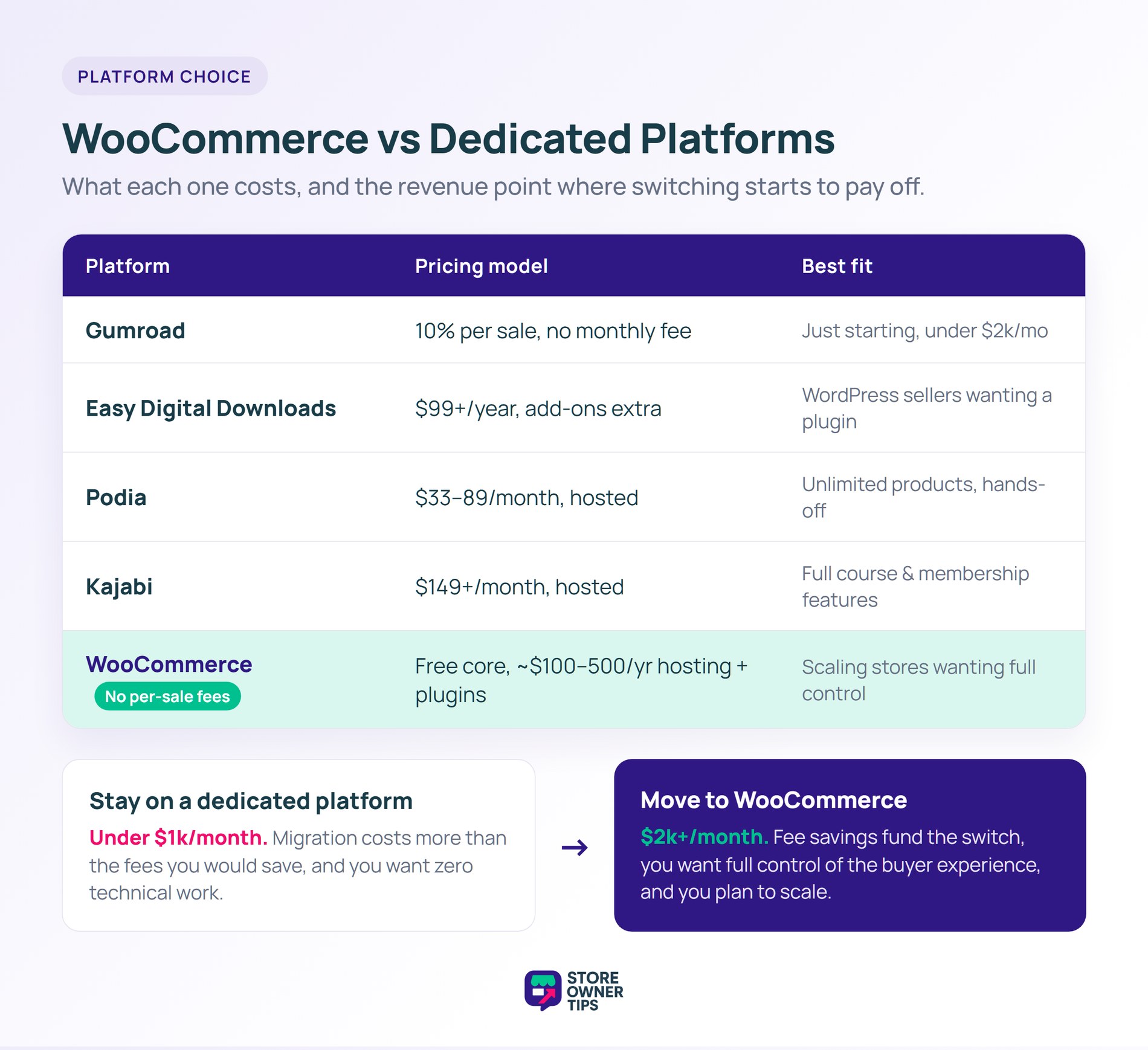
For creators making under $2k/month, Gumroad’s simplicity often wins. Conversely, at $5k/month, Gumroad’s 10% fee ($500/month) funds WooCommerce hosting, plugins, AND a developer to set it up. Most creators wait too long to migrate.
WooCommerce wins on flexibility. You control:
Dedicated platforms are easier to start but harder to escape if you grow big.
Selling digital products is an amazing way to make money online because you don’t have to worry about inventory or shipping.
Hosted platforms often charge high monthly fees or take a big percentage of your sales. On the other hand, WooCommerce lets you keep total control over your business for a fraction of the cost.
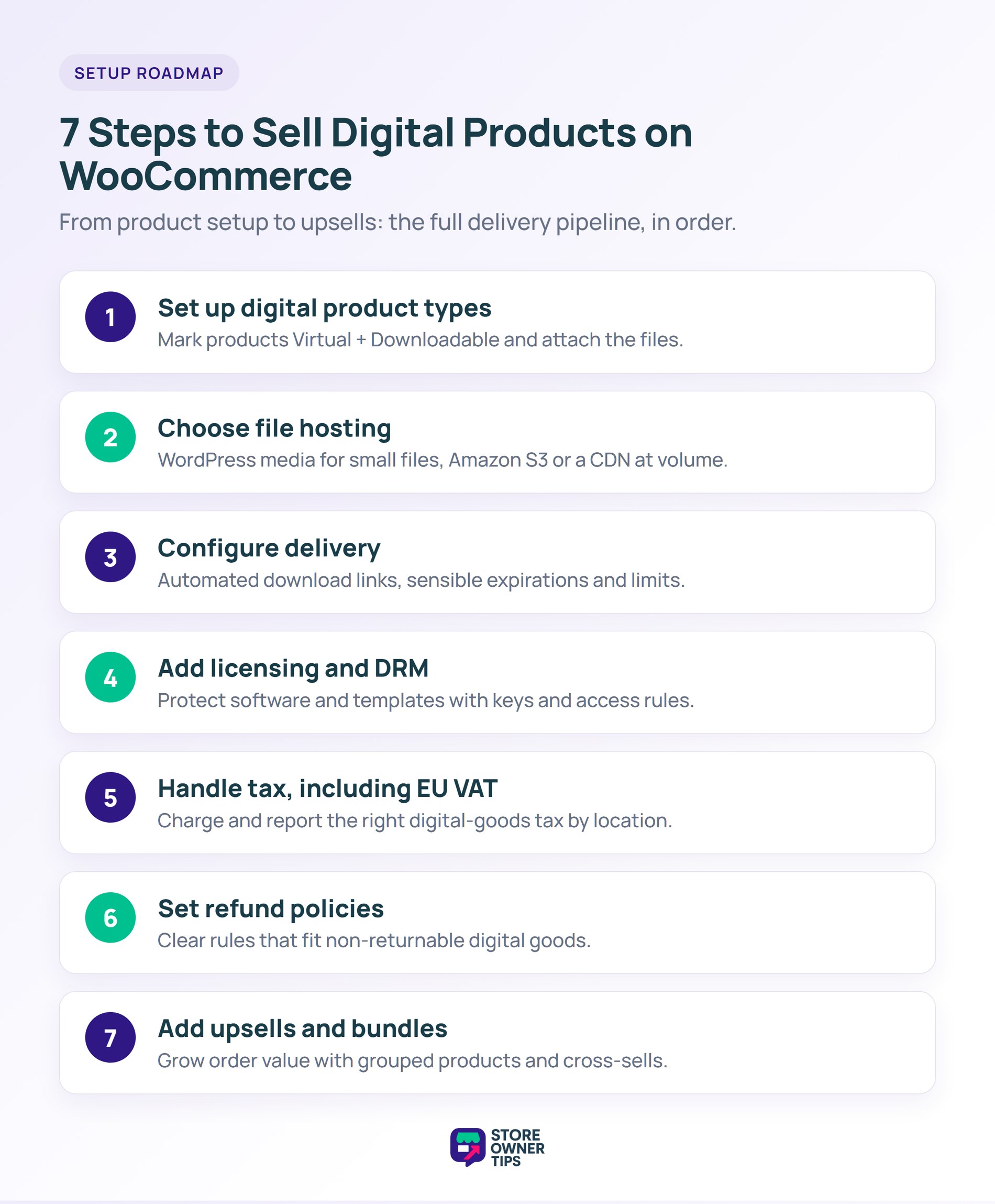
Setting up a digital store might seem like it has a lot of moving parts, but it’s actually very approachable when you break it down. Just follow the seven simple steps below. You’ll learn how to safely upload your files and protect your work. Before long, you’ll be running automated deliveries to your customers with ease!
WooCommerce natively supports digital products. In the product editor:
For most digital products, leave download limit unlimited but set a reasonable expiry (30-365 days) to prevent link sharing abuse.
Where you host digital files matters for both security and performance.
Pros: Simple, integrated with WooCommerce. Cons: Limited protection against direct downloads, uses your hosting bandwidth.
Best for: Small files (under 50MB), low-volume stores.
Pros: Scalable, low-cost at volume, secure signed URLs, doesn’t use hosting bandwidth. Cons: More setup work, separate monthly cost.
Best for: Large files (video, software, high-resolution images), higher-volume stores.
Sendowl, Cloudinary, or similar. Integrates with WooCommerce through plugins.
Best for: Creators who need professional delivery infrastructure without managing AWS.

WooCommerce handles download delivery automatically. Customers receive an email with download links after purchase, and can access downloads from their “My Account” page.
Set reasonable expiration based on product type:
Most digital products should allow unlimited downloads for paying customers. The only exception is for very expensive products ($500+) where you want to discourage account sharing.
Never serve download links that reveal the file URL directly. WooCommerce’s default download handling uses secure tokens that expire, which is the right approach.
For products where license keys or usage restrictions matter:
Plugins: WooCommerce License Manager, WooCommerce Software Add-on, or custom integrations.
When a customer completes checkout, a unique license key generates and appears in their order confirmation. They can use this key to activate the software.
For software products, set up a license activation server where installed copies can phone home to verify valid licenses. Plugins like Freemius or Paddle handle this for WordPress plugins specifically.
Full DRM (like Adobe’s digital rights management for PDFs, or Widevine for video) requires enterprise-level tooling. For most creators, “honest system + limited downloads + watermarks” works better than actual DRM.
Digital products have special tax rules in many jurisdictions.
Since 2015, EU has required VAT collection on digital product sales based on the buyer’s country, regardless of seller location.
Setup:
Non-EU sellers must register for Non-Union OSS to legally sell digital products to EU customers.
Most US states treat digital goods the same as physical goods for sales tax purposes. If you have nexus in a state that taxes digital products, collect sales tax.
Canada requires GST/HST collection on digital goods sold to Canadian customers.
See our WooCommerce tax guide for full detail on international tax compliance.
Refund policies for digital products are different from physical products. Consider:
Digital products have near-zero marginal cost, which makes bundles and upsells extremely effective.
Plugins like FunnelKit or CartFlows add post-purchase upsell flows. After buying the main product, the customer sees a one-click offer for a related product. Conversion rates are high because they’ve already entered payment info.
Bundle related digital products at a discount. Creating an “Ebook + Templates + Course” bundle for $97 when individual prices would total $147 is a strong offer.
A low-priced tripwire ($7-17) gets customers to buy something quickly, establishing them as paying customers. Then upsell higher-priced products to those buyers.
Yes. WooCommerce natively supports downloadable and virtual products. You can sell digital products with the core plugin alone.
For most creators, core WooCommerce + Amazon S3 Storage for file hosting is enough. For software-specific needs, add License Manager. For course sales, consider pairing WooCommerce with LearnDash or LifterLMS.
Perfect protection is impossible. Best-effort approaches: download limits, expiring links, personalized watermarks on PDFs, and license activation for software. Basically, you should focus on making the legitimate experience better than piracy rather than making piracy impossible.
Yes you can by using WooCommerce Subscriptions. You can also combine this with downloadable products, or use a membership plugin (MemberPress, Paid Memberships Pro) for content access.
Use a VAT plugin like Quaderno or WooCommerce EU VAT Assistant. Register for OSS to simplify filing. Charge the customer’s country VAT rate at checkout.
Amazon S3 is the gold standard. After all, it’s scalable, secure, and cheap at volume. Integrate via WooCommerce Amazon S3 Storage plugin.

Selling digital products on WooCommerce gives you ownership, flexibility, and cost savings that hosted platforms can’t match. The setup requires more initial work, but the savings compound as you grow.
With that in mind, here are the steps to take to sell digital products online:
Are you ready to sell digital products WooCommerce style? Start by installing WooCommerce on your hosting. Then, create your first downloadable product and run a test purchase end-to-end. For most creators, you can be selling by the end of a weekend!

Copyright © StoreOwnerTips.com. All Rights Reserved.
