Weekly ecommerce tips, deals & news.
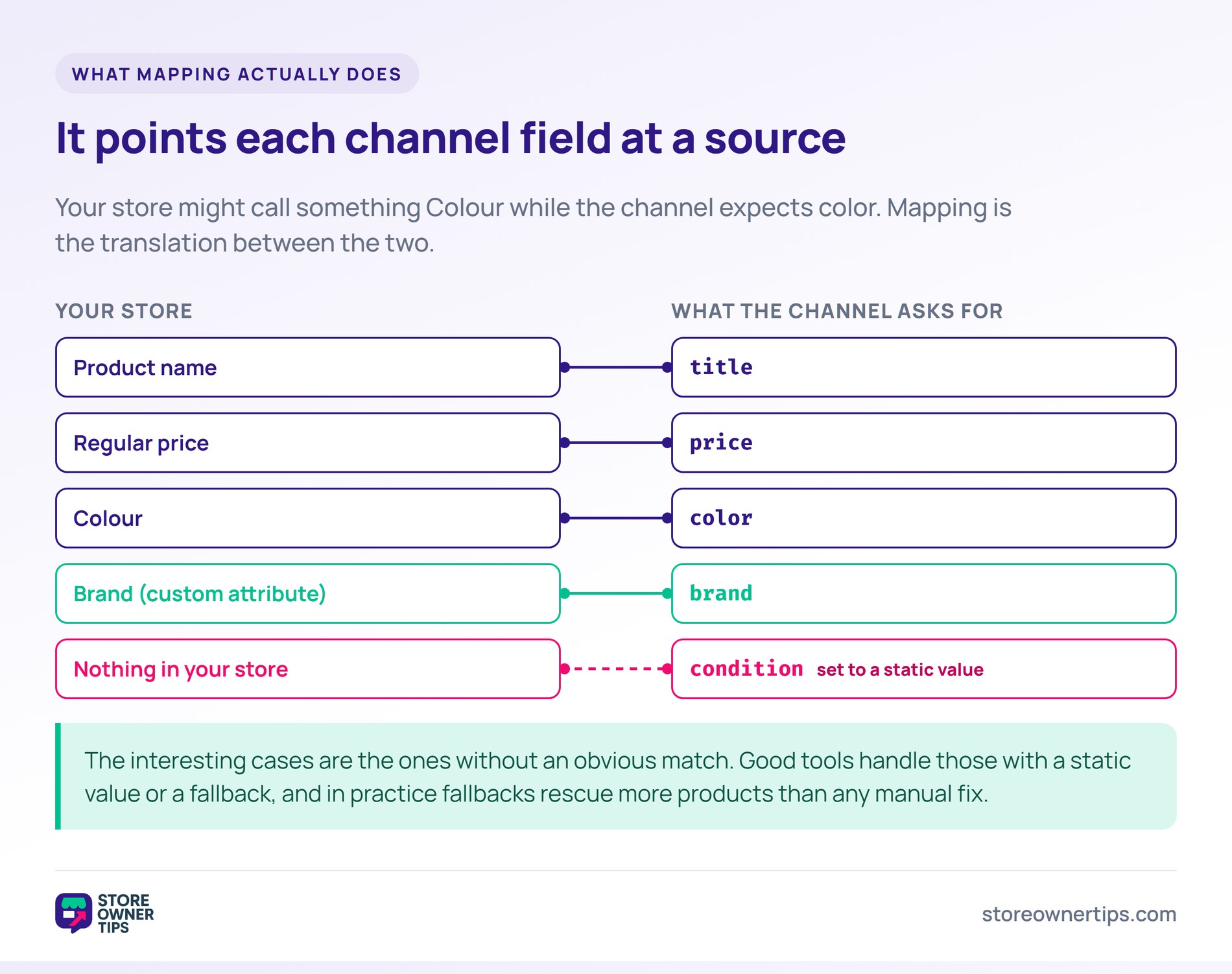
Feed mapping is telling a sales channel which of your product fields corresponds to each of theirs. Your store might call something “Colour” while the channel expects “color”, and mapping is the translation between the two. Without it, the channel cannot read data you already have.
So mapping decides which field goes where. It says nothing about whether the content in it is any good.
Store owners usually discover feed mapping through an error message. Products are rejected for missing information the store demonstrably holds. However, the channel was looking in a field nobody pointed it at.
Mapping is the unglamorous step that makes everything downstream work.
Think of it like filling in a form in another language. You already know your address, but the form asks for it in a specific order with specific labels. Mapping is writing your answers into their boxes.
Concretely, you point each channel field at a source in your store. Product title maps to your product name, and price maps to your regular price. So far so obvious.
The interesting cases are the ones without an obvious match. A channel may want “brand” when your store keeps that as a custom attribute or a category. Meanwhile, “condition” might not exist anywhere in your data at all.
Good mapping tools handle those with a static value or a fallback. Set condition to “new” for everything, or fill an empty description from the short description. In practice, fallbacks rescue more products than any manual fix.
Channels do not agree on names, formats or units. One expects “image_link” and another expects “picture”. So a single mapping cannot serve them all.
Required fields differ too. Google’s product data specification names seven core attributes that must be present for an item to serve at all. Another channel may require fewer, or different ones entirely.
Identifiers are the usual sticking point. A channel might accept a GTIN where another will take your internal SKU. A UPC may be accepted where a GTIN is not. So mapping the wrong one is a quiet, common mistake.
Destination matters as much as format. A feed bound for Google Merchant Center follows one specification, while a comparison shopping engine wants another. Meanwhile, the file itself is often just an XML product feed either way.
This is why one catalog produces several feeds. The source data never changes, only the translation does. Meanwhile, each product data feed ends up looking different from the last.
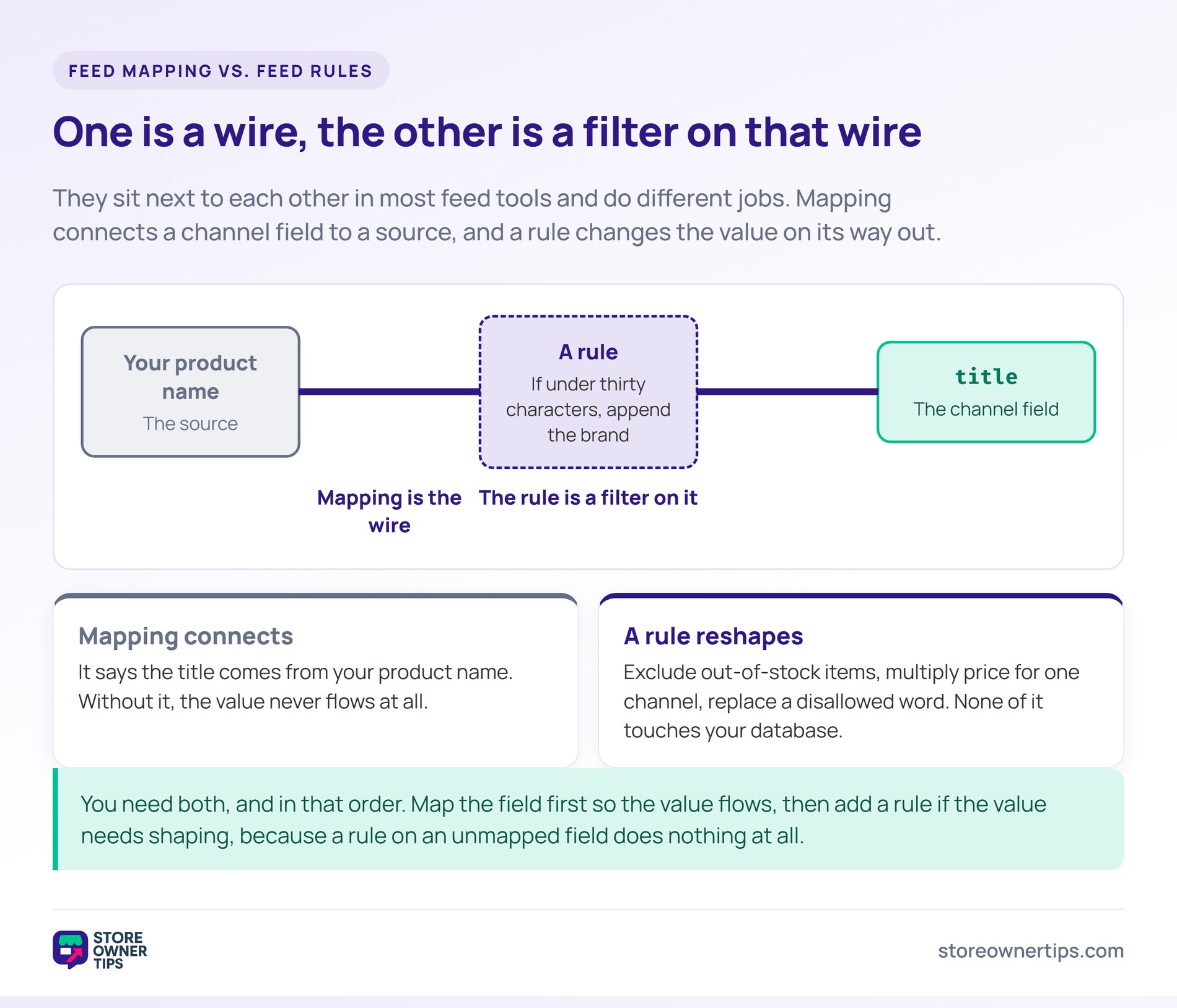
These two get conflated constantly, and the distinction is practical. Mapping is structural: which field goes where. Feed optimization is editorial: whether the content in that field is any good.
You can map a feed perfectly and still perform badly. If your titles are vague, correctly placing them in the title field changes nothing. So mapping gets you accepted, and optimization gets you clicked.
The order matters as well. There is no point sharpening titles for a channel that is rejecting the whole item on a missing identifier. In practice, fix the mapping first and then improve the content.
Both depend on the same underlying data. Neither can invent an attribute your store never recorded. Meanwhile, that gap is a catalog problem rather than a feed problem.
The most common failure is silence. A required field left unmapped does not raise an alarm in your store, because your store is fine. So the problem only appears as a channel rejection days later.
A variable product causes the second wave. A parent product often has no price or identifier of its own, so mapping must reach into each variation. Otherwise every variation inherits blanks.
Formatting trips up the rest. Currency symbols, decimal separators, date formats and units all have to match what the channel expects. For example, sending “12.99 USD” where a plain number is required will fail.
Test with a small sample before pushing everything. Most tools let you preview the generated output for a handful of products. So you see the actual values a channel will receive rather than guessing.
Mappings also rot. Add a new attribute or rename one in your store and the feed quietly stops carrying it. So review the mapping whenever the catalog structure changes.
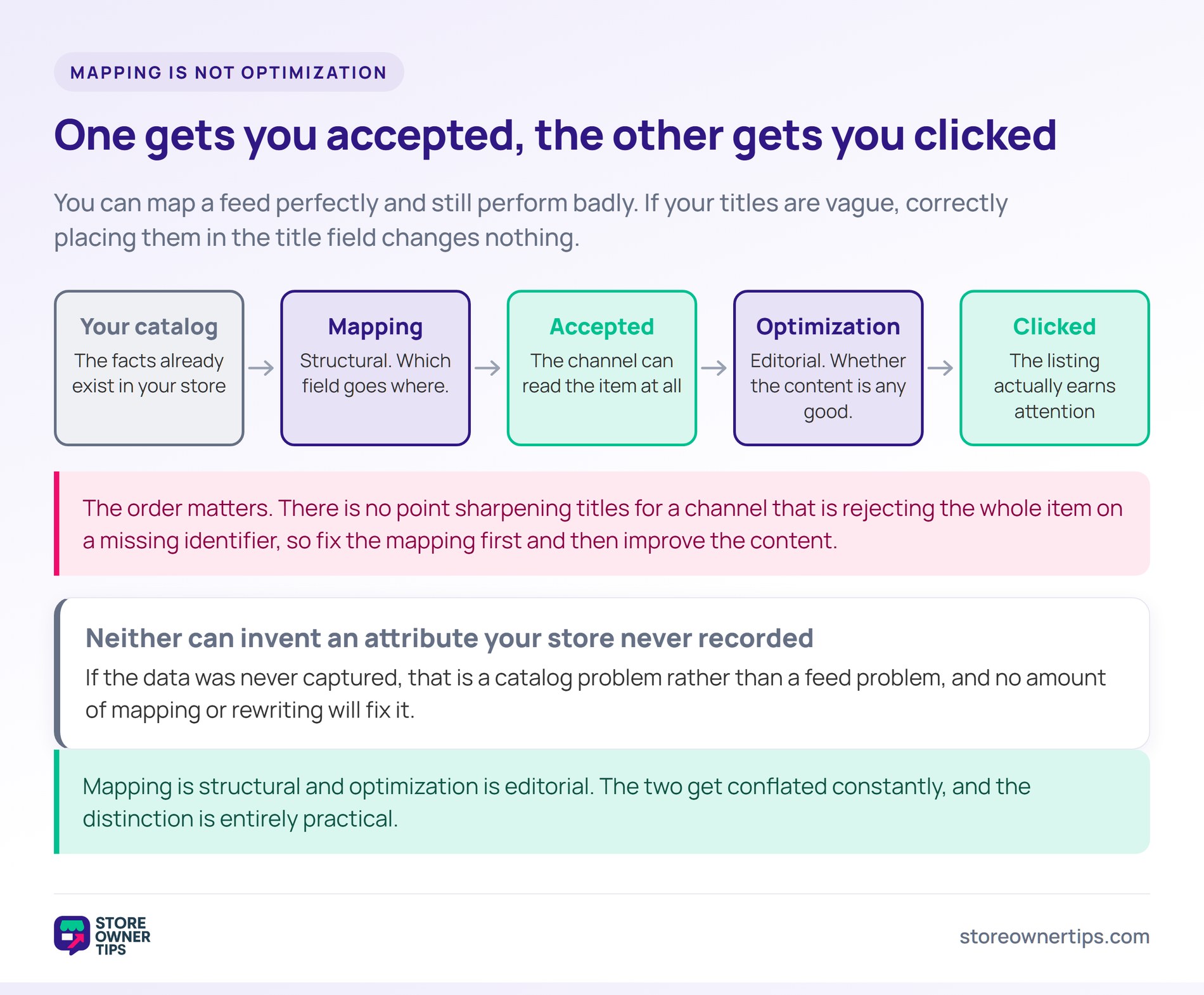
Imagine a lighting store called Lumen Row with 480 products. It sells pendant lamps in several finishes and sizes. Previously it had one feed going to a single shopping channel.
Roughly a third of the catalog is rejected for a missing brand. Lumen Row does record brand, but as a custom attribute rather than a standard field. So the channel never sees it.
A second group fails on identifiers. The parent lamp has no barcode, because barcodes live on the variations. Meanwhile, the feed was built from parent products only.
None of this is a data problem. Every fact the channel wants already exists in the store. The feed simply was not told where to look.
The owner points the brand field at the custom attribute. Then the feed is switched to output variations rather than parents. So each variation carries its own barcode, price and finish.
Two fallbacks cover the remainder. Condition is set statically to “new” for the whole catalog, and any empty description falls back to the short description. In practice, that clears the last stragglers.
The rejected third starts serving without a single product being edited. Nothing in the store changed at all. That is the part store owners find surprising.
The owner also documents the mapping in a short note. Six months later, nobody has to reverse-engineer why brand points at a custom attribute. In practice, that note saves an afternoon whenever the catalog changes.
Lumen Row then builds a second mapping for a different channel. The same 480 products go out with different field names and a different identifier rule. Meanwhile, the catalog remains one source, which is what makes multichannel selling manageable.
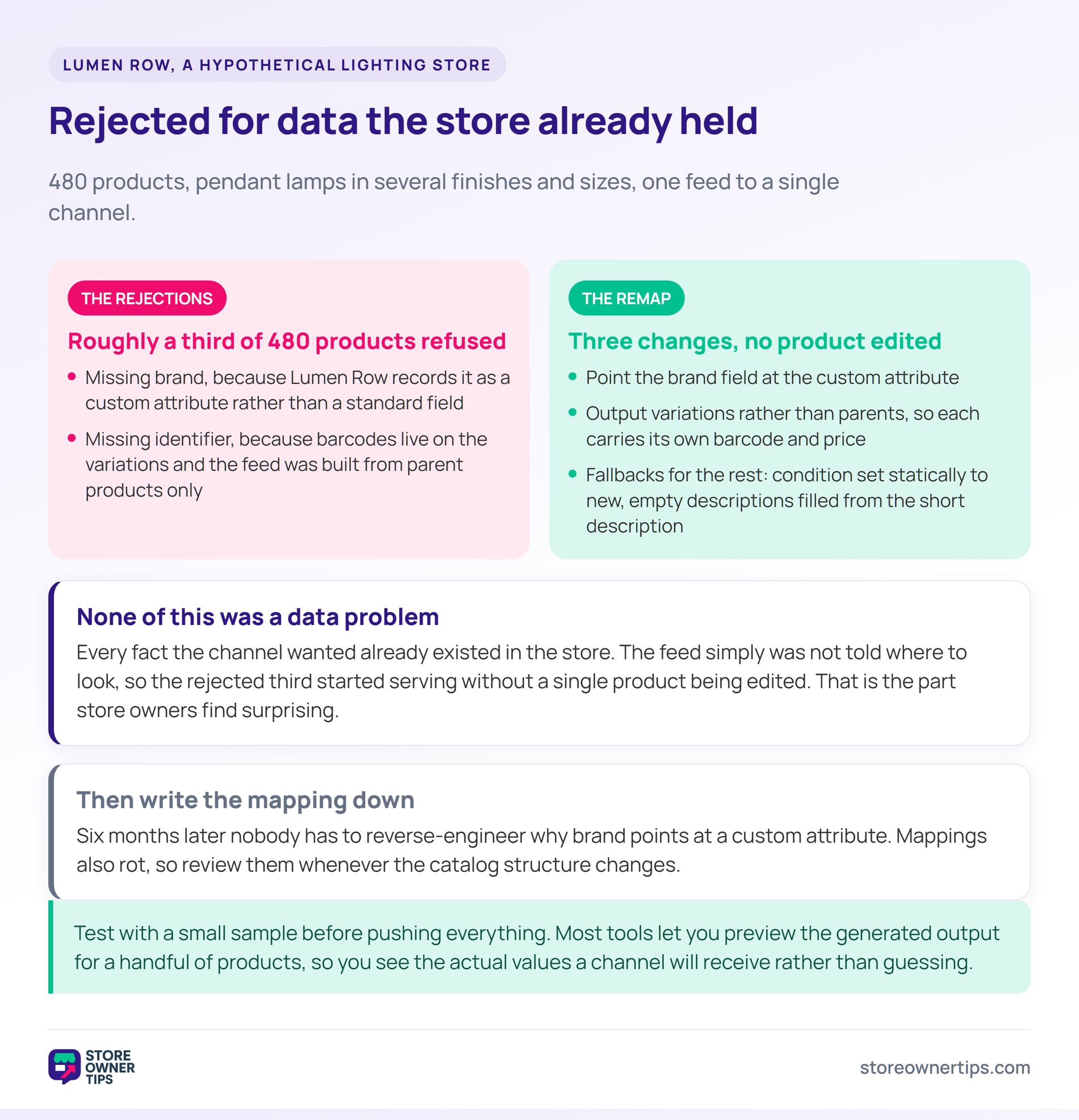
Mapping and rules sit next to each other in most feed tools, and they do different jobs. Mapping connects a channel field to a source. A rule changes the value on its way out.
Mapping says the title comes from your product name. A rule says that if the title is under thirty characters, append the brand. So one is a wire and the other is a filter on that wire.
Rules are also where conditional logic lives. Exclude out-of-stock items, multiply price by a factor for one channel, or replace a word the channel disallows. Meanwhile, none of that touches your database.
You need both, and in that order. Map the field first so the value flows, then add a rule if the value needs shaping. By contrast, a rule on an unmapped field does nothing at all.
Almost always because the field is not mapped. The channel reads only what the feed sends it, not what sits in your admin. So data in an unmapped custom field is invisible to them.
Check the rejection message against your mapping rather than your product page. If the channel names a field, find where that value lives in your store. Meanwhile, resist editing products until you have ruled out mapping.
Yes, because channels genuinely differ. Field names, required attributes and formatting rules all vary. So one mapping reused everywhere will fail somewhere.
The work is smaller than it sounds after the first one. Most tools let you duplicate a mapping and adjust the differences. In practice, the second channel takes a fraction of the time.
No, and that is the reassuring part. Mapping affects the feed output only, so your store is untouched. Delete the mapping and your original data is exactly as it was.
That makes it safe to experiment with. You can try a different source field, regenerate the feed, and compare the result. Meanwhile, nothing a shopper sees on your site changes.
Feed mapping is the translation layer between your catalog and every channel you sell on. Most rejections trace back to it rather than to missing data. Fix the mapping before you touch a single product.
Then review it whenever your catalog structure changes. For how mapping and rules work together, see this guide to using product feed rules.
Copyright © StoreOwnerTips.com. All Rights Reserved.
