Weekly ecommerce tips, deals & news.
An out-of-stock product page looks like a dead end. It isn’t. WooCommerce back in stock alerts turn that dead end into a signup. The signup becomes a sale you’d otherwise have lost.
The recovery is real, and the numbers are unusually good. Omnisend’s 2026 benchmark study covers 27,000+ brands and 470 million automated sends. Back-in-stock emails came out on top of every automation type they measured, converting at 6.72% against a 1.49% automation average.
Here’s the part I find more interesting. Only 0.6% of brands in that dataset ran a back-in-stock automation at all. So the highest-converting automated email in ecommerce is also the one almost nobody sends.
There’s a second use most stores miss entirely. The signup list is the one place customers tell you, unprompted and specifically, what they wanted and couldn’t have. This guide covers both uses, the plugins that handle them, and why price-drop alerts need more caution than restock alerts.
Jump to:

Two different mechanisms get sold under the same name, and the difference matters when you’re choosing.
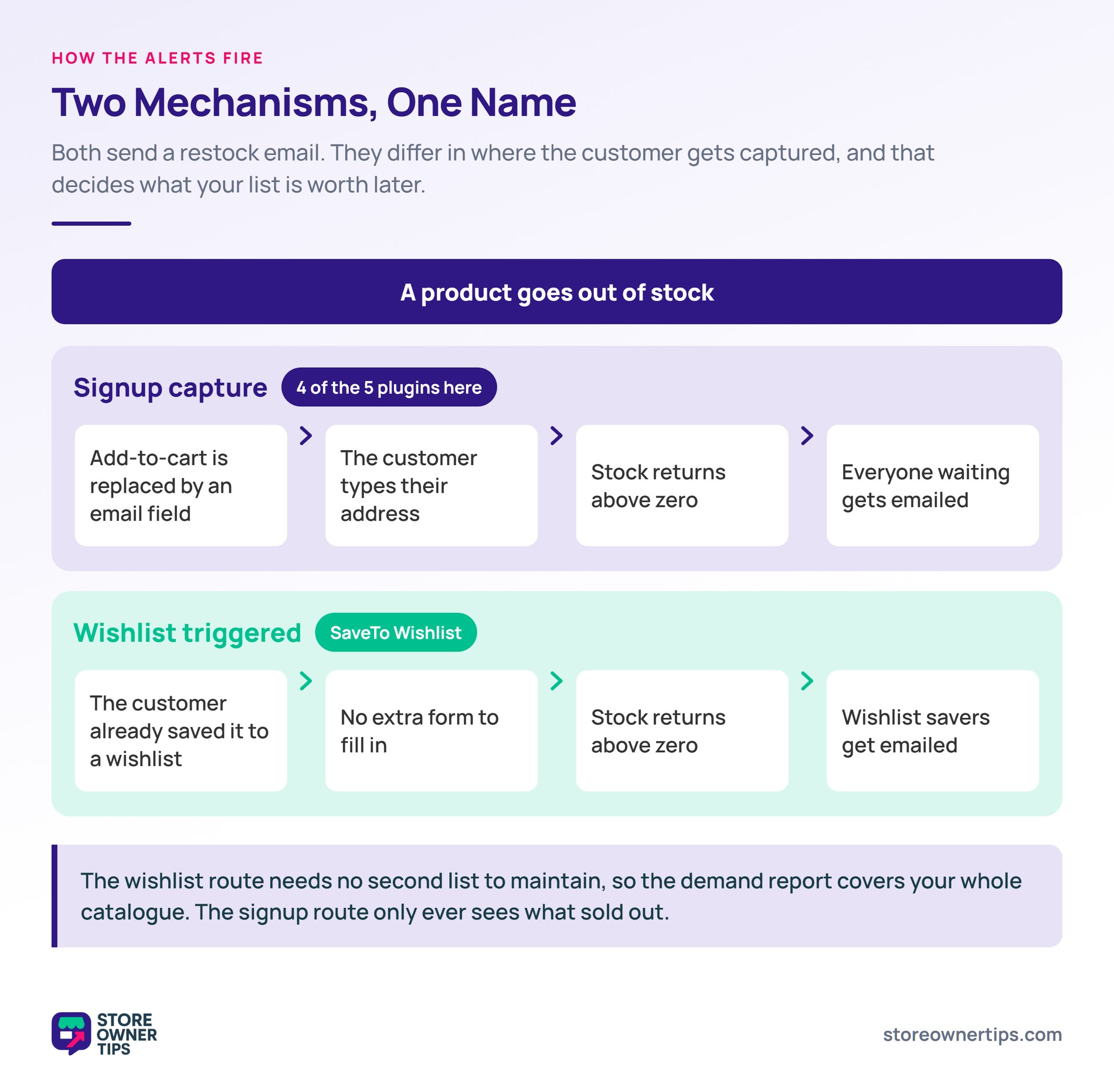
The common one is signup capture. When a product is out of stock, the add-to-cart button is replaced with an email field. A customer enters their address, and when stock returns above zero, the system emails everyone waiting.
The second is wishlist-triggered. Instead of a separate signup, the alert fires for customers who already saved the product to a wishlist. There’s no extra form, because the wishlist is the list. I’ll come back to why that changes the maths on your demand report.
For the signup-capture kind, three parts determine whether it works well.
Where the signup sits. It needs to be exactly where the add-to-cart button was, at the moment the customer discovers the product is unavailable. A signup form in the footer or on a separate page captures almost nobody.
Variation-level signup. This separates useful setups from frustrating ones. If a customer wants a specific size, signing up at product level means being emailed when any variation restocks.
They arrive, find their size still unavailable, and stop trusting your notifications. Signup needs to attach to the variation.
Send timing. Sending the instant stock ticks above zero is not always right. Say you receive three units and forty people are waiting. Thirty-seven get an email about a product that sold out in four minutes.
Better tools either stagger the send or cap it against the restock quantity.
One honest caveat before you build a strategy on this. Baymard Institute’s product-page research argues the signup button can work against you. In their words, it “essentially lets users off the hook”.
Their testing found 30% of users abandoned an out-of-stock product to look for it elsewhere. So treat alerts as a recovery net, not a replacement for showing alternatives on the page.
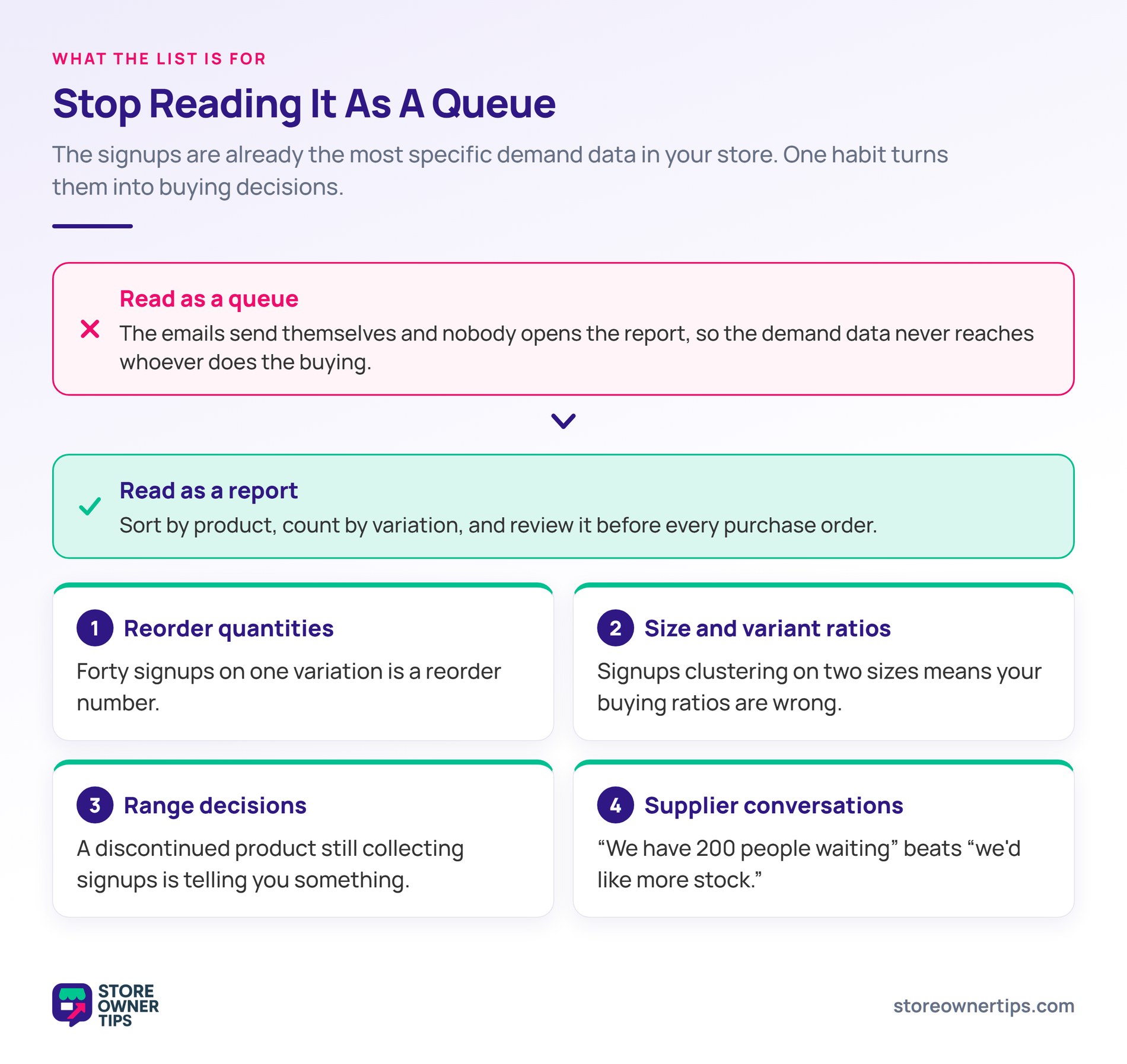
Every signup tells you three things. Which product they want, which variation, and that they wanted it enough to leave an email address.
That’s better data than most demand forecasting, and almost nobody reads it. It also expires. Baymard’s out-of-stock research found 68% of sites won’t let customers order a temporarily out-of-stock product. That sends the demand straight to whoever will.
What to do with it:
The practical step is to read the list as a report rather than as a queue. Sort by product, count by variation, and review it when you place orders. Your out-of-stock rate tells you how often this happens. The signup list tells you which products it happens to.
🔍️ What we’ve seen: stores treat the back-in-stock list as a send-and-forget feature, and nobody ever opens the report. The signups accumulate, the emails go out automatically, and the demand information inside never reaches whoever does the buying. The fix takes ten minutes: add “check the back-in-stock list” to whatever routine precedes a purchase order.
Accurate stock data is what makes any of this trustworthy. Our guide to WooCommerce inventory management covers the settings that stop phantom restocks from firing alerts.
Price-drop alerts let customers register interest and be notified when a product gets cheaper. They’re often bundled with back-in-stock tooling, and they need more thought.
The mechanics are fine. The commercial risk is that you’re teaching customers to wait.
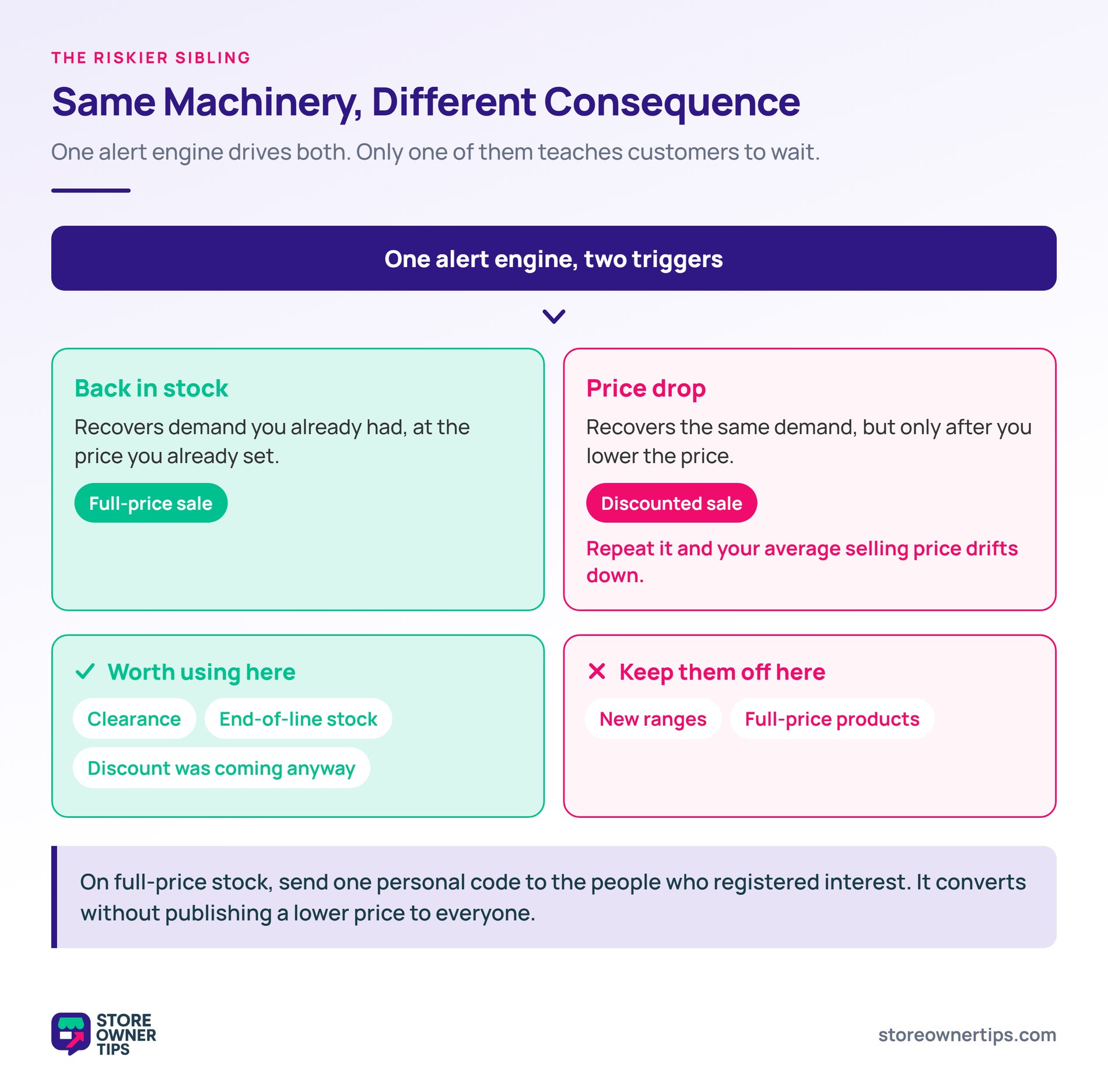
A customer who signs up for a price drop alert wants the product, but not at today’s price. If they learn that waiting reliably produces a discount, you’ve converted a full-price sale into a discounted one. Do that across a catalogue and your average selling price drifts down without anyone deciding it should.
That’s not an argument against using them. It’s an argument for using them deliberately:
The difference between the two alert types is worth stating plainly. A back-in-stock notification recovers demand you already had at your price. A price-drop alert recovers demand at a lower price, and creates an incentive to wait. Same machinery, different commercial consequences.
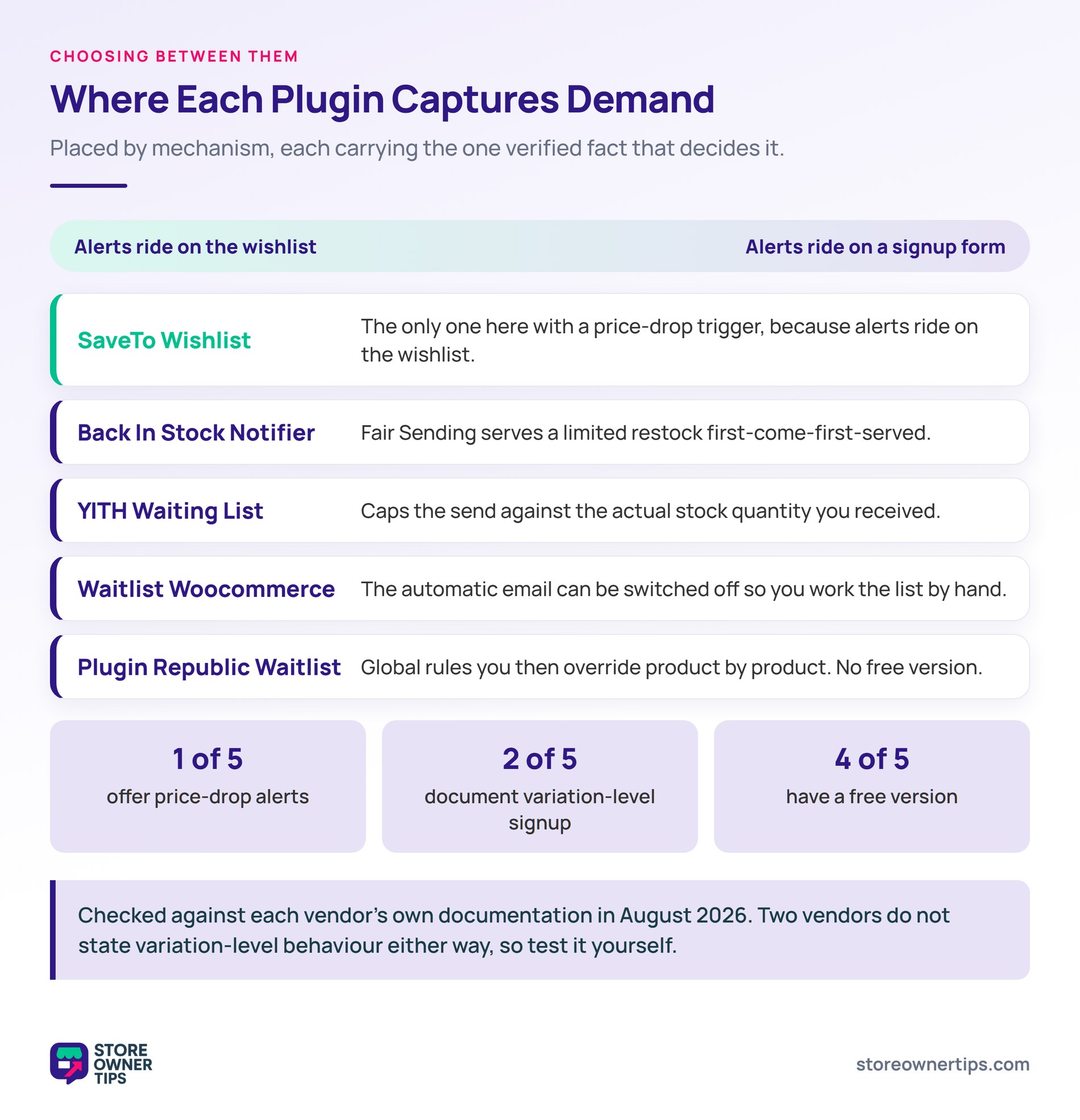
Five options worth a look, and they split along the mechanism difference from earlier. The first runs alerts off the wishlist, and the other four capture signups on the out-of-stock page.
The strongest fit when alerts are one part of a wider demand-capture setup rather than a standalone notification tool.
Worth being precise about the mechanism, because it differs from the others here. SaveTo Wishlist Pro doesn’t put a signup form on the out-of-stock product page. Its automations engine fires when a product someone has already wishlisted comes back in stock. The wishlist is the waiting list, so there’s no second list to maintain.
Two triggers cover this ground. One fires when an out-of-stock wishlist product comes back in stock. The other fires when a wishlist product goes on sale. That second one is the price-drop half, and none of the other four plugins offer it.
Each trigger can drive three actions: send an email, call a webhook, or update user meta. That matters because the alert stops being a fixed email template. You can push the event into a CRM, or tag the customer for a segment, instead of only mailing them.
The wider point is that a wishlist and an alert list are the same data viewed differently. Both are customers naming what they want and haven’t bought. Running them in one place means your demand report covers the whole catalogue. Not only the products that happened to sell out.
Guest wishlists work in the free version of SaveTo Wishlist, so customers don’t need an account to save a product. That’s worth knowing. Baymard found 75% of sites gate save features behind account creation. That’s the friction that stops people using them.
Two honest limitations. Automations need a paid licence, starting on the Growth plan. Also, the pre-built webhook recipes for Mail Mint and Groundhogg only cover the wishlist activity triggers. The back-in-stock and on-sale triggers need a hand-built webhook, or the email action instead.
Best for: stores wanting alerts and saved-product data in one system, and planning to use the list as demand data.
The most complete of the dedicated signup-capture tools, and free to start.
ProPluginsLab ships subscriptions at both product and variation level, which clears the bar that matters most. It also handles the send-timing problem directly. A “Fair Sending” option serves a limited restock first-come-first-served. An email speed limit stops the whole list going out at once.
Beyond that you get reCAPTCHA and Turnstile bot protection, six form and popup designs, and a subscriber dashboard. There’s also a REST API and auto-generated coupons per subscriber. The core plugin is free, with premium add-ons sold as one-time purchases rather than a subscription.
Best for: stores wanting deep restock-notification control, with no wider wishlist or automation needs.
Built around the waitlist framing rather than the notification framing.
The distinction shows in how you work it. Xootix lets you disable the automatic email, which turns the waitlist into a list you contact deliberately. That suits stores allocating a small restock to their best customers rather than first-come-first-served.
It also reports registration counts as demand analytics, which is the report-not-a-queue habit built into the plugin. Forms come as popup or inline. Paid add-ons extend the free core with list management, exports, and custom fields.
Variation-level signup isn’t documented either way, so test it on a variable product before you commit.
Best for: stores that want to work the waiting list as a sales activity rather than an automated send.
The pick if your send-timing worry is overselling a thin restock.
YITH puts a subscription form on each out-of-stock variation. You can then email everyone waiting, or cap the send against actual stock quantity. That cap is the cleanest answer to the three-units-forty-people problem.
A free version exists, with exclusion lists, reCAPTCHA, email reports, and cross-sell emails held for the premium tier. Those cross-sell emails recommend alternatives to people still waiting, which is a reasonable hedge on stock that never comes back. There are no price-drop alerts.
Best for: stores restocking in small quantities that need to cap who gets notified.
A paid-only option that leans on per-product control.
Plugin Republic lets you set waitlist rules globally, then override them product by product. So you can run alerts on your core range and leave them off elsewhere. It also surfaces product popularity insights, an expected back-in-stock date, and an optional notes field on the signup.
There’s no free version. Pricing starts at $69 per year for a single site, or $189 once for a lifetime licence. Variation-level signup isn’t spelled out in the documentation, so check it against your variable products first.
Best for: stores that want alerts on some products only, and prefer a lifetime licence.
Here’s how the five compare on the details that decide it. Every cell below comes from each vendor’s own documentation, checked in August 2026.
| Plugin | Signup form on out-of-stock page | Variation-level signup | Price-drop alerts | Send control | Free version |
|---|---|---|---|---|---|
| SaveTo Wishlist | No, alerts wishlist savers | Not applicable | Yes, on-sale trigger | Rule-based automations | Yes |
| Back In Stock Notifier | Yes | Yes | No | Fair Sending, speed limit | Yes |
| Waitlist Woocommerce | Yes | Not documented | No | Auto-email can be disabled | Yes |
| YITH Waiting List | Yes | Yes | No | Cap sends by stock quantity | Yes |
| Plugin Republic Waitlist | Yes | Not documented | No | Global and per-product rules | No |
Read that table by the job you’re doing. If you only need restock emails, the dedicated tools go deeper on the signup form itself. If you want the demand data behind the alerts, the wishlist route covers more of your catalogue.
Six things separate a plugin that builds trust from one that annoys customers.
That last one catches people. A stock adjustment that briefly marks a product in stock can fire the whole waiting list. There’s no unsending it.
Where the signup form sits is part of the wider product-page question. Our guide to WooCommerce product page optimization covers how that area is usually arranged. If low stock is a frequent state for you, flag it as a badge too. That pairs well with alerts.
Install a plugin, since WooCommerce doesn’t include this out of the box. Most replace the add-to-cart button on out-of-stock products with a signup field. Configure where the form appears, whether signups attach to variations, and how the email is sent. Then test it by taking a product out of stock, signing up yourself, and restocking it.
There’s a full setup walkthrough for restock notifications if you want the step-by-step.
Only if the plugin supports variation-level signup, and not all do. Back In Stock Notifier and YITH both document it. Two of the others don’t say either way, so test them yourself.
This matters more than any other feature. Signing up at product level means being notified when any variation restocks. So someone waiting on one size gets emailed about a different one.
There’s a support cost to getting it wrong, too. Customers emailed about the wrong variation come back asking which one actually restocked, and that’s routine enough for customer self-service to handle.
They’re the strongest automated email Omnisend measured across 27,000+ brands, converting at 6.72% against a 1.49% average for automations generally. The recipient asked for it and named the exact product, which is about as high-intent as email gets.
Your own results depend on timing and stock depth. If the restock is small relative to the waiting list, most recipients arrive to find the product gone. That converts poorly and costs you trust.
Use them selectively. Price-drop alerts teach customers that waiting produces a discount, which can pull your average selling price down over time.
They work well on clearance and end-of-line stock, where the discount was coming anyway. On full-price and new ranges, a personal one-off code to interested customers is usually the better trade.
Without throttling, your entire waiting list can be emailed about a product that isn’t really available. Check that your plugin protects against repeat sends, and take care with inventory adjustments that temporarily mark products in stock. There’s no way to recall a notification once it’s gone.

The shift worth making is from treating the alert list as a mailing list to treating it as a report. The emails largely run themselves. The information inside the signups needs a human to look at it. That’s the part that changes what you buy next.
Maybe you’d rather run alerts off the wishlist, so the demand report covers everything customers saved. That’s the case for SaveTo Wishlist Pro. You get both triggers, back in stock and on sale, plus the email, webhook, and user-meta actions behind them. The wishlist itself, guest saves included, is free to start with.

Copyright © StoreOwnerTips.com. All Rights Reserved.
