The Best WooCommerce POS Plugins For Omnichannel Retail (2026)
May 18, 2026
Running a store that sells both online and in-person? Your inventory is probably a disaster. Sell one unit in-store and the online site still shows it available. Someone orders online and the in-store associate sells the last one to a walk-in. Refunds happen twice. Customers get angry.
A proper WooCommerce POS plugin solves this by keeping inventory in sync between your online store and in-person registers in real time. But choosing the right one isn’t obvious. After all, the market includes everything from simple browser-based POS systems to full retail platforms.
Here’s how the top five compare and which one fits your store.
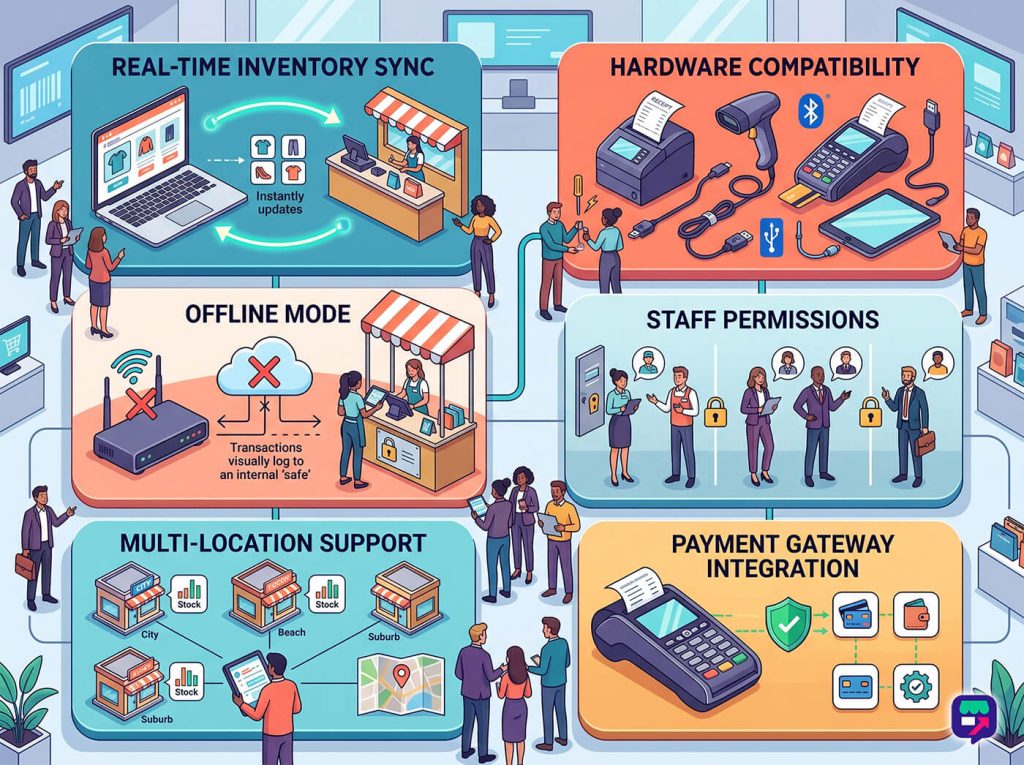
Not all POS plugins are created equal. When evaluating WooCommerce POS options, focus on these criteria:
Real-time inventory sync: Sell a product in-store, online inventory decreases instantly. No delays, no batch jobs.
Hardware compatibility: Works with your receipt printer, barcode scanner, and card reader. Bluetooth support matters for mobile checkout.
Offline mode: Can you still ring up sales when your internet goes down? Critical for retail.
Staff permissions: Different access levels for cashiers, managers, and owners.
Multiple location support: If you run more than one physical store, can the POS handle separate inventory per location?
Payment gateway integration: Works with the card readers and processors you already have.
A great WooCommerce POS includes essential features like real-time inventory syncing and a dependable offline mode (click to zoom).
One thing we commonly see: stores buy a POS plugin thinking they’ll figure out hardware later, then discover the POS doesn’t support the card reader they already bought. Always verify hardware compatibility before purchasing the plugin.
Quick Comparison Table
Here’s the short version:
Plugin
Starting Price
Real-Time Sync
Offline Mode
Multi-Location
Square for WooCommerce
Free (2.6% + 10¢ per transaction)
Yes
Yes
Yes
Oliver POS
$29/mo
Yes
Yes
Yes
Hike POS
$69/mo
Yes
Yes
Yes
WooCommerce POS by Actuality
$139/yr
Yes
Limited
Yes
Vend (Lightspeed Retail)
$119/mo
Yes
Yes
Yes
Pricing shown is approximate as of early 2026. Check each plugin’s site for current rates.
1. Square For WooCommerce
Square is the most recognizable name in small-business POS. Their official WooCommerce integration syncs inventory, products, and customers between your WooCommerce store and Square POS.
What I noticed in practice:
The inventory sync is reliable. Sell at the register, WooCommerce stock updates within a few seconds.
Square’s card readers (Square Reader, Square Stand, Square Terminal) are available at most office supply stores and work immediately.
Pros:
No monthly fee: You pay per transaction (2.6% + 10¢ as of early 2026).
Hardware readily available: Card readers, registers, and accessories sold at retail.
Unified reporting: View in-store and online sales in one dashboard.
Cons:
Per-transaction fees add up: At high volume, flat-rate pricing becomes expensive.
Inventory rules can be finicky: Products with variants need careful setup to sync correctly.
Best for: Small retail stores, pop-ups, and market stalls that want low upfront cost and easy hardware.
2. Oliver POS
Oliver POS is a cloud-based POS specifically built for WooCommerce stores. It runs in a browser, so no app installation is required. Just log in from any tablet or computer with an internet connection.
What I noticed in practice:
The product search is fast, even with 10,000+ SKUs. Fuzzy search handles typos gracefully.
The tablet interface feels closer to a dedicated POS app than browser-based software usually does.
Pros:
WooCommerce-native: Built specifically for WooCommerce, not adapted from another platform.
Browser-based: Works on any tablet, iPad, or laptop.
Flat monthly pricing: $29/mo including unlimited transactions.
Cons:
Requires constant internet: Offline mode exists but has limitations.
Smaller hardware ecosystem: Fewer supported card readers than Square.
Best for: WooCommerce stores with one or two physical locations that want flat-rate pricing and WooCommerce-native integration.
3. Hike POS
Hike POS is a retail-focused POS platform that includes WooCommerce integration as one of its channels. It’s aimed at multi-location retailers and includes more advanced inventory features than Oliver or Square.
What I noticed in practice:
Multi-location inventory works well. You can transfer stock between locations, view per-location reports, and set different prices per store.
The onboarding is more involved than Oliver POS. Expect a few hours of setup for a multi-location store.
Loyalty and gift cards built in: No additional plugins needed.
Works with multiple payment processors: Flexibility on which card reader you use.
Cons:
Higher monthly price: $69/mo starting, higher than Oliver POS.
Platform-first, not WooCommerce-first: WooCommerce is one of several sync options rather than the core focus.
Best for: Multi-location retailers with 2+ physical stores who need advanced inventory management.
4. WooCommerce POS By Actuality
WooCommerce POS by Actuality is a budget-friendly option that runs entirely within WordPress. Instead of a separate cloud service, everything happens in your WordPress admin.
What I noticed in practice:
Setup is faster than cloud POS options. You’re essentially adding a POS interface to your existing WooCommerce dashboard.
Performance depends on your WooCommerce hosting. On shared hosting, the POS interface can feel slow.
Pros:
Self-hosted: All data stays in your WordPress database.
One-time or annual pricing: $139/year for single-site Premium.
Depends on WooCommerce hosting performance: Slow hosting = slow POS.
Best for: Tech-comfortable store owners who want self-hosted POS and are running WooCommerce on capable hosting.
5. Vend (Lightspeed Retail)
Vend, now part of Lightspeed Retail, is an enterprise-grade retail platform that syncs with WooCommerce through an integration. It’s aimed at larger retailers with complex needs.
What I noticed in practice:
Inventory features are the most comprehensive of the five options tested: batch tracking, purchase orders, supplier management, and advanced forecasting.
Pricing starts at $119/month which puts it out of reach for small retailers.
Scales to large retailers: Used by multi-location chains with hundreds of SKUs.
Lightspeed ecosystem integration: Connects with Lightspeed Payments, Lightspeed eCom, and more.
Cons:
Expensive: $119/mo starting is too much for most small stores.
Platform complexity: More features than most small retailers will ever use.
Best for: Mid-to-enterprise retailers with multiple locations and complex inventory needs.
Which WooCommerce POS For Which Use Case?
The right POS depends on your store size, locations, and budget.
Single-location small retail ($50k-250k annual sales): Square for WooCommerce. Low upfront cost, hardware everywhere.
Single or dual-location WooCommerce-first store: Oliver POS. Clean WooCommerce integration at flat monthly price.
Multi-location retail (3+ stores): Hike POS. Built for multi-location inventory management.
Budget-conscious, self-hosted preference: WooCommerce POS by Actuality. Lowest ongoing cost.
Enterprise retail with complex inventory: Vend (Lightspeed Retail). Only if you need enterprise features.
Hardware You’ll Need
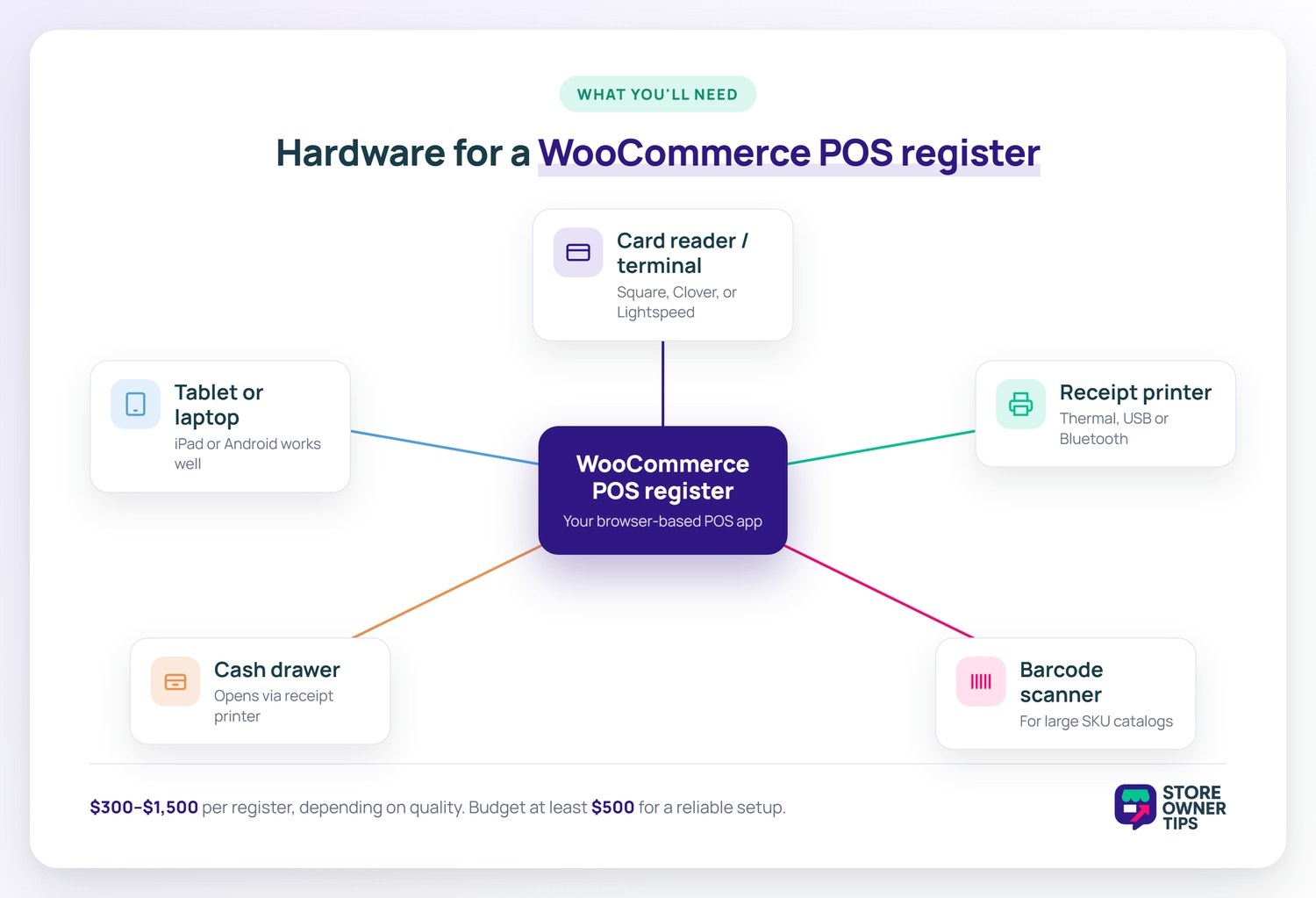
Regardless of which POS plugin you pick, you’ll need some combination of:
Card reader / payment terminal: Square Reader, Clover Flex, or Lightspeed-compatible terminals depending on your POS choice.
Receipt printer: Thermal receipt printer with USB or Bluetooth.
Barcode scanner: Bluetooth or USB scanner if you have a large SKU catalog.
Cash drawer: Connects to receipt printer for automatic opening on cash transactions.
Tablet or laptop: Most browser-based POS systems work well on iPad or Android tablet.
Total hardware cost for a single register runs $300-$1,500 depending on quality choices. Budget at least $500 for a reliable setup.
Whichever POS plugin you choose, a register needs some mix of these five hardware pieces (click to zoom).
Frequently Asked Questions
Do I need a separate POS system or can WooCommerce handle in-store sales?
WooCommerce alone can’t handle in-store sales. After all, it’s designed for online checkout. A POS plugin adds the in-person retail interface, payment hardware support, and real-time inventory sync needed for physical sales.
Can my POS work if my internet goes down?
Square for WooCommerce, Oliver POS, and Hike POS all support offline mode. Transactions process locally and sync when internet returns. WooCommerce POS by Actuality has limited offline support.
Which POS is cheapest for a small retail store?
Square for WooCommerce is free to use (you only pay per-transaction fees). For very low-volume stores, Square ends up cheaper than any monthly subscription option.
Can I use multiple POS plugins together?
In theory yes. However, it’s a bad idea. After all, inventory will quickly desync between systems. Thus, pick one POS solution and commit to it.
Does WooCommerce POS work with Apple Pay and Google Pay?
Square’s POS supports Apple Pay and Google Pay on their Square Terminal and Square Reader devices. Other POS systems support them through compatible card readers.
How long does WooCommerce POS setup take?
Square for WooCommerce: 1-2 hours for basic setup. Oliver POS: 2-4 hours. Hike POS or Vend with multi-location: 1-2 days including training.
Choose The Right WooCommerce POS For Your Store
The right WooCommerce POS for your store depends on your size, locations, and budget. Square for WooCommerce is the low-commitment starting point. Oliver POS is the WooCommerce-native cloud option. Hike POS is the multi-location pick. Vend is for enterprise retail.
If you’re setting up omnichannel retail for the first time, start with Square for WooCommerce. Its low monthly commitment lets you test the workflow without big upfront cost. Once you’ve validated your retail operation, you can migrate to a more specialized platform if needed.