Weekly ecommerce tips, deals & news.
A feed disapproval is when a shopping channel rejects products from your product feed. Those items then stop appearing in listings and ads, while the rest of your catalog keeps running. Google Merchant Center is where most WooCommerce store owners meet it. The fix nearly always lives in your own product data, not in the channel.
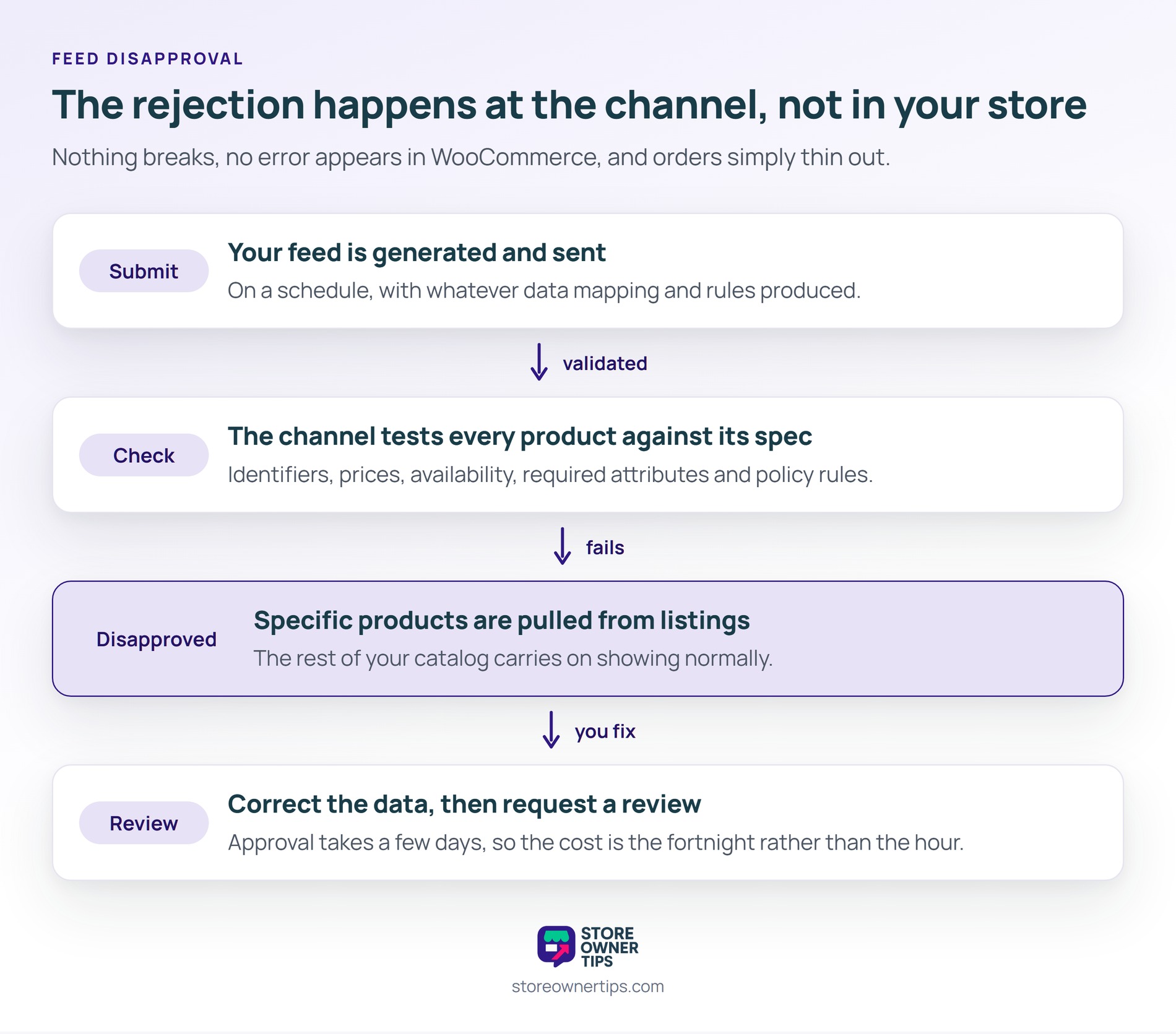
A feed disapproval works as a per-product verdict on the data you submitted, item by item. The channel checks each item against its requirements. Then anything that fails is flagged and pulled from listings until you correct it.
First, think of a bouncer checking guests at a door. Most people walk in fine. However, a few get turned away because their ID is missing or does not match the name on the list.
A feed disapproval is that individual refusal. The party carries on without them. Meanwhile the venue being shut down entirely is a different and much worse event.
In practice, disapprovals surface in the channel’s diagnostics rather than in your store. In Google Merchant Center, affected items appear under a Needs attention view, grouped by issue.
So that grouping is the useful part. Google’s error wording can feel vague on its own. Still, seeing forty products share one error tells you it is a rule problem, not forty separate mistakes.
Usefully, AdTribes walks through the whole recovery loop in its guide to fixing disapproved products in Merchant Center. The sequence is find, group, fix the source, then request a review.
Feed disapprovals cluster around a small set of recurring causes, not exotic ones. In practice, most stores hit the same handful repeatedly.
A handful of causes reach beyond individual products. Misrepresentation, widespread price mismatches and missing trust signals all put the account itself at risk. Therefore they deserve faster attention than a single wrong category value.
Trust signals are the easiest of those to overlook. Clear contact, refund and shipping information on your site is part of what the channel checks. So a disapproval is sometimes about the store, not the product.
That last cause is the one worth watching hardest. Price and availability mismatches also feed into account-level trouble, not just single items. Therefore keeping the feed in sync matters beyond the products currently flagged.
Clearing a feed disapproval follows a fixed sequence, and skipping ahead wastes effort. The temptation is to start editing products immediately. However, the review request has to come last.
Step four is the one people miss. Requesting a review before the new data has reached the channel just gets the same verdict again. So confirm the feed has refreshed first.
For a handful of items, reviewing each one individually is fine. By contrast, when dozens share an error, fix the source and let the channel re-check on its next crawl. Requesting reviews one product at a time does not scale.
Preventing a feed disapproval beats clearing one, because prevention costs no lost visibility. Validating a feed before submission catches missing required fields and malformed values early.
Also, images deserve a look of their own. Reviewing new product photography before publishing avoids a whole class of avoidable rejections. Meanwhile a quick check that feed prices still match the live page prevents the mismatch problems that escalate fastest.
In practice, feed disapprovals are common enough to have a documented repair cycle. AdTribes catalogs 8 recurring feed and Merchant Center issues that WooCommerce stores hit, drawn from real support cases. So the same errors recur across very different catalogs.
Still, recovery is not instant either. Google notes a corrected product can take up to 3 business days to be approved and show again. Meanwhile feed tooling is widespread. AdTribes, our own feed plugin, reports 80,000+ active installations on its free listing.
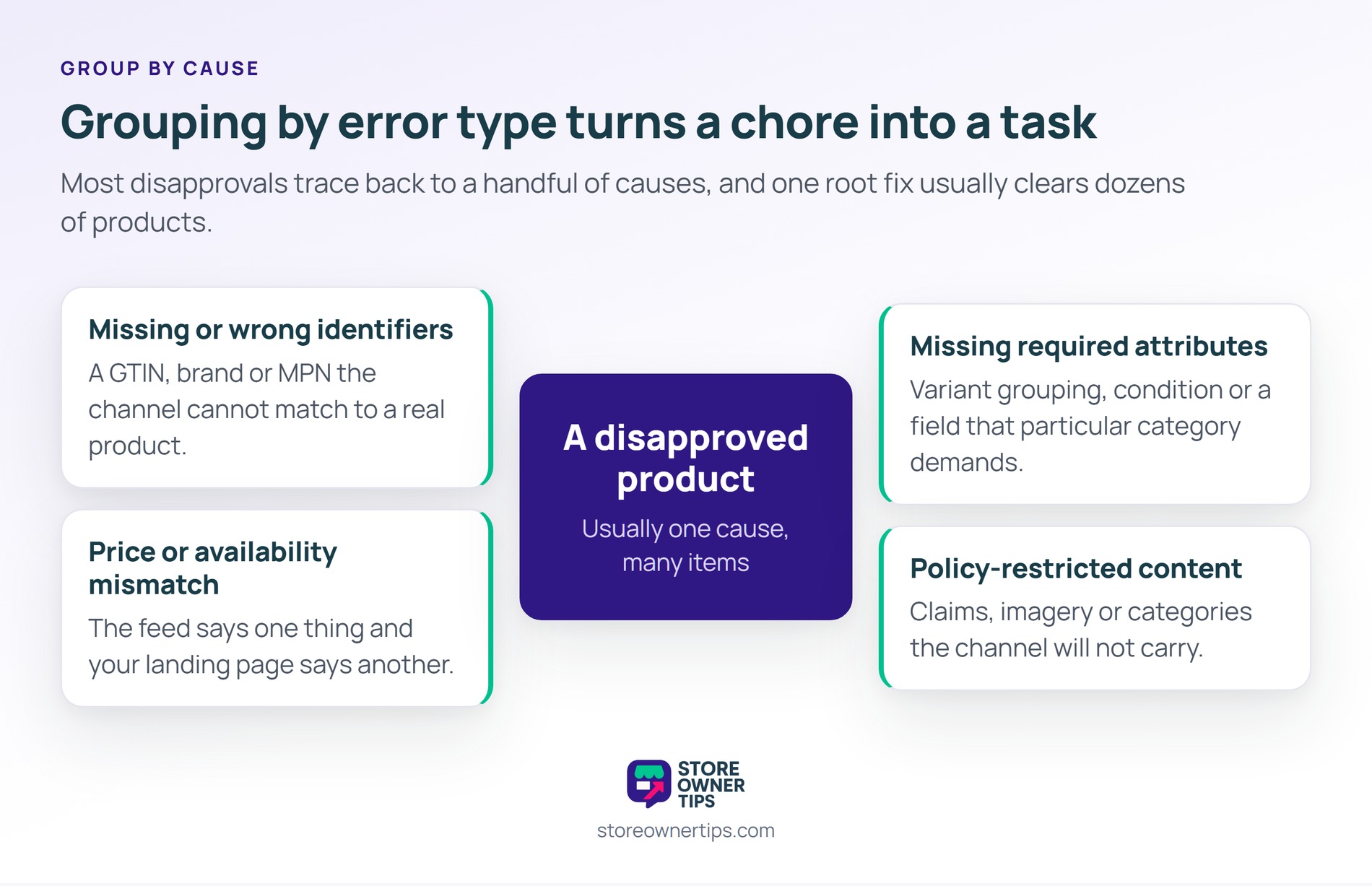
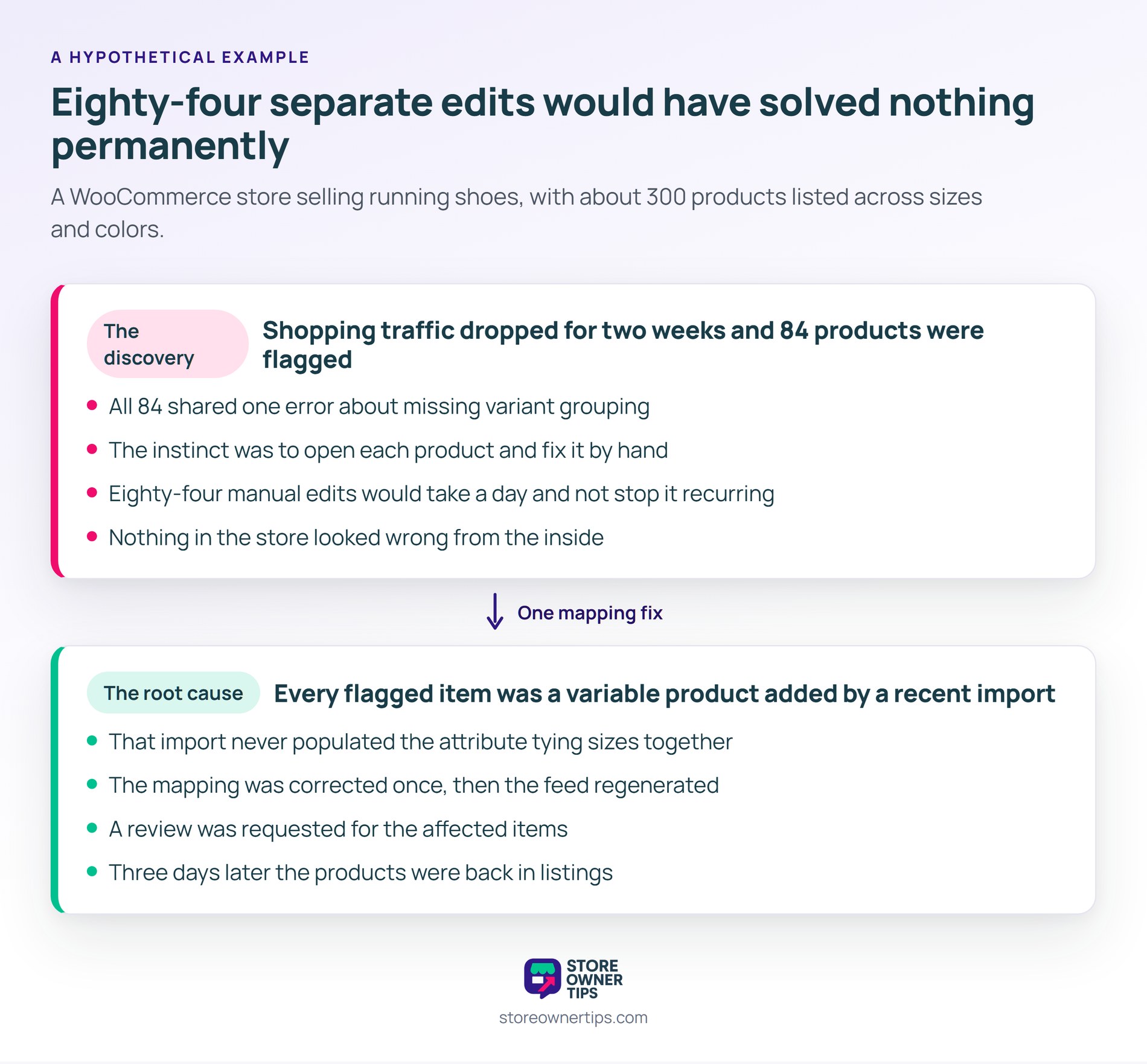
Here’s a hypothetical example. Picture a WooCommerce store selling running shoes, with about 300 products listed across sizes and colors.
First, the owner notices shopping traffic has dropped for two weeks. First she checks Merchant Center and finds 84 products flagged. All 84 share one error about missing variant grouping.
At first her instinct is to open each product and fix it. However, 84 manual edits would take a day and would not stop it recurring. So she looks at what the 84 have in common instead.
As it turns out, every flagged item is a variable product added since a recent import. That import never populated the attribute that ties sizes of one shoe together. Consequently the channel saw 84 unrelated products with duplicate names.
So she corrects the mapping once in her feed configuration, then regenerates the feed. Next she requests a review for the affected items. Three days later the products are back in listings.
The cost was the fortnight, not the hour. Eighty-four products sat invisible while the store looked completely healthy from the inside. Meanwhile nothing in WooCommerce flagged a problem, because the rejection happened at the channel.
Notably, the whole fix took under an hour because she treated it as one problem. Eighty-four separate edits would have solved nothing permanently. In short, grouping by error type is what turns a disapproval from a chore into a task.
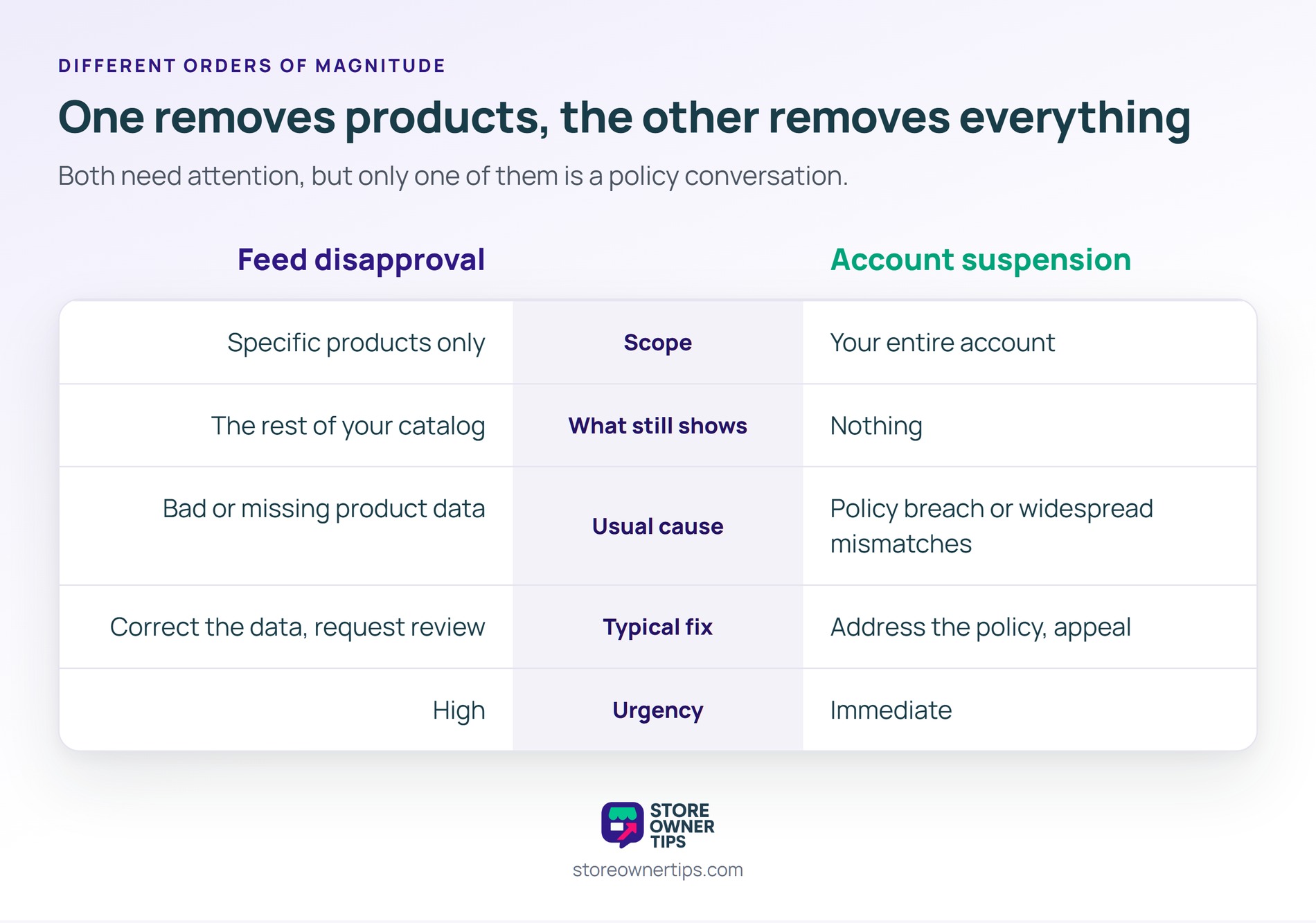
| What you’re comparing | Feed disapproval | Account suspension |
|---|---|---|
| Scope | Specific products only | Your entire account |
| What still shows | The rest of your catalog | Nothing |
| Usual cause | Bad or missing product data | Policy breach or widespread mismatches |
| Typical fix | Correct the data, request review | Address the policy, appeal |
| Urgency | High | Immediate |
A feed disapproval and an account suspension are different problems with different fixes, so identify which you have first. Disapprovals are routine maintenance on your product catalog. Suspensions are an emergency, and letting disapprovals pile up unaddressed is one path toward one.
Up to 3 business days, according to Google, before a corrected product shows again. That clock starts after your updated data actually reaches the channel. So regenerate the feed first, rather than waiting on a review of stale data.
No. Instead, a disapproved product is pulled from both shopping ads and free listings. That is why a feed disapproval can dent organic shopping traffic even if you run no paid campaigns at all.
Google does not publish a fixed threshold for that. What matters is whether the pattern suggests a broader data-quality problem. Therefore treat a disapproval affecting much of your catalog as a signal. Review your feed optimization and settings, not just the flagged items.
A feed disapproval matters because it removes products from where shoppers find them, quietly. Ultimately, a store can lose weeks of shopping visibility while its own site looks perfectly healthy. Nothing breaks, no error appears, and orders simply thin out. Consequently reading the diagnostics on a schedule is the only reliable way to catch it early.
Copyright © StoreOwnerTips.com. All Rights Reserved.
