Weekly ecommerce tips, deals & news.
Decoy pricing adds a strategically bad third option to make one of your other options look like the winner. Stores use it to shift buyers toward a specific tier. The classic example is The Economist subscription page: $59 online, $125 print-only, and $125 print plus online. Almost no one picks the print-only middle option, but its presence pushes most buyers to the $125 combined deal.
Decoy pricing leans on a quirk in human decision-making. When we look at two similar options, we often struggle to pick. Adding a third option that’s clearly worse than one of the originals breaks the tie. Suddenly the option it loses to looks great by comparison.
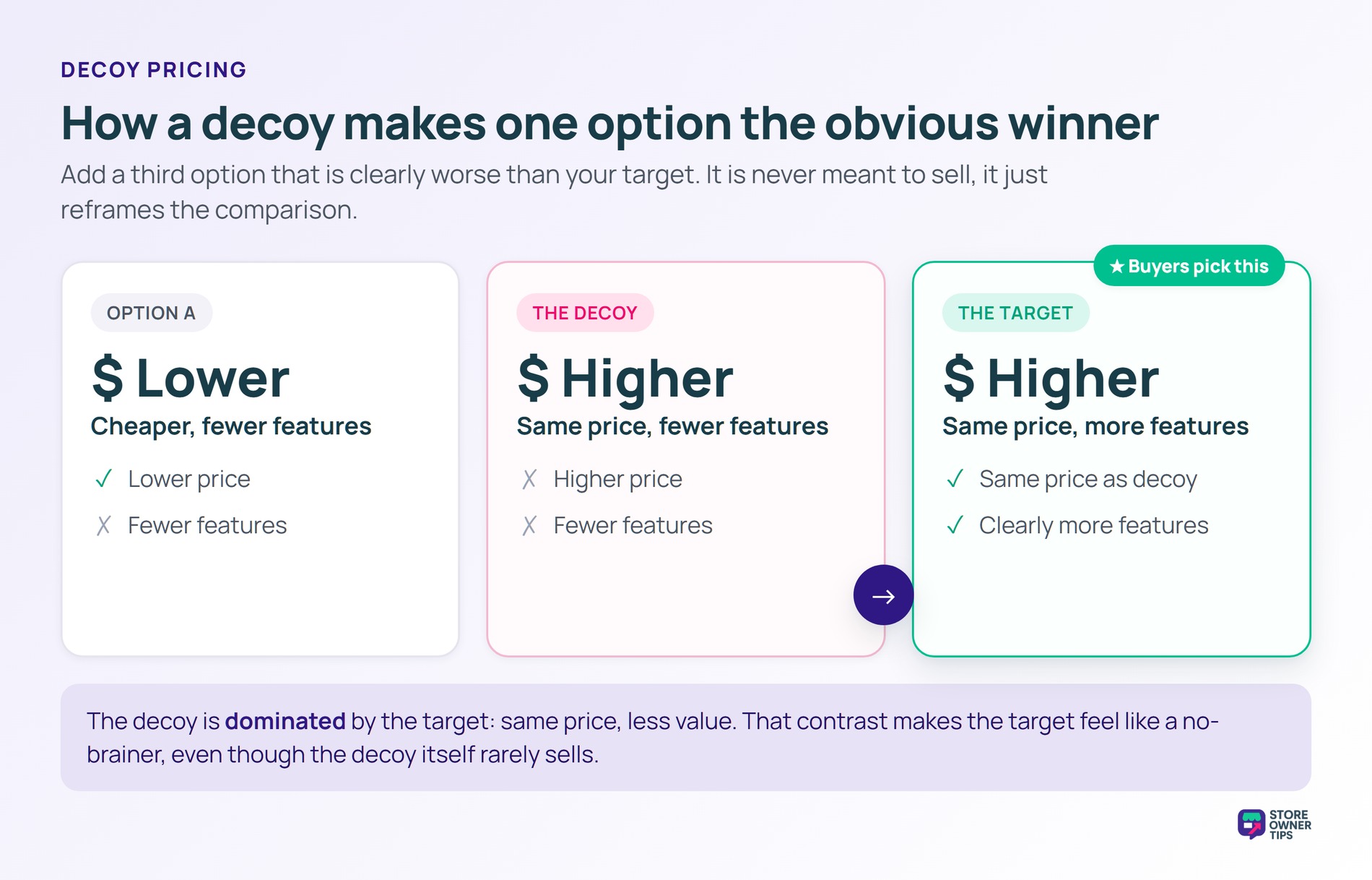
The pattern feels almost too simple. But it shows up reliably in lab experiments, retail aisles, and SaaS pricing pages. People aren’t doing math when they choose, they’re scanning for context cues.
Researchers call this asymmetric dominance. A 1982 Journal of Consumer Research paper first showed the effect. Adding a decoy lifted the chance of picking the option that beat it on every axis. In plain English, the decoy makes the target look like a no-brainer.
The kicker: across six product categories, the effect held in every test except one for lottery tickets. Beer, cars, restaurants, TVs, and film all behaved the same way. That’s a big deal for pricing strategy. A single dud option in the right zone can systematically tilt buyers toward your target plan.
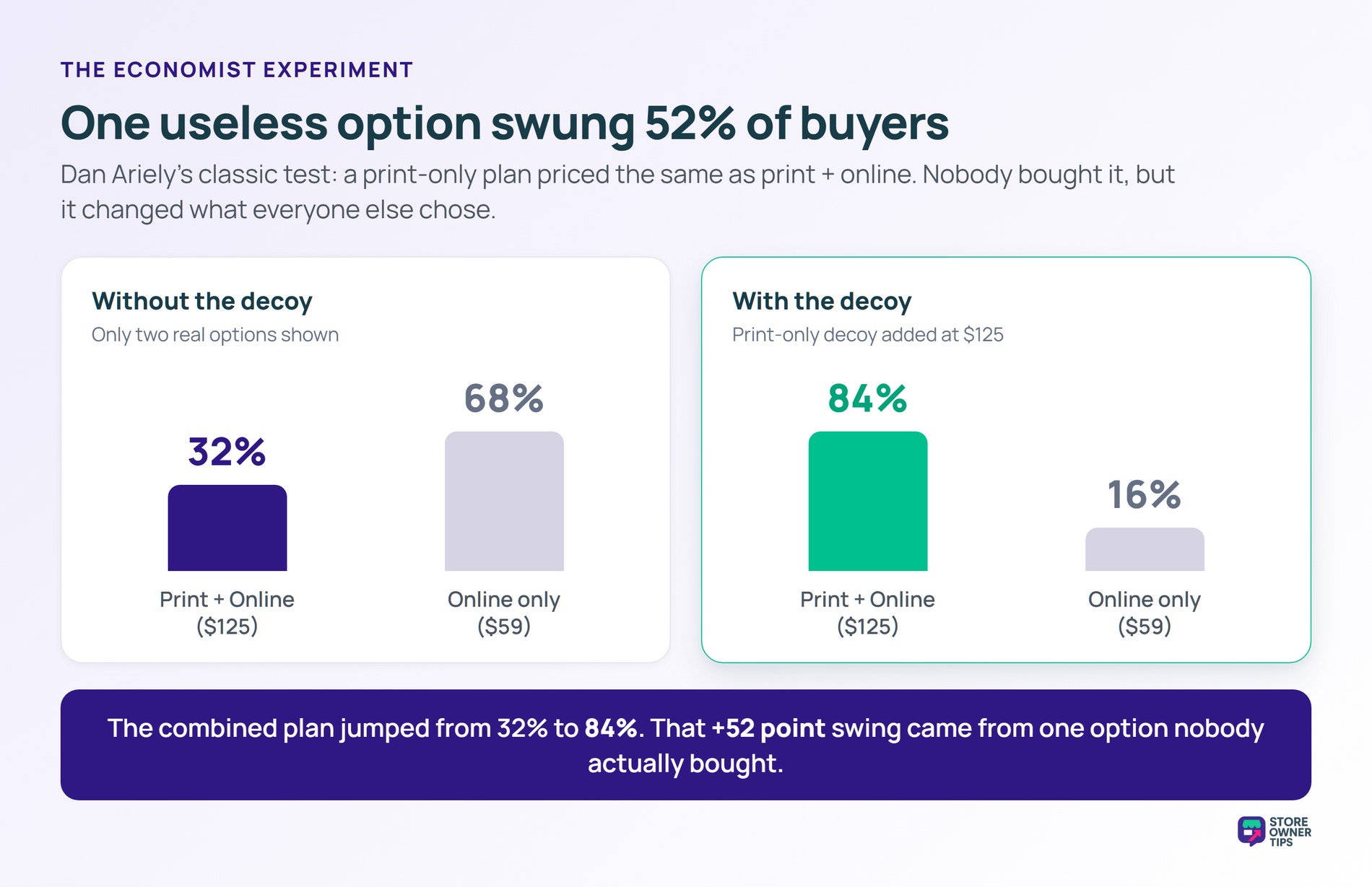
Behavioral economist Dan Ariely ran the most famous decoy test on The Economist’s subscription pricing. The magazine offered three subscription tiers: $59 for online only, $125 for print only, and $125 for print plus online. The print-only option was the decoy, since nobody would pick it over print plus online at the same price.
With the decoy in place, 84% of buyers chose the combined plan. When the decoy was removed and buyers saw only the two real options, just 32% picked the combined plan. The 52-point swing came from a single useless option that nobody actually bought.
Decoy pricing works in retail and SaaS because shoppers rarely evaluate prices in isolation. They compare options to each other. A three-tier pricing page presents one cheap tier, one priced decoy, and the option you actually want to sell. That comparison is where decoys do their work.
In WooCommerce, you can set up decoy pricing inside any tiered product layout, subscription plan, or bundle group. Shopify and other platforms work the same way. Plus, the technical setup is trivial. The hard part is choosing which option to make the decoy.
For a tactical breakdown of how decoys fit into broader pricing strategy, see Advanced Coupons’ guide to pricing psychology tips.
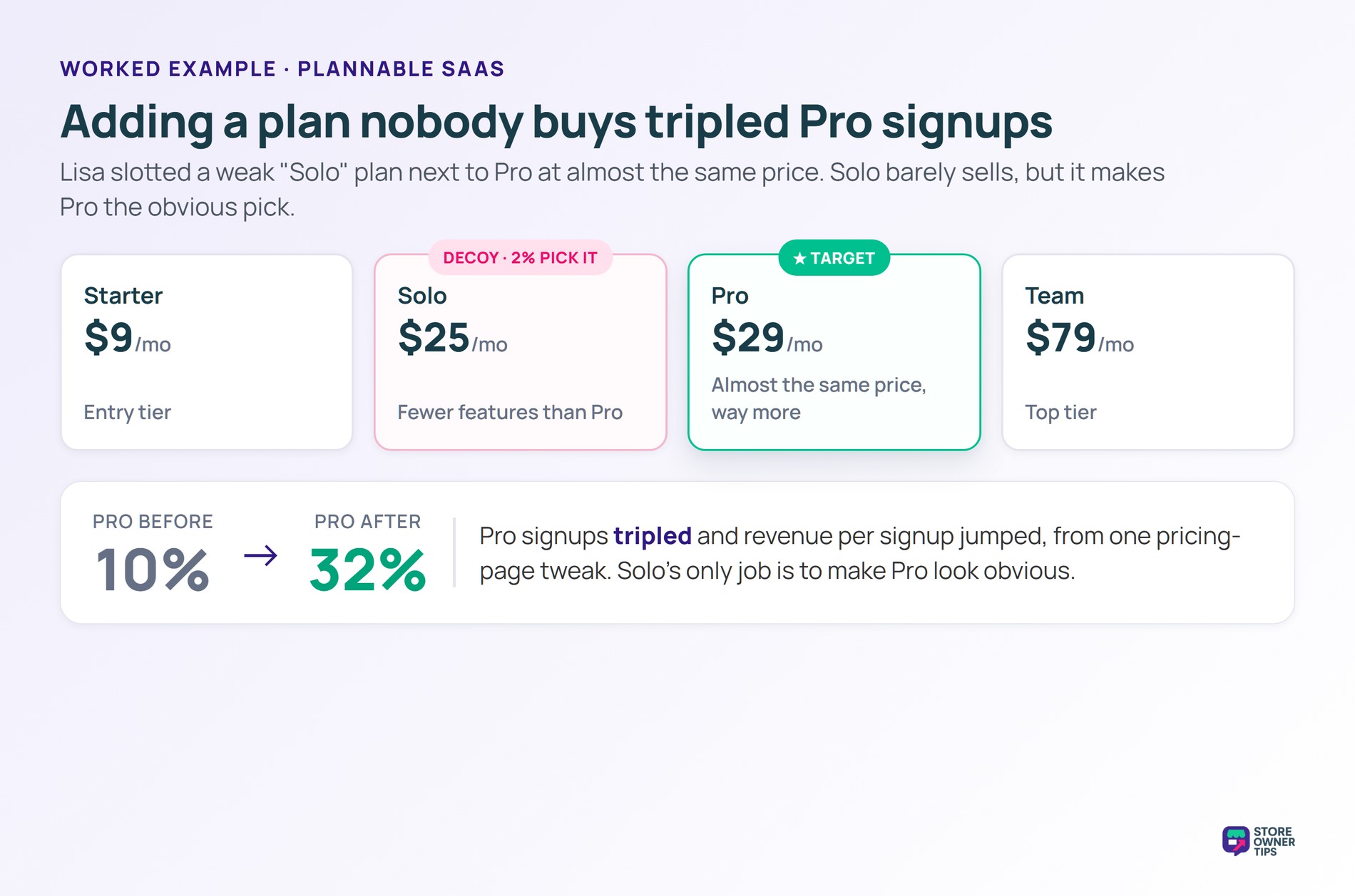
Imagine a WooCommerce-based productivity SaaS called Plannable. The owner, Lisa, sells three plans: Starter at $9/mo, Pro at $29/mo, and Team at $79/mo. Most buyers pick Starter, and only about 10% pick Pro.
Lisa wants more buyers in the Pro tier, because Pro customers retain twice as long as Starter customers. She decides to test a decoy.
She adds a new tier called Solo at $25/mo, sitting right next to Pro at $29/mo. Solo has fewer features than Pro and is almost the same price. It’s a clear loser when compared to Pro side by side.
Lisa’s instinct is to remove Solo. After all, nobody’s buying it. But that’s the point of a decoy. Solo’s presence shifts the comparison frame for buyers who are torn between Starter and Pro.
After a month, Lisa checks the numbers. Pro signups have climbed from 10% to 32% of new buyers. Solo barely sells, picking up just 2% of signups. That’s exactly what a decoy is supposed to do.
The Solo tier exists for one job: to make Pro look obvious. Lisa knows nobody really wants Solo. But Solo’s job isn’t to sell, it’s to shape how buyers compare the other two tiers.
Revenue per signup roughly triples in the Pro tier. The cost of the change was zero, just a small redesign of the pricing page.
Decoy pricing and anchor pricing both use extra options to nudge buyers. The difference is in what those extra options do.
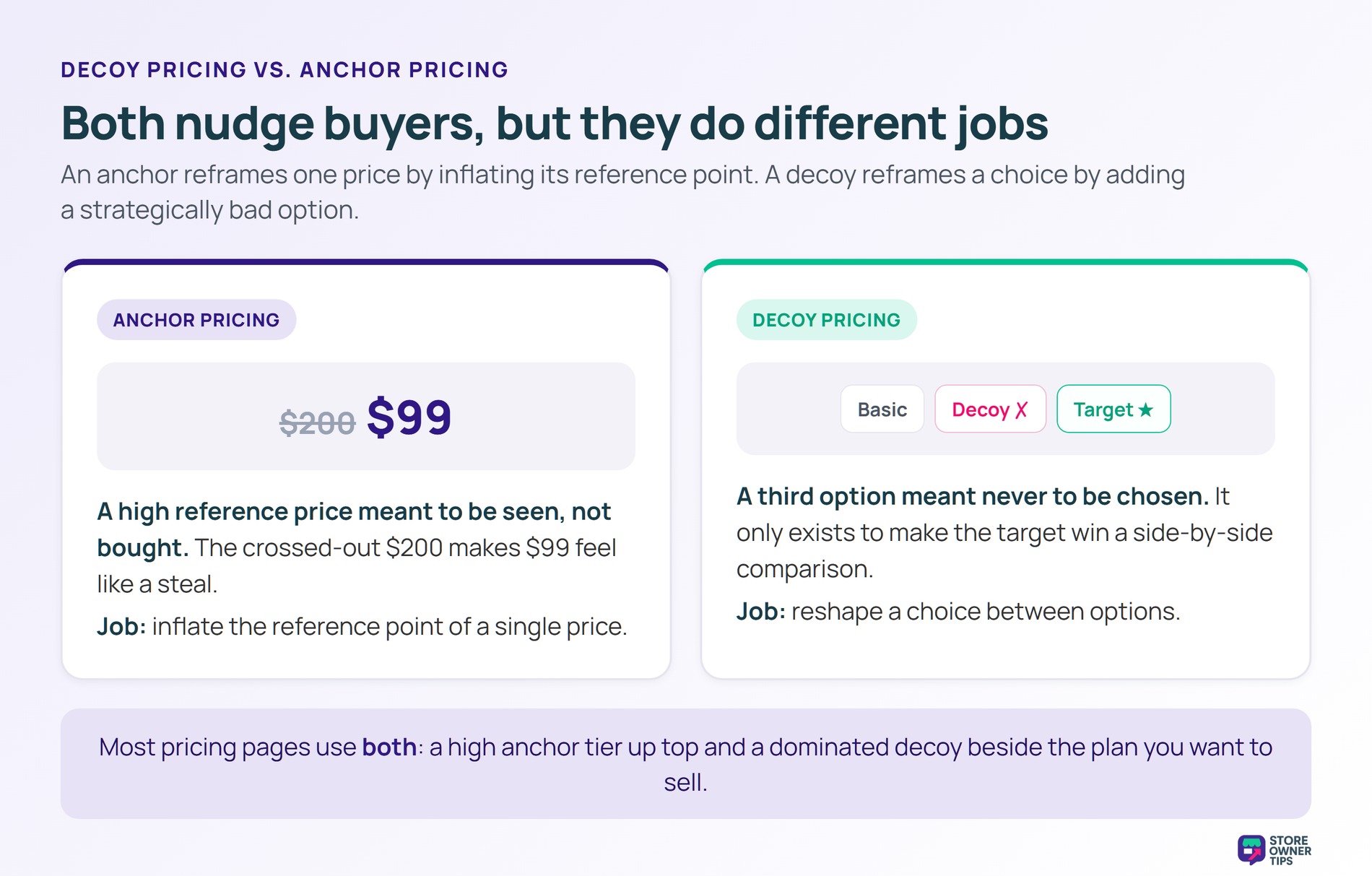
Anchor pricing relies on a high reference price that’s meant to be seen, not necessarily bought. A “Was $200, now $99” tag uses $200 as the anchor. The anchor reframes the discount, making $99 feel like a steal.
By contrast, decoy pricing relies on a third option that’s not meant to be chosen at all. It exists only to make a target option look better in side-by-side comparison. Buyers don’t even register the decoy as a real choice most of the time.
In short, anchors reframe a single price by inflating its reference point. Decoys reframe a choice by adding a strategically bad alternative.
Most pricing pages actually use both. The highest-tier anchor plan and the strategically dominated decoy plan are different roles. A well-designed page can deploy both at the same time. For a related strategy that adjusts prices over time, see our entry on dynamic pricing.
Decoy pricing isn’t a free lunch. It can boost conversion to your target tier, but it can also frustrate shoppers who notice the trick. Here’s an honest look at both sides.
No. The original research tested decoys across cars, restaurants, beer, electronics, and more. Any category where buyers compare options on multiple dimensions is a candidate.
That said, SaaS and three-tier subscription pages are the most natural fit. The same logic applies to bundles and curated product sets in e-commerce.
Pick the target plan first. That’s the one you want most buyers to choose. The decoy should be priced close to the target but be clearly worse in the most visible features.
If the decoy is too cheap, buyers will defect to it instead of the target. If it’s too expensive, it stops feeling like a viable choice and the comparison breaks down.
Decoy pricing is legal. You’re showing real prices on real options. The decoy might be unattractive, but it’s not deceptive in the regulatory sense.
The ethics question is different. Some shoppers find decoys manipulative once they notice them. The defense: every option on your page is a real option at a real price. Buyers are free to choose any of them.
Decoy pricing isn’t about tricking shoppers, it’s about helping them compare. A useless third option lifts conversion to your target plan without changing what anything actually costs. Used well, that’s high-leverage. Used carelessly, it can clutter the page or backfire on buyers who don’t trust the setup.
Copyright © StoreOwnerTips.com. All Rights Reserved.
