Weekly ecommerce tips, deals & news.
A feed rule is an IF/THEN instruction that changes product data on its way into a sales channel feed. Your store data stays exactly as it is. Instead the rule rewrites a title, adjusts a price or fills a blank field. So one bad attribute gets fixed without touching 400 products.
A feed rule works by testing each product against a condition, then changing a field when that condition matches. First the feed is built from your store. Then the rules run over it before the file is sent.
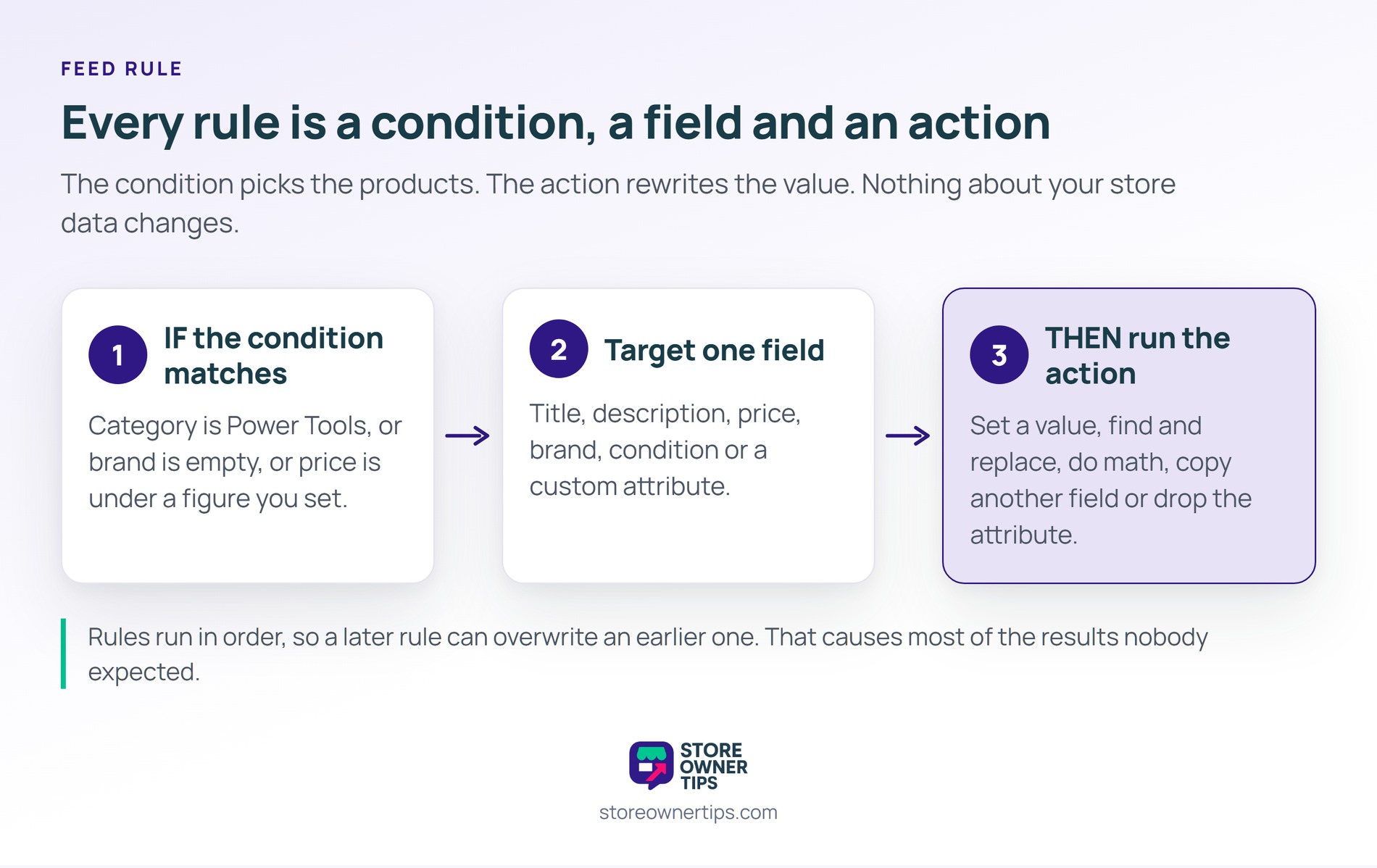
Every rule has three parts: a condition, a field and an action. AdTribes describes the same structure in its guide to product feed rules. Its rules change data on products already sitting in the feed.
So a rule might read: if category is Power Tools, then append the voltage to the title. In short, the condition selects and the action rewrites.
Also, rules run in order. A later rule can overwrite an earlier one, which causes most of the results nobody expected.
The action is the half that changes something. Five kinds cover almost everything stores need.
Still, that last one matters more than it sounds. Sending a blank attribute and sending no attribute are different things to a channel.
Rules exist because channel requirements and store data rarely line up. Each of these is a mismatch you cannot fix in your product editor.
Yet none of those are data errors. They are formatting differences, which is exactly what a rule is for.
It helps to know exactly when a rule fires. The sequence is fixed, and every step happens before the channel sees anything.
So a rule can only work with what mapping already put there. A field nobody mapped has nothing for a rule to change.
A rule that matches nothing is the quiet failure. So nothing breaks, nothing errors, and the feed ships unchanged.
Also, two rules can fight each other. A find-and-replace running after a set-value quietly undoes the set-value on that field.
Therefore change one rule at a time and re-read the output file. In practice reading the generated feed beats trusting the rule list.
Rules are also not feed mapping. Mapping decides which store field fills which channel attribute, while a rule changes the value afterwards. So a mapping problem never gets solved by adding rules.
Channel limits are published, which is what makes rules mechanical rather than guesswork. Google’s product data specification caps a title at 1-150 characters, and notes shoppers usually read only the first 70.
Descriptions get far more room. The same specification allows 1-5,000 characters. Still, it advises putting the important detail in the first 160 to 500.
Also, feed tooling is widespread on WooCommerce. AdTribes Product Feed PRO, our own feed plugin, reports 80,000+ active installations.
Still, no benchmark exists for how many rules a store should run. In practice the right number is however few it takes to pass the channel’s checks.

Here’s a hypothetical example. So picture a hardware store with 1,200 products and titles written for its own website.
Usually store titles run long, opening with the range name and ending with what is in the box. That reads well on a product page.
In shopping results the title gets cut mid-phrase. Consequently the words that would win the click never appear. Meanwhile nobody notices, because the feed is accepted without an error.
So they add a single rule. If the category is Power Tools, set the title from brand, then product type, then voltage.
First the rule rebuilds 340 titles. Then those products start showing a readable title in results.
No product page changed at all. Instead the store data stayed put while the feed carried a different version of it.
Also, an older rule appended a shipping promise to every title. So the new clean titles picked up that suffix again and ran long.
Nobody spotted it for a week, because nothing errored anywhere. Therefore they started reading the output file after every change. Even so, the week of truncated titles was already spent.

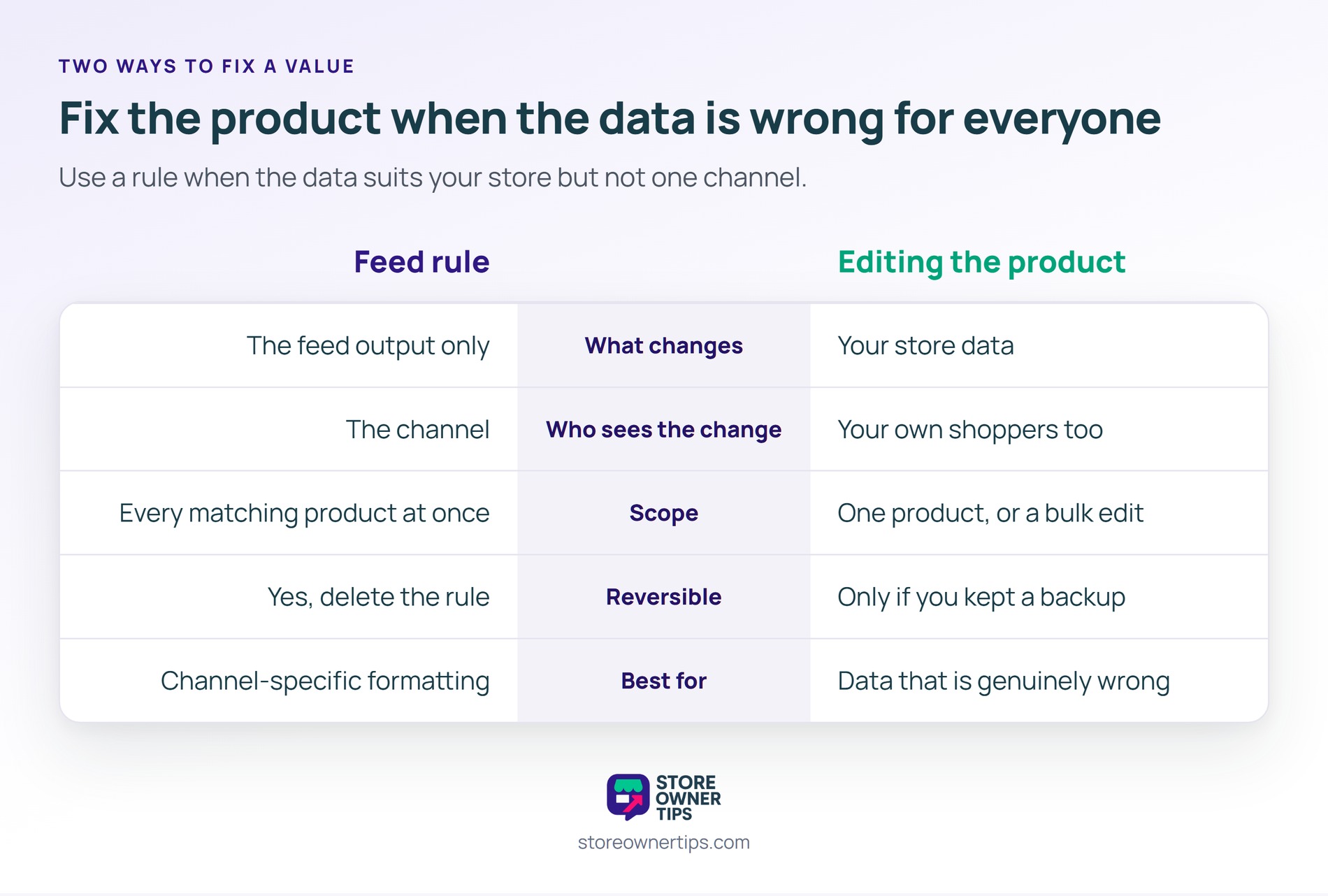
| What you’re comparing | Feed rule | Editing the product |
|---|---|---|
| What changes | The feed output only | Your store data |
| Who sees the change | The channel | Your own shoppers too |
| Scope | Every matching product at once | One product, or a bulk edit |
| Reversible | Yes, delete the rule | Only if you kept a backup |
| Best for | Channel-specific formatting | Data that is genuinely wrong |
In practice the test is simple enough. If the data is wrong for everyone, fix the product. If it is only wrong for one channel, write a rule.
Also, rules can hide a real data problem. A rule filling a blank brand field keeps the feed valid while your product pages stay incomplete. So check which of the two you are actually doing.
Broader feed optimization is the discipline rules serve. They are the mechanism, not the strategy.
No. A rule runs while the feed is being built, so it only changes the file sent to the channel. Your product pages, and what your own shoppers see, stay exactly as they were.
Usually the condition matches no products. Check that the field you are testing really holds the value you expect, including capital letters and spacing. A later rule overwriting the same field is the other common cause.
Fix the product when the data is genuinely wrong. Use a rule when the data suits your store but not one channel. Channel-specific title formats are the clearest case for a rule.
Feed rules matter because every channel wants your catalog described its own way. Without them you either maintain a second copy of your data or accept whatever the channel makes of the first.
So a rule is how one catalog serves several channels at once. Meanwhile your product pages carry on being written for people rather than for a spec. That is the practical basis of multichannel selling from a single store.
Copyright © StoreOwnerTips.com. All Rights Reserved.
