Weekly ecommerce tips, deals & news.
Role-based pricing shows different prices to different customers based on the account role they are assigned. A logged-in wholesale buyer sees one price, a retail shopper sees another, and the product itself never changes. In WooCommerce it runs on user roles, the same system that controls what a person can do in the admin.
So the price someone sees is decided by who they are, not by what they put in the cart.
Most stores start with one price for everyone. However, the moment a second kind of buyer appears, that breaks. A shop reselling your product cannot pay what a shopper pays. Meanwhile, running two storefronts to serve them both is not realistic.
Role-based pricing is the usual way out of that corner.
Every WordPress account already has a role. First, those roles decide permissions, such as who can publish a post or refund an order. Wholesale plugins borrow the same mechanism and attach prices to it instead.
Think of it like a staff badge in a warehouse. The badge does not change the shelves, it changes which door opens. In practice, the product record gains an extra price field for each role you create.
You can usually set that price two ways. Either enter a fixed figure for the role, or map a percentage off the regular price across the whole catalog. The percentage route is faster to launch, while fixed figures give you control where margins are tight.
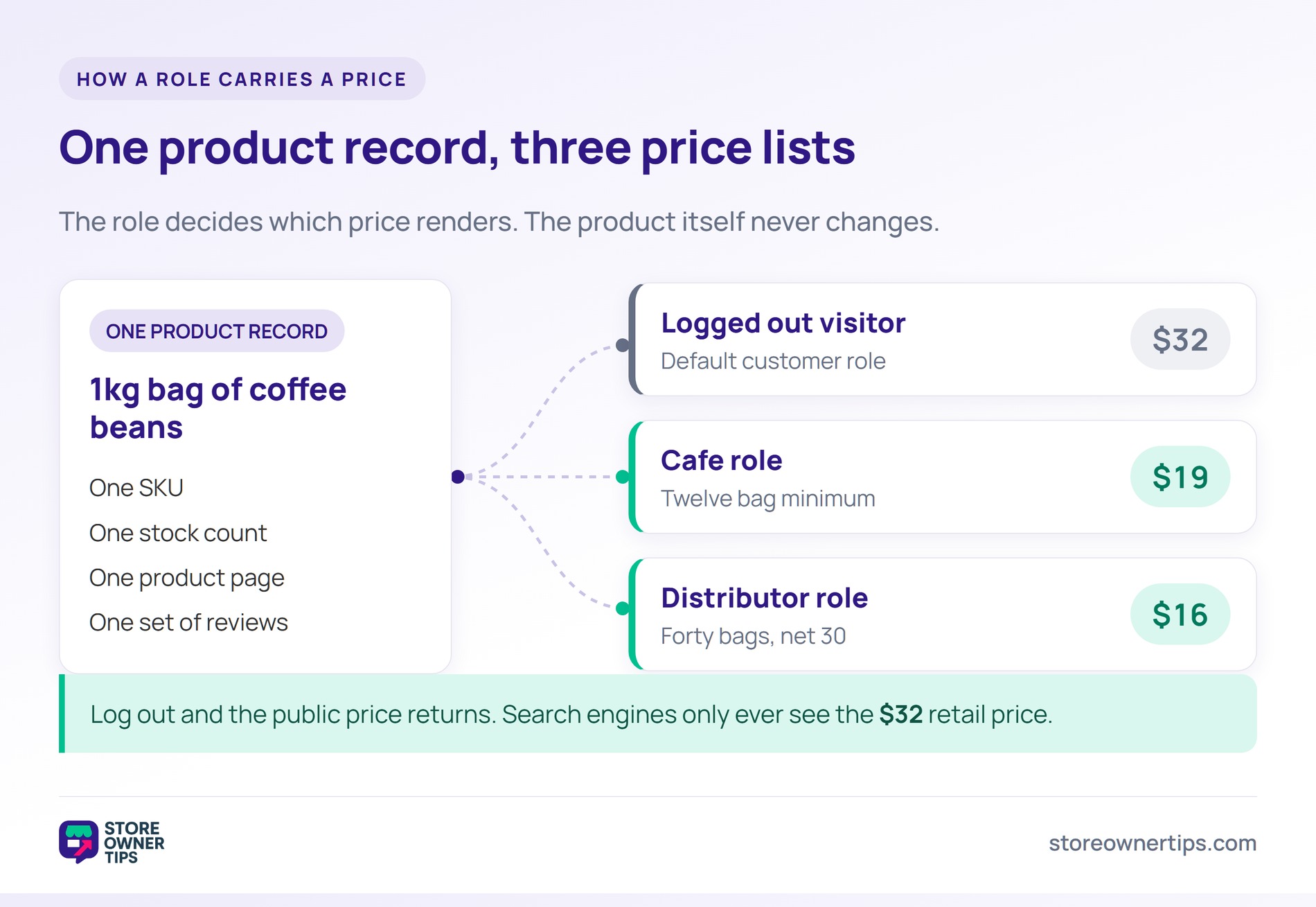
The role then travels with the buyer. Once they log in, every listing, every category page and every cart total reflects their rate. Then log out and the public price returns.
The first reason is arithmetic. Three roles can price a catalog for three hundred buyers, because the buyer count no longer drives the work. So adding a customer is an approval, not a pricing project.
The second reason is that roles carry more than a number. A role can also enforce a minimum order quantity, unlock net terms, or apply a tax exemption. So one assignment configures the whole account.
The third reason is that buyers now expect to see a price at all. Forrester found that at least a third of B2B buyers in North America and Europe are primarily influenced by price. In practice, a logged-in rate answers that without publishing it.
The channel is big enough to justify the setup. U.S. merchant wholesalers moved $11.38 trillion in sales in a recent survey year. Meanwhile, e-commerce already accounted for 33.3% of merchant wholesaler sales.
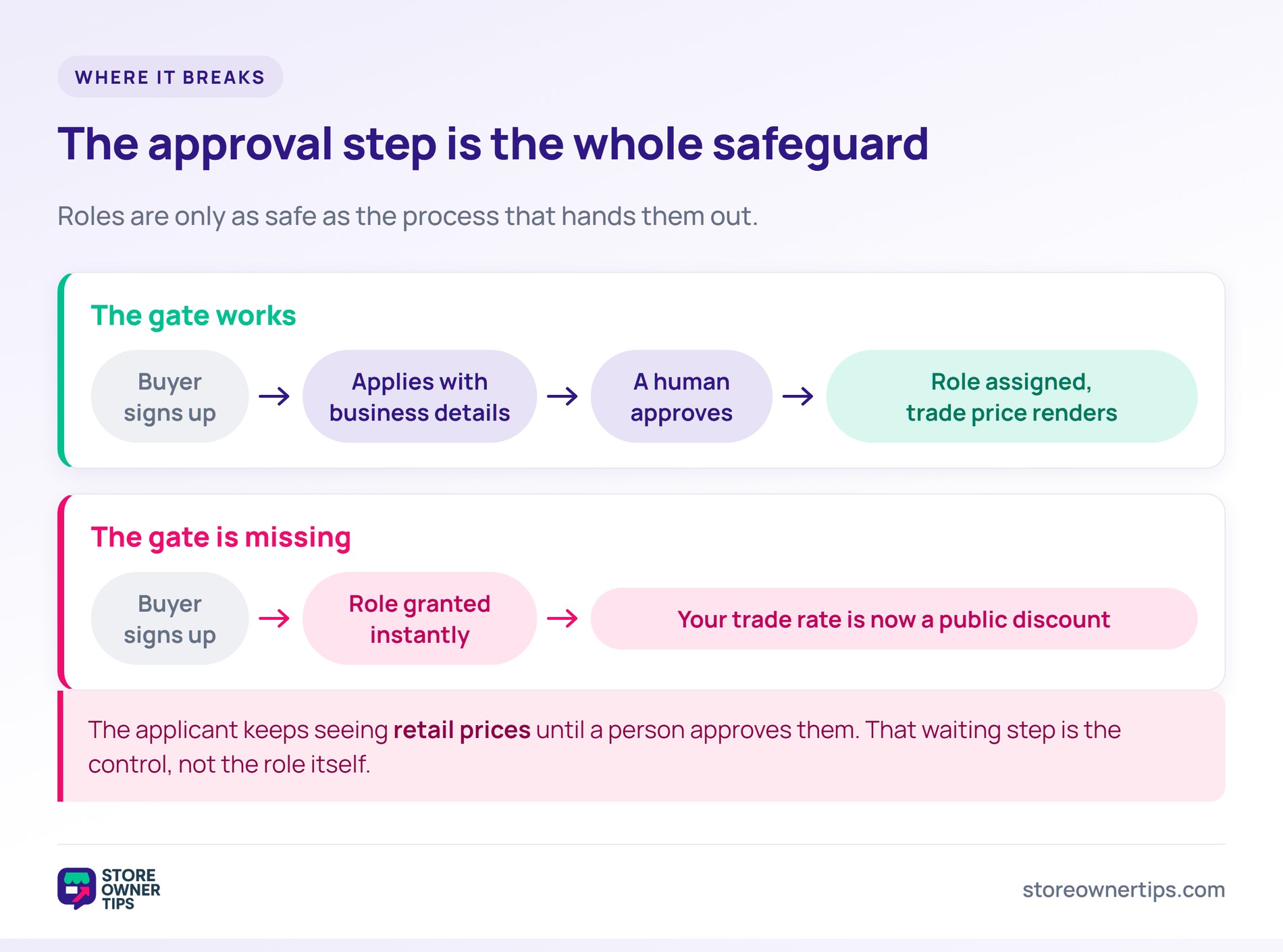
The common failure is not technical. It is handing the role out too easily. A registration form that grants wholesale access instantly is just a public discount with extra steps.
So most stores pair roles with an application. A wholesale registration form collects the business details, and a human approves before the role is assigned. Meanwhile, the applicant sees retail prices until that happens.
The second failure is role sprawl. Every buyer who negotiates a special rate tempts you into a new role. Over time, nobody can say what “Tier 3B” means. So keep the count small and document what each one is for.
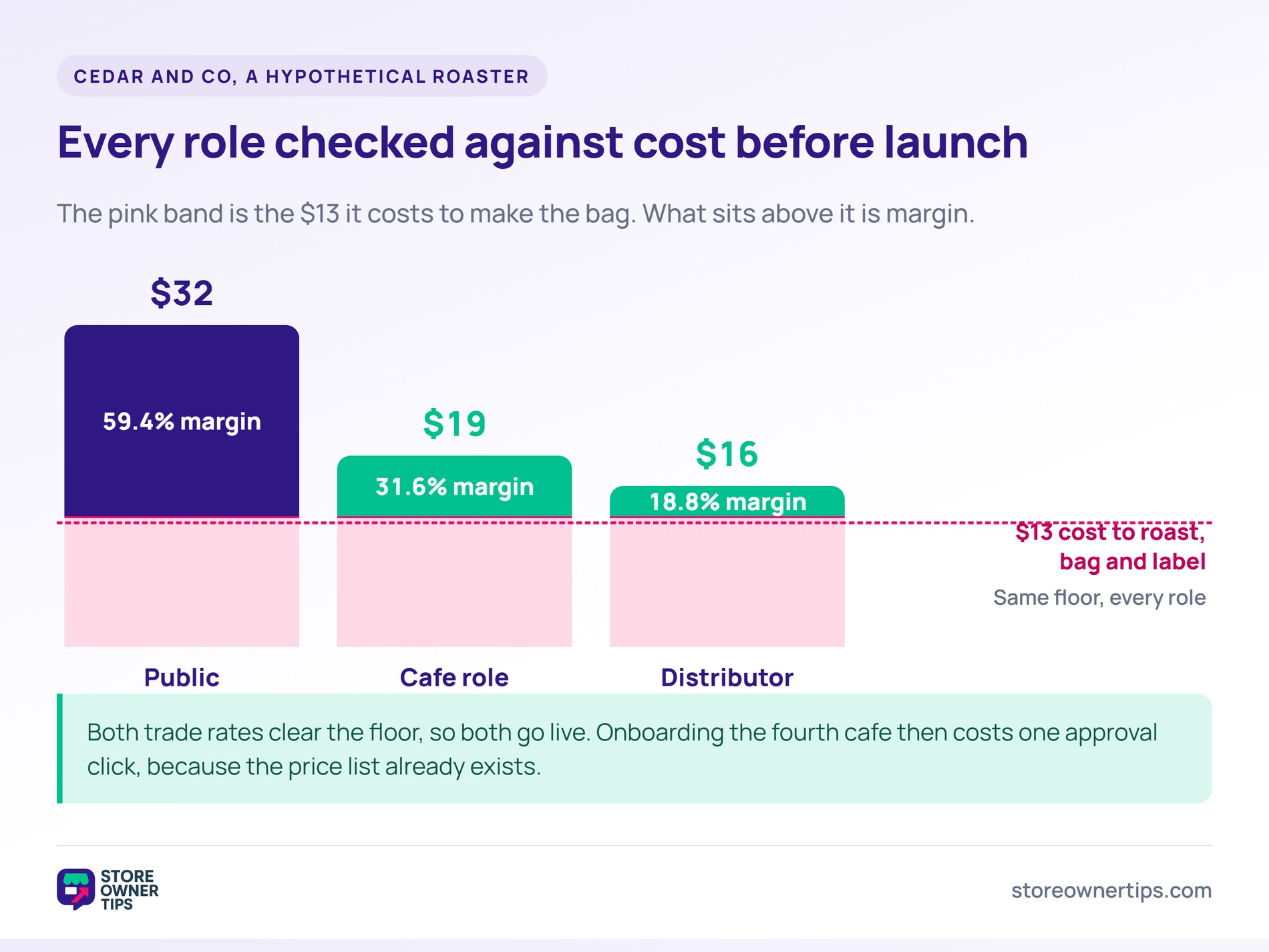
The third is forgetting that a role can be too generous. If your deepest role undercuts your own wholesale pricing floor, volume will not rescue it. Finally, check every role against cost before you switch it on.
Imagine a coffee roaster called Cedar & Co. selling a 1kg bag of beans. It sells to the public, to cafes, and to one regional distributor. Previously it ran three separate spreadsheets and quoted by email.
The bag retails at $32 and costs $13 to roast, bag and label. So the owner creates two roles beside the default customer role. One is Cafe, the other is Distributor.
Cafe pays $19 a bag with a twelve-bag minimum. Distributor pays $16 with a forty-bag minimum and thirty-day terms. Meanwhile, the public still sees $32 everywhere.
Each rate gets checked against the $13 cost before launch. Cafe keeps a 31.6% margin and Distributor keeps 18.8%. Both clear the floor the owner set, so both go live.
Nothing about the catalog changes. There is still one bag of beans, one product page and one stock count. The three prices live on that single record.
A cafe owner who signs up sees $32 at first. Their application sits until the roaster checks the business details and assigns the Cafe role. Then, from the next login, every page shows $19.
The quoting email disappears entirely. Buyers self-serve at their own rate, which is faster for them and cheaper for the roaster. As a result, the owner spends the reclaimed hours on roasting rather than replying.
Onboarding the fourth cafe costs nothing. It is one approval click, because the price list already exists. That is the whole point of pricing by role instead of by customer.
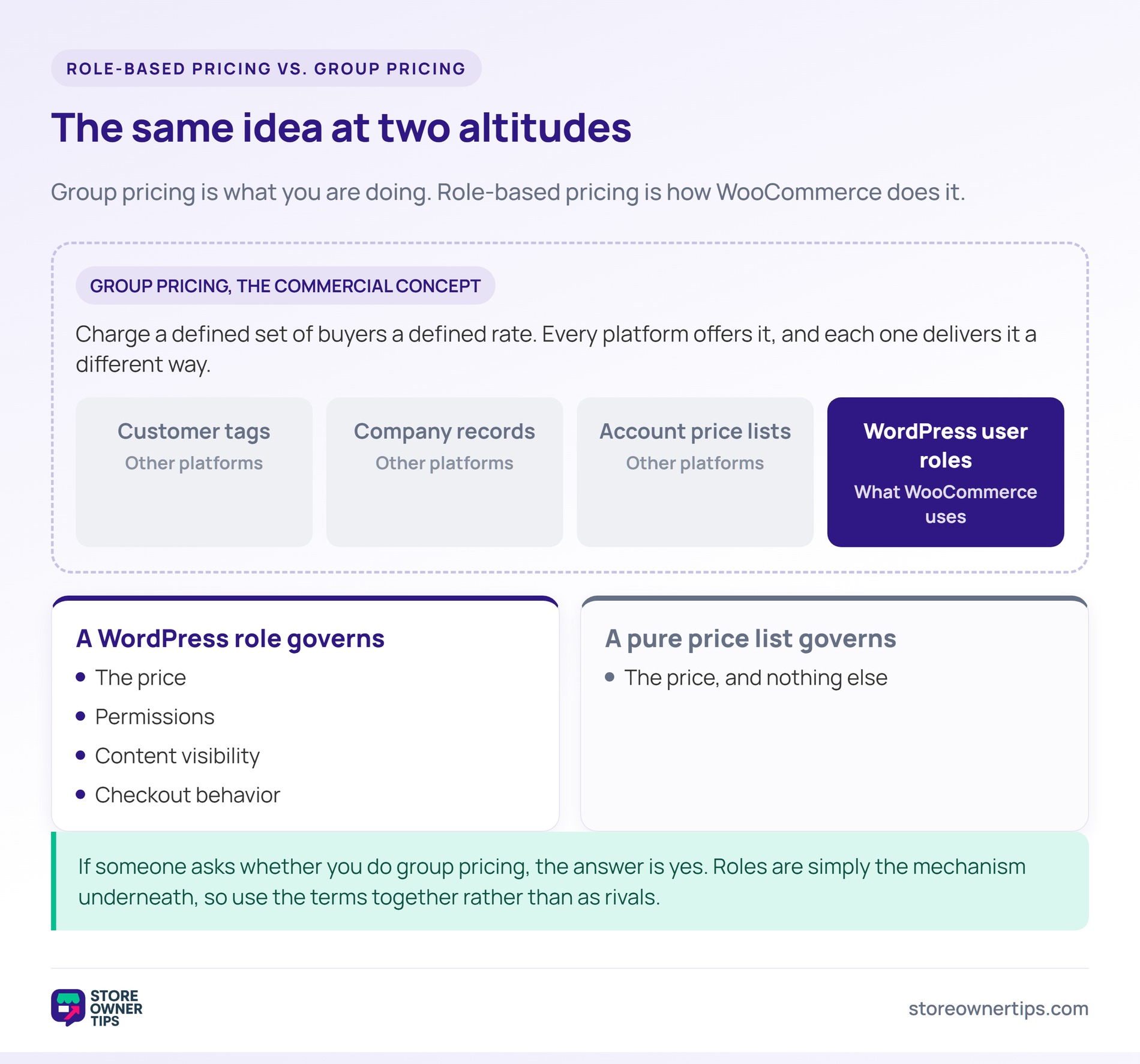
These two describe the same idea at different altitudes, and they get used interchangeably. Group pricing is the commercial concept: charge a defined set of buyers a defined rate. Role-based pricing is how WooCommerce actually delivers it.
The distinction matters when you shop for tools. A platform can offer group pricing through customer tags, company records, or account-level price lists. WooCommerce reaches for user roles because that system already exists in WordPress.
That implementation detail has consequences. Because a role is a WordPress object, it can also govern permissions, visibility and checkout behavior. Meanwhile, a pure price-list system usually governs only the number.
In practice, if someone asks whether you do group pricing, the honest answer is yes. Roles are simply the mechanism underneath. So use the terms together rather than treating them as rivals.
Start with one and add a second only when the business case is obvious. In practice, most stores need fewer roles than they think. Two or three usually cover every buyer type you actually serve.
The signal that you need another is a genuinely different commercial relationship. For example, a distributor buying pallets is not the same as a boutique buying a dozen. By contrast, one shop that negotiated a slightly better rate is an exception, not a tier.
Not if the setup is correct. Role prices only render for a logged-in account carrying that role. Everyone else, including search engines, sees the public price.
Some suppliers go further and hide prices from logged-out visitors entirely. That approach is called hidden pricing, and it suits trade-only businesses. Still, most stores are better off showing retail openly and gating only the trade rate.
It does, and this is where stores get burned. A sitewide sale can drop the public price below a role price. Then your wholesale buyer suddenly pays more than the public.
Good tools let you exclude role accounts from public promotions. Before any big sale, check what your deepest role would pay that week. Then decide whether the promotion applies to them at all.
Role-based pricing turns a pricing problem into an access problem, which is a far easier thing to manage. You define a handful of rates once, then decide who belongs on each one.
Get the approval step right and it scales quietly for years. For a full walkthrough, see this guide to role-based pricing for WooCommerce.
Copyright © StoreOwnerTips.com. All Rights Reserved.
