Weekly ecommerce tips, deals & news.
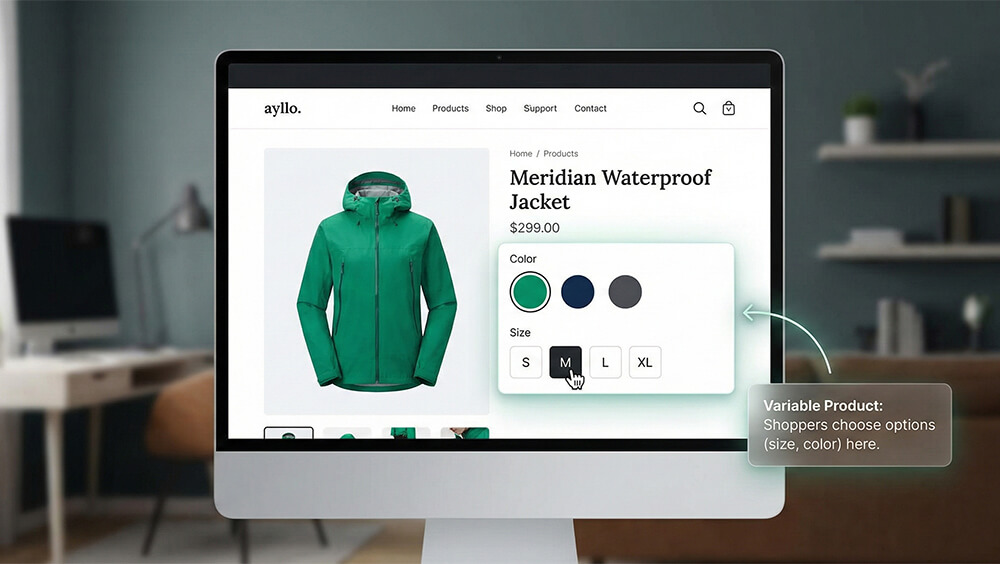
A variable product is an item listing in your online store that lets buyers choose between different options. These choices rely on specific attributes like size or color. This setup keeps your catalog neat by putting all choices on one single page.
Each unique option is known as a variation. You can set a unique price and stock number for every variation you offer. Shoppers then pick the exact version they want before they check out.
You will see this format used often for physical items like clothes and phones. Additionally, it works perfectly well for digital downloads and virtual goods. Knowing how to set up variable products correctly helps you run a better store.
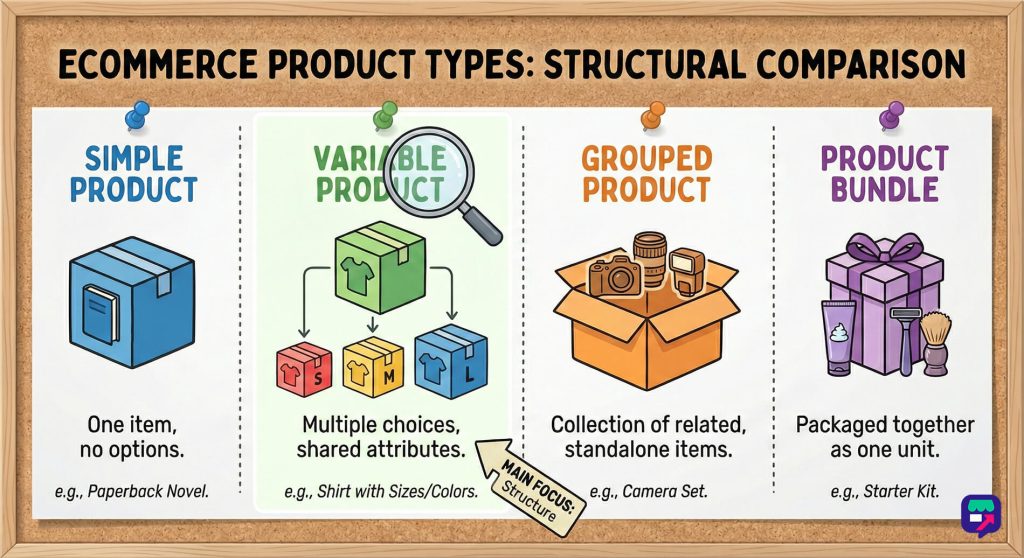
You have several ways to show your inventory to shoppers. Picking the right product type is the first step in creating a clean catalog.
A simple product is just a single item with no distinct options. Customers just add the item to their cart without making any selections. Good examples include paperback books or standardized coffee mugs.
A grouped product is a collection of related simple items shown on a single page. Customers can buy these items individually right from the main listing page. This method works very well for encouraging larger orders.
Product bundles let you package existing items together. You then sell these bundled items as a single complete package. Sellers often offer them at a discounted rate to drive more sales.
| Product Type | Core Function | Typical Example |
| Simple Product | Sells a single item with no options. | A paperback novel. |
| Variable Product | Offers multiple choices based on shared attributes. | A shirt in various sizes. |
| Grouped Product | Displays a collection of related standalone items. | A set of camera lenses. |
| Product Bundle | Packages multiple items together as one unit. | A discounted starter kit. |
Many different retail sectors rely heavily on variable products. Different industries use variations in unique ways to meet shopper expectations.
The clothing industry uses variable products more than any other sector. You can offer a single shirt design in multiple sizes and distinct colors. This stops your store from being overwhelmed by hundreds of separate listings.
Electronic devices frequently use variable products because of their technical specifications. You usually sell a new smartphone model with different storage capacities. Buyers might choose between a base model and an upgraded memory version.
Using variable products gives you and your customers many benefits. The advantages range from better usability to highly accurate inventory tracking.
Variable products keep your store layout looking very clean. Shoppers can view all their choices on one single page. They do not have to use the search bar just to find a different size.
Managing your inventory is much easier when you group options together. You can track stock levels for all variations in one central place. This centralized tracking saves you hours of daily administrative work.

Building variable products requires a few specific steps in your dashboard. You must configure additional tabs to build the customer options.
You must first go to the main products menu in your store backend. You click the button to add a new product and type in a title. Next, you simply change the item format to a variable product using the dropdown menu.
Attributes define the characteristics that make your variations different from each other. They are custom details that help organize your entire store catalog. The most common attributes include:
After saving your attributes, you move to the variations configuration tab. You use the dropdown menu to select the option that creates variations from all attributes. Clicking the go button tells the system to generate the combinations.
You must input a regular price for every single variation you sell. Setting the price is an absolutely mandatory step in this process. If a variation lacks a price, it remains invisible to your shoppers.
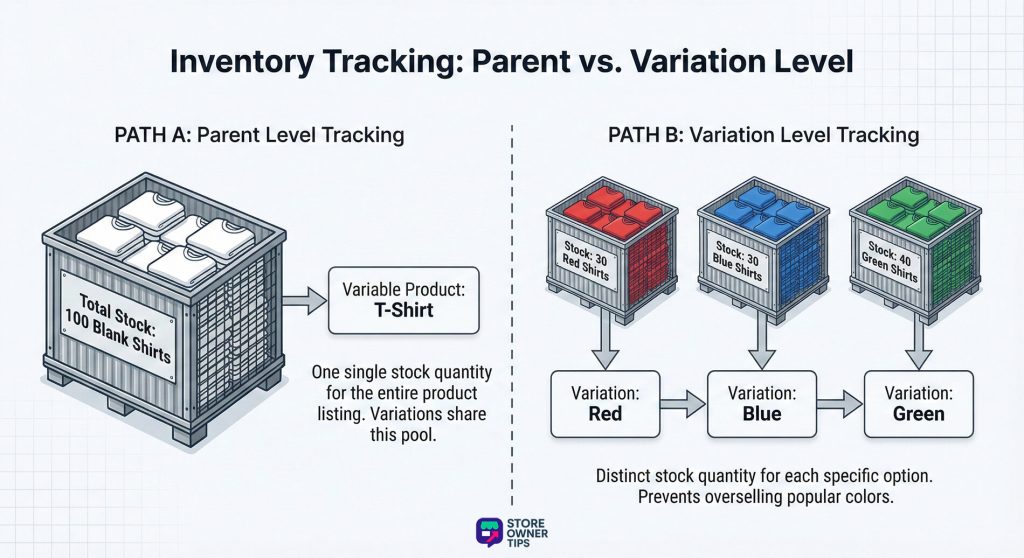
Your platform gives you tools to track your stock levels with high accuracy. You can choose between two different inventory tracking methods based on your needs.
You can choose to manage your stock at the main parent level. This means the overall product shares one single stock quantity. This method works perfectly when you produce your variations on demand.
Tracking stock at the variation level sets a distinct quantity for each option. This stops you from overselling specific popular sizes or colors. To turn this on, you check the manage stock box inside the variation settings.
Large catalogs need bulk uploading tools to manage inventory efficiently. You must structure the data perfectly to link the parent and child components.
You must upload the parent item first to establish the foundation of the listing. This main row in your spreadsheet defines the title and the overall description. You must assign a unique identification code to this parent row.
The individual variations need a separate spreadsheet formatted just for child items. Every child row must reference the unique identification code of the parent item. This column tells the system exactly which main product the variation belongs to.
Variable products demand a lot of processing power from your web server. The constant calculation can cause performance issues for your store.
Your platform uses a specific threshold to decide how variation data loads. By default, this limit is strictly set to thirty variations per product. This built in rule protects your server from crashing.
When a product exceeds thirty options, the system changes its behavior entirely. It stops loading the data dynamically and waits for the user to finish selecting. The platform then uses a separate background request to fetch the correct price.
Variable products introduce some tricky challenges for search engine optimization. You need proper technical configuration to maintain your strong organic rankings.
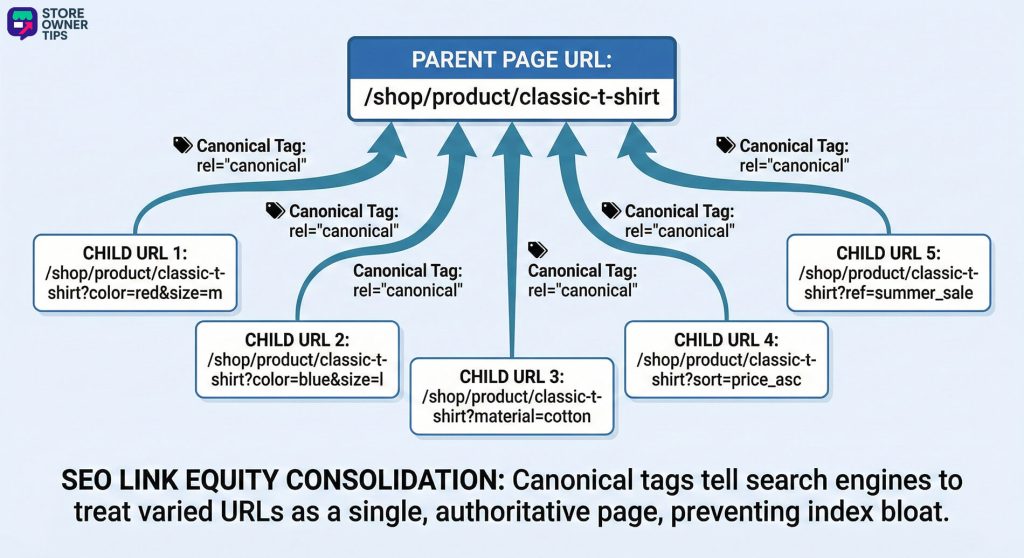
Index bloat happens when search engines store too many low quality pages from your website. A single product with numerous size and color options generates hundreds of distinct addresses. Crawlers waste time scanning these duplicate pages instead of finding your new content.
Canonical tags tell search engines which specific page is the primary version. This is your best defense against parameter index bloat. A proper tag points all variation addresses back to the clean parent address.
A product data feed is a structured file containing all the details about your catalog. It contains your product titles, descriptions, prices, and image links.
Including every single variation in a data feed is usually a very bad idea. A store with hundreds of variations will quickly overwhelm the advertising catalog. You should configure your feed tools to only extract your default variation.
Store owners frequently encounter issues caused by overlooked settings. Recognizing these common errors helps you maintain a functional website.
The most common mistake you can make is forgetting to add a price. The system treats unpriced variations as entirely unavailable. The specific attribute choice simply will not appear in the dropdown menu.
Creating a product with thousands of variations is a major technical mistake. It creates a slow and difficult to manage backend experience for you. It also overwhelms your customer with entirely too many choices.
Ultimately, a variable product is much more than a basic item listing. It is a highly effective tool that keeps your online store looking clean and organized. When you let customers pick their exact size and color on one page, you make buying much easier.
These products also provide excellent inventory control for store owners. You can track exact stock levels for every specific option to prevent embarrassing overselling mistakes. This format transforms a messy catalog into an easy to navigate shopping experience.
Related concepts to explore next: To get the most out of variable products in your daily store operations, it helps to understand these connected terms:
Ready to get started? Try adding variable products to your WooCommerce store to see how they organize your inventory and help you turn visitors into buyers.
Copyright © StoreOwnerTips.com. All Rights Reserved.
