Weekly ecommerce tips, deals & news.
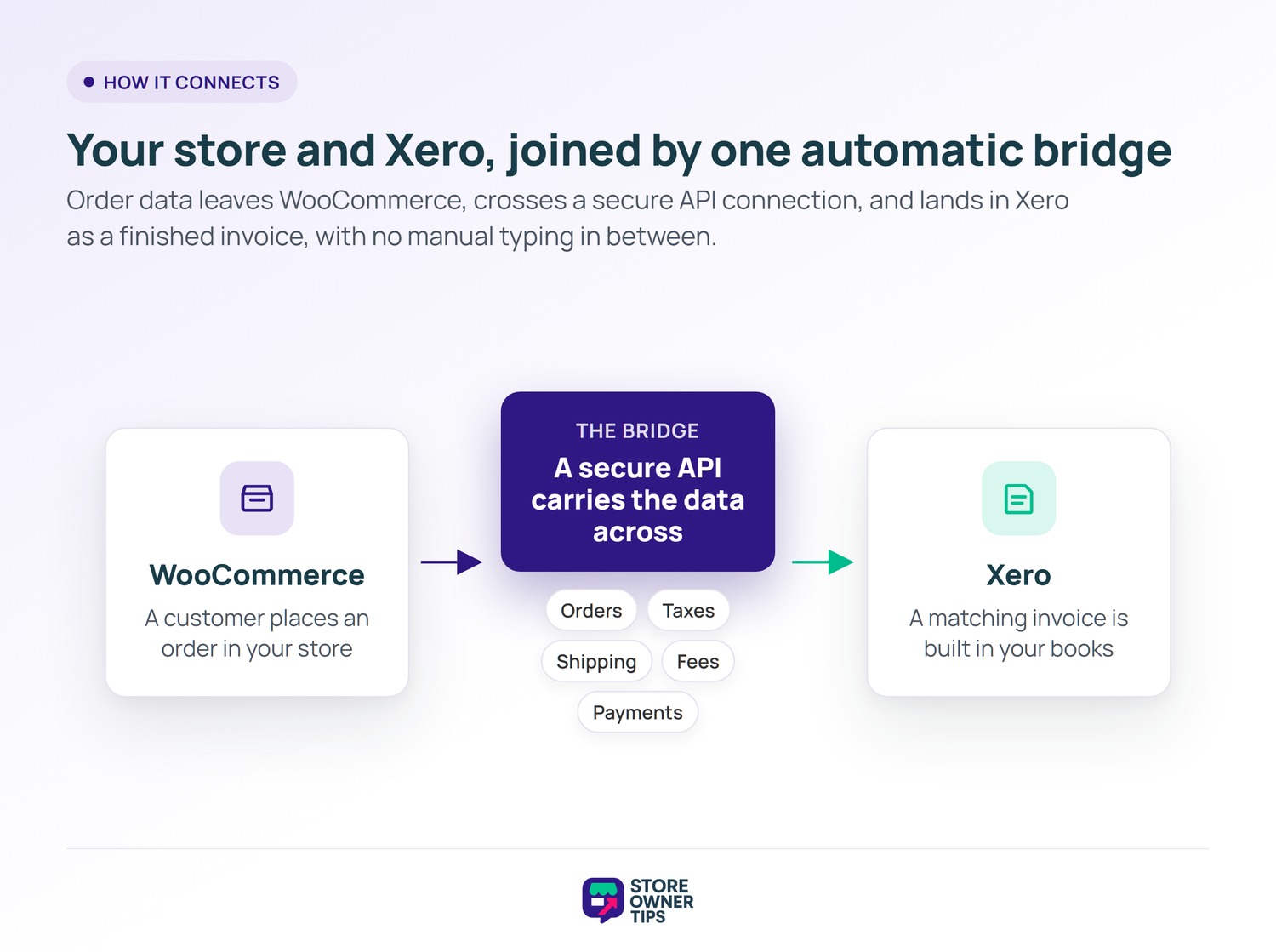
Xero integration connects your WooCommerce store to Xero, a cloud accounting platform, so sales data flows over automatically. Every order can become an invoice in your books without manual typing. It syncs orders, taxes, fees, and payments, keeping your bookkeeping current. Think of it as a bridge between your storefront and your accountant’s ledger.
Xero is a cloud accounting tool used by small businesses worldwide. It reached 4.2 million subscribers on its platform. An integration links your WooCommerce store to that accounting system. The two apps then talk to each other without you in the middle.
Most store owners start by tracking sales by hand or in a spreadsheet. That works for a handful of orders a week. Once volume grows, manual entry becomes slow and risky. An integration removes that copy-paste step entirely.
The goal is not just speed. It is a single source of truth shared by your store and your accountant. When both sides match, tax time stops being a scramble. You also get a clearer view of cash flow as it happens.
The two systems connect through an API. An API is like a restaurant waiter between the kitchen and your table. You never enter the kitchen, yet your order still arrives correctly. The waiter knows the format both sides expect.
Your store hands the order details to the waiter. The waiter carries them to Xero and builds an invoice there. Taxes, shipping, and fees ride along as separate lines. When the customer pays, the integration marks that invoice as paid.
This happens for every order, all day, with no clicks from you. You set the rules once during setup. After that, the bridge runs on its own in the background.
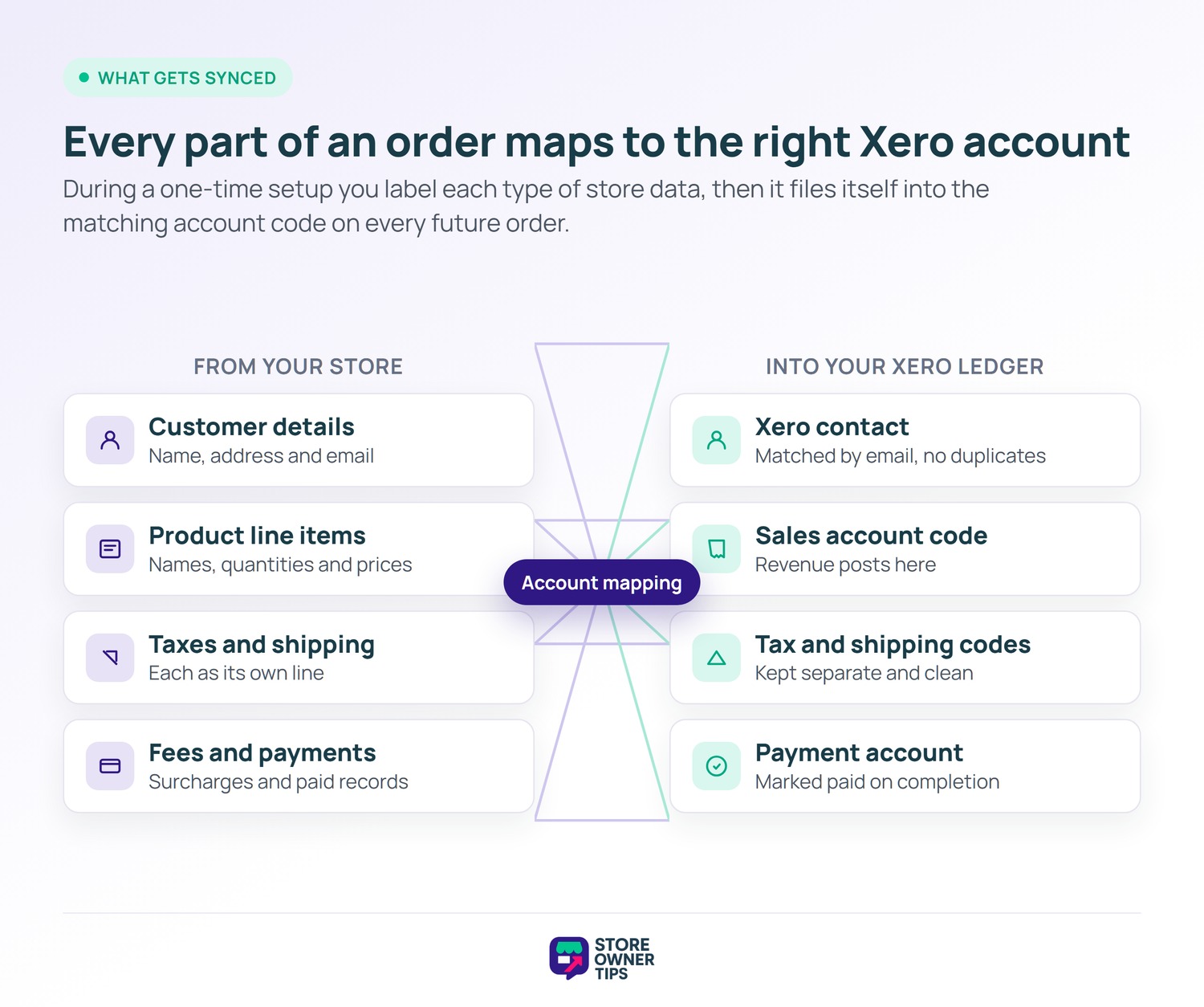
Setup is where you teach the two systems to agree. You connect your store to your Xero account through a secure login. Then you map store data to Xero account codes. This mapping is the part worth doing slowly.
You tell the connector which Xero account holds sales revenue. You do the same for shipping, fees, and payments. Think of it like labeling drawers before filing papers. Once labeled, every new order files itself in the right drawer.
You also choose when an invoice gets created. Some owners create it the moment an order is placed. Others wait until the order reaches a paid or processing status. Both are valid, and you can change the rule later.
On WooCommerce, the official extension sends a clear set of data to Xero. The list covers most of what your bookkeeper needs. Here is what typically moves across the bridge.
The official WooCommerce docs confirm this maps to specific account codes in your Xero Chart of Accounts. You pick a Sales, Shipping, Fees, and Payment account once. Inventory plugins can also push stock counts, though that depends on the connector. In short, the sync mirrors your storefront inside your ledger.
The real driver is accuracy and time. Manual bookkeeping carries an error rate of roughly 1 to 3% of transactions. A direct API sync drops that below 0.5%, since no human retypes anything.
Those small slips add up at scale. Across the wider economy, poor data quality is estimated to cost $3.1 trillion a year in the US alone. For one store, that shows up as wrong tax filings and messy reconciliations. Automating the data entry removes a big chunk of that risk.
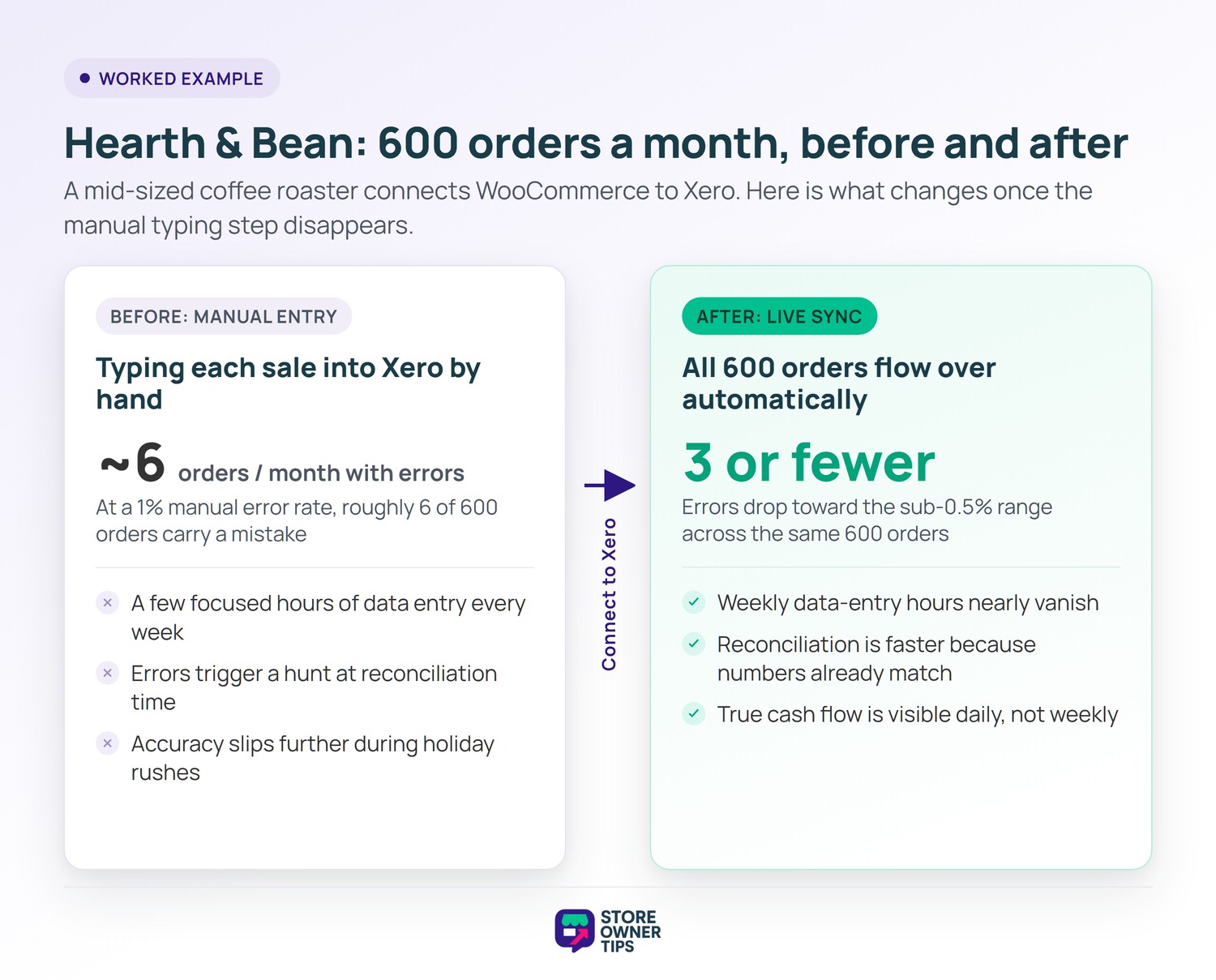
Imagine a mid-sized coffee roasting brand called Hearth & Bean. They process about 600 WooCommerce orders a month. Before any integration, the owner enters each sale into Xero by hand. That takes a few focused hours every week.
At a 1% manual data entry error rate, roughly 6 of those 600 orders carry a mistake. A wrong tax line here, a mistyped total there. None feels urgent on its own. Yet they pile up by quarter’s end.
When the accountant reconciles, those 6 errors trigger a hunt. Each one eats time to find and fix. The owner also worries about filing the wrong tax figure.
Busy weeks make it worse. During a holiday rush, entry falls a few days behind. Then the owner rushes to catch up, and accuracy slips further. The 1% rate can climb when people work under pressure.
Hearth & Bean connects WooCommerce to Xero. Now all 600 orders flow over as invoices automatically. The expected error count drops toward the sub-0.5% range, so roughly 3 or fewer slip through.
The weekly data-entry hours nearly vanish. The owner spends that time on roasting and marketing instead. Reconciliation gets faster because the numbers already match. This is the quiet payoff most stores chase when they integrate.
There is a knock-on benefit too. Because invoices and payments post in near real time, the owner sees true cash flow daily. That helps them decide when to reorder green coffee beans. In practice, cleaner books make better business calls, not just tidier ones.
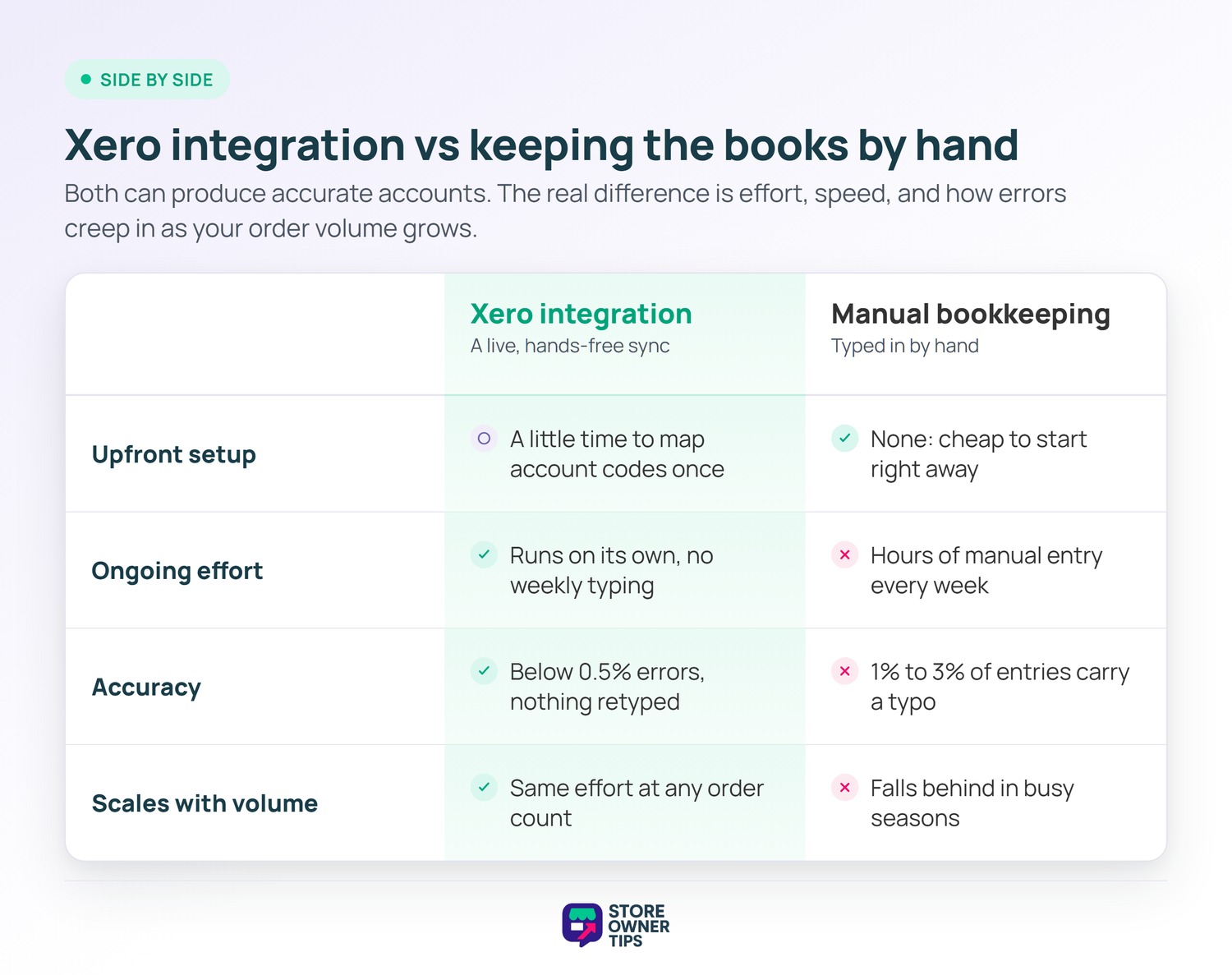
The natural opposite of an integration is keeping the books by hand. Both can produce accurate accounts in the end. The difference is effort, speed, and how errors creep in.
Manual bookkeeping means someone reads each order and types it into Xero. It is cheap to start and needs no setup. However, it scales badly and invites typos as volume rises.
An integration costs a little setup time up front. After that, it runs hands-free and stays accurate at any volume. For a growing store, the sync usually wins on total time saved.
There is a middle path worth knowing about. Some owners batch-import sales by file each month instead of a live sync. That is faster than pure typing, but it still leaves room for mistakes. A live integration closes that gap by removing the human step.
So the choice is rarely about which is more accurate in theory. It is about which one you will actually keep up with. Manual books often fall behind during busy seasons. A sync simply does not, since it never gets tired or distracted.
Yes. WooCommerce offers an official extension that creates Xero invoices for your store’s sales. It sends contacts, line items, taxes, shipping, and fees across. Payment records post once an order is marked paid. Several third-party connectors add extra options on top.
Most setups sync orders, invoices, taxes, shipping charges, and fees. Customer billing details become a Xero contact. Payments sync too, and some inventory tools push stock counts as well. Each line maps to a Xero account code you set during setup.
You can run it either way. Automatic mode posts each order to Xero on a chosen event, like order completion. Manual mode lets you push contacts, invoices, and payments yourself when you prefer control.
Xero integration turns bookkeeping from a chore into a background process. It keeps your WooCommerce sales, taxes, and payments accurate in your accounts with little effort. For any store with steady order volume, that saved time and reduced risk compound into real long-term growth. Set it up once, and your books keep themselves current.
Copyright © StoreOwnerTips.com. All Rights Reserved.
