Weekly ecommerce tips, deals & news.
Picture the back room in February. There are 340 units of last autumn’s best-seller, still in their cartons. A liquidator has emailed an offer to take the lot for less than you paid for a third of it.
To sell excess inventory without giving it away, set a floor price first. Then sell it in lots to trade buyers, through a B2B stock marketplace or your own wholesale tier. Call a liquidator only when speed matters more than price.
Every month those cartons sit there, they cost you in tied-up cash, shelf space and ageing stock. Slow inventory turnover shows up as cash you can’t spend on stock that does sell.
I’ve noticed most owners reach for a sitewide clearance sale first. The catch is that retail customers learn a lesson from it: wait, and it gets cheaper. This guide covers the bulk routes that avoid that, and how to price each lot.
Jump to:

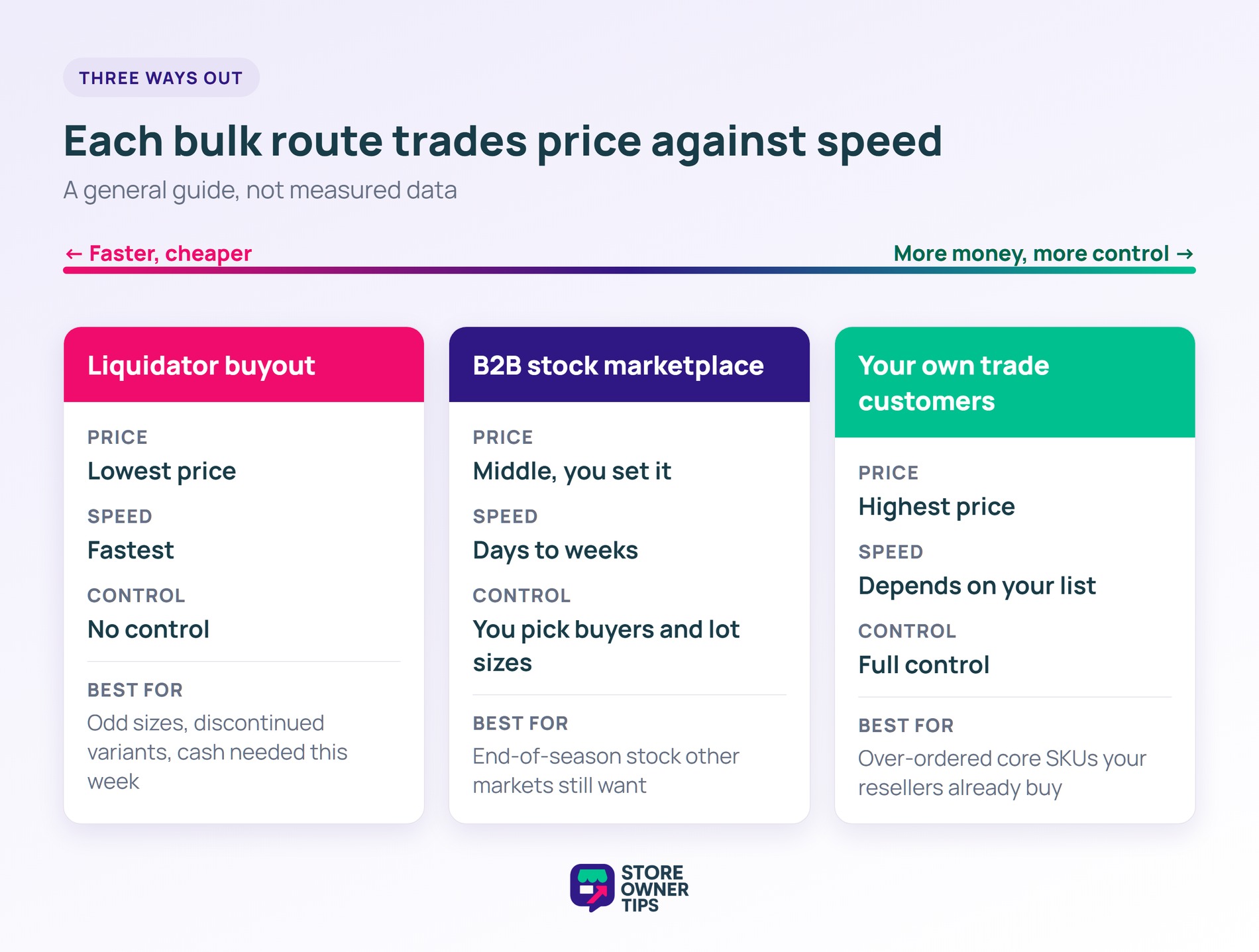
Three routes move surplus in bulk, and each one trades price against speed and control. The table compares them (a general guide, not measured data):
| Route | Price you recover | Speed | Control over where it lands |
|---|---|---|---|
| Liquidator buyout | Lowest | Fastest | None |
| B2B stock marketplace | Middle, and you set it | Days to weeks | You choose buyers and lot sizes |
| Your own trade customers | Highest | Depends on your list | Full |
The right route depends on the stock. End-of-season apparel suits a marketplace, since resellers elsewhere may be buying for a different season. An over-ordered core SKU can go to your own trade buyers. Meanwhile, discontinued variants in odd sizes are often the ones a liquidator ends up with.
Other tactics help with smaller amounts. Bundling slow items with fast sellers works for a shelf of stock. So does donating, or asking the supplier about a return. However, they rarely clear a pallet.
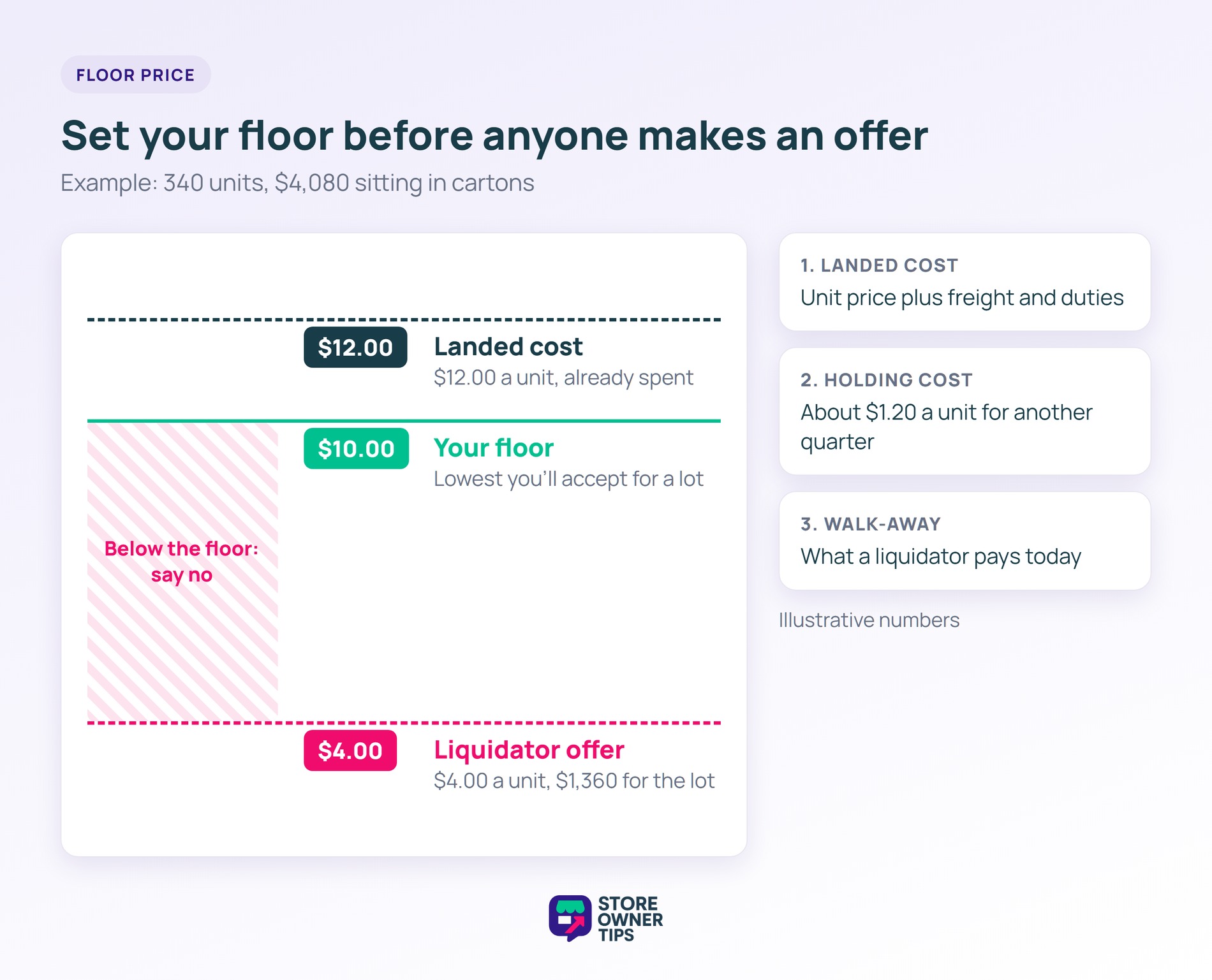
Your floor price is the lowest per-unit price you’ll accept for a lot. Set it before you list, so the first offer doesn’t become your anchor.
Build it from three numbers:
Here’s what this looks like in practice (example data). You hold 340 units with a $12.00 landed cost, so $4,080 is sitting in cartons. A liquidator offers $4.00 a unit, or $1,360 for the lot.
Holding the stock another quarter costs about $1.20 a unit. On top of that, the line’s sell-through rate says retail won’t clear it before then.
You decide anything at or above $10.00 a unit beats both waiting and the liquidator. So $10.00 becomes your floor.
🔍️ What We’ve Seen: Owners accept the first lot offer without a floor price. Later, they find the same units relisted online below their own retail price. A floor set in advance makes it easy to turn that offer down.
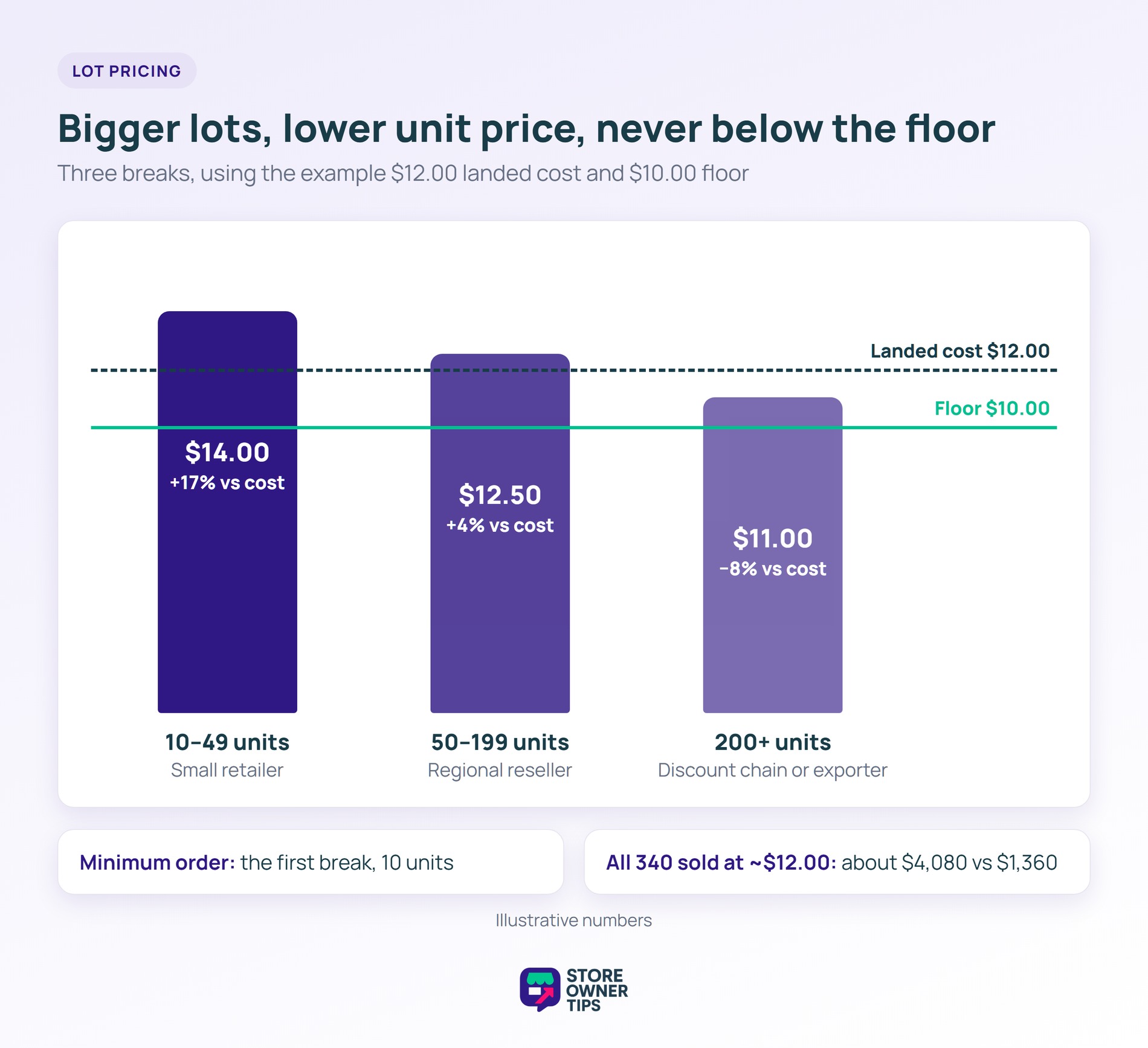
Lot pricing means the unit price drops as the order gets bigger. Bigger buyers clear more stock per sale and earn a better rate. Meanwhile, smaller buyers pay more, which protects your margin.
Three breaks are enough for most surplus. Using the example above, with a $12.00 landed cost and a $10.00 floor (illustrative numbers):
| Lot size | Unit price | vs. your landed cost | Who buys at this size |
|---|---|---|---|
| 10–49 units | $14.00 | +17% | Small independent retailer |
| 50–199 units | $12.50 | +4% | Regional reseller |
| 200+ units | $11.00 | −8% (still above floor) | Discount chain or exporter |
The top tier sells below cost, and that’s fine. The landed cost is already spent, so the floor is the line that matters now.
Set your minimum order at the first break, here 10 units. It keeps one-off bargain hunters out and tells trade buyers this is a wholesale offer.
Say all 340 units sold in mixed lots averaging $12.00. You’d recover about $4,080 against the liquidator’s $1,360, and the $2,720 difference covers the time you spend listing.
A B2B stock marketplace is a website where businesses buy from other businesses in bulk. Sellers post lots with a minimum order, and trade buyers browse them.
Merkandi is one example. AdTribes describes it as a B2B wholesale and surplus goods marketplace. Trade buyers search it for overstock, clearance and bulk lots, which suits a seller with a pallet to clear.
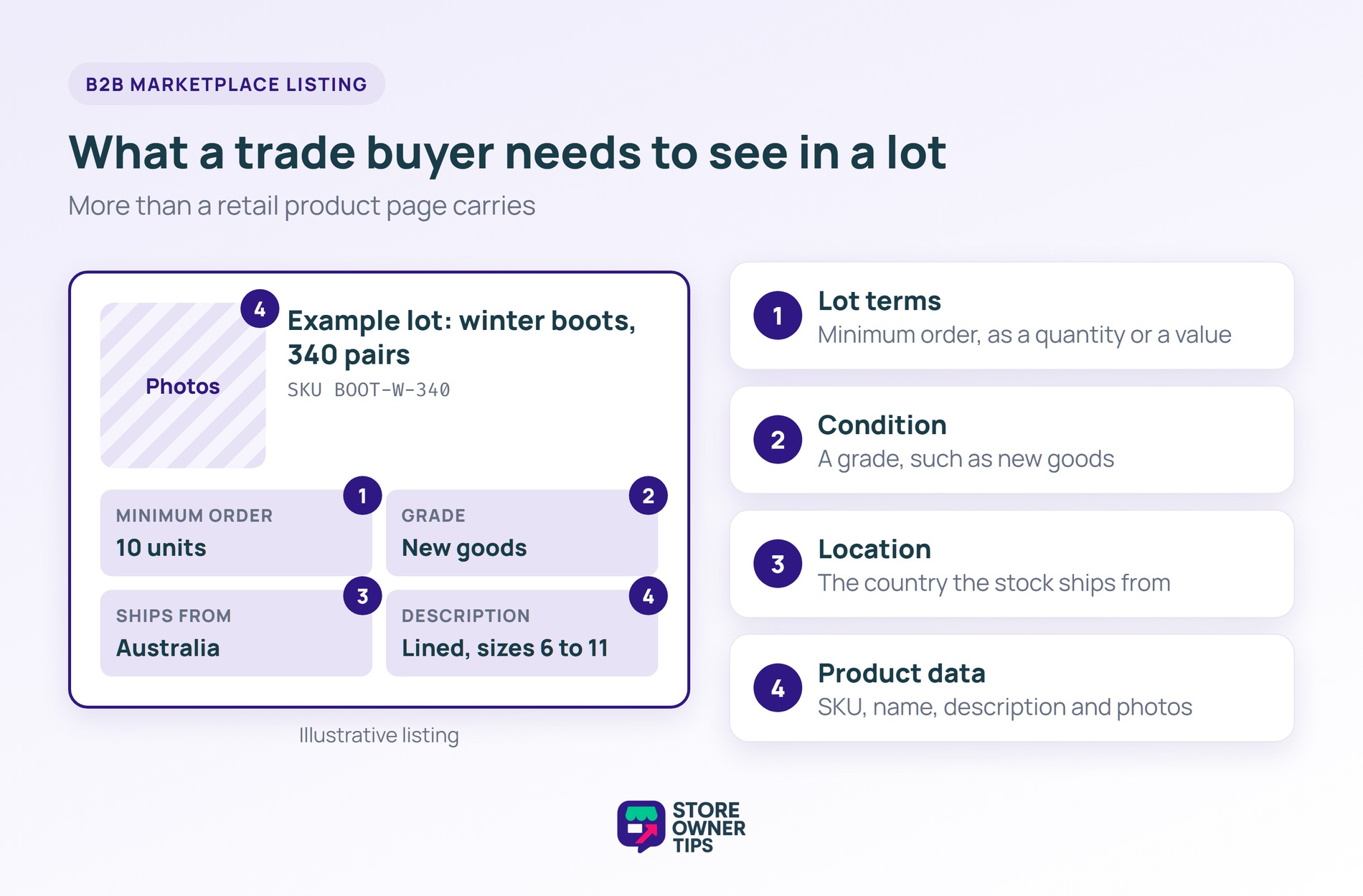
A listing there needs more than a retail product page carries:
Typing that in by hand for dozens of SKUs is slow. That’s why the next step sends it straight from WooCommerce.
A product feed is a file that lists your products in the format a sales channel expects. The marketplace reads your products from the feed’s URL, so you don’t re-enter each listing.
For a wider look at the options, see our roundup of WooCommerce product feed tools.
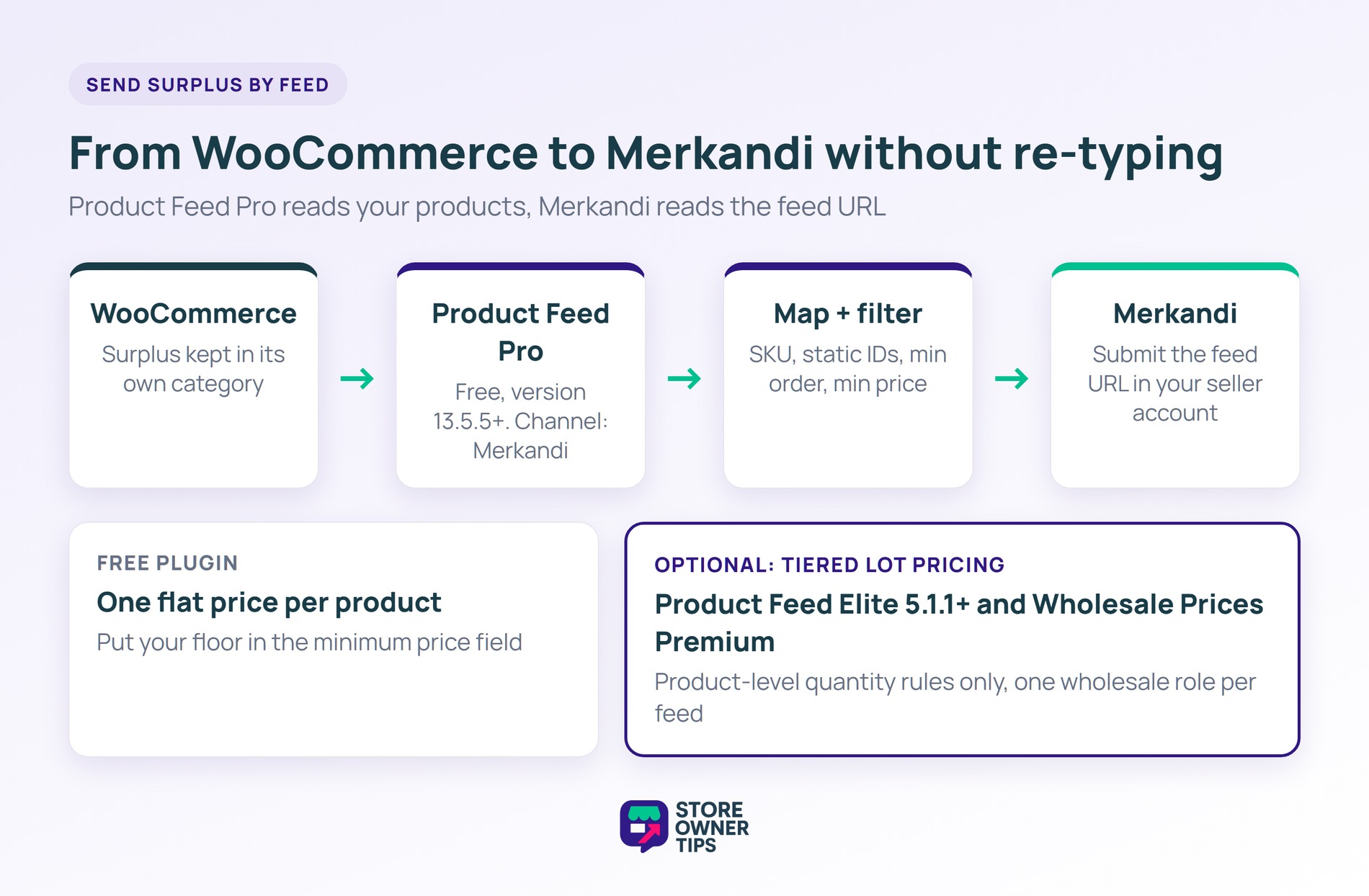
For Merkandi, AdTribes’ Merkandi product feed is a channel inside Product Feed Pro, the free AdTribes plugin, from version 13.5.5. You create a feed and pick Merkandi as the channel. Next, you map your fields and submit the feed URL through your Merkandi seller account.
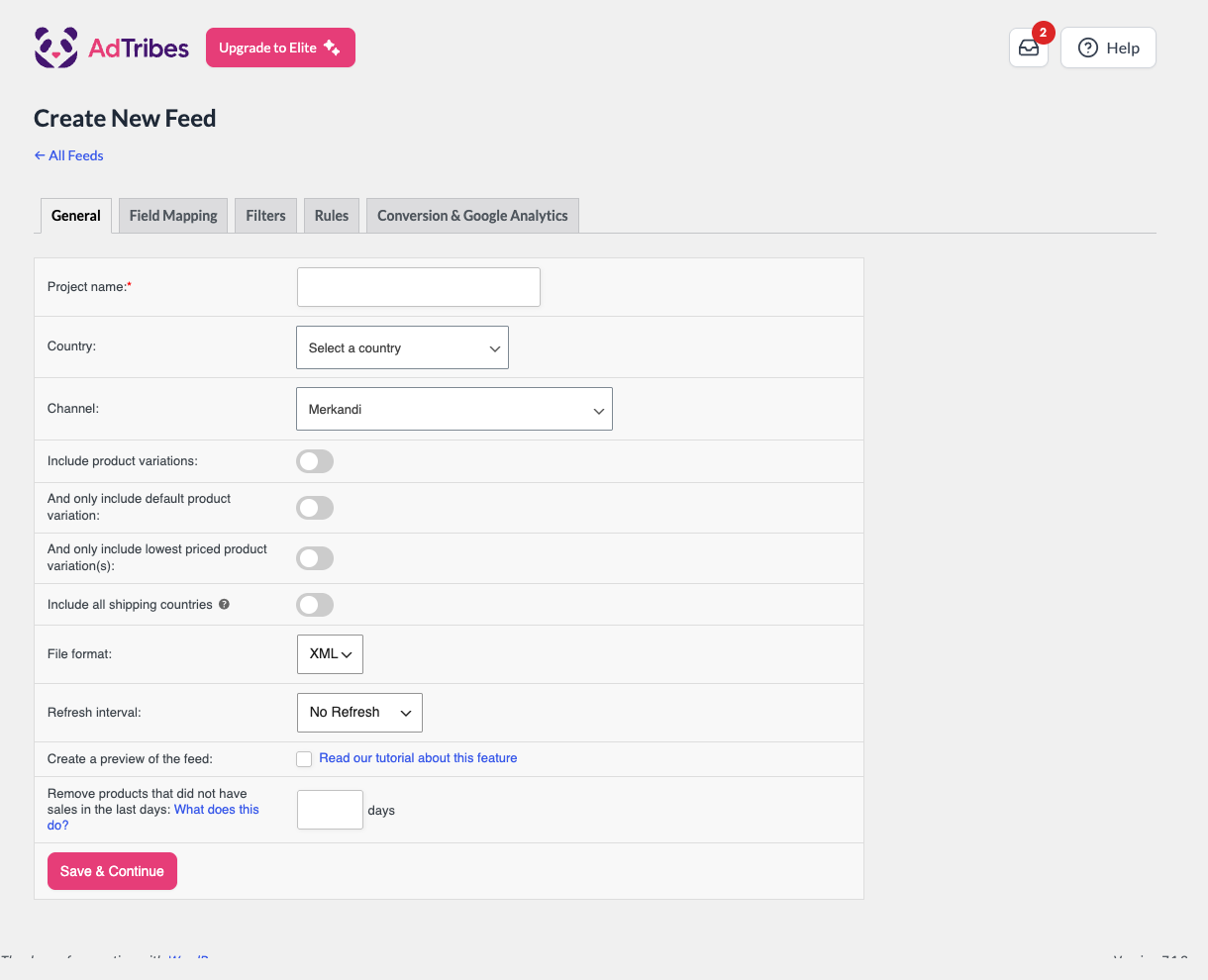
Most fields map straight across, but a few have no WooCommerce equivalent. Category ID, country ID and grade are Merkandi reference numbers. You enter each one as a static value from Merkandi’s reference lists.
Two more rules catch people out:
The mapping also has fields for the minimum order and a minimum price. The guide describes minimum price as the lowest price you’ll accept, used for negotiation. That field is where your floor price goes.
Then use the feed’s filters to include only the surplus. For example, keep those products in their own category and filter by it.
The free plugin sends one flat price per product. To send your lot breaks instead, you need two plugins active. Those are Product Feed Elite 5.1.1 or later and Wholesale Suite’s Wholesale Prices Premium.
Set Wholesale Prices Premium quantity pricing on each product, and the feed exports those rules as Merkandi tiered pricing.
A few limits apply, per the Merkandi feed setup guide:
If you already sell to trade buyers, the same quantity rules work on your own store. Wholesale Prices Premium sets quantity-based wholesale prices on each product. Each wholesale role can have its own rules, so the lot table above can run on your site too.
This route usually recovers the most, with buyers you already know. Don’t have that channel yet? Our guide to adding a wholesale channel to your WooCommerce store covers the setup.
Once it’s running, a surplus lot becomes an email to your trade list instead of a call to a liquidator.
Selling wholesale usually recovers more per unit, because you set the price and lot size. Liquidation clears everything faster. However, it pays a fraction of cost and gives you no say over where the goods end up. Liquidate only when you need the space or cash this week.
Start with a floor price built from landed cost, holding cost and the best liquidator offer. Next, set two or three quantity breaks above it. Put the lowest unit price on the biggest lot, and keep every tier at or above the floor.
Yes, if you control who buys it. A minimum order keeps one-off shoppers out. Choosing your own buyers also lowers the chance the stock reappears below your shelf price. A public clearance sale is the route most likely to train customers to wait.
No. Product Feed Pro sends your products to Merkandi at a flat price, for free. Your quantity price breaks are the exception. To carry those, the feed needs Wholesale Prices Premium and Product Feed Elite 5.1.1 or later.

Floor price first, lots second, and the liquidator as the last call instead of the first. In that order, you sell excess inventory to buyers who want it in bulk, and you set the price.
After that, look at how the surplus built up. Keeping stock levels in line with demand stops the next back room filling up.
Ready to clear the back room? Install Product Feed Pro, create your Merkandi feed and list your first lot this week.

Copyright © StoreOwnerTips.com. All Rights Reserved.
