Weekly ecommerce tips, deals & news.
Picture this: A customer lands on your store, buys a pair of running shoes, and disappears forever. No second order, no referral, nothing. Now multiply that by every single first-time buyer you’ve ever had. Hurts, right?
Here’s a number that should stop every store owner in their tracks: acquiring a new customer costs 5-7x more than retaining an existing one. Yet most WooCommerce stores pour nearly all their budget into acquisition and almost nothing into retention.
A loyalty program flips that script, and setting one up with a WooCommerce points and rewards plugin is way easier than you think. By the end of this article, you’ll have everything you need to launch a working WooCommerce loyalty program on your store today.
🚀 Power Tip: Before you go live, consider privacy laws like the GDPR. A WooCommerce loyalty program tracks personal data like names and shopping habits. You legally need to ask customers to “opt-in” (agree to join) before you start tracking them. You also need a simple way to delete their data if they ask. Always protect your customers’ privacy!
Let’s talk numbers, because the case for WooCommerce loyalty programs is hard to argue with.
Repeat customers spend significantly more than new ones, according to a Bain & Company study. Even more compelling: Harvard Business Review states that increasing customer retention by just 5% can boost profits by 25% and even up to 95% for software companies without shipping or warehouse costs.
That’s not a small margin of improvement. That’s potentially doubling your profit by keeping the customers you already have.
This all comes down to customer lifetime value (CLV). Basically, this is the total amount a customer spends with you over their entire relationship with your store. A one-time buyer who spends $50 has a CLV of $50. A loyal customer who buys from you six times a year for three years? That’s a CLV of $900. Same acquisition cost, wildly different return.
A WooCommerce loyalty program creates what we call the “loyalty loop”: purchase, earn rewards, redeem rewards, purchase again. It gives customers a concrete reason to come back instead of shopping with your competitors.
🔍️ What We’ve Seen: Stores that launch even a basic points program tend to see measurable repeat-purchase lifts within the first 90 days. We worked with a home goods store that added a simple “1 point per dollar” program and tracked a notable increase in repeat orders within the first quarter. The program didn’t need to be fancy. It just needed to exist and be visible.
Not all WooCommerce loyalty programs are built the same, and the right model depends on your store, your products, and your customers. Here’s a breakdown of the four main types:
This is the most common and easiest to set up. Customers earn points for every dollar spent, then redeem those points for discounts on future orders. Simple, familiar, and effective for most stores.
Example: Earn 1 point per $1 spent. Redeem 100 points for $1 off your next order.
Think Bronze, Silver, and Gold status levels. Basically, customers unlock better perks as they spend more, which creates a powerful incentive to keep climbing. These work especially well for high-AOV stores in fashion, luxury, or specialty niches.
Example: Bronze (0-$500 lifetime spend) gets 1x points. Silver ($500-$1,500) gets 1.5x points + free shipping. Gold ($1,500+) gets 2x points + exclusive early access.
Reward customers for bringing their friends. This doubles as both a retention tool and an acquisition channel, which makes it incredibly efficient.
Example: Give $10, get $10 for every successful referral.
Combine points, tiers, and referrals into one unified program. This is the most engaging approach, but also the most complex. We recommend starting simple and layering on tiers and referrals once your basic points program is running smoothly.
Here’s a quick comparison:
The following table is illustrative. The best program type depends on your specific store, products, and customer base.
| Program Type | Best For | Complexity | Example |
|---|---|---|---|
| Points-based | Most stores, beginners | Low | Earn 1 point per $1, redeem 100 pts = $1 off |
| Tiered | High-AOV, fashion, luxury | Medium | Bronze/Silver/Gold with escalating discounts |
| Referral | Stores with strong word-of-mouth | Low-Medium | Give $10, Get $10 for each referral |
| Hybrid | Established stores, 6+ months in | High | Points + tiers + referral bonuses combined |
Our recommendation: Start with a points-based program. Get it running, make sure customers are engaging with it, and then layer on tiers or referrals as your program matures.
We recommend Advanced Coupons as your WooCommerce rewards plugin because it integrates natively with WooCommerce’s coupon system. You don’t have to manage a separate reward currency or wrestle with compatibility issues. It just works with what you’ve already got.
Here’s the full walkthrough:
Since the Loyalty Program is a premium add-on, you won’t find it by searching your WordPress dashboard. First, buy it from the Advanced Coupons website and download the .zip file to your computer. Then, in WordPress, go to Plugins > Add New > Upload Plugin. Upload the file, activate it, and paste in your license key, which acts like a digital receipt that proves you bought the software.
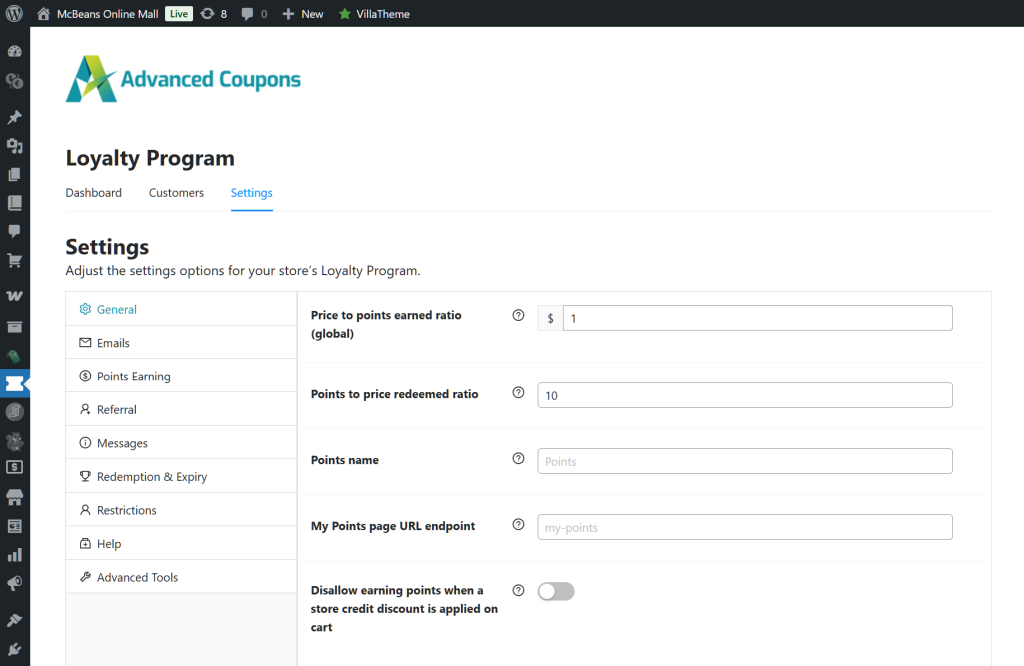
Head to the Loyalty Program settings in your dashboard. Here you’ll set how customers earn points:
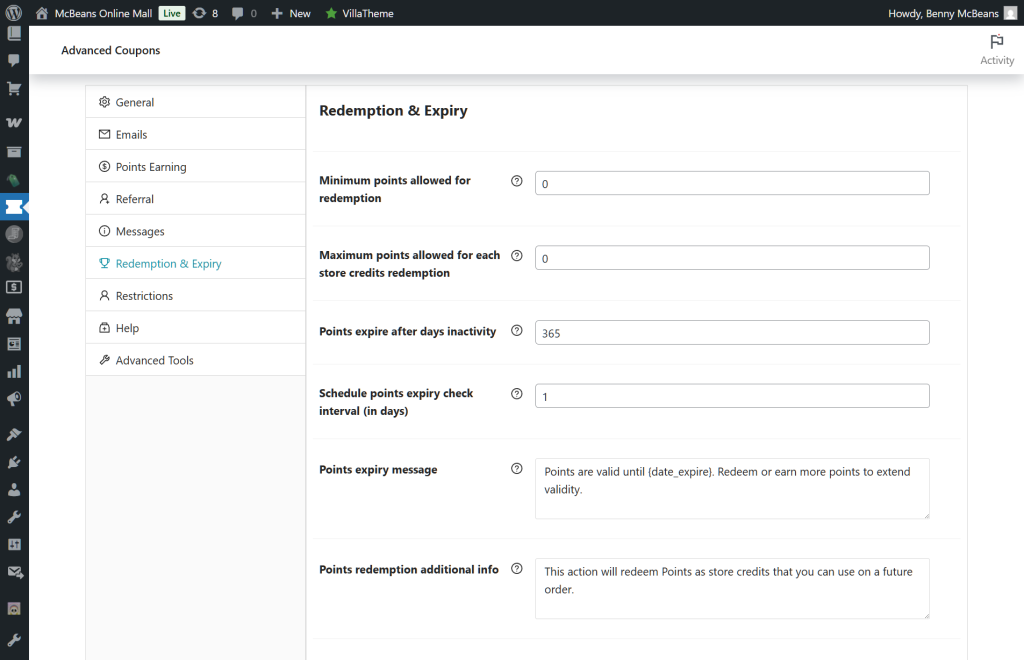
Crucial Step: Make sure you tie point payouts to the “Completed” order status. If you don’t do this, sneaky shoppers could place an order, get their reward points, and then cancel their payment to cheat the system.
I tested several earning configurations, and 1 point per $1 with a signup bonus of 50-100 points hits the sweet spot — it’s simple enough for customers to understand instantly, and the signup bonus gives them an immediate reason to engage.
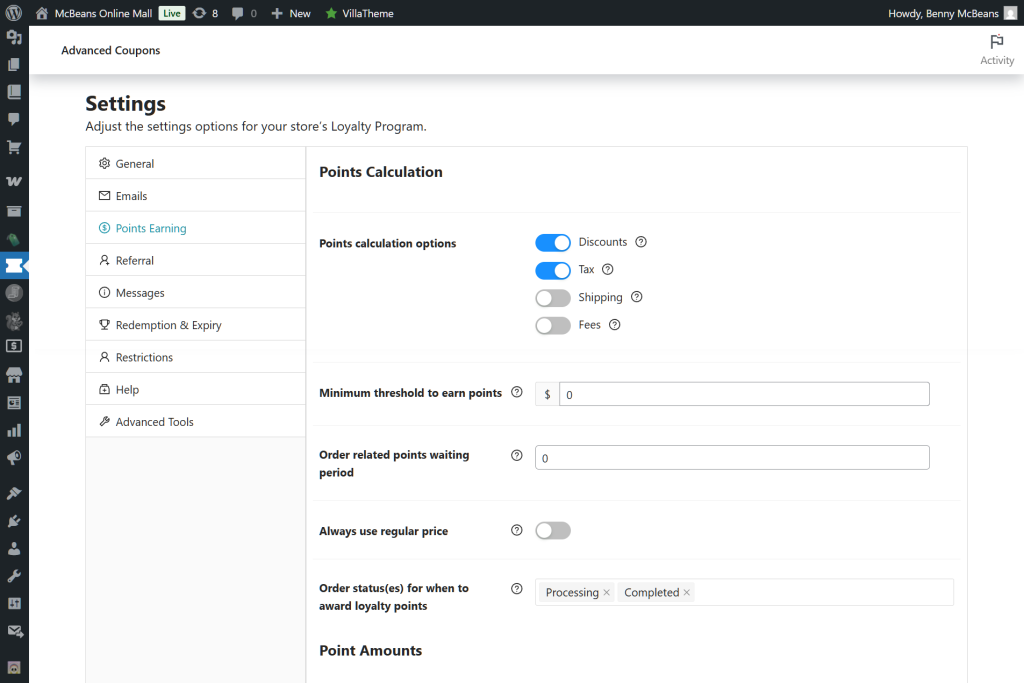
Under the Redemption tab, configure how points translate to discounts. A common starting point is 100 points = $1 discount. But keep in mind, a 1% reward feels pretty small to today’s shoppers, so you might want to test bigger payouts. Also, if your store accepts multiple currencies, make sure your rewards plugin adjusts point values dynamically based on the exchange rate. Otherwise, shoppers could game the system, like buying points cheap in one currency and cashing them out for more in another!
Set a minimum redemption threshold (e.g., 500 points minimum) so customers don’t try to redeem tiny amounts that create more admin headaches than they’re worth.
If you want to add tiers, navigate to the Tiers tab. Set up your levels based on lifetime spend or total points earned. We’ve found that three tiers is the sweet spot. They’re enough to create aspiration without overwhelming customers.
Keep the tier names on-brand. “Bronze/Silver/Gold” works, but so does “Member/VIP/Elite” or whatever fits your store’s personality.
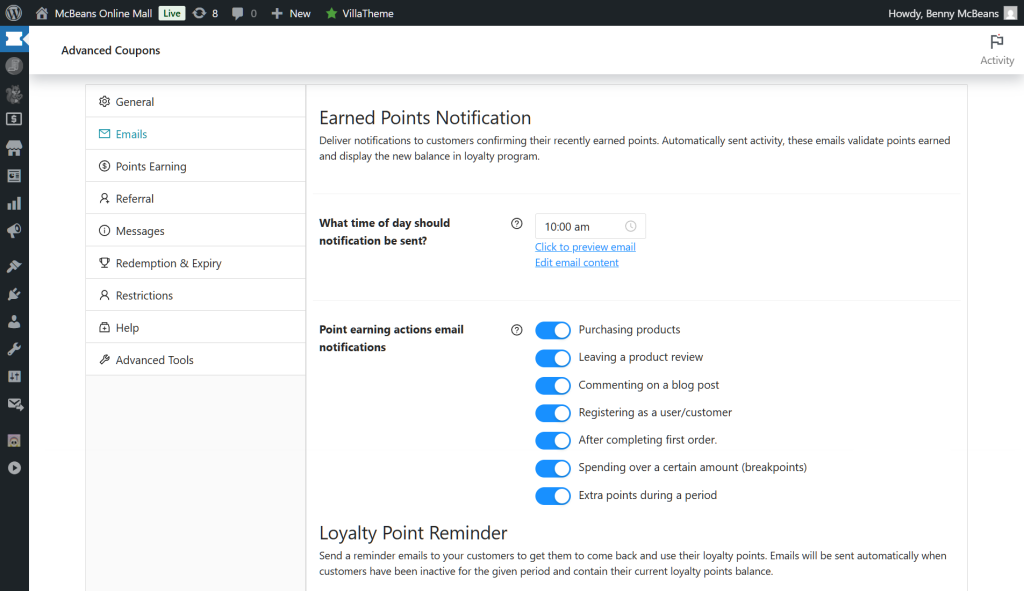
Turn on email notifications for key events:
These automated emails are what keep the loyalty loop turning. Without them, customers forget they even have points.
Advanced Coupons automatically adds a loyalty dashboard widget to the WooCommerce My Account page. Double-check that it’s showing up by logging in as a test customer. Basically, customers should be able to see their:
Before going live, run through the complete earn-and-redeem cycle as a test customer:
I’ve caught configuration errors on this step more times than I can count. Don’t skip it.
🚀 Power Tip: Set a bonus-points multiplier for the first 30 days after launch. Something like 2x points on all purchases during your “Grand Opening” period. It trains new members to check their points balance and gets the habit loop started fast. We’ve seen this approach generate significantly more enrollment and first-redemption activity than a standard launch.
While we lean toward Advanced Coupons, it’s worth knowing your options. Here’s how each top WooCommerce points and rewards plugin stacks up:
The following table is illustrative and based on our testing. Pricing and features may change; verify with each provider before purchasing.
| Plugin | Price | Points System | Tiers | Referrals | Coupon Integration | Our Take |
|---|---|---|---|---|---|---|
| Advanced Coupons Loyalty Program | From $99.50/yr | Yes | Yes | Yes | Native (built-in) | Top pick |
| WooCommerce Points and Rewards | $179/yr | Yes | No | No | Basic | Solid but limited |
| YITH Points and Rewards | $139.99/yr (No free trial) | Yes | Yes | No | Limited | Good, pricier |
| Gratisfaction | Free / Premium | Yes | Yes | Yes | Requires setup | Decent free option |
Advanced Coupons integrates directly with WooCommerce’s native coupon system. Therefore, your loyalty rewards work seamlessly with cart conditions, BOGO deals, and any other coupon-based promotions you’re already running. No separate reward currency to manage, no compatibility headaches.
Furthermore, as a Rymera ecosystem product, Advanced Coupons is designed to work smoothly alongside other WooCommerce-focused tools like Wholesale Suite and SaveTo Wishlist.
I tested WooCommerce Points and Rewards alongside Advanced Coupons, and the difference in coupon integration alone was the deciding factor. With Advanced Coupons, I could create a “spend 500 points and get free shipping on orders over $50” rule quickly. With the native WooCommerce extension, that kind of conditional logic simply isn’t possible unless you add a separate tool.
YITH is a solid option if you’re already deep in the YITH ecosystem. However, it’s pricier and the coupon integration feels bolted on rather than native.
Gratisfaction is worth a look if your budget is tight. Its free tier gives you all the fancy features, like VIP tiers and sweepstakes. But here’s the catch: it limits you to just 100 WooCommerce loyalty program members. Thus, once your program gets popular and crosses that line, you’ll have to upgrade to a paid plan.
Setting up the program is just the beginning. Here’s what separates WooCommerce loyalty programs that drive real retention from ones that quietly collect dust:
Keep earning rules dead simple. If a customer can’t understand how to earn and redeem points in 10 seconds, simplify it. “1 point per dollar, 100 points = $1 off” is about as clean as it gets.
Promote the program everywhere. Header announcement bar, product pages, checkout page, order confirmation emails, post-purchase follow-ups. If customers don’t know the program exists, it can’t work.
Pair loyalty with wishlists. This is a combo we love. SaveTo Wishlist lets customers bookmark items they want but aren’t ready to buy. When they’ve accumulated enough points for a discount, those wishlisted items become irresistible. It’s a natural one-two punch for retention.
Combine loyalty rewards with seasonal campaigns. Consider double-points weekends, birthday bonuses, holiday multipliers, and the like. After all, these give you built-in reasons to email your loyalty members and drive traffic back to your store. Don’t forget to tie these into your broader coupon strategy for maximum impact.
Review and adjust quarterly. Check your redemption rates, point liabilities, and repeat purchase metrics every quarter. If nobody’s redeeming, your rewards might not feel valuable enough. On the other hand, if everyone’s redeeming immediately, you might be giving away too much.
A WooCommerce loyalty program is one of the highest-ROI retention tools you can add to your online store. It doesn’t need to be complicated. After all, even a basic points program can drive measurable repeat purchases within the first 90 days.
For WooCommerce store owners looking for the smoothest implementation, we recommend Advanced Coupons as the best starting point. Its native integration with WooCommerce’s coupon system means less configuration headaches and more flexibility as your program grows. This is especially true when you start combining loyalty rewards with cart conditions, BOGO deals, and seasonal promotions.
Here’s your action plan:
You’ve already done the hardest part: getting customers to your store. Now keep them coming back.

Copyright © StoreOwnerTips.com. All Rights Reserved.
