Weekly ecommerce tips, deals & news.
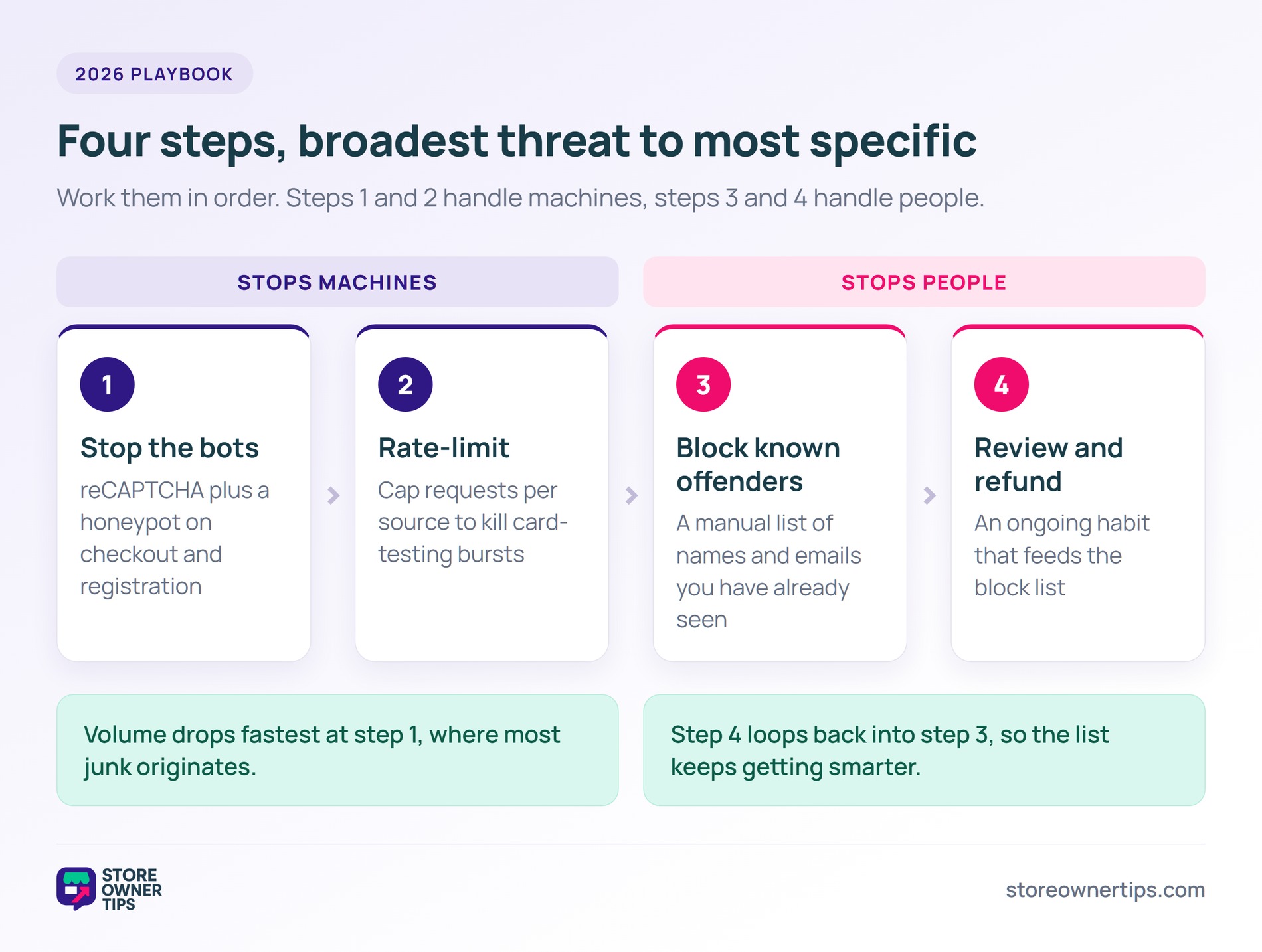
To stop WooCommerce spam orders, work through four steps in order. Block bots with reCAPTCHA or a honeypot. Rate-limit repeat automated attempts. Block known offenders by email, IP address or full name, then review and refund cleanly.
I’ve seen enough messy order screens to know how draining this gets. You log in expecting real sales and find a wall of junk instead. Fake names, throwaway emails, declined cards, and the same address hitting checkout again and again.
It wastes your time and skews your reports. Worse, it sometimes costs real money in gateway fees and chargebacks.
The good news is that spam orders follow patterns, and patterns can be stopped. This playbook covers what they are, why they happen, and a plan you can set up this week.
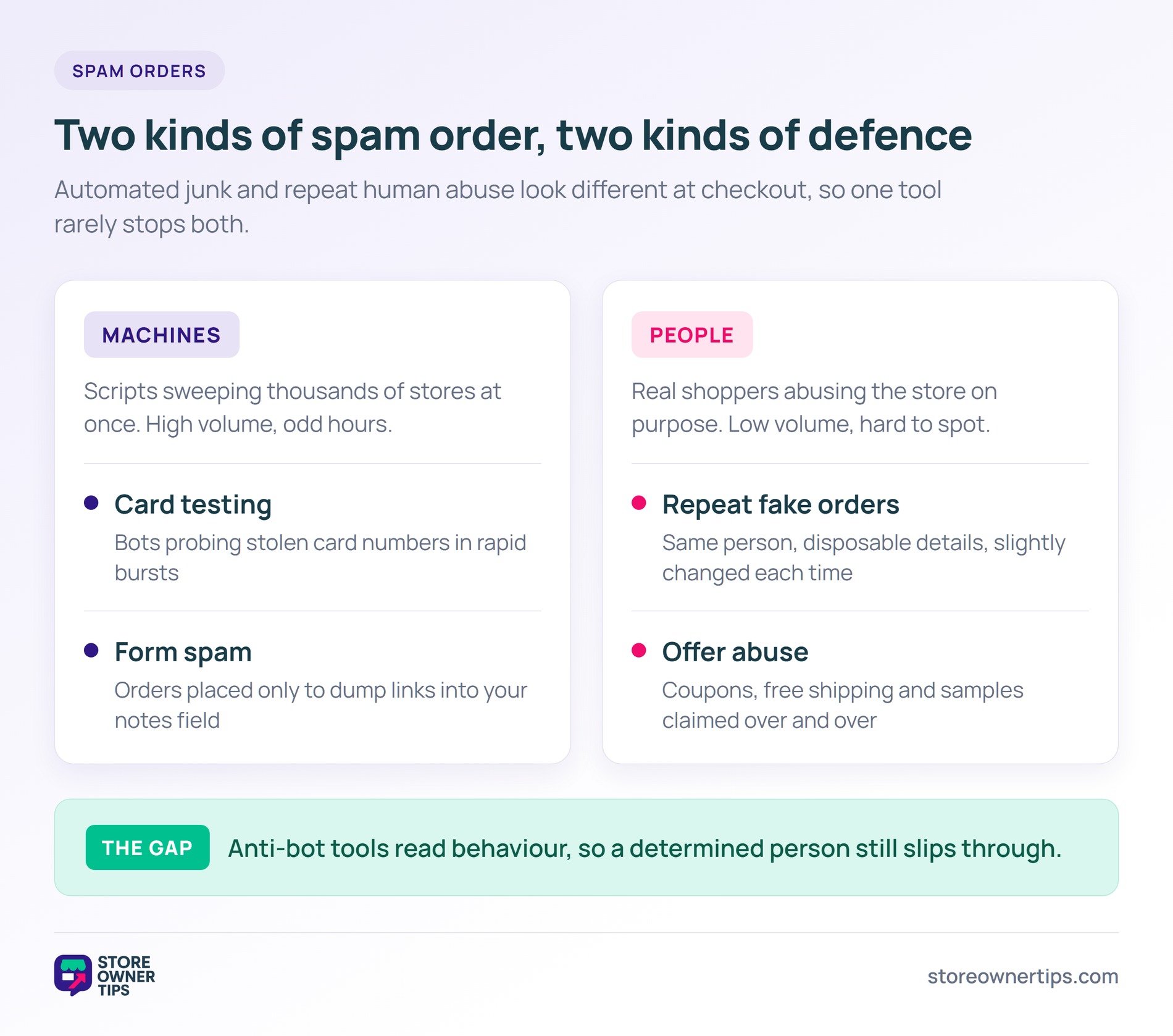
A spam order is any checkout submission that isn’t a genuine purchase attempt. Some come from bots running automated scripts. Others come from real people abusing your store on purpose. They look different but cause the same headache.
Here are the common types I see:
Bots drive a lot of this, and the share keeps climbing. Imperva’s 2025 Bad Bot Report found bad bots made up 37% of all internet traffic in 2024. That’s up from 32% the year before. Automated traffic also passed human traffic for the first time in a decade, at 51%.
When more than half the internet is automated, your checkout page is a target. That’s true whether you’ve noticed it yet or not.
Spam orders happen because your checkout is a public form. Anyone, or any script, can submit it. You don’t have to be a big brand to get hit. Small stores get caught in broad automated sweeps.
Fraudsters often test cards on smaller stores first, because smaller stores tend to have weaker checks. Meanwhile, the same Imperva research found account takeover attacks rose 40% in 2024.
There’s a quieter cost too. The Merchant Risk Council’s 2024 Chargeback Field Report found chargebacks cost merchants an estimated $117.47 billion in 2023. Nearly three quarters of those surveyed also reported an 18% average rise in friendly fraud over three years.
Some of those disputes trace back to orders you could have blocked before they ever processed. That’s the case for fixing this properly rather than clearing junk by hand each morning.
🔍️ What we’ve seen: Most owners assume WooCommerce spam orders are all bots, so they install one tool and stop there. Then one determined person slips through with different details every time. Bots and known offenders are separate problems, and each needs its own layer. That’s why this playbook splits them out.
The plan below moves from the broadest threat to the most specific. Set up each step in order. You can stop after any step that solves your problem, though most stores benefit from all four.
Start by filtering automated traffic, since bots cause the highest volume of junk. The simplest fix is a bot challenge on your checkout and registration forms.
A few options that work well:
Set up one of these first. For most stores, reCAPTCHA plus a honeypot removes the bulk of bot orders straight away.
Even with a bot challenge, scripts will keep hammering your checkout. Rate limiting caps how many requests one source can make in a short window. That slows or stops these bursts.
You usually don’t need a dedicated plugin. Many hosts include rate limiting at the server level, and most security plugins can throttle repeated checkout or API requests.
Card-testing attacks rely on speed and volume, so a sensible rate limit takes away their main advantage. Check your host’s documentation first. Our WooCommerce security checklist covers the wider hardening steps worth pairing with this.
Steps 1 and 2 handle machines. Step 3 handles people. When the same person keeps placing junk orders with real-looking details, bot tools won’t help. They aren’t behaving like bots.
Checkout Guard from Visser Labs is built for exactly this. It works as a manual block list. Each rule can match an email address, an IP address, or a first and last name together. A first name or last name on its own won’t block anyone, so always enter the full name.
Rules also accept wildcards. *@example.com covers a whole throwaway email domain, and 192.168.1.* covers an IPv4 range. Checkout Guard refuses patterns that would match every customer, so you decide how wide each rule reaches.
When a blocked customer tries to buy, they’re stopped before the order completes. They see a denial message you write yourself, and it’s fully customisable. Each rule also records who on your team added it.
You can attach a short note explaining why someone was blocked. Notes are set through Checkout Guard’s REST API rather than the add-entry dialog. The same API lets a fraud service, a helpdesk automation or your own script add and remove rules without anyone opening WordPress.
The appeal is how predictable it is. There’s no scoring, no third-party service to call, and nothing to tune. It only blocks the people and patterns you put on the list. Keep wildcard rules narrow and you won’t turn away real customers by accident.
By contrast, automated risk-scoring tools assign points to every order and auto-flag the suspicious ones. Those suit high volumes of unpredictable fraud, though they need tuning and can produce false positives. The two solve different problems. Scoring guesses at unknown risk, while a block list nails offenders you can name.
The last step is an ongoing habit, not a one-time setup. Set a routine to scan new orders for spam patterns. Refund and cancel anything fraudulent quickly, then add the worst repeat offenders to your block list from Step 3.
Quick refunds matter because unresolved fraudulent charges often become chargebacks, which cost more than the order did. Advanced Coupons compares store credit versus refunds if you’re weighing how to hand money back. Keep a simple log of blocked names, emails and IP addresses so your list gets smarter over time.
Visser Labs has a guide on exporting your orders if you’d rather build that log from order data.
For the broader picture on catching bad orders before they settle, see our guide to WooCommerce fraud prevention.
Work the four steps in order and the volume drops fast. Most stores see the biggest single improvement from Step 1 alone.
A sudden wave of junk orders is usually card testing. Bots run stolen card numbers through your checkout in small amounts to find the ones that still work, and smaller stores get hit because their checkout has fewer checks. A bot challenge plus rate limiting stops most of it.
Look for mismatched or nonsense details. A name that doesn’t match the email is a classic. So is a free email on an expensive order, or repeated declined cards. Bot orders also arrive in rapid bursts at odd hours.
No, reCAPTCHA stops most automated submissions but not all spam. It can’t stop a real person determined to abuse your store. For known human offenders you need a block list instead. That’s why this playbook uses layers rather than one tool.
A block list blocks specific people you’ve already identified by email, IP address or full name. There’s no guessing and no false positives on anyone else. A fraud-scoring tool assigns risk points to every order and flags what it judges suspicious. Use a block list for known offenders and scoring for unknown fraud at scale.
Yes, card-testing orders can rack up payment gateway fees. Fraudulent charges can become chargebacks with extra fees attached. The time you spend cleaning up has a cost too. Stopping WooCommerce spam orders early protects your money and your reporting accuracy.
Not always, but most stores benefit from all four. Each one handles a different threat. Bots, repeat automated attempts, and known human offenders are separate problems. If you only face one, stop after the step that fixes it and add the others if new patterns appear.
WooCommerce spam orders feel overwhelming until you break them into layers. Handle the bots first, then slow the repeat scripts. Block the people you can name and keep a review routine going. Do that and your order screen goes back to showing real sales.
Here’s the recap:
Tightening who can register helps too. Wholesale Suite covers customer account types and manual approval for new signups.
When known repeat offenders are the problem you keep hitting, a manual block list is the most reliable fix. Checkout Guard blocks specific emails, IP addresses and full names at checkout, before the order ever lands.

Copyright © StoreOwnerTips.com. All Rights Reserved.
