Weekly ecommerce tips, deals & news.
As a store grows, it’s easy to get drowned in customer emails. Usually, these aren’t complaints, but just routine order questions, shipping updates, and returns. Most stores think they need to hire multiple full-time support agents to survive, but there’s a better way.
WooCommerce customer service scales through tools and workflows, not just hiring. By automating common questions and deflecting easy tickets, you can focus human time on issues that actually need it.
This guide covers the exact customer service stack every small-to-mid WooCommerce store needs to cut ticket volume by up to 70%.
Table of Contents

Scalable WooCommerce customer service for online stores relies on four pillars working together:
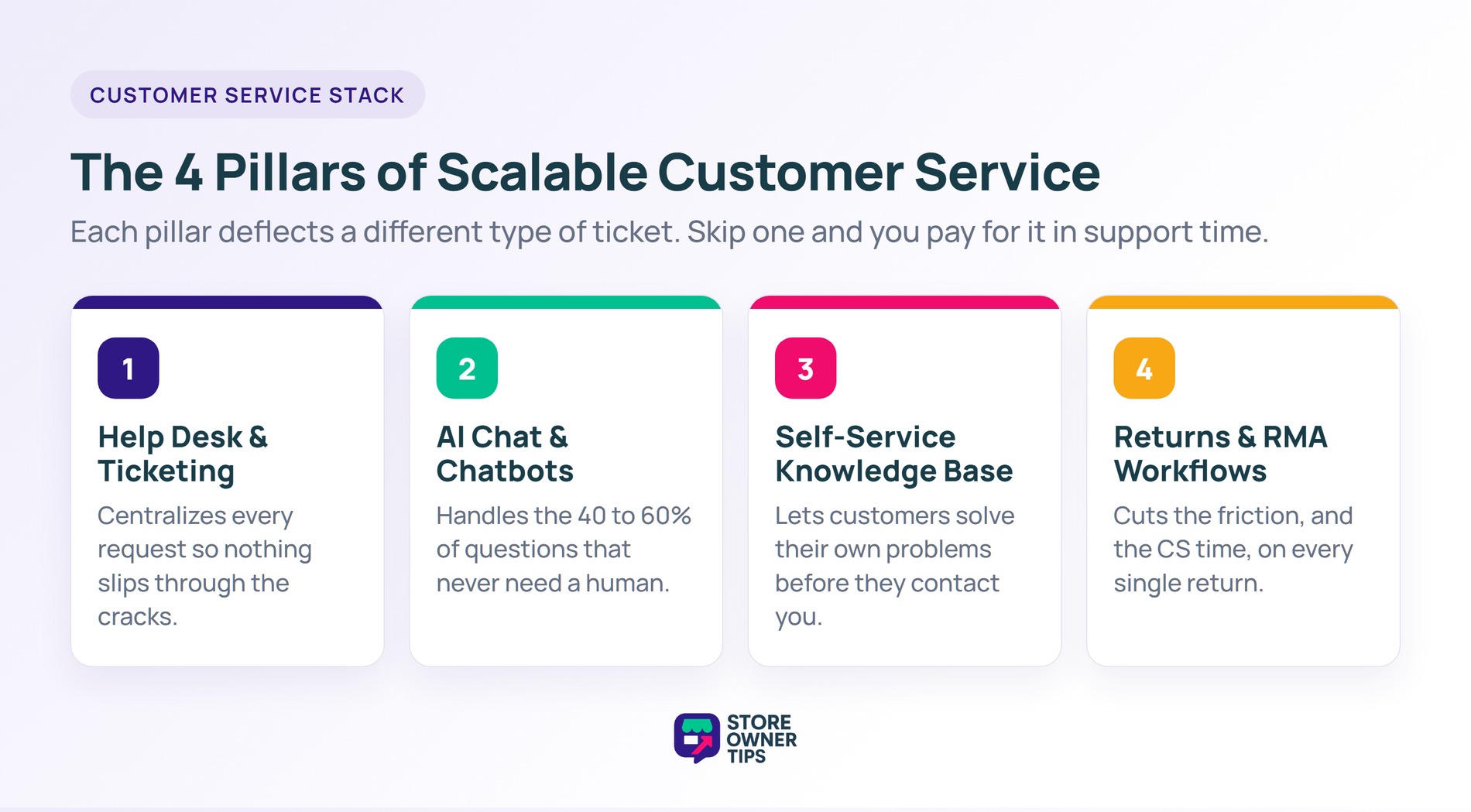
Stores that skip any pillar end up doing disproportionate CS work. For example, a store with no knowledge base answers the same shipping question 50 times a week. A store with no RMA workflow spends 20 minutes per return coordinating email chains.
When you look at 40% of CS tickets being “where’s my order?”, you don’t need more agents. You need proactive order tracking emails. Fix the top 3 ticket categories with automation before hiring.
Running an online shop means you’ll eventually get flooded with questions about shipping, tracking, and missing packages. If you try to answer every single message by hand, you’ll quickly run out of time to actually grow your business.
The secret to handling a busy store is to build a WooCommerce customer service system using four main pillars. These tools work together to answer easy questions automatically, let shoppers help themselves, and organize messy emails so nothing gets lost.
A help desk centralizes your WooCommerce customer service conversations from email, contact forms, and chat into one interface. From there, your team can organize requests, assign them to the right person, use quick search filters to find past issues, and respond to tickets.
| Plugin | Starting Price | WordPress-Native | Integrated With WooCommerce |
|---|---|---|---|
| FluentSupport | $139/yr | Yes | Yes |
| Help Scout | $20/user/mo | No (external SaaS) | Yes (plugin) |
| Zendesk | $19/agent/mo | No (external SaaS) | Yes (plugin) |
| Freshdesk | $15/agent/mo | No (external SaaS) | Yes (plugin) |
Pricing shown is approximate as of early 2026.
WordPress-native help desk that runs in your WordPress admin. All tickets and customer data stay in your database.
What I noticed in practice:
Pros:
Cons:
Best for: Small-to-mid WooCommerce stores that want WooCommerce-integrated ticketing without SaaS subscriptions.
Polished SaaS help desk with strong WordPress integration. Runs externally, integrates with WooCommerce via plugin.
Pros:
Cons:
Best for: Growing stores with 2-10 person support teams.
Enterprise help desk used by large ecommerce operations. Very feature-rich but complex to set up.
Best for: Enterprise stores with dedicated support teams managing 500+ tickets/day.
Similar to Zendesk but more affordable starting tier.
Best for: Mid-size stores wanting enterprise features without Zendesk’s complexity.

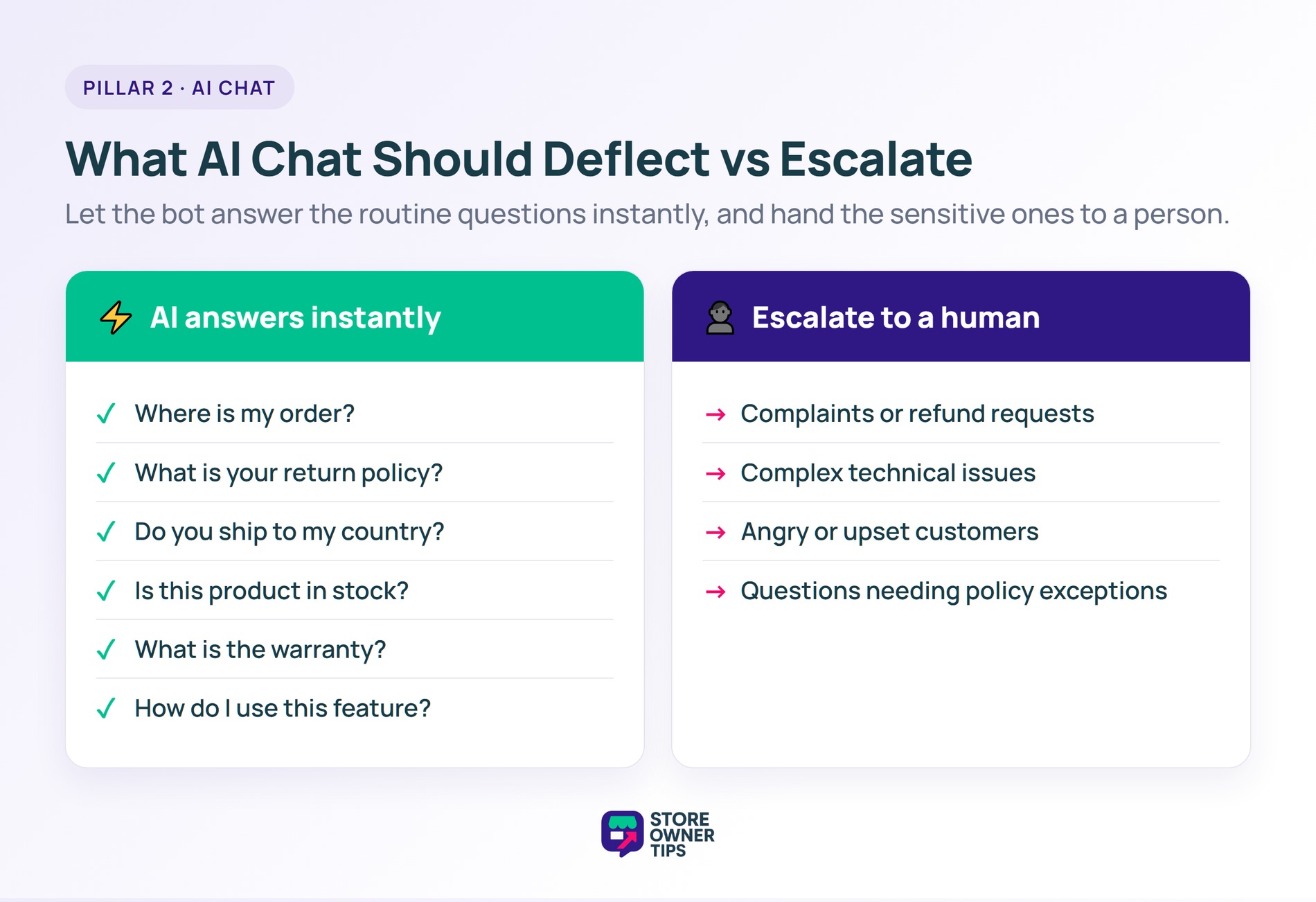
AI chat deflects questions before they become tickets. For WooCommerce stores specifically, StoreAgent AI is purpose-built to answer customer questions based on your product catalog and content.
Traditional live chat requires someone always online. AI chat works 24/7 without staff. For small stores with 1-3 people, AI chat is the only sustainable way to offer instant customer responses.
See our WooCommerce live chat setup guide for plugin comparison and configuration.
For any of these, AI chat should answer instantly without escalating to a human.
Build AI with clear escalation paths to human agents when necessary.
A knowledge base is where customers find answers without contacting you. Done right, it deflects 40-60% of repeat questions.
Start with your top 20 most-asked questions. Each needs:
A hidden knowledge base helps no one. To make it visible, make sure to:
Returns eat disproportionate CS time when handled via email. If your store offers a standard 30-day money-back guarantee, a proper (Return Merchandise Authorization) workflow reduces return-related tickets by 60-80%.
Use a plugin like:
Workflow:
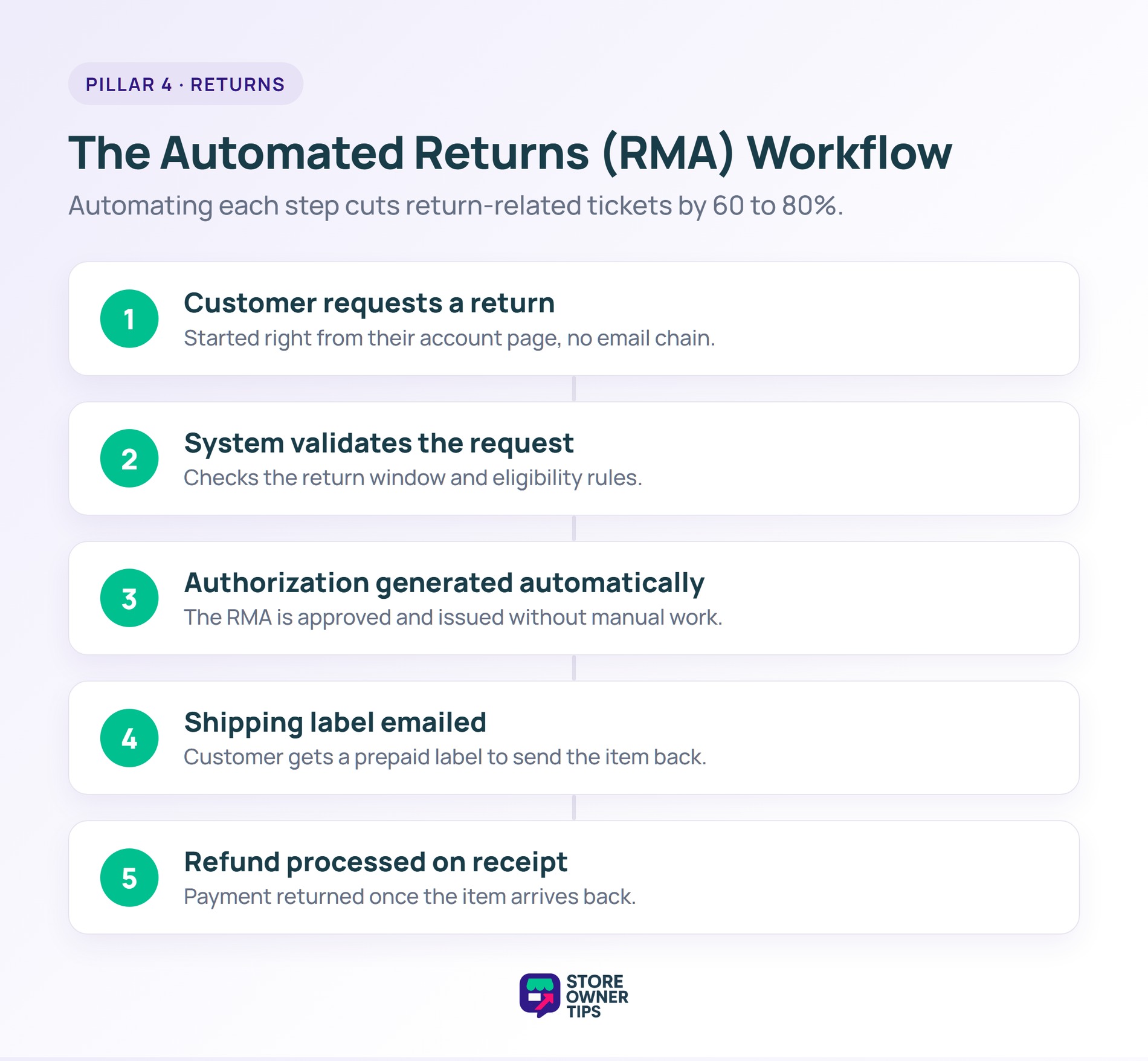
Each step automated reduces CS workload.
The single biggest source of WooCommerce customer service tickets is the classic question: “Where’s my order?”
Fortunately, you can easily reduce these with:
Plugins like AfterShip or Tracking More add these features to WooCommerce.
Rule of thumb: automate first, hire second.
Before hiring:
After those, if CS volume still exceeds your capacity, hire. But most stores we see hire too early, adding humans to handle WooCommerce customer service tickets that automation should deflect entirely.
Standard Operating Procedures (SOPs) make CS consistent and scalable.
Minimum SOPs to document:
Document these in your help desk as templates. New hires or contractors follow the same process.

Depends on ticket volume and automation. A store with good automation can handle 500+ orders/month with one part-time agent. A store without automation might need full-time support at 200 orders/month.
FluentSupport for WordPress-native integration. Help Scout for growing teams with strong interface requirements. Zendesk for enterprise operations.
Install AfterShip or similar tracking plugin. Send automated shipping notifications with tracking links. Add an order tracking page accessible from the customer’s account.
Both. Email for detailed issues requiring back-and-forth. Chat (AI-powered for 24/7) for quick questions. Offer multiple channels, meet customers where they are.
When CS volume prevents you from doing strategic work AND automation has already been exhausted. Usually at $100k+/month revenue.
Respond professionally, acknowledge the concern, offer to make it right privately. Publicly visible responses to bad reviews often improve other shoppers’ perception more than private resolution.
Yes. If your AI chatbot tracks visitor behavior to provide better answers, you must clearly disclose how the tool gathers and stores cookie information during the chat session.
Yes. The most reputable help desk tools use strict encryption standards, keeping support teams across the worldsafe from common data breaches and hackers.
Usually, yes. However, you still need to update your terms. When you use external services like Zendesk or Help Scout, you must explain in your privacy policy how these third-party partners process your personal customer information.
Yes. Additionally, if the chat widget monitors what pages a customer visits before asking a question, your policy should explain how you collect and use this browsing data.
Reviewing your customer service ticket data is one of the best ways to find broken links, clarify confusing product descriptions, and generally optimize our website for future shoppers.
You must be completely transparent with your buyers about how your customer service tools securely store and process your personal data after a ticket is closed.
Many use browser cookies. If your support tools assign a specific tracking ID to recognize returning visitors in the chat window, you need to list these unique identifiers in your cookie policy.
Whether you use a WordPress-native plugin or a standalone SaaS tool, keeping your ticketing software updated ensures your customer data remains worldsafe and secure.
Many tools track the customer journey so agents can see what a shopper tried to do before they asked for help. Legally, store owners often claim a legitimate interest to optimize their support speed by using this helpful tracking data.
Strong WooCommerce customer service isn’t about having the best agents; it’s about having the right systems. Help desk + AI chat + knowledge base + automated returns = 70% less CS workload for the exact same, or even better, user experience.
First, set up each of the 4 pillars of customer support in order. Then:
If you’re ready to build WooCommerce customer service that scales, start with FluentSupport or Help Scout as your help desk foundation. Once that’s in place, add StoreAgent AI for automated chat responses. Together, those two alone deflect the majority of easy tickets and let you focus human support on the issues that matter.

Copyright © StoreOwnerTips.com. All Rights Reserved.
