Weekly ecommerce tips, deals & news.
A store sells steadily for two years. Then a letter arrives from a state tax authority the owner has never dealt with.
There was no office in that state, no staff, and no warehouse. The store simply crossed a revenue threshold nobody knew existed. Now there’s back tax owed, plus penalties and interest on top.
I’ve seen this pattern trip up plenty of store owners. Tax rarely breaks a business on day one. Instead, it breaks it later, when everything lands at once.
This WooCommerce tax guide covers US sales tax, EU VAT, UK VAT, and GDPR compliance. It isn’t legal advice. Still, it’s practical enough that you can set your store up properly and avoid the most common mistakes.
Every store has some tax obligations. However, the complexity depends on four things:
Two categories of tax matter for ecommerce stores.
Transaction taxes: These get charged on sales. Think sales tax in the US, VAT in the EU and UK, and GST in Canada or Australia. You collect them from customers, then remit them to the authorities.
Income taxes: These get charged on business profits. They’re separate from transaction taxes. Your accountant handles them, not WooCommerce.
This guide focuses on transaction taxes, the ones WooCommerce needs to handle at checkout.
US sales tax is one of the most fragmented systems you’ll deal with. Forty-five states and the District of Columbia levy a statewide sales tax. Alaska charges none at state level, but it’s the only no-tax state that lets local governments charge their own. On top of that, many cities and counties add local rates.
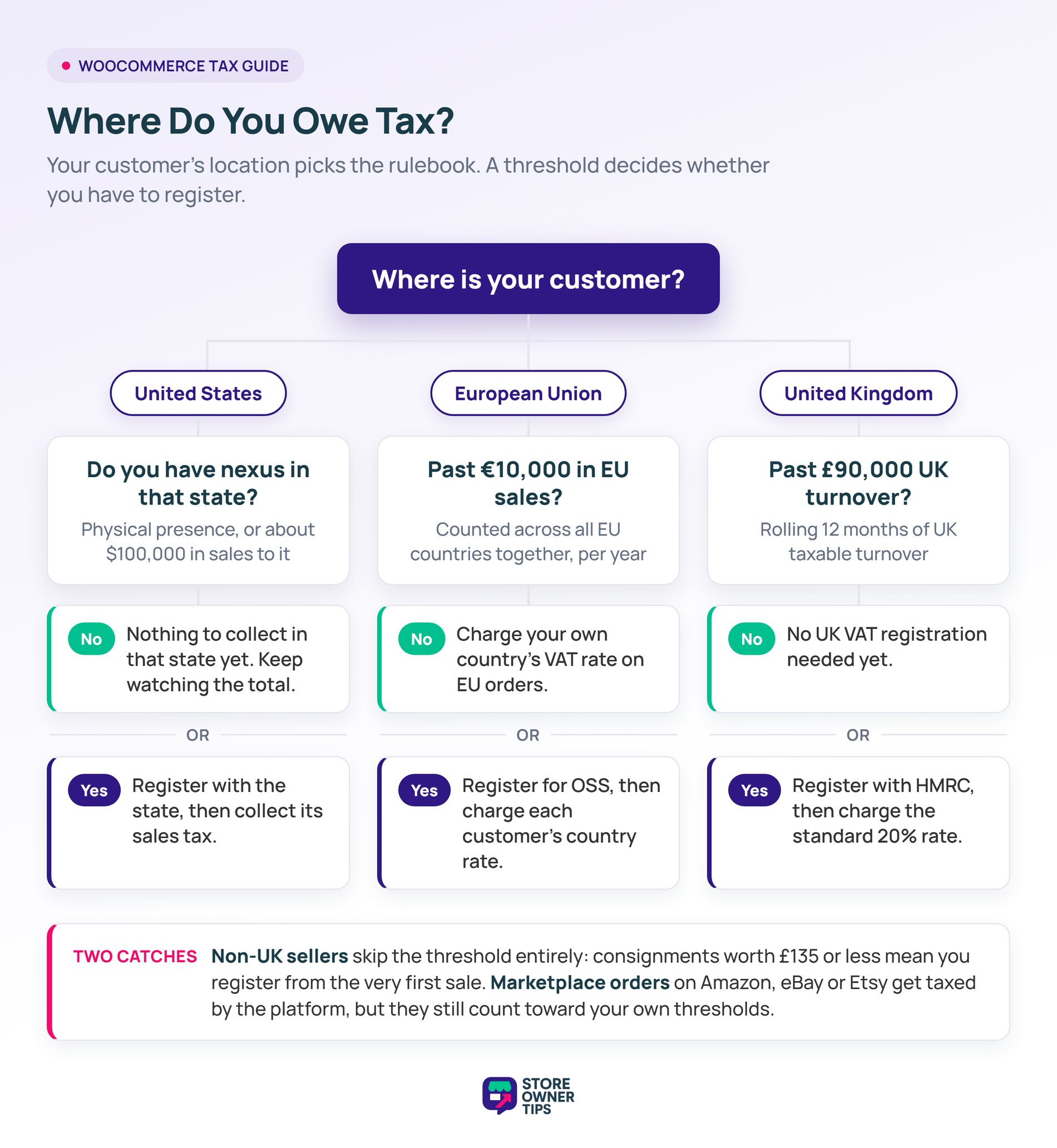
Nexus is the connection that obliges you to collect tax in a state. You have physical nexus anywhere you have a physical presence:
In South Dakota v. Wayfair, decided in June 2018, the Supreme Court overruled the old physical presence rule. As a result, states can now require sales tax collection based on revenue alone.
$100,000 in annual sales to a state is the most common trigger. Some states set the bar higher. California, Texas, and New York use $500,000, while Mississippi uses $250,000.
Many states used to add a second test of 200 separate transactions. That test is disappearing fast. As of January 2026, 16 states had dropped it, with Kentucky following in August 2026.
Cross a threshold in a state and you must register there, then start collecting.
If you sell on Amazon, eBay, Walmart Marketplace, or Etsy, those platforms handle sales tax for you. Marketplace facilitator laws make the platform responsible for collecting and remitting. So you don’t collect tax twice on those orders.
That said, your paperwork doesn’t disappear. California, for example, still requires sellers to report total sales, marketplace orders included, then claim a deduction. Meanwhile, your own WooCommerce sales still count toward nexus thresholds.
One more angle is worth knowing. If you run your own multi-vendor marketplace, those same facilitator rules can point at you instead. Check how your states define a facilitator before you launch a marketplace.
For a single-state operation, WooCommerce’s built-in tax settings can work fine. You just need correct rates for every state and ZIP code you touch. Beyond that, automation saves a lot of pain:
I compare pricing for all three further down. In practice, most stores only install tax automation after an audit letter arrives. Set it up before you need it, because one state penalty costs more than a year of software.
EU VAT changed shape on 1 July 2021. The One Stop Shop (OSS) took over from the older MOSS system. It also folded in distance sales of physical goods.
The old per-country distance selling thresholds are gone. In their place sits a single EU-wide threshold of €10,000.
Those rates vary a lot. Standard rates run from 17% in Luxembourg to 27% in Hungary, with an EU average near 21.9%.
Instead of registering in every EU country you sell to, you register in one. Under OSS you:
Non-EU businesses have options too. There’s a Non-Union scheme for services supplied to EU consumers. Meanwhile, imported goods valued at €150 or less run through a separate Import One Stop Shop (IOSS).
Digital products have needed VAT at the customer’s rate for years, going back to the MOSS era. Physical goods only joined that model in July 2021. So if you sell digital products, this rule has applied to you all along.
Use a tax automation tool for rate calculation, or enable WooCommerce’s built-in EU VAT rates by hand. Then add a VAT number field for your B2B EU customers. VAT-registered businesses use the reverse charge, so they don’t pay VAT on your invoice.
You’ll also want a clean way to handle accounts that shouldn’t be charged tax at all. Wholesale Suite lets you tax exempt a wholesale customer role, so those orders skip tax automatically. That beats granting tax exemption order by order.
UK VAT split from the EU system in 2021. If you sell to UK customers, here’s what applies:
Non-UK sellers face a stricter rule. For consignments valued at £135 or less sold to UK customers, UK VAT applies at the point of sale. There’s no turnover threshold here, so you register from the first sale.
There is one carve-out. If you only sell to UK VAT-registered businesses that supply their VAT number, you don’t have to register. Above £135, normal import VAT and customs rules take over instead.
GDPR isn’t a tax law. Still, it’s a compliance requirement for every WooCommerce store with EU customers. The top fine tier reaches €20 million or 4% of worldwide annual turnover, whichever is higher.
A consent management plugin does most of the heavy lifting. Two of them hold up well:
Check that whatever you pick is still actively maintained. WP GDPR Compliance was a popular free option for years. However, it was permanently closed on the WordPress plugin directory in February 2024. An abandoned compliance plugin only gives you false confidence.
Then add these to your store:
Once you owe tax in more than one jurisdiction, manual calculation gets risky. Three tools handle the complexity well, and each suits a different kind of store.
Best for US-focused stores with nexus in several states. Plans start at $39 per month, with a Professional tier at $99. Setup is quick and the US coverage is strong. Its international features are thinner than Avalara’s.
Best for larger stores with complex product taxability and international sales. Plans start at $699 per state, per year, priced on transaction volume. Coverage is the broadest of the three. For a small single-state store, though, it’s more than you need.
Best for SaaS and digital product sellers who need international VAT. Plans start at $29 per month, with a Startup tier at $49. The interface is clean, and the EU VAT and invoicing features are strong. Its jurisdiction coverage is narrower than Avalara’s.
Pick based on where your customers are, not on price alone. A US-only store rarely needs Avalara. An EU-heavy digital store rarely needs TaxJar.
If you’re just starting out, the built-in settings handle simpler scenarios. Here’s the order to work through them.
Keep your records exportable from day one. Filing a return means pulling order totals, tax collected, and dates for a set period. A tool like Store Exporter Deluxe can export WooCommerce orders with tax fields straight into your accounting software. Even a plain order export beats screenshotting the admin.
For most multi-state US or multi-country EU operations, move to a tax automation tool as soon as the budget allows.
WooCommerce can calculate tax once you enter rates manually under Settings > Tax. For automatic rates across US states or EU countries, you’ll need a tax plugin like TaxJar or Avalara.
No. You only collect where you have nexus. That means physical presence, or economic nexus, which is most often $100,000 in annual sales to that state.
For simple, mostly US operations, it often is. It calculates rates automatically and costs nothing. For product taxability variations or multi-state nexus tracking, move up to TaxJar or Avalara.
Not under OSS. You register in one EU country, then cover all your EU sales with a single quarterly return.
Yes. The fine tiers in the regulation are real, reaching €20 million or 4% of worldwide annual turnover. For a small store, the basics cover most of your risk. That means a cookie banner, a real privacy policy, and clear consent.
For a single-jurisdiction store with one rate, yes. For anything multi-jurisdiction, manual tax is too error-prone. Use TaxJar, Avalara, Quaderno, or the free WooCommerce Tax plugin.
Staying compliant across several jurisdictions isn’t easy, but it is manageable. Automated rate calculation, registering where you actually have nexus, and a proper GDPR setup cover most of the risk. In my experience, the stores that get hurt are the ones that never checked.
Here’s what to do next:
If you’re US-based, the fastest first step is a nexus check. Most tax platforms offer a free trial plus a nexus report that reads your sales history. It’ll tell you which states you already owe in. That turns “I don’t know” into a list you can work through.

Copyright © StoreOwnerTips.com. All Rights Reserved.
