Weekly ecommerce tips, deals & news.
A product catalog is the complete, organized record of everything your store sells. In practice, it holds each product’s name, description, images, price, stock, and attributes like size or color. Think of it as the master list your storefront, your filters, and your sales channels all read from. So get it right and every other system downstream works.
In short, the catalog is your store’s single source of truth.
Most store owners picture their catalog as the shop page shoppers browse. That page is only a rendering. The catalog itself is the underlying data, and it exists whether anyone visits or not. That distinction matters more than it sounds.
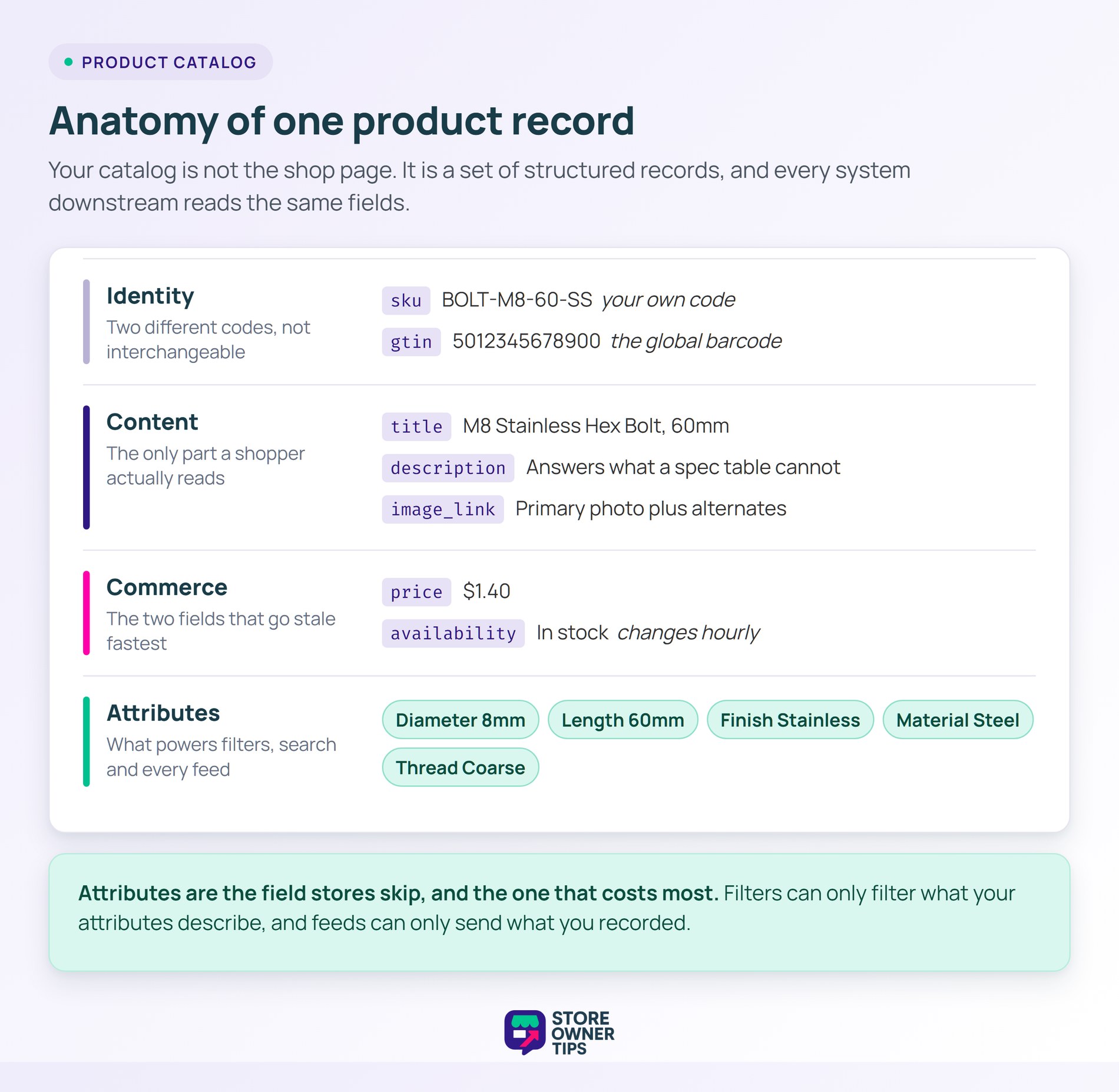
Every catalog entry is one product record. First, it carries an identifier, a name, a description, a price, and stock status. Most also carry images, a category, and a set of attributes.
The identifier is where stores get sloppy. Internally you use a SKU, which is your own code for the item. Externally, shopping engines want a GTIN, the barcode number that identifies the product globally. Crucially, those two are not interchangeable.
Attributes are the fields that describe variation. For example, a t-shirt in four sizes and three colors is not twelve products. In WooCommerce, that is one variable product with twelve variations underneath it.
Getting that shape right early saves enormous pain later. By contrast, twelve separate listings split your reviews, stock, and search ranking. One parent product keeps all of it together.
Descriptions carry more weight than store owners expect. They are the only field that answers questions a spec table cannot. Plus, they are what AI shopping tools quote when summarizing your product.
Stock and price are the two fields that go stale fastest. Both change constantly, and both get cached in several places at once. So an inventory management process matters as much as the initial data entry.
A flat list of products is not a catalog, it is a spreadsheet. Structure is what makes it browsable. Categories give shoppers a path, and attributes give them a way to narrow it.
Those attribute filters are called faceted navigation. Think of them like the sorting bins in a hardware aisle. Without them, a shopper facing 900 products has to scroll instead of choose.
This is where most stores lose money quietly. Baymard Institute found that 80% of e-commerce product lists have serious usability issues. Meanwhile, 57% of sites fail to offer all five essential filter types.
The catalog is usually to blame, not the theme. In practice, filters can only filter what your attributes describe. If half your products have no material recorded, no plugin can fix it.
Category depth is a balancing act too. Too few categories and everything lands in one bucket. Meanwhile, too many and shoppers get lost three levels down. Breadcrumb navigation helps, but it cannot rescue a badly planned tree.
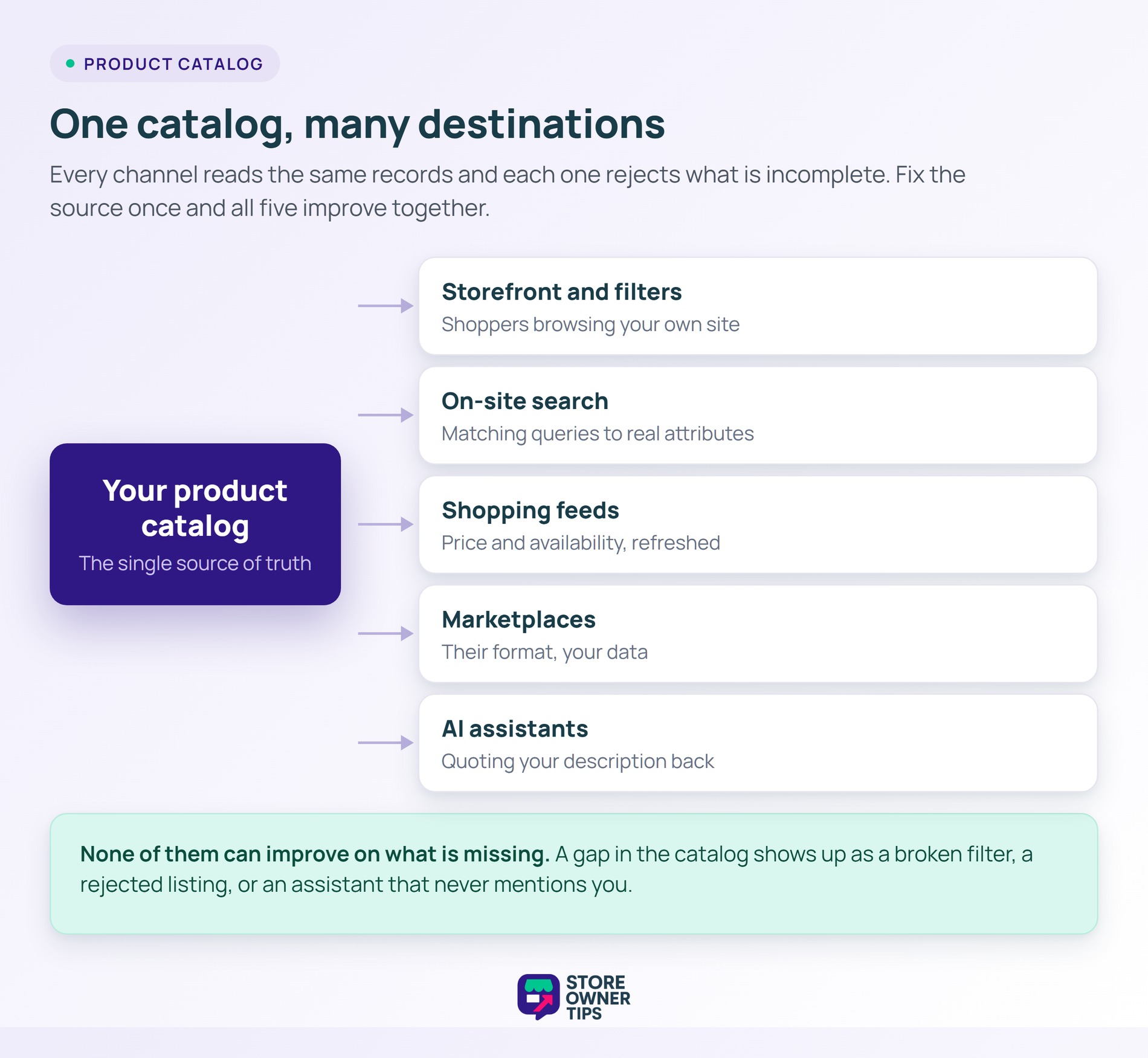
Your catalog is read by more than shoppers. Shopping engines, marketplaces, and AI assistants all pull the same fields. As a result, each one rejects records that are incomplete.
Google’s product data specification requires seven core attributes on every item. Miss one and the product simply does not serve. There is no warning on your storefront, because your storefront does not care.
The shopper-facing cost is just as real. Baymard rates 62% of mobile e-commerce product pages as mediocre or worse. In practice, thin descriptions and missing specs are a large part of that.
There is a duplication trap here as well. For example, listing the same item under several URLs creates duplicate content and splits ranking signals. Consolidating variations under one parent fixes both problems at once.
The stakes keep rising as the channel grows. E-commerce reached 16.9% of total U.S. retail sales in a recent quarter. That share gets decided by data most owners never look at.
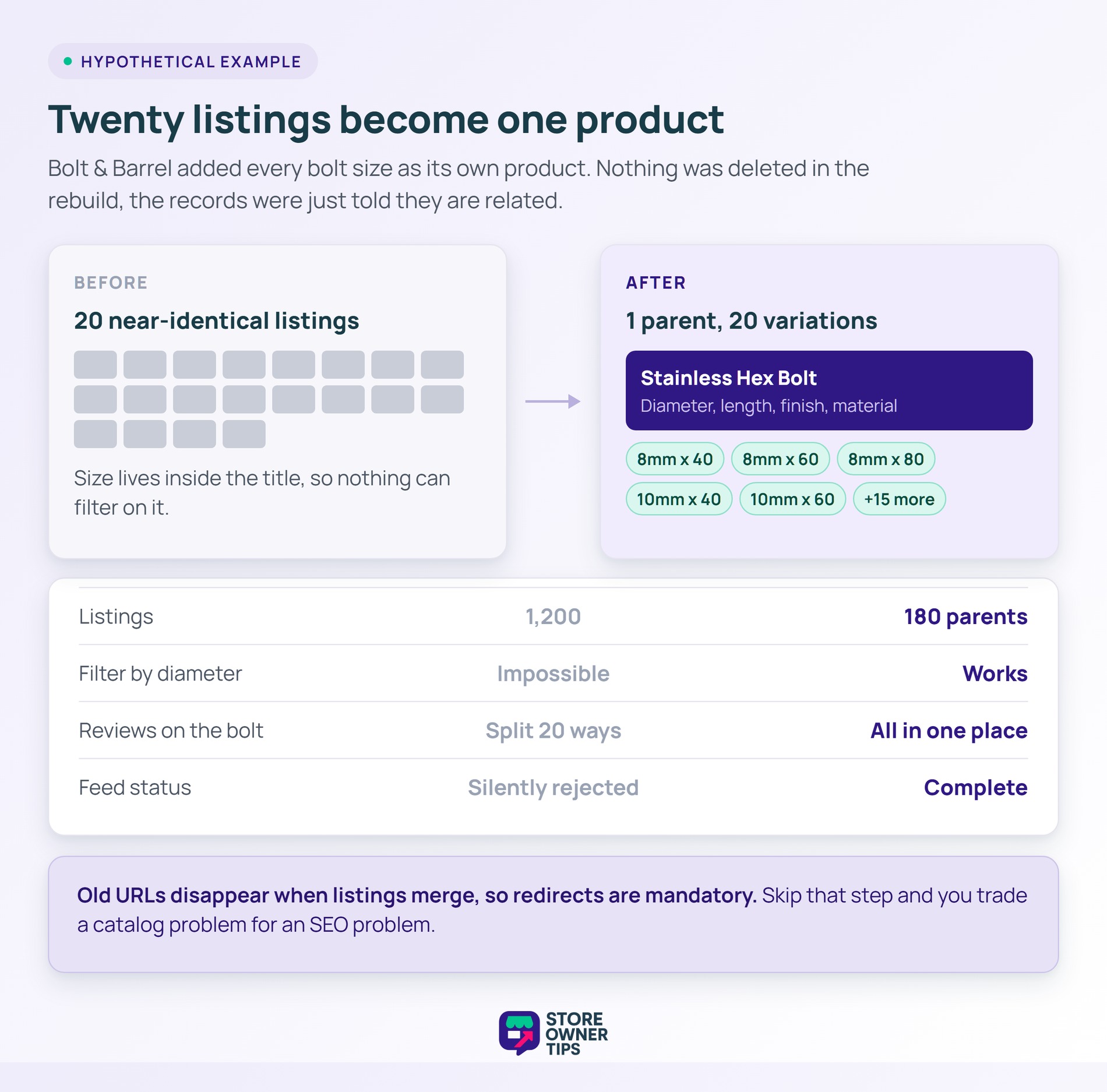
Imagine an online hardware supplier called Bolt & Barrel. It sells fasteners, fixings, and small tools to trades and hobbyists. Over time, the catalog has grown to roughly 1,200 listings.
The trouble is how those 1,200 listings were created. Every bolt size was added as its own separate product. As a result, a single bolt in five diameters and four lengths became twenty listings.
So the shop page shows twenty near-identical rows. Shoppers cannot filter by diameter, because diameter was never recorded as an attribute. It only exists inside each product title.
The feed side is worse. Most listings have no barcode recorded and no brand field. Meanwhile, those gaps are exactly the fields shopping channels require.
None of this shows up as an error. The store loads fine, orders come through, and nothing looks broken. Meanwhile, the owner just sees a conversion rate that will not move.
The owner restructures rather than rewrites. First, diameter, length, finish, and material become real attributes. Then each family of bolts becomes one parent product with variations underneath.
Those 1,200 listings collapse into about 180 parent products. Nothing was deleted, because every variation still exists and still sells. The catalog simply stopped pretending they were unrelated items.
Now the filters work. A shopper can pick 8mm, then stainless, then 60mm, and land on one page. Previously that same journey meant scrolling twenty pages of near-duplicates.
The feed benefits immediately too. With brand and barcode populated, the required fields are finally complete. As a result, listings that were silently rejected start serving.
Reviews consolidate as a side effect. Previously, twenty scattered listings had one or two reviews each. Now one parent product carries all forty in a single place.
There is a cost to the rebuild worth naming. Old product URLs disappear when listings merge, so redirects are mandatory. Skip that step and you trade a catalog problem for an SEO problem.
The work itself is unglamorous. It is attribute mapping, bulk editing, and a lot of checking. Still, it is the highest-leverage week the store has spent in years.
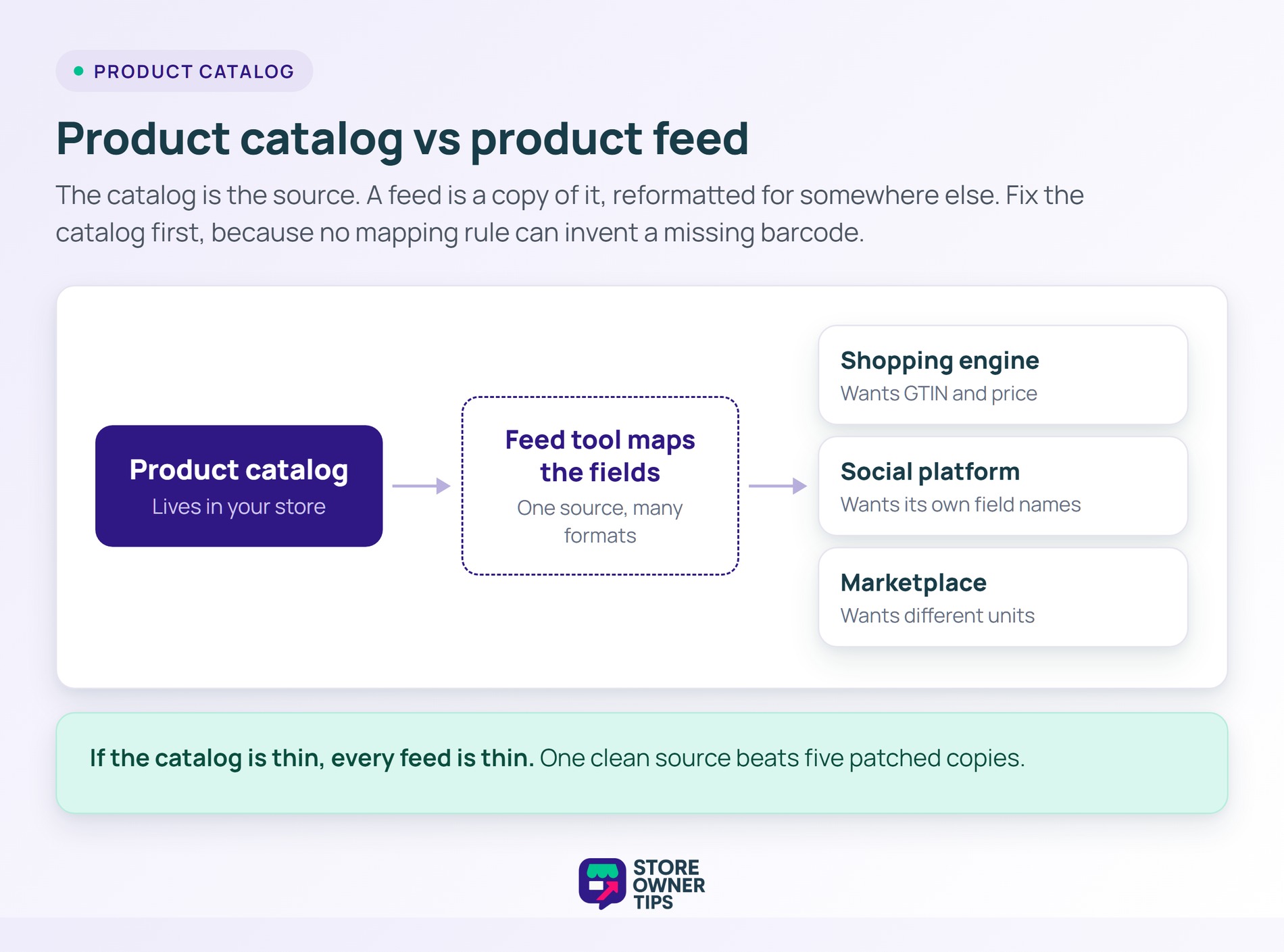
These two get used interchangeably, and they should not be. Your catalog is the source. Meanwhile, a feed is a copy of it, formatted for somewhere else.
The catalog lives in your store and serves your own shoppers. A product data feed is generated from it and sent outward. Shopping engines, social platforms, and marketplaces each receive their own version.
The formats differ because the destinations differ. For example, one channel wants a specific field name, another wants different units. In practice, a feed tool maps your catalog fields to whatever each channel demands.
That mapping is why feeds break so often. If the catalog is thin, the feed is thin, and no rule can invent a missing barcode. For a fuller explanation, see this guide to what a product feed is.
So fix the catalog first, then the feed. Doing it the other way round means patching the same gaps over and over. In short, one clean source beats five patched copies.
There is no right number, only a right structure. In practice, a hundred well-described products will outsell a thousand thin ones. Size matters far less than completeness.
That said, catalog size does change your priorities. Under a few hundred products, careful manual entry is realistic. Past that, you need bulk editing, import rules, and a clear attribute standard.
Growth is what exposes weak foundations. For example, a messy catalog of eighty products is annoying, while eight thousand is unmanageable. So set the attribute rules while the catalog is still small.
A category page is a view, not the data itself. It queries your catalog and displays whatever matches. So change the catalog and every category page changes with it.
Think of the catalog as a library’s index and the category page as one shelf. Rearranging the shelf does nothing if the index is wrong.
That is why fixing a bad category page rarely works. The page only reflects what the records contain. If products lack a color attribute, no layout change will produce a color filter.
You need them for anything sold beyond your own site. Shopping channels use them to match your item to a known product. Without one, your listing often cannot be verified.
You do not need them for handmade or own-brand items that have none. In those cases, brand plus your own identifier is usually accepted. Still, record whatever identifiers you have, because channels keep tightening these rules.
The practical advice is simple. So capture the barcode at the moment you receive stock. Chasing them retroactively across a thousand items is a genuinely miserable project.
Your product catalog is the foundation every other system stands on. Search, filters, shopping feeds, and AI assistants all read the same records. None of them can improve on what is missing.
So invest in complete attributes and sane structure before you invest in traffic. A clean catalog quietly makes everything downstream work better.
Copyright © StoreOwnerTips.com. All Rights Reserved.
