Weekly ecommerce tips, deals & news.
Sooner or later, a trade customer asks the same question. Can you invoice us on net 30, like everyone else does? It’s a reasonable request. It’s also the moment most store owners learn that WooCommerce payment plans are not one feature.
WooCommerce takes payment at checkout. That’s the whole design. So the first time a buyer asks to be billed later, the answer has to come from a plugin.
Here’s where it gets confusing. The phrase payment plan covers three genuinely different arrangements, and the plugins that serve them aren’t interchangeable. Pick the wrong shape and you’ll have a working system doing the wrong job.
I’ve seen this trip up plenty of stores, so this guide separates the three first. Then it covers the credit question most roundups skip. The tools come after that, because the tool is the easy part.
Jump to:

Three arrangements hide behind one phrase, and they differ on the thing that matters most: who risks not getting paid.
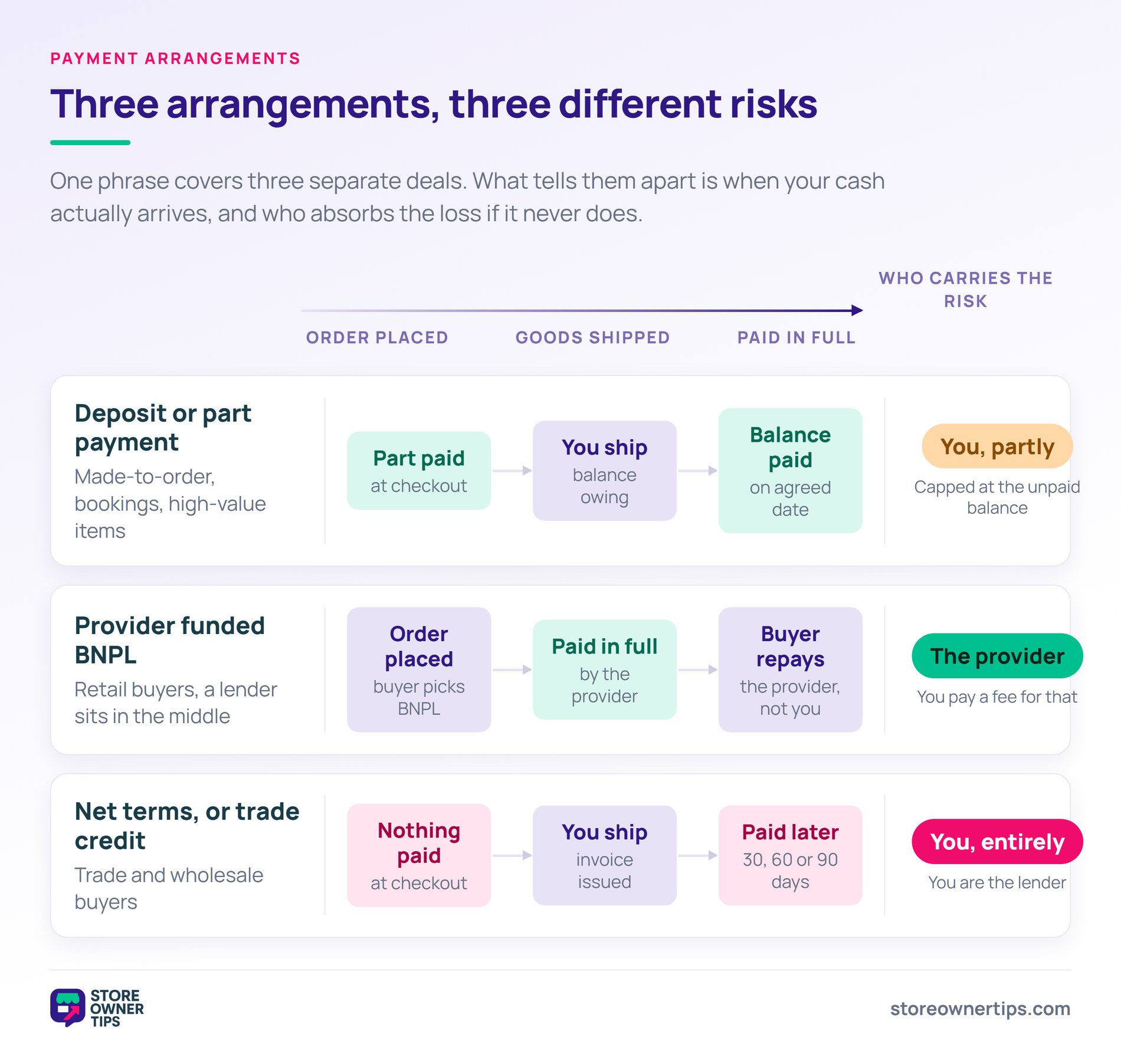
Deposits and partial payments. The customer pays part of the total at checkout, and the balance later. Common for made-to-order goods, bookings and high-value items. You’re holding a commitment plus some cash, so your exposure stays capped.
Instalments, including buy-now-pay-later. The customer pays in scheduled portions over time. In a true BNPL arrangement, a third-party provider pays you in full up front. They then collect from the customer and carry the credit risk, for a fee.
Net terms, or trade credit. You ship the goods, send an invoice, and the customer pays within an agreed window. Thirty, sixty or ninety days are the usual choices. This is how a large share of trade actually happens.
The scale is worth appreciating. U.S. merchant wholesalers recorded $11,382.3 billion in sales in 2022, up 17.4% on 2021. Terms are the payment convention across most of that volume. That’s why trade buyers treat them as a baseline rather than a favour.
The distinction that matters most is who carries the risk of not being paid.
| Deposit / partial | True BNPL (provider funded) | Net terms | |
|---|---|---|---|
| Who carries credit risk | You, on the balance | The provider | You, entirely |
| Paid before dispatch | Partly | Yes, by the provider | No |
| Typical buyer | Retail | Retail | Trade and wholesale |
| Needs qualification | No | Provider decides | Yes, you decide |
BNPL is not net terms. With provider-funded BNPL, someone else takes the credit risk and charges you a fee for it. With net terms, you’re the lender. That’s why the tooling differs, and it’s why the next section comes before the plugin list.
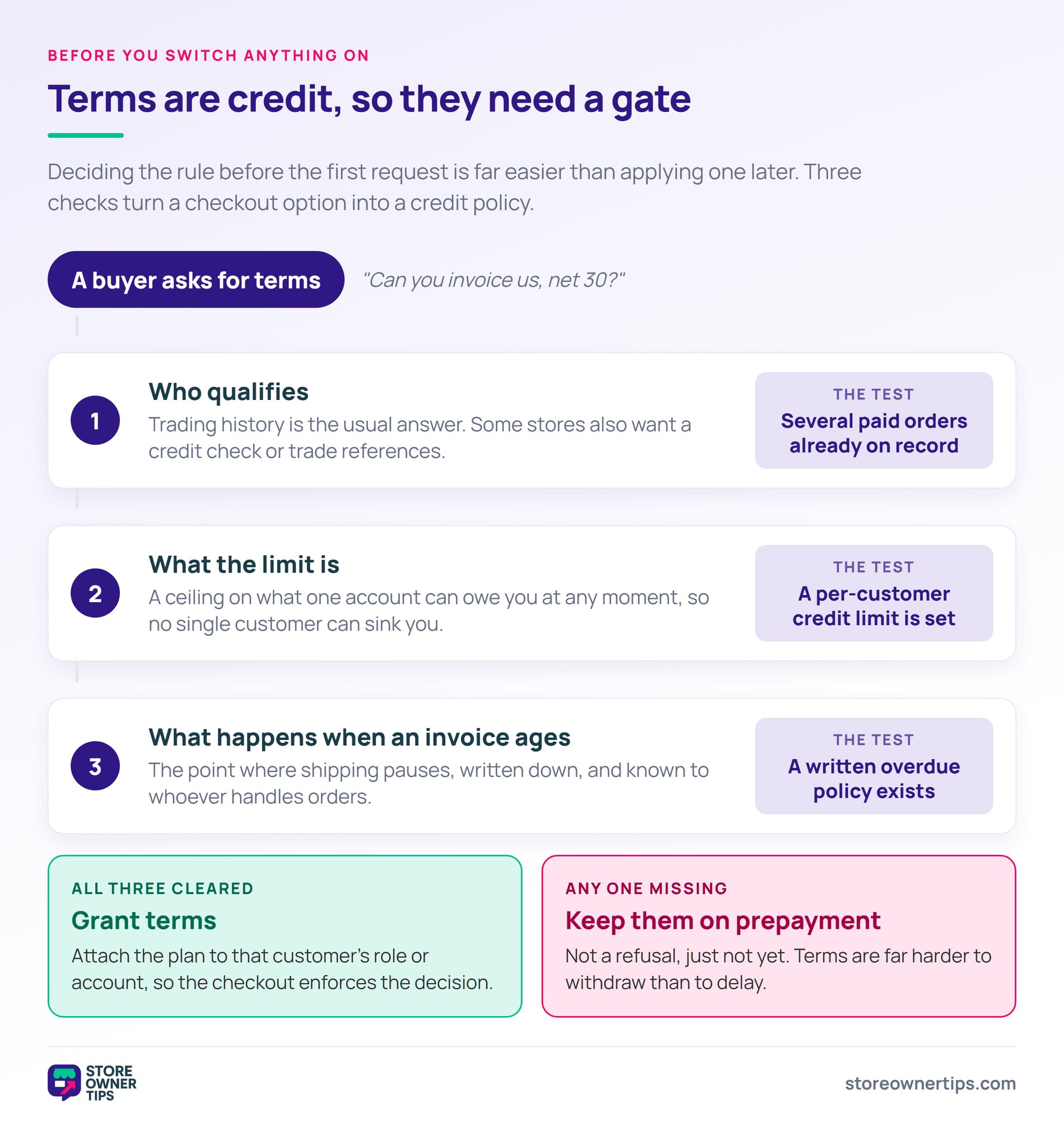
Net terms are a lending decision before they’re a technical one, and no plugin can make it for you.
The case for offering them is short. Trade buyers expect terms, and in my experience a supplier who insists on card payment at checkout often gets skipped. A buyer ordering against an invoice also isn’t limited by the cash in their account that day. That’s a real commercial advantage, and it’s the same mechanism that grows your exposure.
Building out the trade side of a store takes groundwork first. Our guide to starting a WooCommerce wholesale store covers the pricing and account setup that usually comes before terms.
The case against is cash flow, and the numbers are worth sitting with. In the US, 43% of B2B credit sales are overdue. Around 5% of long overdue invoices end up written off as bad debt.
Every invoice on 30-day terms is your money funding someone else’s business for a month. So if your suppliers want paying in 14 days and your customers pay in 45, growth widens that gap.
Three things to decide before you switch anything on:
🔍️ What we’ve seen: the most common mistake is offering terms to whoever asks first. It’s usually a customer the store didn’t want to lose. Terms then become hard to withdraw without straining the relationship. Deciding the qualification rule before the first request is far easier than applying one later.
The honest framing is that terms are a service you provide, and providing it costs you real money. Price that in, or restrict who gets it.
If the vocabulary is new, the Wholesale Suite guide to net payment terms in WooCommerce is a useful primer.
With the three arrangements separated, the tool choice gets much simpler. Here are five options, and the arrangement each one actually fits.
Wholesale Payments was built for trade credit from the start, rather than adapted from a retail deposits plugin. That’s the reason it sits at the top of this list.
It ships with three ready-made plans: NET30, an initial 50% payment, and three equal payments. Each plan is a breakdown of scheduled portions. For every portion you set the days after order, then choose a fixed amount, a percentage, or no payment required. That last option is what lets an order go through with nothing taken at checkout.
Two details matter in practice. Reminders can be scheduled before a payment falls due, and again after it goes overdue. That’s the part stores usually end up doing by hand. And plans can be limited to chosen wholesale roles or to named wholesale users.
That restriction setting is what turns terms into an actual credit policy. You decide who qualifies, and the checkout enforces it rather than a policy document nobody opens.
Orders generate invoices automatically, and the invoice list filters by processing, overdue, completed and cancelled. So you can see what’s outstanding without exporting anything to a spreadsheet.
One requirement to know up front: setup begins by connecting a Stripe account. If Stripe isn’t your gateway, this one won’t fit, and that’s worth checking before you buy. It also comes as part of the Wholesale Suite All Access Bundle rather than a standalone purchase.
Suits: stores extending genuine trade credit to qualified wholesale customers.
A freemium plugin for taking a deposit at checkout and collecting the balance later.
The free version handles deposits as a fixed amount or a percentage. Customers then pay the balance from their account page. The premium version adds payment schedules by days, weeks, months or years, plus balance reminder emails and role-based deposits.
What’s missing on either tier is the credit side. There’s no per-customer credit limit, and no aged-debt view built around an invoice getting older. So it does the deposit job well without becoming a terms system.
Suits: made-to-order and high-value retail where you want commitment up front, not trade credit.
A marketplace extension for splitting a purchase into scheduled instalments, deposits or layaway.
Plans can be set per product, on the cart, or store-wide. Three scheduling styles cover most cases: custom dates, fixed recurring intervals, or instalments counted back from a deadline. Reminders are well covered too, with manual, automatic, overdue and failed-payment types.
Where it stops short for trade is customer gating. The documentation doesn’t describe restricting a plan to a role or a named customer. So terms can’t be granted selectively, which is the whole basis of a credit policy.
Suits: fixed instalment plans on specific products, like a course or a high-ticket item.
Another marketplace option in the instalment category, with more control over scheduling dates.
Plans attach to products or to a cart subtotal, and due dates can be synchronised to set calendar dates. Reminder emails go out automatically before each due date. Miss one and the plan purchase moves to overdue status on its own.
This one gets closer to selective terms than most here. Rules include a user filter that limits a plan to specific users, though not to a role. Still, there’s no credit limit and no net-terms invoicing behind it.
Suits: stores needing several different instalment structures across a catalogue.
Marketed as a buy-now-pay-later plugin, though that label is worth reading carefully.
The plugin advertises no third-party middlemen, working across Stripe, Authorize.net and 28 or more gateways. So you’re the one collecting the instalments, and the credit risk stays with you. It handles automatic billing, retries failed instalments, and sends reminders before each payment is due.
That’s a useful distinction to hold on to. A plugin named buy-now-pay-later isn’t the same as a provider funding the purchase for you. Check which one you’re getting before you assume the risk has moved.
Suits: retail stores wanting to offer instalments on their own existing gateway.
The pattern across all five is fairly clear. Four of them schedule payments against a product or a cart. Only one is built around granting credit to a chosen customer.
Here’s how they compare on the capabilities that decide a trade setup:
| Plugin | Deposits | Instalments | Order with nothing paid at checkout | Restrict by role or user | Reminders |
|---|---|---|---|---|---|
| Wholesale Suite Wholesale Payments | Yes | Yes | Yes, via no payment required | Roles and named users | Before due and after overdue |
| Deposits & Partial Payments | Yes | Premium only | Not documented | Roles, premium only | Balance reminders, premium only |
| Ultimate Payment Plans | Yes | Yes | Not documented | Not documented | Before due, overdue, failed |
| Payment Plan Suite | Yes | Yes | Not documented | Named users only | Before due |
| Payment Plans for WooCommerce | Yes | Yes | Not documented | Not documented | Before each payment |
Every cell above comes from each plugin’s own documentation. Where a capability isn’t described there, it’s marked as not documented rather than absent. So check with the developer if it’s the one thing you need.
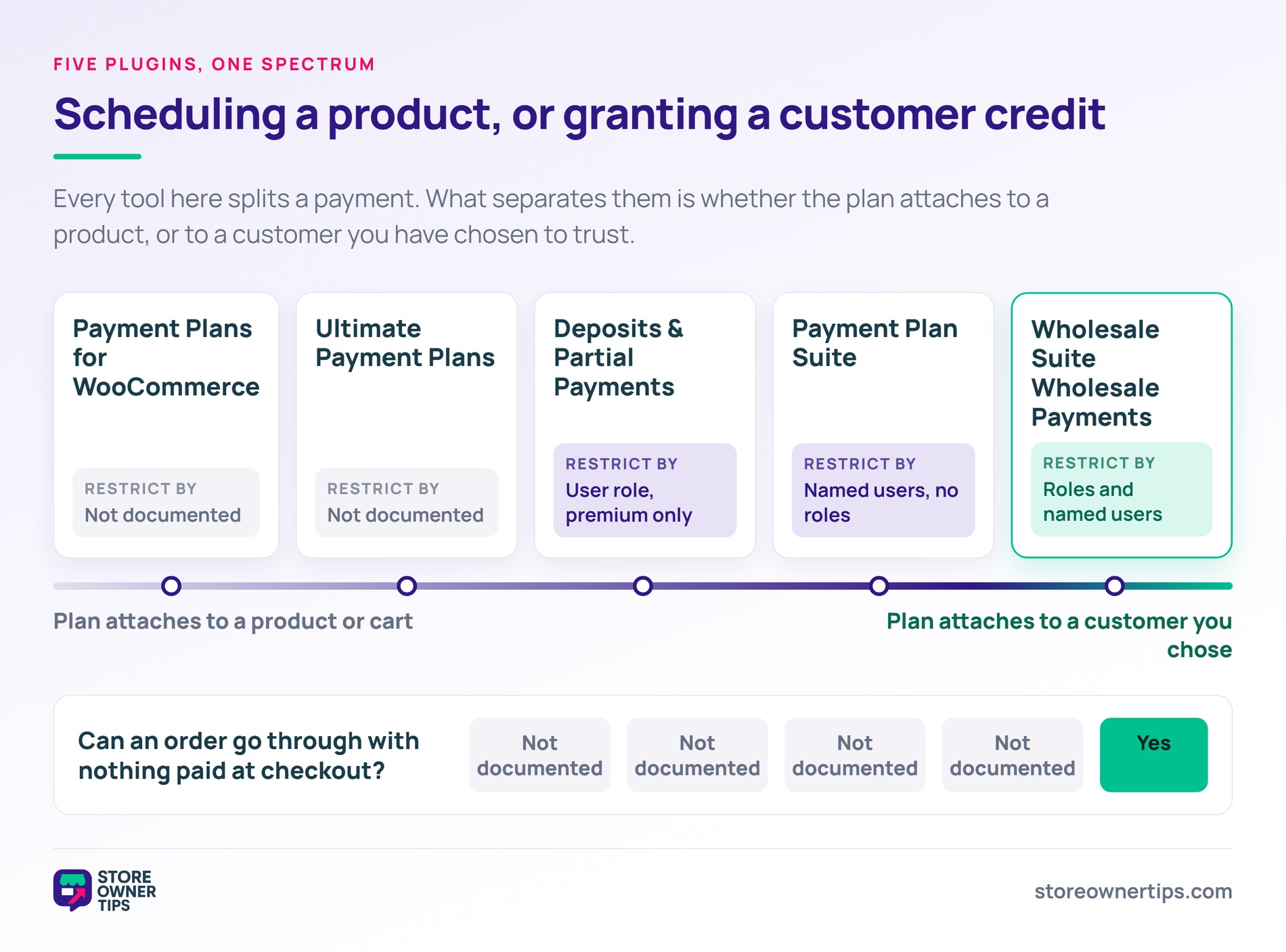
Five capabilities decide the tool once you know which arrangement you need.
For the wider trade setup, our roundup of WooCommerce wholesale plugins covers pricing and ordering. Meanwhile, our guide to B2B plugins for WooCommerce covers the account-management side. And our net terms explainer covers the vocabulary buyers will use.
Buyers who need a price before they order are a related but separate case. That one is handled by request-a-quote plugins rather than payment plugins. Quoting comes before the order, and terms apply after it.
Not out of the box. WooCommerce collects payment at checkout by default. Net terms need a plugin that can place an order without taking payment. It also has to record what’s owed and handle the invoice and reminders.
Wholesale-focused payment plugins do this. General deposit plugins usually don’t.
With true buy-now-pay-later, a provider pays you in full and collects from the customer. They take the credit risk in exchange for a fee. With net terms, you deliver the goods and wait for payment yourself. The risk is entirely yours.
BNPL suits retail. Net terms suit trade relationships. Watch the labels though, because some plugins use the BNPL name while you fund the plan yourself.
No. Terms are credit, and giving credit to unqualified customers is how bad debt builds up.
The usual approach has three parts. Require a trading history of several paid orders first. Then set a per-customer credit limit. Decide in advance when overdue invoices pause further shipments.
Choose a plugin that schedules reminders before the due date and after it. That way chasing isn’t a manual job. Beyond the tooling, set a written policy for when shipping pauses on an overdue account. Make sure whoever handles orders knows it.
The plugin can send reminders. Only you can decide when to stop supplying.
Yes, if your plugin can restrict plans by user role or by named user. That’s the mechanism that turns terms into a credit policy rather than a checkout option. New trade customers might get a 50% deposit arrangement. Established ones get net 30, and your largest accounts net 60.
Often, though it isn’t guaranteed. A buyer ordering against an invoice isn’t limited by the cash in their account that day. That’s a genuine commercial benefit. It’s also what increases your exposure to a single customer, which is why credit limits matter.

Offering terms isn’t a checkout feature you switch on. It’s a lending decision you enforce at checkout. The plugin question sits downstream of the policy question. Get that order wrong and you’ll have a well-configured system extending credit to the wrong people.
For stores extending genuine trade credit, Wholesale Payments is the closest fit here. It treats terms as something you grant to qualified wholesale roles and named users. Reminders run before each due date and again after it. Confirm Stripe suits your store first, because the setup starts there.

Copyright © StoreOwnerTips.com. All Rights Reserved.
