Weekly ecommerce tips, deals & news.
A persistent cart is a cart that survives. The shopper closes the tab, comes back on another day or another device, and their items are still sitting there. WooCommerce ships one, and most store owners don’t realise it, because it only covers people who are logged in.
The gap most stores never plan for is what happens at the edges of that. Guests get a session and then nothing. And the moment a shopper deliberately moves an item out of the cart to keep it for later, it leaves your abandonment reporting as well.
In practice, every store reaches the same moment. A shopper has five things in the cart, decides to buy two, and doesn’t want to lose the other three.
Without a save option, they delete the three items. That intent is gone, and you never find out what they wanted.
Below is what WooCommerce already persists, the three ways to extend it past the live cart, and how to measure cart persistence honestly.
Jump to:
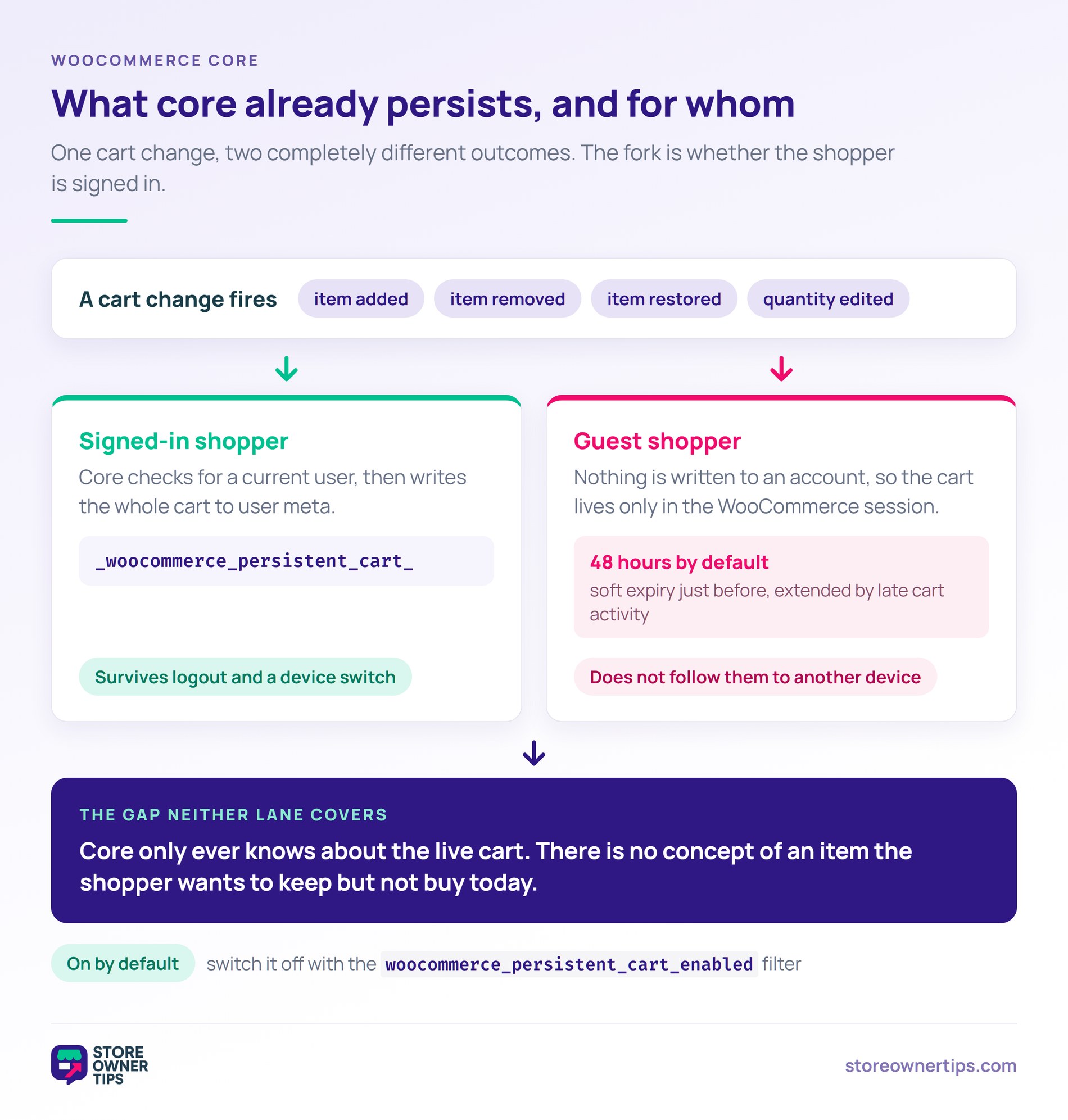
Start with what you already have, because it is more than most stores assume. WooCommerce core saves a logged-in shopper’s cart against their user account, and the behaviour is switched on by default.
The cart is written to user meta under a _woocommerce_persistent_cart_ key, and it updates whenever the cart changes: an item added, an item removed, an item restored, or a quantity edited. Developers can turn the whole thing off with the woocommerce_persistent_cart_enabled filter, which defaults to true.
Three limits are worth knowing before you plan around it:
So the built-in persistent cart is real, and it is narrow. It keeps a logged-in basket intact across devices, which genuinely helps a returning shopper, and it does nothing at all for the two cases that lose you the most intent: the guest who never signs in, and the item a shopper parks on purpose.
The persistent cart holds whatever is in the cart. Move an item out of it to keep for later and the item is outside that system: the cart total drops, shipping thresholds recalculate, and any cart-level discount re-evaluates.
That last part catches stores out. Free shipping over a threshold is the usual casualty. Moving items to a saved list can push the shopper back under it. The message they see changes mid-session, and it can read like the offer was pulled.
Three things change the moment an item moves:
None of that is a reason to skip the feature. It’s a reason to know what you’re changing before you turn it on.
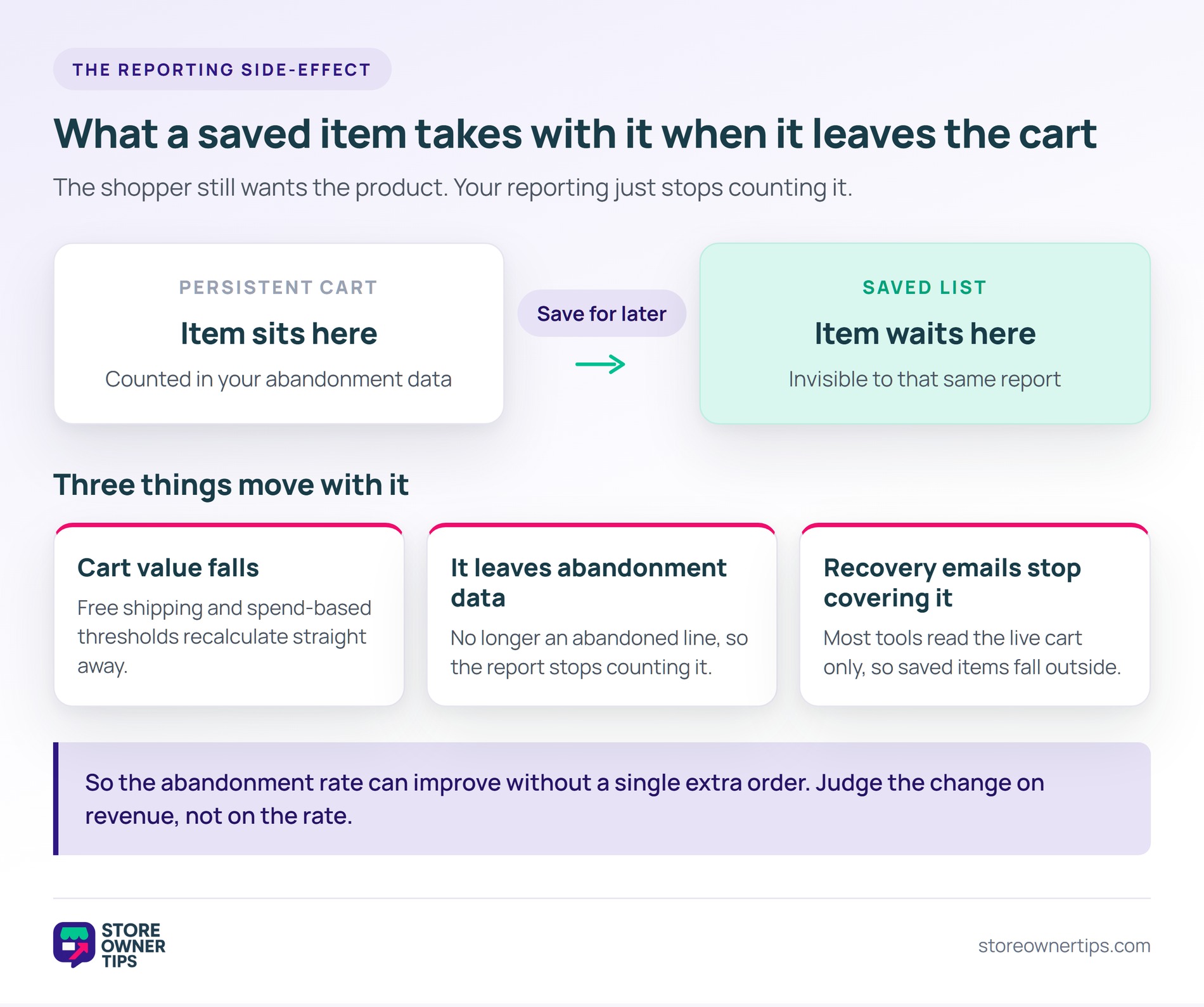
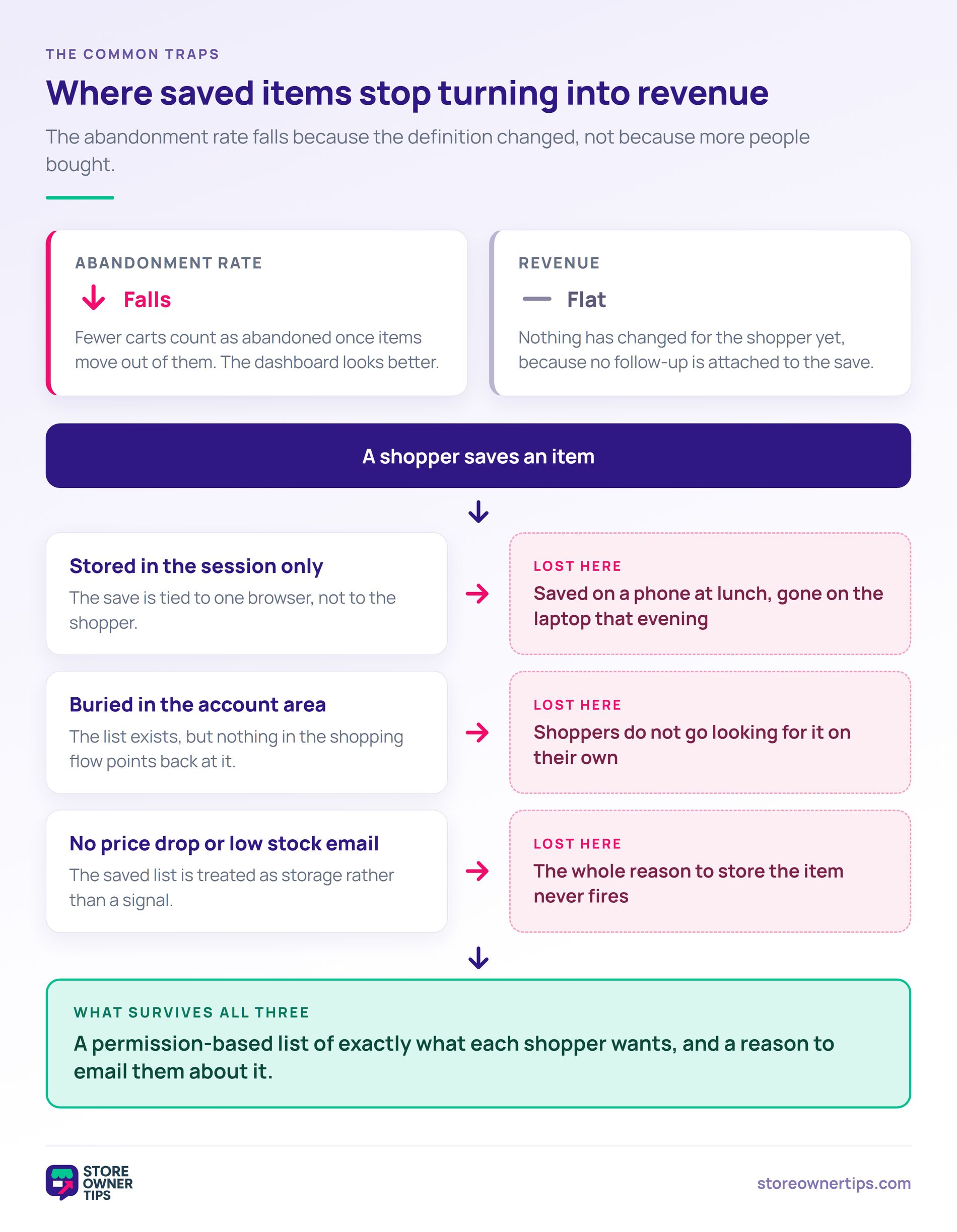
However, your abandonment rate improves partly because the denominator changed, not because more people bought. Fewer carts sit unfinished, since some of that intent moved into a list your report doesn’t read.
The baseline is worth keeping in view. According to Baymard Institute, the average documented cart abandonment rate is 70.22%, last updated in September 2025. A number that high moves easily when you change what counts as a cart.
So treat a post-launch drop as a measurement change until you can prove otherwise. The honest test is whether revenue moved, not whether the rate did.
I’ve seen this misread as a win more than once. A store adds a save option, the rate falls a few points, and the feature gets credit it hasn’t earned yet. Worth reading alongside the changes that actually reduce cart abandonment, which move orders rather than definitions.
Still, the genuine gain sits elsewhere. A deleted line is gone for good. A saved item comes with a shopper still attached to it.
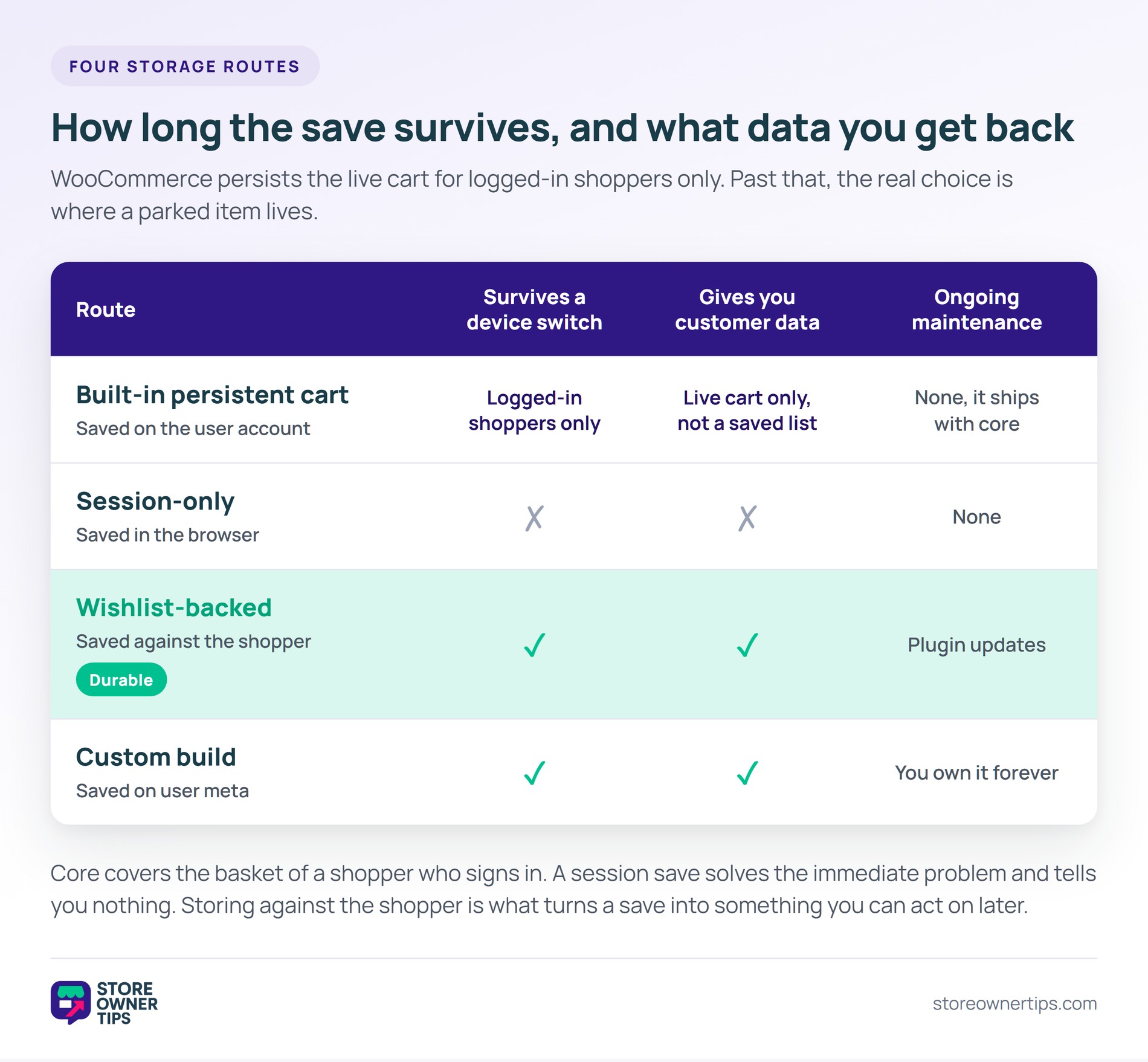
Core persistence stops at the live cart, and there is no built-in control for parking an item. So the real decision is where a parked item lives. The three routes differ mainly in how long it survives.
By contrast with the built-in behaviour, the lightest option keeps parked items in the browser session. A shopper moves something out of the cart and it sits below, ready to move back.
It’s quick to add and it solves the immediate problem. The catch is that the list belongs to that browser, so it inherits the same 48-hour ceiling as a guest cart. Switch to a phone and the save is gone.
You also get no data from it. Nothing attaches to a customer record, so you can’t email anyone about what they saved. The save happens and then it’s invisible to you.
Meanwhile, the durable version writes the save to a wishlist instead of a session. The item survives across sessions and devices, because it’s stored against the shopper rather than the browser. That is the same principle core uses for the persistent cart, applied to items the shopper isn’t buying yet, and it is what our glossary calls a persistent wishlist.
That’s the route I’d point most stores at, and the reason is data rather than convenience. A saved item now carries a shopper you can contact and a product you can report on.
SaveTo Wishlist Lite is a free way to add that layer. Multiple lists let a shopper separate a genuine save from a maybe. SaveTo Wishlist also covers the guest wishlist case, where shoppers save without an account.
The honest trade-off: a wishlist is a slightly bigger idea than a cart utility. Some shoppers read “wishlist” as aspirational and “save for later” as practical, so the label you put on the button matters.
Finally, agencies sometimes store parked items directly against the user record, much the same place core keeps the persistent cart. It gives you full control of the markup and the data model.
It also gives you a feature to maintain forever. Every WooCommerce release becomes something to retest, and you own any edge case around variations and stock.
Worth it if saving is central to your model. Hard to justify if you mainly want the cart to stop losing items, which core already half solves.
Whichever route you pick, name the control the same thing everywhere. A button that says Save for later and a page headed My Wishlist will generate support email.
As a rule, track the parked item all the way to an order, not just the save itself. A save count on its own tells you the button works, which was never the question.
Four numbers answer whether the feature earns its place:
Give the window room. A save is a deliberate not-yet, so judging it on a seven-day window will understate it badly.
Then hold your abandonment rate to one side. Compare it against the same period last year, not the week before launch. The metric’s definition effectively changed on the day you shipped.
🔍️ One thing we see constantly: a store adds a save control on top of the persistent cart, watches the abandonment rate fall, and calls it success. Nobody checks whether revenue moved, and the saved items quietly sit there with no follow-up attached.
That said, it’s an easy trap, because the dashboard genuinely looks better. The rate is real, but the cause is a definition change rather than more orders.
Three other patterns come up often:
That last one is where most of the value sits. Saved items are a permission-based list of what each shopper wants. It goes stale if nothing uses it.
If you want the shopper-side definition of parking an item, our save for later glossary entry covers the psychology behind it. SaveTo Wishlist also has a straight wishlist versus save for later comparison if you’re deciding what to call the control.
A persistent cart keeps a shopper’s cart contents between visits instead of emptying when the session ends. They can close the browser, come back days later, and the items are still there. WooCommerce does this for logged-in shoppers by storing the cart against their user account. Guests rely on a session that expires instead.
Yes, for logged-in shoppers, and it is on by default. Core saves the cart against the customer’s user account whenever items are added, removed, restored or changed in quantity, so it follows them to any device they log into. Developers can switch it off with a filter. There is no equivalent for guests.
For a guest, the default session runs for 48 hours, with a soft expiry just before that, and the window extends if there is cart activity as it closes. For a logged-in shopper, the persistent cart has no expiry of its own, so items can sit there indefinitely. That gap is why guest saves need somewhere more durable to live.
No, though they solve overlapping problems. A persistent cart keeps items the shopper intends to buy, in the cart, ready for checkout. A wishlist holds items they are considering, deliberately outside the cart. Plenty of stores need both: one to stop the basket emptying, one to catch what the shopper is not buying today.
A persistent cart can genuinely help, because a returning shopper finds their basket intact instead of rebuilding it. Moving items out to a saved list is different: those items stop counting as abandoned, so the measured rate falls without more orders. Judge either change on revenue per shopper rather than on the rate alone.
Not from WooCommerce core, which checks for a logged-in user before it saves anything. A guest cart lives in the session and goes when that expires. If guests matter to your store, storage tied to a wishlist covers them without forcing registration. Baymard Institute finds 18% of non-browsing cart abandonments happen because a site wanted an account.
Yes, if a meaningful share of your shoppers check out as guests, or regularly arrive with more in the cart than they intend to buy today. Multi-item baskets, considered purchases and higher price points all point that way.
By contrast, it matters less for single-item impulse buying. If most carts hold one thing, a save control adds a step without much to catch.
Here’s what to do next:
A persistent cart keeps the basket. Everything past that only pays off when something acts on the saves. If you want durable storage and the follow-up in one place, SaveTo Wishlist Lite is free and handles both.

Copyright © StoreOwnerTips.com. All Rights Reserved.
