Weekly ecommerce tips, deals & news.
A checkout error is a failure in your own store that stops a shopper finishing an order. The customer wanted to buy, and your site would not let them. No bank refused anything, and nothing went down. The purchase simply could not complete.
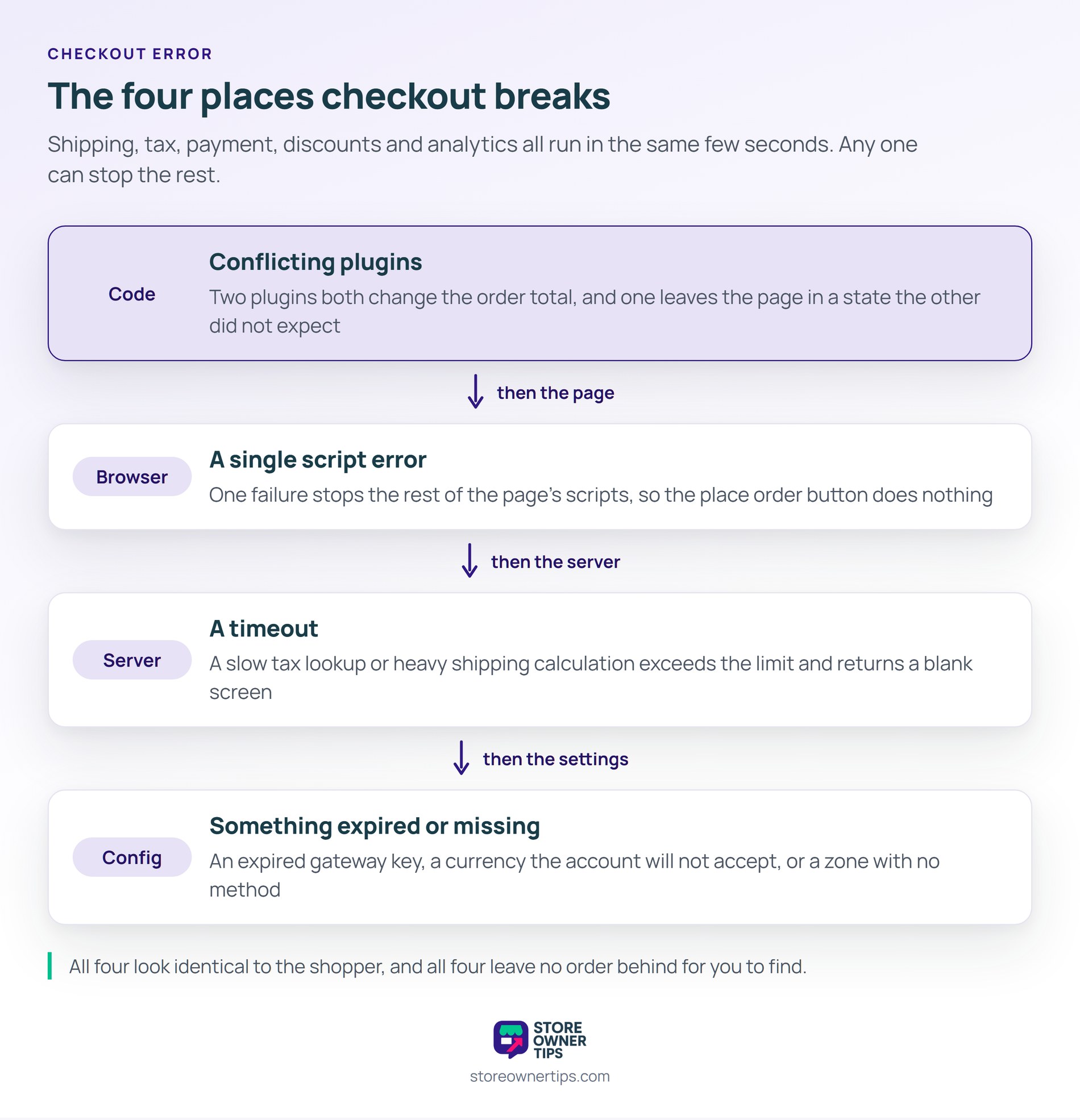
Checkout errors happen because checkout is the most crowded page you run. Shipping, tax, payment, discounts and analytics all execute in the same few seconds. Any one of them can stop the rest.
Everywhere else on your store, a broken feature is cosmetic. Here it is the difference between revenue and nothing.
First is conflicting code. Two plugins may both change the order total. Either one can leave the page in a state the other did not expect.
Next is the browser. A single script error stops the rest of the page’s scripts running. The place order button then does nothing at all when clicked.
Then come server limits. A slow tax lookup or a heavy shipping calculation can exceed a timeout. The shopper sees a blank screen or a generic failure notice.
Last is configuration. An expired gateway key does it. So does a currency the account will not accept, or a shipping zone with no method. Everything looks fine until someone tries to pay.
Most store problems announce themselves. A checkout error does the opposite, because a failed checkout usually leaves nothing behind. No order is created, so nothing appears in your order list.
Your analytics will not flag it either. Traffic and add-to-cart numbers stay normal, and only the final step moves. That change is small enough to look like an ordinary quiet week.
The shoppers rarely tell you. Someone who cannot pay assumes the problem is on their end. They try once, give up, and buy somewhere else.
So the usual discovery route is accidental. Somebody on the team places a test order, or a regular customer bothers to email.
There is one place worth checking regularly. Your payment gateway records attempts that your store never turned into orders. A gap between attempts and orders points straight at this.
The hardest errors only affect some shoppers. Your own test order works perfectly, which is why the problem survived this long.
Start by copying the conditions rather than the steps. Use the shopper’s country, their payment method, and a product like theirs. Errors that depend on a tax rate or a shipping zone only appear that way.
Then take it off the live store. A staging copy lets you turn plugins off one at a time without costing sales. WC Vendors explains the setup in its piece on why staging sites matter.
Check the browser console last, not first. It names the exact script that stopped, which turns guesswork into a single line of code.
Keep a note of what you ruled out as you go. Half the cost of these problems is testing the same plugin twice on different days.
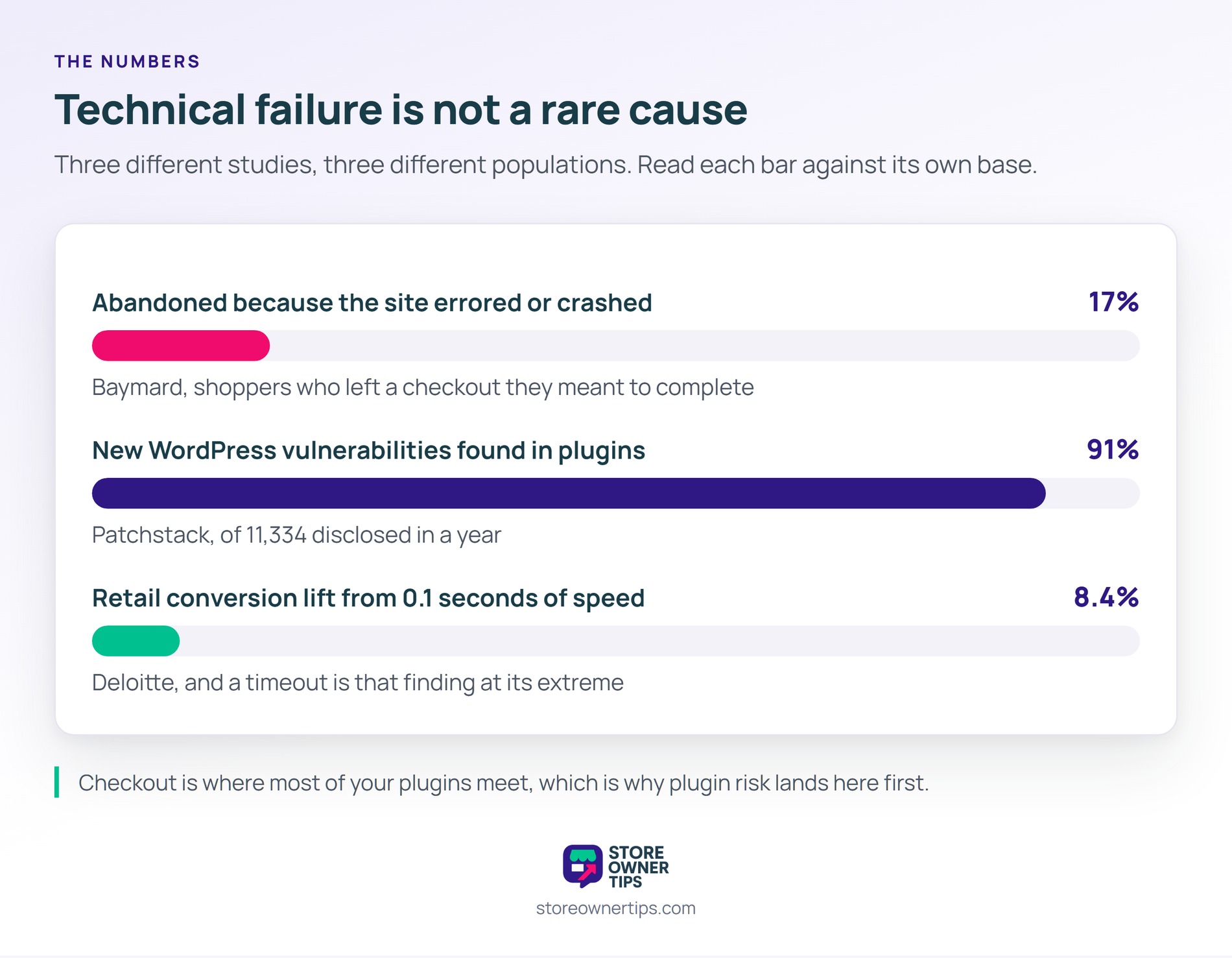
Shoppers report this more often than most owners expect. Baymard asks people why they abandoned a checkout they meant to complete.
In that list, 17% said the site had errors or crashed. That puts technical failure ahead of several reasons stores spend far more time on.
The code doing the breaking is usually not core. Patchstack counted 11,334 new WordPress vulnerabilities in a year, with 91% of them in plugins. Checkout is where most of your plugins meet.
Speed belongs in the same conversation. Deloitte measured a 8.4% retail conversion lift from 0.1 seconds. A checkout that times out is the extreme version of that finding.
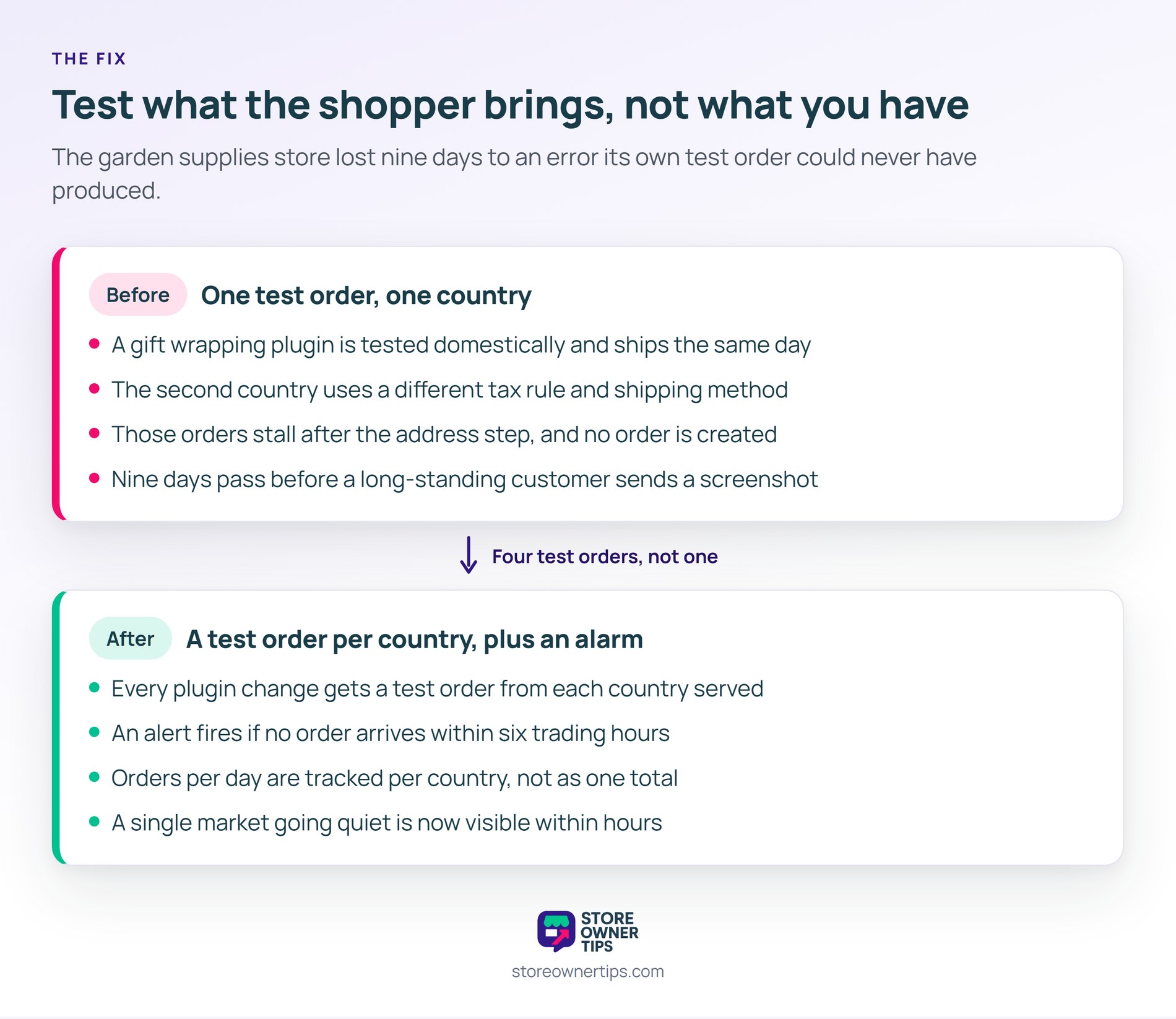
A checkout error usually looks like a quiet week that nobody can explain. Here is a hypothetical example. Imagine a garden supplies store shipping to two countries.
In this scenario the store adds a gift wrapping plugin on a Tuesday. It puts a checkbox and a small fee on the checkout page. The test order goes through without trouble.
What the test did not cover was the second country. Orders there use a different tax rule and a different shipping method.
The wrapping fee and the tax rule both try to recalculate the total. On those orders the page stops responding after the address is entered. The place order button turns gray and stays there.
Domestic orders keep arriving normally, so the daily totals look soft rather than broken. The owner puts it down to the season.
Nine days pass before anyone works it out. A long-standing customer finally sends a message with a screenshot. She had tried three times on two different days.
Roughly a fifth of the store’s orders come from that country. At about 30 orders a week, the nine days cost somewhere near $2,600 in sales.
The immediate repair takes twenty minutes on a staging copy. Turning the wrapping plugin off restores checkout, and its developer ships a patch two days later.
The lasting fix is the test routine. Every plugin change now gets a test order from each country the store ships to. That is four orders rather than one.
The team also adds a simple alarm. If no order arrives in six trading hours, someone gets a message. That alone would have caught this on day one.
They keep one number on the wall from then on. It is orders per day for each country, not orders per day overall. A single market going quiet is now visible within hours.
Finally they write down a recovery route for next time. WC Vendors covers the same ground in its guide to recovering a broken WordPress site.
| What you’re comparing | Checkout error | Failed payment |
|---|---|---|
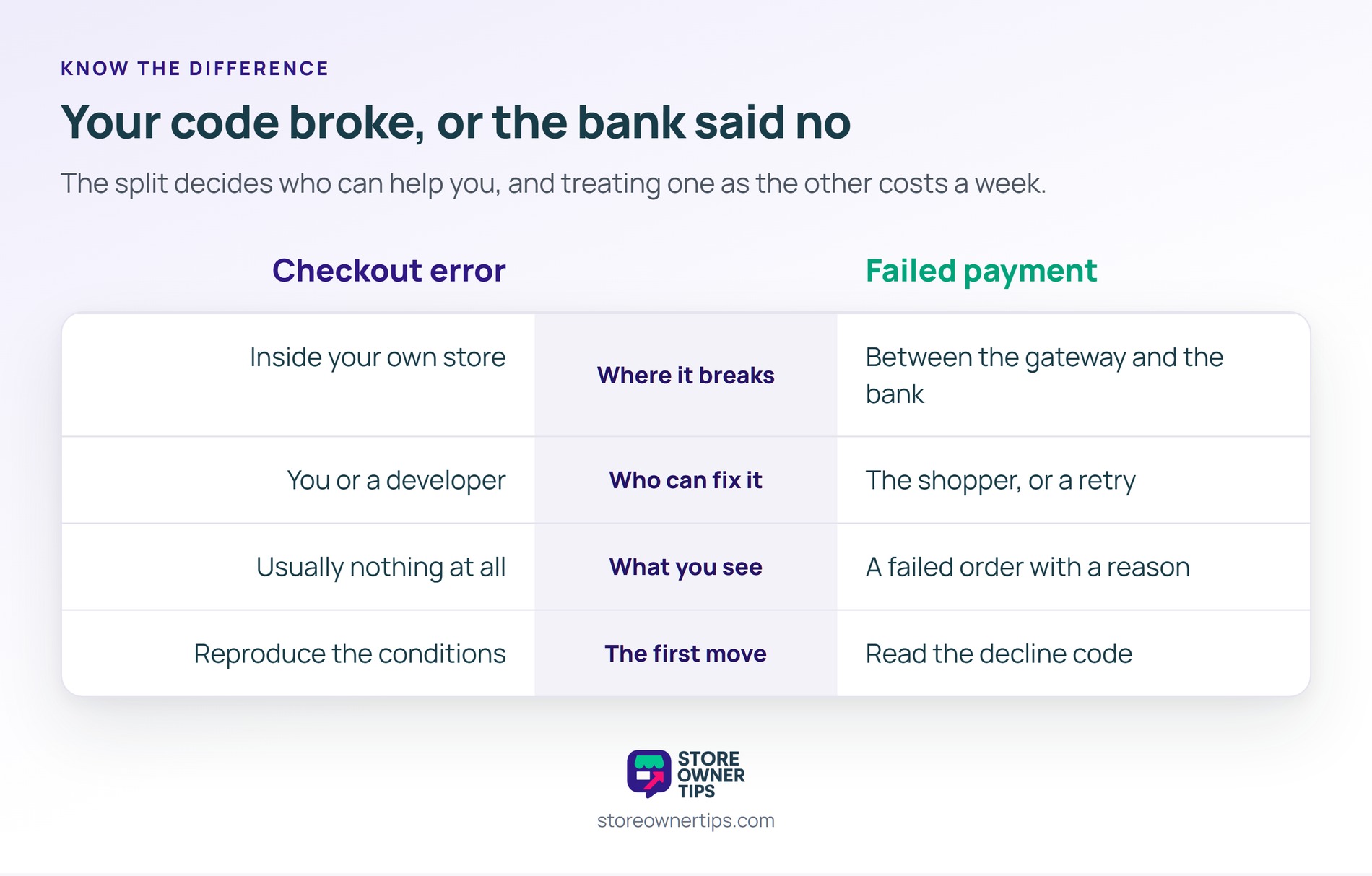
| Where it breaks | Inside your own store | Between the gateway and the bank |
| Who can fix it | You or a developer | The shopper, or a retry |
| What you see | Usually nothing at all | A failed order with a reason |
| The first move | Reproduce the conditions | Read the decline code |
The two also fail at different rates. A failed payment hits one shopper at a time, and a checkout error hits everyone who matches the conditions. So one is a nuisance and the other is an outage in disguise.
The split matters because it decides who can help you. A failed payment has a record, a code, and often a retry that works. A checkout error leaves none of those, so you have to go looking. Treating one as the other is how stores spend a week on the wrong problem.
Place a real order through it, using a real card and a real address. A test gateway skips exactly the steps that tend to break.
Do it from a phone on mobile data, not your office machine. Caching and browser extensions hide problems your shoppers meet.
Because checkout behaves differently depending on what the shopper brings. Their country sets the tax rule and their cart sets the shipping method.
A coupon, a heavy item, or a second currency each changes the path. So the error lives in a combination rather than in the page.
Yes, because unpatched code is the larger risk by a wide margin. The answer is not fewer updates, and it is safer updates.
Update on a staging copy first, then place a test order. That routine takes ten minutes and removes most of the danger.
A checkout error matters because it fails the shoppers who were ready to pay. Everything you spent getting them there is already spent. In short, the cheapest order you will ever win is the one your own store stopped turning away.
Copyright © StoreOwnerTips.com. All Rights Reserved.
