Weekly ecommerce tips, deals & news.
Data loss is when store records you depend on are gone, damaged, or no longer reachable. Orders, customers, products and settings all count. The site itself may still load perfectly. What it cannot do is tell you who bought what.
Data loss happens because a store is not one thing. It is a database, a set of files, and a pile of settings. Each can fail on its own, and they rarely fail together.
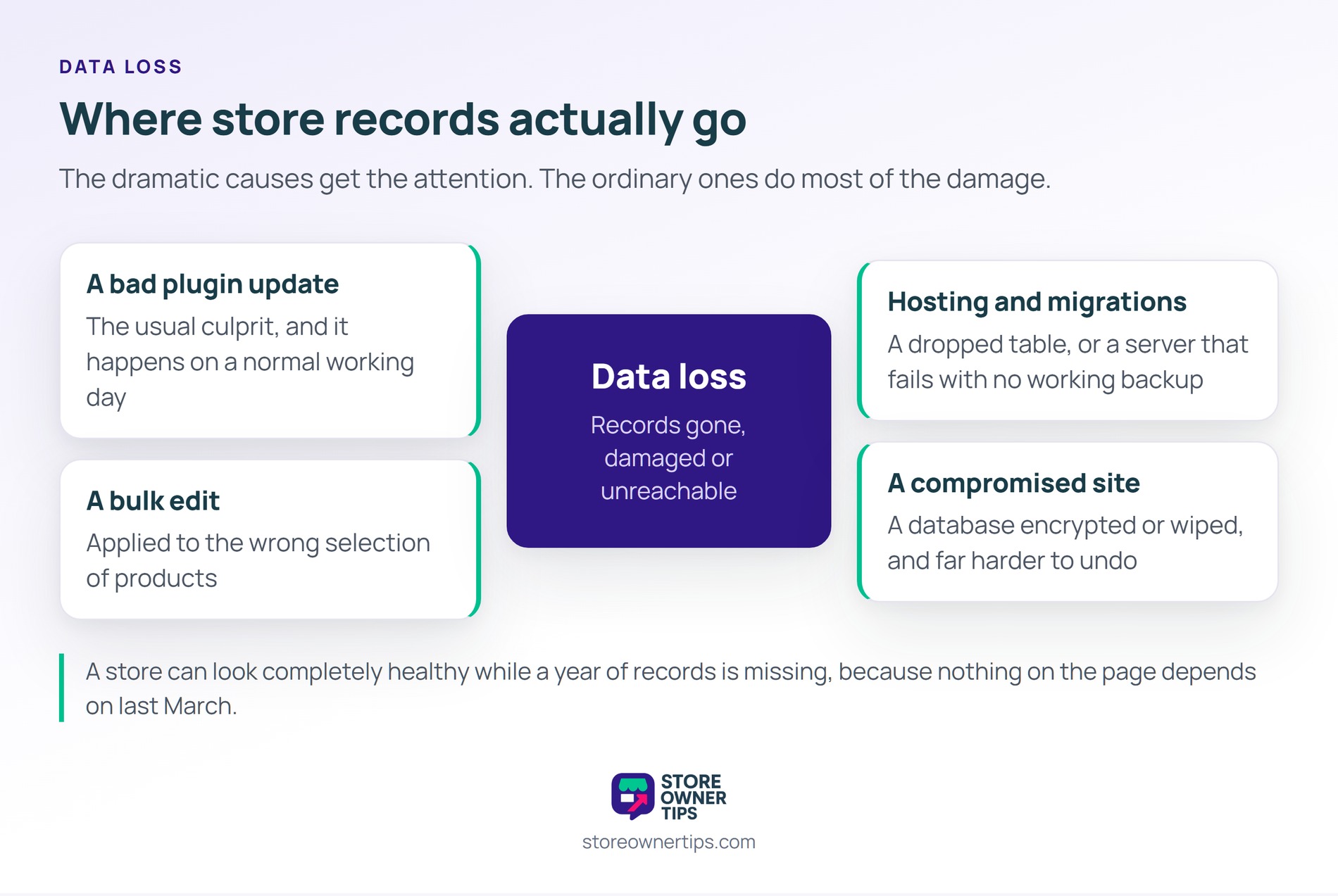
That is why a store can look completely healthy while a year of records is missing. Nothing on the page depends on last March.
Sort your records by whether you could recreate them. Products sit at the easy end, because the information exists elsewhere. Photographs, descriptions and prices can be rebuilt from suppliers and old files.
Customer accounts are harder. You can ask people to register again, but you will lose most of them in the asking.
Orders are the ones that cannot come back. They are your accounting record, your warranty record, and your proof of what shipped. No supplier holds a copy for you.
Settings are the quiet third category. Tax rules, shipping zones and coupon configurations take days to rebuild. Worse, nobody notices they are wrong until an order goes out mispriced.
The dramatic causes get the attention and are not the common ones. Most store owners lose data to something entirely ordinary.
A plugin update that goes badly is the usual culprit. So is a bulk edit applied to the wrong selection of products. Both happen during a normal working day.
Hosting accounts for a share of it too. A migration that drops a table, or a server that fails without a working backup, ends the same way.
Then there is the deliberate kind. A compromised site can have its database encrypted or wiped. That route is rarer, and it is far harder to undo.
Most stores have backups. Far fewer have ever restored one. Those are different states of readiness, and only the second one counts.
Backups fail quietly in predictable ways. They run against the files but skip the database. They fill a disk and stop without telling anyone.
Some are stored on the same server they protect. A failure that takes the server takes the backup with it.
The nastiest version is a backup that works perfectly. It faithfully copies a database that was already damaged. Every stored copy then holds the same broken records.
There is a second gap worth closing. A backup is a copy of a system, while an export is a copy you can read. Visser Labs covers that distinction in its guide to backing up a WooCommerce store.
The bill for data loss arrives in installments. The first is the rebuild, measured in someone’s unpaid weekend. That part is annoying rather than serious.
The second installment is marketing you can no longer do. Repeat purchase campaigns need purchase history. Without it, your best customers become strangers again.
Then there is the admin cost nobody budgets for. Returns, warranties and accounting questions all need the order that proves them. Every one of those becomes a judgment call instead of a lookup.
The last installment is trust. A customer told their record no longer exists rarely blames the server.
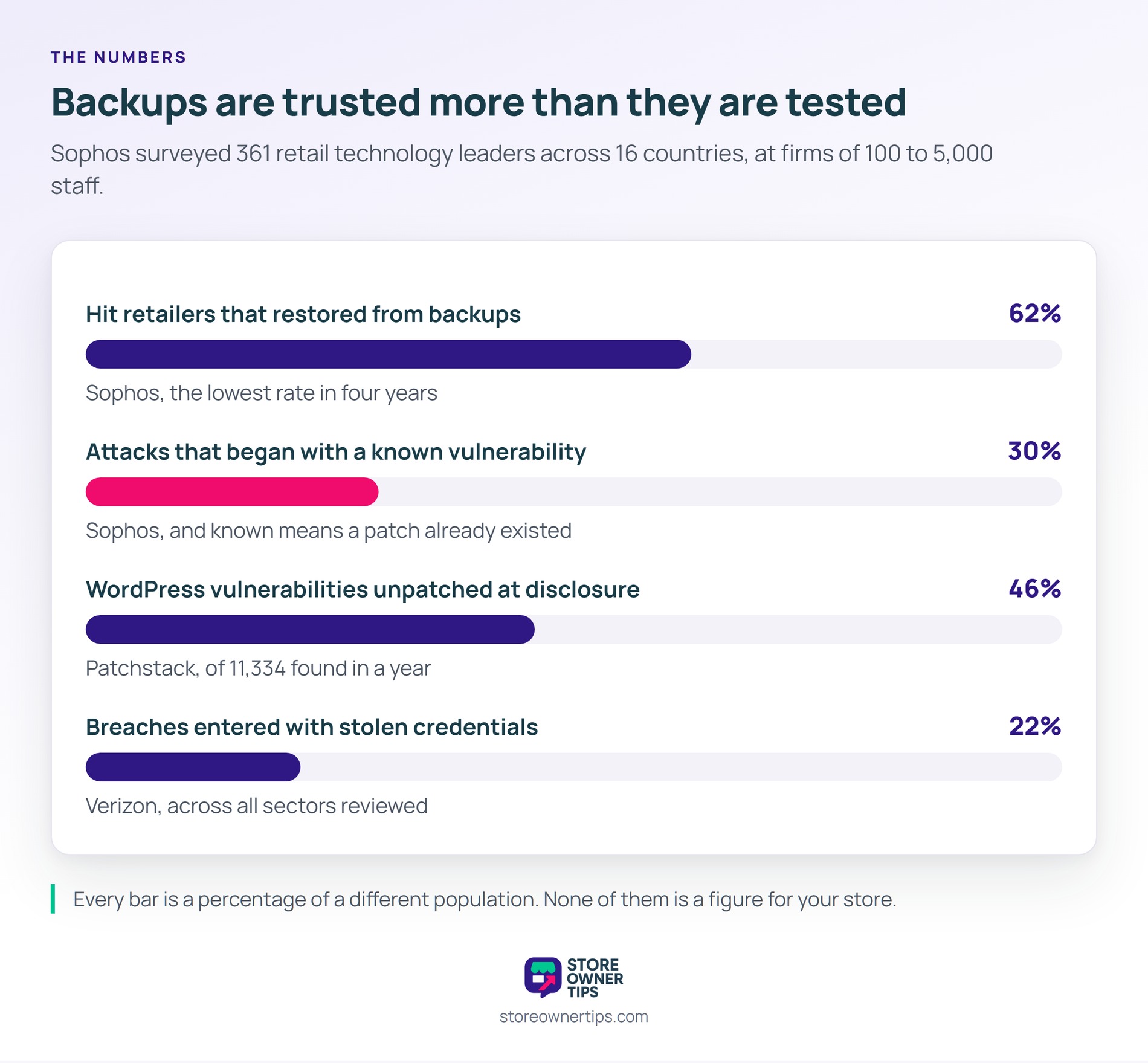
The best current figures come from ransomware research, which is the sharpest version of this problem. Sophos surveyed 361 retail technology leaders across 16 countries in early 2025.
Among retailers that were hit, 62% restored data from backups. That was the lowest rate in four years. Note the sample size, since those firms employ between 100 and 5,000 people.
The same study found 30% of attacks began with a known vulnerability. Known means a patch already existed.
That matters for WordPress stores specifically. Patchstack recorded 11,334 new vulnerabilities in a year, and 46% were unpatched at disclosure.
Stolen logins open the same door. Verizon found compromised credentials were the way in for 22% of the breaches it reviewed. An intruder with a valid password can delete as easily as read.
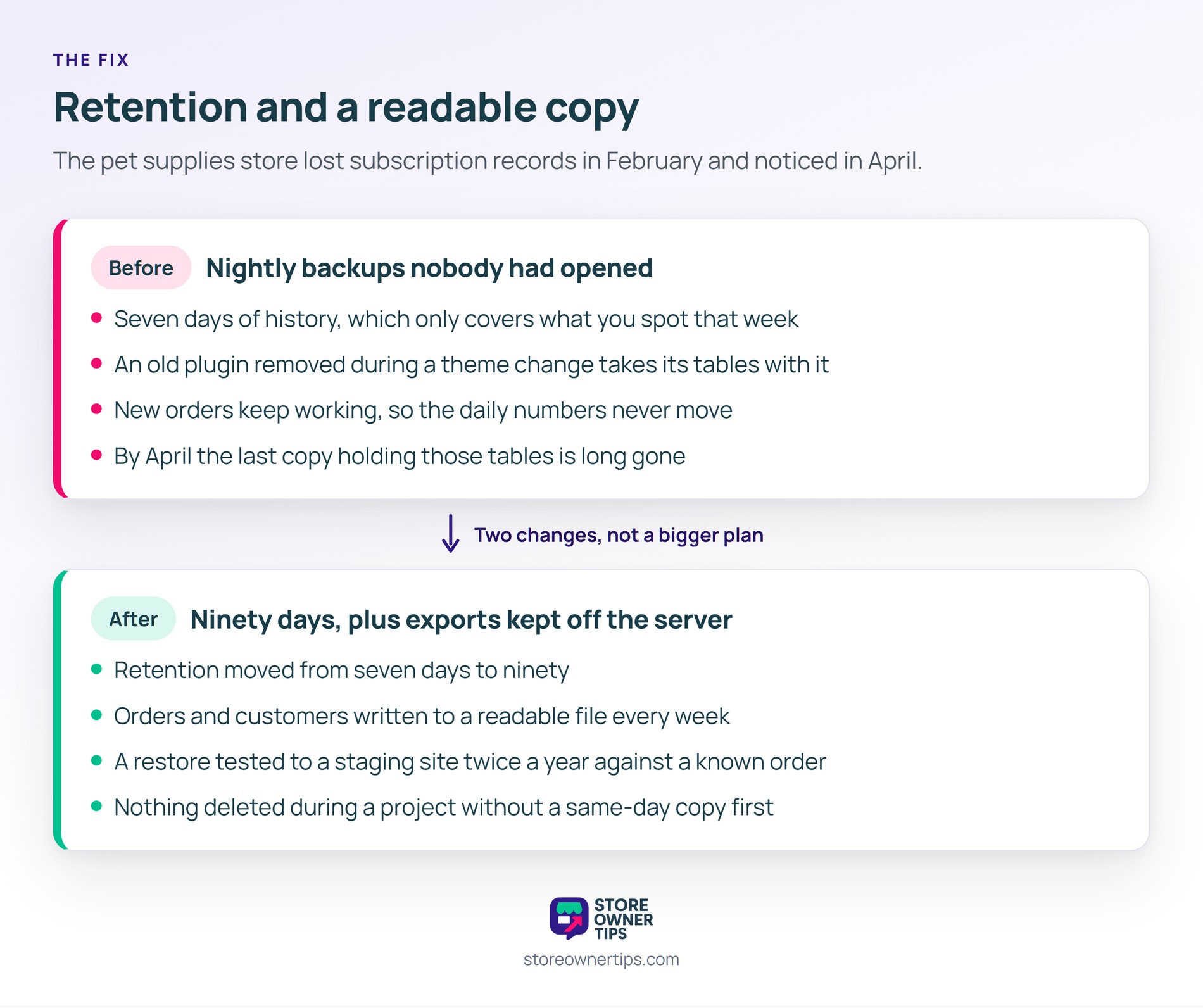
Data loss rarely announces itself on the day it happens. Here is a hypothetical example. Imagine a small pet supplies store with four years of trading behind it.
In this scenario the store runs nightly backups through its host. Nobody has restored one, because nothing has ever needed restoring. The backups keep seven days of history.
A developer helps with a theme change in February. During the work, an old plugin is removed along with its database tables.
Those tables held the store’s subscription records. New orders keep working, so the store looks fine from the front. The daily numbers do not move at all.
Five weeks later the renewals stop arriving. About 180 customers were on repeating orders worth roughly $4,000 a month. None of them renew, and none of them are told why.
By the time anyone looks, the seven days of backups have rolled over many times. The last copy containing those tables is long gone.
The team rebuilds what it can from payment gateway records. Names and amounts survive there, and the products and schedules do not.
So the store changes two things rather than buying a bigger backup plan. Retention goes from seven days to ninety. A short window only protects against failures you spot immediately.
Next comes a scheduled export. Orders and customers are written to a file every week and kept off the server. Those files are readable without restoring anything.
The owner also books a restore test twice a year. A copy is restored to a staging site and checked against a known order.
That test is the only part that proves anything. A backup nobody has opened is a promise, not a plan.
Finally, database changes move behind a rule. Nothing gets deleted during a project without a same-day copy first. In short, the store stopped trusting a process it had never watched run.
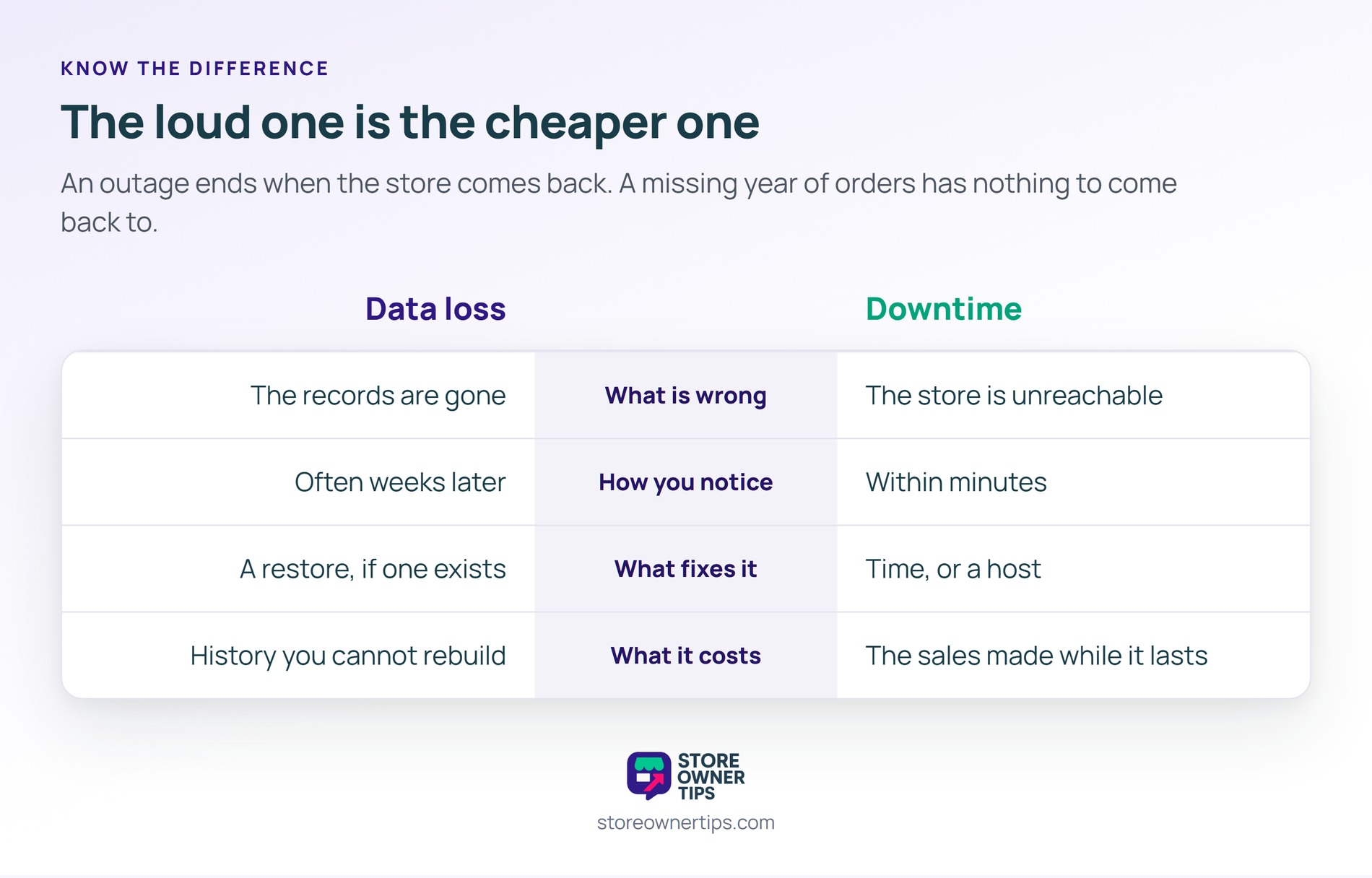
| What you’re comparing | Data loss | Downtime |
|---|---|---|
| What is wrong | The records are gone | The store is unreachable |
| How you notice | Often weeks later | Within minutes |
| What fixes it | A restore, if one exists | Time, or a host |
| What it costs | History you cannot rebuild | The sales made while it lasts |
Downtime is loud and data loss is silent, which is exactly backwards from how much they cost. An outage ends when the store comes back. A missing year of orders does not end, because there is nothing to come back to. So the problem that panics you is usually the cheaper one.
Long enough to cover the time it takes you to notice a problem. Seven days only helps with failures you see the same week.
Ninety days is a reasonable floor for most stores. Keep one copy per month for a year if the storage is cheap.
It is a good start and a poor finish. Host backups usually live near the server they protect, and retention is often short.
Keep a second copy somewhere your host does not control. Ask what the restore actually involves before you need it.
Orders, with the customer details attached to them. That single file carries your accounting history and your customer list together.
Products come second, because suppliers and old files can help you rebuild those. Nobody else holds your order history.
Store the file somewhere separate from the store itself. An export sitting on the same server protects you from almost nothing.
Data loss matters because it takes the part of your store you cannot buy again. Traffic can be earned back and stock can be reordered. In short, the records of what your customers did are the one asset with no replacement on the market.
Copyright © StoreOwnerTips.com. All Rights Reserved.
