Weekly ecommerce tips, deals & news.
A member’s card expires on a Tuesday. By Friday, your plugin has locked them out, kept them in on a grace period, or not noticed at all. That moment decides whether a membership business works, so it’s how we ranked these WooCommerce membership plugins.
WooCommerce Memberships comes out on top. It gates content, products and prices from inside WooCommerce. Plus, it pauses access instead of canceling it when a renewal fails.
It’s tempting to compare WooCommerce membership plugins on how many content types they can lock. However, every plugin here can lock content. The harder part is the week after a failed renewal, so that’s where we looked closest.
We’ve also included a different kind of membership: one you sell to marketplace sellers instead of customers.
Jump to:
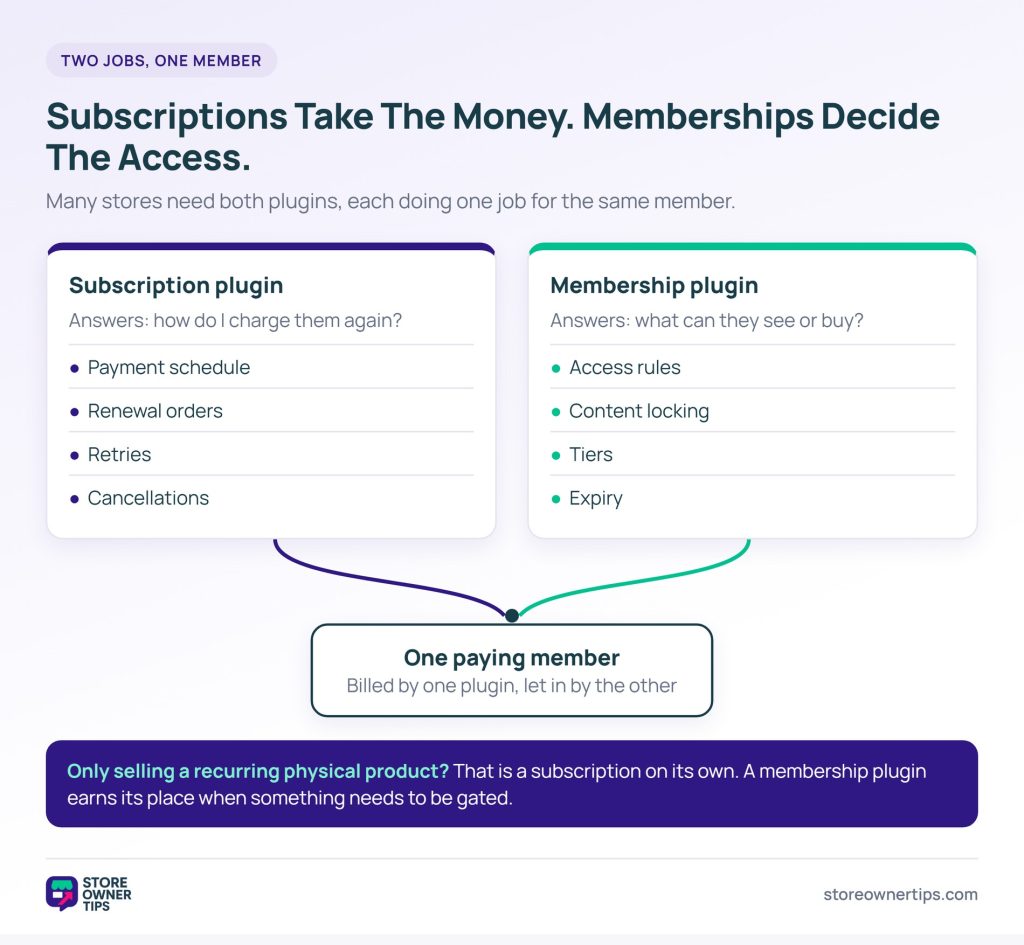
A subscription is a billing arrangement, while a membership is an access arrangement. They overlap constantly, yet they solve different problems. That’s why it’s easy to buy the wrong one.
A subscription plugin answers one question: how do I charge this customer every month without asking again? It owns the payment schedule, renewal orders, retries and cancellations.
By contrast, a membership plugin answers a different question: what can this person see or buy, and for how long? It owns access rules, content locking, tiers and expiry.
Plenty of stores need both. For example, a paid community with monthly billing needs a subscription plugin to collect payment. It also needs a membership plugin to decide what each member can reach. Some plugins bundle the two. That’s convenient until you need to change one without disturbing the other.
If you only sell a recurring physical product, you don’t need a membership plugin. That’s a subscription, and our roundup of WooCommerce subscription plugins covers the billing side. Come back here when something needs to be gated.
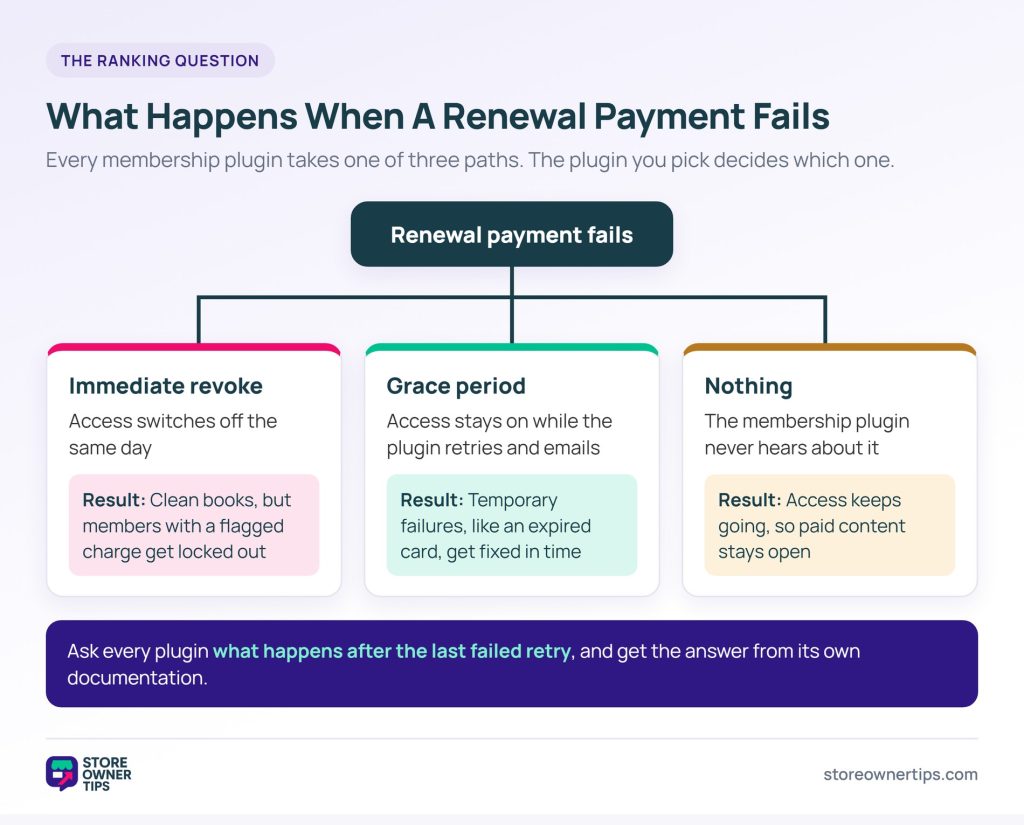
Most WooCommerce membership plugins do one of three things when a renewal fails. The plugin you pick decides which one your members get.

Immediate revoke. Access switches off the day the renewal fails. The accounting stays clean. However, it also locks out members whose bank flagged a routine charge. Expect a few support tickets from people who did nothing wrong.
Grace period. Access stays on for a set window while the plugin retries and emails the member. Many failed payments are temporary, such as an expired card. In those cases, a grace period gives the member time to fix it before they lose access.
Nothing. The renewal fails, the membership plugin never hears about it, and access continues. This usually happens when the membership plugin and the payment plugin aren’t connected properly.
That last case is worth checking before you commit. So don’t stop at asking whether it supports recurring payments. Instead, ask what happens after the last failed retry. The answer should come from the plugin’s own documentation, not a feature table.
We ranked these WooCommerce membership plugins on four things that are expensive to change once you have members:

We haven’t run all seven through a year of real renewals, and we won’t pretend we have. Instead, every detail below comes from each plugin’s own documentation and pricing pages. Where the docs didn’t cover failed payments, we read the plugin’s code.
Prices, ratings and install counts were checked on 5 October 2026. They change over time, so confirm them before you buy.
Here’s how the seven compare on price and on failed payments. Prices are yearly, in each vendor’s own currency.
| Plugin | Price per year | Free version | When a renewal fails | Member prices on products |
|---|---|---|---|---|
| WooCommerce Memberships | $199 | No | Membership pauses until the subscription is paid | Yes |
| Paid Member Subscriptions | From €99 | Yes | Retries 3 times, 3 days apart; you choose whether access stays on | Yes |
| Paid Memberships Pro | From $499 | Yes | Gateway retries first, or access ends while on hold (WooCommerce checkout) | Yes |
| Membership for WooCommerce | From $99 | Yes | Member goes on hold | Yes |
| YITH WooCommerce Membership | $179.99 | No | Membership is canceled | Yes, one discount per plan |
| MemberPress | From $199.50 first year | No | 1-day grace period, then access ends | No |
| WC Vendors Membership | Included in Growth ($199.50 first year) | No | Follows WooCommerce Subscriptions | Sets seller commission instead |
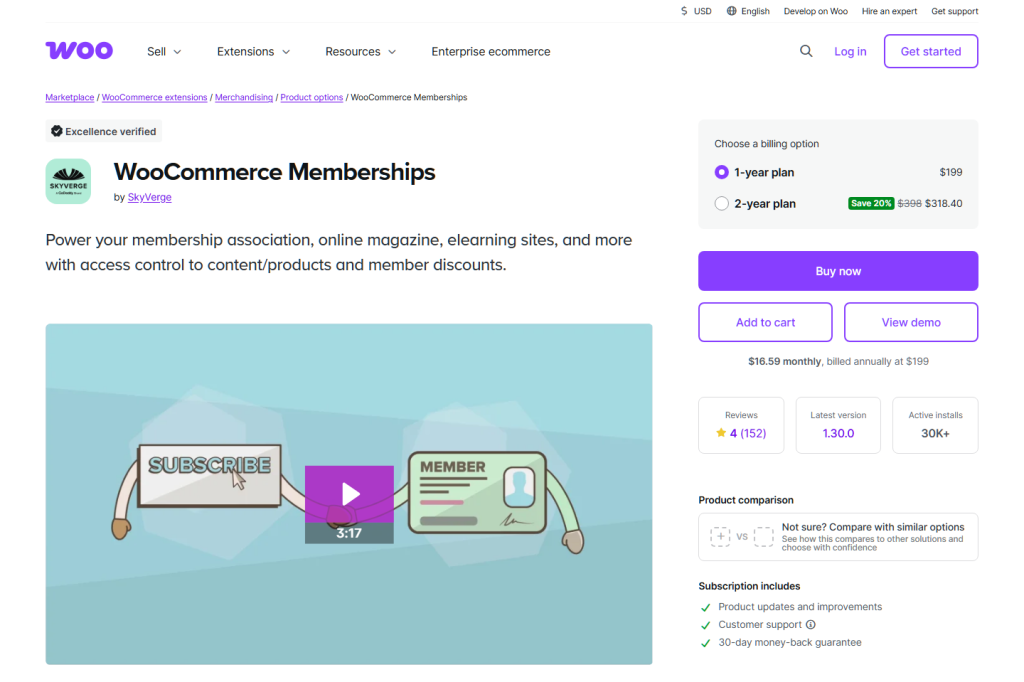
The official extension, and the right default when membership is tied to what people buy. It costs $199 a year with no free version, and its marketplace listing shows 30K+ active installs.
It gates posts, pages and custom post types. On the store side, it can hide products from non-members. Alternatively, it can keep products visible but let only members buy them. Member discounts can cover every product, some products, or whole categories.
Memberships has no billing engine of its own. Instead, recurring plans need WooCommerce Subscriptions, and the membership follows the subscription’s status. A failed renewal puts the subscription on hold by default, so the membership pauses.
Members can’t reach restricted content while paused. As soon as the subscription is active again, access comes back. Subscriptions also has an optional automatic retry for failed payments.
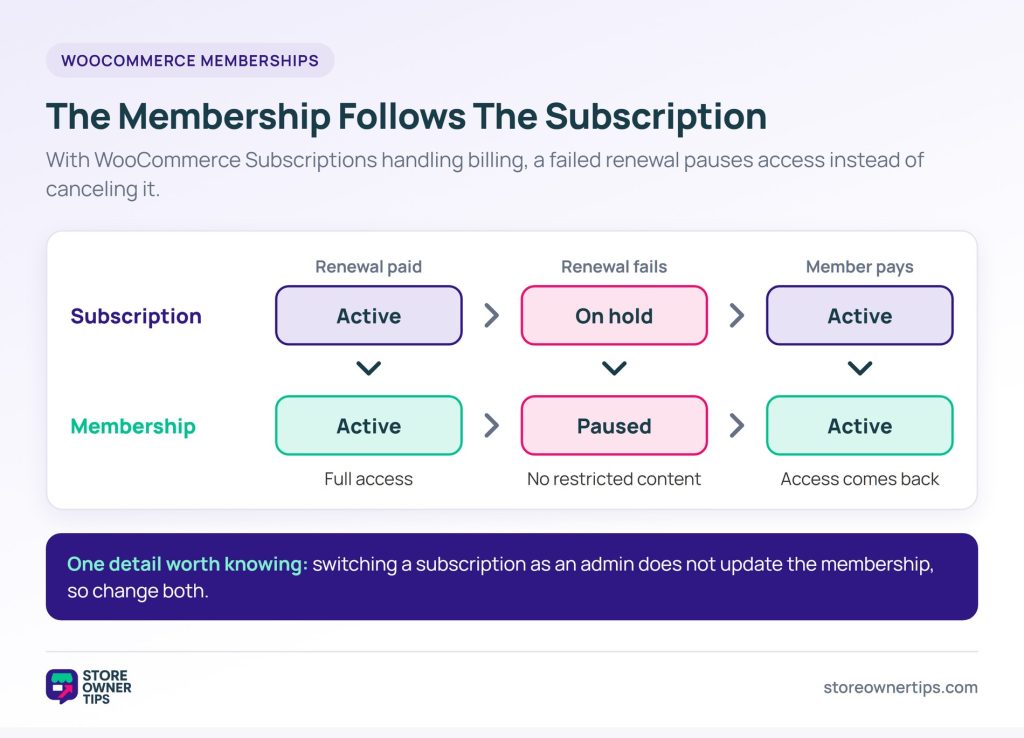
Upgrades, downgrades and proration come from Subscriptions too. One detail worth knowing: switching a subscription as an admin doesn’t update the membership, so change both. Group memberships need the Teams add-on, sold separately.
Best for: stores where membership changes what a customer can buy or what they pay.
Paid Member Subscriptions handles billing and access in one plugin, and its free version covers both. It has 10,000+ active installs and rates 94/100 from 269 reviews. Recurring Stripe and PayPal payments are free, and paid licenses start at €99 a year.
It also gives you direct control over failed payments. When a payment fails, it retries up to 3 times, 3 days apart, and both numbers are settings. A third setting decides whether the subscription stays Active or turns Expired during retries. Expired is the default, so switch it to Active if you want a grace period.
It runs its own checkout, and WooCommerce is optional. Connect the two to restrict who sees or buys a product, or to run a members-only shop. Member prices can be set per product or per plan.
You can also sell plans through WooCommerce checkout. However, recurring plans then need WooCommerce Subscriptions. Free trials, sign-up fees and discount codes aren’t available on that route either.
Upgrades work out of the box, and downgrades are a setting you switch on. Proration needs a Pro or Agency license. Renewals run on WP-Cron, so the vendor recommends setting up a real server cron job.
Best for: content memberships that want billing, retries and access in one plugin, with WooCommerce as an extra.

Paid Memberships Pro has a free, open-source core, and its WooCommerce add-on is free too. The Standard plan includes every premium add-on and support for $499 a year. The vendor also reports 90,000+ active sites. Both plugins left the WordPress plugin directory in October 2024, so you’ll get them from the vendor’s site.
The add-on links a WooCommerce product to a membership level, so buying the product grants the level. You can set a member price per product, or a storewide percentage discount per level. Members-only products need a separate add-on.
Failed payments work differently depending on the checkout. On PMPro’s own checkout, it records the failed order and emails you and the member. The payment gateway handles retries, and the level is only canceled once the gateway gives up.
On WooCommerce checkout, by contrast, the add-on removes the level as soon as the subscription goes on hold. It restores the level when the subscription is active again.
Recurring sales through WooCommerce need WooCommerce Subscriptions. In addition, some PMPro features don’t work with WooCommerce checkout, including proration on plan changes and the Group Accounts add-on.
Best for: stores that want member pricing on WooCommerce products from a free, long-running membership platform.
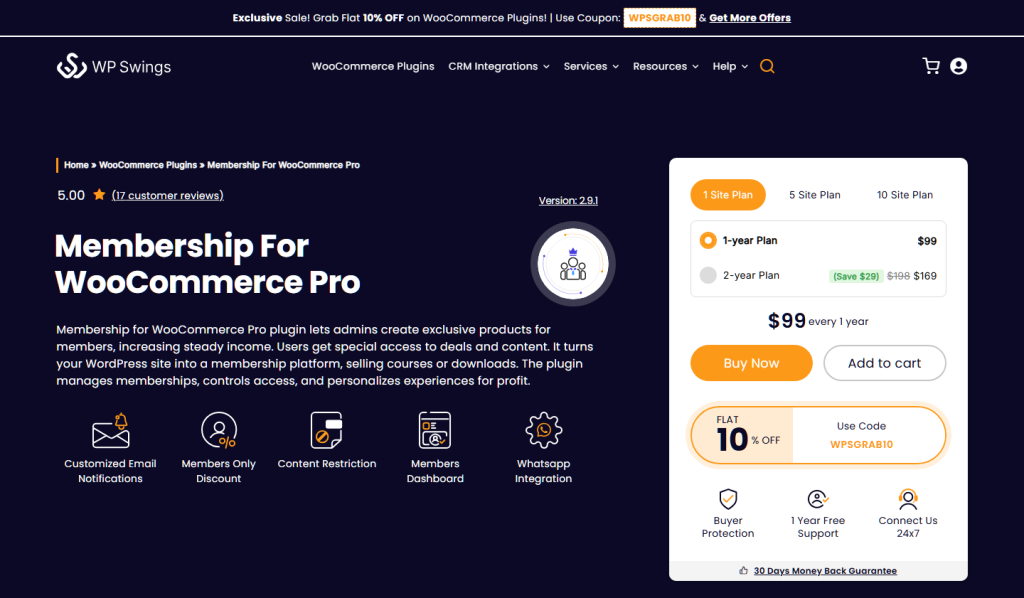
WP Swings designed Membership for WooCommerce around WooCommerce from the start. Its Pro version is the lowest-priced paid tier here, at $99 a year for one site. The free version has 800+ active installs and rates 88/100 from 28 reviews.
The free version covers cart-total discounts, free shipping for members, limited or lifetime plans, and member import and export. Pro adds page and post restriction and members-only products. It can also show member prices to non-members, so shoppers see what joining would save them.
One caution: the free listing and the Pro page disagree on whether product restriction is free. Check that with the vendor before you plan around it.
Recurring plans need the vendor’s separate Subscriptions for WooCommerce plugin. The docs don’t describe failed payments. However, in the plugin’s own code, a failed renewal order puts the member on hold. Member benefits only apply to active members.
The docs don’t cover upgrades or proration either. Ask the vendor about both before you launch.
Best for: stores that want member discounts and perks inside WooCommerce on a small budget.
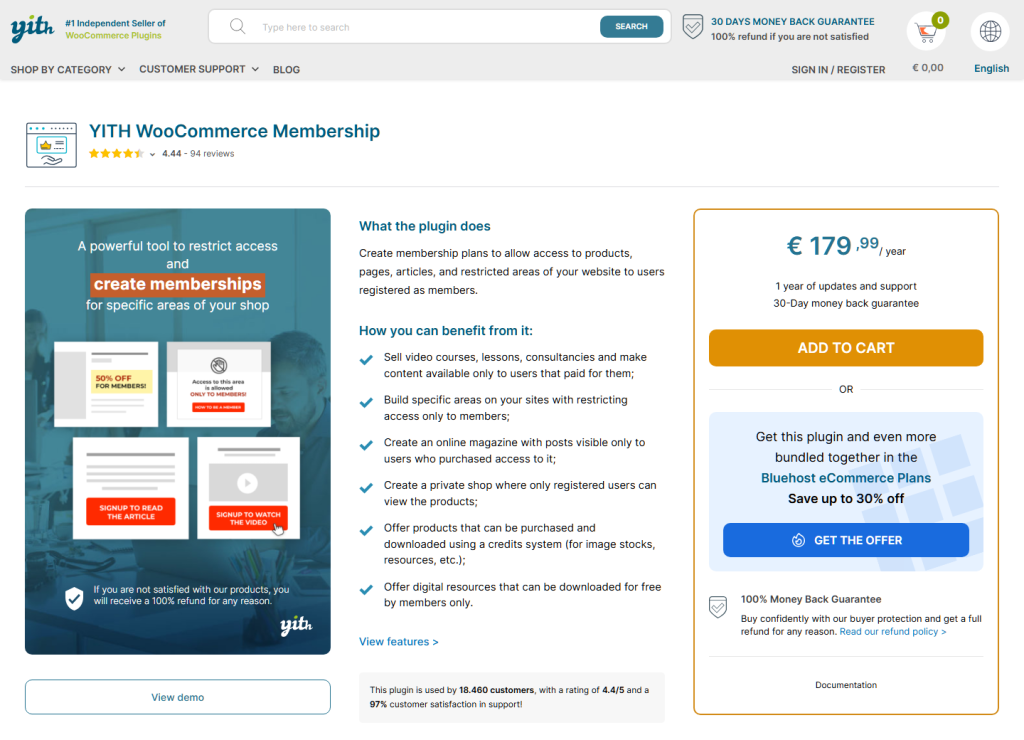
YITH WooCommerce Membership is premium only, at $179.99 a year. Its free version left the WordPress plugin directory in 2018. It allows unlimited plans. Gated items can be hidden behind a 404 page, shown with a redirect, or swapped for alternative content.
Each plan can carry one percentage discount across the whole shop, plus member-only free shipping, protected downloads, and dripped content. A block lets you gate part of a post instead of all of it. Members can also pause their own membership.
Recurring billing needs the separate YITH WooCommerce Subscription plugin, which then controls the membership status. On failed payments, it’s the strictest plugin here. When the system cancels a subscription after a failed payment, the membership is canceled too.
An overdue subscription suspends the membership instead. Meanwhile, a cancellation by you or the member sets it to expiring until the paid period ends.
Best for: stores already running YITH WooCommerce Subscription that want a clear cutoff when payments stop.
MemberPress comes up when you search for WooCommerce membership plugins, so it helps to know where it fits. It isn’t a WooCommerce plugin. It runs its own checkout, and its official WooCommerce add-on was discontinued in 2019.
Plans start at $199.50 for the first year on Launch, renewing at $399. Launch accepts Stripe only and adds a 4.9% fee per successful payment. Growth costs $349.50 and Scale $499.50 for the first year, and all renewals are at full price.
Access lasts while a member has a completed, unexpired transaction. While a payment confirms, MemberPress gives a 1-day grace period, and a code snippet can extend it for renewals. Retries happen in Stripe, under Stripe’s own retry rules.
Its rules protect pages, posts, categories and files. Courses, content dripping, and upgrades with automatic proration are built in. It can also hide WooCommerce products from the shop page. However, it can’t give members a price on them, because the two checkouts are separate.
Best for: memberships and courses that don’t need WooCommerce checkout at all.

This one flips the model: the members are your sellers, not your customers. WC Vendors Membership sells plans that decide what each seller can do on your multi-vendor marketplace.
Each plan sets its own price, expiry, sign-up fee, product limit and commission type. It also sets disk usage, file count and allowed categories. As a result, a plan becomes a commercial arrangement, not just an access token. A higher tier can carry a lower commission rate, more products, or more storage.
It’s included in the WC Vendors Growth plan, at $199.50 for the first year and $399 a year after. It runs on WC Vendors Pro, and WooCommerce Subscriptions handles the recurring billing. So Subscriptions’ retry and on-hold rules decide what happens when a seller’s renewal fails.
Tick Membership required, and a seller without an active plan has every vendor function disabled until they pick a plan. Sellers can upgrade or downgrade once you turn on subscription switching and group the plans. Without that, changing plans means canceling and signing up again.
Best for: marketplace operators charging sellers for a place on the platform.
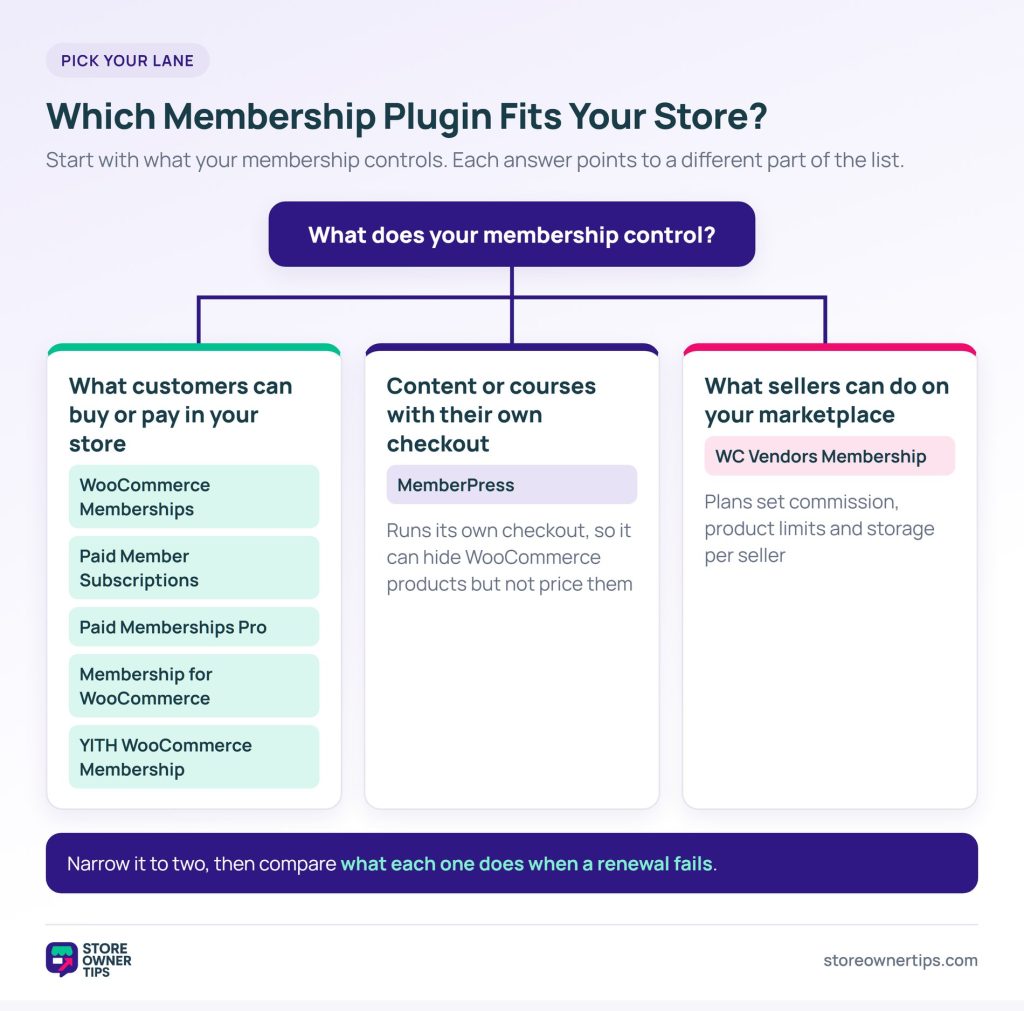
Seven WooCommerce membership plugins, but really three kinds of membership. If yours changes what customers pay, start with the first five. For content or courses outside your store, look at MemberPress, and for seller plans, WC Vendors Membership.
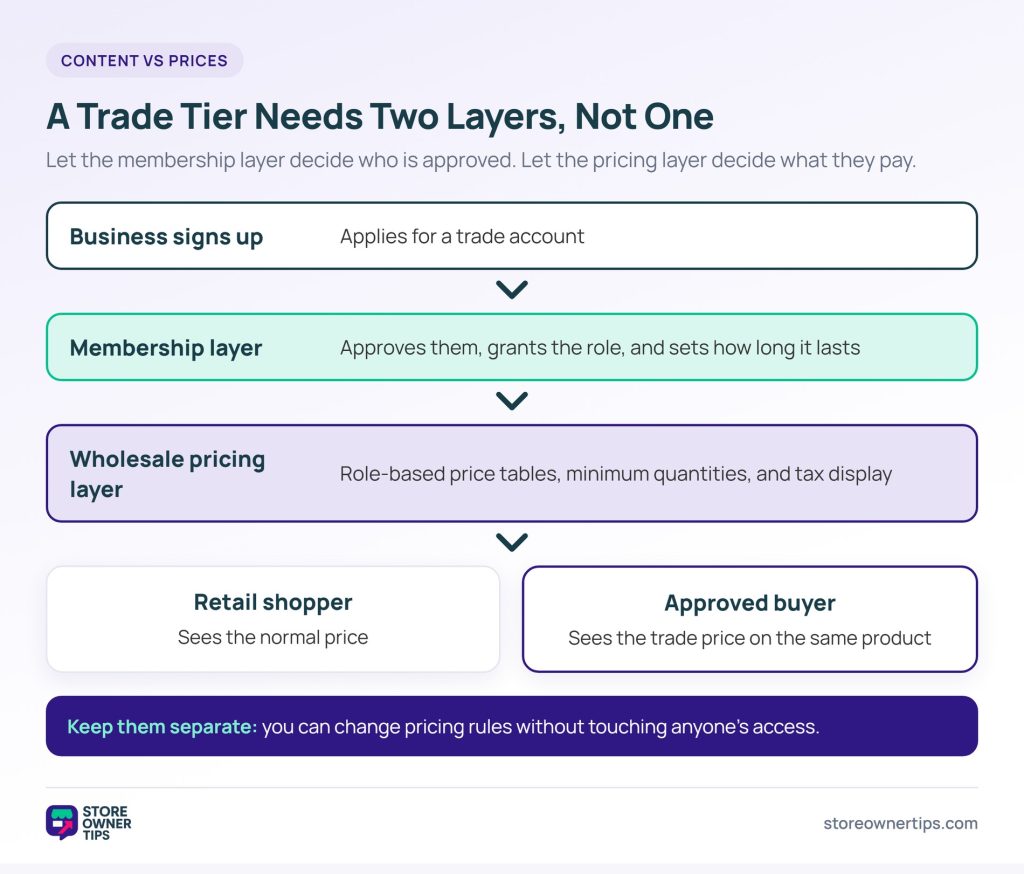
Gating content hides something from non-members. Price gating, on the other hand, shows everyone the same product, but members pay a different amount. It’s easy to buy a content-gating plugin when what you needed was a pricing one.
Say you want a trade tier where approved businesses see wholesale prices on your normal catalog. That’s really a pricing problem, not a membership one. A plugin built for trade-only pricing handles role-based price tables, minimum quantities and tax display. A membership plugin can grant the role, but it won’t price the catalog.
The two work well together. Use the membership layer to decide who’s approved and for how long. Then use the wholesale layer to decide what approved buyers pay. Keeping them separate also lets you change pricing rules without touching anyone’s access.
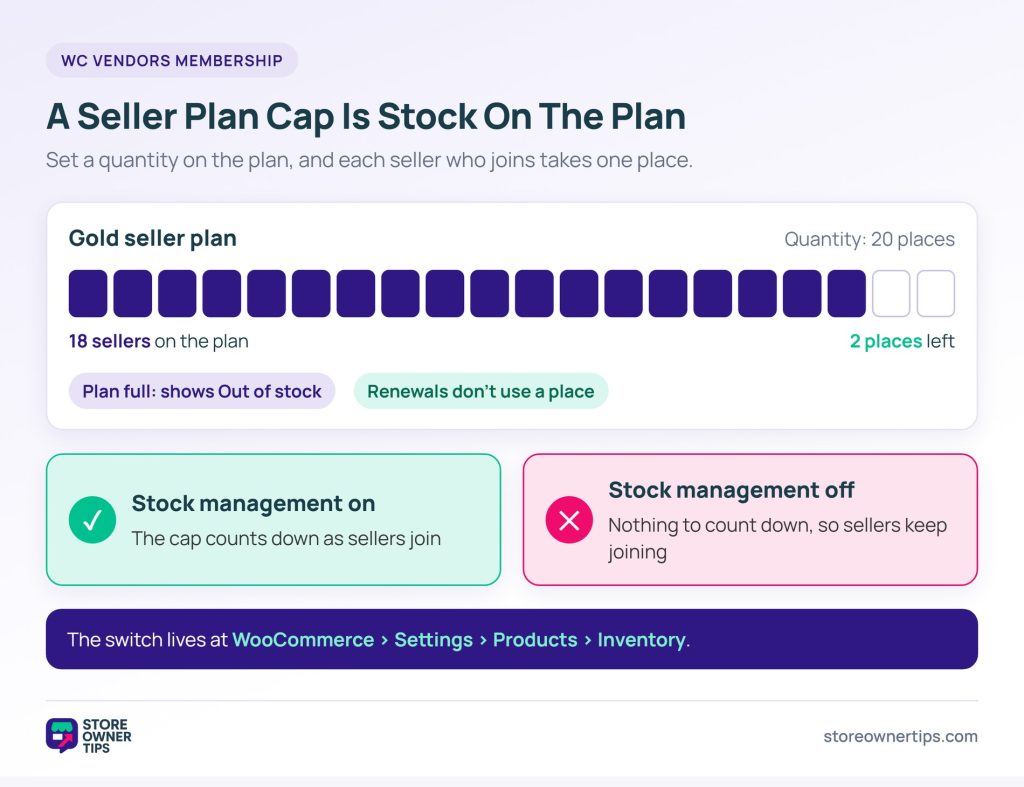
A marketplace flips the model. Instead of selling access to customers, you’re selling sellers a place on your platform. So the plan needs to cap something real.
WC Vendors Membership lets you cap the number of sellers on a plan. That’s how you run a curated marketplace. The cap uses WooCommerce stock management, so the plan behaves like a product with limited inventory.
It can also put plan selection right on the seller registration form. Plus, it emails the seller when a paid renewal completes.
🔍️ What we’ve seen: a store owner sets a cap on a seller plan, but sellers keep joining past the limit. It looks like a bug, yet it’s an easy setting to miss. The cap relies on WooCommerce stock management being switched on. With stock management off, there’s nothing for the cap to count down.
If you run a multi-seller marketplace, start with your marketplace plugin’s own membership layer. A customer-facing membership plugin doesn’t know about sellers, commissions or payouts.
Usually yes, unless your membership plugin handles billing itself. A membership plugin controls access, while a subscription plugin controls recurring payments. Some plugins bundle both, which is simpler to run but harder to change later. If members pay once for lifetime access, you only need the membership plugin.
The content stays, but the protection disappears. The plugin applies its locks when a page loads, so deactivating it usually exposes everything until you reactivate. That’s why it pays to test any plugin switch on a staging site first. Your members’ paid content stays protected on the live store while you experiment.
Some plugins allow it, but behavior varies when plans conflict. If one plan grants access and another restricts it, the plugin decides which wins. That rule is often hard to find in the docs. So check it before you sell add-on tiers alongside a base plan.
Look for an upgrade or plan-change path instead of cancel-and-resubscribe. Canceling and re-adding resets the join date and can trigger a fresh welcome sequence. It also breaks any reporting based on membership length. Plugins that treat a tier change as a modification keep that history intact.
Only if it gates commerce as well as content. Five plugins on this list can set member prices on WooCommerce products. MemberPress can hide products but can’t price them, because its checkout is separate. WC Vendors Membership sets the seller’s commission rather than the customer’s price.
The useful question isn’t which plugin has the most features. It’s whether your membership gates content, gates commerce, or gates a place on your platform. Each answer points to a different part of this list, and few stores need all of it.
Here’s what to do next:
Memberships are one part of keeping customers past the first order. They work best alongside other retention tactics, like rewarding the customers you already have. Either way, it’s worth seeing membership next to the other WooCommerce plugins most stores end up needing.

Copyright © StoreOwnerTips.com. All Rights Reserved.
