Weekly ecommerce tips, deals & news.
Ask a store owner how their best customers found them, and the answer is often word of mouth. Ask what the store does to encourage it, and there’s usually a pause.
A WooCommerce referral program turns that word of mouth into a system. Each customer gets a unique link, and they’re rewarded when someone who used it signs up or buys.
Setting one up comes down to three decisions: the reward, how long the link works, and who’s excluded. After that comes the part most guides skip, which is getting customers to share.
In our experience, referral programs rarely stall because customers won’t recommend you. They stall on small settings that quietly stop rewards from landing, so this guide covers those too.
Jump to:
A referral program and an affiliate program aren’t the same thing. They differ in who promotes you, how those people are paid, and how the payouts may be taxed.
An affiliate program recruits third parties to promote you, such as bloggers, comparison sites and creators. They bring an audience you don’t have, and they’re paid commission in money. Our guide to launching an affiliate program with third-party publishers covers setup, commission structures and disclosure obligations.
A referral program, by contrast, rewards people who’ve already bought from you for introducing someone they know. They’re not publishers, and they don’t have an audience. Instead, they’re usually rewarded in store value: points, store credit, or a discount on their next order.
That difference shapes the whole design. Affiliates need tracking that survives a stranger’s click weeks later. Referrals, meanwhile, need a link a customer can send one friend without feeling like a salesperson. Our referral program definition covers the terminology in more depth.
Plenty of stores run both. Since they do different jobs for different audiences, it often makes sense to set them up as separate systems.
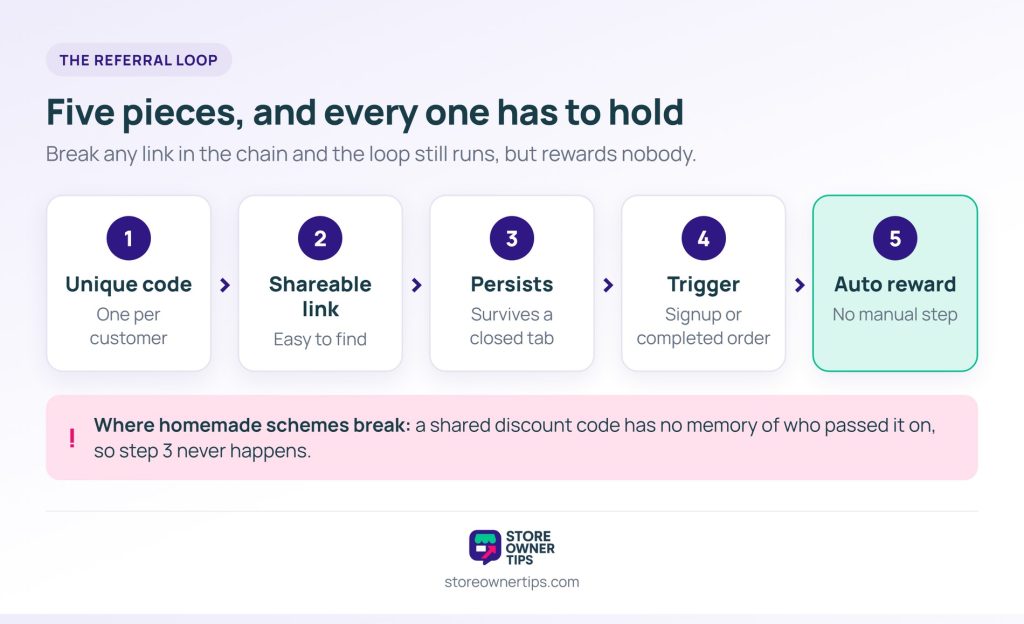
A WooCommerce referral program needs five pieces. If any one is missing, the loop can run and still reward nobody.
Persistence is where most homemade schemes fall down. A discount code passed between friends has no memory of who shared it. As a result, you can’t reward the referrer, and the loop turns into an ordinary discount.
A WooCommerce referral program can reward the referrer, the friend, or both. The right choice depends mostly on how often people buy from you.
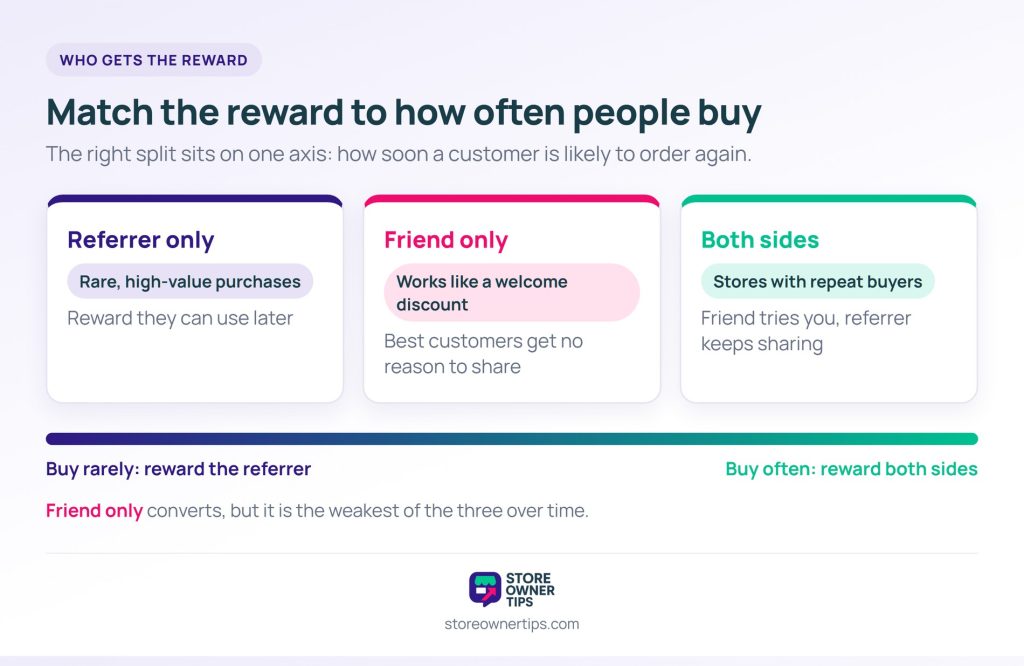
Referrer only suits considered, high-value purchases where customers won’t buy again soon. Give them a reward they can use later, or one they value for its own sake.
Friend only works more like a welcome discount. It can convert well, but it gives your best customers no reason of their own to share. Over time, that makes it the weakest of the three.
Both sides is the usual choice for stores with repeat buyers. The friend gets a reason to try you, and the referrer gets a reason to keep sharing.
On reward size, work backwards from your margin and repeat rate rather than copying another store’s number. You didn’t pay for an ad to win this customer. So you can usually afford more than an ad would cost. Still, you can’t afford more than the customer is worth.
For the referrer’s side, points and store credit tend to work better than a percentage discount. They bring the customer back to spend, rather than shrinking what they spend today.
Advanced Loyalty Program is the loyalty plugin from Advanced Coupons. Since version 1.9, it includes a referral system that pays in loyalty points rather than cash. That suits the reward model above, because referral points land in the balance customers already earn from orders.
Every customer gets an eight-character referral code, shown as a shareable link on their My Points page. When someone clicks that link, the plugin stores the code in their WooCommerce session and a 30-day cookie. It then sends them to a landing page you choose.
Two separate rewards can fire, and both go to the referrer. One fires when the referred person registers an account. The other fires each time one of that person’s orders is completed. You set them separately, so you can reward signup only, purchase only, or both.
Both point values default to zero, and the exclusion lists start empty. That’s the most important thing to know about the feature. If you launch your WooCommerce referral program without setting point values, it tracks correctly and awards nothing.
So work in this order. First, fill in “Points awarded to referrer on signup” and “Points awarded to referrer on purchase”. Next, set the “Referral redirect URL”. Only then tell customers the feature exists.
🔍️ What we’ve seen store owners miss: referrals get announced to customers while both point values are still zero. Codes generate, links get shared, and attribution records correctly. Yet no points are ever awarded. It can go unnoticed for weeks, because everything except the reward is working.
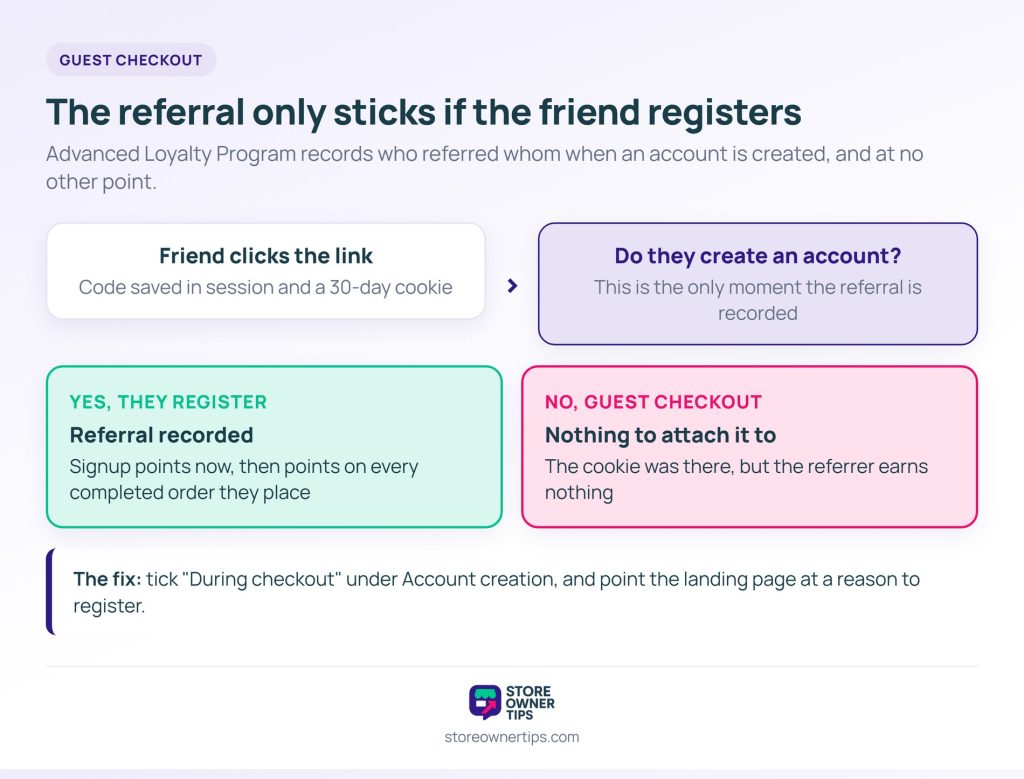
A referral only sticks if the friend registers. Advanced Loyalty Program records who referred whom when the friend creates their account, and at no other point.
Most WooCommerce referral program setups miss what follows from that. A friend who clicks the link and checks out as a guest earns the referrer nothing. The cookie was there, but there was no account to attach it to.
Unfortunately, WooCommerce’s defaults work against you here. Under WooCommerce > Settings > Accounts & Privacy, “Enable guest checkout” is ticked out of the box. Account creation “During checkout” is not.
You don’t need to switch guest checkout off, since some shoppers won’t make an account for anyone. Instead, two smaller changes cover most of the gap:
That landing page is also where the friend’s side of the reward has to live. Advanced Loyalty Program rewards the referrer only. So if you chose a both-sides reward earlier, the friend’s half needs its own coupon.
Anyone can reach that page directly, not just referred friends. For that reason, keep the welcome offer modest and set the coupon’s “Usage limit per user” to 1.
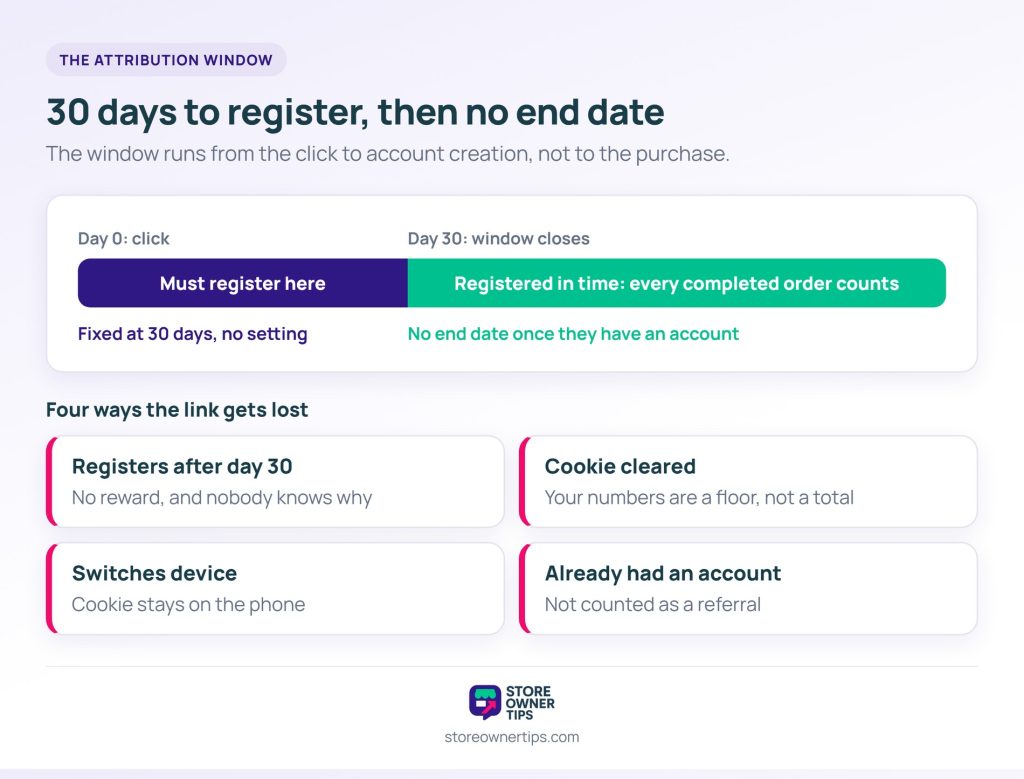
The 30-day cookie decides how long a friend has to create an account after clicking. There are four ways it can fail.
The window expires. Someone clicks in March and creates their account in May. There’s no reward, and neither person knows why. The plugin fixes the window at 30 days, with no setting to change it.
Note that the window runs from the click to registration, not to the purchase. Once the friend registers inside it, their later orders keep counting.
The cookie gets cleared. Browser settings, privacy tools or tracking protection can remove it. There’s no fix for this one. Instead, treat your WooCommerce referral program’s reported numbers as a floor rather than a total.
The friend switches device. They click on their phone at lunch, then register on a laptop that evening. The cookie stays on the phone, so the plugin never learns who referred them. As a result, neither reward fires.
The friend already had an account. The plugin only records a referrer when someone creates a new account. So an existing customer clicking a friend’s link doesn’t count as a referral.
Expect someone to test your WooCommerce referral program’s rules, and set things up for that before launch rather than after.
Self-referral is the obvious one: a second email address, a referral link to yourself, and a reward. Rewarding mainly on completed purchases helps here. A self-referral that needs a real, paid order stops being worth the effort.
Role and user exclusions work differently from how they read. Advanced Loyalty Program has “Disallowed User Roles” and “Disallowed Users” lists, both empty by default. When a referred friend registers, the plugin checks the new account against them, not the person who shared the link.
So a role on the list means signups with that role earn their referrer nothing, at signup or later. That helps if your store gives trade accounts their own wholesale role. Test it with your registration form, since the role has to be in place as the account is created.
However, the lists won’t stop a staff member sharing their own link. Check the points history of any staff or test account that refers people.
Discount farming is subtler. It happens when the friend’s reward is generous enough to turn the scheme into coupon sharing. Watch for referred accounts that place one discounted order and never return. If that pattern dominates, shift more of the reward to the referrer’s side.
As a rule, reward the outcomes you want. A referral that brings one order is worth less than one that brings a lasting customer. Per-order purchase points already lean that way, since they keep paying out while the friend keeps ordering.
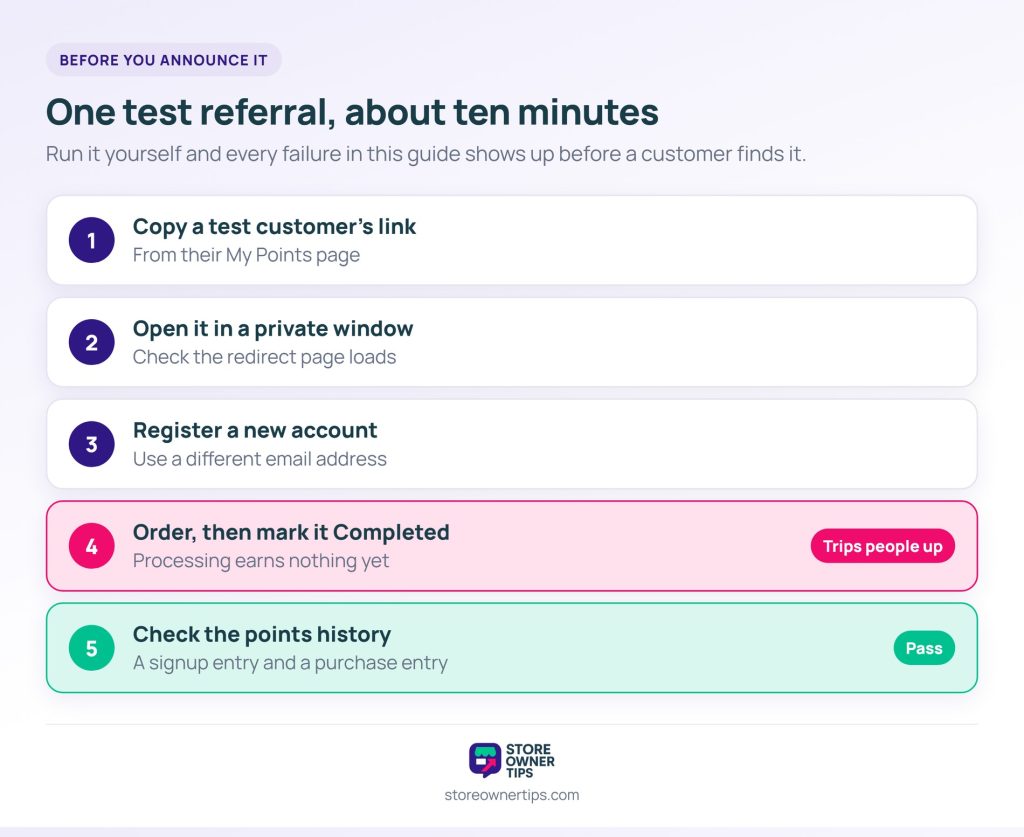
Run one full referral yourself before any customer hears about your WooCommerce referral program. It takes about ten minutes and catches every failure covered above.
Step four is the one that trips people up. Purchase points fire only when an order reaches Completed. An order still on Processing hasn’t earned the referrer anything yet.
For stores shipping physical goods, orders often sit on Processing until they’re dispatched. Referrers get their points on your fulfilment timeline, not at checkout. Mention that when you announce the program, and you’ll get far fewer “where are my points?” emails.
The test also shows how purchase points scale. They’re a flat amount per completed order, whatever the order total. Plus, they repeat on every completed order the friend places, with no end date.
So size the purchase points for a customer’s tenth order, not just their first. A value that feels generous once can add up over a long-lived customer.
Customers share your WooCommerce referral program when they know the link exists and have a reason to use it. The plugin shows each customer’s link on their My Points page. Anyone who never opens that page won’t know they have one.
Ask when the customer has something to recommend. That’s after the order arrives, not at checkout. A short email a few days after an order completes catches people while the product still feels new.
Link that email straight to the My Points page, so the referral link is the first thing they see. Otherwise, a link to your homepage leaves them to find it themselves.
Then name the reward in plain numbers. “Earn rewards for referring friends” makes the customer work out whether it’s worth the effort. By contrast, “Get 200 points when a friend signs up, plus more per order” does that work for them.
Give the customer a line to pass on as well. The referral only counts once the friend registers, so the line should say that. Something like: “Use my link and create an account to get your welcome offer.”
A referral program rewards existing customers for introducing new ones. A unique link usually tracks who referred whom. The reward typically arrives as points, store credit or a discount rather than cash.
Affiliates are third-party promoters with their own audience. They’re paid commission in money, often under formal agreements with disclosure obligations. Referrers are existing customers introducing people they know, and they’re usually rewarded in store value.
Thirty days is a common default and suits most stores. In Advanced Loyalty Program, it’s fixed at 30 days and covers the time between clicking and creating an account. Once the friend registers, their later orders still count.
Both, for most stores with repeat purchases. Referrer-only suits high-value purchases people make rarely. Friend-only works more like a welcome discount, so it gives customers less reason to share.
Points and store credit given to ordinary customers are usually treated differently from cash affiliate commission. Still, it depends on your jurisdiction and the amounts involved. Check with your accountant before launching a scheme with large cash-equivalent rewards.
Referrals can feel like something that either happens or doesn’t. In practice, they’re a system, and systems can be configured.
Start smaller than you think: one reward, one trigger, one announcement to your existing customers. A program that runs for a quarter and produces real numbers beats a perfect one that never launches.
Here’s what to do next:
Referrals work best inside a wider WooCommerce loyalty program. There, referral points sit in the same balance as points from buying. That turns a one-off introduction into a reason to come back. It’s the same job as the rest of your work on keeping customers past the first order.
If your scheme is really about recurring access rather than one-off introductions, a membership plugin may fit better. Our comparison of WooCommerce membership plugins covers that ground.
To set up points-based referrals, start with Advanced Loyalty Program from Advanced Coupons. It handles the referral codes, the 30-day tracking and the points. Your part is the point values, the landing page and the checkout settings above.

Copyright © StoreOwnerTips.com. All Rights Reserved.
