Weekly ecommerce tips, deals & news.
Picture this. You want to run a simple “buy one, get one free” weekend promo. You open WooCommerce, dig through the coupon settings, and realize there’s no BOGO option at all.
So you grab the first plugin you find. Then you hit a paywall asking for a yearly fee just to unlock the one feature you came for. That’s the frustrating reality of running BOGO deals on WooCommerce.
The platform handles flat discounts and percentage codes fine. Buy-one-get-one logic, though, isn’t built in. You need a plugin, and the right WooCommerce BOGO plugin makes the difference between a five-minute setup and an afternoon of trial and error.
I’ve looked at how the main options handle the same buy-one-get-one deal: which makes it easiest, which charges for the basics, and which one I’d actually recommend. Here’s what stands out, starting with my top pick.
A BOGO deal (buy one get one) gives shoppers a second item free or discounted when they buy a qualifying product. It’s one of the oldest tricks in retail. Still, it keeps working because of how people read value.
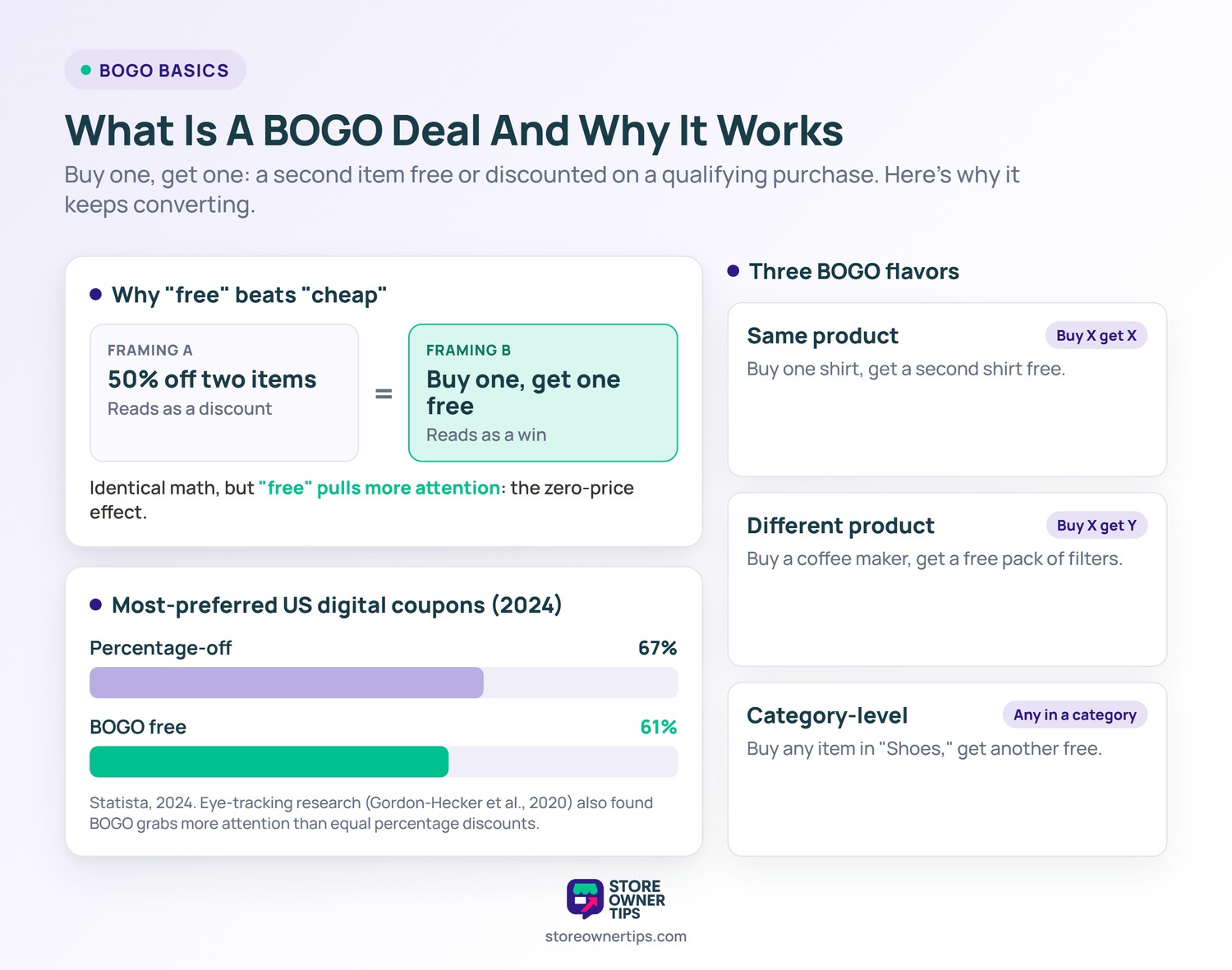
A free item feels like a bigger win than the same savings shown as a percentage. That holds even when the math is identical. That gap is sometimes called the zero-price effect, where “free” carries more pull than “cheap.”
The data backs this up. According to Statista, buy-one-get-one-free was the second-most preferred digital coupon type among US online shoppers in 2024. It was favored by 61%, just behind percentage-off coupons at 67%. A Journal of Business Research study (Gordon-Hecker et al., 2020) using eye-tracking found that BOGO deals pull more attention than equivalent percentage discounts.
BOGO offers come in a few flavors, and the best plugins handle all of them:
If you want the full mechanics, our BOGO coupon code glossary entry breaks down how these codes are structured. Now, on to the plugins.

I ranked these on how easily they create real BOGO offers, how many trigger types they support, and whether you have to pay to unlock the basics. Prices below are list prices. Vendors often run time-limited promos, so confirm the current rate before buying.
Advanced Coupons is my top pick. It’s the major coupon plugin that ships free buy-one-get-one deals across all three trigger types: same product, different product, and category-level. You add the BOGO rule right inside WooCommerce’s native coupon screen, so there’s no separate dashboard to learn.
The free version can also auto-add the free product when the cart qualifies, so customers don’t have to type a code. Because the BOGO settings live on the standard coupon edit screen, anyone who’s made a normal coupon already knows where to go. As a result, building a “buy from this category, get one free” rule doesn’t take much guesswork.
🔍️ What we’ve seen: Store owners often set up a same-product BOGO and then test it with the most expensive item in the cart. They expect that one to come free. By default, the logic decides which qualifying item gets discounted, and it isn’t always the priciest one. Always run a test order on staging with mixed cart values first, so you know exactly which unit gets the free or discounted price.
Premium (Advanced Coupons Premium, from $199/year list) adds cart conditions, scheduling, and more advanced quantity logic. The core BOGO feature you came for, though, is free. For deeper tutorials and recipe ideas, the team maintains a guide to Advanced Coupons BOGO deals.
Best for: store owners who want flexible BOGO without paying upfront.
WebToffee Smart Coupons is another plugin with a free BOGO module. Its free tier handles same-product and different-product BOGO. The premium version (around $89/year list) opens up store credit, gift cards, and bulk coupon generation.
Compared with Advanced Coupons, the rule builder feels more configuration-heavy. You step through more dropdowns before the deal goes live, and the BOGO controls sit outside the native coupon screen. By contrast, Advanced Coupons keeps category-level BOGO and auto-apply in its free tier on that familiar screen. If you already lean on store credit and gift cards, WebToffee’s bundled approach can still appeal.
Best for: stores already using store credit or gift cards that want BOGO bundled in.
FlyCart’s Discount Rules for WooCommerce is a capable pricing engine, but its BOGO functionality is locked to the PRO version (from $79/year list). The free plugin handles bulk and tiered discounts well. Buy-one-get-one specifically sits behind the paywall.
Once you’re in PRO, the rules engine supports conditional offers like “buy product A, get 50% off the cheapest item in the cart.” The trade-off is a separate rules dashboard rather than the WooCommerce coupon screen, so there’s more of a learning curve. Advanced Coupons, by comparison, gives you working BOGO for free on the native coupon screen, with no upgrade needed to start.
Best for: stores running complex tiered or conditional pricing that don’t mind paying for PRO.
The official “Buy One Get One Free” extension on the WooCommerce.com marketplace is a reliable, single-feature option. It handles BOGO, 2-for-1, and free-gift deals, and it benefits from the trust of being an official extension. It’s priced at $49/year list.
The catch is that it’s paid with no free tier, and it does one thing only. There’s no broader coupon, store-credit, or loyalty layer to grow into. Setup is straightforward and the deals apply cleanly. Still, you’re paying a recurring fee for a feature Advanced Coupons offers for free.
Best for: stores that prefer an official WooCommerce.com extension and only need BOGO.
PW WooCommerce BOGO is the no-frills free pick. It does store-wide buy-one-get-one in a single click: name your deal, hit publish, and the BOGO runs across your catalog.
That simplicity is both its strength and its ceiling. You can have a basic store-wide BOGO live almost immediately, with nothing to configure. However, the free version has no category targeting, no different-product (Buy X Get Y) logic, and no auto-apply (those sit in its Pro upgrade). For a quick, blanket promo it’s hard to beat. For anything targeted, you’ll outgrow it fast.
Best for: stores that want one simple, free, store-wide BOGO with zero setup.
Setting up a buy-one-get-one deal is quicker than most store owners expect once you have a plugin installed. Here’s the general flow using Advanced Coupons, my top pick, since it keeps everything on the familiar coupon screen.
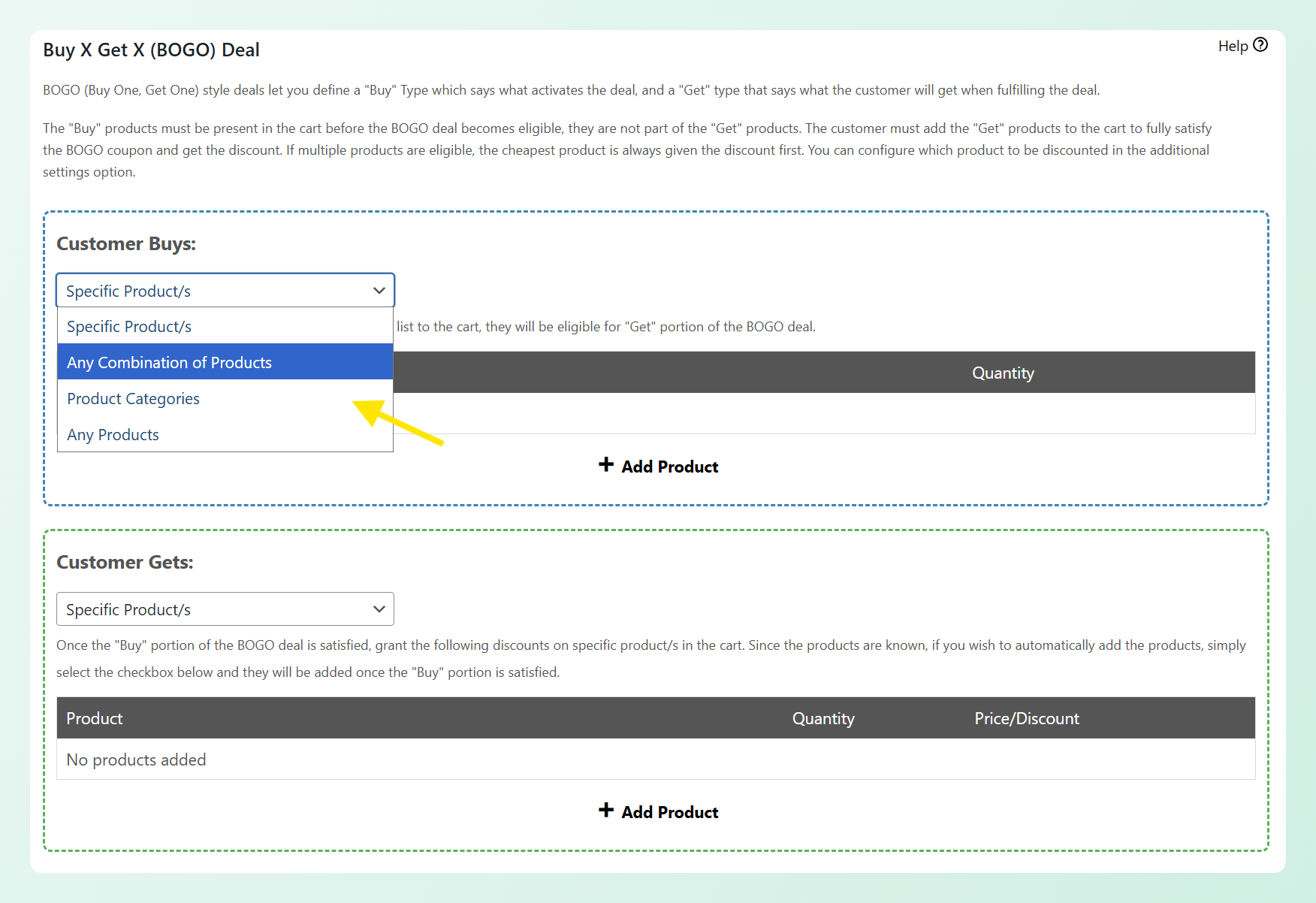
That last step matters more than it sounds. Skipping a test order is the most common reason a “free” item shows up at the wrong price on launch day.
Here’s how the five WooCommerce BOGO plugins stack up on the features that matter most for buy-one-get-one deals. Prices are list prices and may change.
| Feature | Advanced Coupons | WebToffee Smart Coupons | FlyCart Discount Rules | WooCommerce Buy One Get One Free | PW WooCommerce BOGO |
|---|---|---|---|---|---|
| Free BOGO? | Yes | Yes | No (PRO only) | No (paid) | Yes |
| Same-product (Buy X Get X) | Yes | Yes | PRO | Yes | Yes |
| Different-product (Buy X Get Y) | Yes | Yes | PRO | Yes | Pro only |
| Category-level | Yes | Yes | PRO | Yes | No |
| Tiered/quantity BOGO | Premium | Yes | PRO | Yes | Pro only |
| Auto-apply (no code) | Yes | Yes | PRO | Yes | Pro only |
| Native coupon screen | Yes | No | No | Partial | No |
| Starting price (list) | Free / $199/yr | Free / $89/yr | $79/yr (PRO) | $49/yr | Free |
The right WooCommerce BOGO plugin comes down to how flexible you need to be and whether you want to pay for the basics.
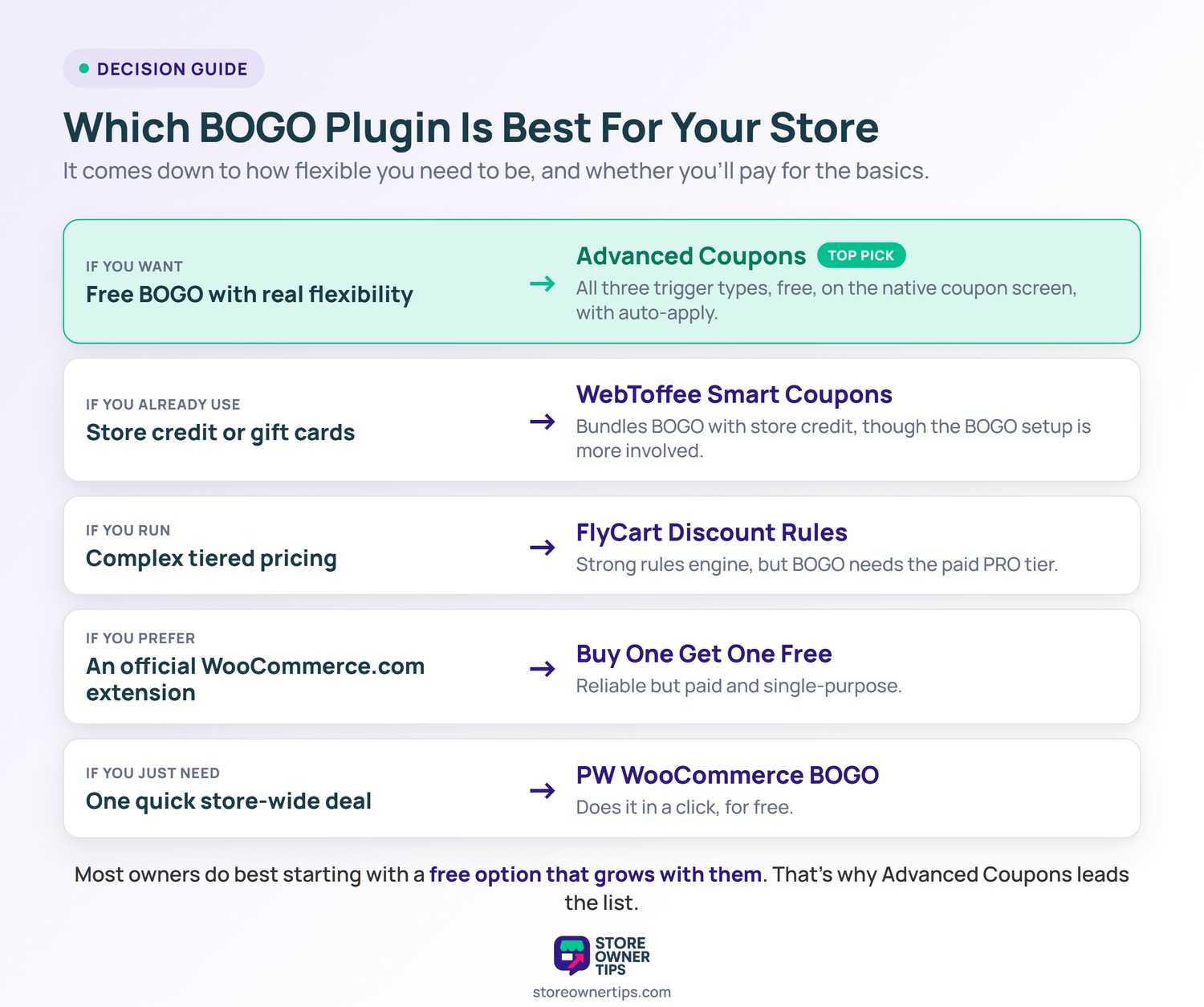
For most store owners, starting with a free option that can grow with you makes the most sense. That’s why Advanced Coupons leads my list.
Yes. Advanced Coupons includes a free buy-one-get-one module, and PW WooCommerce BOGO is free for simple store-wide deals. Advanced Coupons offers free BOGO across same-product, different-product, and category-level triggers with auto-apply.
No. WooCommerce handles flat and percentage coupons natively, but buy-one-get-one logic isn’t built in. You need a dedicated BOGO plugin to create same-product, different-product, or category-based offers.
Same-product BOGO (Buy X Get X) gives a second copy of the item the customer bought, like “buy one mug, get one free.” Different-product BOGO (Buy X Get Y) rewards a separate item, like “buy a camera, get a free memory card.” Both are useful, but different-product offers work well for cross-selling.
Yes, if your plugin supports auto-apply. Advanced Coupons can trigger BOGO offers automatically once the cart qualifies. Shoppers then see the discount without typing anything.
Test the offer on a staging site with a realistic cart before going live. BOGO logic decides which qualifying item gets the discount, and it isn’t always the most expensive one. A quick test order prevents pricing surprises on launch day.
BOGO deals keep working because shoppers feel the value of “free” more sharply than a discount of equal size. The right WooCommerce BOGO plugin lets you tap that without paying for features you don’t need yet. The tools that win are the ones that keep setup simple and don’t gate the basics behind a license.
Here’s how to choose the best WooCommerce BOGO plugin for your store:
If you want flexible buy-one-get-one deals without an upfront cost, the Advanced Coupons BOGO deals guide is a good next read once you’re ready to go further.
For more on building promotions that convert, see our guide to the best WooCommerce coupon plugins.

Copyright © StoreOwnerTips.com. All Rights Reserved.
