Weekly ecommerce tips, deals & news.

The right Black Friday sale ideas can make November your biggest month of the year. After all, discounts are the main reason shoppers show up for the season’s biggest shopping event.
Shoppers are ready to spend, too. Adobe forecasts $12.9 billion in US online sales on Black Friday 2026, up 9.2% year over year. It expects Cyber Monday to reach $15.1 billion.
In short, your deals need to be ready well before the sale begins. Below, I’ll walk you through 11 Black Friday sale ideas, plus the margin math and a 2026 launch timeline.
So let’s get cracking!
Jump to:
For small businesses and major brands alike, Black Friday is one of the biggest shopping events of the year.
Many shoppers wait all year just to grab major deals. A clear plan helps you turn that demand into orders, instead of scrambling once the traffic arrives.

Here’s what the numbers say:
Based on a DHL report on global Black Friday shoppers:
The rush of the Black Friday season can be overwhelming if you’re not ready. Early prep gives your store room to handle a surge in orders, without broken coupons or stock surprises.
When you plan your sale ideas early, you give yourself more time to test, adjust, and improve.
In the next sections, I’ll walk through the sale ideas you can start preparing today. Getting your store ready before the rush saves you from fixing problems mid-sale.
To succeed on Black Friday, planning your marketing strategy isn’t enough. Read the guide below to learn what else you should prepare:
Black Friday Checklist: How To Boost Sales & Prep Your WooCommerce Store Fast (5 Powerful Tips)
The same DHL report found that 52% of shoppers buy more when a retailer sends them an offer or code.
That’s because shoppers love a good bargain. If your deals are clear and easy to understand, people are more likely to buy. So the core of any Black Friday plan is a set of clear, simple deals.
The strategy is simple: offer bigger savings when shoppers spend more.
For example, give 10% off when a customer spends $50, then 20% off when they reach $100.
This turns shopping into a goal. Customers feel like they are leveling up, motivating them to add more items to reach the next reward tier.
It also makes the discount feel earned, not just handed out, which can make shoppers feel better about the purchase.
From our experience, tiered discounts work especially well during seasonal sales or product launches. After all, they push shoppers to explore your catalog instead of buying just one item.
You can also show how close they are to the next tier with a cart message or progress bar. That nudge keeps the goal in view.
Group items that make sense together. For example, if someone buys a camera, offer a memory card and a case at a lower price.
Bundles save shoppers from searching for each item on their own. It feels like a ready-made kit that solves the entire need in one click.
They also help customers avoid decision fatigue. Instead of choosing between dozens of accessories, they get a curated set designed to work well together.
From what we’ve seen, bundles often increase perceived value too. Shoppers compare the bundle price to what they’d pay individually and feel like they’re getting more for less.
Because the thinking is done for them, the bundle feels like the smarter, more convenient choice.

A Buy X Get Y deal gives customers something extra once they reach a specific purchase requirement. For example, buy two shirts and get the third one for half off. It feels like unlocking a reward.
BOGO (Buy One Get One) is a type of Buy X Get Y deal. Buying one item unlocks a second item for free.
These deals work because people love the feeling of getting something for free. The perceived value often feels higher than a regular discount, which makes these offers hard to pass up.
They’re also a smart way to move slower-selling products or clear seasonal inventory. Instead of cutting the price of one item, you give shoppers a reason to add more to their cart.
When customers get more for the same price, they feel clever and satisfied. And because the deal feels like a win, they’re more likely to remember your store.
A coupon is a discount or special offer that customers can apply to their purchase. It’s usually a code or an automatic deal. It can lower the price, add a free item, or give another perk at checkout.
Coupons give shoppers a small thrill. Typing in a code or clicking a special link feels like unlocking a secret. For example, entering SAVE25 at checkout takes 25% off the order on the spot. That small win is a big part of their appeal.
URL coupons are even easier because the discount applies the moment they click the link. No typing. No guessing. This keeps the checkout flow smooth and reduces the chance of cart abandonment.
From our observation, coupons also create a sense of control. Shoppers feel like they earned the deal, which makes the purchase feel more satisfying.
Done well, coupons make the whole purchase feel smarter and more rewarding.

To run deals like the ones above, the Advanced Coupons plugin adds the rules WooCommerce’s basic coupons lack. The free version covers BOGO deals for specific products, cart conditions, URL coupons, and scheduling. Premium adds the rest of the features below.
Together, these features let you reward loyal customers and move slower products without discounting your whole store.

Add a visible timer to remind shoppers that time is running out. When people see a countdown, they feel a small push to act. Urgency becomes real, not theoretical.
This taps into the fear of missing out. When shoppers think the deal might disappear, they stop hesitating. Suddenly, waiting feels risky.
Countdown timers also shorten decision time. Instead of going back and forth, customers decide sooner so they don’t miss the deal.
Timers can also keep visitors focused on checkout, rather than drifting off to compare other sites.
One rule matters here: only count down to a real deadline. A timer that resets, or a sale that quietly continues, costs you shoppers’ trust.
Free shipping can be the final push that convinces someone to complete their purchase.
Unexpected costs are the top reason shoppers abandon checkout. In Baymard’s research, 40% of shoppers who left a checkout blamed extra costs like shipping, tax, and fees.
Free shipping also simplifies mental math. Instead of calculating totals, comparing rates, or second-guessing the cost, shoppers can focus on actually buying.
If you offer free shipping, make it obvious. Highlight it on product pages, in the cart, and near the checkout button. In short, don’t hide it!
You can also set a spending threshold, such as “Free shipping when you spend $50.” It gives customers a reason to add a few more items.
Clear messaging builds trust, and trust leads to more completed orders.

OptinMonster is a popup and campaign builder. It’s designed to turn more of your existing visitors into subscribers and buyers. Beyond basic popups, it adds the targeting and timing rules a Black Friday offer needs.

Open your sale to email subscribers or repeat customers a day or two before everyone else. Early access rewards your most loyal shoppers, and it spreads your orders over more days.
It also gives people a reason to join your list in November. A simple “Sign up for early access” message on your homepage does the job.
The easiest setup is a coupon only your list receives. With Advanced Coupons, you can also restrict a coupon to certain user roles or to logged-in customers. That way, a shared code won’t work for shoppers outside the group.
Instead of cutting your prices, add a free item to qualifying orders. A free gift protects your regular price, and it costs you the item’s cost, not its retail price.
Pick a gift that’s cheap for you but useful to the buyer, like a sample or a slow-selling accessory. For example, “Spend $75 and get a free tote bag.”
Advanced Coupons Premium can add the gift to the cart automatically when the coupon applies. Set its price to 0, and the shopper sees it free in their cart.
A Black Friday reward that’s spent later brings the shopper back in December. That turns one sale into two.
There are two common ways to do it:
Both rewards cost you nothing until the customer comes back to spend them. Mention the reward in your order confirmation email, so buyers remember they have it.
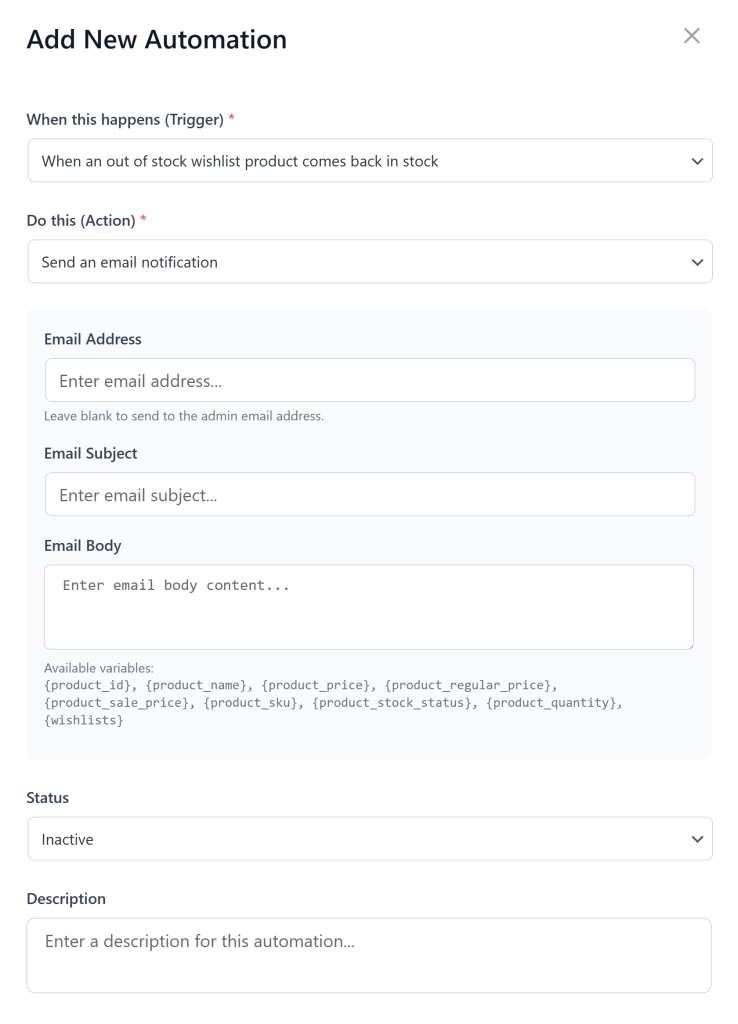
Shoppers who saved a product to a wishlist have already told you what they want. A “your saved item is on sale” email reaches them as soon as you apply the sale price.
That’s warmer than a general sale email, because it’s about a product they picked themselves. It can also reach shoppers who saved gift ideas weeks before Black Friday.
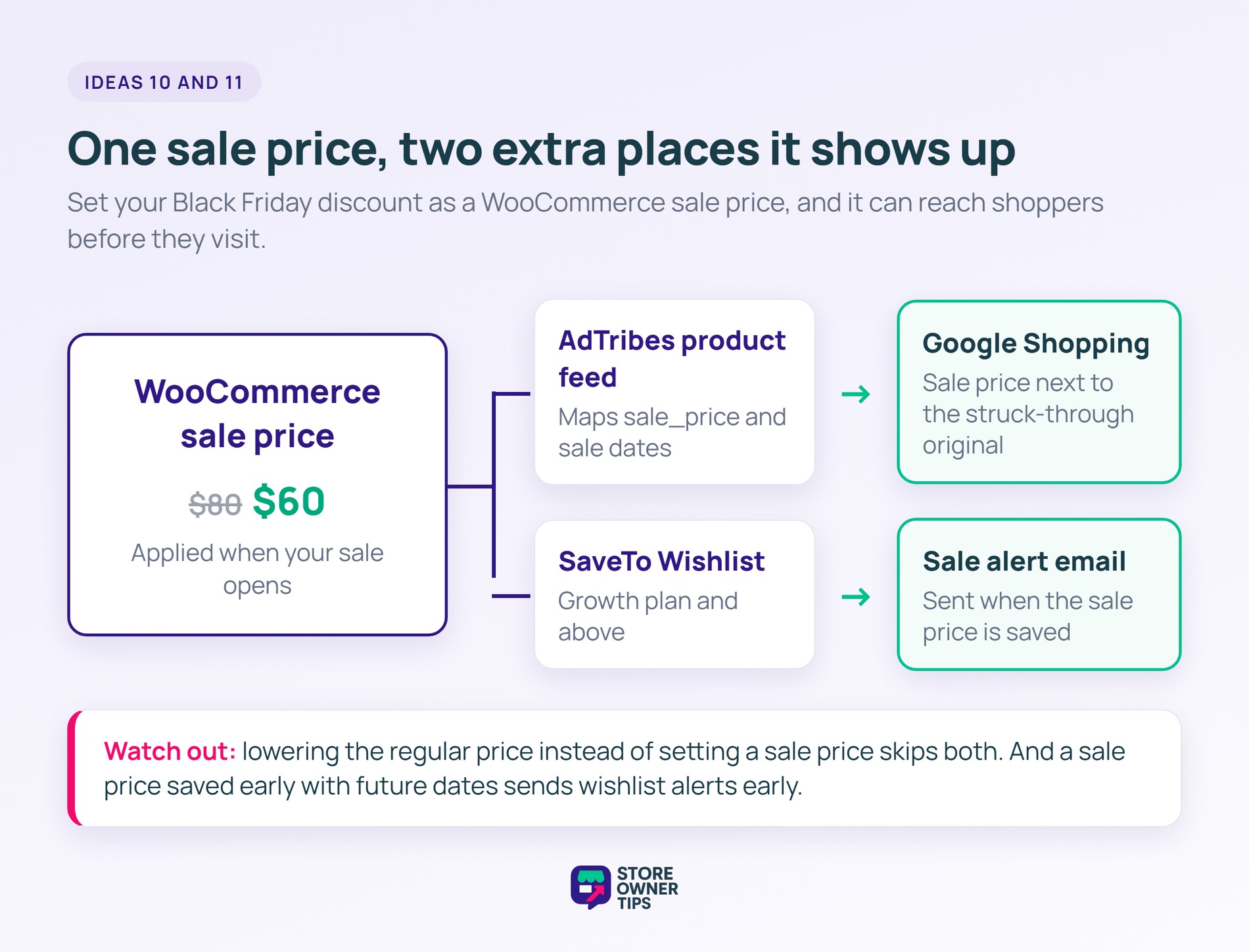
SaveTo Wishlist sends these price-drop alerts automatically on its Growth plan and above. One detail matters here: the alert fires when you set a sale price. Lowering the regular price alone won’t trigger it, so run your Black Friday discount as a sale price.
Timing matters too. The alert fires when you save the sale price, not when a scheduled sale starts. So if you enter Black Friday prices with future dates in mid-November, shoppers get the alert in mid-November.
To avoid that, apply the sale price for wishlisted products when your sale opens. Or, if you’d rather set everything up early, change the sale price again at launch. A new sale price counts as a new price drop.
SaveTo Wishlist is a WooCommerce wishlist plugin with a free Lite version and three paid plans. Lite handles the saving and sharing. SaveTo Wishlist Pro, included from the Growth plan up, adds the alerts and data a Black Friday sale can use.
One limit to know: Lite doesn’t send sale alerts, so idea 10 needs the Growth plan or above. Together, these features turn saved items into a list of shoppers you can reach the day your sale starts.
Your Black Friday price should show up before the shopper even reaches your store. Google can show your sale price next to the struck-through original in Google Search, Shopping ads, and the Shopping tab.
To make that happen, your product feed needs two fields:
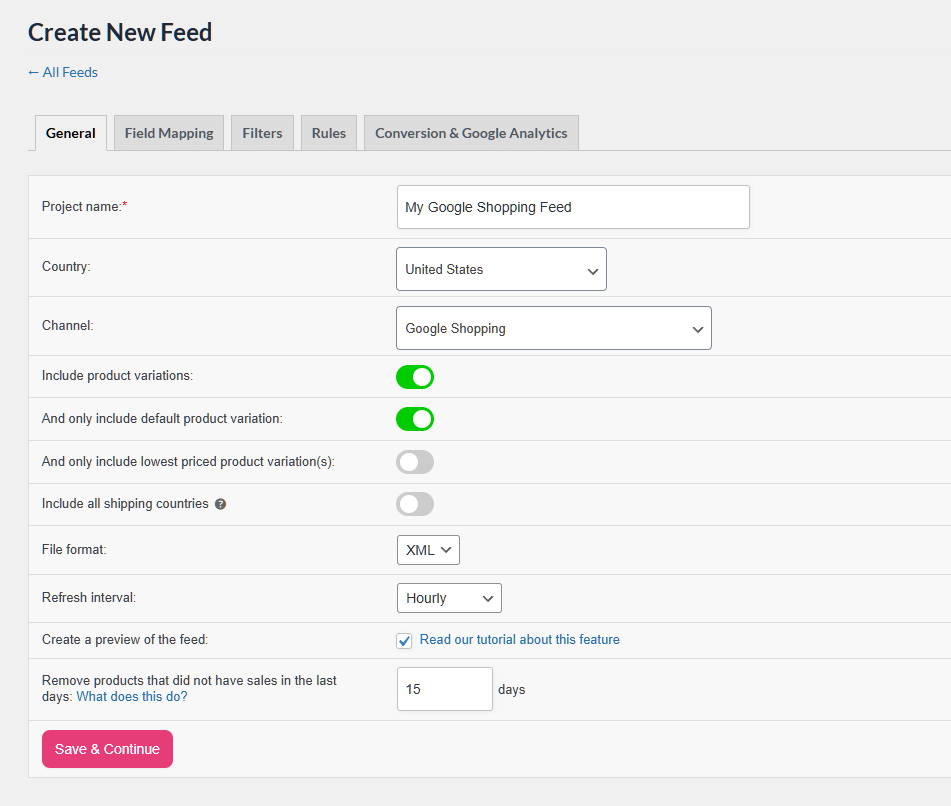
The free version of AdTribes can map both fields from your WooCommerce sale prices. That means you set the sale once in WooCommerce, and your feed follows. One setting matters here: map Google’s price field to Regular Price, not Price. That way, the feed keeps sending the original price during the sale.
Keep a few rules in mind. Google’s sale price annotations need a discount between 5% and 90%, and your product page has to show both prices. WooCommerce does that by default, with the regular price struck through.
Shopping ads also need a price history at the regular price. In the US, that’s 5 of the past 30 days or 15 of the past 200. In the UK, Australia, Canada, and other listed countries, it’s 30 of the past 200 days. So avoid raising regular prices in November. Even when you meet every rule, Google doesn’t guarantee the annotation will show.
AdTribes builds product feeds from your WooCommerce catalog for Google Shopping, Meta, TikTok, and other channels. Its free plugin, Product Feed PRO, covers what idea 11 needs. The paid Product Feed Elite plans add custom refresh schedules, more templates, and extra tools.
Google still has to process each feed change, so don’t leave feed checks to the last hour. If you apply sale prices on launch day for wishlist alerts, set the feed to refresh hourly. Then check Merchant Center that morning.
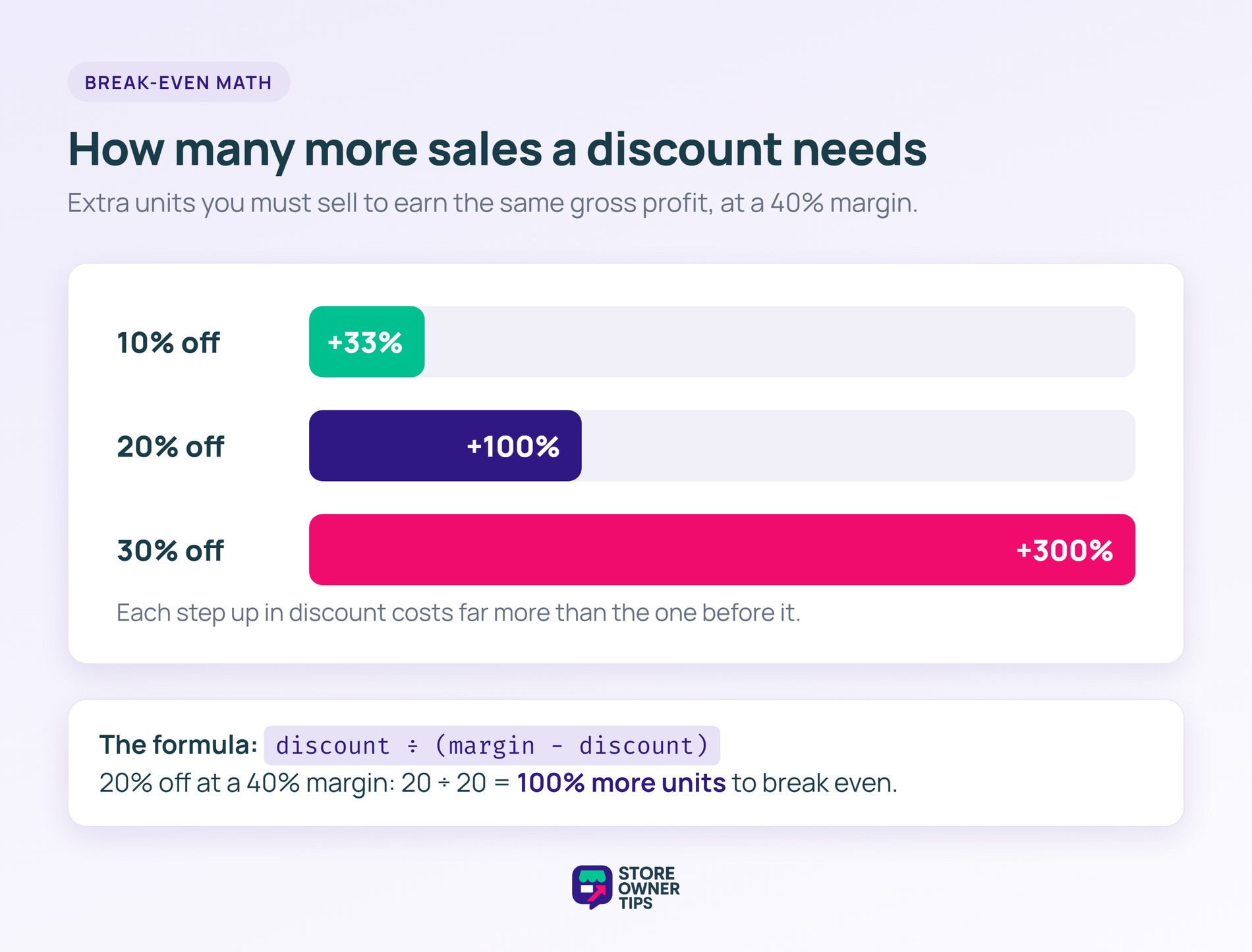
Every discount comes out of your margin, not your revenue. So before you pick a percentage, check how many extra sales it takes just to earn the same profit.
The math is simple: divide the discount by your margin minus the discount. So a 20% discount on a 40% margin needs 20 ÷ 20, or 100% more units, to break even.
| Your gross margin | 10% off | 20% off | 30% off |
|---|---|---|---|
| 30% | +50% sales | +200% sales | No profit left |
| 40% | +33% sales | +100% sales | +300% sales |
| 50% | +25% sales | +67% sales | +150% sales |
Extra units you need to sell to earn the same gross profit as at full price
That’s why the ideas above that protect your price matter. Tiered discounts only pay out on bigger orders. Free gifts cost you the item’s cost, not its retail price. Store credit and bonus points get spent on a later order.
You can also keep thin-margin products out of the sale. WooCommerce coupons have “Exclude products” and “Exclude categories” fields under Usage restriction, so one code won’t discount everything.
🔍️ What we’ve seen: Stores often pick one sitewide percentage, even though their margins vary a lot by product. Running this math per category usually shows one or two categories that are better left at full price.
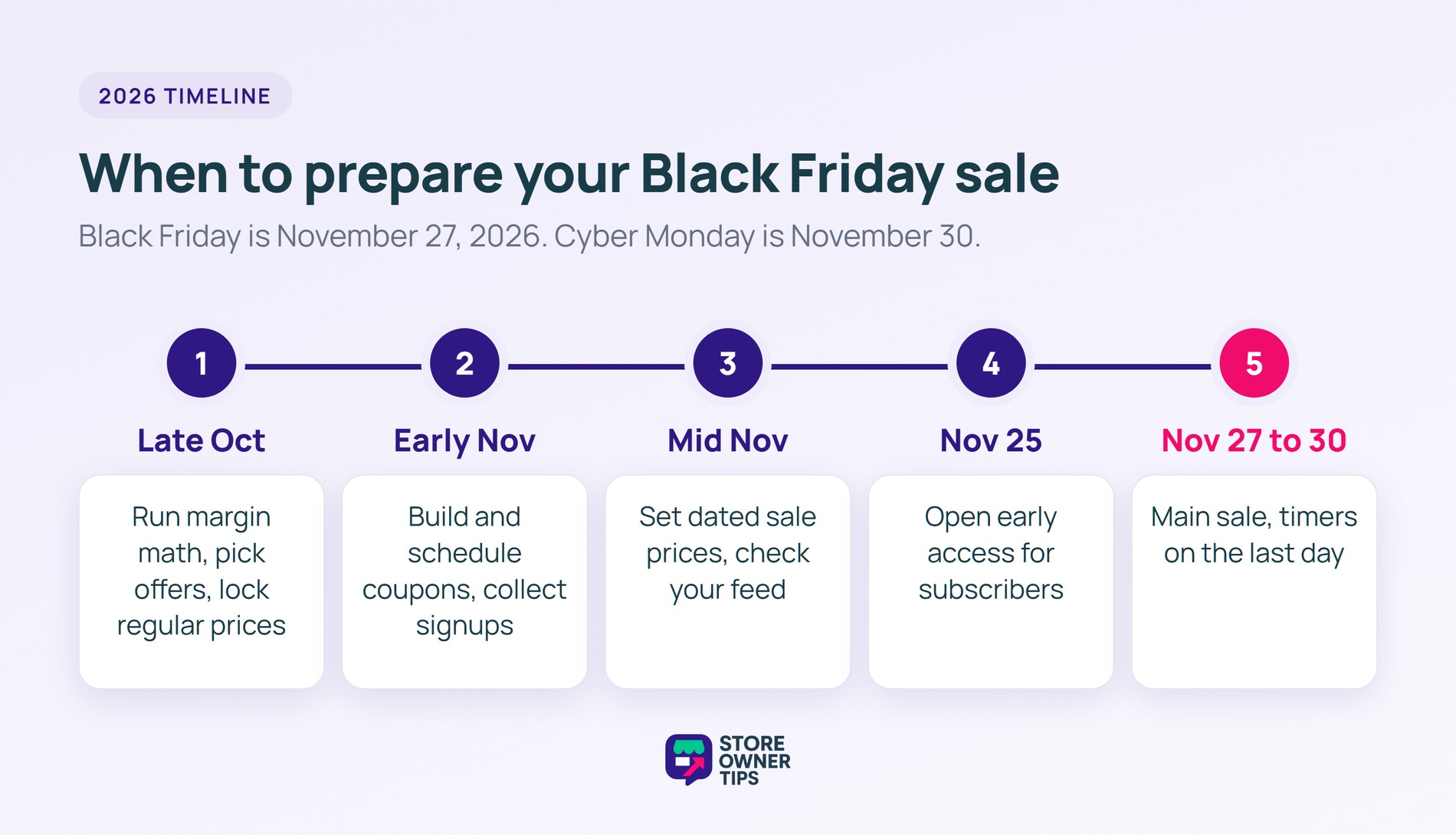
Black Friday falls on November 27, 2026, and Cyber Monday on November 30. Most of your planning, though, needs to happen weeks earlier.
Advanced Coupons lets you set a coupon’s start and end date and time in the free version. That way, your deals switch on and off at midnight without you watching the clock.
Black Friday can feel chaotic. With the right Black Friday sale ideas, though, it can be one of your strongest weeks of the year. And by preparing early, you avoid last-minute stress and give yourself time to build campaigns that actually convert.
The ideas above help shoppers spend more while feeling good about it. Customers who feel rewarded instead of pressured are more likely to come back.
Here’s your Black Friday plan:
When the weekend’s over, our guide to what to do after Black Friday covers the follow-up. Start planning your Black Friday sale ideas now, so everything’s ready by November 27.
Preparing early gives you time to test your offers, check your margins, and fix problems before traffic peaks. It also builds the regular-price history Google needs to show your sale price as a discount.
Popular Black Friday sale ideas include tiered discounts, bundles, BOGO deals, and coupons. Free gifts, store credit, early access for subscribers, and free shipping also work well. Countdown timers add urgency to any of them.
Tiered discounts give bigger savings as the cart total grows, like 10% off at $50 and 20% off at $100. Shoppers add items to reach the next tier, and the bigger discount only applies to bigger orders.
Bundles group related products into a ready-made kit, so shoppers don’t have to pick each item. That saves time, cuts decision fatigue, and makes the set feel like better value.
Countdown timers show exactly when a deal ends. That deadline pushes shoppers to decide now instead of later, which cuts hesitation during a short sale window.

Copyright © StoreOwnerTips.com. All Rights Reserved.
