Weekly ecommerce tips, deals & news.
A backorder is an order placed for a product that is currently out of stock but will ship once it returns. The buyer pays now and waits for the restock, rather than losing the chance to buy. It lets you keep selling popular items even when the shelf is empty. Think of it as a rain check that captures the sale instead of losing it.
A backorder happens when a buyer orders an out-of-stock item. The product is not on the shelf right now. But you promise to ship it once new stock arrives.
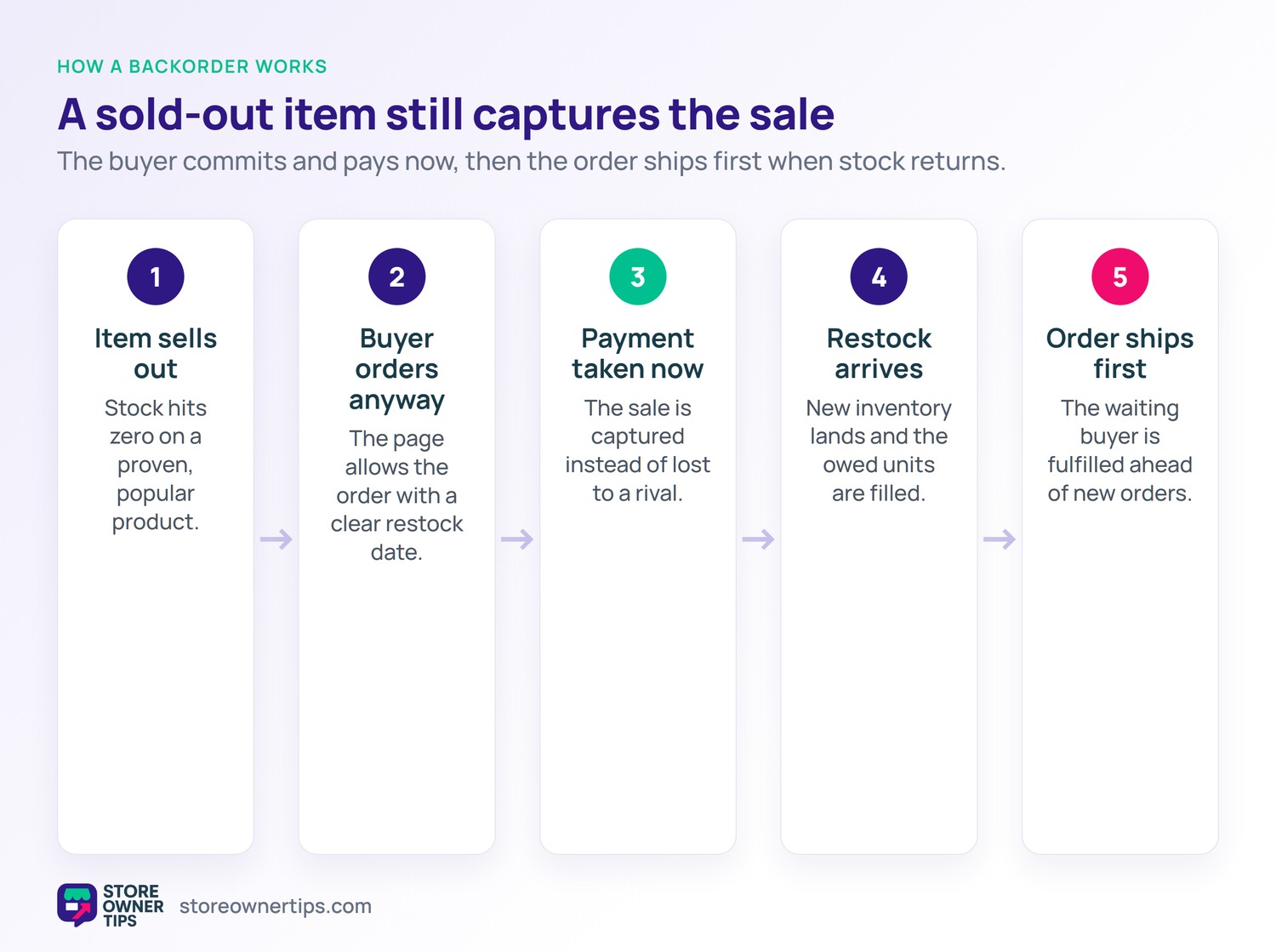
Think of it like a rain check at a shop. The item is sold out today, but your spot is saved. When it returns, your order ships first.
This keeps the sale alive during a stockout. Without it, that eager buyer would simply leave. With it, you capture the order and the revenue.
Backorders work for physical goods with restocks. A made-to-order item behaves a little differently. But the core idea is the same delayed delivery.
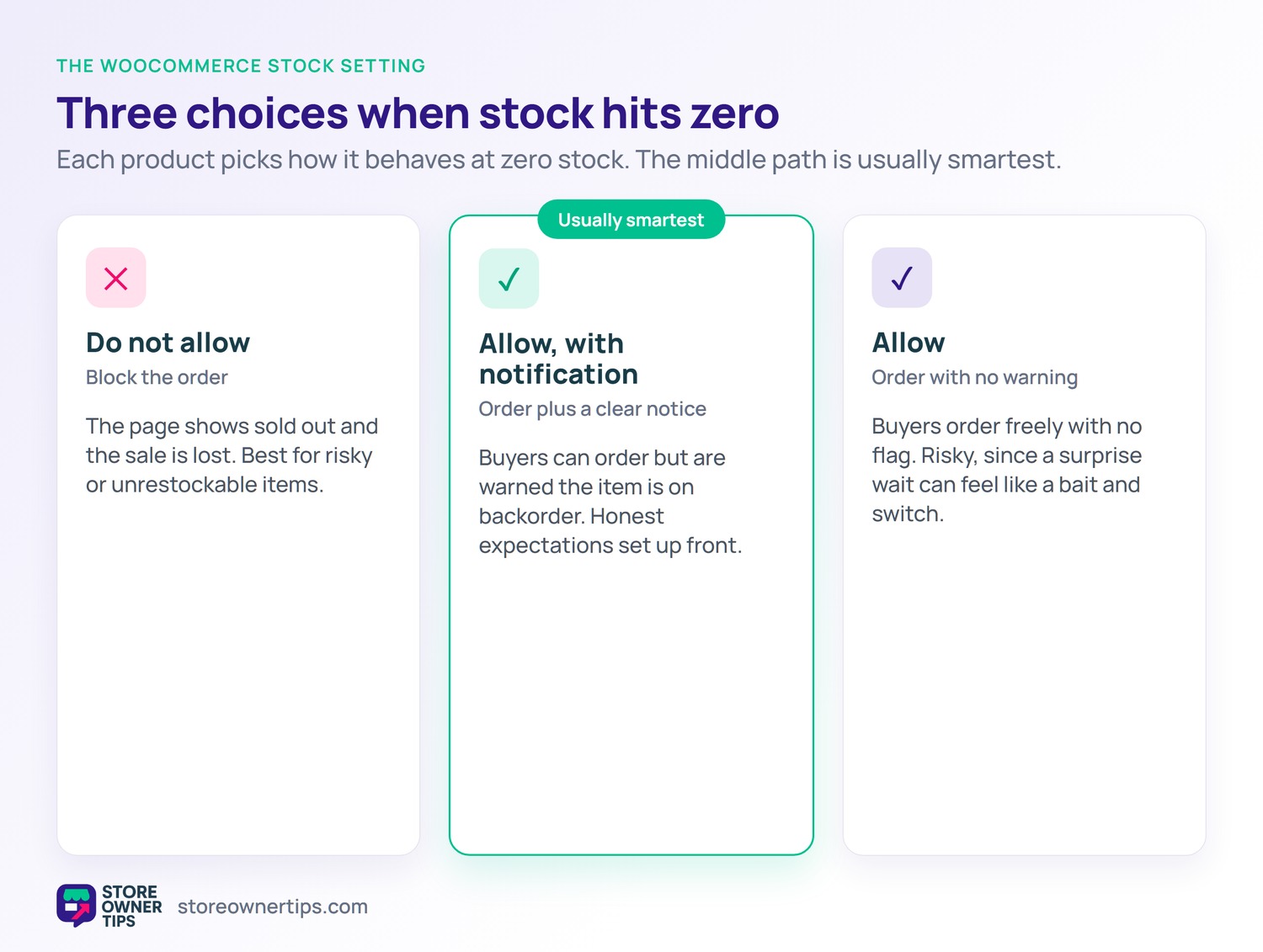
On WooCommerce, backorders are a built-in stock setting. Each product offers three choices for when stock hits zero. You can allow backorders, allow them with a notice, or block them.
The middle option is often the smartest. It lets buyers order but warns them the item is on backorder. That honesty sets the right expectation up front.
The store keeps counting stock into the negative. That tells you how many units you owe. WooCommerce and Shopify both handle backorders this way, though setup differs.
You can set backorder rules per product. A steady seller can allow them freely. A risky item can block them outright.
The biggest reason is to capture sales you would lose. A stockout normally sends a buyer to a rival. A backorder keeps that eager shopper with you.
Those saved sales matter on thin margins. General retailers average a net margin of just 5.61%. Every captured order helps protect that slim profit.
Backorders also signal real demand. A long backorder list proves an item is hot. That insight guides how much to reorder next.
They also smooth out supply hiccups. A delayed shipment no longer means lost sales. You bridge the gap and keep revenue flowing.
Backorders live or die on clear communication. A buyer will wait if they know the timeline. They grow angry only when left in the dark.
So show the expected ship date plainly. Put it on the product page and the order confirmation. An honest estimate beats a hopeful guess.
Speed expectations make this tricky. About 63% of consumers now expect delivery within two days. A backorder breaks that norm, so honesty is the only safe path.
Let buyers cancel a backorder easily too. A simple exit lowers their risk of ordering. Oddly, that freedom makes more of them stay.
Stockouts are a silent profit leak. A sold-out page often ends in a lost sale. That feeds the wider abandonment problem, which averages 70.22%.
A backorder plugs part of that leak. The buyer commits now instead of walking away. You keep the order that a blank shelf would lose.
Pair backorders with a back-in-stock notification too. Some buyers prefer a heads-up over a wait. Offering both captures the widest range of shoppers.
Backorders can actually help your cash flow. The buyer pays now, before the stock arrives. That cash can even fund the restock order.
But the timing cuts both ways. You owe a product you do not yet hold. So never spend that money as if the order is done.
Treat backorder revenue as a promise, not a profit. Keep enough on hand to deliver. That discipline keeps the model safe.
A deposit model can lower the risk further. You take part of the payment now. The rest is due when the item ships.
Backorders are not right for every item. Skip them when your restock date is unknown. A vague wait frustrates buyers fast.
Also avoid them for one-time or seasonal goods. A holiday item that arrives in January is useless. Better to mark it sold out cleanly.
Finally, be careful with unproven products. A backorder on a slow seller may never clear. Save the tactic for items you can truly restock.
Watch your cancellation rate on backorders too. A high rate signals waits that are too long. Tighten the timeline or pause the option.
A few habits make backorders smooth. Always state the expected ship date clearly. Repeat it on the page, cart, and email.
Send proactive updates as the date nears. A short note keeps anxious buyers calm. Silence is what breaks their patience.
Cap the backorder quantity to what you can deliver. An endless list you cannot fill invites refunds. Limit it to a realistic restock.
Track every backorder’s promised date. A simple list keeps you accountable. Hitting dates builds a reputation buyers trust.
The first mistake is hiding the backorder status. A surprise wait after checkout feels like a bait and switch. Always flag it before the buyer pays.
Another trap is vague or missing dates. Without a timeline, anxiety and cancellations climb. A clear estimate keeps buyers calm.
A third slip is overpromising the restock. A missed date breaks trust badly. Under-promise and over-deliver instead.
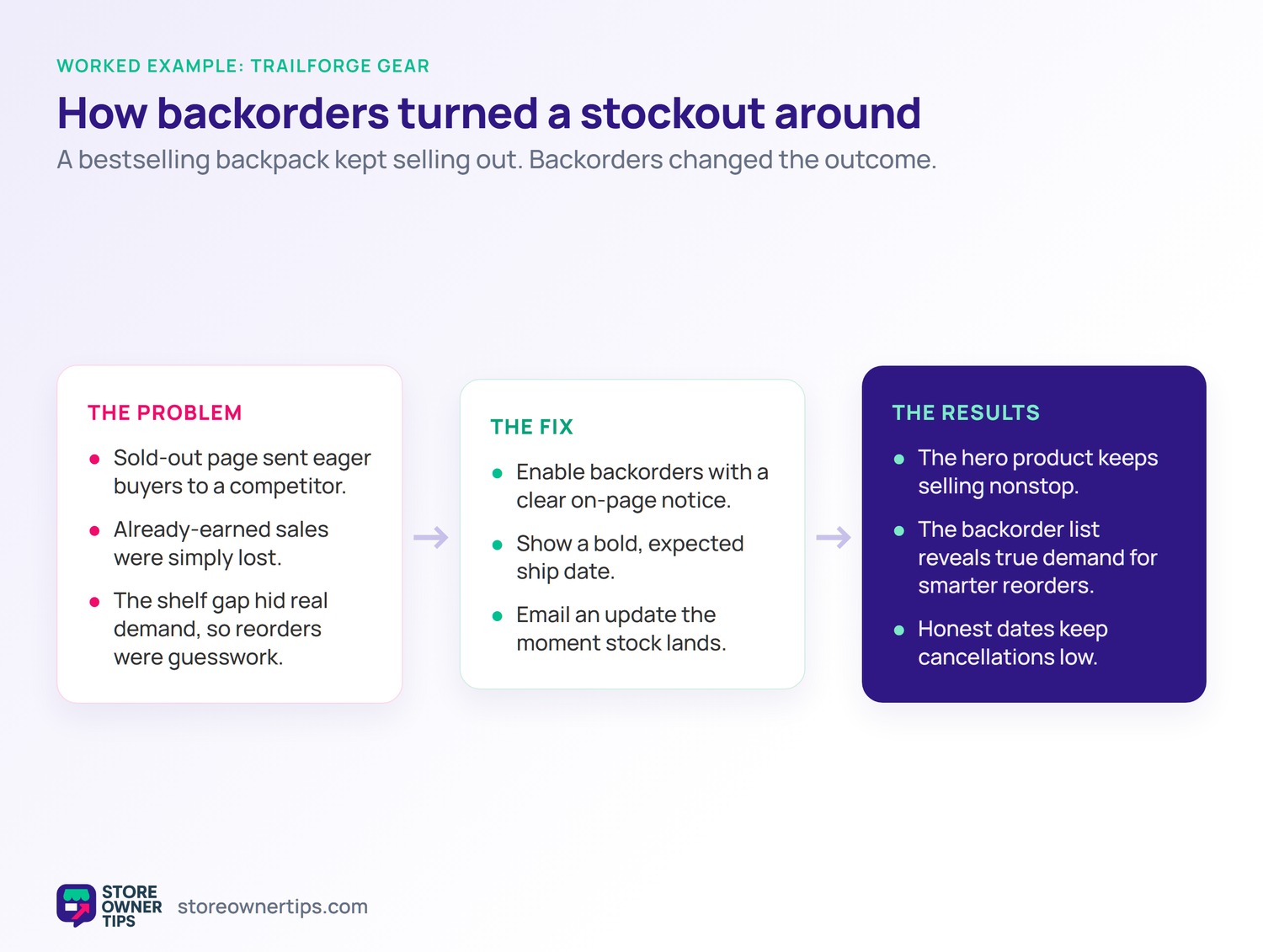
Imagine a gear brand called TrailForge on WooCommerce. Its bestselling backpack keeps selling out fast. Each stockout used to mean lost sales.
When the backpack sold out, the page showed sold out. Eager buyers left and bought from a competitor. TrailForge lost easy sales it had already earned.
The shelf gap also hid real demand. The owner could not see how many buyers wanted it. Reorders were guesswork at best.
TrailForge enables backorders with a clear notice. Now the page lets buyers order the sold-out pack. A bold line shows the expected ship date.
The store also emails an update when stock lands. Buyers feel informed and stay patient. The sale is captured instead of lost.
TrailForge keeps selling its hero product nonstop. The backorder list reveals true demand at last. Reorders get bigger and smarter.
It also watches its cart abandonment on the backpack. The number drops once buyers can order anyway. Fewer dead ends mean more sales.
Cancellations stay low because the dates are honest. Buyers happily wait for a product they want. The lesson is clear: backorders turn stockouts into sales.
Backorders and pre-orders both sell before stock is on hand. The difference is the product’s history. A backorder is an existing item that sold out.
A pre-order is for a product not yet released. Buyers reserve it before it ever launches. The item has no sales history yet.
So a backorder restocks something proven. A pre-order introduces something brand new. Both capture demand early, in different ways.
The tactics also feel different to buyers. A backorder says this is popular and worth the wait. A pre-order says be the first to get it.
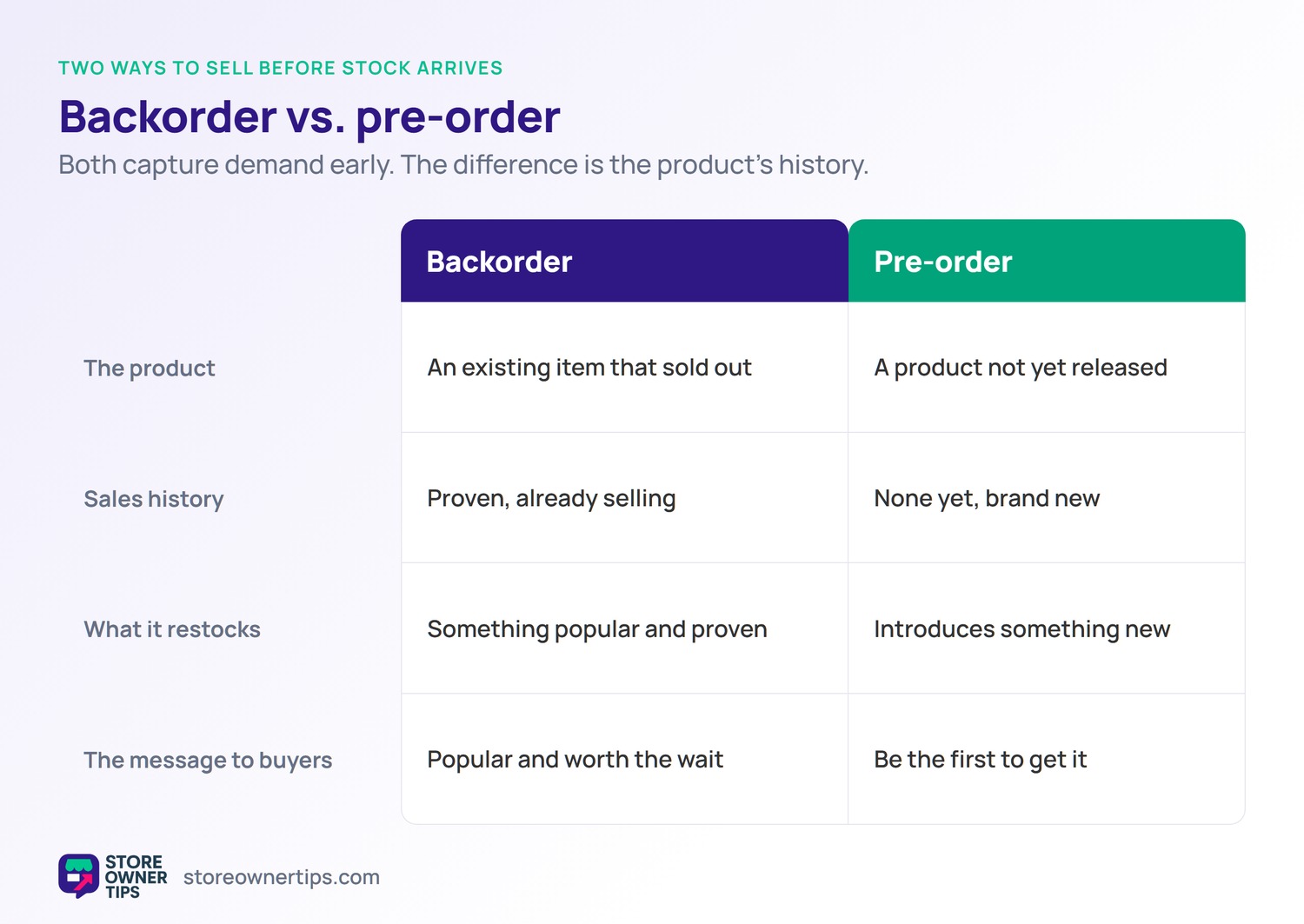
A backorder is for an existing item that sold out. A pre-order is for a product not yet released. Both let buyers order before stock is in hand.
Not when handled with clear, honest dates. They capture sales a stockout would lose. Clear dates turn the wait into trust.
No, reserve backorders for proven, restockable items. Avoid them for seasonal or unpredictable goods. Test it on one bestseller first.
A backorder turns a stockout into a captured sale instead of a lost one. It works best on proven items with a clear, honest restock date. Communicate the timeline well, and backorders keep your bestsellers earning even when the shelf is bare. Handled well, a stockout need never cost you a sale.
Copyright © StoreOwnerTips.com. All Rights Reserved.
