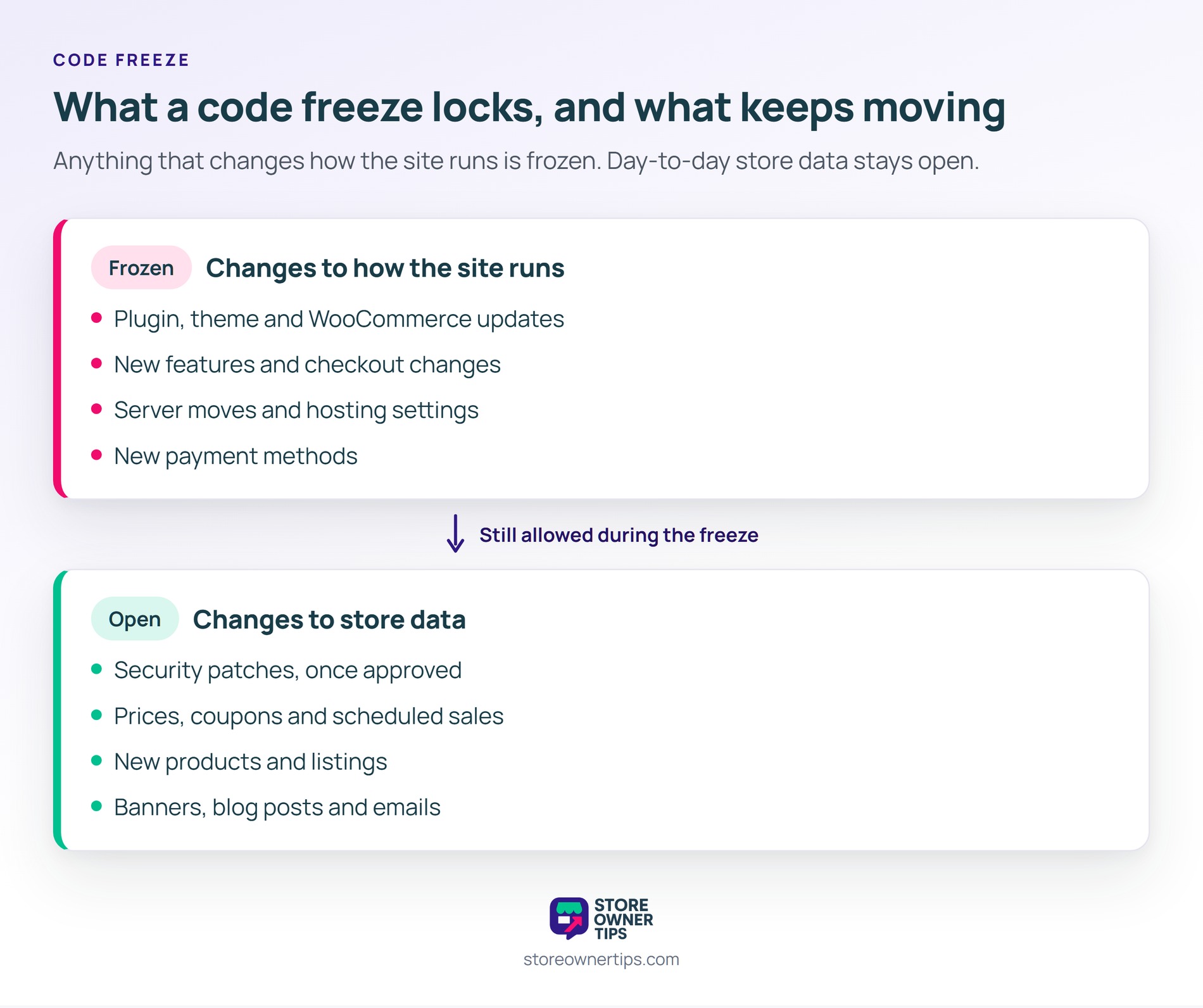
A code freeze is a set period when a store stops making technical changes to its website. For most WooCommerce stores, it runs from early November through the holidays. During a freeze, nobody updates plugins or themes, adds features, or changes major settings, so nothing breaks during peak traffic.
A code freeze works by drawing a hard line on the calendar. Before that line, you change and test. After it, you only sell.
Think of it like a restaurant on its busiest night. The kitchen doesn’t swap ovens or rewrite the menu at 7 p.m. on a Saturday. It cooks with the setup it already trusts.
Most stores pick a start date in early November and an end date after the last holiday shipping day. The freeze covers the busy stretch of Black Friday, Cyber Monday, and the December rush. Some stores also freeze around one big sale of their own.
A code freeze covers anything that changes how the site runs. That includes WordPress core, WooCommerce, plugins, themes, custom code, payment gateways, and hosting settings. A single update can trigger a plugin conflict that quietly breaks the cart.
That said, day-to-day store work keeps going. You can still edit prices, schedule coupons, add products, publish blog posts, and send emails. These changes live in your store’s data, not its code, so they rarely break anything.
Write the freeze rules down in one short document. List the start date, end date, frozen items, allowed items, and the approver. Then share it with everyone who has an admin login, including freelancers and agencies.
Preparing for a code freeze means doing all your risky changes early. Update every plugin and theme in October, then watch the site for a week or two. That way, any bug shows up while traffic is still calm.
Test every change on a staging site first. A staging site is a private copy of your store, like a dress rehearsal before opening night. Next, run a load test to see how the site handles a crowd. Check your Core Web Vitals while you’re at it.
Finally, take a full backup the day the freeze begins. The Black Friday marketing guide from Visser Labs recommends testing that restore process before the big day. After all, a backup you’ve never restored is only a hope. For a wider prep list, see how Wholesale Suite suggests you prepare for Black Friday.
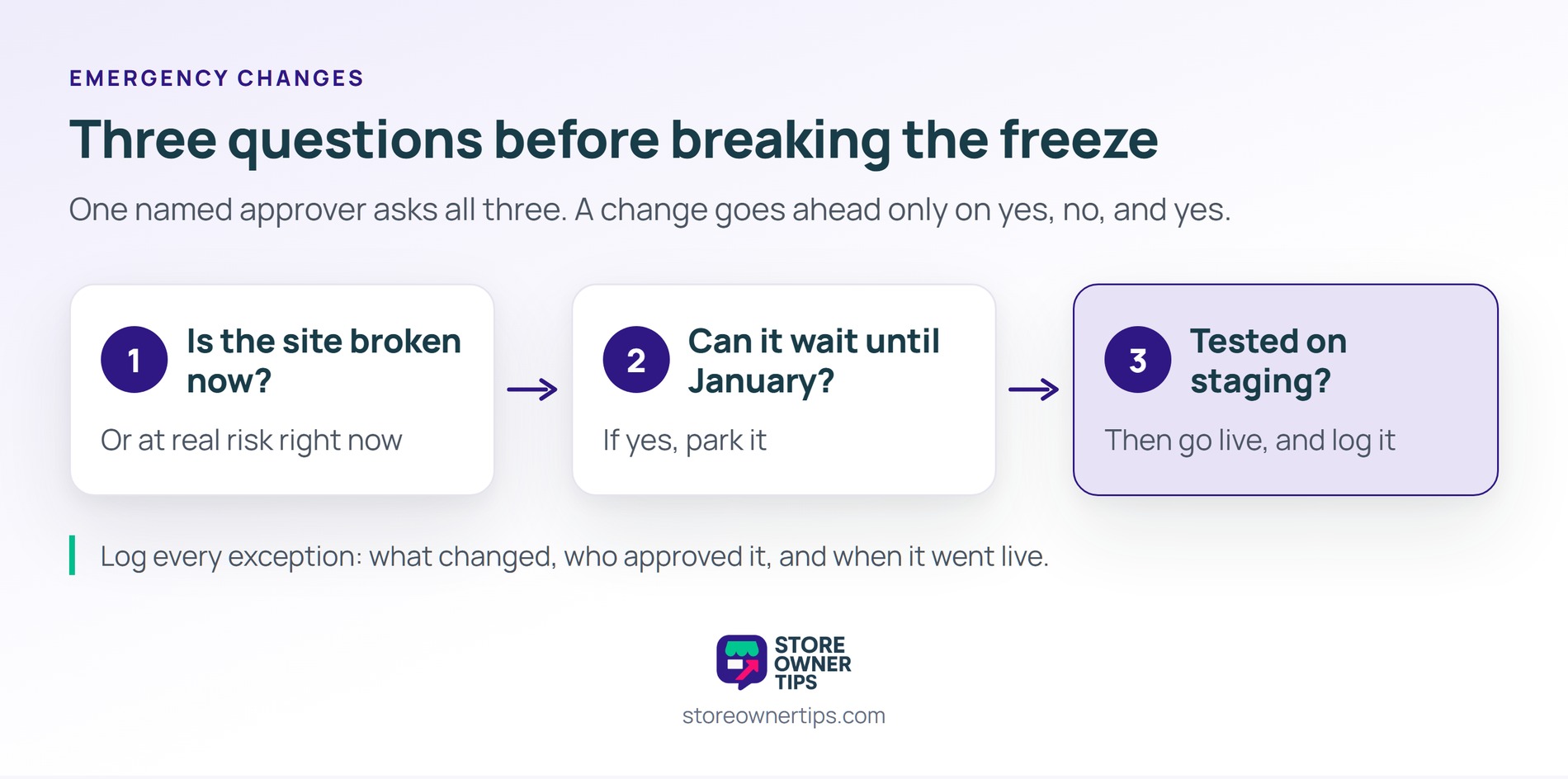
One named person should approve every emergency change during a code freeze. In a small store, that’s usually the owner. In a bigger team, it might be the lead developer or operations manager.
The approver asks three questions. Is the site broken or at risk right now? Can the fix wait until after the holidays?
The third question is whether the fix has been tested on staging. If the answers are yes, no, and yes, the change goes ahead. Keep a simple log of every exception. Note what changed, who approved it, and when it went live.
The numbers behind a code freeze show that rushed changes cause outages. Uptime Institute’s annual outage research found nearly 40% of organizations had a major outage caused by human error. That covers the past three years. The same Uptime Institute report says 85% of those incidents came from staff skipping procedures or from flawed processes.
Shoppers also leave when a site misbehaves, as Baymard’s research shows. Baymard Institute found that 17% of US shoppers who abandoned an order did so because the site had errors or crashed. On top of that, speed matters. A Google study run by Deloitte found a 0.1-second faster mobile site lifted retail conversions by 8.4%.
A code freeze in practice looks like a quiet, boring November for the tech side of a store. Here’s a hypothetical example. Imagine a small WooCommerce store called Wickfield Candle Co. that sells hand-poured candles.
In mid-October, the owner updates every plugin on a staging copy first. One update clashes with the gift-wrap add-on at checkout. She rolls it back, finds a fix, and pushes the clean version live a week later.
Next, she runs a load test and takes a full backup. On November 1, she posts a note for her two helpers. It says no updates or new plugins until January 5, and she approves any exceptions.
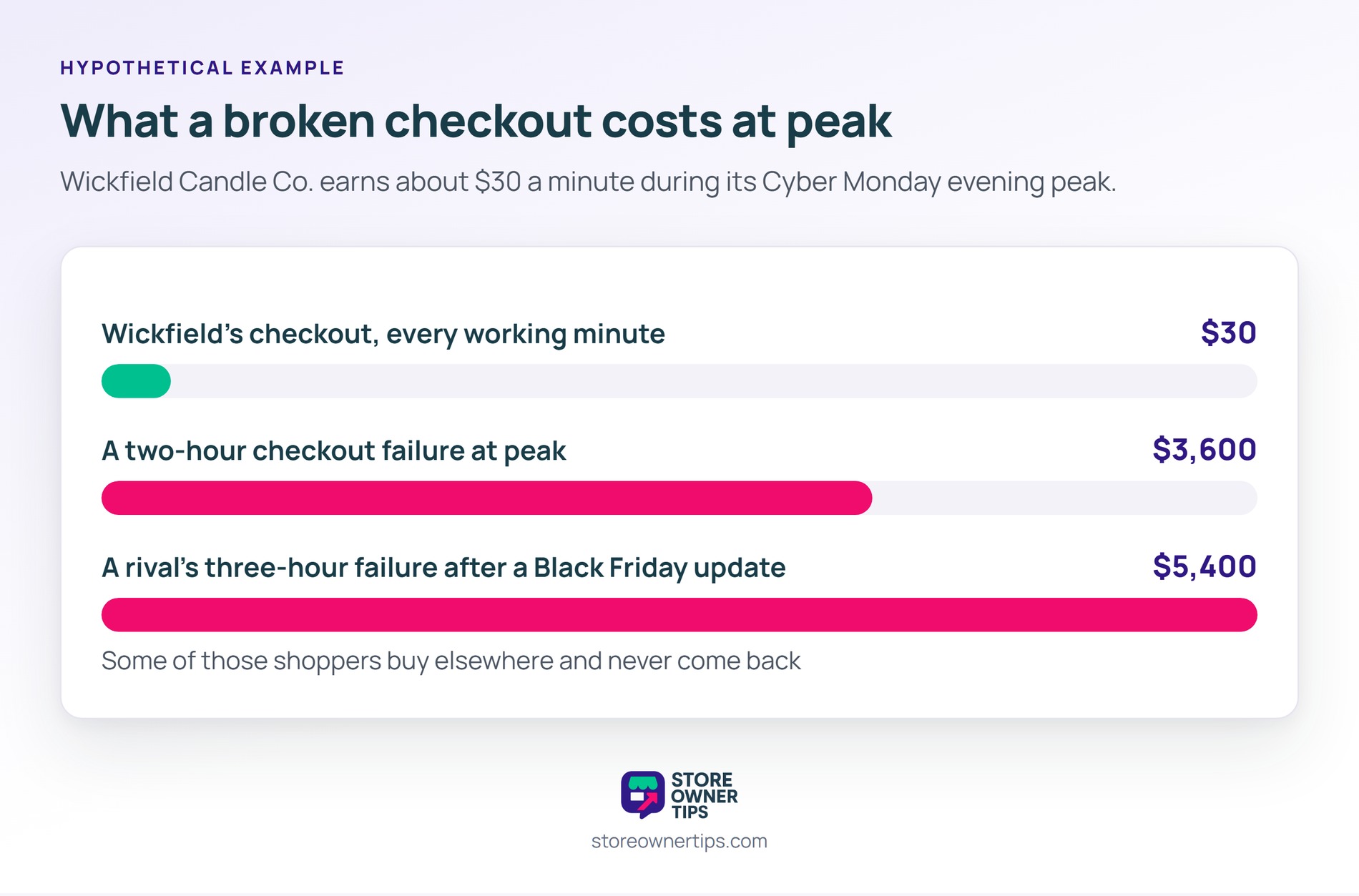
On Cyber Monday, Wickfield earns about $1,800 an hour at its evening peak. That’s $30 every minute the checkout works. A two-hour checkout failure at that point would cost roughly $3,600 in lost orders.
Meanwhile, the team keeps selling normally. They change sale prices, launch a scheduled coupon, and publish a gift guide. As a result, none of that touches the code, and the freeze stays intact.
Halfway through December, a security patch lands for one plugin. The owner tests it on staging, approves it, and installs it the same morning. The store gets through the season without a single checkout error.
In January, she lifts the freeze and works through the parked updates. AdTribes lists that cleanup in its after Black Friday tasks for store owners, including updating plugins.
Now compare that with a rival candle shop that updates plugins on Black Friday morning. Its checkout breaks for three hours before anyone notices. At the same $30 a minute, that’s about $5,400 in lost orders. Some of those shoppers simply buy elsewhere and never come back.
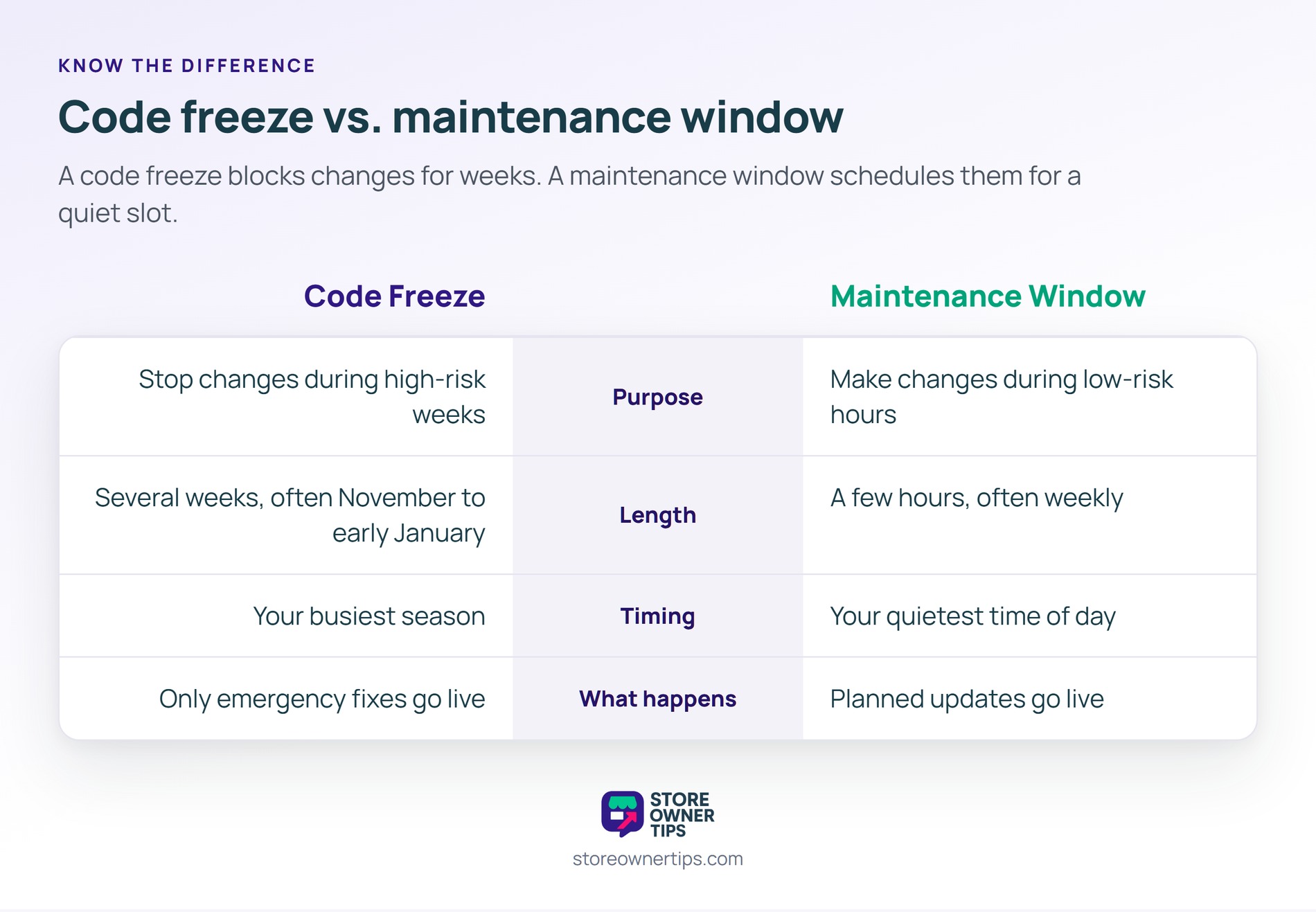
A code freeze blocks changes for weeks, while a maintenance window schedules changes for a short, quiet slot.
| What you’re comparing | Code Freeze | Maintenance Window |
|---|---|---|
| Purpose | Stop changes during high-risk weeks | Make changes during low-risk hours |
| Length | Several weeks, often November to early January | A few hours, often weekly |
| Timing | Your busiest season | Your quietest time of day |
| What happens | Only emergency fixes go live | Planned updates go live |
In practice, most stores need both. Use regular maintenance windows all year to keep plugins current. Then switch to a code freeze when traffic and stakes are at their highest.
A code freeze trades flexibility for stability, which brings clear benefits and a few real costs.
Most stores start a code freeze in early November, a few weeks before Black Friday. That leaves time to spot any bugs from October updates.
Mapping your sale dates on a holiday sales calendar makes the freeze dates easy to pick. Many stores end the freeze in early January. If you run a big sale of your own in October, freeze before that sale too.
Yes, security updates are the main exception to a code freeze. Test the patch on a staging site first, then have your approver sign off. Install it during a quiet hour and check that checkout still works afterward. Patches that only add features aren’t urgent, so those can wait until January.
Yes, prices and coupons can change during a code freeze because they’re store data, not code. Set up your offers ahead of time with a Black Friday checklist for WooCommerce. Just avoid installing a new coupon or discount plugin once the freeze has started. New cart rules or discount logic are safer to test on staging before the freeze begins.
A code freeze matters because the busiest days carry the highest cost for downtime. Adobe Analytics reported shoppers spent $16 million every minute during peak Cyber Monday hours. Even marketplaces, as WC Vendors notes in its Black Friday marketplace playbook, can crash under that kind of traffic.
In short, locking the code keeps your store open when it counts. A few weeks of patience protects the biggest sales of the year.
Copyright © StoreOwnerTips.com. All Rights Reserved.
