Weekly ecommerce tips, deals & news.
A digital wallet is an app or service that stores a shopper’s payment cards for fast, secure checkout. Instead of typing a card number, the buyer taps a button and confirms with a face scan or fingerprint. The wallet shares a secure token with your store, not the real card details. Common examples include Apple Pay, Google Pay, and PayPal.
A digital wallet holds a buyer’s cards inside a secure app. The shopper adds a card once and stores it safely. After that, they pay with a single tap or click.
Think of it as a tap-to-pay version of a real wallet. A physical wallet holds your plastic cards in one place. A digital wallet does the same, but on your phone or browser.
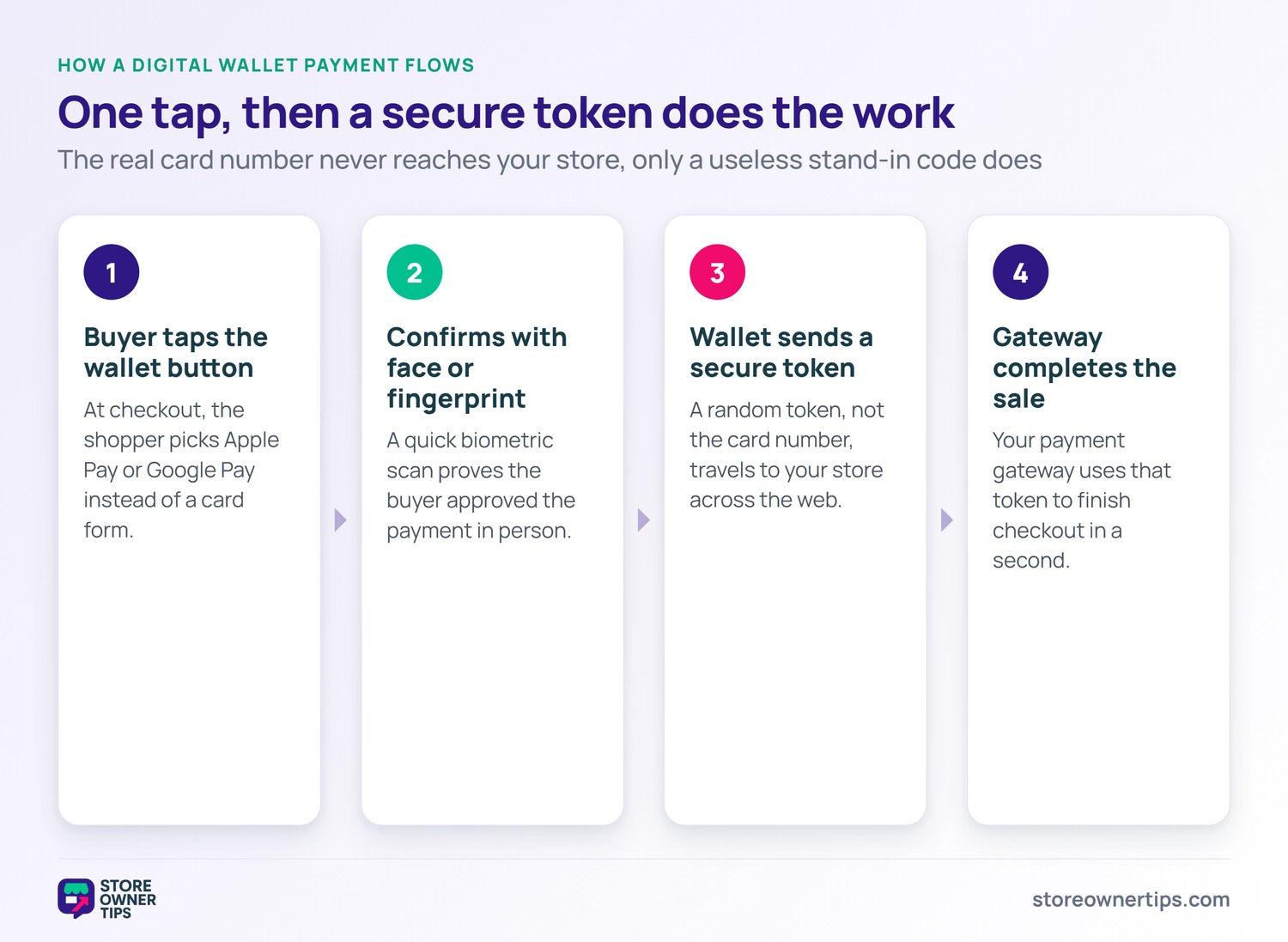
The wallet keeps the real card number locked away. It only shares a stand-in code with the store. That design keeps sensitive data out of harm’s way.
A wallet can also store more than cards. Many hold loyalty cards, tickets, and passes. That makes the app a daily habit for buyers.
At checkout, the buyer chooses a wallet button. The wallet asks them to confirm with a fingerprint or face scan. That quick check approves the payment in a second.
The wallet then sends a secure token to your store. Your gateway uses that token to complete the sale. The real card number never travels across the web.
The whole flow takes just a tap or two. There are no long forms to fill out. That speed is the wallet’s biggest selling point.
Buyers never share their card with your store at all. They trust the wallet to hold those details. So a leak at your end cannot expose their card.
On WooCommerce, wallets appear as express checkout buttons. Your payment gateway enables Apple Pay or Google Pay. The wallet button then shows on the cart and checkout.
Buyers can often pay straight from the product page. One tap skips the entire checkout form. WooCommerce and Shopify both support major wallets, though setup differs.
The buttons usually appear only on supported devices. An iPhone user sees Apple Pay, for example. That smart matching keeps the checkout clean.
Wallets are a core part of a frictionless checkout. They cut the longest, most painful step to a tap. So enabling them is low effort, high reward.
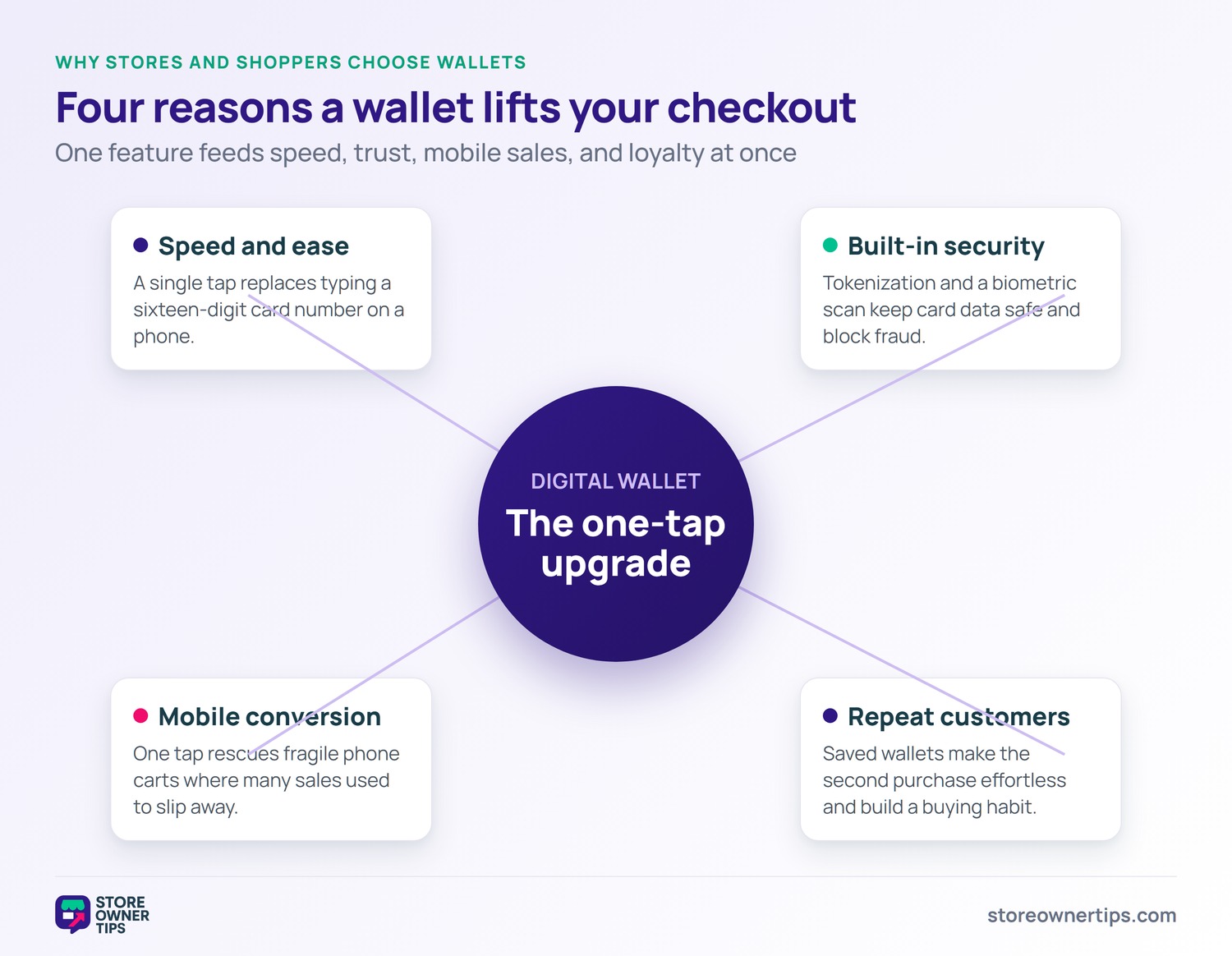
The top reason is sheer speed and ease. A tap beats typing a sixteen-digit card number. On a phone, that difference feels huge.
Wallets also remove the fear of entering card data. The buyer trusts the wallet to guard their details. That comfort makes them more willing to buy.
They are great for repeat purchases too. A returning buyer pays in seconds without hunting for a card. That smoothness builds a habit of buying from you.
Wallets also remember shipping details for many buyers. That can fill the address fields too. The result is a near-instant checkout.
The biggest win is higher mobile conversion. Phone checkouts are where many sales slip away. A one-tap wallet rescues those fragile mobile carts.
Missing a buyer’s preferred method costs you sales. About 10% of shoppers abandon when their method is missing. Wallets add a method many people now expect.
Faster checkout also cuts overall cart abandonment, which averages 70.22%. Every bit of friction you remove helps your bottom line. Wallets remove the worst friction on phones.
The wallet sheet also shows the full total before the buyer confirms. That eases the 48% of shoppers who abandon over surprise costs. There are no hidden shocks at the final tap.
Wallets lean on a trick called tokenization. The real card number is swapped for a random token. Even if stolen, that token is useless elsewhere.
Each payment is also confirmed by the buyer in person. A fingerprint or face scan proves they approved it. That step blocks most fraud attempts.
This security helps you with PCI compliance too. Your store never touches the real card number. So the wallet carries much of that heavy burden.
Buyers sense that safety at checkout. That trust often shows up as higher conversion. A familiar wallet box simply feels safe.
Wallets come in a few main flavors. Device wallets like Apple Pay live on a phone. They use the phone’s built-in security to confirm payments.
Online wallets like PayPal live in an account. The buyer logs in and pays from a stored balance or card. These work across many devices and stores.
Some wallets blend both styles together. They store cards and also hold loyalty points or passes. The buyer keeps everything handy in one app.
Pick the wallets that match your buyers’ devices. An iPhone-heavy crowd needs Apple Pay first. Check your analytics to see what they carry.
Wallets shine brightest for returning buyers. A repeat shopper pays in one tap, with no card hunt. That ease nudges them to buy again sooner.
Faster reorders can lift your average order value over time. Happy, frictionless buyers tend to add more. So wallets quietly support loyalty and growth.
A saved wallet also lowers the effort of impulse buys. A tempting add-on is one tap away. That convenience can grow each order.
The first mistake is not enabling wallets at all. Many gateways support them with a single toggle. Leaving them off quietly costs mobile sales.
Another trap is hiding the wallet button too deep. Buyers should see it on the cart and product page. Early placement captures the one-tap shopper.
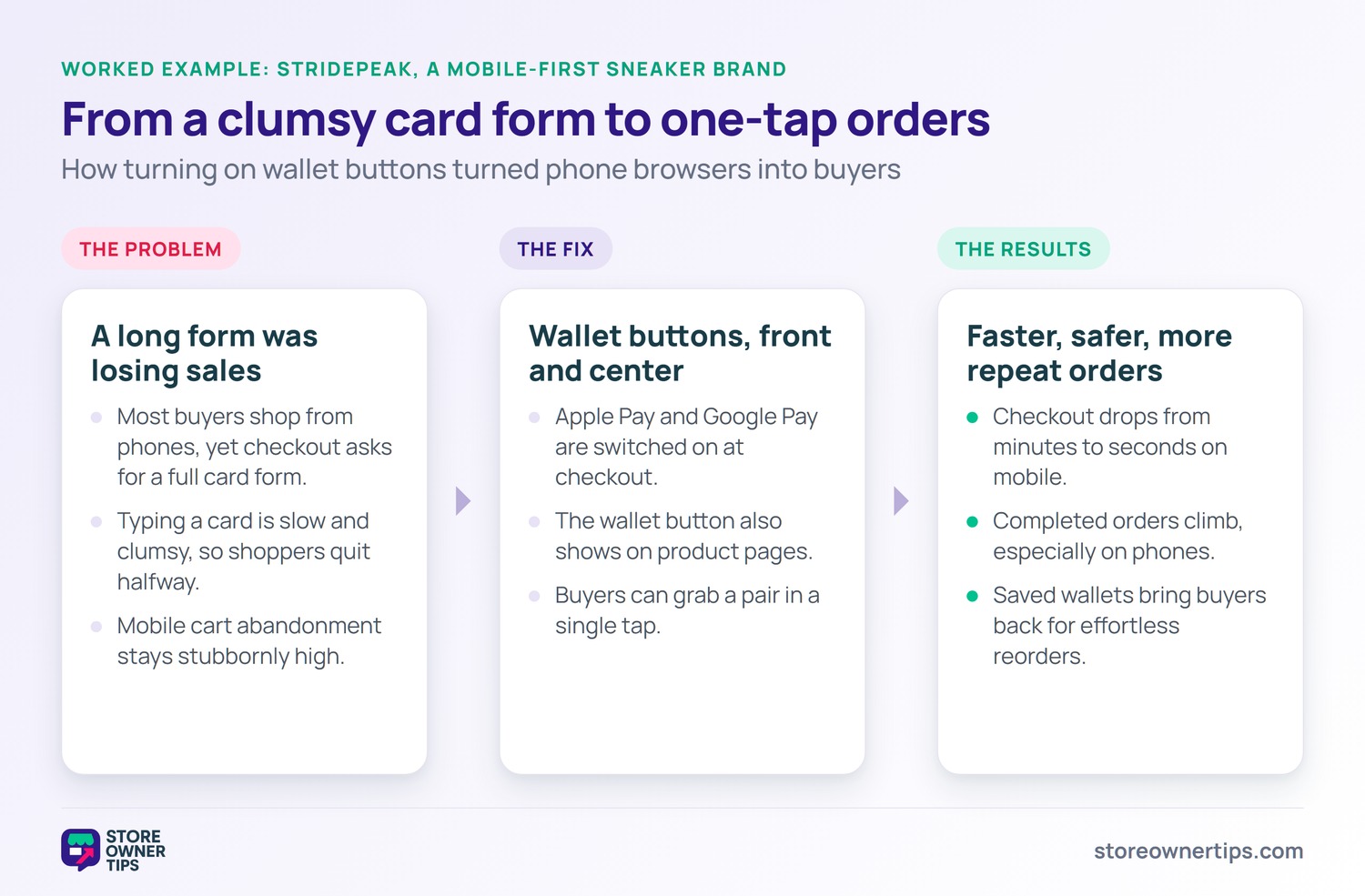
Imagine a sneaker brand called StridePeak on WooCommerce. Most of its buyers shop from their phones. Yet its checkout still asks for a full card form.
Typing a card on a phone is slow and clumsy. Many shoppers give up halfway through the form. StridePeak watches its mobile cart abandonment stay stubbornly high.
The long form is the clear weak point. Buyers want the shoes but hate the typing. The store is losing easy mobile sales.
StridePeak turns on wallet buttons at checkout. Now iPhone users tap Apple Pay to pay instantly. Android users get Google Pay the same way.
The brand also shows the wallet button on product pages. A buyer can grab a pair in one tap. That speed fits how mobile shoppers behave.
Mobile checkout times drop from minutes to seconds. Fewer buyers abandon the clumsy old form. Completed orders climb, especially on phones.
StridePeak also sees more repeat mobile orders. Saved wallets make the second purchase effortless. Buyers come back because paying is painless.
The brand also enjoys safer payments through tokenization. Buyers trust the familiar wallet box. The lesson is clear: wallets turn mobile browsers into buyers.
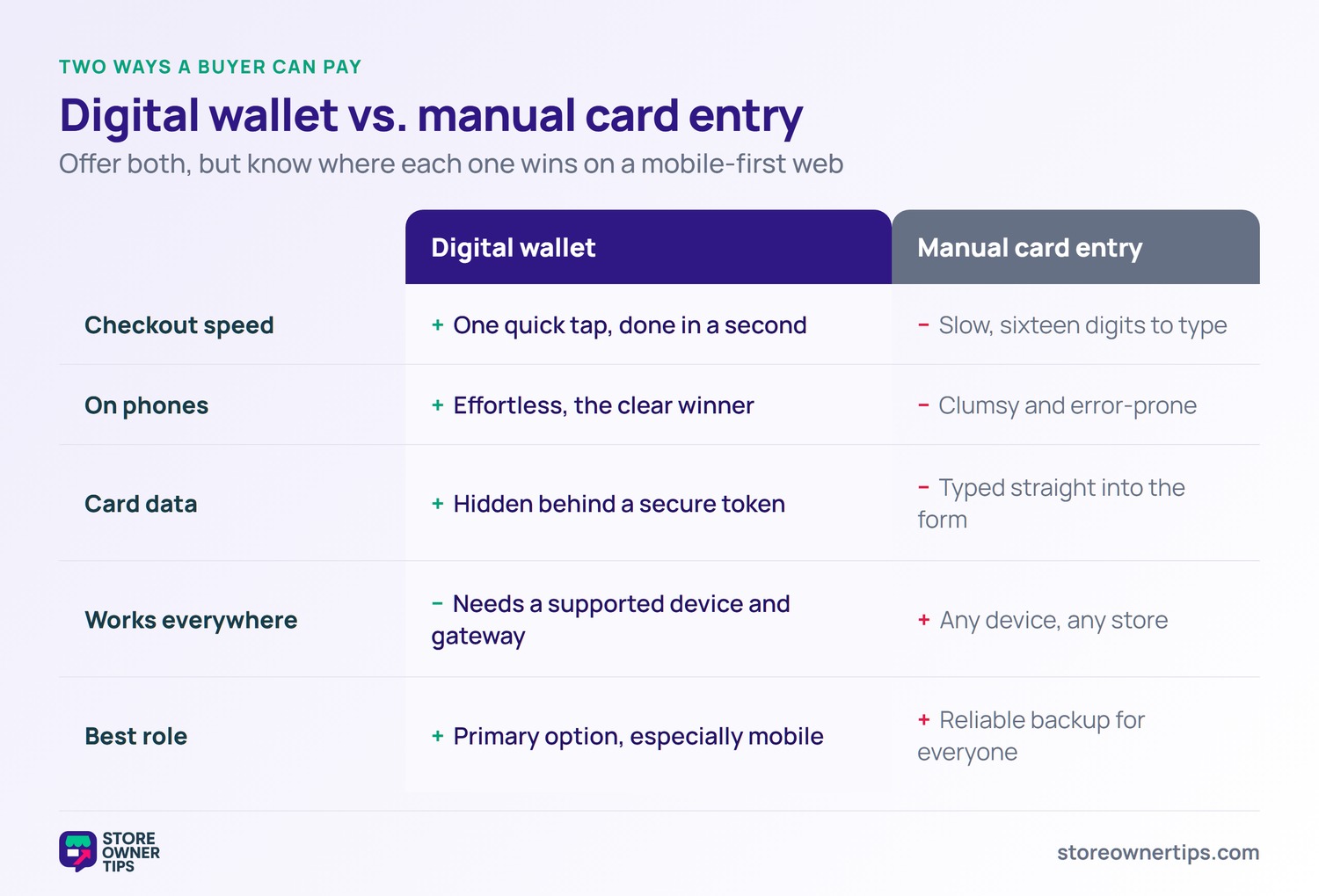
The classic alternative is typing a card by hand. Manual entry works on any device and store. However, it is slow and error-prone, especially on phones.
Digital wallets trade that effort for one quick tap. The buyer confirms with a scan and is done. They also keep the real card number hidden.
Manual entry still matters as a backup option. Not every buyer uses a wallet yet. So offer both and let the shopper choose.
For mobile-heavy stores, wallets are the clear winner. They cut the worst friction in phone checkout. That alone can lift your sales.
Yes, they are built around strong security. Tokenization hides the real card number from your store. A buyer scan also confirms each payment.
They often do, especially on mobile devices. A one-tap option rescues carts that a long form would lose. That speed lifts checkout conversion.
Start with the ones your buyers already use. Apple Pay and Google Pay cover most phone shoppers. Check your gateway to see which it supports.
A digital wallet turns a slow card form into a single secure tap. It speeds up checkout, guards card data, and lifts conversion on mobile. Offer the wallets your buyers use, and you remove one of the biggest hurdles to a sale. On a mobile-first web, that is a serious edge.
Copyright © StoreOwnerTips.com. All Rights Reserved.
