Weekly ecommerce tips, deals & news.
JSON-LD (Structured Data) is a small block of code you add to a web page. It spells out exactly what a page is about, like a product’s price, rating, or stock status. Search engines like Google read it and then show rich results. Those are the eye-catching listings with star ratings, prices, and extra details.
Search engines are smart, but they still guess. For example, when a crawler reads your product page, it sees only text and images. As a result, it has to figure out which number is the price and which is the rating. Structured data removes that guesswork entirely.
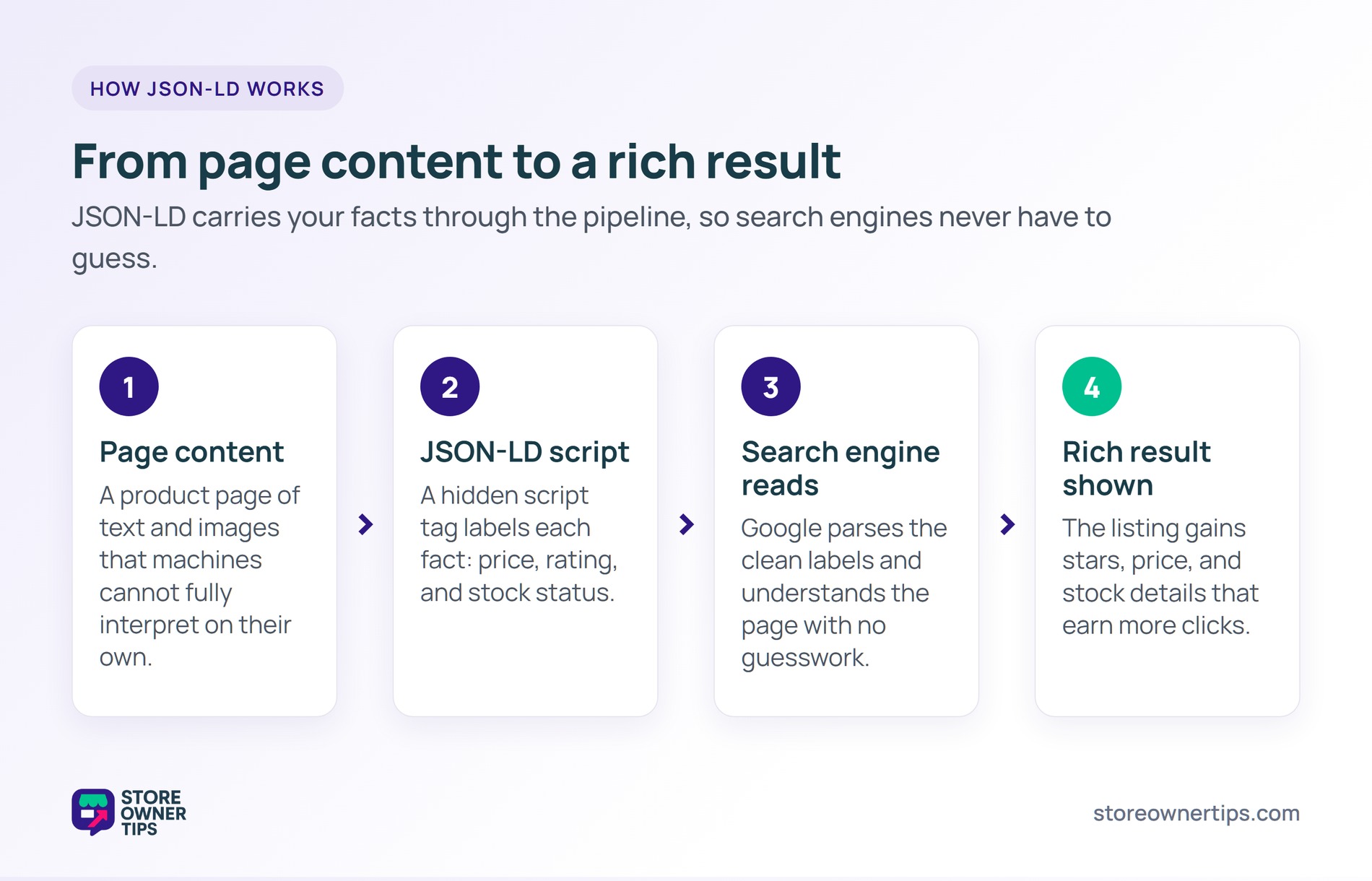
Think of it like a nutrition label on a box of cereal. The cereal is your page content, and the label is the JSON-LD. Instead of forcing a taste-test, you hand over a clear list of facts. Search engines read that label and know exactly what they see.
This clarity matters more every year. AI assistants and chatbots now answer shopping questions directly. They lean on clean, structured facts to pick which products to mention. So good JSON-LD helps you show up in those answers, not just classic search.
JSON-LD stands for JavaScript Object Notation for Linked Data. That sounds technical, but the idea is simple. In short, it is a tidy list of labeled facts. It lives in a script tag in your page code, tucked away from the visible content.
The vocabulary comes from a shared standard called Schema.org. In short, it is like a dictionary that Google, Bing, and others all agree on. So when your code says “price” or “ratingValue,” every search engine knows what you mean. As a result, the data travels well across every platform.
On WooCommerce or Shopify, the platform or an SEO plugin builds this code for you. WooCommerce outputs basic product schema on every product page automatically. It includes the name, image, SKU, price, currency, and stock status. A product schema setup like this is the backbone of e-commerce structured data.
You are not limited to products, either. JSON-LD can describe articles, recipes, events, and FAQs. Each type uses its own set of labels from the same shared dictionary. That flexibility is why structured data covers almost every kind of page.
Rich results work because they catch the eye. A plain blue link is easy to scroll past. A listing with gold stars, a price, and “in stock” feels more trustworthy and complete.
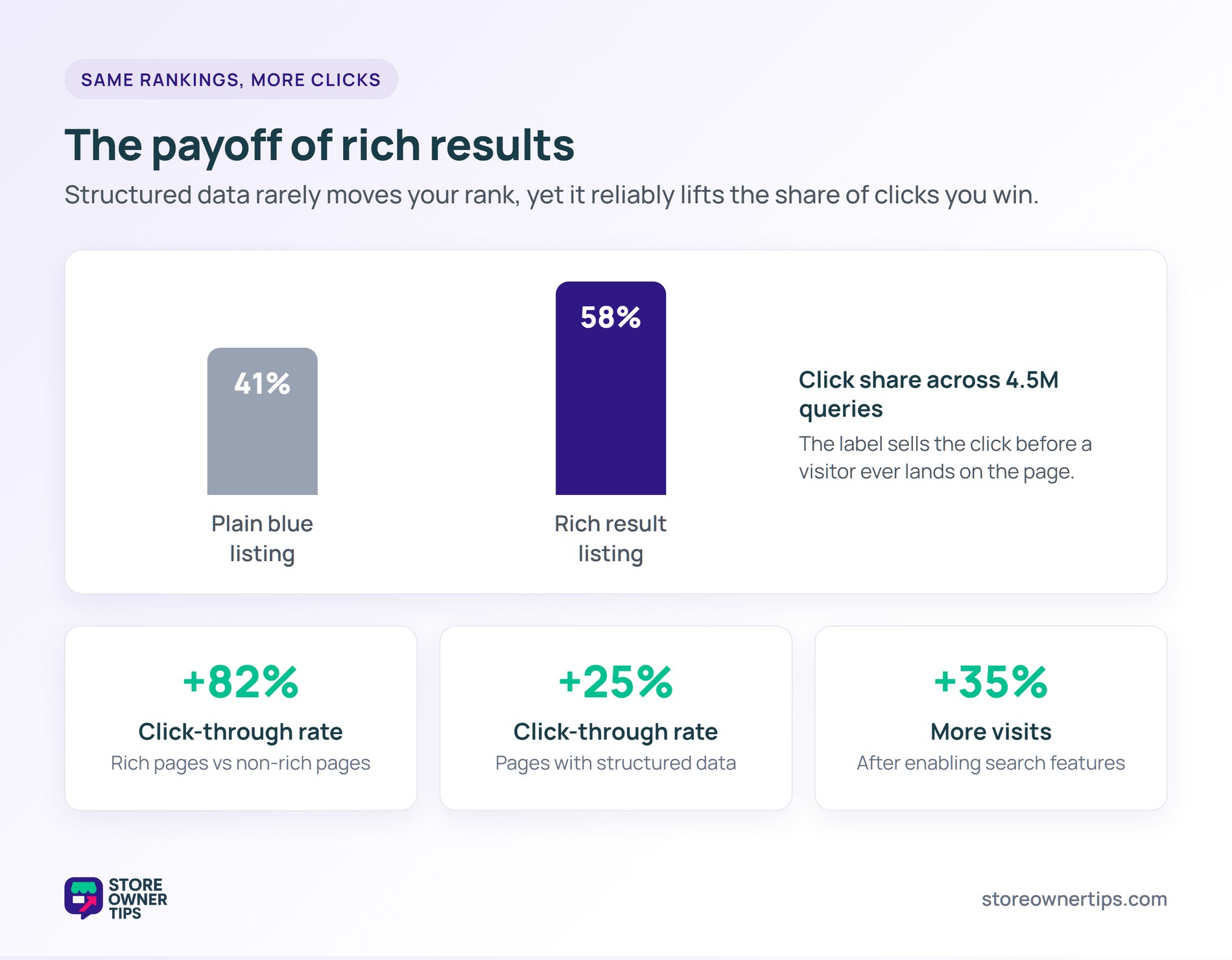
That extra detail does real work. Milestone Research analyzed over 4.5 million queries. They found that users click on rich results 58% of the time, compared to 41% for plain results. In short, the label sells the click before the visitor even lands on your page.
There is a trust signal at play too. Prices and review stars answer a shopper’s questions before they click. That reduces uncertainty, and people lean toward the option that feels safest. So a rich listing often beats a higher-ranked plain one for attention.
Adding the code is only half the job. You also want to confirm search engines can read it. Google offers a free Rich Results Test for exactly this. You paste in a URL, and it shows what schema it found and flags any errors.
It pays to test after any big site change. A theme update or new plugin can quietly break your markup. Catching the problem early keeps your rich results from disappearing.
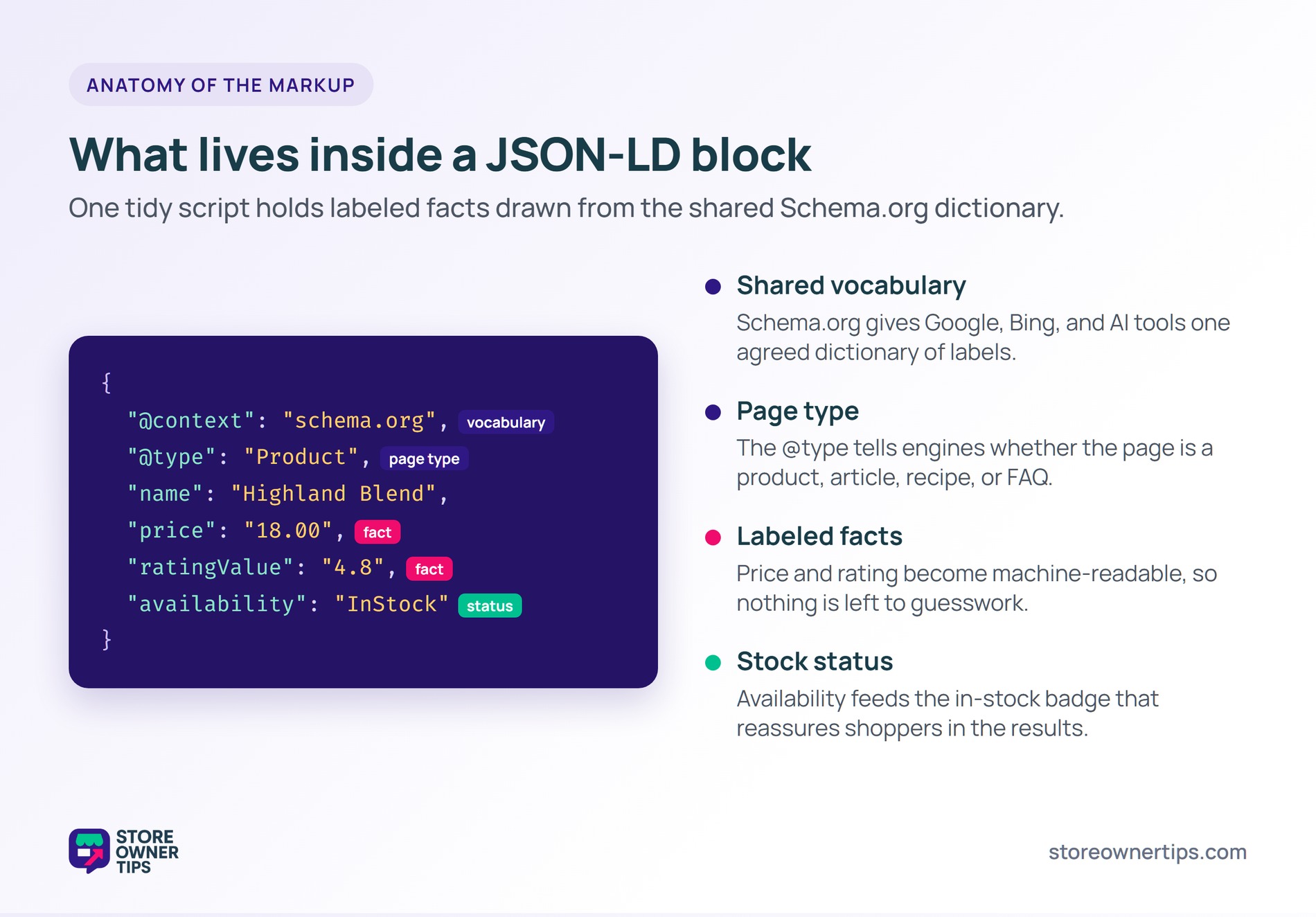
Imagine a mid-sized coffee roasting brand called Highland Roast. They sell single-origin beans through a WooCommerce store. Their pages rank well, but plain blue links blend into the crowded search results.
First, the owner turns on full product structured data through an SEO plugin. Now each product page sends Google a clean label. In practice, it lists the price, the average review score, and the in-stock status.
Within a few weeks, Google starts showing those details in search. Highland Roast’s flagship blend now appears with gold review stars and a clear price. The listing finally looks as premium as the beans inside the bag.
Say the rankings barely move, but the clicks climb anyway. That tracks with real data. Nestle measured that pages showing as rich results earned an 82% higher click-through rate than non-rich pages.
Even a smaller lift adds up fast. Rotten Tomatoes saw a 25% higher click-through rate on pages with structured data. For Highland Roast, that means more visitors from the same rankings. As a result, their organic traffic grows without spending a cent on ads.
The brand then adds FAQ structured data to its main blog guides. Food Network took a similar path with search features. They enabled them on most of their pages and saw a 35% increase in visits. For Highland Roast, the compounding effect is what makes the small setup worth it.
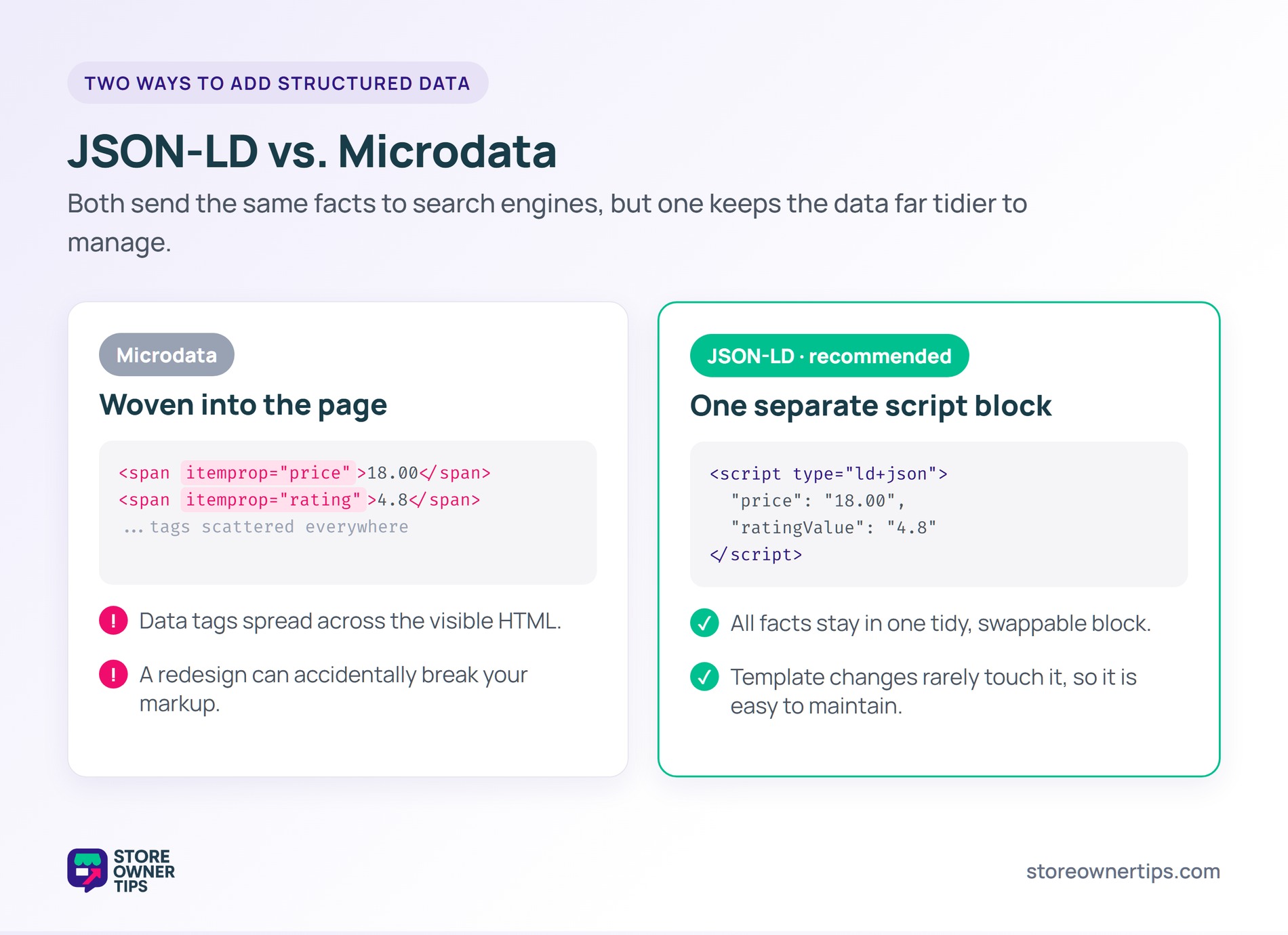
JSON-LD is not the only way to add structured data. By contrast, the older method is called Microdata. Both send the same facts to search engines, but they work very differently.
Microdata weaves the data directly into your visible HTML. It tags each piece of content with special attributes spread across the page. JSON-LD, by contrast, keeps all the data in one separate script block. The visible page and the data stay neatly apart.
Picture the difference like writing recipe notes. Microdata scribbles them in the margins of every page. JSON-LD keeps one clean index card you can swap out. Both hold the same facts, but one is far tidier to manage.
That separation matters for upkeep. With Microdata, redesigning a page can accidentally break your markup. JSON-LD sits on its own, so a template change rarely touches it. For this reason, Google clearly prefers JSON-LD and calls it easier to maintain at scale.
For most store owners, the choice is simple. New stores should start with JSON-LD from day one. If your site still runs on Microdata, switching is usually worth the cleaner setup. Either way, you only want one format in use to avoid sending mixed signals.
Not directly. Structured data does not give you a ranking boost on its own. Instead, it changes how your listing looks in the results. By winning rich results, you earn more clicks at the same rank.
That extra traffic is the real prize, not a higher position. It can also help you win a featured snippet for question-style pages.
Not for the basics. WooCommerce outputs basic product JSON-LD automatically on every product page. However, a good SEO plugin extends it to articles, FAQs, and breadcrumbs. The plugin route is also safer, since it keeps your markup valid as Google updates its rules.
This is common with variable products. WooCommerce can group several prices into one offer, which confuses Google. Required fields like description or image may also go missing. First, test the page in Google’s Rich Results Test, then fix any gaps or duplicate schema before resubmitting.
JSON-LD is one of the highest-value, lowest-effort wins in e-commerce SEO. It tells search engines exactly what you sell and helps you earn the eye-catching rich results that drive clicks. As AI search keeps growing, clean structured data only gets more valuable. Set it up once, keep it clean, and it quietly works for your store every single day.
Copyright © StoreOwnerTips.com. All Rights Reserved.
