Weekly ecommerce tips, deals & news.
A wholesale order form is a single searchable table that lets a trade buyer order your whole catalog at once. Instead of visiting one product page at a time, they type quantities into rows and submit everything together. In practice, it replaces the retail browsing journey with something closer to a spreadsheet.
So it exists because a buyer ordering ninety items should not have to click ninety times.
A retail storefront is built to help someone decide. It uses big photography, reviews and related products to move an undecided shopper toward one purchase. However, a trade buyer arrived having already decided.
Instead, they are restocking, and everything designed to help them choose is in the way.
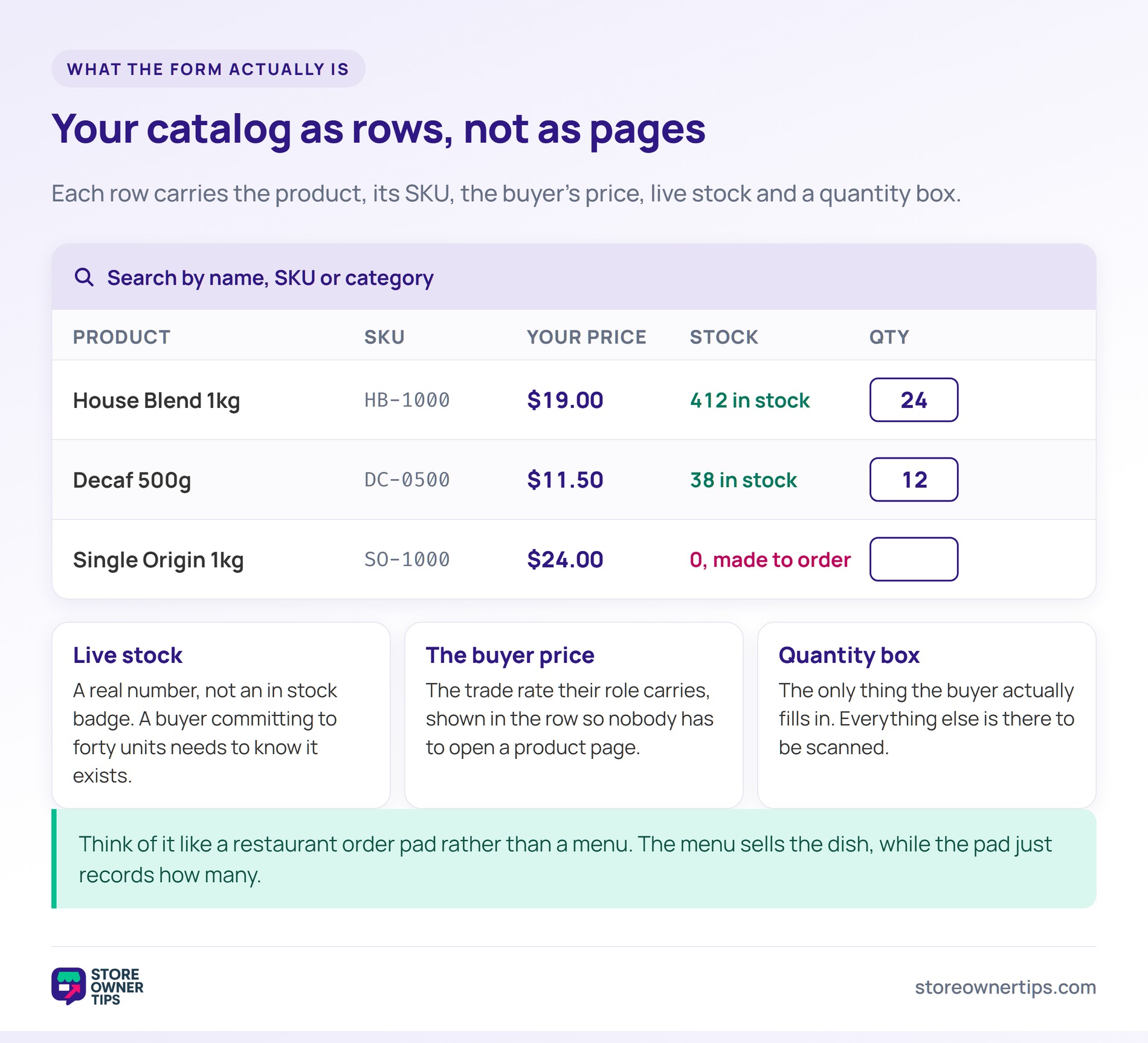
At its simplest it is one page holding your catalog as rows. Each row shows the product, its SKU, the buyer’s price, stock status and a quantity box. Then the buyer fills in the boxes they need and adds everything at once.
Think of it like a restaurant order pad rather than a menu. The menu sells the dish, while the pad just records how many. So both are useful, but only one belongs in front of a regular.
Search is the part that carries the experience. A buyer should be able to type a SKU, a product name or a category and narrow instantly. Meanwhile, sorting and filtering handle the buyer who is scanning a range rather than hunting one item.
Also, variations need care here. A shirt in five sizes should expand inside its row, not force the buyer back to a product page. Otherwise the form solves the browsing problem and reintroduces it two clicks later.
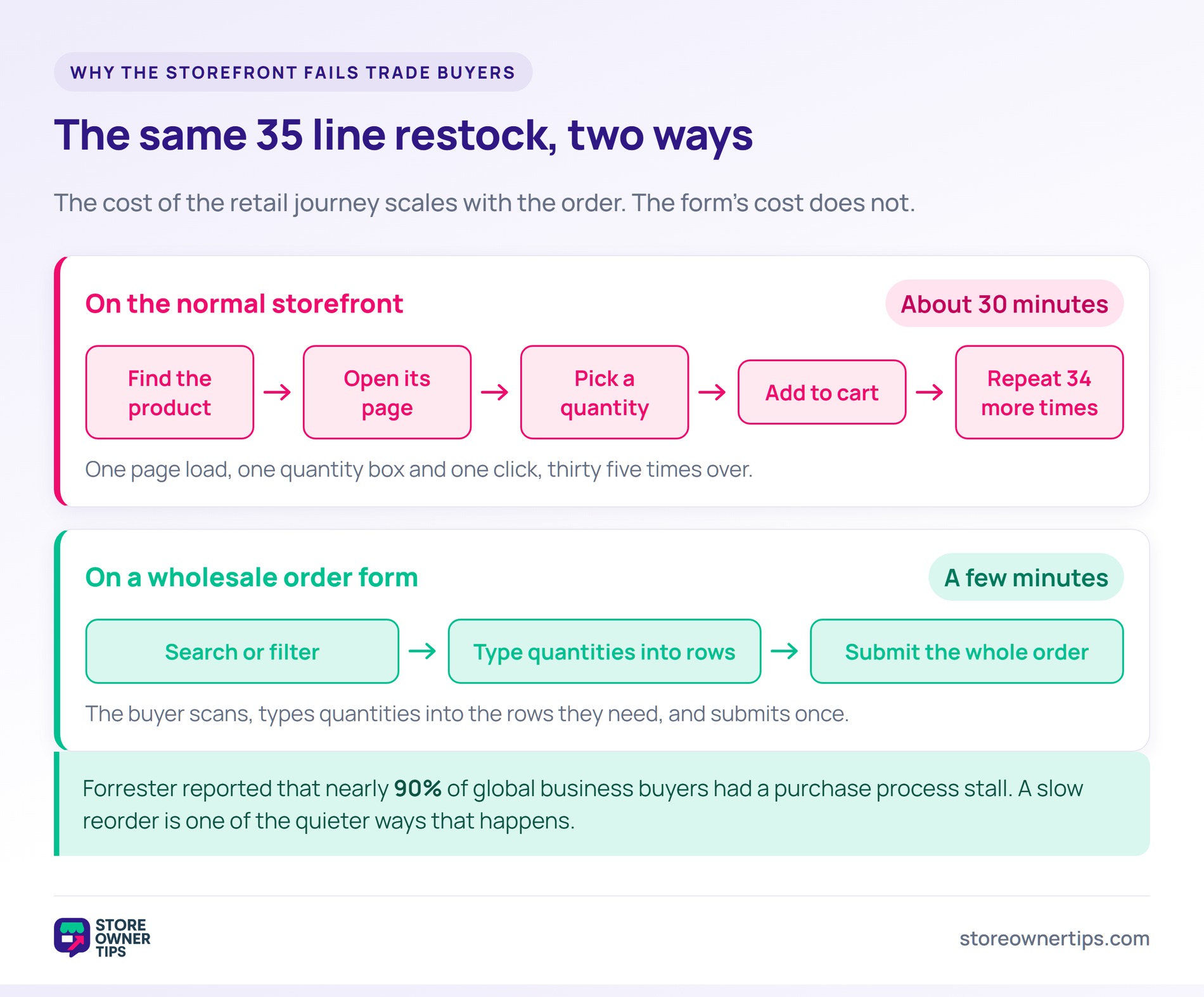
The cost of the retail journey scales with the order. Forty line items means forty page loads, forty quantity selectors and forty add-to-cart clicks. For example, a fortnightly restock can take a buyer half an hour.
That friction has a measurable cost. Forrester reported that nearly 90% of global business buyers had a purchase process stall. A slow reorder is one of the quieter ways that happens.
Abandonment is the other half of the story. Baymard Institute puts the average documented cart abandonment rate at 70.22%. Trade buyers are more committed than shoppers, but they are not infinitely patient.
Meanwhile, the channel has already moved online. E-commerce accounted for 33.3% of total U.S. merchant wholesaler sales on Census Bureau figures. So the alternative to a good form is not a phone call, it is a competitor’s form.
First, price and stock are the two non-negotiables. A buyer committing to a large quantity needs to know the item exists before they type a number. So show real stock levels, not just an in-stock badge.
Next, order rules belong on the form as well. If a line carries a minimum order quantity, the form should say so before checkout rejects the cart. The same goes for case sizes and increments.
In practice, pricing breaks are worth surfacing too. Where you run quantity-based pricing, a visible next tier turns a forty-unit order into a sixty-unit one. Otherwise the buyer never learns the tier exists.
Finally, decide what happens for items you will not price publicly. Some suppliers route those lines to a request for quote instead of a quantity box. That keeps one form usable across your whole range.
Imagine a stationery supplier called Quill & Sons with 240 products. Its trade buyers are independent bookshops that reorder monthly. Previously every one of them ordered by emailing a spreadsheet.
A typical restock is 35 line items across four categories. On the normal storefront that means 35 separate product pages. In practice, buyers gave up and went back to email.
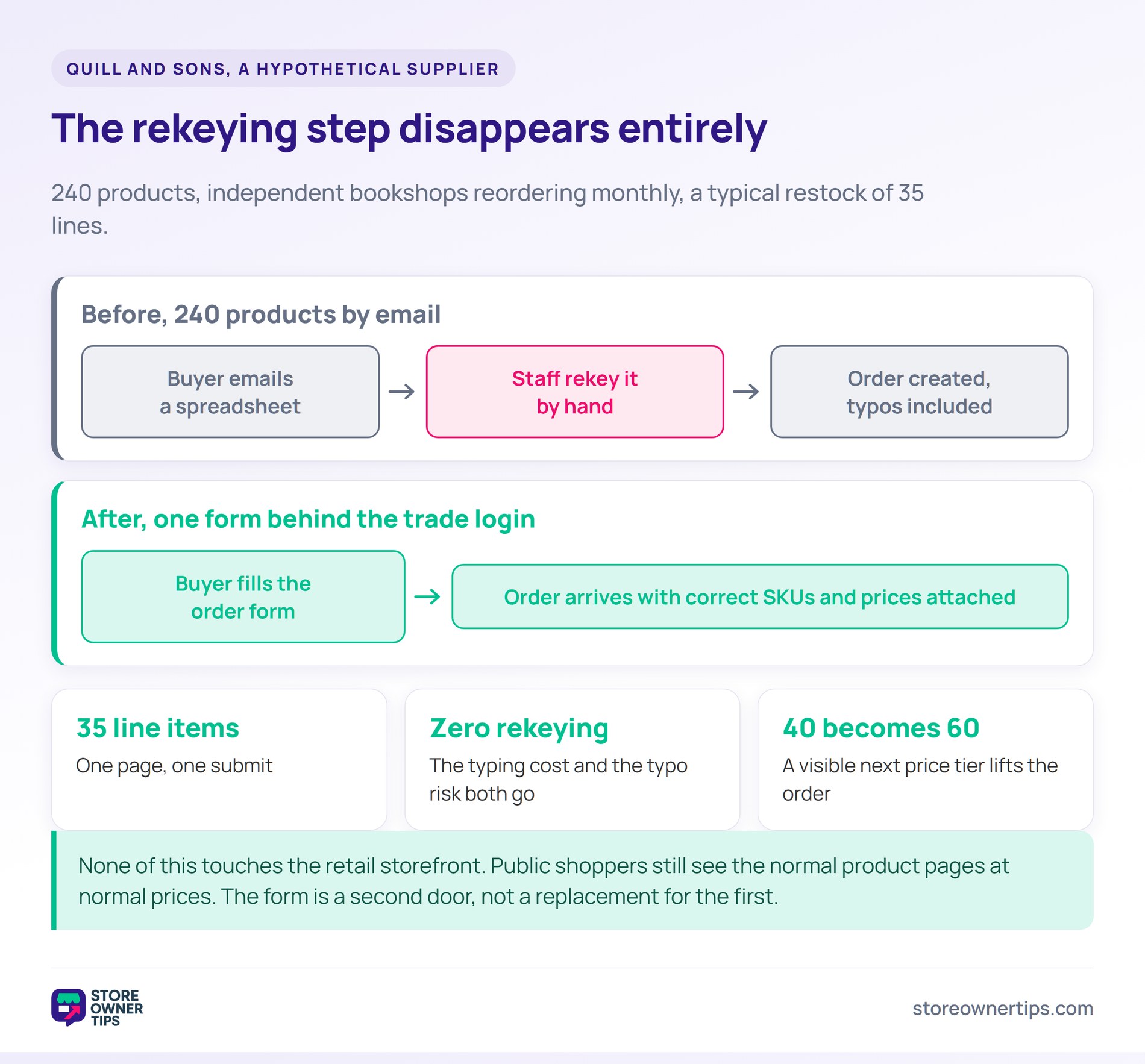
The email route then created a second problem. Someone at Quill & Sons had to rekey every spreadsheet into an order by hand. So each order carried a typing cost and a typo risk.
So the owner builds one order form behind the trade login. It lists all 240 products with SKU, trade price, live stock and a quantity box. Search and category filters sit at the top.
The 35-line restock becomes one page and one submit. A buyer who knows their SKUs can finish in a few minutes. Meanwhile, a buyer browsing a category still sees the whole range at once.
The rekeying disappears completely. Orders arrive as real orders, with correct SKUs and correct prices attached. As a result, the typo risk goes with it.
Something less obvious also changes. Because the next price tier is visible in the row, some buyers round an order of 40 up to 60. The form quietly does the job a sales rep used to do.
None of this touches the retail storefront. Public shoppers still see the normal product pages at normal prices. The form is a second door, not a replacement for the first.
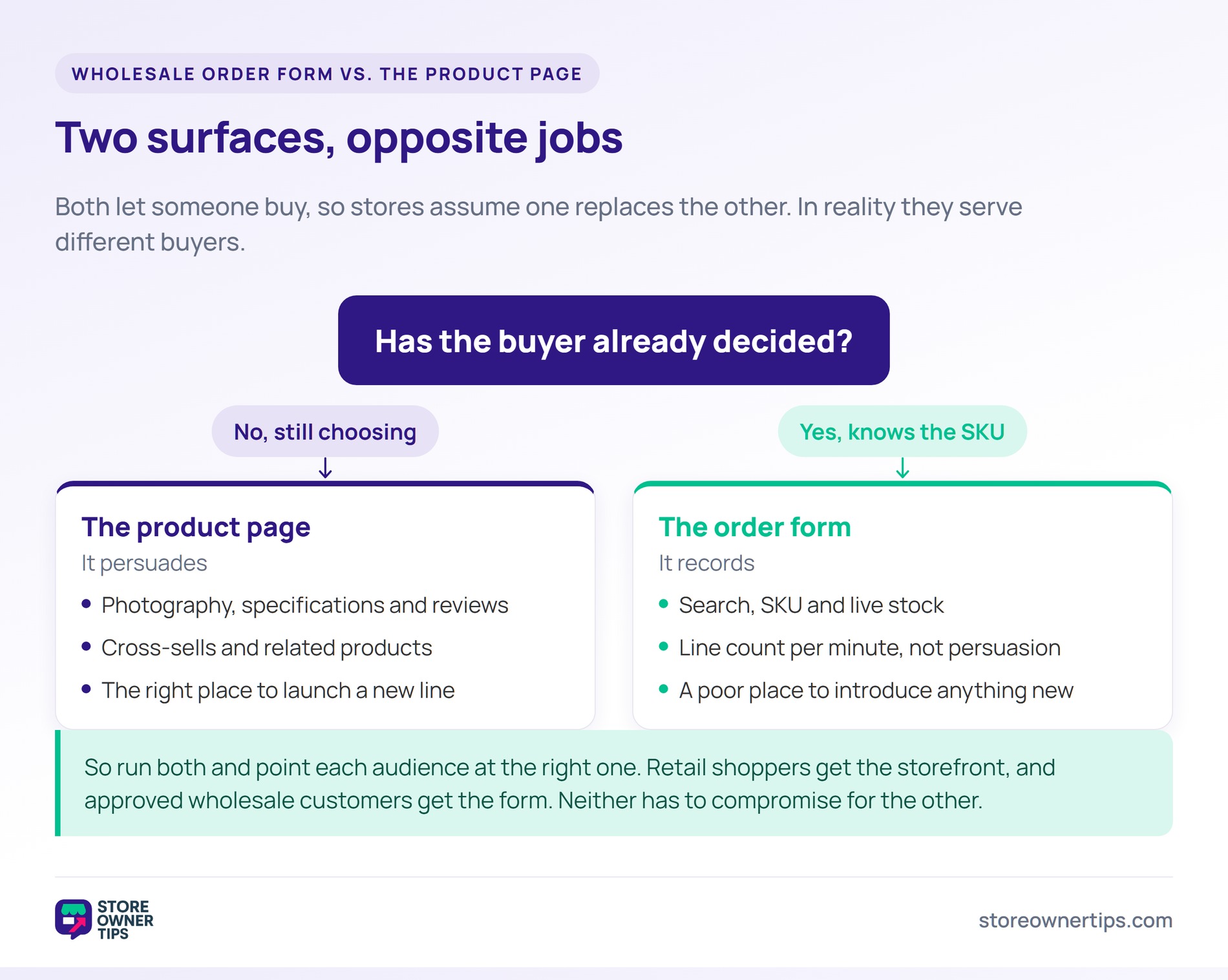
Both let someone buy, so stores assume one can replace the other. In reality they serve opposite jobs. A product page persuades, while an order form records.
The product page is right when the buyer is undecided. It earns its keep with photography, specifications, reviews and cross-sells. Meanwhile, every one of those elements slows down a buyer who already knows the SKU.
The order form is right when the decision is already made. It optimizes for line count per minute rather than persuasion. By contrast, it is a poor place to introduce a product nobody has heard of.
So run both and point each audience at the right one. Retail shoppers get the storefront, and approved wholesale customers get the form. Neither has to compromise for the other.
Usually not, because it normally displays trade pricing. If the form is public, your wholesale rates are public too. So most suppliers put it behind the same login that unlocks the rates.
There is one exception worth knowing. A public form showing retail prices can work well for bulk-friendly consumer stores. In that case it is a convenience feature rather than a trade channel.
Technically a lot, but usefully far fewer without filtering. A few hundred rows are comfortable when search and categories work properly. Past that, the form needs pagination or lazy loading to stay quick.
The better question is how many rows a buyer sees at once. Nobody scrolls two thousand lines. So default the view to a category and let search do the rest.
It replaces the order-taking part, which is the part neither side enjoys. Reps stop transcribing quantities and start doing the work only a person can do. For example, negotiating terms or opening a new account.
It does not replace the relationship. A buyer with a damaged shipment or an unusual request still wants a human. So treat the form as self-service for routine reorders, not as a replacement for support.
A wholesale order form is the cheapest way to make reordering easy. Easy reordering is what keeps trade accounts loyal. Get search, live stock and order rules right, and the form does the routine work for you.
For a step-by-step build, see this guide to making a WooCommerce bulk order form.
Copyright © StoreOwnerTips.com. All Rights Reserved.
