Weekly ecommerce tips, deals & news.
A Request for Quote (RFQ) is a digital tool that changes how people buy from your online store. Instead of clicking a standard “Add to Cart” button and paying a set price right away, buyers send you a list of the items they want. You then review their request and send back a custom price tailored just for them. It turns a basic retail website into a dynamic negotiation table.
When you run a standard online store, buyers usually act on emotion. They see something they like, add it to their cart, and buy it instantly. But business-to-business (B2B) buying is entirely different. Corporate buyers are looking for logical deals, reducing risk, and getting approval from their bosses.
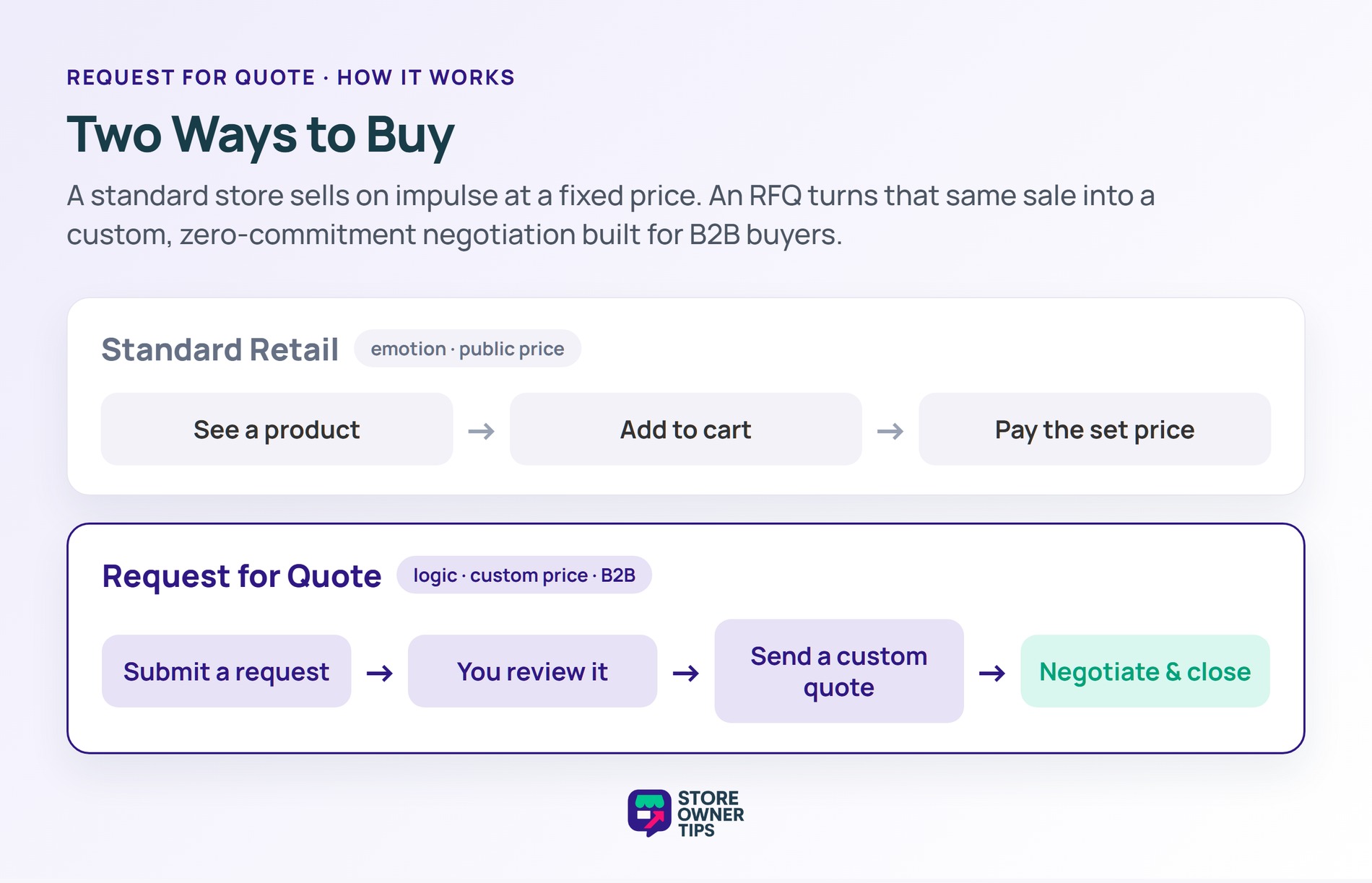
An RFQ system is perfectly built for this mindset. It lets a corporate buyer lock in their pricing and reserve inventory without actually spending their company’s money right away. This zero-commitment setup lowers the psychological barrier to entry. It also makes the buyer feel special because a formal request for quotation signals they’re getting a custom, relationship-based price instead of a generic retail rate.
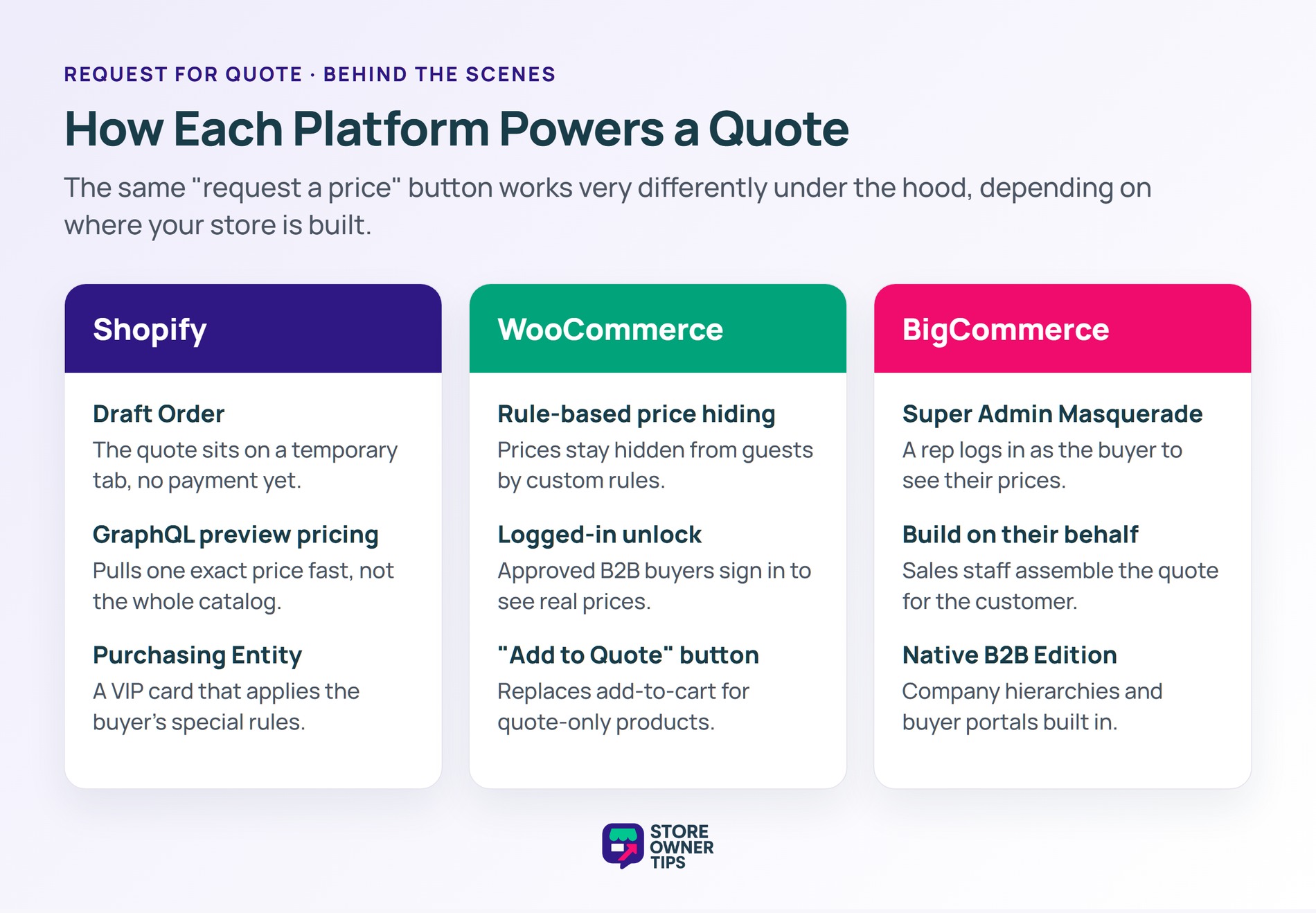
Behind the scenes, setting up a Request for Quote changes how your website’s database works. Managing this digital RFQ process properly ensures that your store handles custom requests efficiently. On platforms like Shopify, a quote creates a Draft Order. Think of a Draft Order like a restaurant putting your meal on a temporary tab instead of making you pay before you take your first bite. The platform also uses a Purchasing Entity to identify the buyer. You can think of a Purchasing Entity as a VIP club membership card that tells the website exactly which special rules, tax breaks, and discounts apply to that specific person.
If you use Shopify, your store will also use something called a GraphQL API to calculate preview prices. Think of this API like asking a librarian for one specific page of a book instead of having them carry an entire encyclopedia to your desk. It keeps your website running incredibly fast.
Other platforms handle quotes differently. WooCommerce uses custom rules to hide prices from guests and show them only to logged-in buyers. BigCommerce uses a feature called Super Admin Masquerade. This is like a tailor trying on a custom suit using a mannequin shaped exactly like you. It lets your sales team log into the store and see the exact custom prices your buyer sees, allowing them to build a quote on their behalf.
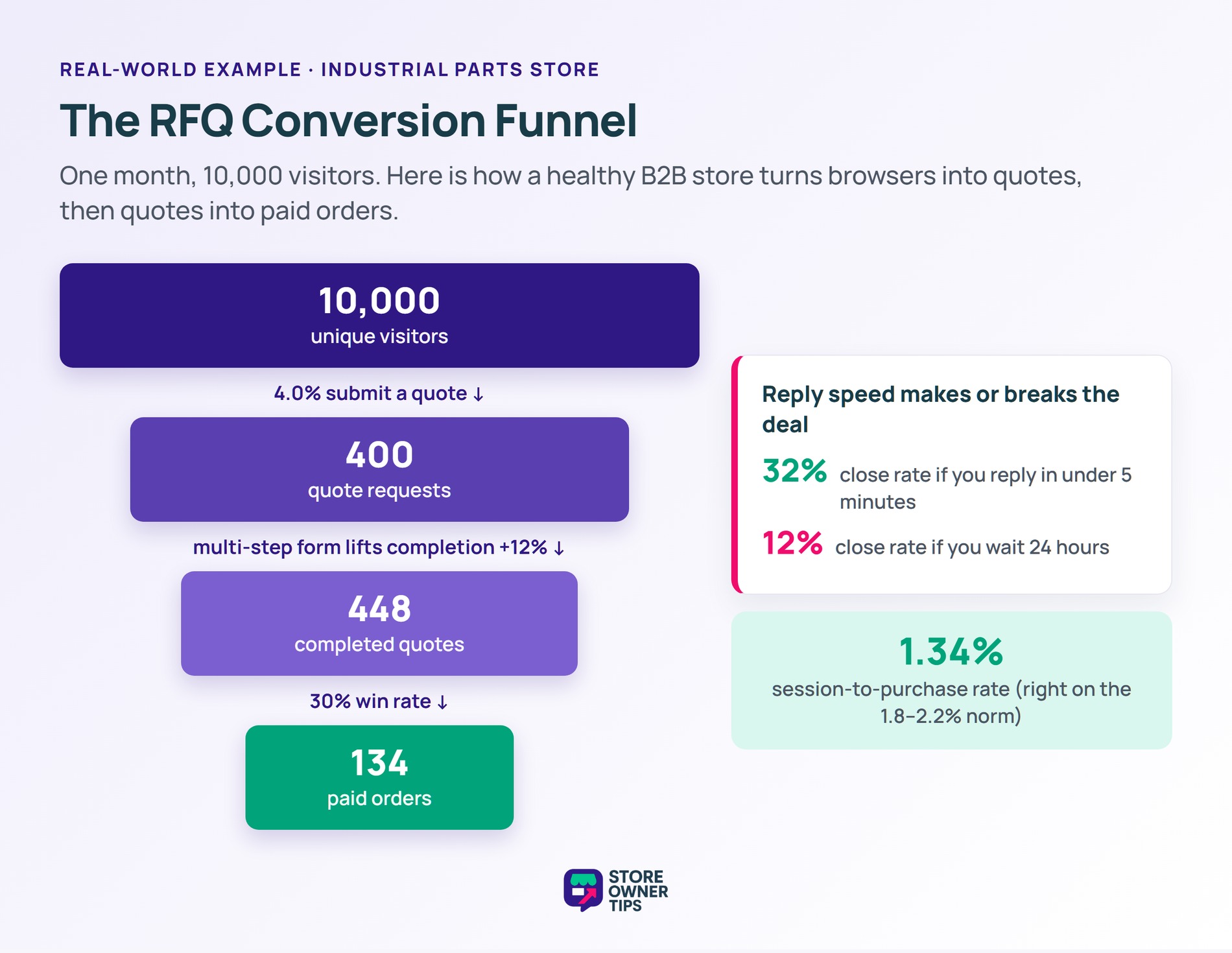
Imagine a mid-sized online store that sells heavy industrial manufacturing parts. Because they deal with corporate buyers, they rely entirely on a Request for Quote system. We can use published industry benchmarks to estimate how this store might perform over a single month.
Let’s say this manufacturing store gets 10,000 unique visitors in a month. In standard e-commerce, you want people to buy instantly. But here, the goal is getting them to submit a quote. By commonly cited industry estimates, a healthy Visitor-to-Lead (RFQ Rate) often sits between 2.0% and 5.0%. Our store is doing well and hits a 4.0% rate. This means 400 visitors submit a formal quote request.
However, the store owner notices a problem. Their initial RFQ template layout used a single long form that asked for 7 pieces of information. Research shows a massive drop-off called the “5-to-7 Cliff.” For every extra field you add after 5 fields, your conversion rate drops by roughly 2.8 percentage points. To fix this, the owner breaks the long form into a simple multi-step form. According to the data, using a multi-step form lifts quote request completion rates by a solid 12%. Thanks to this simple tweak, their 400 quotes jump to 448 quotes.
Now, the sales team has to work the leads. This is where speed matters more than anything. The data shows that if a sales rep replies to a quote in under 5 minutes, they close the deal 32% of the time. If they wait 24 hours, the win rate plummets to just 12%.
Our hypothetical sales team is fast. They hit a strong Quote-to-Order (Win Rate) of 30%, which sits within the 25% to 35% range these aggregators commonly report. They successfully convert 30% of their 448 quotes, resulting in 134 finalized, paid orders. If we look at the big picture, 134 orders from 10,000 visitors gives this manufacturing store a final Session-to-Purchase conversion rate of 1.34%. This is plausible, as manufacturing conversion rates are often reported around 1.8% to 2.2%.
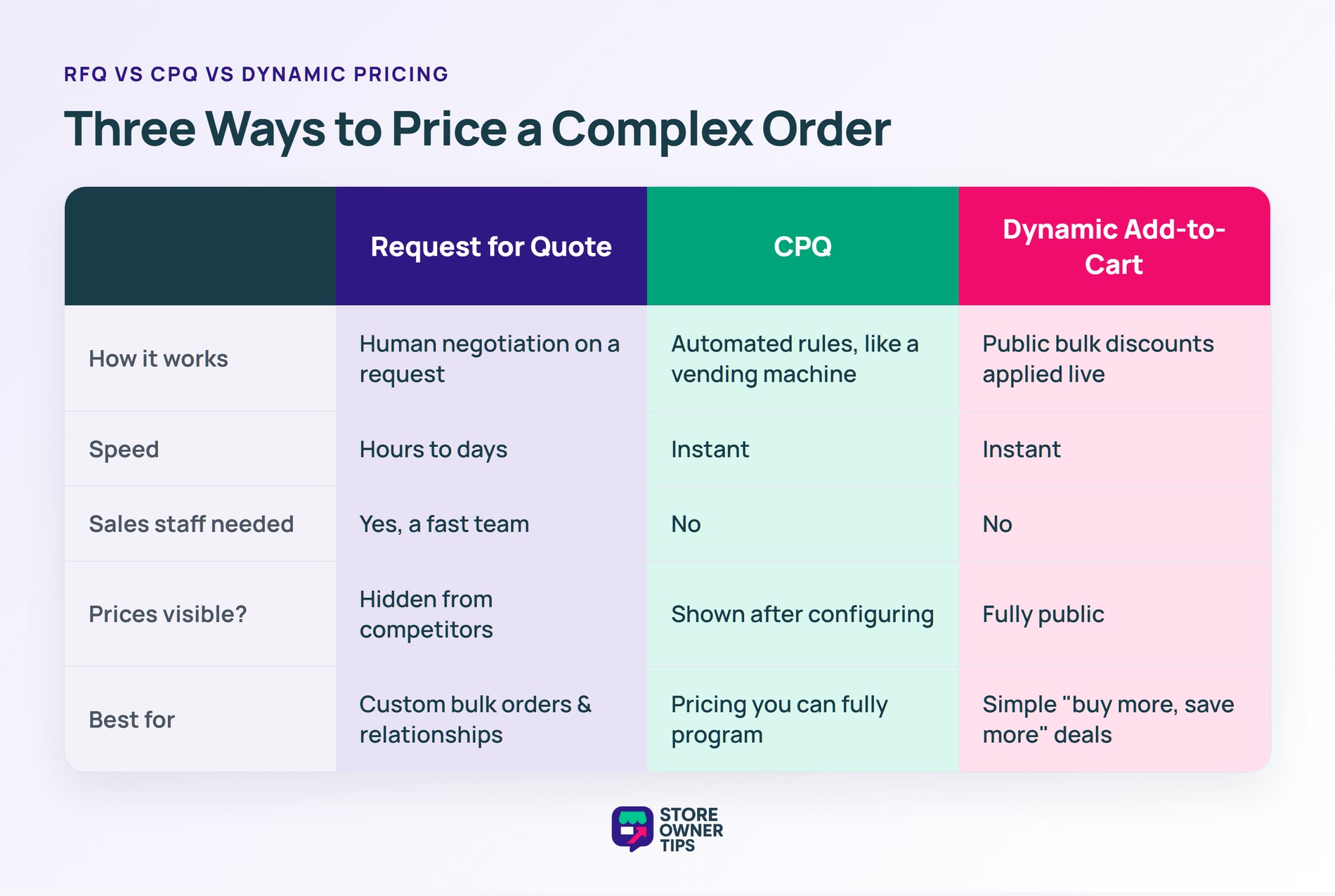
If you have a complex store, you might wonder if you need an Request for Quote or a CPQ system. They sound similar, but they do very different things.
A Configure-Price-Quote (CPQ) system is completely automated. Think of CPQ like a highly advanced vending machine. If a buyer is building a custom tractor online, choosing a bigger engine might automatically change the size of the wheels and instantly update the final price. The system does the math instantly without a human. CPQ is great when all your pricing rules can be mathematically programmed.
An RFQ, on the other hand, is a digital request for a human negotiation. It’s slower, taking hours or days instead of seconds. However, it’s much better for custom bulk orders and building long-term relationships where a human touch is needed.
Alternatively, you could use Dynamic Add-to-Cart pricing. This is where the website automatically gives a discount if you buy in bulk (like “Buy 100 units, get 15% off”). The pricing is totally visible to the public. It’s fast and requires zero sales staff, but you lose the ability to negotiate or hide your prices from competitors.
I have a massive catalog (2,000+ SKUs) for a distribution company. Should I use Shopify, BigCommerce, or WooCommerce to build an Request for Quote system where users can build a cart and request a quote?
BigCommerce’s B2B Edition is highly suitable right out of the box because it natively supports complex company hierarchies and dedicated buyer portals. Shopify is powerful, but its native B2B features are locked behind the expensive Shopify Plus tier. WooCommerce is the most cost-effective and flexible option for massive catalogs, but it requires heavier ongoing manual server maintenance to keep the database running fast.
How do I provide accurate shipping quotes for custom or draft orders?
Standard e-commerce platforms struggle with this because live shipping rates usually only trigger at the final checkout, not during the draft stage. A common workaround is to create a dummy draft order priced at $1, enter the buyer’s zip code, and check the “requires shipping” box to ping the carrier APIs for a live rate. For a long-term fix, you must use specialized third-party shipping apps that connect directly into your draft API.
How do I hide my base retail pricing from the general public, but allow my logged-in B2B customers to request custom prices for large volume orders?
On WooCommerce, you use quote rule plugins to target the “Guest” user role. This hides the price and changes the button to “Login to View Price.” When a tagged B2B user logs in, they bypass the rule, see the prices, and get an “Add to Quote” button. On Shopify, achieving this natively requires the Shopify Plus tier to use Payment Customization APIs that dynamically adjust visibility based on who is logged in.
To speed up your quoting workflow, you should automate your internal routing rules. Make sure new requests are sent instantly to the right sales representative based on the product category or customer location, which helps keep your response times well under the critical 24-hour mark.
A good quote form design should only ask for crucial data points in the beginning, such as corporate email, company name, and specific product requirements. Keeping the layout simple prevents user friction and stops buyers from abandoning the form before submitting it.
Implementing a Request for Quote system transforms your store from a simple cash register into a powerful lead-generation and negotiation engine. By mastering the balance between form friction, internal response speeds, and custom pricing, you can protect your profit margins and build highly lucrative relationships with enterprise clients.
Copyright © StoreOwnerTips.com. All Rights Reserved.
