Weekly ecommerce tips, deals & news.
An XML sitemap is a simple file that lists the important pages on your store. Search engines read this file to find and crawl your pages more efficiently. Think of it as a guest list you hand the doorman, so the right pages get noticed first. It does not force Google to index every page, but it makes discovery much faster.
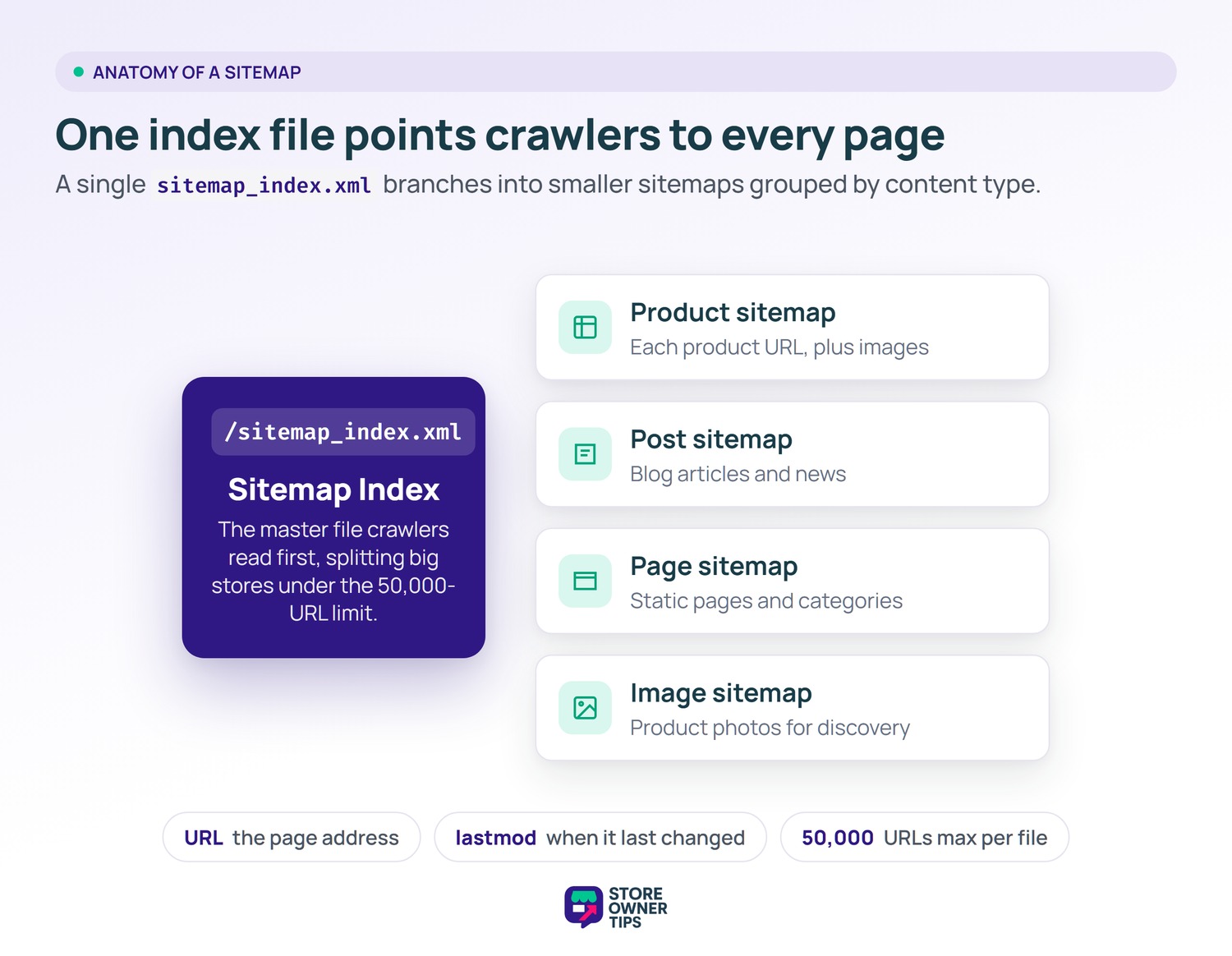
An XML sitemap is a machine-readable file written for search engines, not shoppers. It lists the URLs you want crawled, plus the date each page last changed. Search engines read it to crawl your site more efficiently.
Picture a giant library with no card catalog. A visitor could still find books by wandering the shelves. A catalog just makes the search faster. Your XML sitemap is that catalog for search engine crawlers.
In WooCommerce, the file usually lives at a fixed address like /sitemap_index.xml. That index points to smaller sitemaps grouped by type. Each entry shows the page URL and a last-modified date. Crawlers use those dates to decide what to recheck first.
There are firm size rules to know. A single file can hold no more than 50,000 URLs and 50MB uncompressed. Large stores split URLs across many files behind one index. Good SEO plugins handle this splitting automatically.
The business logic is simple: pages that never get crawled can never rank. New products may sit unseen for a while. A sitemap nudges crawlers toward them sooner. That discovery is the first step toward earning organic traffic.
This matters most for two kinds of stores. First, large catalogs with products buried deep in the menu. Next, newer stores with few backlinks pointing in. In both cases, crawlers may miss pages that only strong internal linking would surface.
Still, a sitemap is a suggestion, not a command. Google is clear that a sitemap does not guarantee indexing. It helps discovery, but quality and relevance decide what actually ranks. Treat it as one foundation piece, not a magic switch.
You rarely build a sitemap by hand on WooCommerce. WordPress ships with a basic core sitemap out of the box. Most stores upgrade to a dedicated SEO plugin for finer control. These plugins generate the file and refresh it as your catalog changes.
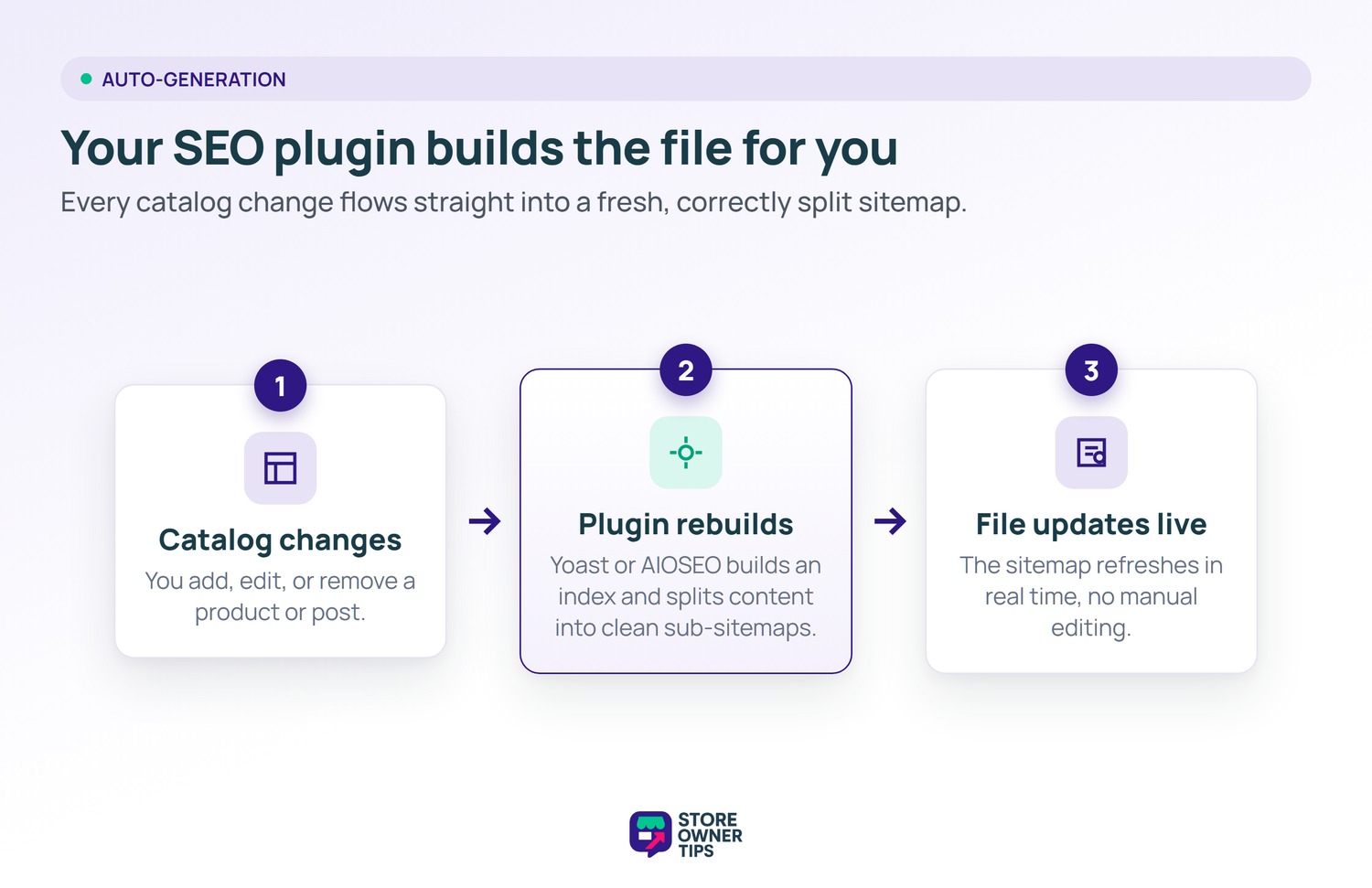
Popular SEO plugins like Yoast or AIOSEO take over sitemap duties once active. They build an index file, then split your content into clean sub-sitemaps. Many add a product-specific sitemap that includes images and skips hidden items. As you publish or remove a product, the file updates in real time.
These tools also let you exclude pages you do not want crawled. Thank-you pages, cart pages, and thin tag archives are common removals. Keeping junk out of the file is just as important as adding good pages. A clean sitemap should list only canonical, indexable URLs.
Many plugins also build a dedicated product sitemap with images. That helps Google understand your content beyond plain pages, much like rich snippets do. For a product-heavy store, it means cleaner image discovery too.
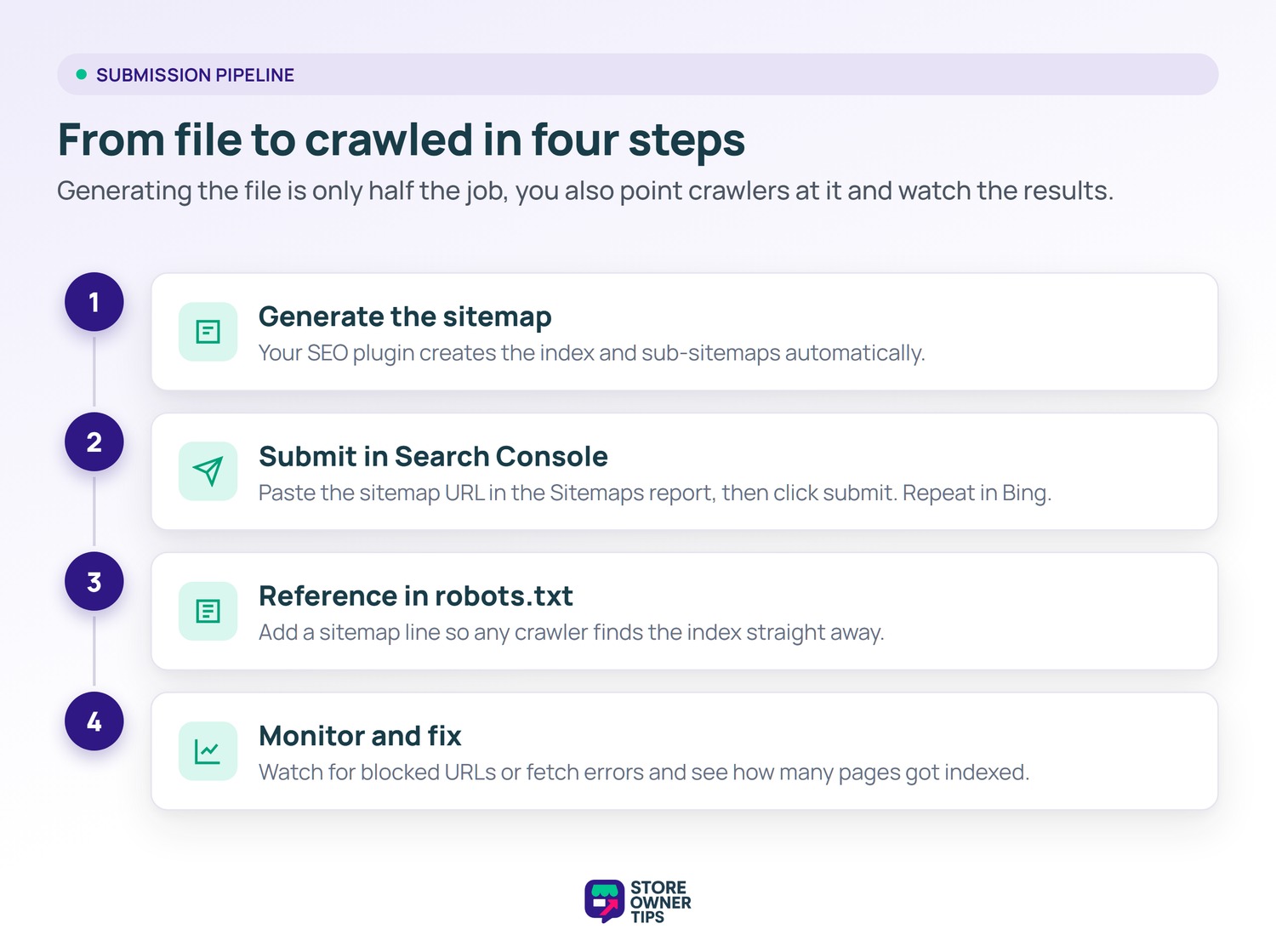
Once the file exists, you submit it in Google Search Console. You open the Sitemaps report, paste the sitemap URL, and click submit. Google then schedules crawls and reports any errors it finds. You can do the same in Bing Webmaster Tools for extra coverage.
Submission is a one-time setup, but the checking is ongoing. Watch the report for warnings like blocked URLs or fetch errors. Fixing those quickly keeps discovery smooth. Search Console also shows how many submitted URLs were actually indexed.
One more tip helps crawlers find the file fast. You can reference the sitemap location inside your robots.txt file. That line points any crawler straight to your index. Together, submission and robots.txt give you full coverage.
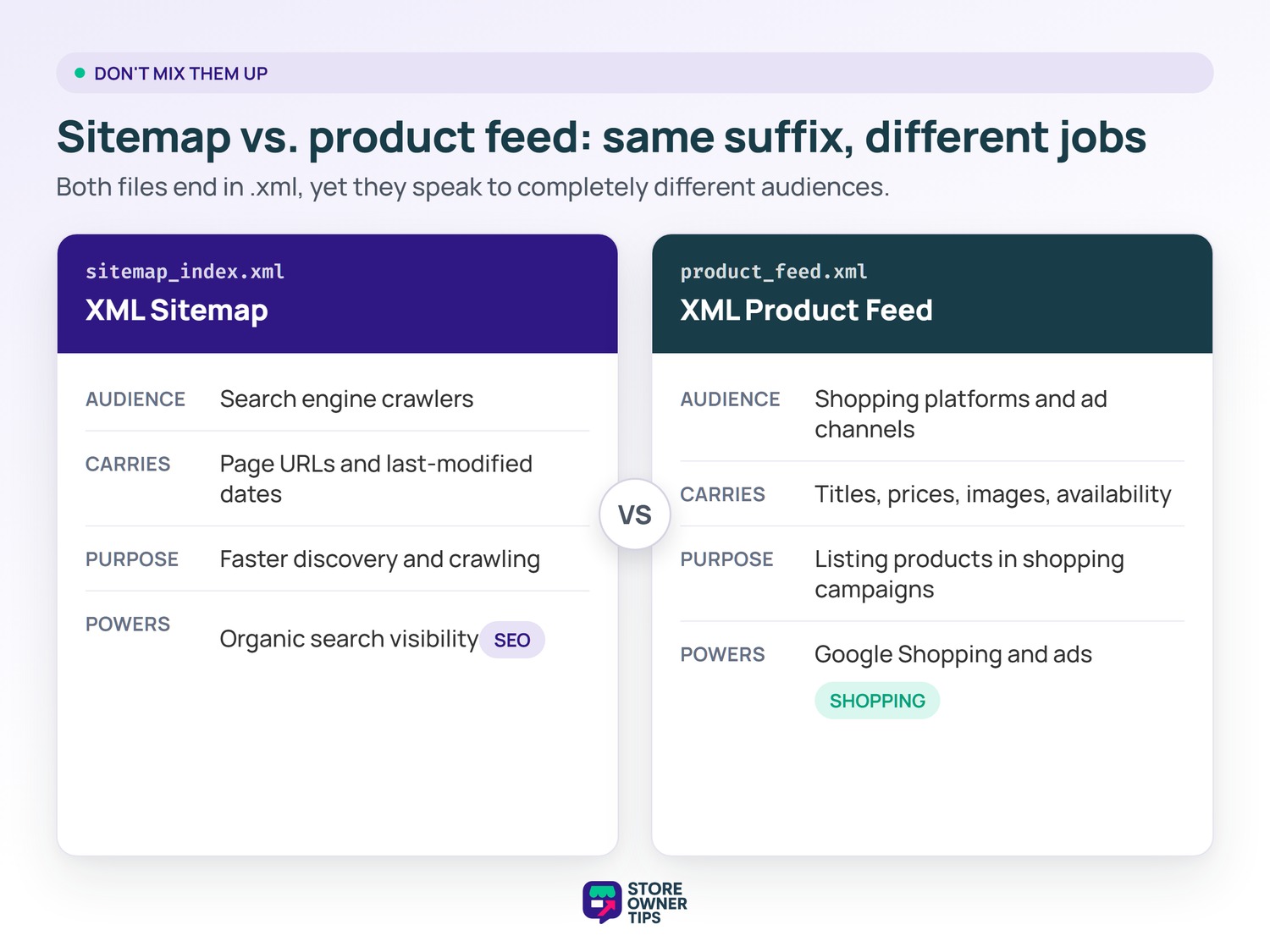
People mix these two files up often, but they do very different jobs. An XML sitemap talks to search engine crawlers about which pages exist. An XML product feed sends structured product data to shopping platforms. One serves SEO, the other serves shopping ads and listings.
A sitemap lists URLs and last-modified dates so crawlers can find your pages. It does not carry prices, stock levels, or product attributes. A product feed, by contrast, carries titles, prices, images, and availability. That feed goes to channels like Google Shopping, not the organic crawler.
In short, use a sitemap to help your pages get crawled and ranked. Use a product feed to push products into shopping campaigns. Most serious stores end up running both files at once. They solve separate problems, so one never replaces the other.
The naming overlap is the only real source of confusion. Both files end in .xml, yet their audiences differ completely. One speaks to the organic crawler, while the other feeds ad and shopping platforms. Keep that split clear, and you will set each one up correctly.
Imagine a mid-sized coffee roasting brand running on WooCommerce. The store has 2,000 product pages plus a busy blog. Many seasonal blends sit three clicks deep in the menu. Crawlers keep missing the newest single-origin beans.
The owner activates an SEO plugin to auto-generate a clean sitemap. The plugin splits the file because 2,000 products sit well under the 50,000-URL limit per file. Cart and checkout pages get excluded from the file. The owner then submits the index in Google Search Console.
Before this, Search Console showed only part of the catalog as indexed. The store was clearly above Google’s 500-page small-site threshold. That size is exactly when a sitemap starts to earn its keep. Deep pages had simply never been discovered.
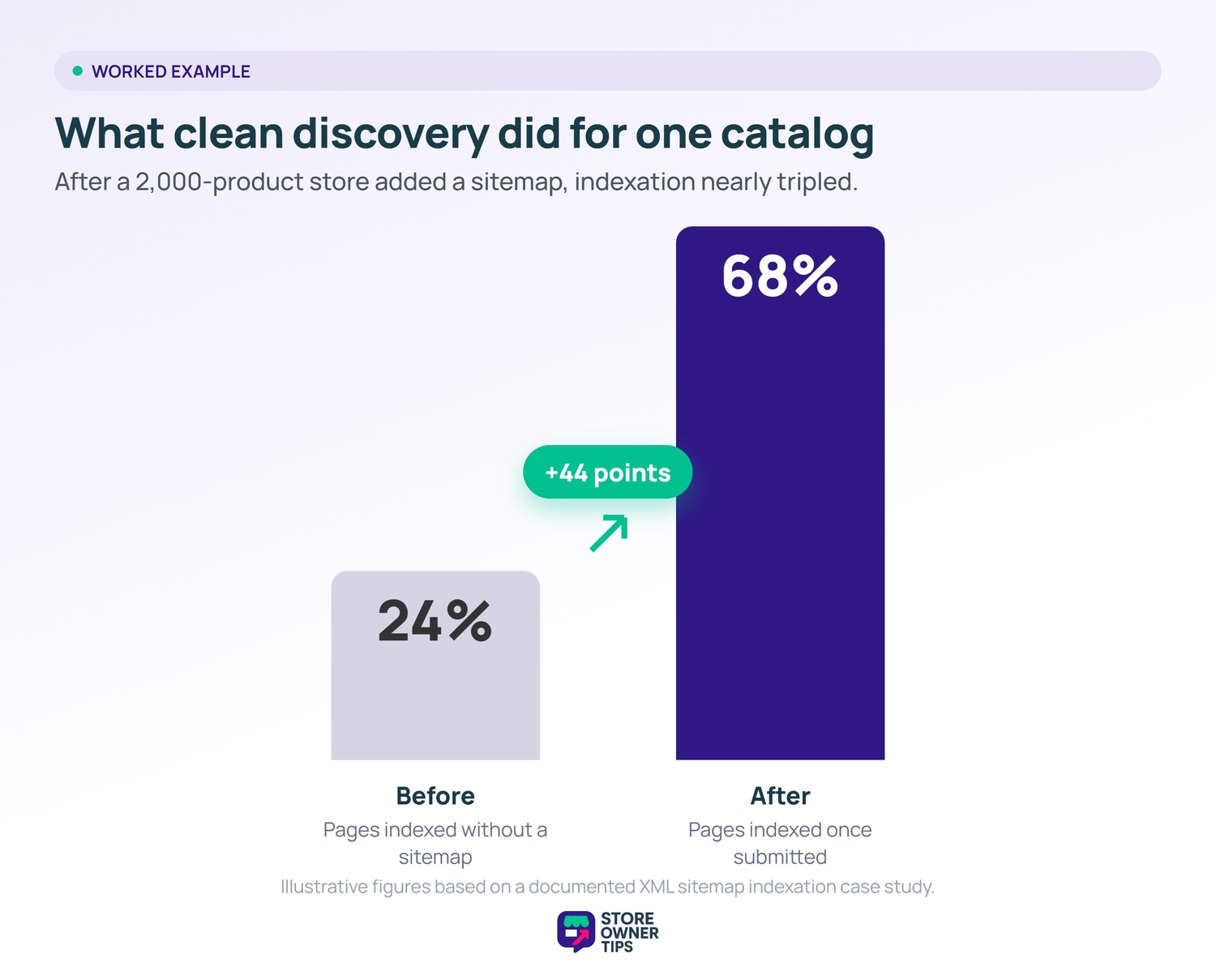
Over the next few crawl cycles, more product pages appear in the index. In one documented case, a site saw indexation climb from 24% to 68%. For our coffee brand, that kind of lift means many more beans become findable. More indexed pages create more chances to rank and sell.
The math is easy to picture here. If 1,000 hidden pages move from unindexed to indexed, each gains a shot at search traffic. Even modest rankings across hundreds of pages add up. That is the quiet, compounding payoff of clean discovery.
The owner also keeps the file tidy as the catalog grows. Sold-out seasonal blends drop off automatically when unpublished. Fresh roasts join the file the moment they go live. As a result, the crawler always works from a current list.
Maybe not, if your store is tiny. Google says sites with about 500 pages or fewer may not need one. Even so, most SEO plugins create a sitemap by default. There is little downside to keeping it on.
No, it does not. A sitemap helps search engines discover URLs, but it does not guarantee crawling or indexing. Google still weighs page quality and relevance. The sitemap just opens the door to discovery.
You should not have to update it by hand. Quality SEO plugins refresh the file automatically as you change content. They add new products and drop deleted ones in near real time. Your main job is to keep the plugin configured and the file clean.
An XML sitemap is the quiet foundation under your store’s search visibility. It will not rank pages on its own, but it makes sure crawlers can find them. For any growing WooCommerce catalog, that faster discovery is well worth the few minutes of setup. Get it right early, and every new product starts from a stronger position where good visibility begins with simply being found.
Copyright © StoreOwnerTips.com. All Rights Reserved.
