Weekly ecommerce tips, deals & news.
Picture a shopper who wants to buy something for a friend. They have no idea what that friend would actually like. So they close the tab, and the sale never happens.
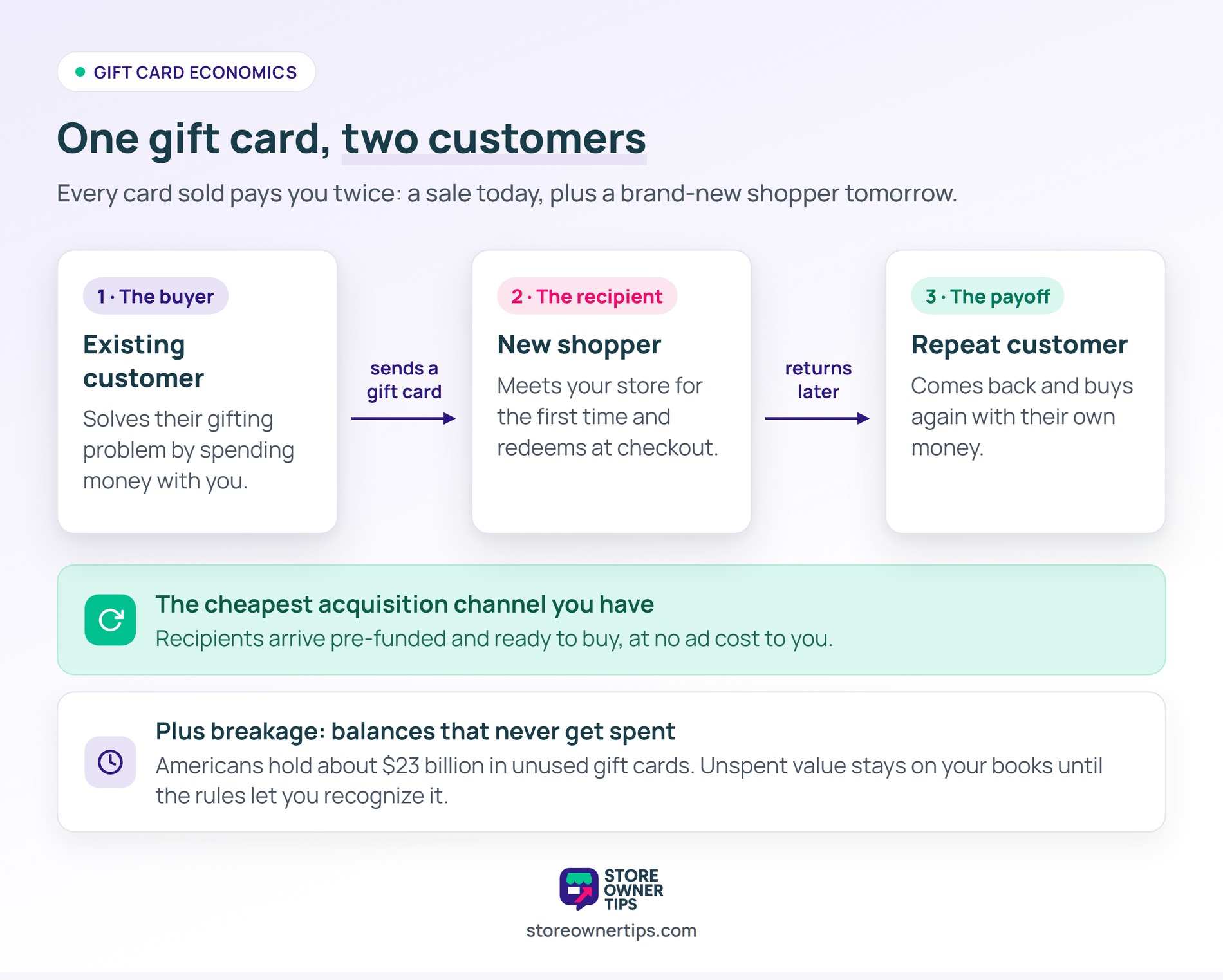
This is exactly the gap that WooCommerce gift cards fill. The buyer solves their gifting problem. You gain a brand-new customer: the recipient.
I’ve seen plenty of store owners treat gift cards as an afterthought. In my experience, that’s a mistake. Every card sold introduces someone new to your store.
Below, I’ll walk through how to set them up, which plugin to pick, and the promotion tactics that turn gift cards into steady revenue.
Table of Contents

Most stores treat gift cards as an “extra feature” and never promote them. That’s a missed opportunity. Gift cards can make up a real slice of holiday revenue when you push them properly.
The reason is simple. Every gift card transaction actually involves three moving parts:
That recipient is the part most owners miss. Many of them come back and buy again on their own money. As a result, gift cards become one of the cheapest acquisition channels you have.
Breakage matters too. Americans hold around $23 billion in unused gift cards each year. Some of that balance never gets spent, and it stays on your books until the rules let you recognize it.
WooCommerce doesn’t sell gift cards on its own. You need a reliable WooCommerce gift card plugin to get the job done. Three options come up most often, so here’s how they stack up.
| Plugin | Free version | Premium (annual) | Physical cards | Redeems to store credit |
|---|---|---|---|---|
| Advanced Gift Cards for WooCommerce | Yes (free base plugin) | From $99.50/yr | Digital only | Yes |
| YITH WooCommerce Gift Cards | Yes | Premium, annual only | Yes (premium) | No |
| PW WooCommerce Gift Cards | Yes | From $99/yr (Pro) | Yes (Pro) | No |
Pricing is approximate and current as of 2026. Always check each plugin’s site for the latest.
Advanced Gift Cards runs on top of the free Advanced Coupons base plugin. That’s a big deal if you also want flexible smart coupons, store credit, or BOGO deals in one system.
What we like about it: gift cards redeem straight to store credit at checkout. Buyers can schedule delivery for a future date. It also ships with 85 card designs, so you skip the design work.
Pros:
Cons:
Best for: stores that want gift cards, coupons, and store credit managed in one connected toolkit.
YITH offers a free version plus a premium tier. The premium version adds scheduled delivery, physical cards, expiry dates, and bulk generation.
It’s a capable standalone plugin. That said, it runs on its own. The gift cards don’t tie into a wider coupon or store-credit system unless you add more YITH plugins.
Pros:
Cons:
Best for: stores that specifically need to print physical gift cards.
PW Gift Cards, by Pimwick, is a focused plugin with a genuinely useful free version. The free tier handles basic gift card sales well.
Upgrading to WooCommerce Gift Cards Pro costs $99 per year for a single site. It adds physical card support through CSV import, plus bulk generation.
Pros:
Cons:
Best for: budget-conscious stores that want to start free and upgrade later.
If you already run coupons or store credit, Advanced Gift Cards keeps everything in one place. That integration is why I’d start there.
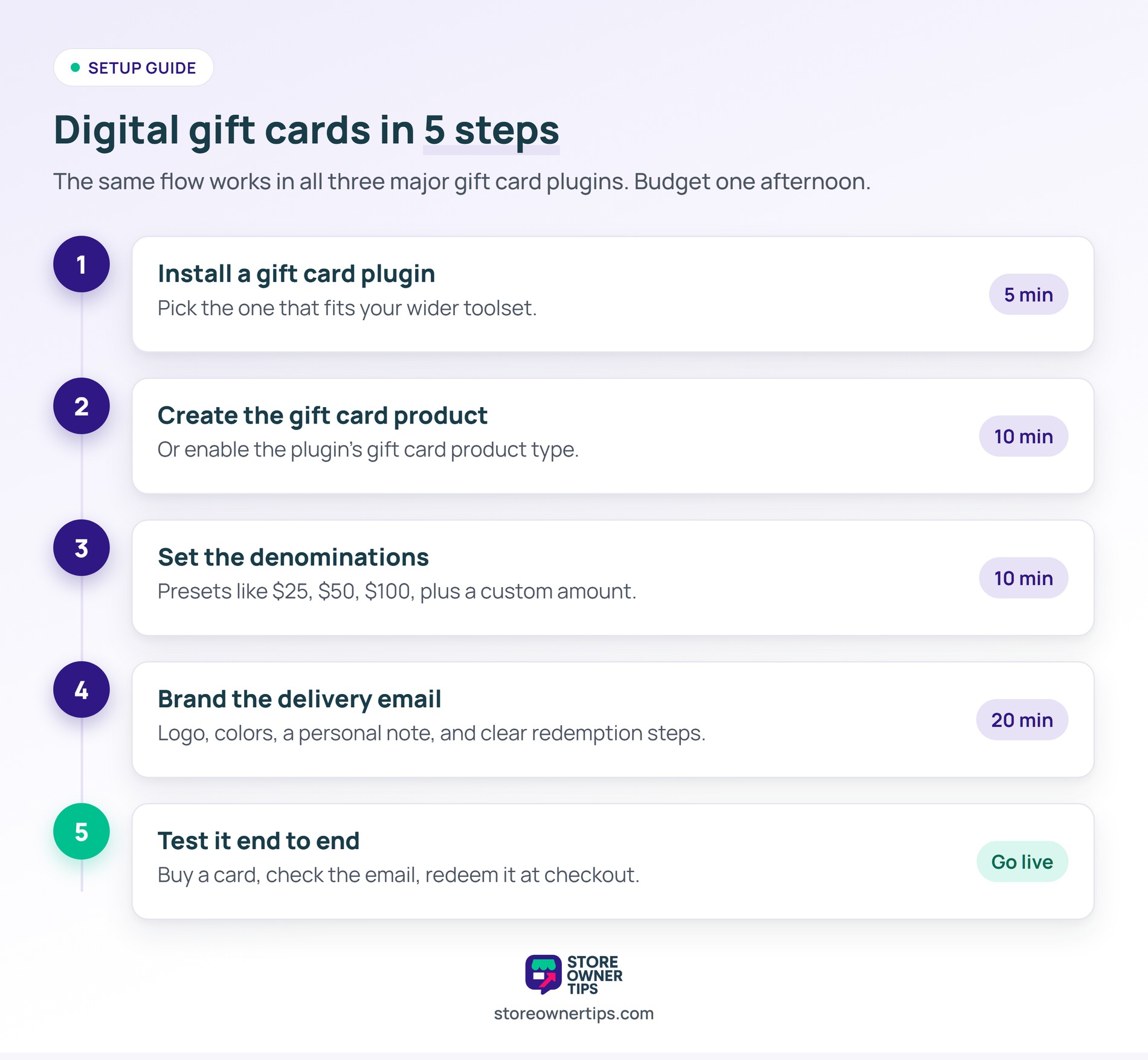
Setup is quicker than most owners expect. Here’s the flow, from digital cards to delivery emails. Advanced Coupons also has a full gift card setup walkthrough if you want more detail.
Digital cards are delivered by email. The customer buys one, and the recipient gets a unique code to redeem at checkout. The steps below apply to all three plugins.
Most stores offer $25, $50, $100, and $250 as presets. A “custom amount” option adds flexibility for bigger or smaller gifts.
It takes a little extra work to sell physical gift cards, but they can strongly drive in-store and retail sales. Keep a few things in mind before you commit.
Most pure-ecommerce stores skip physical cards. They matter most for shops with retail locations that already sell physical gift items or handle B2B gifting.
Your gift card email is often your first impression on a new customer. Generic plugin defaults feel spammy, so it’s worth customizing a few things.
Scheduling, available in all three plugins, lets buyers send cards on a set date. That’s essential for birthdays, holidays, and Valentine’s gifts.
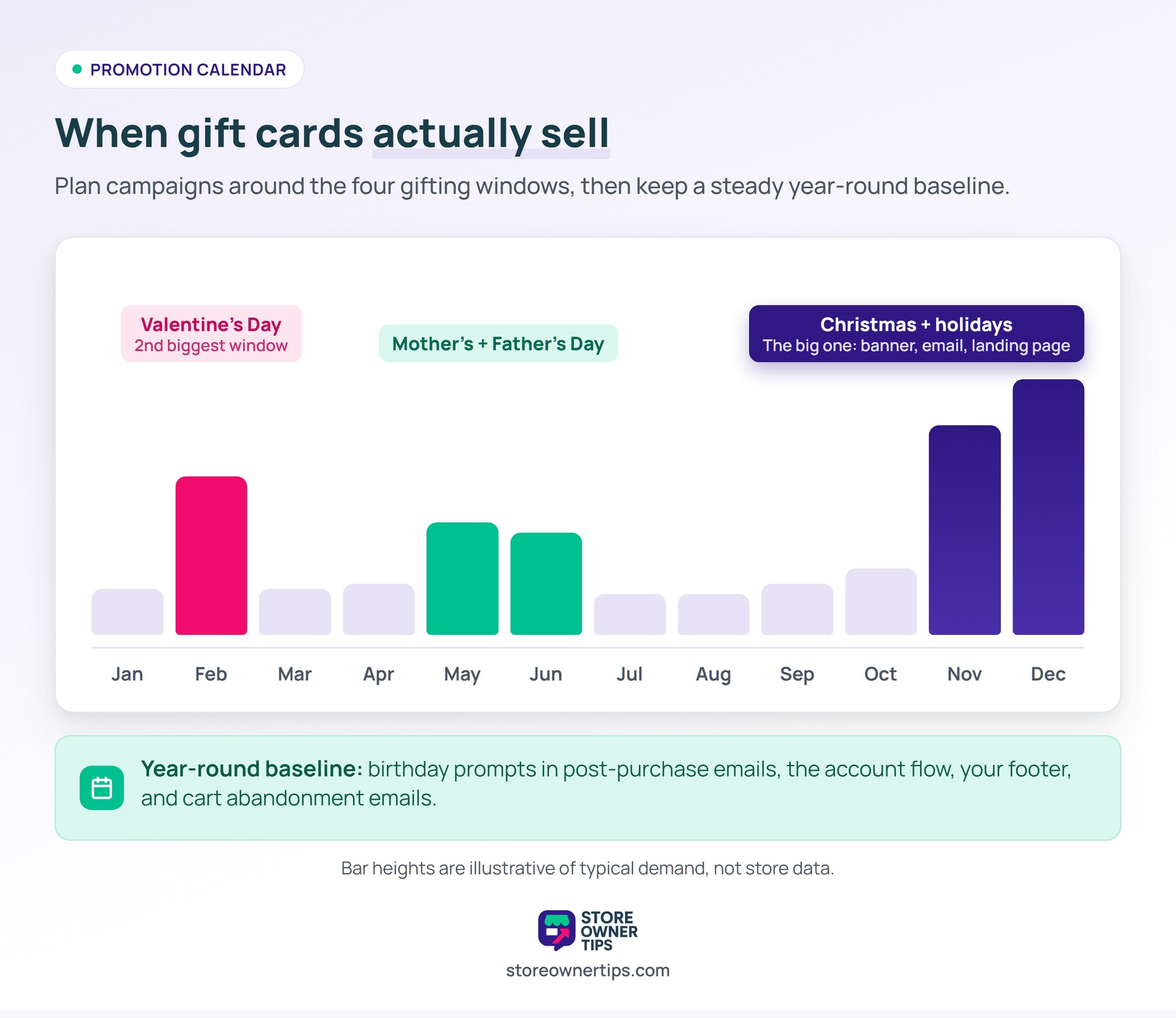
Gift card sales spike during gift-giving seasons. A little planning around each one pays off. Our wider holiday marketing ideas guide goes deeper, but here are the key windows.
This is the biggest gift card period for most stores. Promote it hard:
Valentine’s Day is the second-biggest gift card moment for many stores. It works especially well for:
These bring smaller but meaningful bumps for the right niches. Worth a simple email campaign at least.
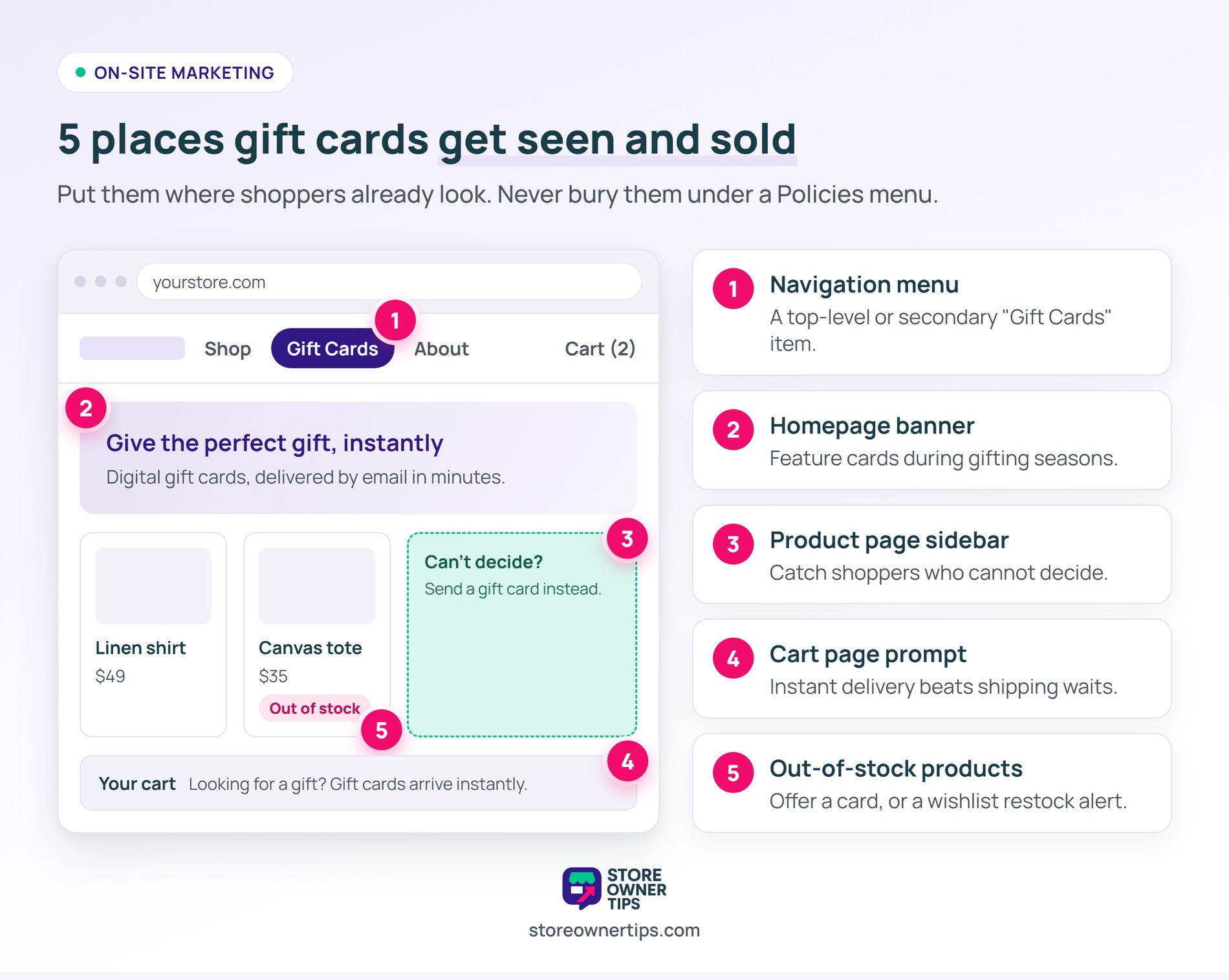
Don’t limit gift cards to holidays. Add “Send a gift card” prompts in these spots:
Gift cards create an accounting wrinkle that surprises many store owners. It’s worth understanding before you sell your first one.
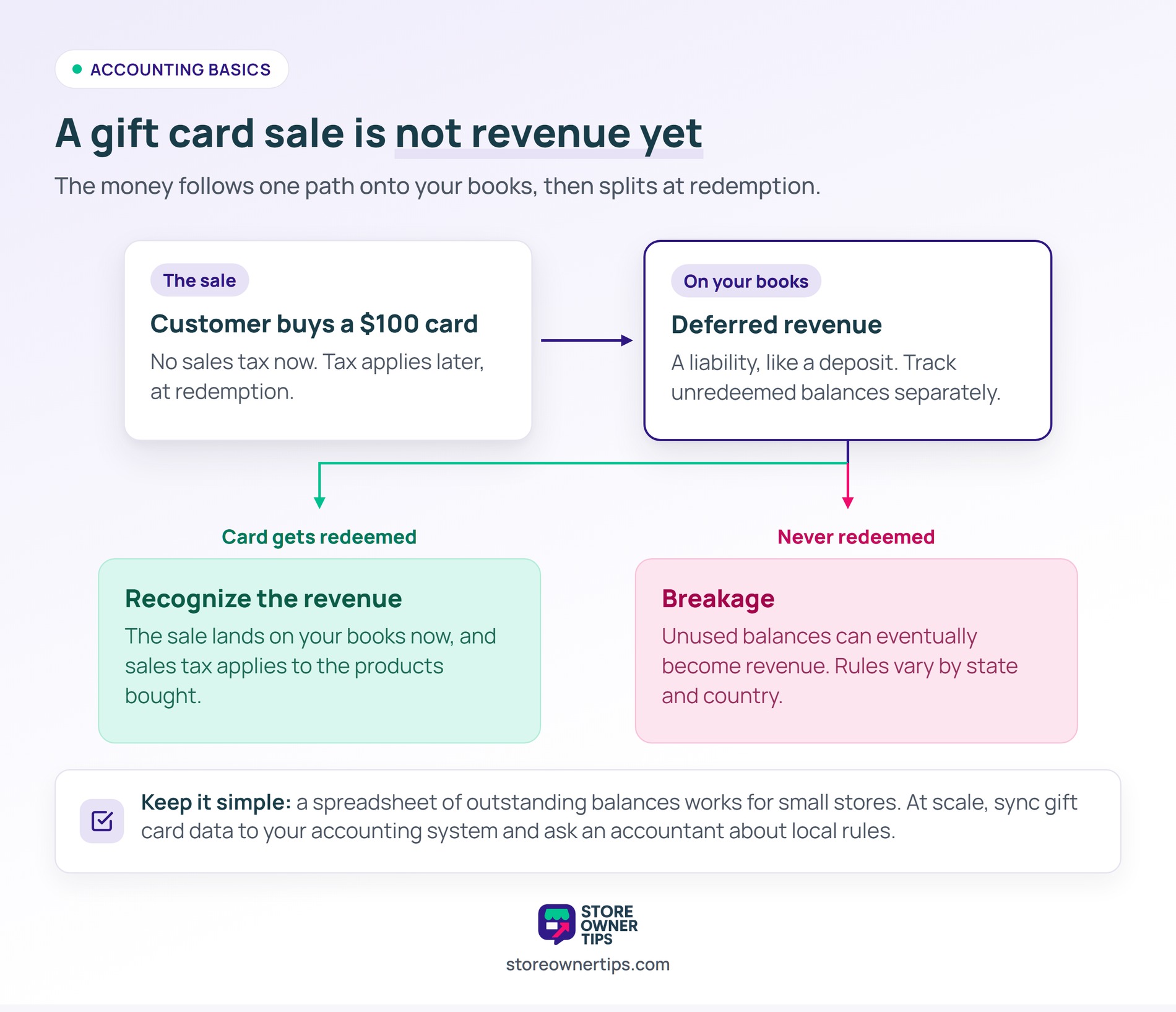
When someone buys a gift card, you haven’t earned revenue yet. You’ve taken a deposit. This counts as “deferred revenue” on your books. You recognize the revenue when the card is redeemed, not when it’s bought.
Here’s what that means in practice:
For most small stores, a simple spreadsheet of outstanding balances works fine. At scale, connect your gift card data to QuickBooks or your accounting system. When in doubt, check with an accountant on your local rules.
Where you promote gift cards decides how many sell. Some spots convert far better than others.
High-impact placements:
Low-impact placements to avoid:
No, not on its own. You need a gift card plugin, like Advanced Gift Cards, YITH WooCommerce Gift Cards, or PW WooCommerce Gift Cards.
It depends on your setup. Advanced Gift Cards is my pick if you also want coupons and store credit in one system. YITH suits stores that need physical cards. PW is a solid budget choice.
In most jurisdictions, no. Sales tax applies when the card is redeemed for a product, not when it’s bought. Check your local tax rules to confirm.
Yes. Most gift card plugins track the remaining balance. A customer can spend a $100 card across several orders until it’s fully used.
Set sensible expiry dates, use long random codes, and watch for unusual redemption patterns. Our guide on WooCommerce fraud prevention covers this in more detail.
Yes. Several plugins support bulk code generation for corporate orders. It’s a handy option for B2B clients and holiday team gifts.
While older plugins like Ultimate Gift Cards exist on the market, the three options covered above—Advanced Gift Cards, YITH, and PW—remain the most trusted, regularly updated, and heavily supported choices for a modern store.

WooCommerce gift cards are one of the highest-ROI features you can add. They drive revenue and bring in new customers at the same time. Setup takes an afternoon, and the payoff runs year-round.
Here’s what to do next:
If you want gift cards, coupons, and store credit in one connected system, start with Advanced Gift Cards. Set them up now, promote them at the next holiday, and watch your acquisition costs drop.

Copyright © StoreOwnerTips.com. All Rights Reserved.
