Weekly ecommerce tips, deals & news.
Most stores that expand overseas don’t fail on the product. They fail on small details at checkout. Baymard Institute puts the documented average cart abandonment rate at 70.22%. The single biggest reason is extra costs turning up too late.
Cross-border shoppers hit that wall harder than local ones. A buyer in Berlin sees a USD price and does the conversion in their head. Then shipping and duties land as a surprise. A proper WooCommerce multi-currency setup removes the first half of that friction.
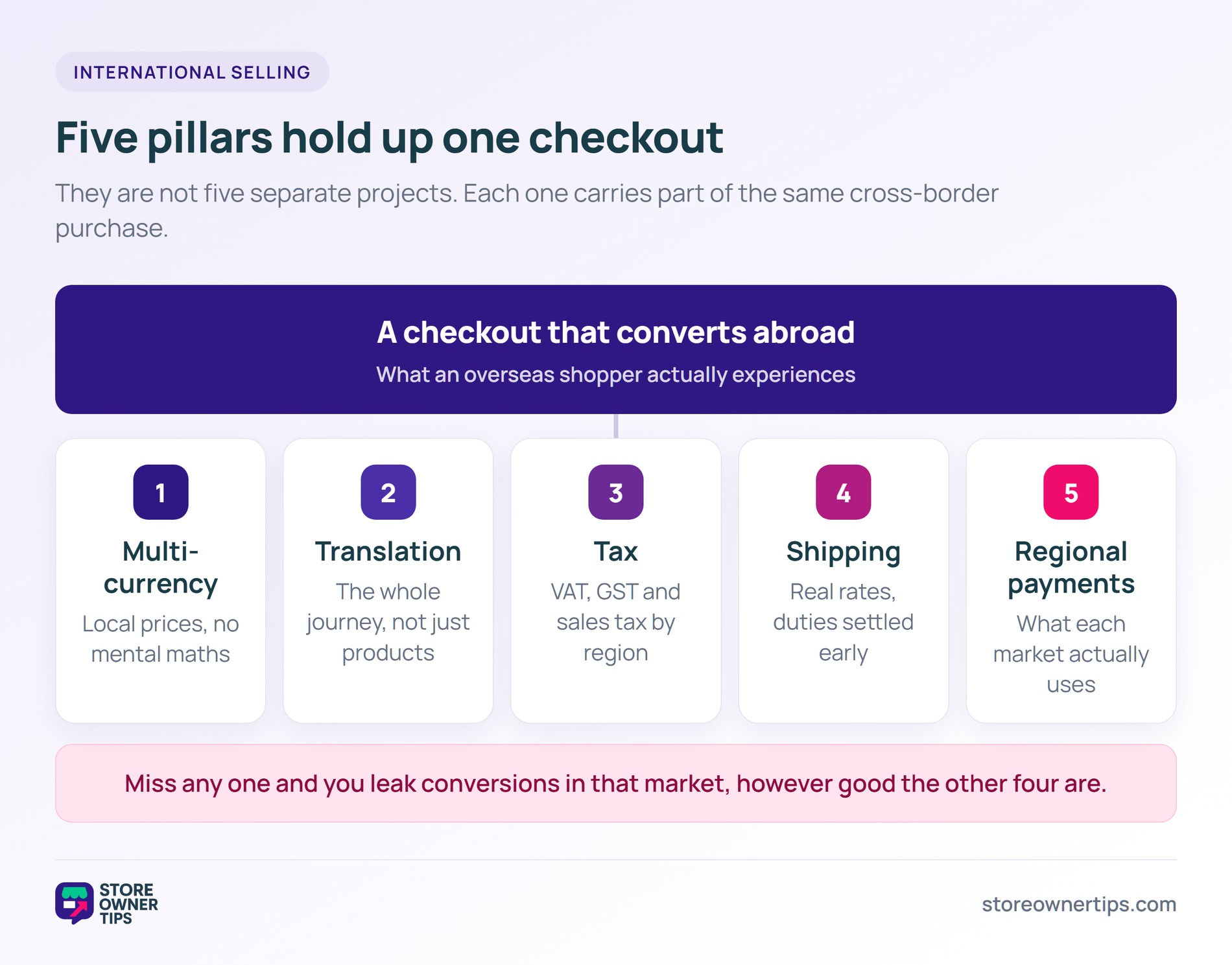
I’ve watched store owners treat international selling as one giant project. In practice, it’s five smaller ones. You need currency, translation, tax, shipping, and regional payment methods to work together.
This guide walks through all five, with current pricing and the rules that actually apply in 2026. Whether you’re expanding to Canada or going fully global, the same principles hold.
International ecommerce isn’t one problem. It’s five overlapping ones, and each needs its own answer:
Miss any one of these, and you leak conversions in that market. Get all five right, though, and you reach buyers most of your competitors never bother serving.
Local pricing is the first thing an overseas shopper notices. WooCommerce ships with a single store currency, so you’ll need a plugin to show more. Here’s how the main options compare.
| Plugin | Price | Free version | Automatic currency detection | Geo-based pricing |
|---|---|---|---|---|
| Aelia Currency Switcher | €99/yr (1 site) | No (14-day trial) | Yes | Yes |
| FOX (formerly WOOCS) | Free, Pro from $49/yr | Yes (2 currencies) | Yes | Yes (Pro) |
| CURCY Multi Currency | Free, $34 one-time | Yes | Yes | Yes (Pro) |
Pricing checked against each vendor’s own site in July 2026.
This is the most feature-complete option of the three. Aelia lists it at €99 per year for a single site, with a 14-day trial. There’s no free tier.
What you get for that is genuinely deep. Exchange rates update automatically from Open Exchange Rates, OFX, or the Turkish Central Bank. You can also set rates by hand instead.
Worth knowing:
If you run recurring billing, check subscription handling with Aelia’s support before committing. We couldn’t confirm that behaviour from their public documentation.
WOOCS was renamed FOX, so you’ll still see both names in older roundups. The free version runs up to two currencies. Pro starts from $49 per year, and a lifetime licence is available.
Worth knowing:
CURCY is the budget pick. VillaTheme sells it for $34 as a one-time purchase, and there’s a free version too.
Best for: Stores that want multi-currency without another annual renewal on the books.
Whichever plugin you pick, three settings matter more than the rest:
AdTribes has a good walkthrough on changing WooCommerce currency for international sales if you want the step-by-step. Get this pillar right first, because the other four build on it.
Language matters more than most store owners expect. CSA Research surveyed 8,709 consumers across 29 countries. It found 76% prefer to buy products with information in their own language. Another 40% said they’d never buy from a site in a different language.
That said, most stores translate their product pages and stop there. Checkout fields, order emails, and account pages stay in English. A half-translated store feels more broken than an English-only one.
Pricing here trips people up, because the cheapest tier often excludes WooCommerce. Check that before you buy.
Work through the whole customer journey, not just the catalogue:
You don’t have to do every language at once. Pick your strongest non-English market and finish that one properly.
Tax is the compliance landmine of international selling. Getting it wrong can mean back-taxes, penalties, or losing the right to sell in a region. Here’s what applies where.
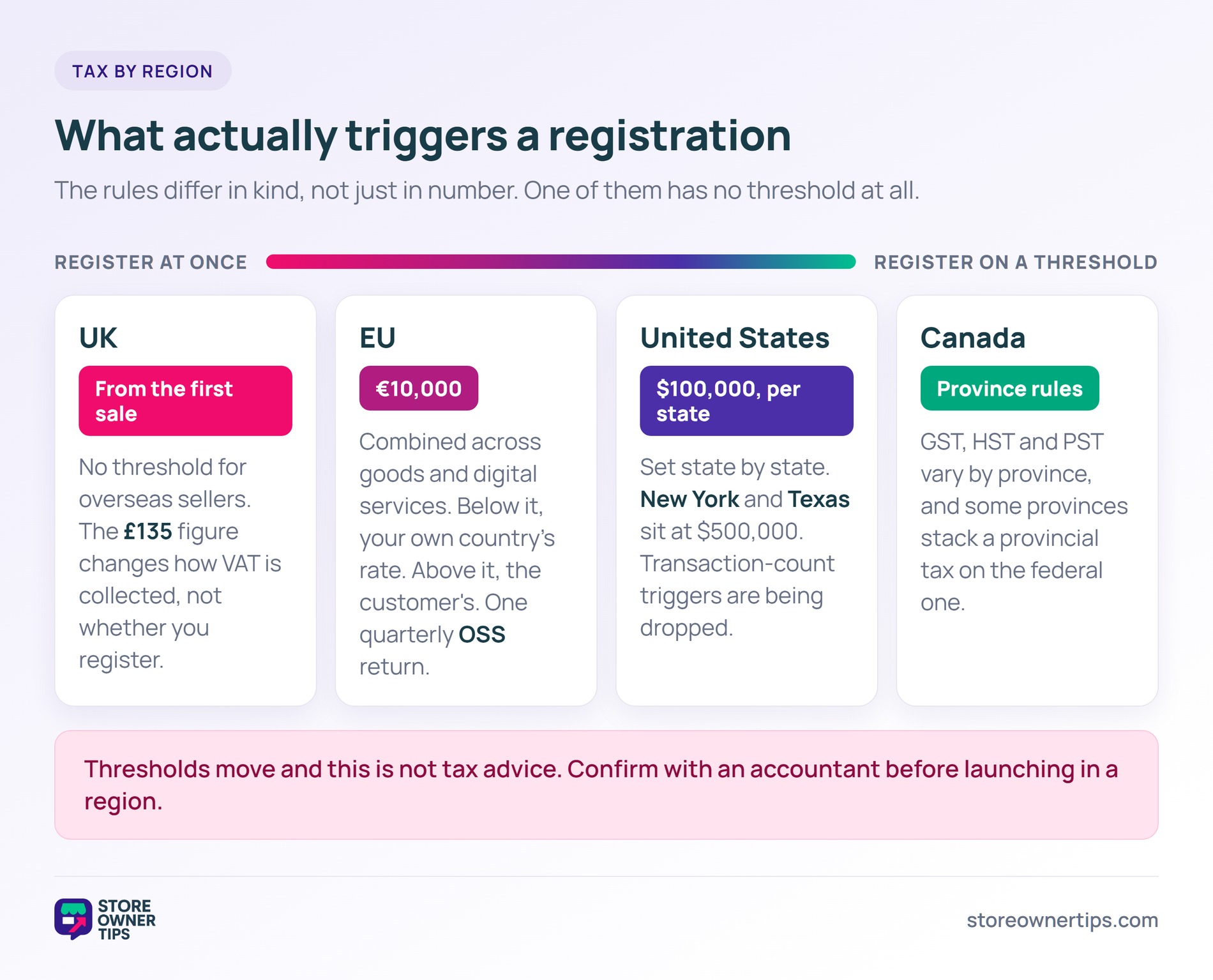
The EU applies a EUR 10,000 threshold to distance sales across the bloc. Stay below it and your sales can be taxed at your own country’s rate. Go above it and you charge the customer’s country rate instead.
That threshold is a combined total. It covers intra-EU distance sales of goods plus cross-border digital services together, not each separately.
The One Stop Shop is what keeps this manageable. You register in a single EU country and declare VAT for all of them there. Under the Union scheme, the OSS return is submitted quarterly.
Selling B2B into the EU changes the picture again. Business customers with a valid VAT number are usually handled through the reverse charge, so you’ll want role-based tax rules. Wholesale Suite covers how to tax exempt a wholesale customer in WooCommerce.
This one catches people out, so read it carefully. There’s no sales threshold to cross before you register. HMRC guidance for overseas goods sold directly to UK customers requires overseas sellers to register from the first taxable sale.
The £135 figure you may have seen is about collection, not registration. For consignments of £135 or less, you charge and account for UK VAT at the point of sale. Above £135, normal import VAT and customs rules apply instead.
Two exceptions are worth noting. Business-to-business sales to a customer with a UK VAT number work differently. Sellers supplying only zero-rated goods don’t need to register.
Every US state sets its own rules. Broadly, you collect sales tax in states where either of these is true:
The common threshold is $100,000 in annual sales, sometimes paired with 200 transactions. Some states set it higher, though. New York and Texas both sit at $500,000, according to Avalara’s state-by-state economic nexus guide.
The transaction-count part is also disappearing. South Dakota, Louisiana, North Carolina, Utah, and Illinois have all moved to sales-only thresholds. Check current rules per state rather than trusting an older roundup.
For automation, TaxJar handles US sales tax calculation and filing, but it’s US-only. Avalara is the option to look at if you need international coverage as well.
Canadian rates vary by province, and some provinces stack a provincial tax on top of the federal one. Most automated tax tools handle that complexity once you give them correct settings.
None of this is tax advice, and thresholds move. Confirm your position with an accountant before you launch in a new region.
Shipping is where surprise costs usually appear, and that’s the number-one abandonment trigger. Three decisions do most of the work here.
Pull live rates from your carriers rather than guessing. Flat-rate shipping on international orders loses money on heavy items. Meanwhile, it overcharges for light ones and quietly costs you sales.
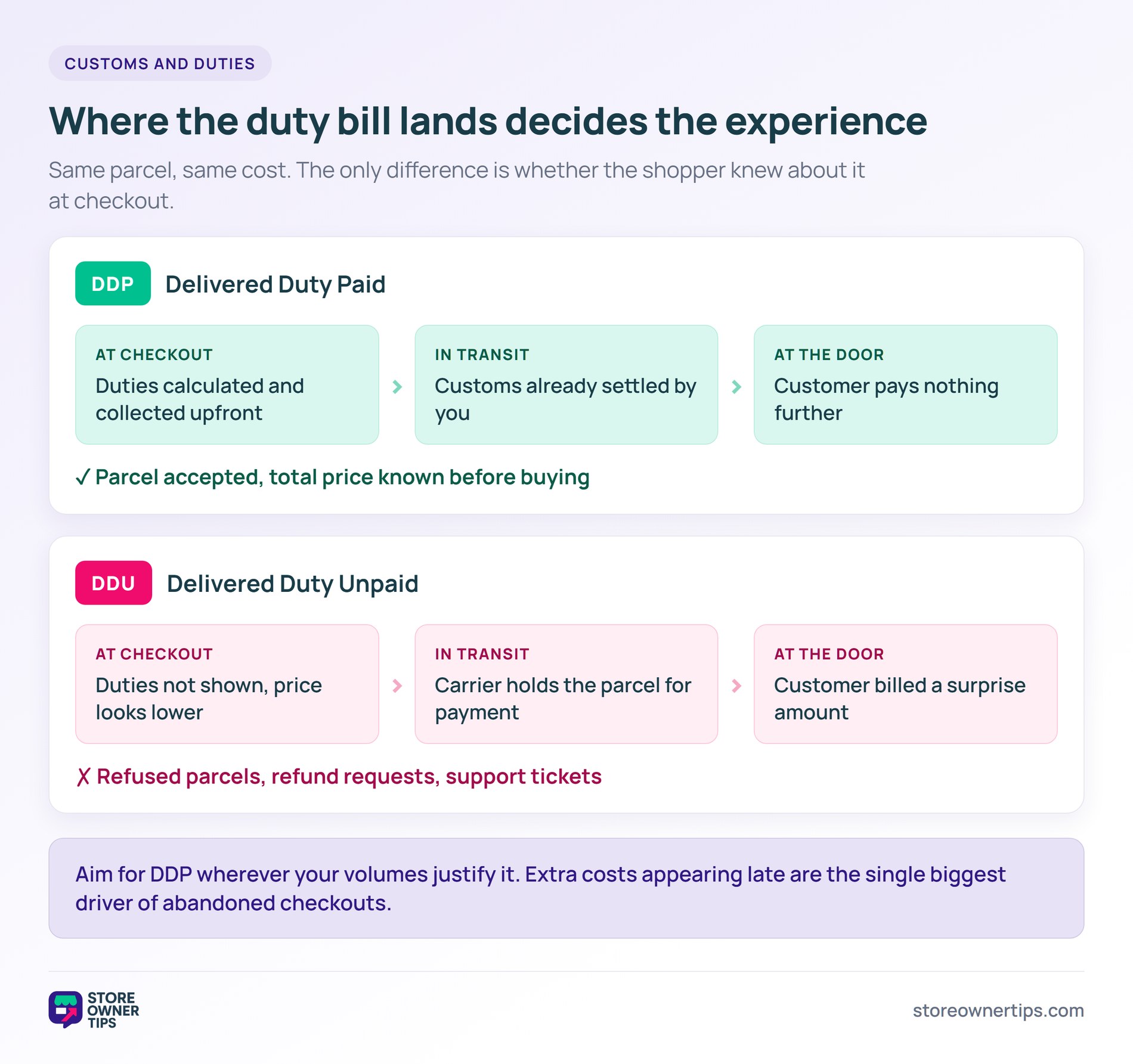
You have two broad choices. With DDP (Delivered Duty Paid), you collect duties at checkout and the customer pays nothing on delivery. With DDU, the customer settles duties with the carrier at the door.
DDP is the better experience by a wide margin. A surprise duty bill on the doorstep drives refund requests and refused parcels. Aim for DDP wherever your volumes justify it.
Both ShipperHQ and Zonos calculate duties and taxes at checkout and integrate with WooCommerce. If shipping cost is your main leak, our guide to reducing cart abandonment in WooCommerce covers the rest.
Credit cards dominate US checkout. They don’t dominate everywhere else. Offering the wrong methods reads as a store that wasn’t built for that market.
These are the methods worth supporting per region, checked against Stripe’s current payment method support:
Two German methods have gone away, and older guides still list them. Giropay stopped accepting payments in June 2024. SOFORT was folded into Klarna and retired on 31 March 2025.
POLi is another one to drop from old checklists. Australia Post closed POLi in Australia in 2023, though it still runs in New Zealand under new ownership.
Stripe covers a lot of this natively, so start there. For the wider picture, see our comparison of the best WooCommerce payment gateways.
If you advertise on Google Shopping or Meta across borders, you’ll need per-country product feeds. Each one carries its own language, currency, pricing, and availability.
AdTribes handles this with its multi-currency addon for Product Feed Elite. It reads from the currency switcher you already run, including Aelia and CURCY, so feed pricing matches your storefront.
Translation ties in the same way. Product Feed Elite integrates with WPML, Polylang, and TranslatePress to generate feeds in each target language. If you’re new to this channel, start with our guide on selling on Google Shopping with WooCommerce.
Distance between your customer and your server shows up as lag. On a checkout page, that lag costs money. Three things are worth checking:
For provider-level detail, see our comparison of the best WooCommerce hosting. Our WooCommerce speed optimization guide covers what to fix once hosting is sorted.
It depends on budget and depth. Aelia Currency Switcher is the most complete at €99 per year. FOX (formerly WOOCS) has a free tier for two currencies, with Pro from $49 per year. CURCY is $34 as a one-time purchase.
Not always. English works in plenty of markets, though it matters most in France, Germany, Japan, and Latin America. CSA Research found 40% of shoppers would never buy from a site in another language. Test English-only first, then translate where the data shows demand.
Register under the One Stop Shop scheme in one EU country. A tax tool such as Avalara or Stripe Tax handles the rate calculation. You then file a single quarterly OSS return instead of one per country. Note that TaxJar covers US sales tax only.
Show VAT-inclusive prices to consumers in the EU and UK, where that’s the expectation for retail. Tax-exclusive pricing is normal in the US and Canada. Most multi-currency plugins can switch this by geolocation.
Stripe has the broadest reach of any single gateway. It supports iDEAL, Bancontact, SEPA, Klarna, Alipay, and WeChat Pay among others. Add regional gateways where local methods dominate, such as MercadoPago in Latin America.
Yes. Each country needs its own feed with the right language, currency, and availability. AdTribes automates that for multi-country feed management.
Selling internationally on WooCommerce means solving five problems that overlap. Currency, translation, tax, shipping, and regional payments all feed into the same checkout. Leave one unsolved and it undercuts the other four.
Here’s the order I’d work in:
Don’t try to launch everywhere at once. Turn on multi-currency for your three biggest foreign markets first. Then layer translation, tax, and shipping onto each one as it grows. International selling on WooCommerce is very achievable, and it just takes doing the boring parts properly.

Copyright © StoreOwnerTips.com. All Rights Reserved.
