Weekly ecommerce tips, deals & news.
Many WooCommerce stores sit online for years while a massive chunk of their product pages get zero organic traffic. The issue usually isn’t a Google penalty, bad hosting, or the wrong plugins.
Instead, it comes down to small decisions, like category URL structure, internal linking, and product schema, that were never made intentionally. Without the right foundational work, a store simply defaults into bad SEO.
This WooCommerce SEO guide covers a consistent playbook to fix this. It walks you through everything a store owner needs to drive organic traffic to product and category pages, from the basic setup to advanced strategies.
Table of Contents
WordPress SEO guides focus on blog posts, specifically emphasizing keywords, content length, and internal links. Those matter for WooCommerce too, but product and category pages play by different rules.
WooCommerce SEO needs to solve problems that blog SEO doesn’t:
Plugins like AIOSEO or Yoast handle the technical foundation, but only if you configure them correctly for WooCommerce specifically.
Ranking an online store on Google requires a different game plan than a regular blog. You have to manage product descriptions, category pages, and the hidden code that highlights your prices in search results. Leave these on default, and your products will disappear in the crowd.
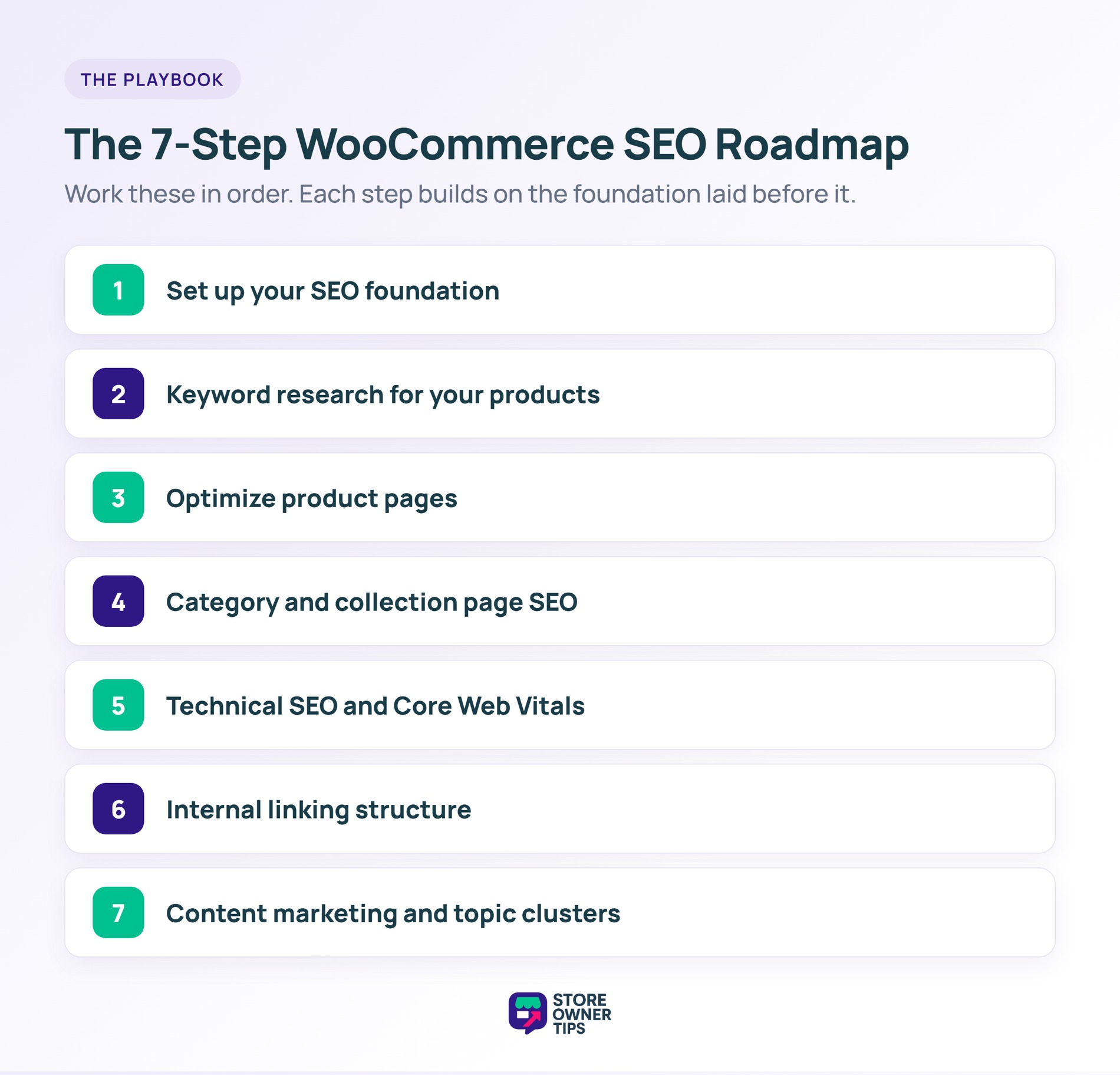
Taking control of your technical setup is the key to getting free, organic traffic. Here are seven simple steps to build a strong SEO foundation and rank higher.
Before any content work, establish the technical foundation.
Both plugins are excellent for WooCommerce. AIOSEO Pro has slightly better WooCommerce-specific features (product schema, category schema, sitemap filters). Yoast Premium has a more polished UI and better content analysis tools.
Configure the basics:
/wp-admin/ and filtered product pagesWooCommerce defaults to /product/product-name/ and /product-category/category-name/, which is fine but can be improved.
If you’re launching a new store, consider:
/product-name/ (no prefix) — shortest URLs, best for SEO/shop/product-name/ — keeps a clear shop namespaceDon’t change URLs on an existing store without 301 redirects. Broken URLs destroy rankings faster than anything else.
Enable product schema in your SEO plugin. This gets price, availability, and review stars into Google’s rich results. Most SEO plugins do this automatically when WooCommerce is detected.
Keyword research for WooCommerce differs from blog keyword research in one key way: commercial intent matters more than search volume.
A blog post targeting “best running shoes” (high volume) can’t outrank Amazon and Foot Locker. A product page targeting “men’s minimalist running shoes size 11” (lower volume but specific intent) can rank and convert.
For each product, research:
Tools: Keywords Everywhere browser extension, Google Search Console, Google Autocomplete, AnswerThePublic.
Wishlist analytics also show which products shoppers want most.
Every product page targets one primary keyword. Category pages target broader category keywords. Blog content targets informational queries that lead to product pages.
Avoid keyword cannibalization; two pages targeting the same keyword will split the ranking signal and both will underperform.
Product pages do most of the SEO heavy lifting for WooCommerce stores.
Your product title should match customer search intent, not just your internal naming convention. “Wireless Bluetooth Headphones With Noise Cancellation” beats “Model XK-300” for most stores.
Format: [Descriptive name] + [key attribute] + [brand if relevant]
Product descriptions need to be long enough to rank, short enough to sell. Aim for 300-500 words split into:
Unique descriptions matter. Manufacturer-supplied descriptions appear on hundreds of retailer sites — Google filters them heavily. Rewrite or expand.
Make sure your SEO plugin outputs:
Use Google’s Rich Results Test tool to verify your schema is valid.
Create pathways from blog posts to relevant product pages. Direct your visitors from category pages to specific products. Connect related products to each other to build authority. Target 3-5 internal links per product page pointing to complementary content.
Category pages are where many WooCommerce stores leave traffic on the table.
WooCommerce category pages typically show products and nothing else. Add 200-400 words of category-level content at the top or bottom of the page explaining what products are in this category, who they’re for, and why they matter.
Category slugs should match how customers search. “Running Shoes” → /running-shoes/ is better than /category-running/ or /cat-8/.
Category pages with 100+ products paginate. Make sure your SEO plugin adds rel="next" and rel="prev" tags correctly, or Google won’t treat paginated results as part of the same collection.
Filter URLs (color, size, brand, price range) can create thousands of indexable pages. For most stores, these should be noindexd to prevent duplicate content. Your SEO plugin should have a setting to handle this.
One thing we commonly see: stores let filter URLs (like /category/?color=blue) get indexed, then wonder why their category page SEO is weak. Google splits ranking signal across dozens of filter combinations. Disallow or noindex filter URLs.
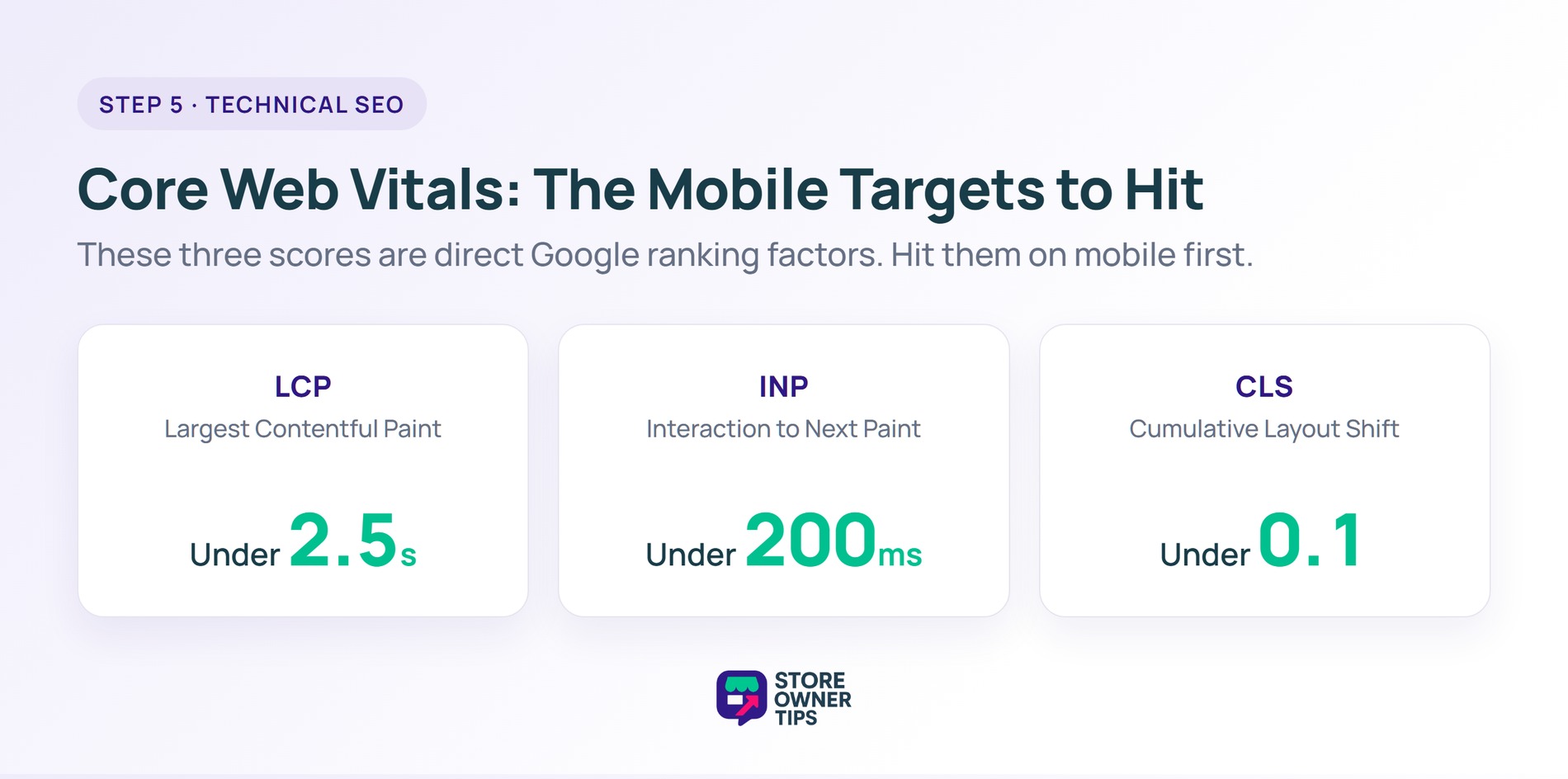
Google cares about technical SEO more for ecommerce than for blogs. Slow product pages lose sales and rankings simultaneously.
Target these Core Web Vitals scores on mobile:
How to improve:
Make sure Google can actually crawl your store. Check:
Good internal linking tells Google which pages are most important and distributes authority across your store.
Basic structure:
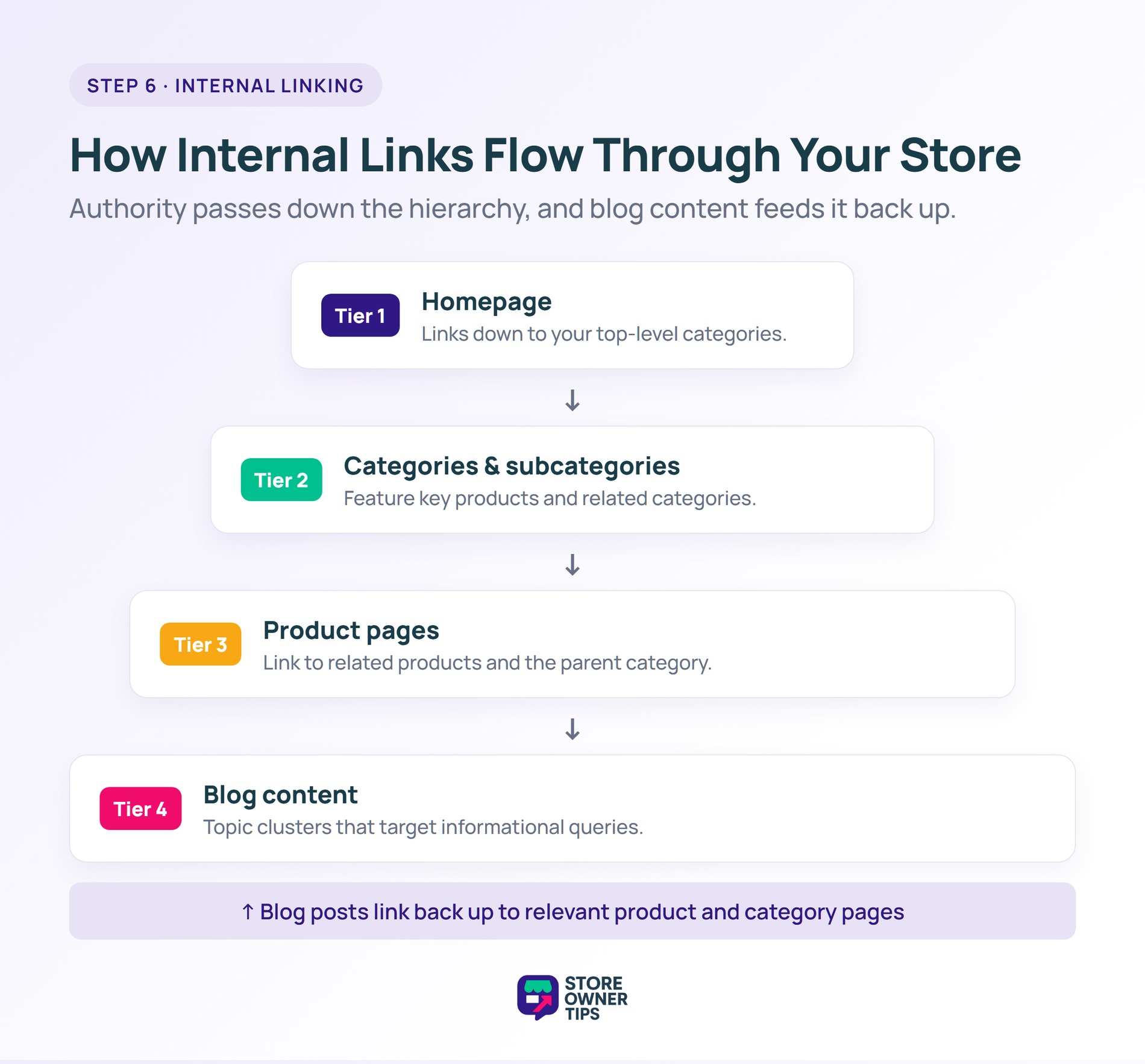
Instead of “click here” or “this product,” use descriptive anchors:
Products that don’t get internal links rarely rank. Make sure every indexable product has at least 3 incoming internal links from relevant pages.
Blog content that ranks for informational queries can drive organic traffic and link to product pages.
For each major product category, create:
Example for a running shoe store:
“Best running shoes for marathon training” is better than “what are running shoes” for ecommerce. BOFU keywords have buyer intent.
Google rewards fresh content. Update pillar posts quarterly, refresh rankings data, add new sections.
Tools like StoreAgent AI can help generate and optimize product descriptions and blog content for WooCommerce stores at scale.
These come up repeatedly during audits:
Plugins install features, but they don’t do SEO for you. The fundamentals, such as intentional keyword targeting, product page depth, category structure, and internal linking, are still your job. Nothing replaces that work.
AIOSEO Pro and Yoast SEO Premium are the two best WooCommerce SEO plugins. Both handle product schema, sitemaps, and WooCommerce-specific features well. Pick based on UI preference.
Yes. WooCommerce gives you more control over URLs, schema, and technical SEO, which matters at scale. Both platforms can rank well with proper optimization.
Expect 3-6 months for meaningful organic traffic growth. Technical fixes show results faster (weeks). Content marketing takes longer.
Yes. Submit via Google Search Console. Your SEO plugin generates the sitemap automatically; you just need to submit the URL once.
No, for most stores. Filter URLs create duplicate content. Configure your SEO plugin to noindex or disallow them.
Very. Google’s Core Web Vitals are direct ranking factors. Slow stores rank lower and convert worse.
WooCommerce SEO is less about plugins and more about intentional decisions on URL structure, category organization, product page depth, and internal linking. Plugins handle the technical foundation, while the strategy is your job.
Here’s what to do next:
If you’re ready to get serious about WooCommerce SEO, start with the foundation by picking an SEO plugin, fixing your URL structure, and configuring product schema. Everything else builds on that base.

Copyright © StoreOwnerTips.com. All Rights Reserved.
