Weekly ecommerce tips, deals & news.

Most quote plugins do the easy part well. They add a button, and the requests start arriving.
The trouble shows up a few weeks later. Requests land as plain emails with no line items and no quantities, and nothing turns them into an order. I’ve seen this catch out plenty of store owners, and it’s an easy trap to walk into.
Adding WooCommerce request a quote functionality is straightforward, and most plugins handle that end well. What separates them is everything downstream: who reviews the request, whether they can adjust a line price, how an agreed quote becomes a paid order, and what the customer sees at each step.
A request for quote (RFQ) is simply a buyer asking for a price before committing. This guide is about setting that up in WooCommerce properly.
Jump to:
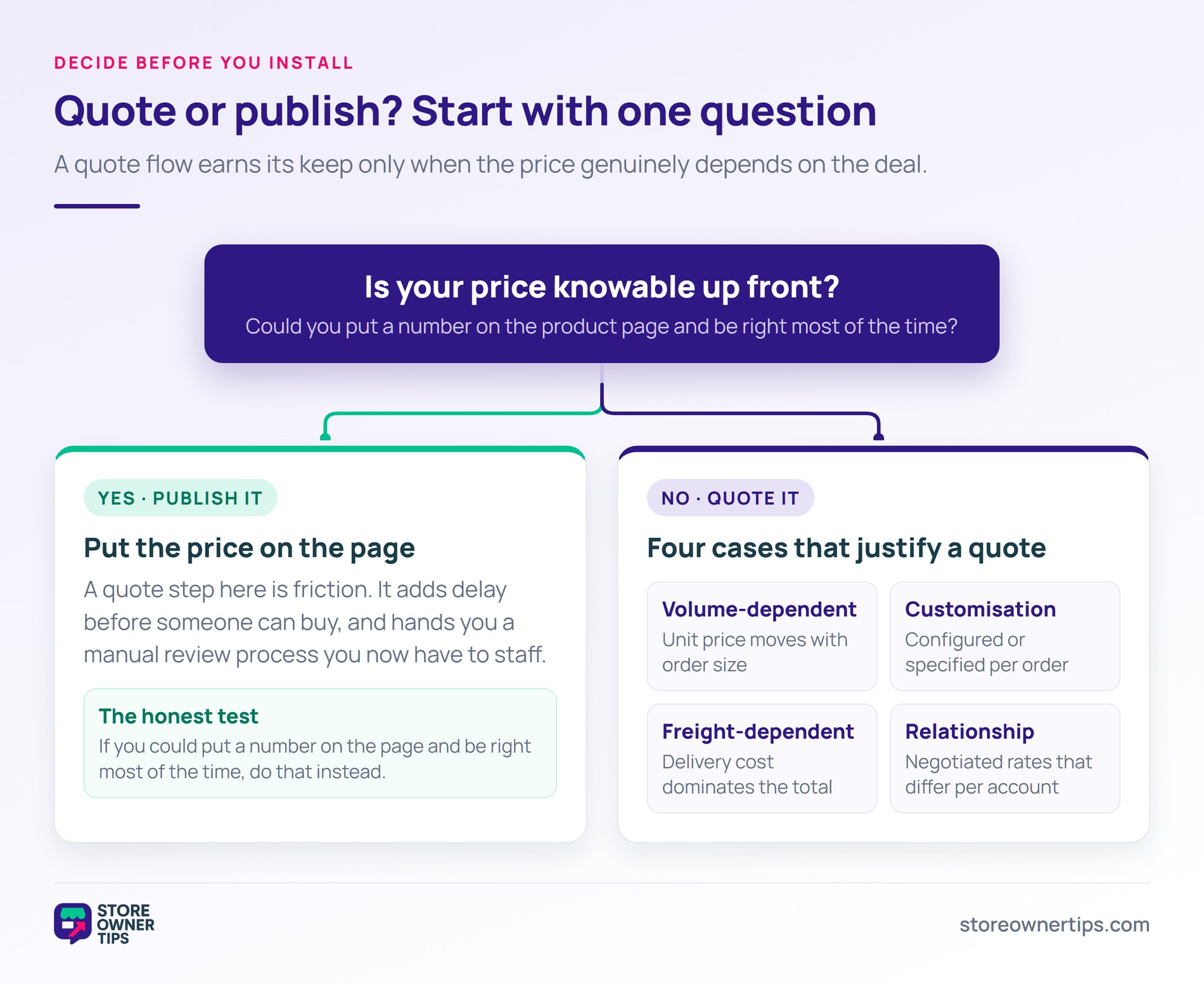
Quotes make sense when the price genuinely depends on the deal. There are four common situations.
Negotiated pricing is the norm across a large share of trade. The U.S. Census Bureau’s Annual Wholesale Trade Survey put U.S. merchant wholesaler sales at $11,382.3 billion in 2022, a 17.4% rise on the previous year. Buyers moving that kind of volume expect to agree a price before they order.
Here’s the counter-case, which matters more than the list above. If your price is knowable, a quote request is friction. Every quote step adds a delay between wanting the product and being able to buy it. A store that hides prices it could publish also takes on a manual review process it now has to staff.
The honest test: if you could put a number on the product page and be right most of the time, do that instead.
That said, there’s a middle path worth knowing about. Some stores publish prices for retail visitors and quote only for trade accounts. That’s a visibility decision rather than a quoting one, and Wholesale Suite’s guide to hiding prices from users who aren’t logged in covers how it’s done.
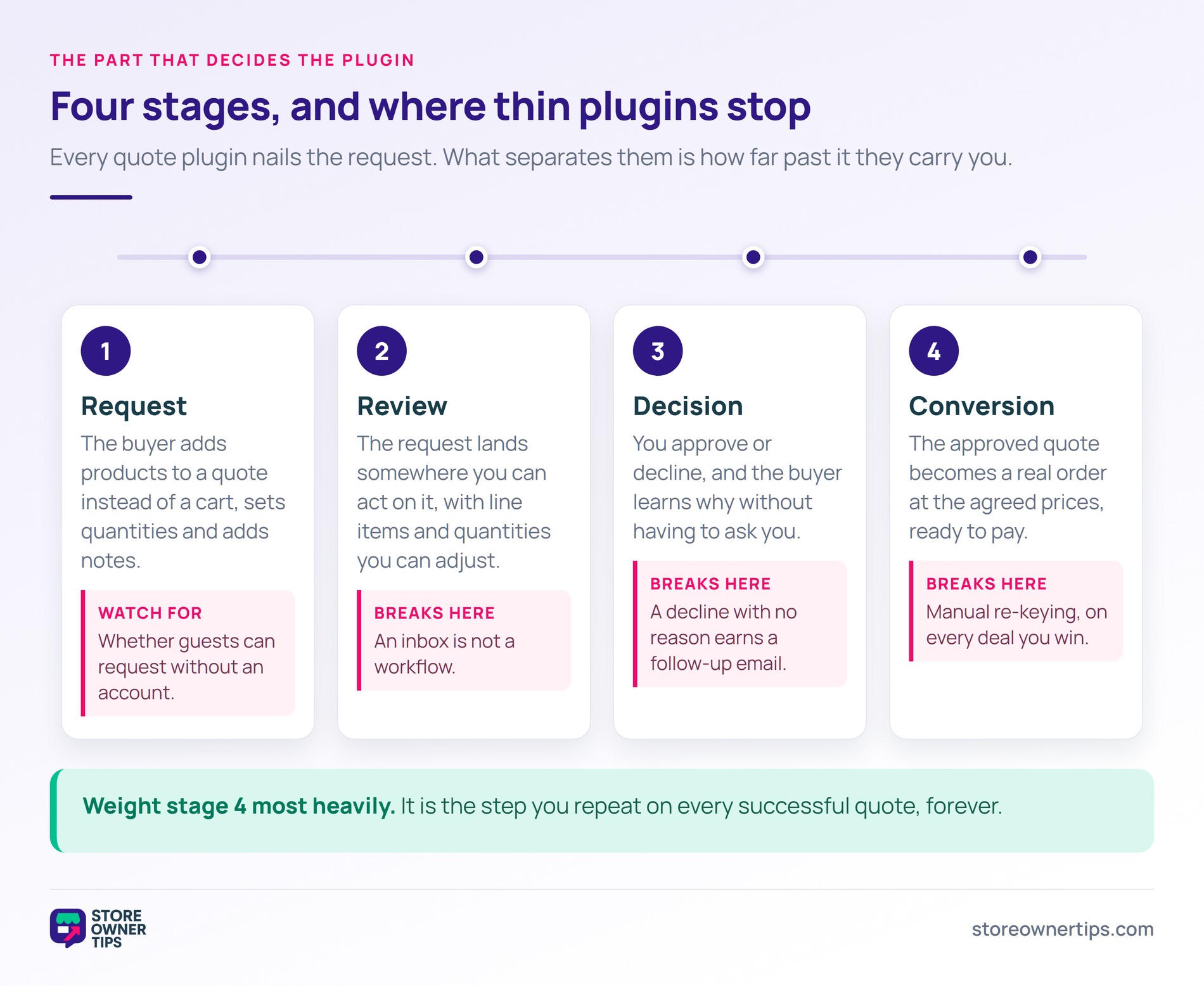
A complete quote workflow has four stages, and plugins vary enormously in how many they cover.
1. The request. The customer adds products to a quote rather than a cart, sets quantities, and submits with any notes. The useful details here are whether guests can request without an account, and whether the customer can include a message.
2. The review. The request arrives somewhere you can act on it. This is where thin plugins fall down, because an email is not a workflow. You want a list of pending quotes, each opening to line items and quantities you can adjust.
3. The decision. You approve or decline. Declining well matters more than it sounds. A decline without a reason produces a follow-up email you then have to answer anyway.
4. The conversion. An approved quote becomes an order at the agreed prices. If this step is manual, you’re re-keying orders at the exact moment money is involved.
Wholesale Suite’s Wholesale Quotes covers all four, and the specifics are worth stating because they set the benchmark for the rest of this list. Quotes arrive in a dashboard under Wholesale in the WordPress admin. Opening one lets you review items, adjust quantities, and change the price on an individual line.
That price control is admin-side by design. Customers can update quantities on a pending quote, but they can’t touch prices, so negotiation stays with you while the buyer can still correct an order size.
Approving sends the customer an email. Declining requires a reason before the request will submit, and that reason appears in the decline notification under its own heading, so the customer knows why without asking. Converting an approved quote creates a WooCommerce order at Pending payment status, with the quoted prices carried onto each line, so the customer can pay through normal checkout.
One prerequisite matters for the buying decision. Wholesale Quotes needs the free WooCommerce Wholesale Prices plugin installed and active, and it stays dormant with an admin notice until that’s in place. It’s a free base plugin rather than a paid commitment, but it does mean quoting arrives as part of a wholesale setup rather than on its own.
🔍️ What we’ve seen: stores tend to evaluate quote plugins on the request form, then meet the gap three weeks later when the first genuinely complicated quote arrives. The request form is the part every plugin does well. Ask the vendor what happens after approval, and if the answer is “you create the order manually,” that’s a process you’ll be doing on every deal.
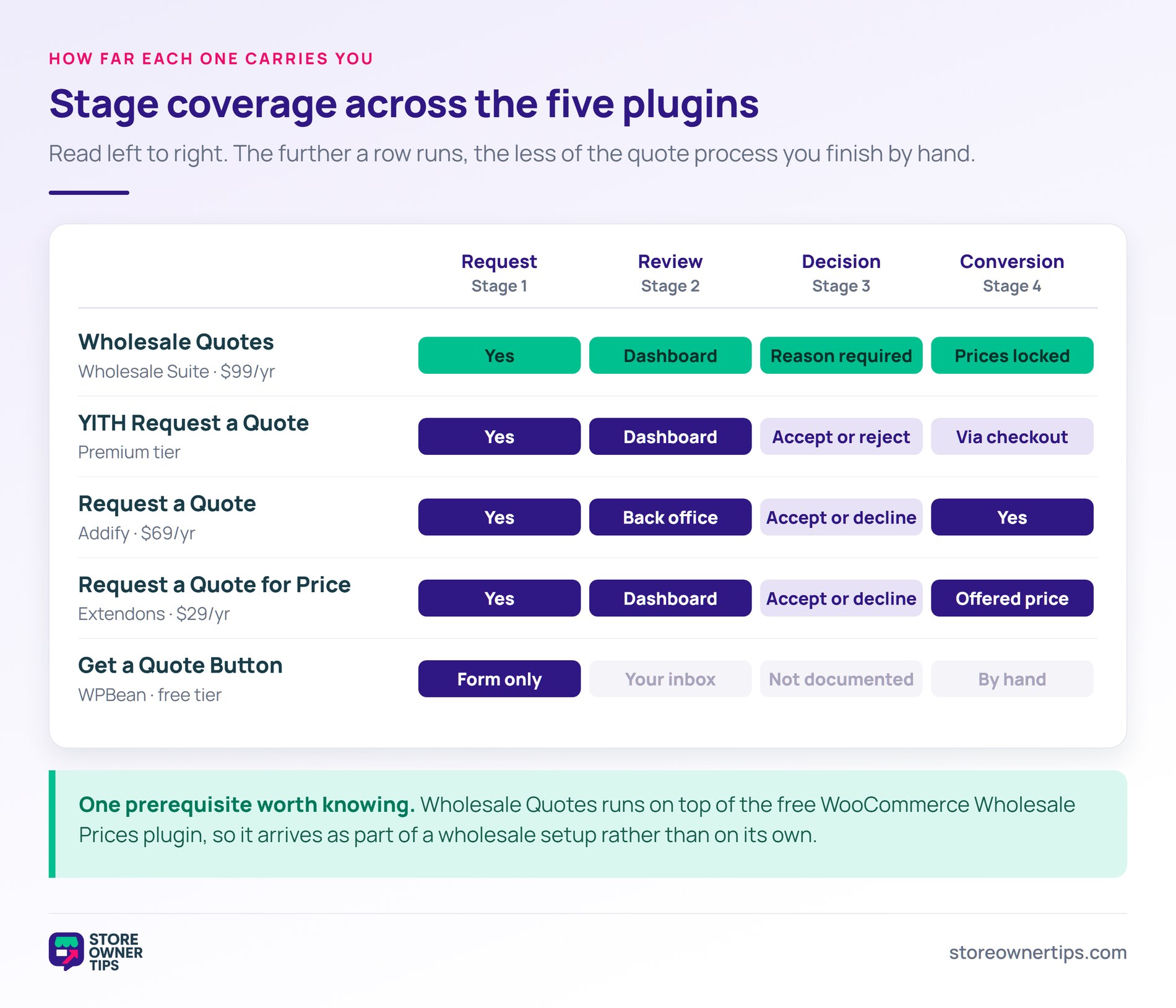
Five options worth knowing about, judged on how far each one carries you through those four stages. Prices and capabilities below come from each vendor’s own documentation.
The most complete workflow of the options here, and the right choice if quoting is part of a trade operation rather than an occasional need.
Covered above in detail: a quotes dashboard, quantity and line-price adjustment, approve and decline with a required reason, and conversion to a real WooCommerce order with the quoted prices carried across. Guests can request quotes without an account, and you can throttle abuse with limits based on IP address and email.
A few details round it out. Customers manage their requests from a Quotes section in My Account, and they can hold multiple quotes at once rather than one running list. Quote emails can be switched on or off per event, covering submitted, approved, declined, expired and converted.
The thing I’d flag when evaluating it is the prerequisite. It runs on top of the free Wholesale Prices plugin, so the real question is whether wholesale pricing belongs on your store at all. If it does, the WooCommerce wholesale quotes plugin is the deepest workflow in this list at $99 per year for a single site. If you only need occasional quoting on an otherwise retail store, that’s a heavier setup than the job requires.
Best for: trade and wholesale stores where quoting is a routine part of how orders happen.
A long-established option, and the split between its free and premium versions is the thing to understand before choosing it.
The free version puts an “Add to Quote” button on product pages, collects requests into an admin list, and lets you export them to CSV and send quotes manually. That’s the request stage handled, and not much past it.
Premium is where the workflow appears. It documents editing product prices before sending, adding shipping fees or discounts, setting quote expiry dates with follow-up reminders, and a customer-facing accept or reject step. Accepted quotes send the customer to checkout as a standard WooCommerce order. PDF quotes and quote buttons on shop and category pages are premium too.
By contrast with Wholesale Quotes, the price control sits in the quote you send rather than in a required decline step, and YITH doesn’t document a mandatory reason when you turn a request down.
Best for: stores that want an established quoting plugin and are willing to buy premium for the approval workflow.
A free plugin from WPBean, focused entirely on the request end, and running on around 6,000 sites.
It does what its name says: adds a quote button that opens a form. Worth knowing before you install it, the free version needs Contact Form 7 or WPForms to supply that form, and it sends you an enquiry rather than building a multi-product quote. There’s no admin quote dashboard, no price editing and no order conversion in the free tier.
The pro version adds a genuine multi-product quote system, targeting by category, tag, variation or user role, and price-on-request behaviour. Still, if your quote volume is low and you’re comfortable managing the conversation by email, the free version is a sensible way to find out whether quoting suits your buyers before paying for a workflow.
Best for: testing demand for quoting at low volume, where email management is acceptable.
Sold through the official WooCommerce marketplace at $69 per year, and more capable than its listing suggests at a glance.
Customers add multiple products to a quote basket and adjust quantities before submitting. Admins review submitted quotes in the back office, edit the offered price, and move quotes through accepted or declined statuses with email notifications at each step. Accepted quotes convert into an order, either by the admin or by the customer from their account page.
It also generates branded PDF quotes and attaches them to quote emails, which is genuinely useful if your buyers circulate quotes internally for approval. Quote requests work for logged-out visitors as well.
What it doesn’t document is an expiry mechanism or a required reason on decline, so chasing stale quotes stays a manual job.
Best for: stores that want a full quote workflow with PDF quotes and prefer buying from the official marketplace.
The cheapest full workflow here at $29 per year, also sold through the official marketplace.
Despite the name pointing at price-on-application, it builds a proper multi-product quote list that works like a shopping cart. Customers add items and submit a request form. Admins get a quote management dashboard, set an offered price, and move requests through accept, decline or convert.
Converting an accepted quote creates an order using the offered price, so the negotiated number carries across rather than being re-keyed. Admins can also create quotes from the back end, which covers buyers who phone or email instead of using the form.
Guest quoting isn’t documented, so check that against your own process if first-touch enquiries matter to you.
Best for: stores wanting a complete quote-to-order workflow on the smallest budget.
Here’s how far each workflow goes, based on each vendor’s published documentation at the time of writing. Where a vendor doesn’t document a capability, it’s marked as such rather than assumed absent.
| Plugin | Multi-product quote | Guest requests | Admin sets price | Decline with reason | Converts to order |
|---|---|---|---|---|---|
| Wholesale Quotes | Yes | Yes, with IP and email limits | Yes, per line, admin-only | Yes, reason required | Yes, quoted prices at Pending payment |
| YITH Request a Quote | Yes | Yes | Yes, premium | Not documented | Yes, premium, via checkout |
| Get a Quote Button (WPBean) | Pro only | Yes | Not documented | Not documented | Not documented |
| Request a Quote (Addify) | Yes | Yes | Yes, offered price | Not documented | Yes |
| Request a Quote for Price (Extendons) | Yes | Not documented | Yes, offered price | Not documented | Yes, at the offered price |
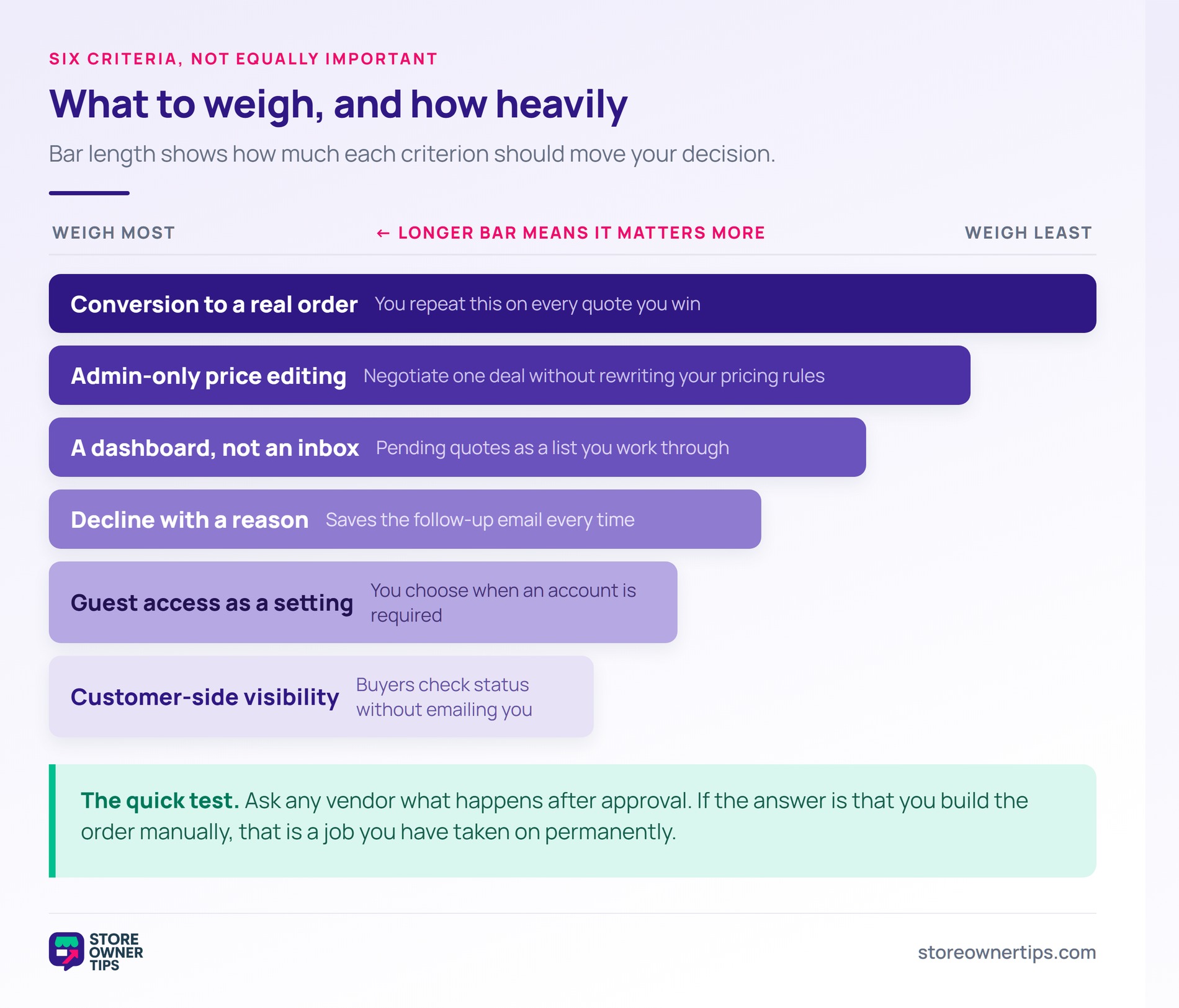
Six things decide whether a quote plugin fits your process.
The one to weight most heavily is conversion, because it’s the step you’ll perform on every successful quote forever.
For the surrounding trade setup, our roundup of WooCommerce B2B plugins covers account management, start a WooCommerce wholesale store covers the groundwork, and best WooCommerce wholesale plugins compares the pricing tools that usually sit alongside quoting.
Once a quote becomes an order, trade buyers often expect to be invoiced rather than pay at checkout. That’s a separate capability, covered in our guide to B2B payment and net terms plugins.
With most plugins, yes, if you enable it. Guest quoting reduces friction for first enquiries, which matters when a buyer is comparing several suppliers. Wholesale Quotes supports it and adds spam limits based on IP address and email, while Extendons doesn’t document guest support. Some stores allow guest requests for new enquiries and require accounts for repeat trade customers.
In the better plugins, yes, and in Wholesale Quotes you can do it line by line. This is what lets you negotiate a one-off price for a specific deal without changing your store’s pricing rules. Check that customers cannot edit prices from their side, only quantities, or your pricing control is illusory.
That depends on the plugin, and it’s the most important question to ask. The behaviour you want is automatic conversion into a WooCommerce order with the quoted prices carried across, ready for the customer to pay. Wholesale Quotes creates that order at Pending payment status. Weaker plugins leave you to build the order manually on every successful quote.
Usually not. Quotes add a delay between wanting the product and being able to buy it. Use quoting where the price genuinely varies with volume, specification or freight, and publish prices everywhere else. A common pattern is to show prices to retail visitors and quote only for trade accounts.
Not for every plugin, but some are built on top of another tool. Wholesale Quotes needs the free WooCommerce Wholesale Prices plugin installed and active, and shows an admin notice until it is. The marketplace and YITH options run standalone. Check prerequisites before buying, because they change what you’re actually adopting.

The point worth holding onto is that a quote plugin is a process, not a feature. You’re not buying a button, you’re committing to reviewing requests, deciding on them, and turning the agreed ones into orders. The plugin only determines how much of that work stays manual.
If quoting is a routine part of how your trade customers order, Wholesale Quotes covers the full path from request through approval to a real order with the agreed prices carried across. That last stage is the one most quoting plugins leave you to do by hand, and it’s the one you’ll repeat on every deal you win.

Copyright © StoreOwnerTips.com. All Rights Reserved.
