Weekly ecommerce tips, deals & news.
A coupon usage limit caps how many times a discount code can be redeemed. Most stores set two of them: a total limit across all shoppers, and a per-customer limit. Together they decide whether an offer stays contained or runs indefinitely.
So the limit is what turns a discount into a campaign rather than a permanent price cut.
Every promotion has a cost, and most stores never decide what the maximum is. They set a discount code, launch it, and find out afterwards. However, a usage limit lets you fix the ceiling in advance.
It is the cheapest financial control in the whole discounting toolkit.
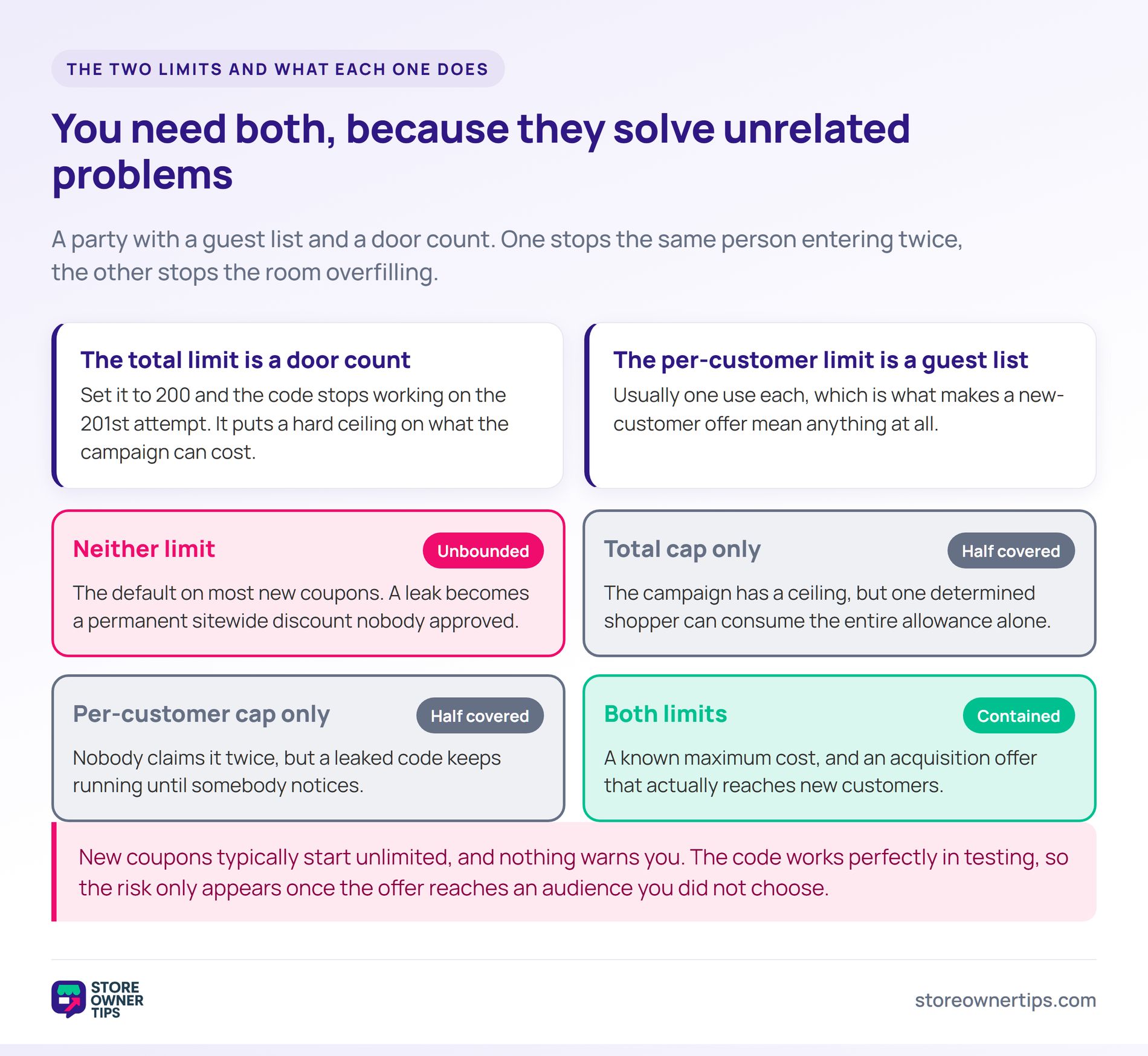
The total usage limit caps redemptions across everybody. Set it to 200 and the code stops working on the 201st attempt. So it puts a hard ceiling on the campaign’s cost.
The per-customer limit is different. It usually caps each shopper at one use, which is what makes a new-customer offer mean anything. Meanwhile, without it a single person can claim the same welcome discount indefinitely.
Think of them like a party with a guest list and a door count. The guest list stops the same person entering twice. Meanwhile, the door count stops the room overfilling.
You need both, because they solve unrelated problems. A total cap alone still lets one shopper consume the entire allowance. By contrast, a per-customer cap alone lets a leaked code run until you notice.
New coupons typically start unlimited. Nothing warns you, and the code works perfectly in testing. So the risk only appears once the offer reaches an audience you did not choose.
A code with no cap is an open-ended commitment. If it leaks, it becomes a permanent sitewide discount that nobody approved. Meanwhile, that is the most common route into coupon abuse.
The damage hides in margin rather than revenue. Orders keep arriving and the dashboard looks healthy. In practice, only gross margin shows what happened.
Retail loss generally behaves like this. NRF research found that 9% of all returns are fraudulent, which is invisible in a revenue total too. So small unbounded leaks add up quietly.
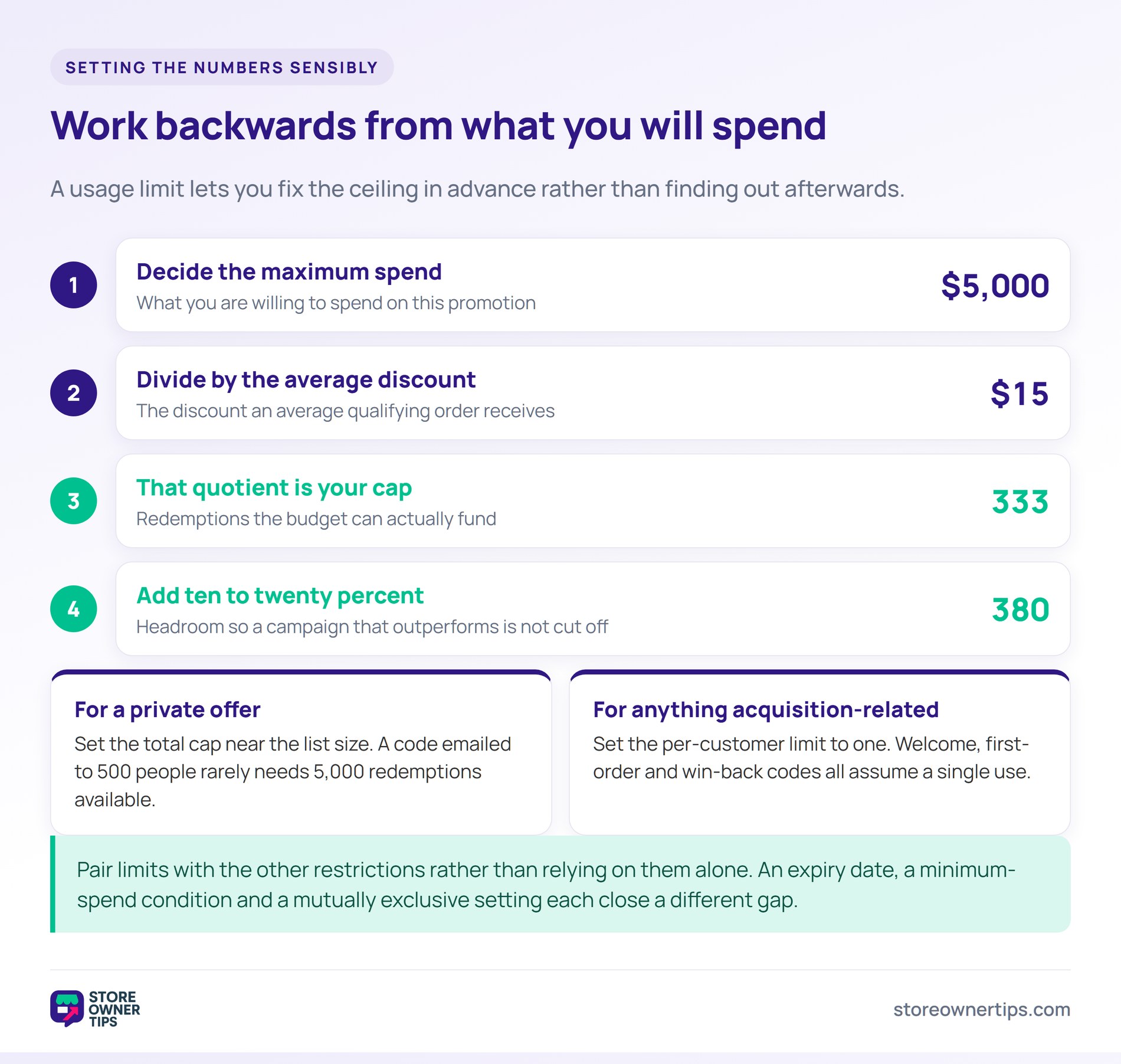
Work backwards from what you are willing to spend. Decide the maximum discount budget, then divide by the average discount per order. That quotient is your total usage limit.
For a private offer, set the total cap near the list size. A code emailed to 500 people rarely needs 5,000 redemptions available. So a cap slightly above the list gives headroom without leaving the door open.
Set the per-customer limit to one for anything acquisition-related. A first-order discount, a welcome code and a win-back code all assume a single use. Meanwhile, a loyalty or restock offer may sensibly allow several.
Pair limits with the other restrictions rather than relying on them alone. An expiry date, a minimum-spend cart condition, and a mutually exclusive setting each close a different gap. So the cap is one control among several.
Imagine a coffee subscription store called Cardinal running a referral promotion. It runs through a referral program, where existing customers share a $15 code with friends. Previously the code had no limits of any kind.
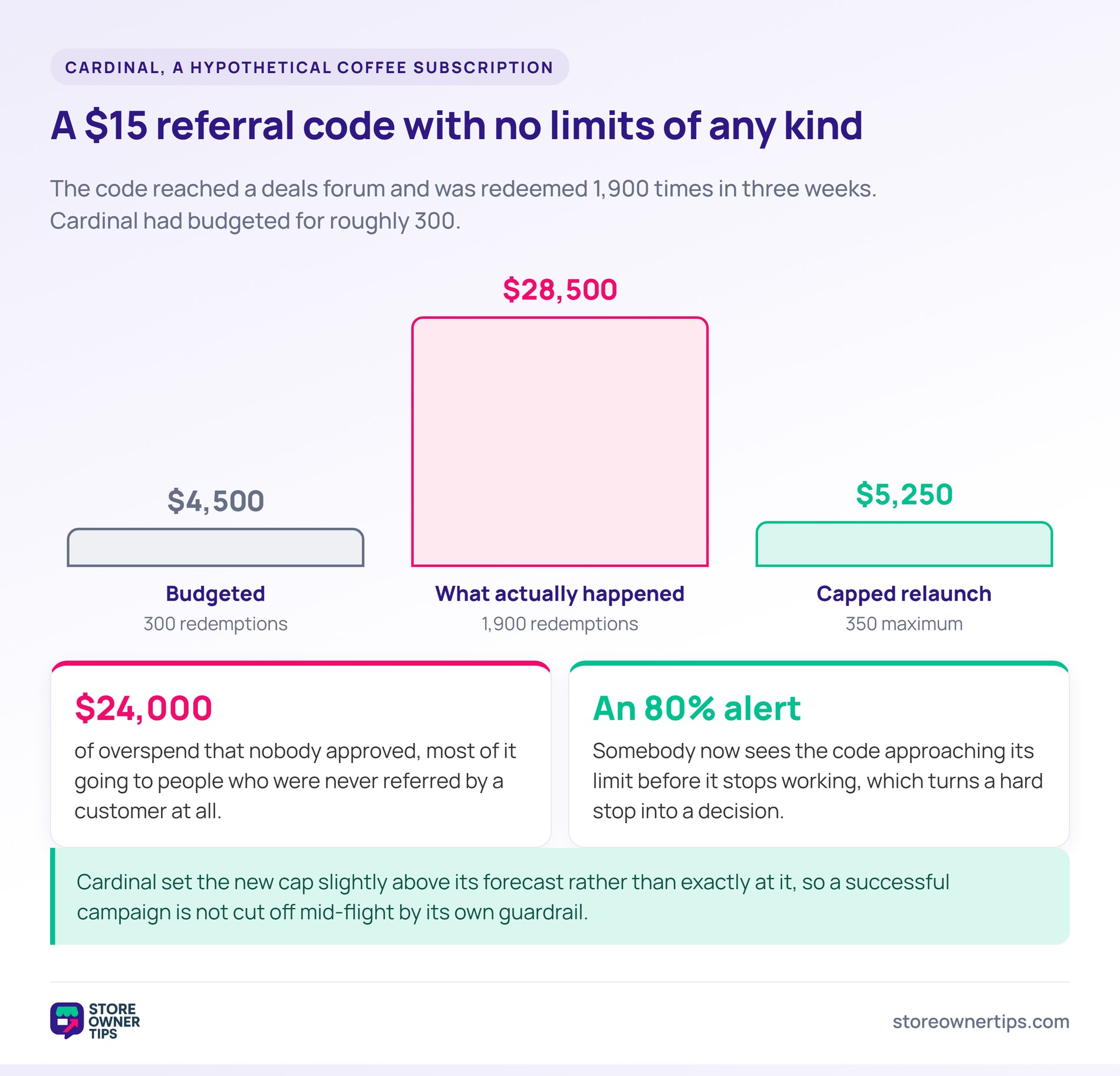
The code spreads faster than expected and reaches a deals forum. Within three weeks it is redeemed 1,900 times. Cardinal had budgeted for roughly 300.
At $15 a redemption, the promotion cost $28,500 instead of $4,500. That overspend of $24,000 was never approved by anybody. Meanwhile, most of it went to people who were not referred by a customer at all.
A handful of accounts also used the code repeatedly. With no per-customer cap, nothing prevented it. So the offer paid the same person several times over.
Cardinal relaunches with a total cap of 350 and a per-customer cap of one. The maximum possible cost is now $5,250. The promotion cannot exceed its budget, whatever happens to the code.
The team also switches to a unique URL coupon per referrer. A leaked code is now worth one order rather than a season. Meanwhile, they can see exactly which customer generated each referral.
One deliberate refinement follows. Cardinal sets the cap slightly above its forecast rather than exactly at it. That way a successful campaign is not cut off mid-flight by its own guardrail.
They also add an alert at eighty percent of the cap. Somebody now sees the code approaching its limit before it stops working. In practice, that turns a hard stop into a decision.
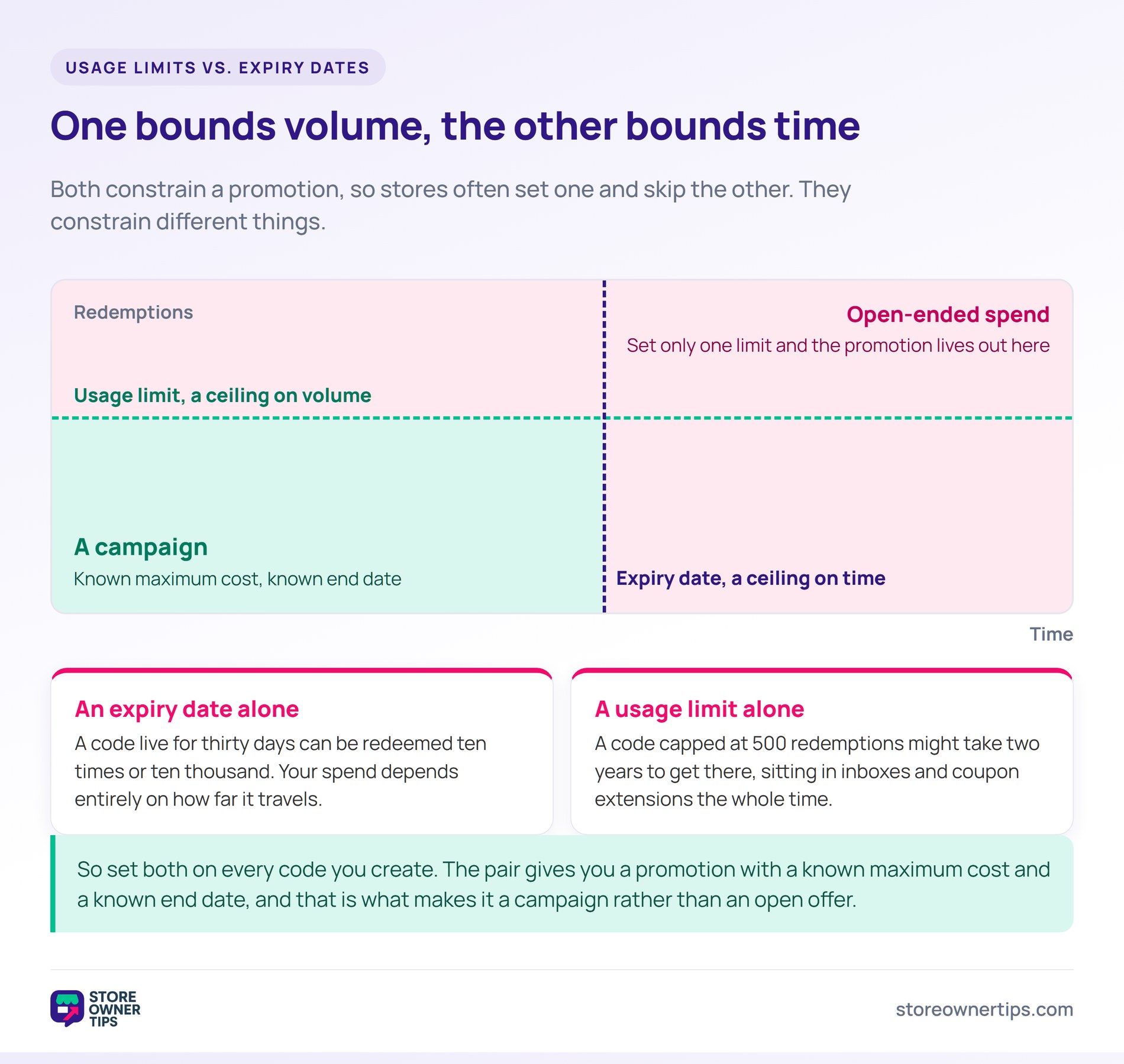
Both bound a promotion, so stores often set one and skip the other. They constrain different things. A usage limit bounds volume, while an expiry date bounds time.
An expiry date alone leaves the cost open. A code live for thirty days can be redeemed ten times or ten thousand. So your spend depends entirely on how far it travels.
A usage limit alone leaves the timing open. A code capped at 500 redemptions might take two years to get there. Meanwhile, it sits in inboxes and coupon extensions the whole time.
So set both on every code you create. The pair gives you a promotion with a known maximum cost and a known end date. That is what makes it a campaign rather than an open offer.
Divide your maximum discount budget by the average discount per order. A $5,000 budget with $15 off per order gives roughly 330 redemptions. So that is your ceiling.
Then add a little headroom above your forecast. A cap set exactly at the expected number will cut off a campaign that outperforms. In practice, ten to twenty percent of slack is enough.
It stops the casual version, which is most of it. Someone who would have used a code twice on the same account is blocked immediately. It also costs you nothing to switch on.
Determined repeat use is harder, because a fresh email looks like a fresh customer. Unique single-use codes handle that far better than any cap. So match the control to the risk.
It simply stops applying, usually with a generic checkout error. That is a poor experience for a shopper who was told the offer existed. So plan the message rather than leaving the default.
An alert before the cap is reached helps more than anything. Knowing a code is at eighty percent lets you extend it or wind it down deliberately. Meanwhile, nobody discovers the limit from a complaint.
A coupon usage limit is how you decide in advance what a promotion is allowed to cost. Set a total cap from your budget and a per-customer cap of one on anything meant for new customers.
Then pair both with an expiry date so the offer has an end as well as a ceiling. For the full set of controls, see this guide to WooCommerce coupon restrictions.
Copyright © StoreOwnerTips.com. All Rights Reserved.
