Weekly ecommerce tips, deals & news.
Downtime is any period when shoppers cannot reach your store or cannot complete a purchase on it. The site is unreachable, or a critical step refuses to work. Either way nobody can buy.
So downtime is measured in lost orders rather than in minutes. For example, ten minutes on a quiet Tuesday costs almost nothing. Ten minutes mid-promotion is a different number entirely.
Downtime works as a chain where any single broken link takes the whole store with it. Think of the chain as a relay of five runners. Domain, DNS lookup, certificate, web server and database. Every one of them has to hand over cleanly.
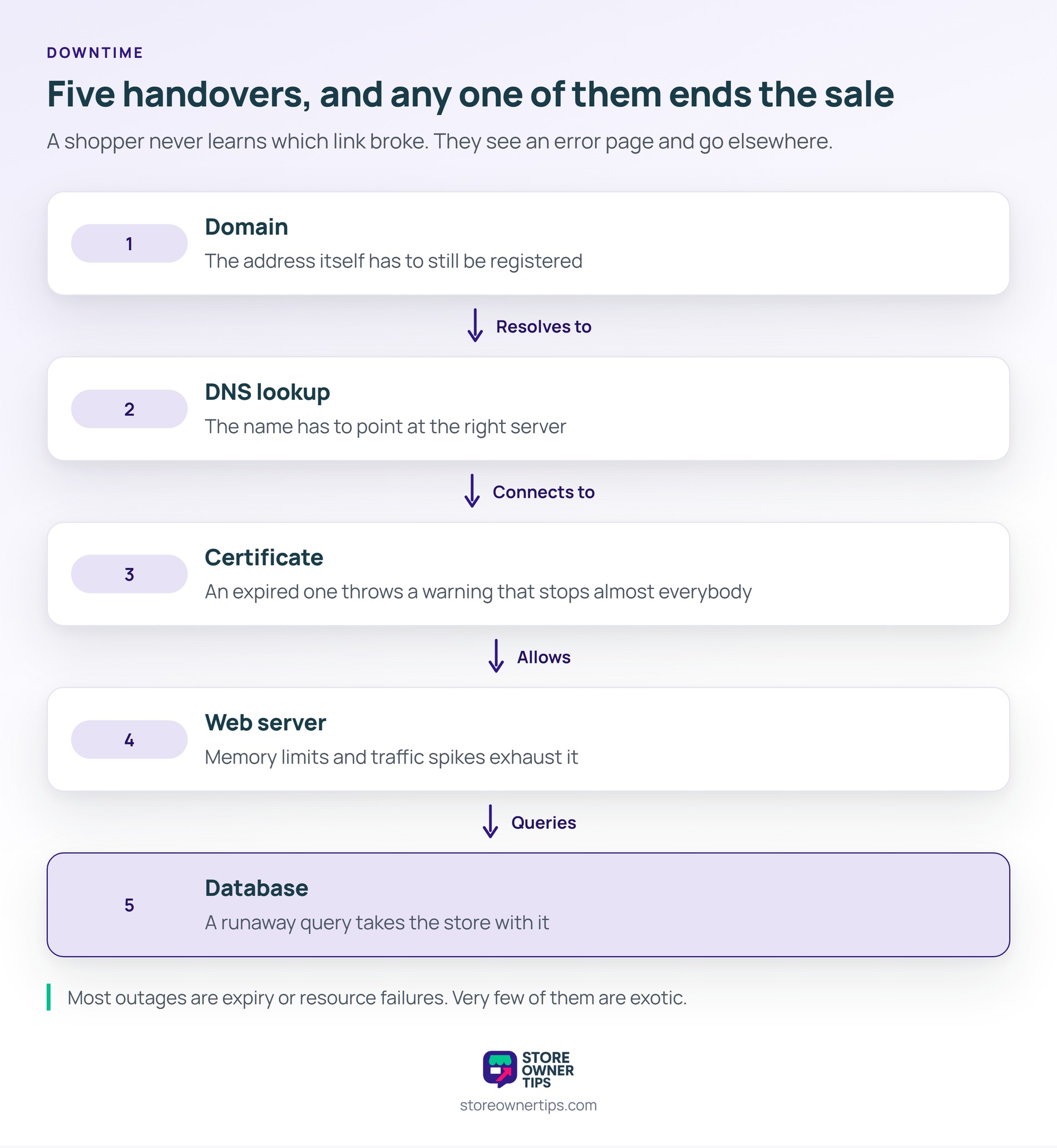
Still, a shopper never learns which runner dropped the baton. They see an error page, so they leave and try somewhere else.
Downtime rarely comes from anything exotic. First on the list are the expiry failures, which are entirely avoidable. For example, an expired certificate throws a browser warning that stops almost everybody.
Meanwhile an expired domain is rarer and worse, because it removes the address. A DNS misconfiguration after a host migration can also point your name at nothing.
Then come the resource failures. A traffic spike, a runaway query or a low memory limit can exhaust the server and return a blank page. In practice, a promotion that works too well is a common trigger.
Finally there are code failures. A fatal error after an update takes the site down instantly, and a plugin conflict is a frequent cause. Guides on WordPress site recovery cover getting back in when that happens.
Downtime that only affects one step is far more damaging than a site that is plainly dead. In practice, a dead site gets noticed within minutes, because somebody visits the homepage. By contrast, a broken payment step can run for a day.
Meanwhile everything above that step keeps working perfectly. Products load, the cart fills, and your analytics show ordinary traffic. Meanwhile the order count is zero and nothing has raised an alarm.
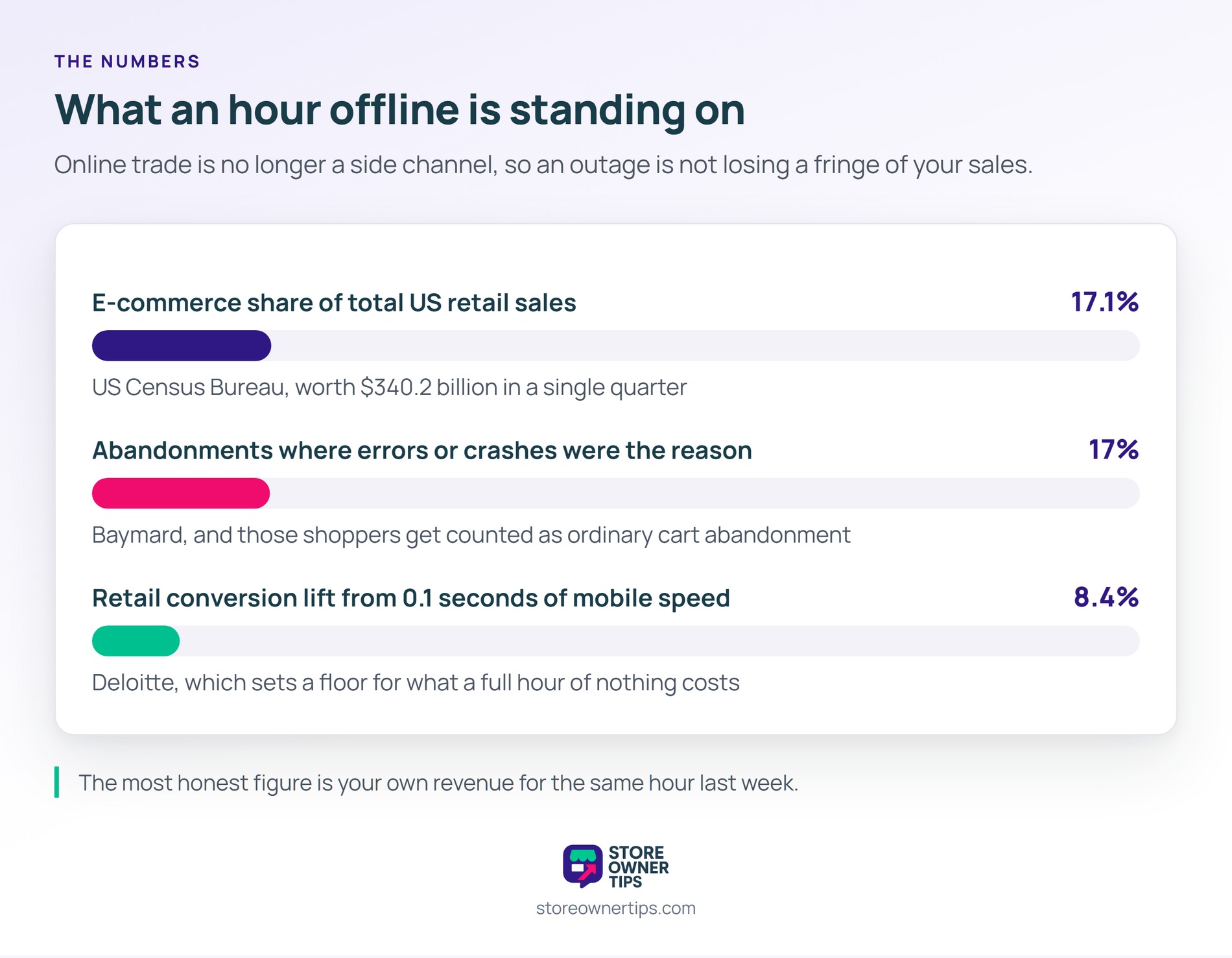
Still, shoppers do not report it either. Baymard finds that a site with errors or crashes is the stated reason for 17% of abandonments. Those people leave quietly and get counted as ordinary cart abandonment.
Catching downtime early means monitoring the purchase, not the server. First, use an external uptime check rather than relying only on your host. Meanwhile a host cannot tell you that it is down.
Next, monitor a real transaction path on a schedule. A synthetic check that loads a product, adds it to a cart and reaches the payment step catches partial failures. That is the check almost nobody sets up.
Then add a simple order-volume alarm. If no order has landed in two hours during trading time, somebody should get a message. In practice, that one alert catches failures every technical monitor misses.
Also keep a recent restore point, because recovery speed is the other half of the problem. Advice on backing up a WooCommerce store is worth acting on before you need it.
Downtime is expensive because online trade is no longer a side channel. The US Census Bureau reports e-commerce at 17.1% of total retail sales, worth $340.2 billion in a single quarter. An offline store is not losing a fringe of its trade.
Speed research points the same way, and it sets a useful floor for the cost. Deloitte measured a 0.1 second mobile speed improvement lifting retail conversions by 8.4%. If a tenth of a second is worth that, an hour of nothing is worth a great deal more.
Still, the most honest figure is one you work out yourself. Take your revenue for the same hour last week and treat it as the hourly cost. That number is what justifies the monitoring spend.
Downtime in practice is usually discovered by a customer rather than by a system. Here is a hypothetical example. Picture a store selling coffee equipment, trading steadily through the week.
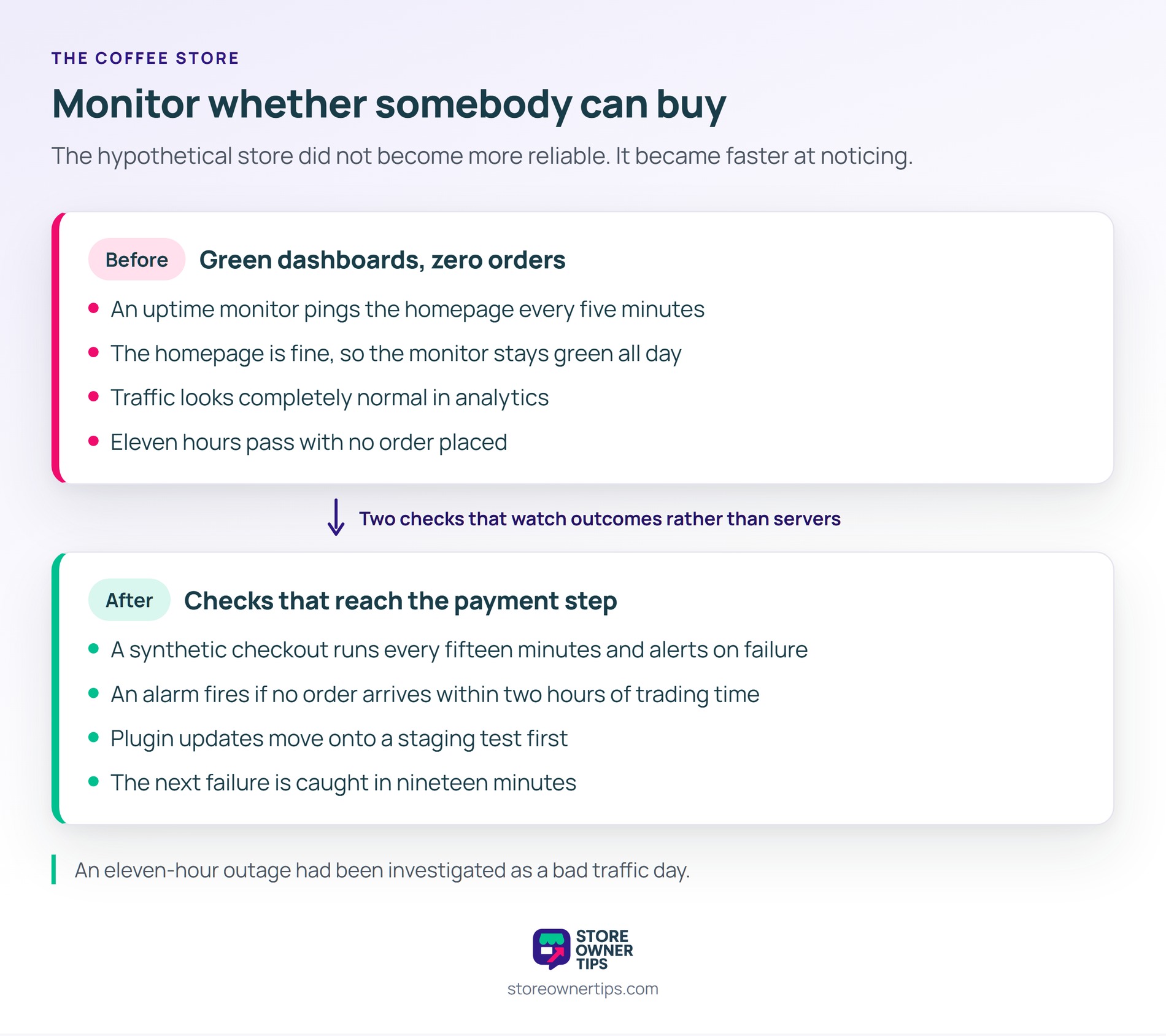
In this scenario, the store runs an uptime monitor pinging the homepage every five minutes. Its host also emails if the server stops responding. Both have been green for months.
Then, on a Thursday, the payment gateway plugin updates itself overnight. The update changes a setting and the payment step starts returning an error. Nothing else on the site is affected at all.
So the homepage monitor stays green all day, because the homepage is fine. Traffic looks completely normal in analytics. Meanwhile not one order is placed for eleven hours.
Meanwhile two customers email to say the payment button does nothing. Both messages arrive in the afternoon and are read at five o’clock. As a result the store loses most of a trading day it would normally take 30 orders in.
Worse, the owner spends the evening assuming a marketing problem. In short, an eleven-hour outage got investigated as a bad traffic day.
So the store adds two checks that watch outcomes rather than servers. First, a synthetic checkout runs every fifteen minutes and alerts on failure. Next, an alarm fires if no order arrives within two hours of trading time.
Also, plugin updates move off automatic and onto a staging test first. That single change removes the most common cause of overnight breakage. Even so, the monitoring stays, because updates are not the only way a store goes down.
As a result, the next failure is caught in nineteen minutes rather than eleven hours. In short, the store did not become more reliable, it became faster at noticing.
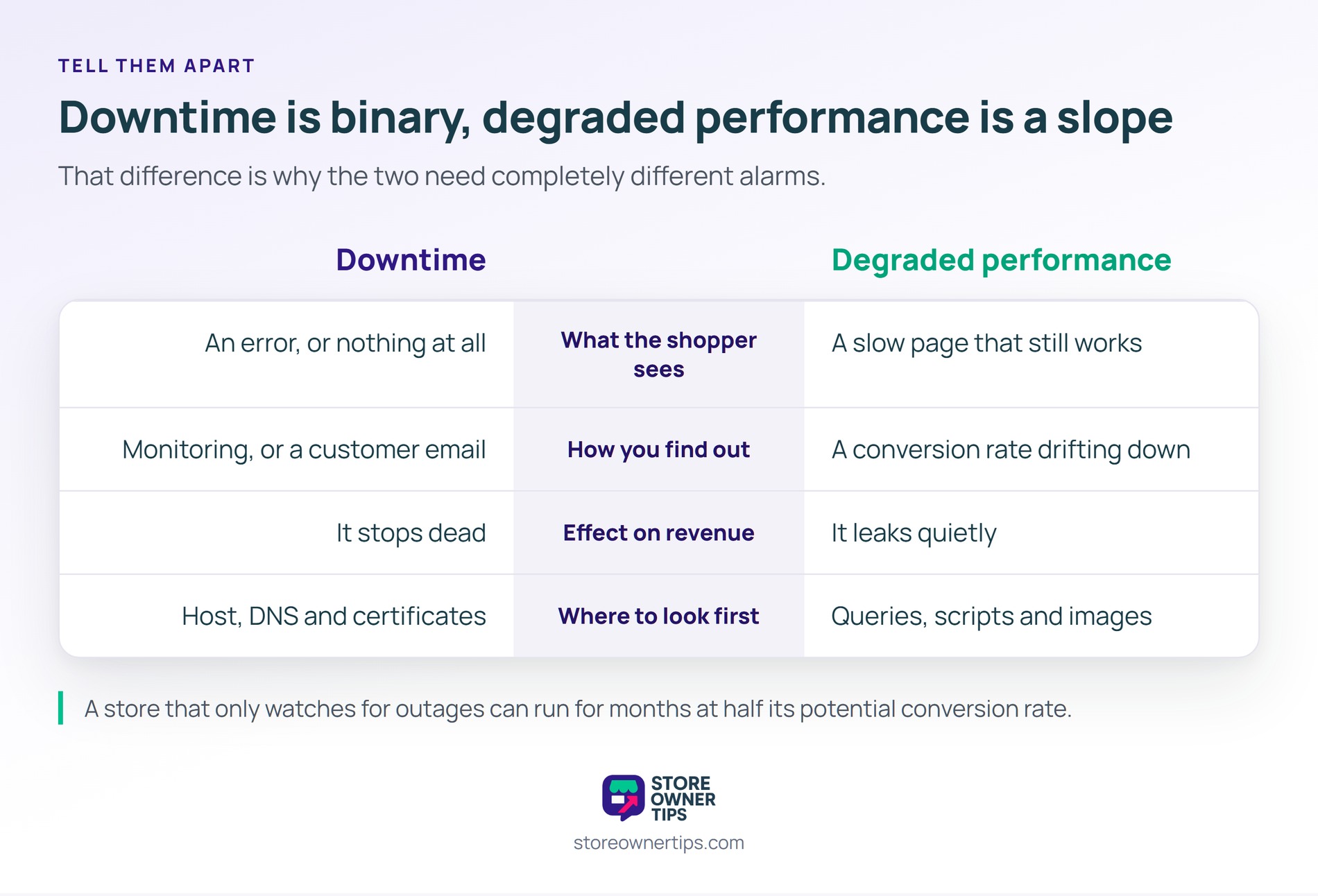
| What you are comparing | Downtime | Degraded performance |
|---|---|---|
| What the shopper sees | An error, or nothing at all | A slow page that still works |
| How you find out | Monitoring, or a customer email | A conversion rate drifting down |
| Effect on revenue | It stops dead | It leaks quietly |
| Where to look first | Host, DNS and certificates | Queries, scripts and images |
Downtime is binary, while degraded performance is a slope. That difference is why the two need completely different alarms.
Both belong on the same dashboard, though. A store that only watches for outages will happily run for months at half its potential conversion rate. Tracking Core Web Vitals covers the slope that monitoring alone will never show you.
Judge it in lost orders rather than against a percentage. Many hosts advertise 99.9% uptime, which still allows roughly 43 minutes offline per month. Whether that matters depends entirely on when it falls.
Work out your revenue per trading hour and decide from there. A store taking $2,000 an hour should treat any outage as urgent.
Usually because dynamic pages cannot be cached and each visit does real work. Cart, checkout and account pages have to be generated per shopper. So a promotion sends the load straight to the database.
Talk to your host before a planned campaign, not during it. Most will raise limits or add capacity temporarily if you give them notice.
Yes, because the two answer different questions. Host monitoring confirms the server is running, which it usually is. It cannot confirm that a shopper is able to pay you.
An external check also survives the thing it is watching. If your host has a problem, its own alerting may be part of that problem.
Downtime matters because it is the one failure where demand and readiness both exist and neither can meet the other. You already paid to bring those shoppers in. Plus the version that costs most is the version your monitoring is least likely to see.
In short, monitor whether somebody can buy, not whether a server replies.
Copyright © StoreOwnerTips.com. All Rights Reserved.
