Showrooming is when a shopper checks out a product in person, then buys it online, often from a cheaper seller. Online stores face a digital version too. Shoppers study your product pages, then buy the same item somewhere else for less.
Showrooming works by splitting the research and the purchase between two different sellers. The shopper gets the hands-on look from one place. Then they hand the money to whoever offers the best deal.
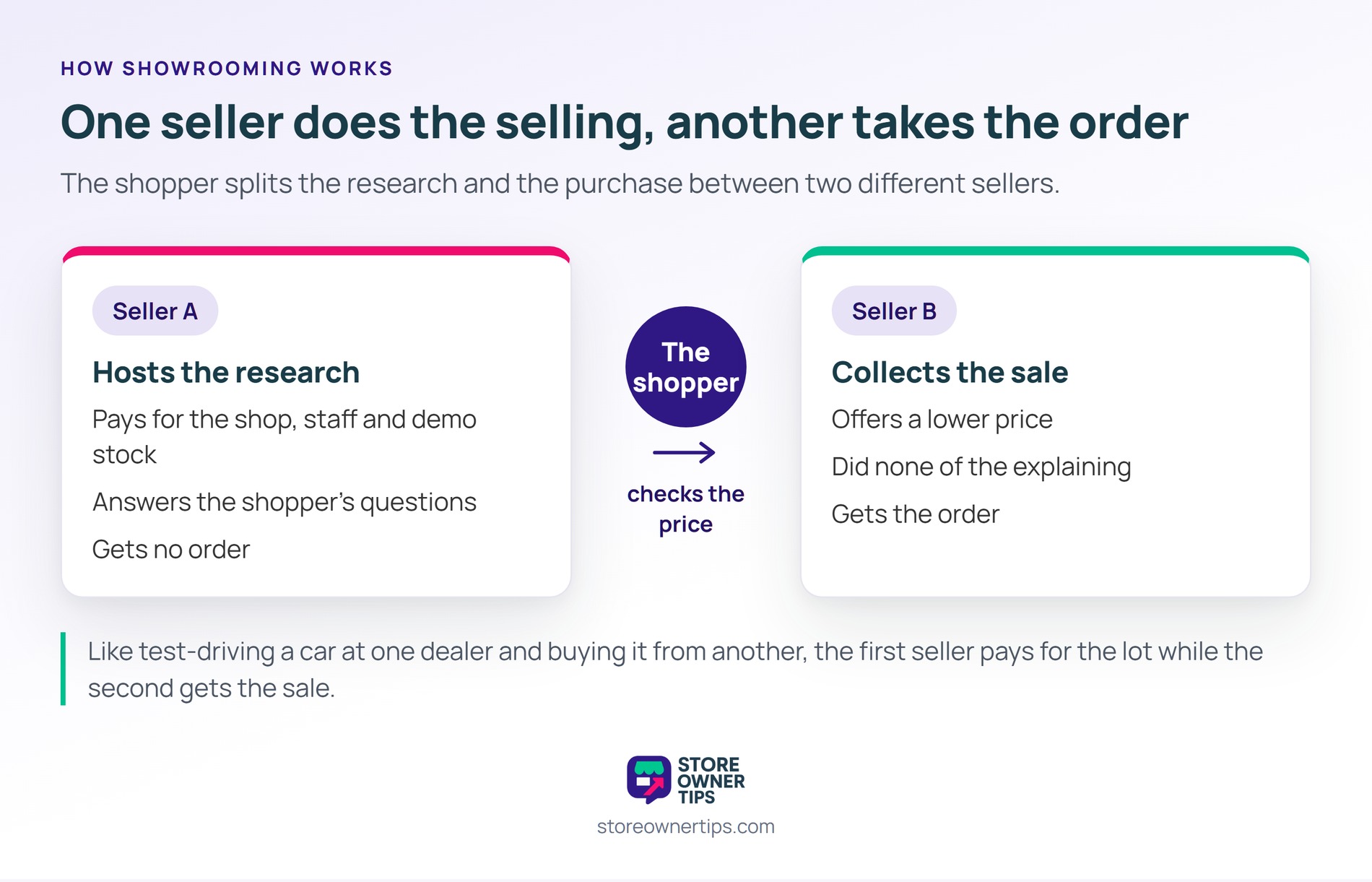
Think of showrooming like test-driving a car at one dealer and buying it from another. The first dealer paid for the lot, the staff and the demo car. Yet the second dealer gets the sale because their price was lower.
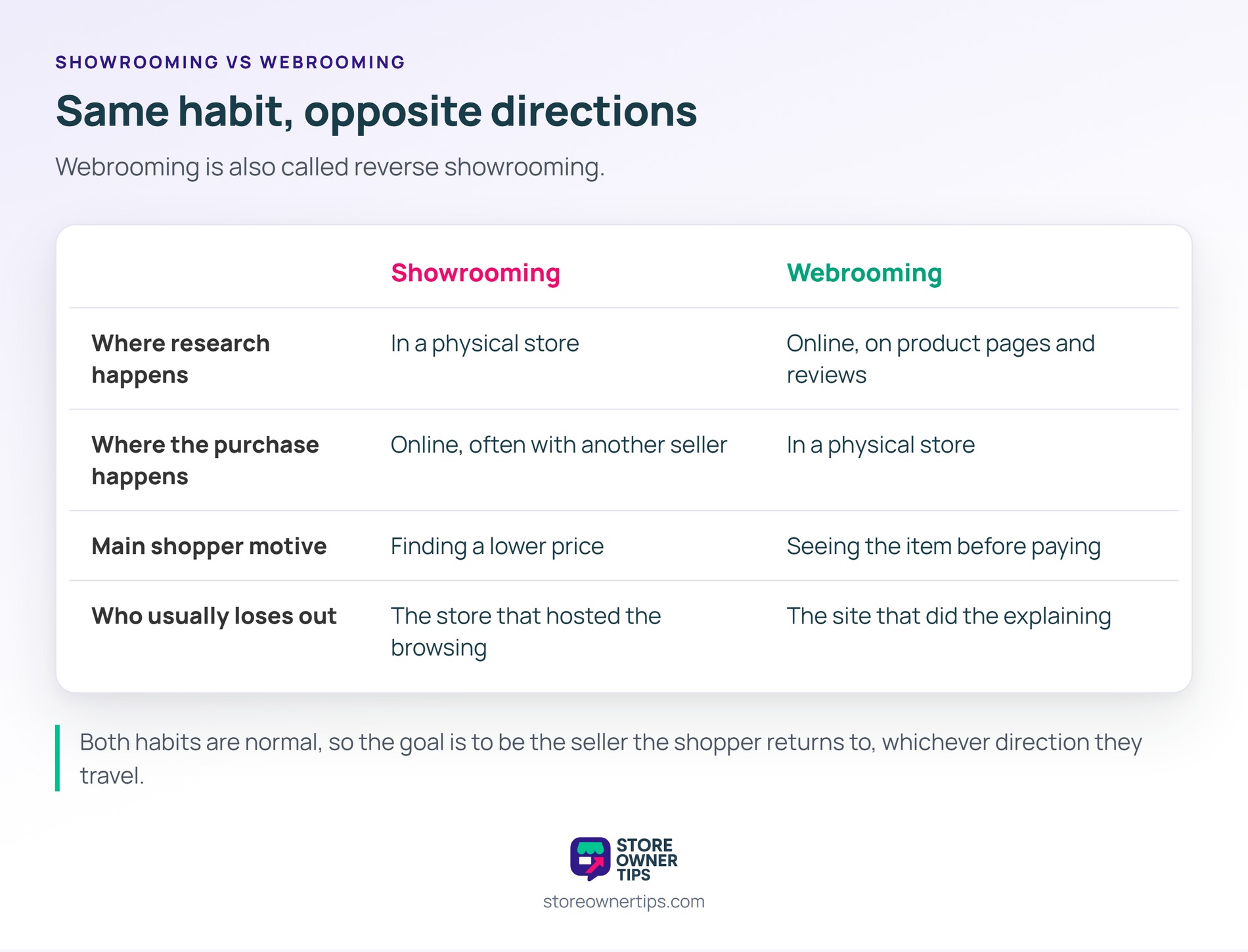
Phones made this easy. In a Pew Research Center holiday survey, 27% of cell owners checked prices elsewhere from inside a store. Among those price checkers, 46% still bought in that store, while 12% bought online.
Those numbers show showrooming isn’t a lost cause. Plenty of shoppers check prices and still buy where they stand. The sale only slips away when the other option looks clearly better.
Shoppers showroom mainly to save money. Pew found that 65% of Americans compare store and online prices, then pick whichever is cheaper. Price comparison has become a normal habit, not a rare trick.
Other reasons show up too. A shopper may want to feel the fabric, check the size or see the real color. However, once that question is answered, the in-person part has done its job. The purchase can then happen anywhere.
Showrooming hits products that look identical everywhere. A branded blender with the same model number sells the same at every shop. So the only thing left to compare is the price tag.
In other words, the more unique your product, the harder it is to showroom. A shared GTIN makes a price search instant, while a custom bundle has nothing to search for.
Digital showrooming happens when your WooCommerce product page does the research work for someone else’s sale. Your photos, size charts and reviews answer the shopper’s questions. Then they search the product name and buy from a cheaper listing or comparison site.
Many of these shoppers aren’t ready to buy yet. Baymard Institute studied why shoppers abandon carts. It found 42% of US online shoppers have left one because they were just browsing and not ready to buy. A browsing shopper who leaves with no saved trace is easy to lose to a lower price later.
That’s where a wishlist matters. A saved product keeps the shopper’s purchase intent tied to your store, not to a search results page.
Showrooming research from the Pew Research Center shows shoppers don’t simply prefer one channel. In a Pew survey on shopping habits, 65% of online shoppers said they generally prefer buying from physical stores. Meanwhile, 21% would buy in a store without checking prices online.
Only 14% said they would buy online without checking store prices first. So most shoppers move between channels before they decide. The seller who stays in touch during that back-and-forth has the best shot at the order.
For store owners, the lesson is practical. Comparison is part of almost every purchase now. Your job isn’t to block it, but to make your store the easy place to finish.
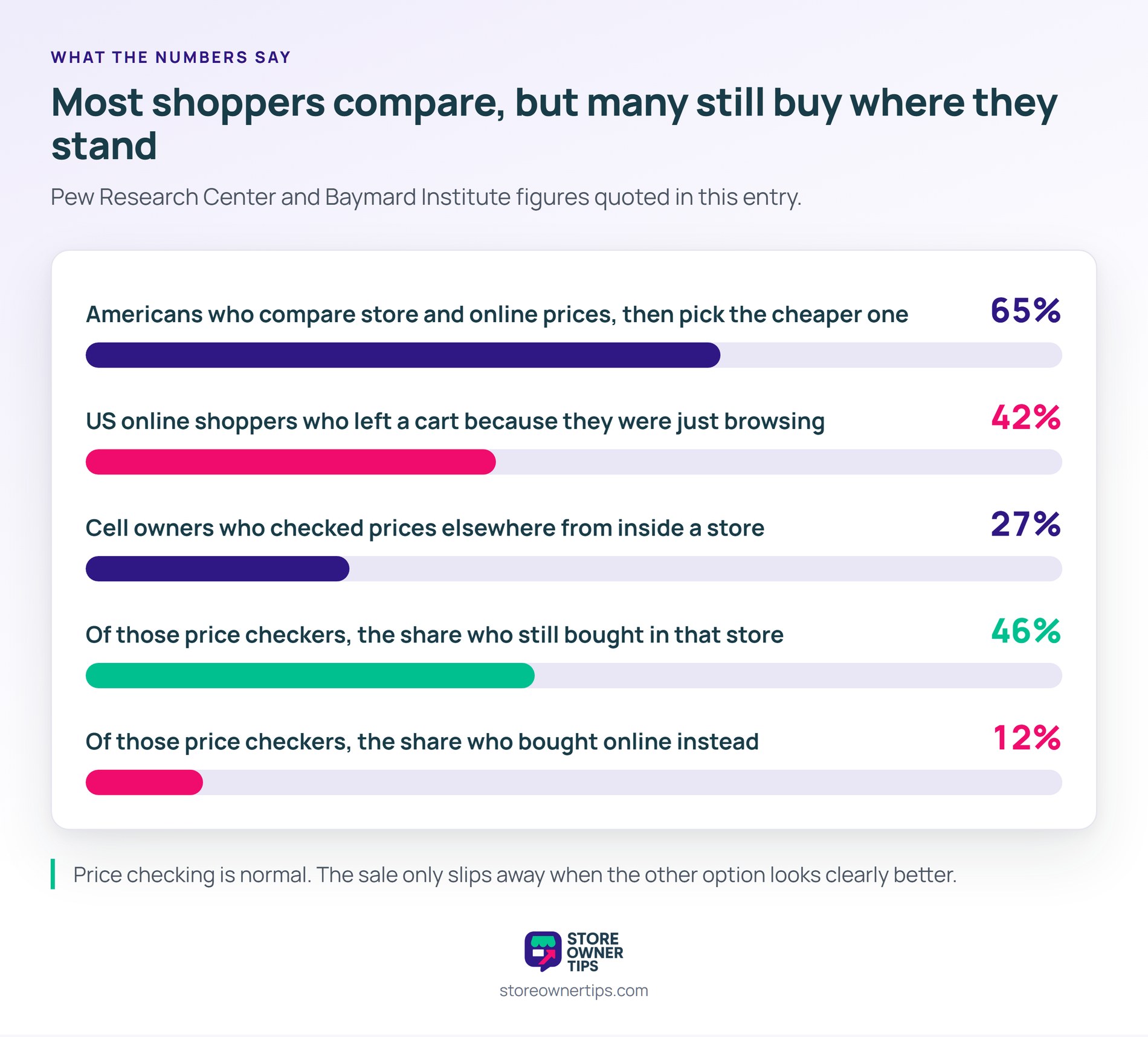
Showrooming in practice looks like a busy shop floor that sells less than it should. Here’s a hypothetical example.
Imagine a small cookware brand with one showroom and a WooCommerce store. About 1,500 people visit the showroom each month. The owner notices many of them photographing price tags and leaving empty-handed.
Using the Pew benchmarks above, about 27% of visitors check prices on their phones. That’s roughly 405 price checkers a month. If 12% of them buy online, around 49 orders a month could go to another seller.
The brand’s average order is $85. So up to $4,165 a month in sales could leave through shoppers’ phones. That’s nearly $50,000 a year walking out the door. On top of that, the showroom’s rent and staff costs stay the same either way.
The owner puts a QR code on every shelf tag. Scanning it opens the product page with a save button. Shoppers who aren’t ready can save the item without making an account, thanks to guest wishlists.
Next, the brand turns on price-drop and back-in-stock emails for saved items. When a pan goes on sale, every shopper who saved it hears about it first. Now the cheaper option is the brand’s own store.
Say the brand wins back half of those 49 online orders. That’s about 24 extra orders, or $2,040 a month. As a result, the showroom now feeds the online store instead of a competitor’s.
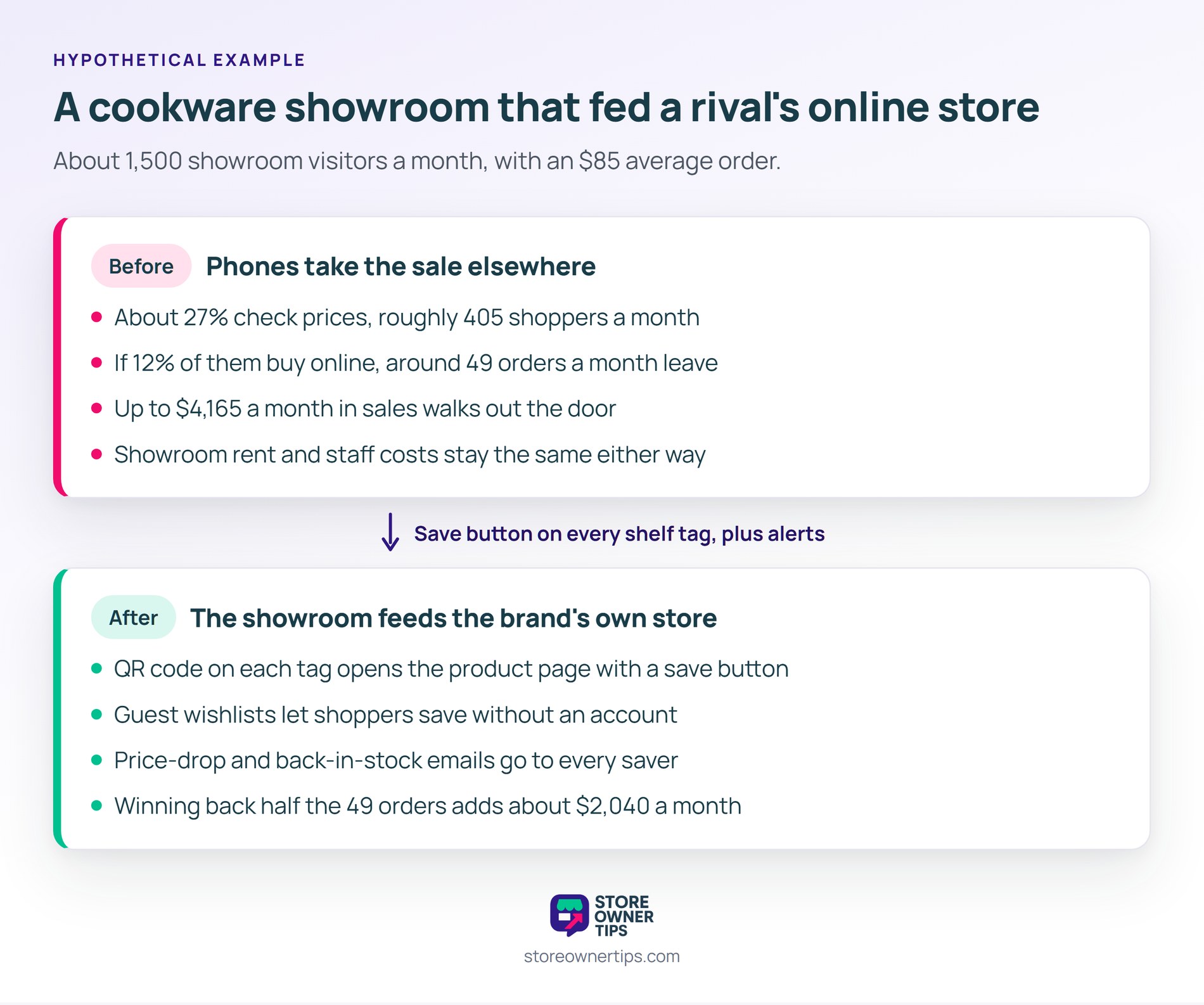
Showrooming and webrooming run in opposite directions. Showrooming means looking in a store and buying online. Webrooming means researching online and buying in a store.
| What you’re comparing | Showrooming | Webrooming |
|---|---|---|
| Where research happens | In a physical store | Online, on product pages and reviews |
| Where the purchase happens | Online, often with another seller | In a physical store |
| Main shopper motive | Finding a lower price | Seeing the item before paying |
| Who usually loses out | The store that hosted the browsing | The site that did the explaining |
Webrooming is also called reverse showrooming. Both habits are normal, so a store can’t stop either one.
Still, each habit leaves clues. A showroomer often scans a barcode or photographs a tag, while a webroomer arrives already knowing the model. The smarter goal is to be the seller the shopper returns to, whichever direction they travel.
You reduce showrooming by giving shoppers a reason to buy from you, even after they compare prices. Matching every competitor’s price is rarely the answer. Instead, the goal is to stay close to the shopper while they decide.
In WooCommerce, SaveTo Wishlist Lite is free and covers multiple named wishlists, guest wishlists and share links. SaveTo Wishlist Pro adds automated price-drop and back-in-stock alerts. Track how many saved items later turn into orders, since that shows whether you’re winning the sale back.
For a simple monthly check, compare three numbers. First, count new wishlist saves. Next, count orders that contained a saved item. Then, count price-drop emails that led to a purchase.
If saves rise but orders don’t follow, your alerts or prices need work. By contrast, a steady rise in saved-item orders means shoppers are coming back to you after they compare.
Showrooming can help or hurt small online stores. If shoppers browse a big retailer’s shelves and then buy from you, you win. If they study your product pages and buy from a cheaper seller, you lose. Saving tools help keep the shopper tied to your store.
Price matching can stop some showrooming, but it eats into your margin on every matched sale. Many small stores do better by alerting shoppers to their own sales. Pickup, bundles and good advice also give shoppers reasons to stay.
Reverse showrooming is another name for webrooming. The shopper researches a product online first, then buys it in a physical store. Shoppers often do this to see the item in person or to take it home the same day.
Showrooming matters because it lets you do all the selling work while another seller takes the order. Shoppers will always compare prices across channels. Stores that keep saved items, send timely alerts and offer more than price win the sale.
Copyright © StoreOwnerTips.com. All Rights Reserved.
