Weekly ecommerce tips, deals & news.
A title tag is the HTML element that sets a web page’s title. It shows up as the clickable blue headline in search results and as the label on a browser tab. It is often the first thing a searcher reads about your page. A clear, compelling title tag can be the difference between a click and a scroll past.
A title tag is a snippet of code in a page’s head. It defines the official title of that page. Search engines and browsers read it to label the page.
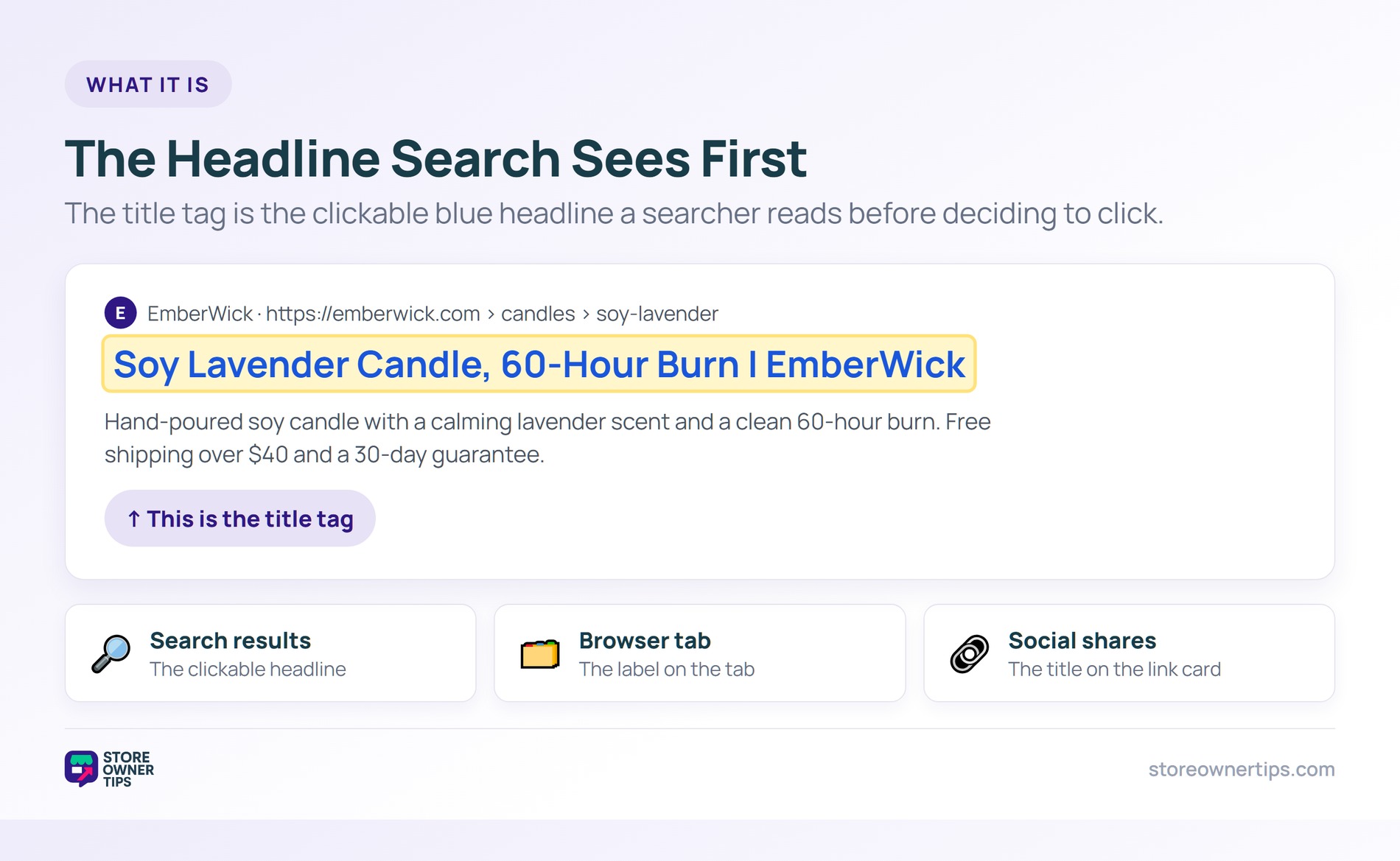
Think of it like a headline on a newspaper rack. A sharp headline makes you pick up the paper. A dull one gets passed over.
It is set behind the scenes, not on the visible page. You write it once, and it follows the page everywhere. Search results, browser tabs, and shares all use it.
A page without a set title still gets one. Google may then write its own from the page. So leaving it blank cedes control of your headline.
The title tag shows up in three key places. First and most important is the search results page. There it is the big, clickable link to your page.
Second is the browser tab at the top of the window. A clear title helps users find your tab among many. Third is social shares, which often pull the title.
Each spot is a chance to earn attention. A vague title wastes all three. A sharp one works in every place at once.
The title tag drives both rankings and clicks. Search engines use it as a strong topic signal. A clear, relevant title helps the page rank.
Then the title has to win the click. The top organic result earns about 27.6% of clicks, and the top three over 54%. A compelling title helps you claim that share.
Organic search drives 53.3% of all site traffic. Your title tag is the gateway to that flow. A weak one leaves clicks on the table.
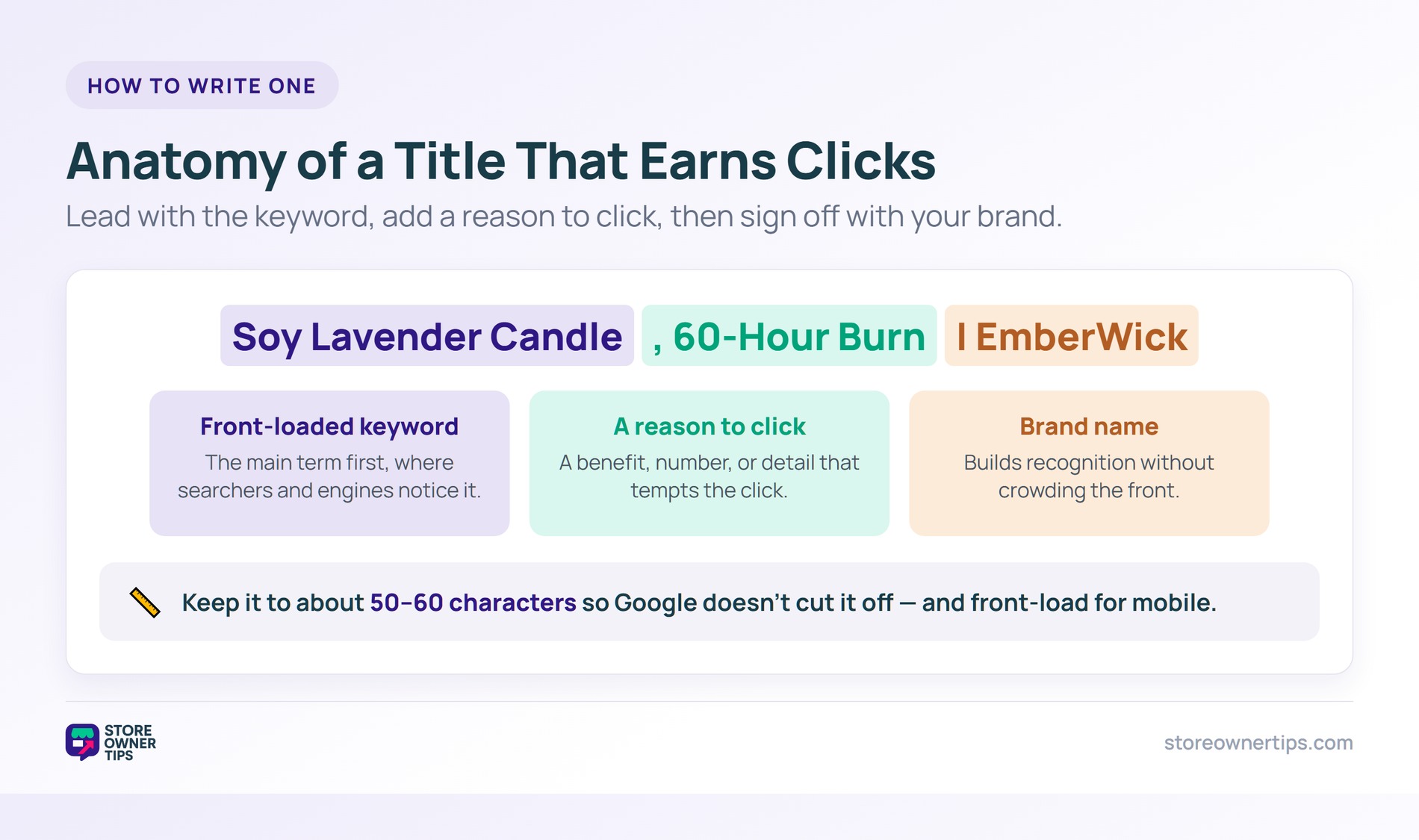
Start with your main keyword near the front. Searchers and engines both notice it there. Front-loading the key term boosts relevance.
Match the title to the searcher’s intent. A page must deliver what the title promises. Reading customer intent helps you word it right.
Add a reason to click beyond the keyword. A benefit, a number, or freshness can help. Make the title both relevant and tempting.
Length matters because Google truncates long titles. Aim for roughly 50 to 60 characters. Past that, your title may get cut with an ellipsis.
Put the most important words first. If the end gets trimmed, the key part still shows. Never bury your keyword at the very end.
Many stores add the brand name at the end. A format like Page Title | Brand Name works well. It builds recognition without crowding the front.
Mobile screens cut titles even shorter. Many searches now happen on phones. So front-load the key part for small screens.
On WooCommerce, an SEO plugin controls your title tags. Tools like AIOSEO or Yoast set them per page. You edit the title right from the product or post.
Templates make this scalable across a catalog. You can set a pattern for all product titles at once. Then fine-tune the important pages by hand.
Each product and category deserves a unique title. Duplicate titles confuse engines and shoppers. A distinct title per page keeps things clear.
A title tag is your ad in the search results. Even a top ranking wastes potential with a dull title. The right words turn impressions into clicks.
Small wording changes can lift clicks sharply. A clear benefit or number draws the eye. Test different angles to find the winner.
Brackets and numbers often boost clicks. A title with a clear figure or year stands out. Use them where they fit honestly.
A higher click rate can even help rankings. Engines notice a result that earns lots of clicks. Even small gains compound across a catalog.
AI search still reads your title tags. They remain a top signal of a page’s topic. A clear title helps engines understand and cite you.
Concise, descriptive titles travel well into AI answers. They label your content for machines and humans alike. This supports your generative engine optimization efforts.
So the title tag is not fading away. It anchors your page across every kind of search. One clear title serves them all.
Titles are not set in stone. You can rewrite a title that underperforms. A fresh angle often revives a stale page.
Watch the click rate for each key page. A high ranking with low clicks signals a weak title. That gap is your cue to rewrite.
Refresh titles when the season or offer changes. A timely hook can lift clicks fast. Small updates keep titles sharp.
Keep a record of what worked. Patterns from past wins guide your next titles. Good titles get easier with practice.
The first mistake is duplicate titles across pages. Identical titles blur which page should rank. Give every page its own clear title.
Another trap is keyword stuffing. Cramming terms reads badly and can hurt rankings. Write for a human first, with one clear keyword.
A third slip is a title that oversells. A clickbait title that the page cannot match breeds distrust. Keep the promise honest and accurate.
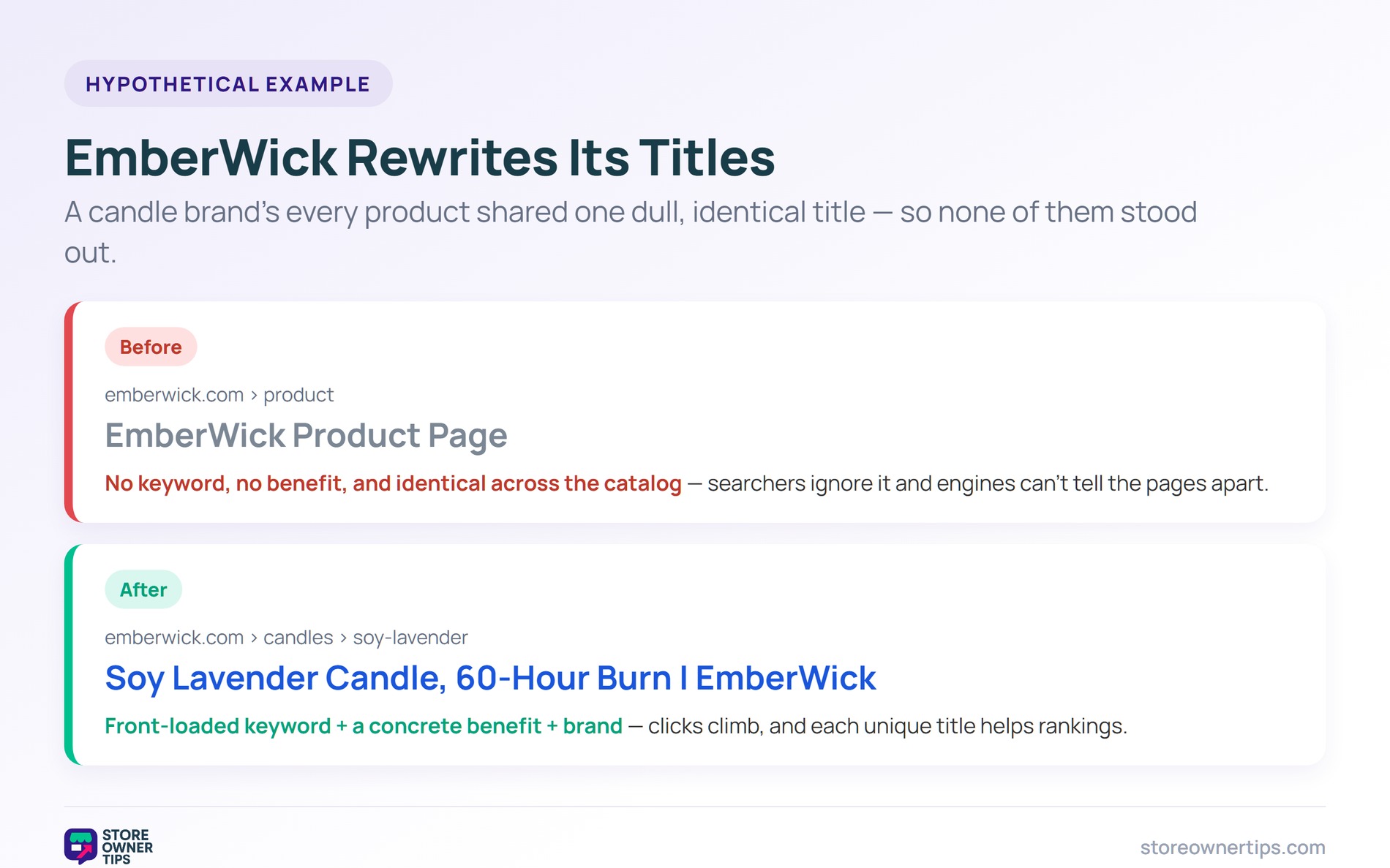
Imagine a candle brand called EmberWick on WooCommerce. Its product titles all read EmberWick Product Page. Search results show that same dull line everywhere.
Those vague titles tell searchers nothing. No keyword, no benefit, no reason to click. EmberWick ranks poorly and earns few clicks.
Identical titles also confuse search engines. They cannot tell the pages apart. The whole catalog blurs into one.
EmberWick rewrites each title with a clear keyword. One reads Soy Lavender Candle, 60-Hour Burn | EmberWick. Each title now describes its exact product.
The brand front-loads the main term every time. It adds a quick benefit where it fits. An SEO plugin makes the bulk update easy.
Click rates climb as titles turn compelling. Searchers finally see what each page offers. Rankings improve as engines read clear topics.
EmberWick also adds the burn time to each title. That concrete detail tempts the click. Specifics beat vague every time.
The catalog now reads as distinct, useful pages. Each title earns its own clicks. The lesson is clear: a sharp title tag wins the click.
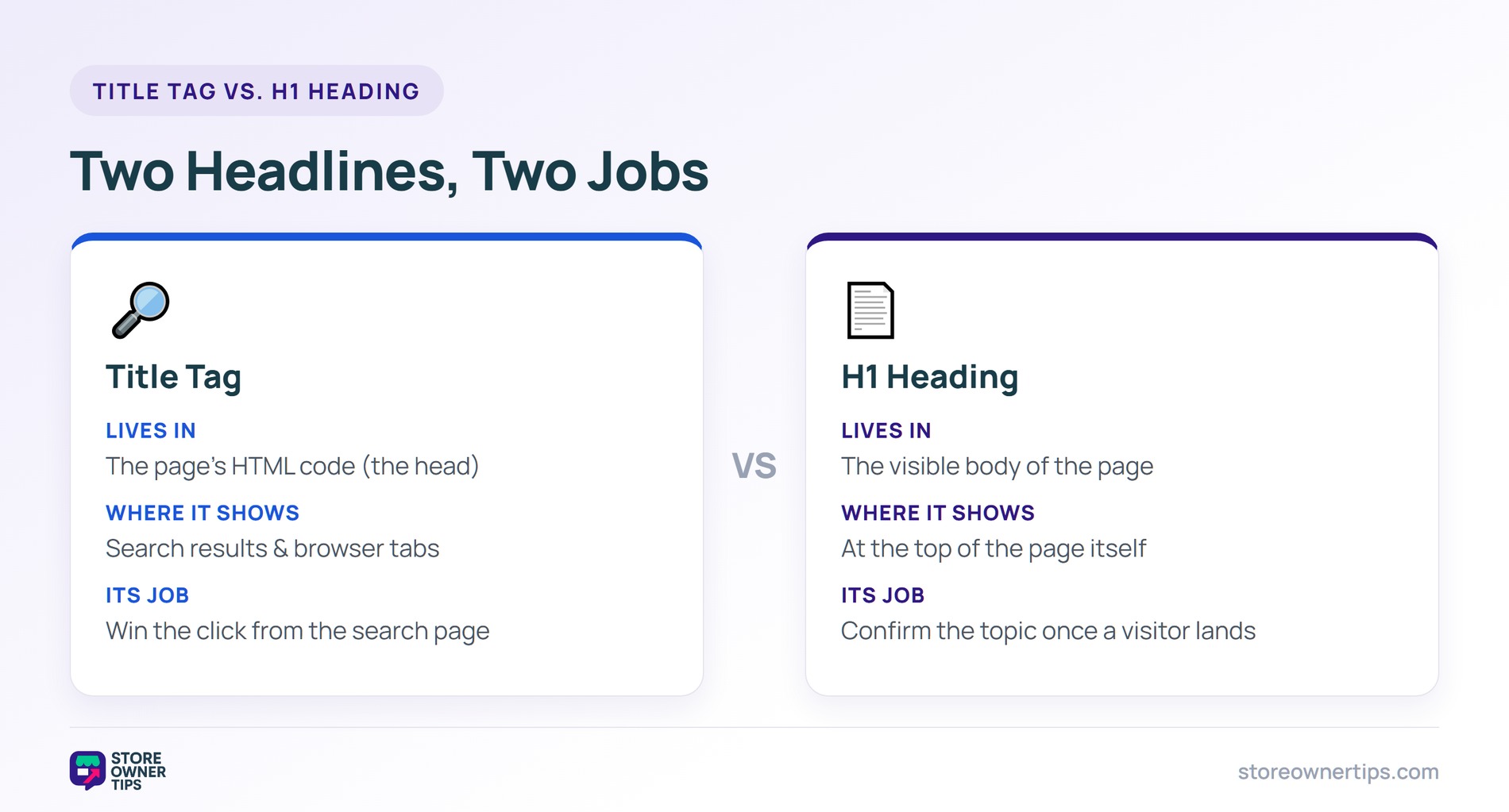
People often confuse the title tag and the H1 heading. They look similar but do different jobs. The title tag lives in the code and shows in search results.
The H1 is the main headline on the visible page. Visitors read it once they arrive. Search engines use it as a secondary topic clue.
They can match or differ on purpose. The title tag can be tuned for the search snippet. The H1 can be tuned for the on-page reader.
So write each with its job in mind. The title tag wins the click from search. The H1 confirms the topic once the visitor lands.
Aim for about 50 to 60 characters. Longer titles get cut off in search results. Check how it looks on mobile too.
The title tag shows in search results and browser tabs. The H1 is the headline on the visible page. One wins the click, the other confirms the topic.
Yes, it is a strong ranking and click signal. A clear, keyword-led title helps the page rank. It is one of your highest-impact on-page tweaks.
A title tag is the clickable headline that represents your page in search. It shapes both your ranking and your click rate, making it prime SEO real estate. Write a clear, keyword-led, tempting title for every page, and you turn search listings into visits. Treat each title as a tiny, free ad.
Copyright © StoreOwnerTips.com. All Rights Reserved.
