Weekly ecommerce tips, deals & news.
Your Halloween sale is ready. The costumes are tagged, the coupon is built, and the banner is live. Then you send one email on October 30 and wonder why it barely moved.
In most cases, the offer isn’t the problem. It’s the timing, the subject line, or an inbox that quietly filtered the message. Halloween email marketing works when you plan it as a short series, not a single blast.
This guide gives you a send schedule built on 2026 shopper data, plus 30 subject lines you can adapt. You’ll also learn how to put a coupon inside the email and which segments to target. Then we’ll cover what to check before the volume spike.
Jump to:
Halloween email marketing pays off because shoppers start early and actively look for deals. According to the National Retail Federation, Halloween spending is expected to reach $13.5 billion in 2026. That works out to about $115 per person.
The same NRF survey shows three numbers that shape your email plan:
Plus, email reaches people who already know your store. According to Twilio, 78% of consumers say they’ve made a purchase from an email. That’s a direct line to people who already like your store.
One note on sources before we start. You may see Halloween-specific open-rate figures quoted online. We couldn’t trace the ones we checked to an original study. So this guide uses sources you can check yourself.
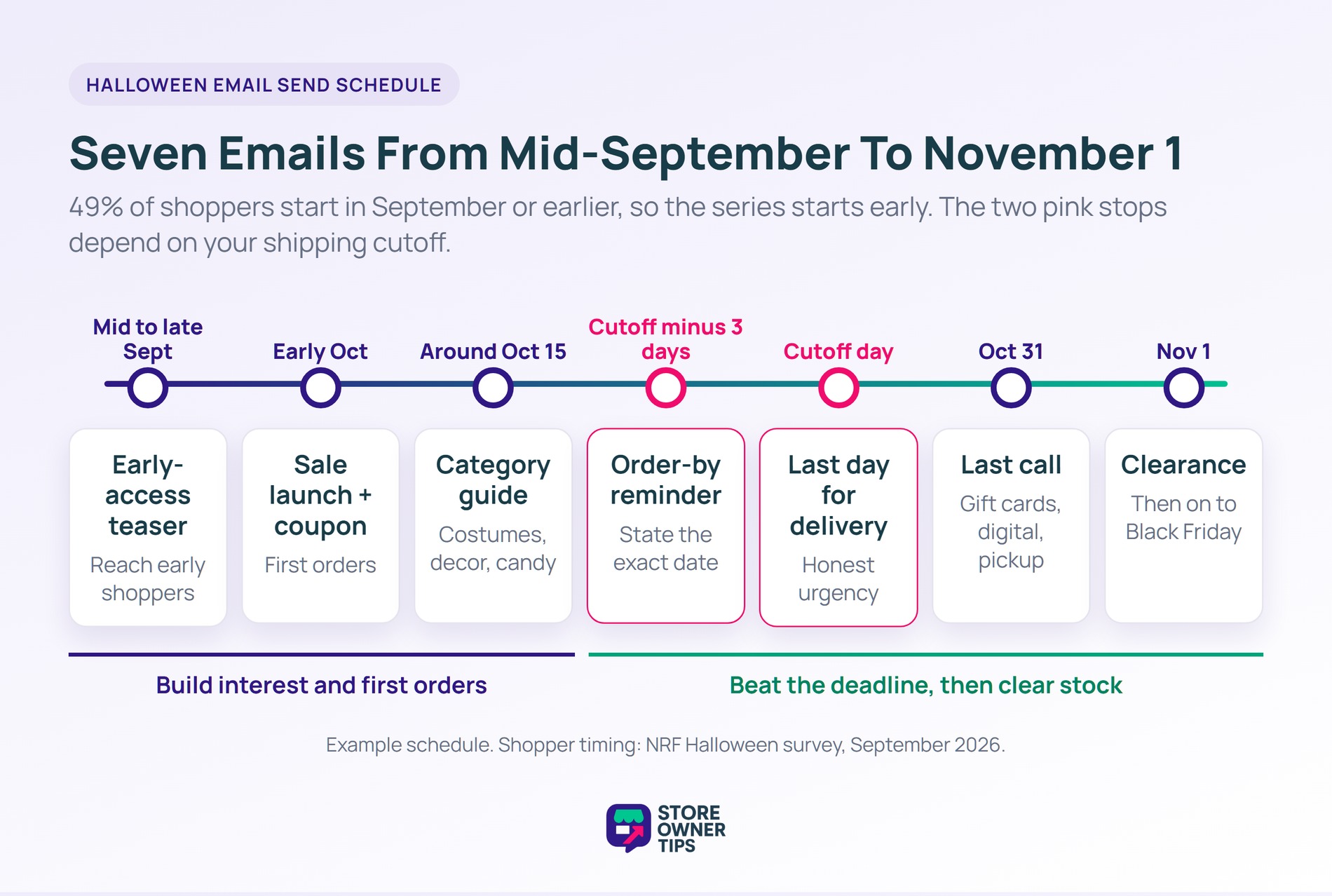
A good Halloween email schedule runs from mid-September to November 1 and sends five to seven emails. That covers the early half of shoppers and the last-minute crowd. In 2026, Halloween falls on a Saturday, so weekend delivery matters more than usual.
Here’s what this looks like in practice (example data):
| When | Goal | |
|---|---|---|
| Mid to late September | Early-access teaser | Reach the 49% who shop early |
| Early October | Sale launch with coupon | Turn interest into first orders |
| Around October 15 | Gift or costume guide by category | Help undecided shoppers pick |
| Shipping cutoff minus 3 days | Order-by reminder | Beat the delivery deadline |
| Shipping cutoff day | Last day for delivery by Halloween | Create real, honest urgency |
| October 31 | Last call: digital, gift cards, pickup | Sell what doesn’t need shipping |
| November 1 | Leftover clearance | Move stock before Black Friday |
That said, spread these out so each email has room to land. Unsure how much your list can take? Advanced Coupons explains how often a store should send emails.
Your shipping cutoff is the last day a customer can order and still get the parcel by October 31. Work it out backwards from Halloween:
Here’s what this looks like in practice (example data). Say transit takes four business days, handling takes two, and you add one buffer day. Counting seven business days back from Friday, October 30, gives a cutoff of Wednesday, October 21. Check your carrier’s transit-time tool, then put that date in your reminder’s subject line.
🔍️ What we’ve seen: The shipping cutoff email is the one stores forget most often. Without it, late orders arrive after Halloween and turn into refund requests. A single reminder that states the exact date saves a lot of support tickets.
These Halloween email ideas follow the schedule above, from the first teaser to the post-holiday clearance. Pick the ones that fit your products rather than sending all nine.
Send a short email in September that promises subscribers first access to the sale. Ask them to reply or click to get on the early list. As a result, those clicks tell you who to target first in October.
Announce the sale with one clear offer and one button. Put the discount in the subject line, the first sentence, and the button text. Shoppers who skim should still see the deal within a second or two.
Group products by what people buy for Halloween, so each reader finds their category fast. The NRF expects shoppers to spend $4.4 billion on costumes, $4.3 billion on decorations, and $4.1 billion on candy. Pet costumes add another $0.92 billion, so a pet section is worth a look.
Tell subscribers the exact last day to order for delivery by Halloween. In practice, this is honest urgency, because the deadline is real. Repeat the date in the preview text.
If customers saved items to a wishlist, a sale price is a natural reason to email them. SaveTo Wishlist can send wishlist price-drop alerts automatically on its Growth plan and above. One catch: the alert fires when you save the sale price, not when a scheduled sale starts. So enter the sale price on launch day, or the alert goes out early.
Give your existing abandoned cart emails a seasonal subject line and banner for October. The automation already runs, so a quick copy change reaches shoppers who were close to buying.
Send a “click to reveal your treat” email, then show the discount on the landing page. Curiosity drives the click, and the page does the selling. Keep the offer fair and the terms clear, since surprise conditions cost trust.
On Halloween itself, shipped orders won’t arrive in time. Instead, promote what doesn’t need a courier: gift cards, digital downloads, or local pickup if you offer it.
Leftover Halloween stock loses value fast. Send a clearance email on November 1, then hand over to your Black Friday plan. Our Black Friday checklist covers what comes next.
You don’t need all nine. Pick three or four that fit your products and schedule. Then build each email around a single offer.
Good Halloween email subject lines are short, specific, and tied to one offer. According to Klaviyo, the typical subject line runs about seven words, emojis included. It also found that 43.5% of small businesses use emojis in subject lines.
Still, treat that as a style guide, not proof that emojis lift opens. Test one emoji version against a plain version on your own list. Swap the brackets below for your offer and dates.
Pair each subject line with preview text that adds the date or the discount. The preview is the second line people read, so it’s worth more than a “View in browser” link.
For more deadline wording, Advanced Coupons shares urgent subject lines in its guide to flash sale advertising.
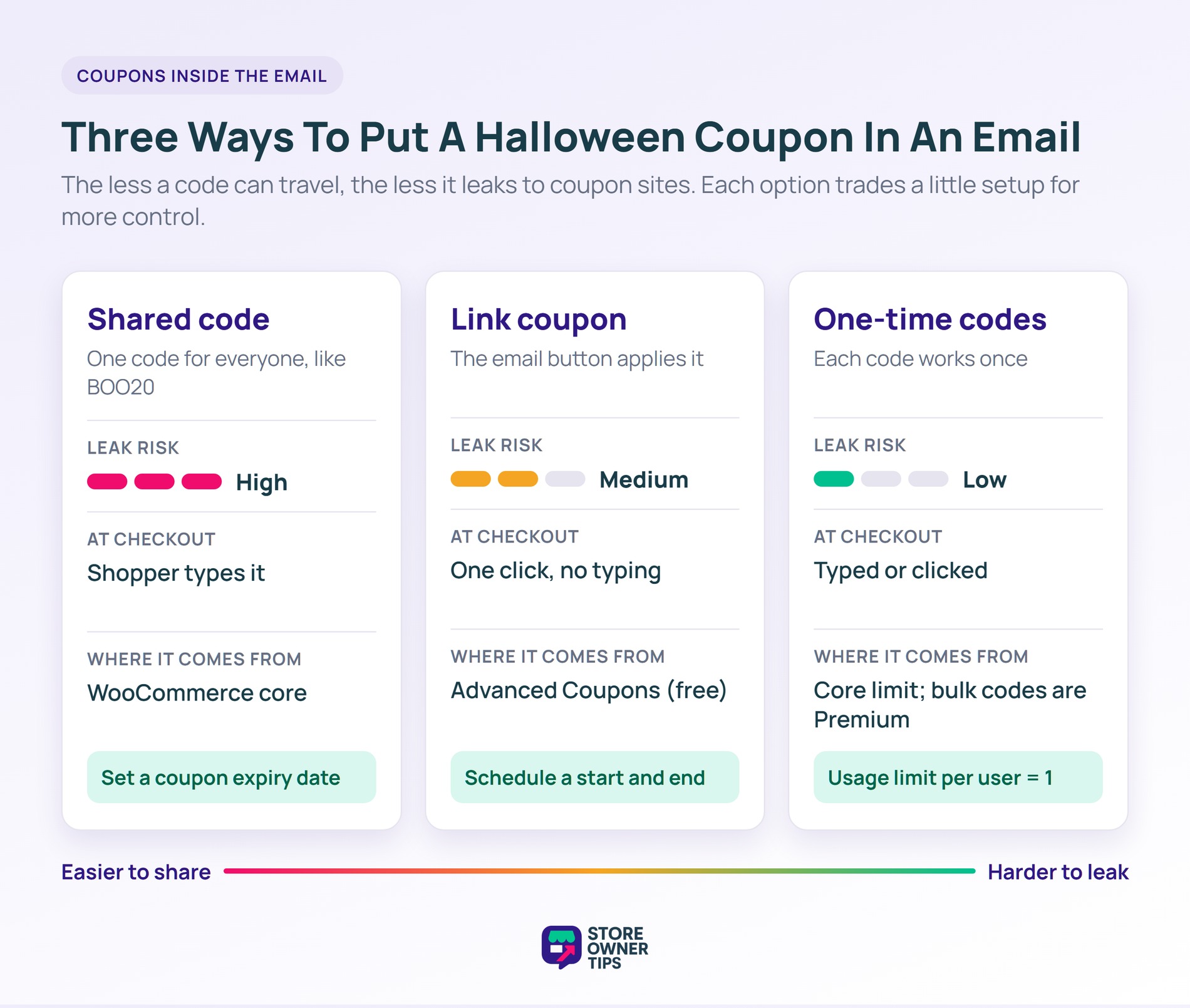
The easiest coupon email is one where the shopper never types a code. You have three main options, and each suits a different goal.
Timing matters as much as the code. The free version of Advanced Coupons can schedule a coupon with a start and end date and time. As a result, the code switches on with the launch email and off at midnight on the 31st. Premium adds recurring weekly schedules.
Want ready-made copy? These coupon email templates give you wording you can adapt for Halloween. Also, tick Exclude sale items if some products are already marked down.
Segmenting means sending different Halloween emails to different groups instead of one message to everyone. Each email stays relevant to the person reading it, which helps protect clicks and keep complaints down.
Start with these five segments:
Does your email tool not sync with WooCommerce? You can export customer emails from your store and import them as lists. SaveTo Wishlist also shows how wishlist data helps with customer segmentation.
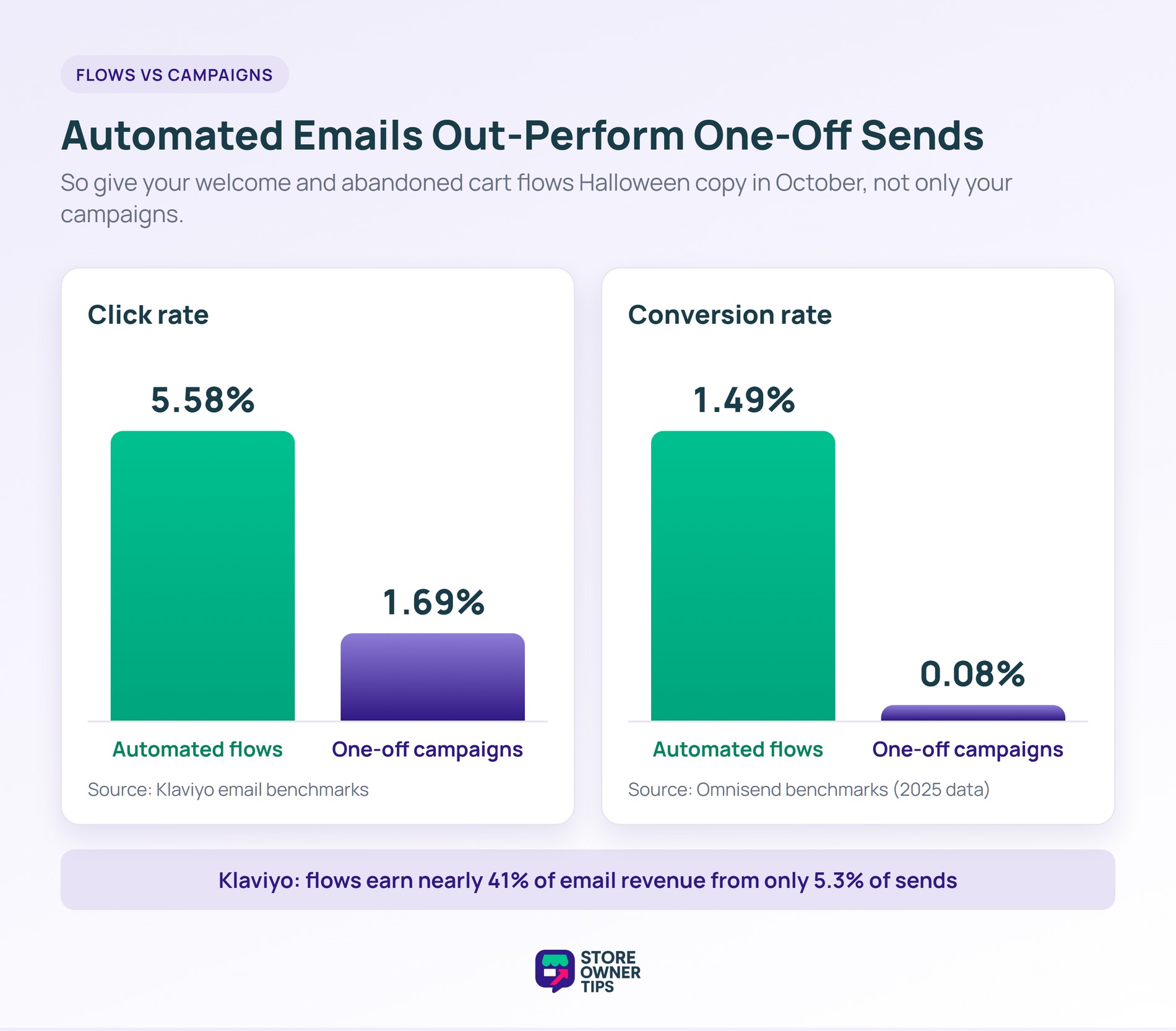
Your automated emails often outperform your campaigns. According to Klaviyo, automated flows get a 5.58% click rate, compared with 1.69% for campaigns. Flows also earn nearly 41% of email revenue from only 5.3% of sends.
Omnisend found a similar gap, with automated emails converting at 1.49% versus 0.08% for campaigns. So give your welcome and cart emails a Halloween look for October, then switch them back.
A Halloween email can’t sell if it lands in spam. Since February 2024, Gmail requires everyone sending to Gmail accounts to set up SPF or DKIM. Spam complaints must also stay below 0.3%.
Senders who send more than 5,000 messages a day to Gmail must also meet these rules:
Yahoo asks for the same basics and says to honor unsubscribes within two days. Your email platform usually handles the unsubscribe header. However, your domain records are your job or your host’s.
Per Google’s sender FAQ, mail from your subdomains counts toward the same 5,000. Once you cross it, Google treats you as a bulk sender permanently.
Also, raise your volume gradually. Google’s guidelines say the more email you send, the more slowly you should increase volume. So going from one email a month to five in two weeks is worth avoiding. Wholesale Suite’s guidelines for stores that send email cover the basics of staying out of spam.
🔍️ What we’ve seen: Stores often email old, inactive contacts for the first time in months during a holiday sale. Complaints climb, and later emails start landing in spam. Send to your engaged subscribers first, then add older contacts in small batches.
Measure Halloween emails by clicks, orders, and revenue, not opens. Apple’s Mail Privacy Protection downloads email content in the background by default, whether or not the person reads it. So many emails get counted as “opened” when nobody looked.
That affects a big share of your list. According to Litmus, Apple Mail accounted for 62.26% of tracked opens in July 2026. Litmus also cites studies estimating that Apple’s privacy feature affects roughly 55–60% of all opens. So a rising open rate on its own doesn’t tell you much.
Track these numbers instead:
That said, one limitation is worth keeping in mind: email gets credit for some sales it didn’t fully cause. A shopper might click your email, leave, and buy later from a search ad. So compare against last October, and read the numbers as a trend. For broader campaign ideas, see our Halloween marketing campaign guide.
Halloween email marketing rewards stores that start early and stay specific. Half of shoppers begin in September, so an early start gives your emails more time to work. A short, well-timed series with one clear offer per email covers both early and last-minute buyers.
Here’s what to do this week:
URL coupons and start and end scheduling come with the free version of Advanced Coupons. Premium adds bulk unique codes and weekly schedules. Compare Advanced Coupons plans to see which fits your Halloween email marketing.
Start in mid to late September. According to the National Retail Federation, 49% of shoppers plan to begin Halloween shopping in September or earlier. An early-access teaser reaches that group, and your launch email can follow in early October.
Most stores do well with five to seven emails between mid-September and November 1. That covers a teaser, a launch, a product guide, shipping-cutoff reminders, a last call, and a clearance email. Send fewer to inactive subscribers.
A good Halloween subject line is short, names one offer, and adds a light seasonal touch. Klaviyo found the typical subject line runs about seven words. Examples include “Order by Oct 21 for Halloween delivery” and “Halloween leftovers, now 40% off.”
You can, but test them. Klaviyo reports that 43.5% of small businesses use emojis in subject lines. That shows they’re common, not that they lift opens. Send a pumpkin emoji version to half your list and compare clicks.
Yes, for clearance. A November 1 email can move leftover costumes and decor before Black Friday takes over the inbox. Keep it short, lead with the discount, and avoid emailing the same segment again that week.

Copyright © StoreOwnerTips.com. All Rights Reserved.
