Store Owner Tips

Subscribe to our newsletter

Weekly ecommerce tips, deals & news.

Thank You, we'll be in touch soon.

Latest News

How To Boost Your Halloween Marketing Campaign (5 Powerful Strategies)

How To Boost Your Halloween Marketing Campaign (5 Powerful Strategies)

Every October, shoppers go looking for costumes, decorations, and candy, and many start their search online. A well-timed Halloween marketing campaign puts your store in front of them while they’re ready to buy.

The goal is simple: bring shoppers to your ecommerce store and get them to buy before October 31. You don’t need a huge budget for that. You need the right strategies, used at the right time.

I’ll walk you through five Halloween strategies, real campaigns to copy, a launch calendar, and how to measure results.

So let’s get started!

Jump to:


5 Halloween Marketing Campaign Strategies To Try

Why you should start your Halloween marketing now

Halloween has become a huge deal for online shops. Shoppers are expected to spend $13.5 billion on Halloween in 2026, up from last year’s record $13.1 billion. A well-planned Halloween marketing campaign helps your store claim its share of that spending.

A few trends make an early start worth it:

  • Early birds: 49% of shoppers plan to start Halloween shopping in September or earlier, up from 34% in 2016.
  • Online search first: Online searches are the top source of costume ideas (32%), and 27% of shoppers plan to buy online.
  • AI shopping help: 47% of shoppers are using AI tools for their Halloween shopping this year. That makes product data for AI shopping worth a look.
  • Worldwide trend: Halloween isn’t just an American holiday anymore. UK shoppers were expected to spend £779 million in 2025, the latest figure available.

So the earlier your store is ready and visible, the more of that early demand you catch.

The five strategies below do two jobs. They give shoppers a reason to buy now, and they get your products seen where people search.

Diagram of 5 Halloween marketing strategies for an online store: Seasonal Theming, Coupons, BOGO, Email Marketing, and Product Feeds.
The right Halloween marketing campaign strategies can boost your traffic and sales this spooky season

1. Seasonal store theming

Seasonal store theming gives your whole online store a temporary Halloween makeover: your website, social media pages, and emails. You use seasonal colors (orange, black, purple), spooky fonts, and graphics like pumpkins and bats. The result is a fun, themed shopping experience.

Theming works because it:

  • Builds excitement: It tells shoppers at a glance that you’re ready for the holiday, which makes browsing more fun.
  • Makes you relevant: It ties your brand to the Halloween season, when shoppers are buying costumes and decorations.
  • Creates urgency: It signals that the spooky theme (and your sale) won’t last forever, which nudges people to buy now.

Keep the theme consistent everywhere. Add temporary headers and footers to your website, and update your social media banners. Then use spooky wording in product names and “Buy Now” buttons (called CTAs).

A fictional e-commerce website homepage with a Halloween theme. The design features a dark, spooky background with bats and spiderwebs, orange and purple accents, and a large banner showing a countdown timer and a clear call-to-action for a "Midnight Sale."
A Halloween makeover adds excitement and a sense of urgency

Example 

Switch your website colors to deep orange and black. You could even add animated bats across the homepage and change your buttons to “Grab Yours Before Midnight!”

We also recommend a live countdown timer in your header or banner that shows when the sale ends. In our experience, a visible deadline is one of the quickest ways to prompt a decision.

Tool recommendations

To make these changes quickly, use your store platform’s built-in tools. For the graphics themselves, free tools like Canva have ready-made templates for Halloween banners and social images.

To add these designs to your site, use the WordPress Site Editor or a visual page builder. On classic themes, the Customizer does the same job. These tools let you:

  • Apply global styles: Change all colors, backgrounds, and fonts on the entire site at once.
  • Add graphic overlays: Drop in temporary images or animations (like ghosts or spider webs) on different pages.
  • Revert quickly: Switch everything back to your regular store look right after Halloween is over.
Screenshot of the Canva interface showing a finished Facebook post graphic for an "AdTribes Halloween Sale." The design features an orange-and-black spooky landscape with carved pumpkins, a full moon, and bats. The bold text reads: "HALLOWEEN SALE 70% OFF ALL LICENSES 24 HOURS ONLY!"
Canva’s templates help you design Halloween campaign graphics without a designer

2. Discount coupons

A coupon is a special code (like SPOOKY20) that customers enter at checkout to get a discount.

Coupons come in a few varieties. For example, one could offer a percentage off (like 20% off). Another could give a fixed dollar amount off (like $10 off). You could even provide free shipping.

We’ve found that coupons push people to buy sooner, and they reassure shoppers who are worried about price. Recent surveys back this up:

  • 62% of consumers say limited-time discounts are the number one thing that gets them to buy.
  • 70% of shoppers have made an unplanned online purchase after receiving a discount offer.
  • 51% of UK adults use discounts and promotions to try new brands and products, up from 44%.

You can set smart rules for when a coupon works. For instance, you can create a coupon that gives free shipping on orders over $75. Or you can limit a coupon to items from a category, like “Spider Web Decor.”

A handy way to share coupons is a URL Coupon. Customers click a link, and the discount applies to their cart automatically, so checkout takes fewer steps.

Two Halloween sale banners offering up to 50% and 70% off with skulls, candy, and witch hats.
A clear discount gives shoppers a reason to buy now

Example

For your Halloween marketing campaign, imagine running a “Witching Hour” sale. Here, you offer a 25% coupon code that only works from 9 PM to 11 PM on October 29th.

Shoppers see 25% as a real saving. On top of that, the two-hour window adds urgency (act fast) and scarcity (the deal is rare). Together, they create Fear of Missing Out (FOMO), which nudges customers to buy before the window closes.

Tool recommendation

The Advanced Coupons plugin adds detailed rules to WooCommerce coupons. You decide who can use each coupon, when, and on what, so every code serves a specific goal.

Key features include:

  • Cart conditions: Set rules based on what’s in the cart. For example, a coupon can require a minimum subtotal or a product from a certain category.
  • User conditions: Target coupons to specific customers, like logged-in shoppers or certain user roles. Premium adds conditions for new and returning customers.
  • Time and date controls: Set start and end dates down to the hour for flash sales, like the “Witching Hour” example.
Screenshot of the Advanced Coupons plugin's Cart Conditions interface, showing an IF/AND logic rule set up: IF the Cart Quantity is MORE THAN 3 AND the Cart Subtotal is MORE THAN $25 (including tax), THEN allow the coupon to be applied.
Advanced Coupons lets you set cart conditions that control when a coupon applies

3. Buy X Get Y (including BOGO)

Buy X Get Y is a promotion with a simple rule. A customer buys a set item or quantity (X) and gets a defined reward (Y).

The most common type is BOGO (Buy One Get One), like “Buy one mask, get the second one half price.” Each BOGO sale moves two items instead of one.

BOGO raises how much each customer buys in one trip, and it helps you clear stock quickly. From what we’ve seen, few offers do both jobs as well. Research backs up its pull:

  • Shoppers prefer BOGO deals and often pick them over price cuts of equal value. That’s the finding of an eye-tracking study in the Journal of Business Research.
  • That preference grows when the discount is high. In those cases, BOGO deals attract more attention than percentage deals.
Visual showing a "Buy X Get Y" split-screen with a cauldron on one side (the purchase) and spider webs with a bright'FREE!' tag on the other side (the reward), highlighting the psychological benefit of getting a free item.
Buy X Get Y rewards a bigger basket and helps clear stock

Example

For your Halloween marketing campaign, focus BOGO deals on items people buy together, like costume accessories or matching party supplies. For instance, offer a “Buy one spooky T-shirt, get a matching pair of Halloween socks free.”

This works because of the “Zero Price Effect.” Demand jumps when an item’s price drops to zero, far more than at any other price cut.

The free item also makes the deal feel bigger, which encourages a purchase right away.

Tool recommendation

Advanced Coupons can run promotions like “Buy one T-shirt, get the socks free.” Its Buy X Get X deal type lets you set precise rules:

  • Define “X” (the purchase): Choose the product a customer must buy and how many, like a vampire cloak. The free version uses specific products, while Premium adds categories and product combinations.
  • Define “Y” (the benefit): Choose what they get: a free item, a percentage off, a fixed amount off, or a set price. For instance, give away vampire fangs with every cloak.
  • Quantity rules: Set the trigger to an exact quantity or “more than” a number, so the deal only applies to bigger baskets.
Screenshot of the Advanced Coupons "Coupon data" panel with Discount type set to "Buy X Get X Deal (BOGO)," showing the Customer Buys and Customer Gets product rules at quantity 1 with a 100% discount.
Advanced Coupons lets you set both the purchase and the reward in a Buy X Get Y deal

4. Email marketing

Email marketing involves sending targeted messages about your sales, products, and events to customers who have signed up. For Halloween, that means emails that look and sound spooky enough to get people clicking.

Email gives you a direct line to customers who already know your store. It also lets you segment your list, so different groups get different offers.

  • According to Litmus, 35% of companies earn $10 to $36 for every $1 spent on email. Another 30% earn $36 to $50.
  • 68% of consumers rank email among their top three preferred channels for hearing from brands.
  • 78% of consumers say they’ve made a purchase from an email.

Use subject lines that create excitement or fear of missing out (e.g., “A Treat You Can’t Resist!”). Send emails to remind customers about deadlines. Also, set up a special abandoned cart email that reminds customers to finish their order with a spooky tone.

A young woman in a Halloween-themed headband is sitting at a wooden desk with candy corn, smiling. Her laptop displays a draft of a dark orange and black "BOO-TIFUL HALLOWEEN" email marketing campaign.
Targeted Halloween emails reach the customers most likely to buy

Example 

For your Halloween marketing campaign, send a series of emails leading up to October 31st. Each email should use eerie graphics and exciting language to tease a big, upcoming event. 

On October 30th, send an email announcing the start of the sale with all the discount details. For the final email on the 31st, use the subject “Hurry! The Clock is Ticking!” and add a live countdown timer.

Tool recommendation

To run the email side, use a platform such as Drip. It helps with:

  • Automation: Ready-made workflows send emails automatically, like a welcome series or an abandoned cart reminder. You can also schedule a series, like one email every few days before Halloween.
  • Design: A visual email builder lets you create professional Halloween emails, and it resizes images for mobile automatically.
  • A/B testing: Test up to four subject lines or content versions to see which gets the most clicks and sales.
Screenshot of the Drip email marketing platform displaying a Halloween sale email preview. The email uses urgency with the subject line "FINAL CHANCE! 70% OFF AdTribes ENDS IN JUST HOURS!" and features a main banner, personalized body text, and a large, live countdown timer showing 00:00:00.
A Halloween sale email built in Drip

5. Product feeds

A product feed is a digital file, like a spreadsheet, that lists all your products. It includes each item’s price, images, description, and stock level. You use it to send product information to sales channels.

A product feed gets your products seen where people already shop, like Google Shopping, Facebook, and TikTok. That brings in new shoppers who might never have found your store otherwise.

A good product feed manager also lets you filter what each channel sees. For instance, you can send only certain products to one channel, like your Halloween range.

Diagram showing an E-Commerce Store connecting via a Product Feed to Popular Sales Channels (Facebook, Google, Twitter), leading to Product Display and reaching Multiple Large Customer Bases, which in turn loop back to the E-Commerce Store. The store initially has a Limited Customer Base.
A product feed carries your catalog to the channels where shoppers browse

Example 

Say you want to send a product feed to Google Shopping for your Halloween marketing campaign. You can set it to include only your costumes and accessories, leaving out unrelated items. Shoppers who click through then land on your holiday products.

Once your Google Shopping feed is live, your products can appear when someone searches for them (e.g. “cute bat earrings”). They show up in Google’s Shopping results or in your shopping ads, with the image and price right there.

Tool recommendation

Product feed software like AdTribes handles the work above for you. It helps with:
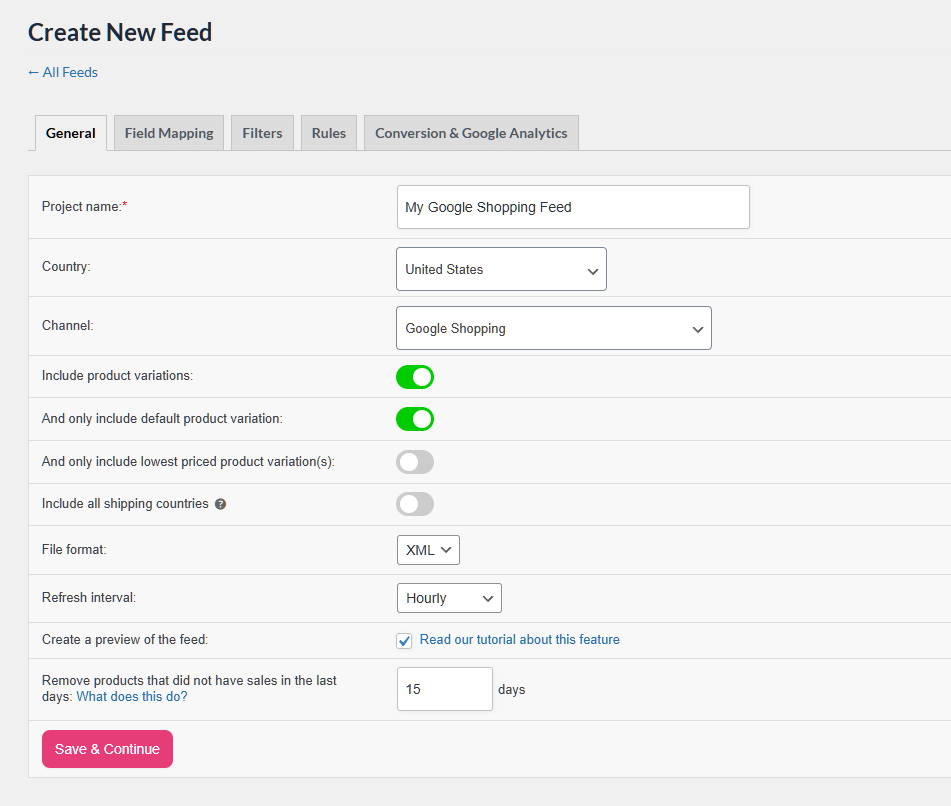
  • Channel mapping: It maps your product data to each channel’s required fields, with templates for 250+ channels like Google and Facebook.
  • Scheduled updates: It refreshes your feed on a schedule, as often as hourly. Price and stock changes then reach your channels without manual exports.
  • Languages and currencies: The Plus and Business plans support translation plugins like WPML and popular currency switchers.
Screenshot of the General settings tab for creating a new product data feed, showing fields configured for My Google Shopping Feed, targeting the United States for the Google Shopping channel, with product variations and default product variations included.
AdTribes walks you through creating a product feed for each channel

Real Halloween Marketing Campaigns To Learn From

Big brands use the same plays as the strategies above, only at a bigger scale. Here are six real Halloween campaigns, plus the part a small online store can copy.
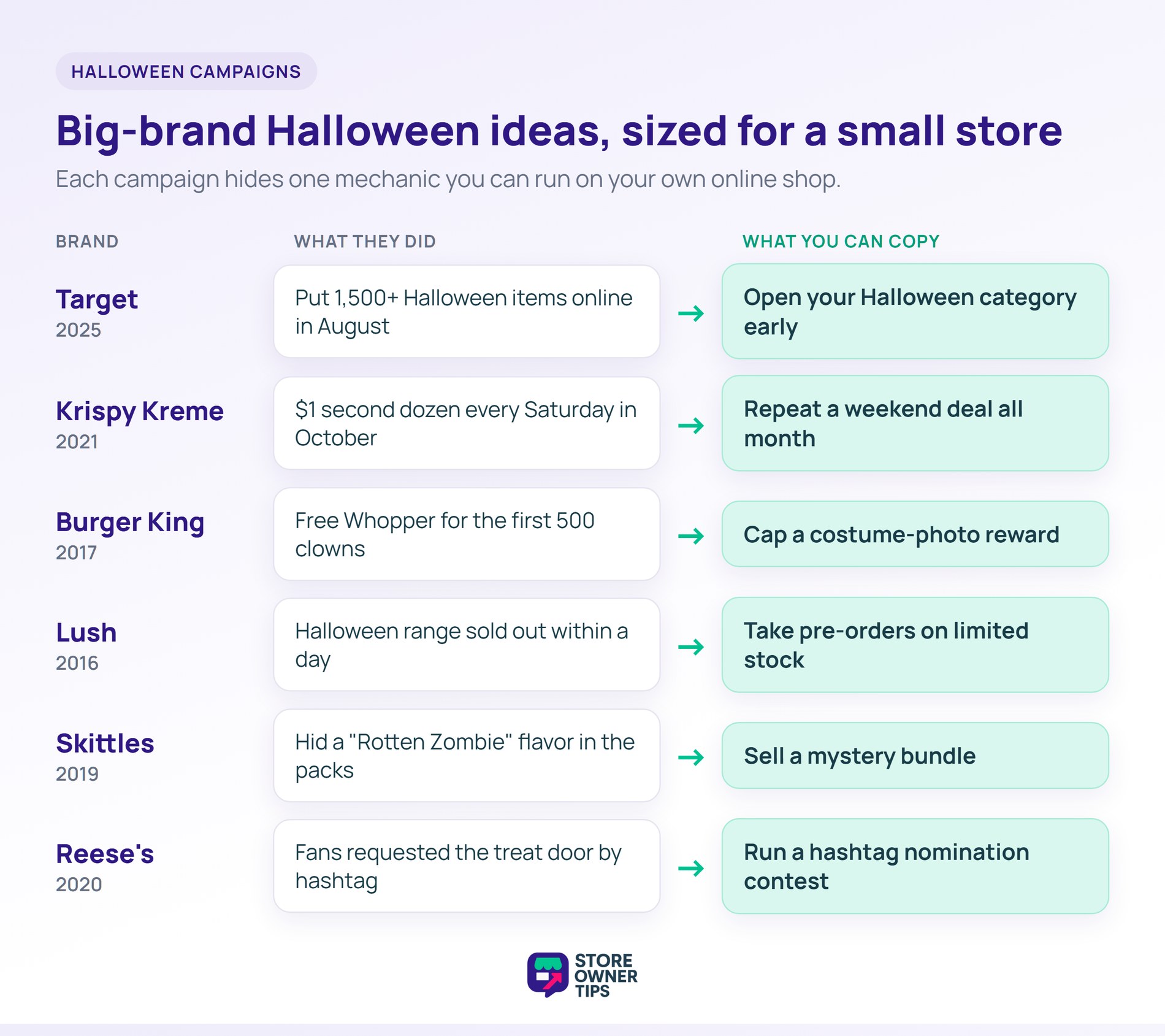
  • Target (2025): Target put more than 1,500 Halloween items on Target.com on August 11, before they reached stores in September. Costumes started at $10 and most decor sat under $25. Copy this: open your Halloween category early and group it into “under $10” and “under $25” collections.
  • Krispy Kreme (2021): Krispy Kreme paired four limited Halloween doughnuts with a weekly Saturday deal. From October 16 to 30, a second dozen cost $1, and the code SCARY worked online. Copy this: a repeating weekend deal gives shoppers a reason to come back every week of October.
  • Burger King (2017): On Halloween night, the first 500 guests dressed as clowns at participating restaurants got a free Whopper. The cap kept the cost known and gave people a reason to hurry. Copy this: give a coupon to the first 50 customers who post a costume photo and tag your store.

Scarcity, mystery, and social contests

  • Lush (2016): Lush’s Halloween range sold out in some Australian stores within a day, and fans voiced their disappointment on Facebook. Copy this: limited stock creates urgency, so plan for the sellout. Take pre-orders so sold-out demand still turns into sales.
  • Skittles (2019): Zombie Skittles gave its flavors spooky names like Mummified Melon and hid a “Rotten Zombie” flavor in the packs. Mars announced them in August, two months before they hit shelves. Copy this: rename a few products for October, or sell a mystery bundle with a surprise inside.
  • Reese’s (2020): Reese’s built a robotic “Trick-or-Treat Door” that handed out king-size cups. Fans requested a visit by posting on Instagram with #ReesesDoor. Copy this: run a hashtag contest where customers nominate someone for a free Halloween box.

When To Launch Your Halloween Marketing Campaign

Launch in early September if you can, because early shoppers spend more. In Deloitte’s 2026 Halloween survey, people who start before mid-August plan to spend 1.7 times more than late shoppers.

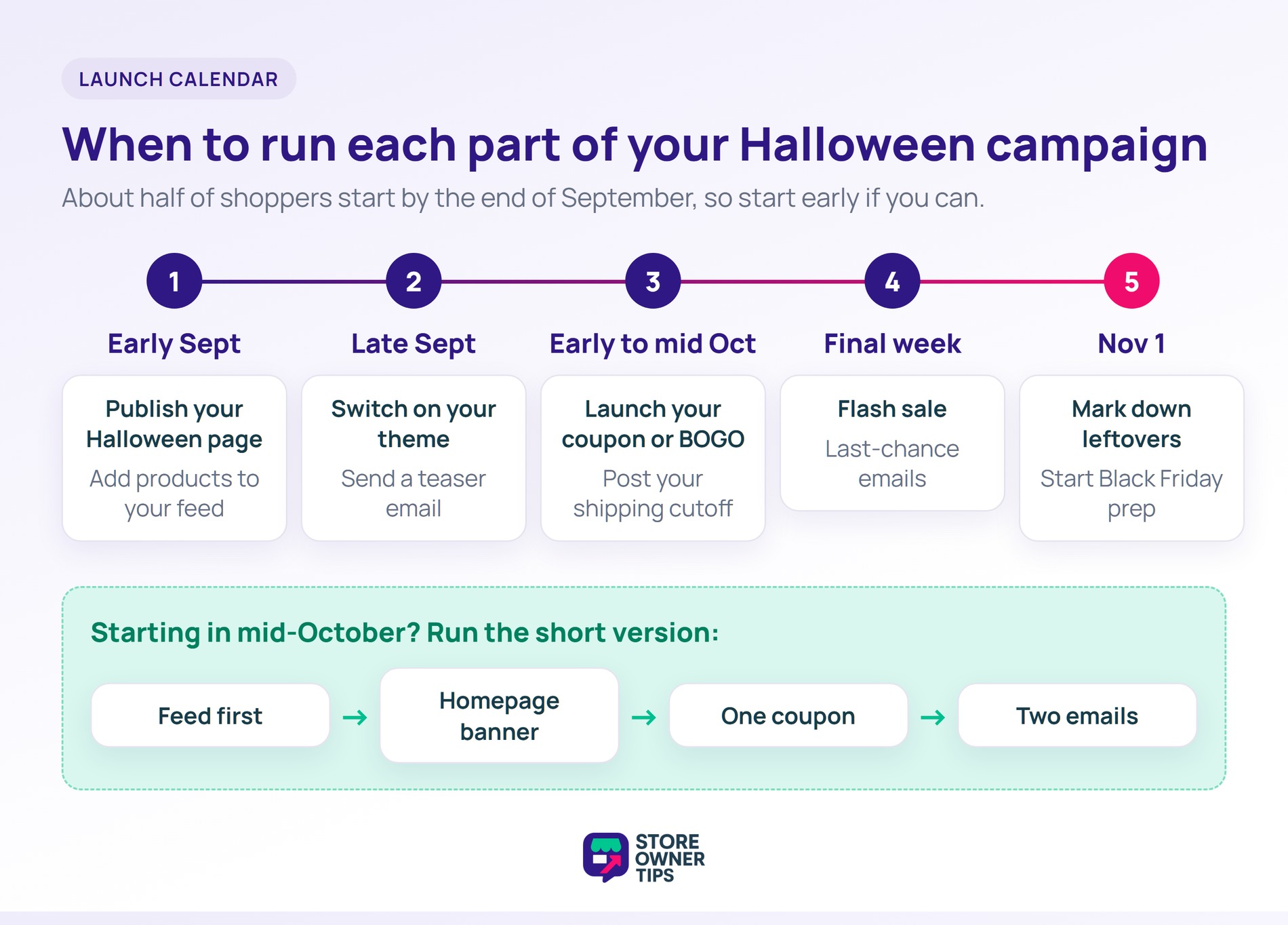
Here’s how the five strategies fit on a calendar:

  1. Early September: Publish your Halloween category page and add those products to your product feed. Feed approval isn’t instant, so Google Shopping listings need a head start.
  2. Late September: Switch on your seasonal theme and send the first teaser email to your list.
  3. Early to mid October: Launch your main coupon or BOGO offer. Post your shipping cutoff, the last order date that still arrives by October 31.
  4. Final week: Run your flash sale and last-chance emails, like the Witching Hour and countdown examples above.
  5. November 1: Mark down leftover Halloween stock, switch your theme back, and start on your Black Friday checklist.

🔍️ What we’ve seen: The shipping cutoff is the step that’s easiest to miss. A costume that arrives on November 1 often comes back as a return. One line on your product pages and checkout sets expectations before the order is placed.

Starting late? Run the short version

A mid-October start still works. Going by the NRF numbers above, about half of shoppers haven’t started by October.

Skip the full store redesign. Put your Halloween products in your feed first, since that’s where searching shoppers find them. Then add a homepage banner, launch one coupon, and send two emails.

How To Measure Your Halloween Marketing Campaign

Measure each tactic on its own, so you know which one to repeat next year. WooCommerce has most of the reports you need built in.
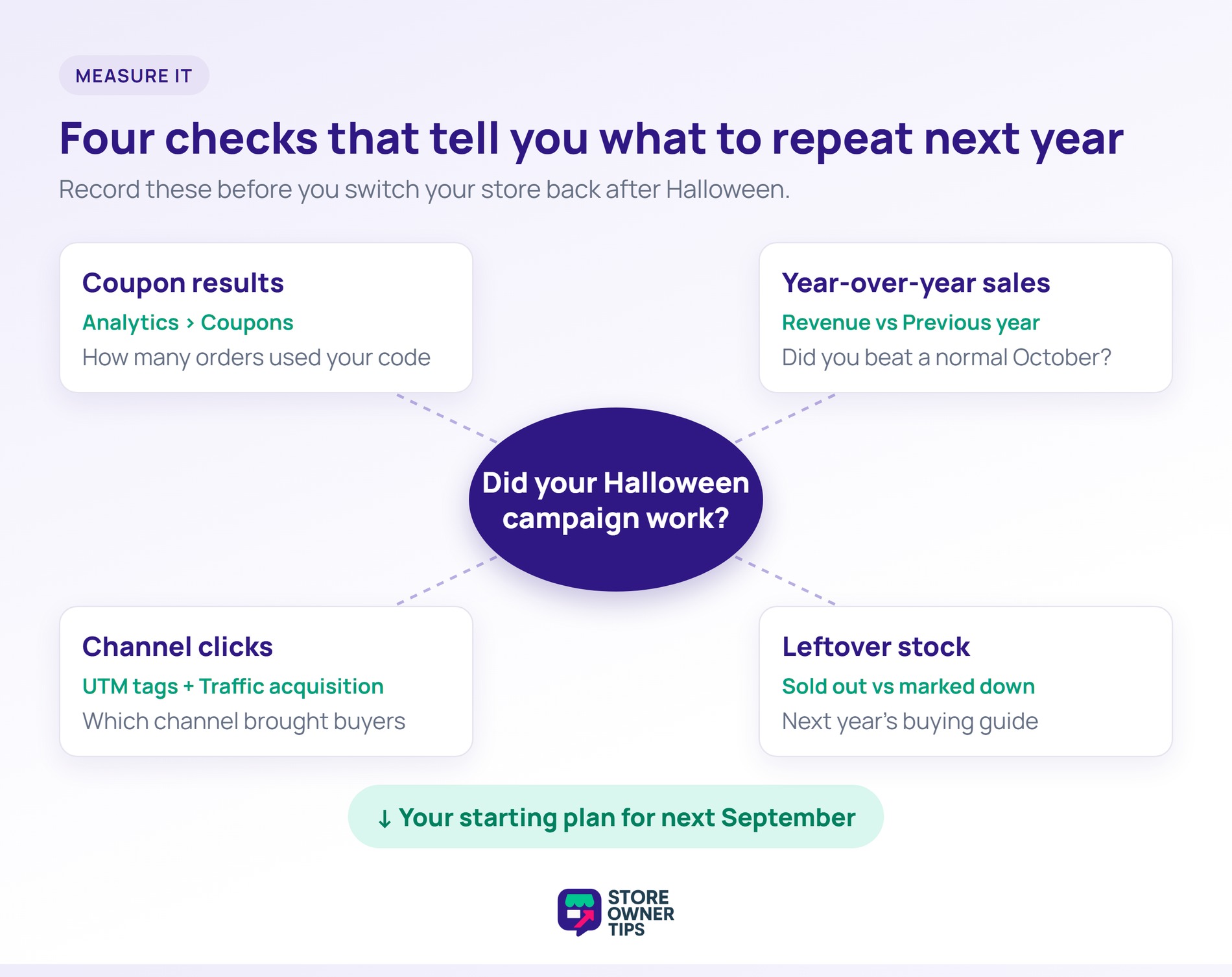
  • Coupon results: Go to Analytics > Coupons and filter to your Halloween code. The Discounted orders and Amount charts show how many orders used it and what it cost you.
  • Year-over-year sales: In Analytics > Revenue, set the date range to October and compare it to the Previous year. That tells you whether the campaign beat a normal October.
  • Email and social clicks: Add UTM tags to every campaign link, such as utm_campaign=halloween2026. Google Analytics’ Traffic acquisition report then shows which channel brought in buyers.
  • Leftover stock: Write down what sold out and what you marked down on November 1. That list becomes your buying guide for next Halloween.

Conclusion

A strong Halloween season comes from a clear plan, not luck. Pair an offer shoppers want with the visibility to reach them, and you’ve covered the two jobs that matter most.

Here’s your Halloween marketing campaign plan in four steps:

  1. Theme your store, then add coupons, BOGO deals, email, and product feeds.
  2. Borrow a proven idea from real Halloween campaigns.
  3. Put each tactic on a launch calendar, starting in September.
  4. Track coupon use and compare against last October so you know what to repeat.

Once your Halloween marketing campaign wraps up, Black Friday is next. Get a head start with these Black Friday sale ideas.


Halloween Marketing Campaign FAQs

What is seasonal store theming, and how can it boost my Halloween sales?

Seasonal store theming gives your online store a temporary Halloween makeover with spooky colors, fonts, and graphics. It builds excitement and ties your brand to the holiday. It also signals that your sale won’t last, which encourages shoppers to buy sooner.

How do discount coupons influence customer purchasing behavior during Halloween?

Coupons give shoppers a reason to buy now instead of later. In Salsify’s 2025 survey, 70% of shoppers said a discount offer led to an unplanned online purchase. You can also add rules, like free shipping over a set amount, and share codes as one-click URL links.

What is a buy X get Y promotion, and why is BOGO effective during Halloween?

A buy X get Y promotion gives customers a reward, often a free item, when they buy a set amount. BOGO (Buy One Get One) is the most common version. Research shows shoppers often prefer BOGO over an equal price cut. It also helps clear seasonal stock quickly.

Why is email marketing important for Halloween campaigns, and how can it be optimized?

Email gives you a direct line to customers who already know your store. To get more from it, write spooky subject lines, send reminders near deadlines, and add countdown timers.

What role do product feeds play in Halloween marketing strategies?

Product feeds are files that list your products and their details. They let you show your Halloween items on channels like Google Shopping and Meta. That puts your products where shoppers already browse, which brings new traffic to your store.

author avatar
Michael Logarta

Share article

Subscribe to our newsletter

Weekly ecommerce tips, deals & news.

Nice – You're in!

Copyright © StoreOwnerTips.com. All Rights Reserved.