Weekly ecommerce tips, deals & news.
Cyber Monday is over, and your list has seen a week of sale emails. Your instinct says to go quiet until January. But December still has weeks of gift shopping left, and most of it happens on a deadline.
That deadline is what makes holiday email marketing different from Black Friday. Shoppers stop asking “what’s the deal?” Instead, they ask “will it arrive in time?” In our experience, answering it in the inbox keeps the store selling after the cutoff, through gift cards and pickup.
This guide gives you a December 2026 email calendar built around real shipping cutoffs. You’ll also get 10 email ideas and 25 subject lines. You’ll also see how to pace sends so subscribers don’t tune out, and what to email after Christmas.
Jump to:
Holiday email marketing still pays after Cyber Monday because the season keeps going for another month. Adobe forecasts $275.1 billion in US online sales from November 1 to December 31, 2026.
And spending doesn’t stop after one big weekend. In 2025, 25 separate days topped $4 billion in US online sales, up from 18 days in 2024. December brings its own peaks:
In short, each of these is a reason to email. A pickup reminder, a gift card email, and a phone-friendly Christmas Day message all match what shoppers do in December.
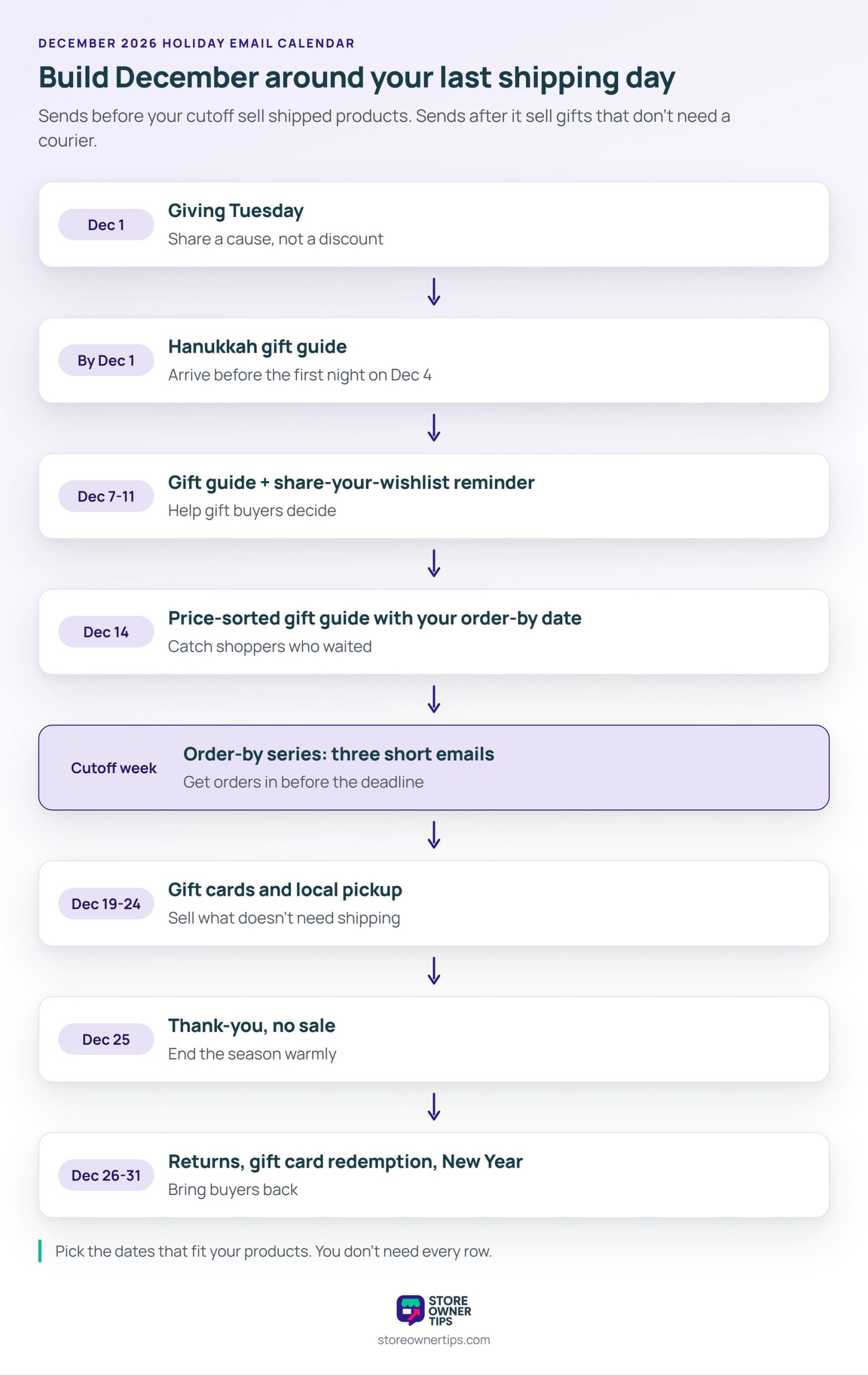
A December email calendar works well when it’s built backwards from your last shipping day. That one date shapes your whole holiday email marketing plan. In practice, every send before that date sells shipped products. After it, each send sells things that don’t need a courier.
Here’s what this looks like in practice (example schedule):
| When (2026) | Goal | |
|---|---|---|
| December 1 | Giving Tuesday | Share a cause, not a discount |
| Around December 1 | Hanukkah gift guide | Arrive before the first night (Dec 4) |
| December 7 to 11 | Gift guide and share-your-wishlist reminder | Help gift buyers decide |
| December 14 | Price-sorted gift guide with your order-by date | Catch shoppers who waited |
| Week before your cutoff | Order-by series (three emails) | Get orders in before the deadline |
| December 19 (Super Saturday) | Fast shipping, pickup, and gift cards | Sell to last-minute shoppers |
| December 20 to 24 | Gift cards and local pickup | Sell what doesn’t need shipping |
| December 25 | Thank-you, no sale | End the season warmly |
| December 26 to 31 | Returns, gift card redemption, New Year | Bring buyers back |
That said, you won’t use every row. Pick the dates that fit your products and audience. For ideas beyond email on each of these dates, see our holiday marketing ideas guide.
Your email cutoff is the carrier’s last ship date minus your own handling time. Carriers publish their dates. However, they can’t know how long you take to pack.
Here’s what this looks like in practice (example data). USPS lists Thursday, December 17, as the last day to ship Ground Advantage for Christmas delivery in the contiguous US. Priority Mail runs to December 18 and Priority Mail Express to December 19.
For example, say you ship Ground Advantage, take two business days to pack, and add a buffer day. Counting three business days back from December 17 gives an order-by date of Monday, December 14. Either way, check your carrier’s holiday page in early December, since dates can change.
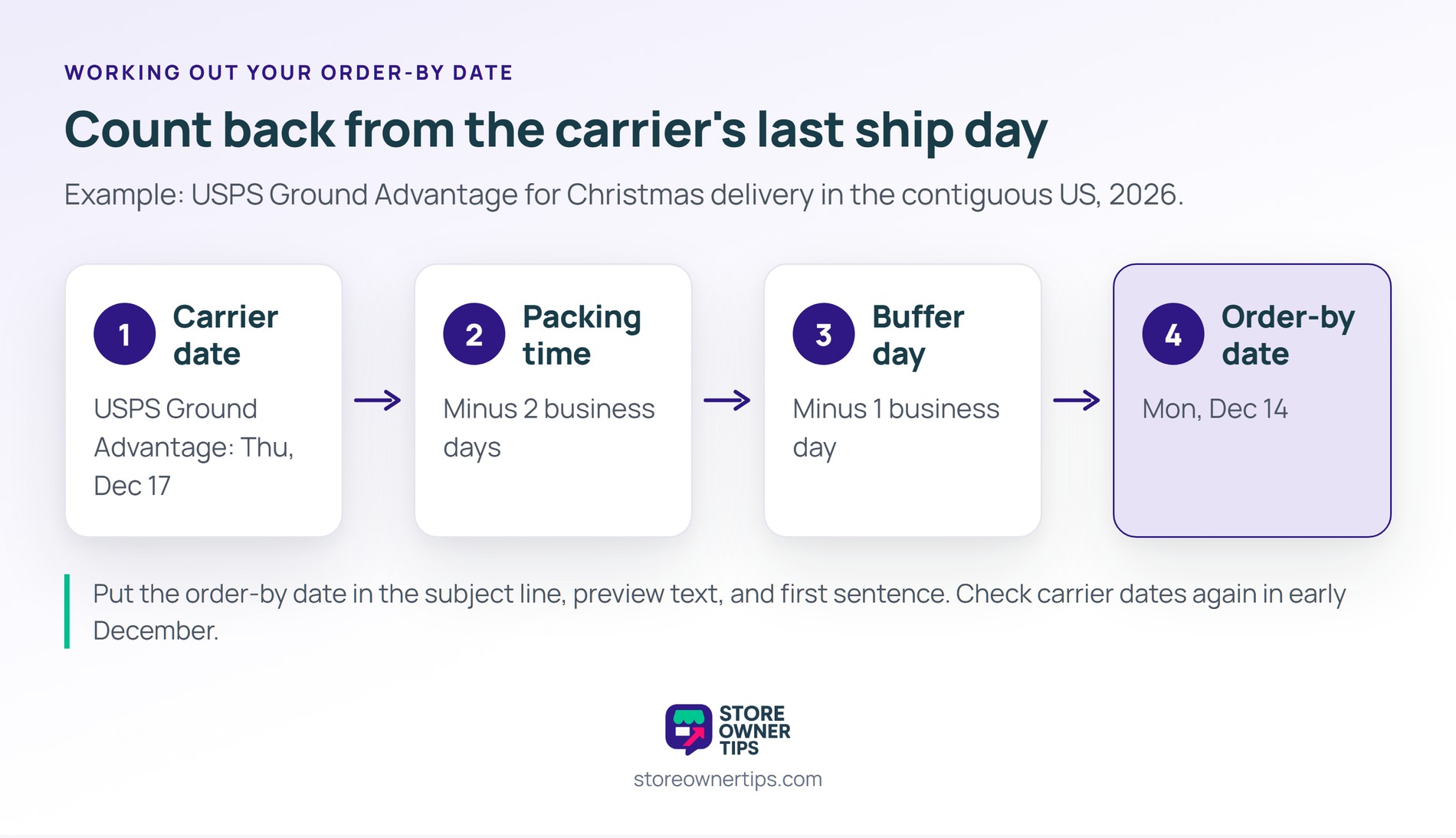
🔍️ What we’ve seen: The cutoff date is the most useful thing a December email can tell a shopper. Stores that send one clear “order by” date often get fewer “where’s my order?” tickets before Christmas.
These holiday email ideas follow the calendar above, from Giving Tuesday to the New Year. Each one has a single job, so pick the ones that match your store. You don’t need all ten to run good holiday email marketing.
Giving Tuesday falls on December 1 in 2026, the Tuesday after Cyber Monday. It’s a day for generosity, not discounts.
So a “we’re donating part of today’s sales to [cause]” email fits better than another price cut. Name the cause and the exact amount, so the promise is easy to check. Some US states have rules for charity-linked sales, so check yours first.
In 2026, Hanukkah runs from sundown on Friday, December 4, to nightfall on Saturday, December 12, according to Hebcal. Because it starts early, send your Hanukkah gift email by December 1. That way, orders can still arrive before the first night.
Plus, eight nights suggest a simple angle: a small gift for each night. Group lower-priced items into a guide built around that idea.
The second Monday of December, sometimes called Green Monday, falls on December 14 in 2026. By then, shoppers who waited past Cyber Monday are still buying, and the cutoff is close. So lead with a gift guide sorted by price, and add your order-by date at the top.
Wishlists turn into gift lists in December. So remind customers that they can share a wishlist with family who are shopping for them. SaveTo Wishlist supports wishlist sharing, so the people buying gifts see exactly what’s wanted. In the free plugin, only public lists show a share link.
Send three short emails about your shipping cutoff. Send one a week before, one two days before, and one on the day.
Plus, each email repeats the date and says plainly what happens after it. Since the deadline is real, the urgency is honest. The reminder helps shoppers rather than pressuring them.
The NRF calls the last Saturday before Christmas Super Saturday, which is December 19 in 2026. By then, the USPS Ground Advantage and Priority Mail cutoffs have passed. So this email should point to faster shipping, local pickup, or gift cards rather than your full catalog.
After your last shipping day, a digital gift card is the one gift that still arrives on time. NRF ranks gift cards as the second-most popular gift of the 2025 season, with spending expected to reach $29 billion.
With Advanced Gift Cards, the buyer adds the recipient’s email and a message, and the card arrives by email. Buyers can also pick a delivery date, like December 25. So a “too late to ship?” email still sells a gift that lands on Christmas morning.
If you have a shop, warehouse, or studio, pickup keeps physical products on the table. Send a “buy online, pick up by Christmas Eve” email with your pickup hours for December 21 to 24. That way, local buyers still get a physical gift in time. Our guide to WooCommerce local pickup covers the setup.
On December 25, send a short thank-you with no sale in it. It’s a warm way to end the season and gives tired inboxes a break. If you sold gift cards, add one line telling recipients how to redeem them.
The week after Christmas is busy, too. NRF found 70% of consumers planned to shop the week right after December 25 in 2025. Retailers also expected 17% of holiday sales to come back as returns.
So send one email that explains your returns process, and suggest store credit as an option. The free version of Advanced Coupons can refund an order as store credit, though only for registered customers, not guests. Then follow it with a New Year email that thanks customers for the year.
You don’t need all ten. Instead, three or four well-timed emails will do more than a daily blast. Build each one around a single date or offer.
Good holiday subject lines lead with the date or the offer, not the season. According to Klaviyo, the typical subject line runs about seven words, emojis included. In December, a clear date in that space does more work than seasonal wording alone. That’s true across holiday email marketing, not just for Christmas sends.
Pair seasonal language with a plain fact in the preview text, like the cutoff date. That way, a festive subject line gets the open, and the fact earns the click.
Check your sender setup in November, before holiday volume arrives. A problem found in mid-December can push your cutoff emails into spam on the days they matter most. Good holiday email marketing starts with emails that actually reach the inbox.
Since February 2024, Gmail has required everyone sending to Gmail accounts to set up SPF or DKIM. If you send more than 5,000 messages a day to Gmail, three more rules apply:
Yahoo sets similar rules and asks senders to honor unsubscribes within two days. Google’s sender FAQ adds that once you cross 5,000 a day, you’re treated as a bulk sender permanently.
Also, raise your volume in steps. Google’s guidelines say the more email you send, the more slowly you should increase volume. So if you usually email twice a month, add extra sends from early November, starting with engaged subscribers. Our glossary entry on email deliverability explains the basics.
Holiday email marketing runs for six weeks, not one weekend, so pacing matters more than in November. As a result, too many sends lead to email fatigue, and fatigue shows up as unsubscribes and spam complaints.
Shoppers notice when brands send too much. Validity surveyed 1,000 US consumers. 49% had unsubscribed from a brand’s holiday emails because they got too many. Weekly was the most preferred frequency, at 25%.
The same survey found misleading subject lines or fake urgency were the next most common reason to unsubscribe, at 16%. So keep December urgency tied to real dates, like your shipping cutoff.
A few ways to keep your list fresh through December:
Plus, let automation carry part of the load. Your welcome and cart emails already run on their own, so give them December copy instead of adding more campaigns. Our guide to WooCommerce email automation covers which flows to set up first.
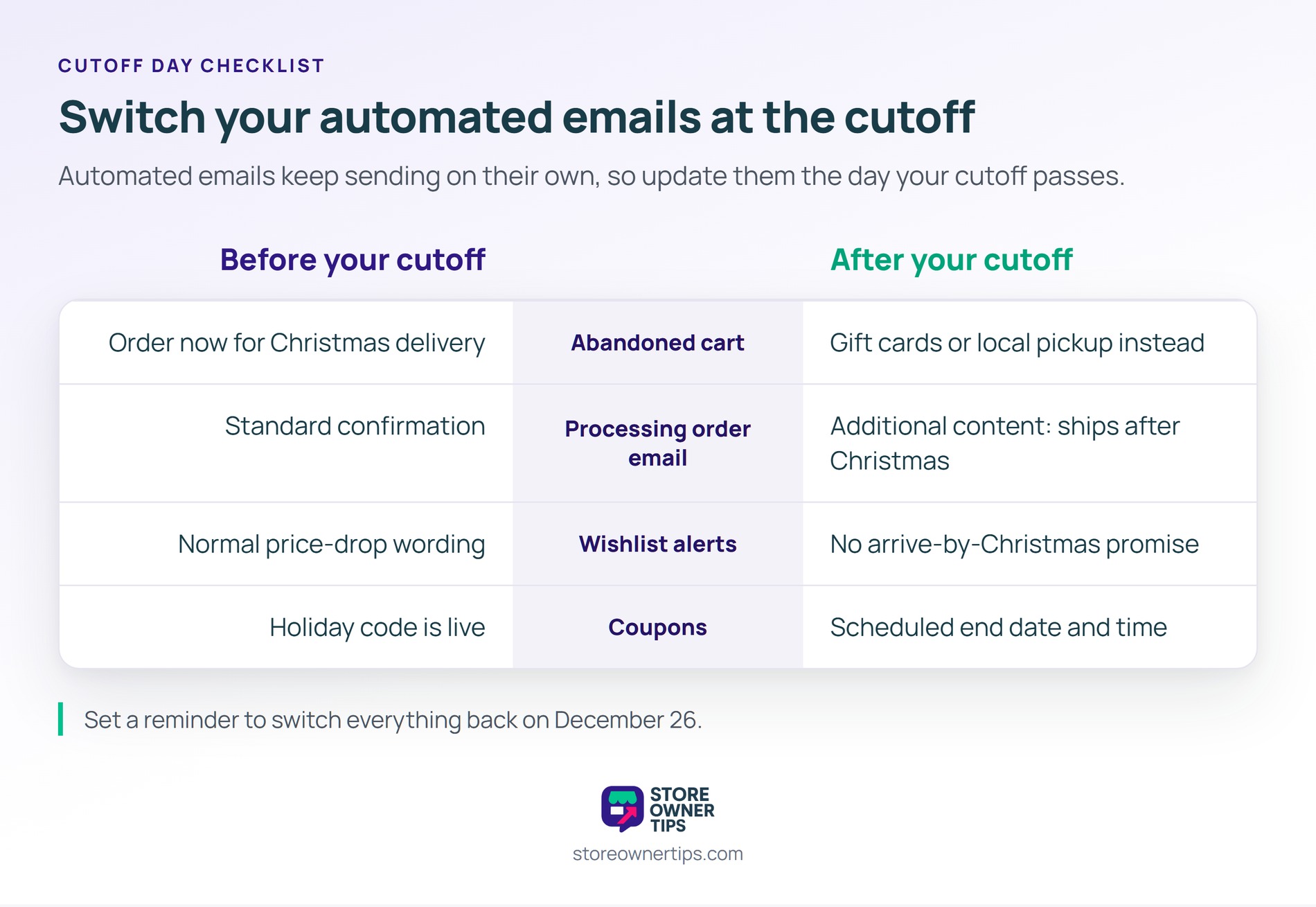
Your automated emails don’t know about your shipping cutoff, so update them the day it passes. Picture a cart reminder on December 20 that still says “get it in time for Christmas.” That’s a promise you can’t keep. Automations are the part of holiday email marketing that’s easiest to forget.
Here’s what to change on cutoff day:
Then set a reminder to switch everything back on December 26. That’s when your returns and gift card emails take over.
🔍️ What we’ve seen: Automated emails are the ones stores most often forget in December. After the cutoff, the old “arrives by Christmas” copy keeps sending on its own. It’s also the email a customer remembers when the parcel lands late.
The week after Christmas is a second, quieter season. In that week, returns, gift cards, and New Year plans all bring people back to your store. Each one deserves its own email. Holiday email marketing doesn’t stop on December 25.
Holiday buyers are also a big share of your new customers for the year. Wholesale Suite shares ideas on how to turn seasonal shoppers into lifelong customers. Our post-Black Friday guide covers welcome flows for them.
Measure holiday emails by clicks, orders, and revenue, then compare them with last December. However, opens aren’t reliable on their own, since Apple’s Mail Privacy Protection loads emails in the background. Clear numbers make next year’s holiday email marketing easier to plan.
According to Litmus, Apple Mail accounted for 62.26% of tracked opens in July 2026. So track these instead:
Finally, write down what worked while it’s fresh. That way, next November, you’ll start from a tested plan instead of a blank calendar.
Holiday email marketing is really deadline marketing. The most useful December email tells shoppers when to order. After that date, it tells them what to buy instead. So plan around that, and the rest of the calendar falls into place.
Here’s what to do next:
Gift cards keep holiday email marketing selling after your last ship day. Compare Advanced Gift Cards plans on the Advanced Coupons pricing page. Your gift cards then arrive by email on the date the buyer picks.
Start right after Cyber Monday, with a Giving Tuesday or gift guide email in the first days of December. Your shipping cutoff series should begin about a week before your last ship date. Keep sending until Christmas Day, then switch to returns and gift card emails.
A weekly rhythm plus your cutoff reminders works for many small stores. In Validity’s survey, weekly was the most preferred frequency for holiday emails. Add two or three cutoff reminders, and send fewer to inactive subscribers.
Lead with the exact order-by date for Christmas delivery, in the subject line and the first sentence. Say which shipping method the date applies to. Then point to gift cards or local pickup for anyone who misses it.
A good one is short and leads with a date or an offer. For example: “Order by Dec 14 for Christmas delivery.” Klaviyo found the typical subject line runs about seven words. Save festive wording for the preview text or the email itself.
Yes. The week after Christmas is a good time for returns information, gift card redemption tips, and a short clearance email. NRF found 70% of consumers planned to shop that week in 2025.

Copyright © StoreOwnerTips.com. All Rights Reserved.
