Weekly ecommerce tips, deals & news.
Picture searching for one customer’s email in three places: WooCommerce, the email tool and a spreadsheet. Three different phone numbers come back.
It’s a common setup. A store’s customer count says one thing, the email platform says another, and both are right in their own way. That’s the problem a WooCommerce CRM integration is meant to fix.
The first decision isn’t which CRM. It’s which system owns the customer record. If two synced systems both think they’re in charge, you get duplicates, overwritten fields and the same mess.
In our experience, getting that one decision right does more for the integration than any choice of tool.
Jump to:
WooCommerce knows more than most owners realize, and less than a CRM does. Knowing which is which keeps your WooCommerce CRM integration from fixing a problem you don’t have.
It keeps a customer record for every registered account. That covers billing and shipping addresses, order history, total spend and whatever your checkout collects. All of it is available through the REST API, which is what any integration will use.
What it doesn’t hold is anything that happened away from the store. There’s no record of the email you sent, the call you took, the quote or the support ticket they opened. It knows what people bought, not what happened around the buying.
That’s the honest test for whether you need a CRM at all. If every meaningful interaction is a transaction, WooCommerce plus good reporting may be enough. If customers talk to you between orders, that conversation is probably living in someone’s inbox right now.
Guest orders complicate this. A guest checkout creates an order without a customer account. So one person ordering three times as a guest leaves three orders with no account linking them.
Any integration has to decide whether to match those on email address. Getting that wrong is a major source of duplicates.
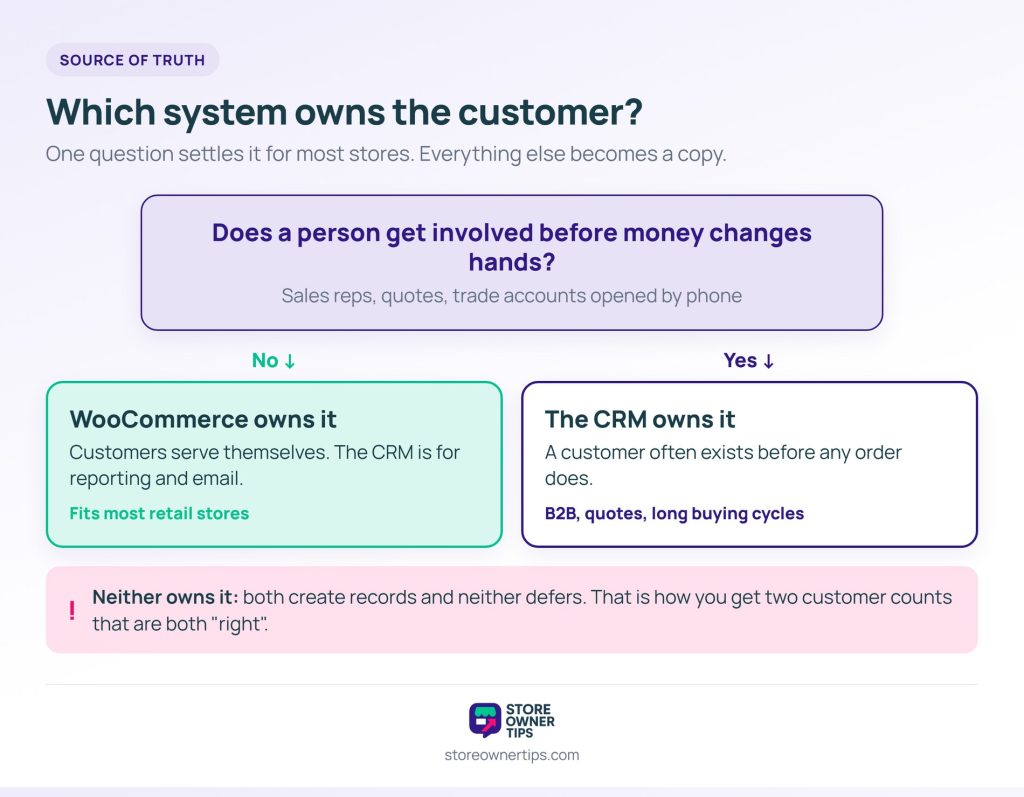
Before any WooCommerce CRM integration goes live, pick one system as the source of truth for customer identity. Every other system then holds a copy it doesn’t get to overwrite.
The right owner usually follows from how your business actually runs:
Write the decision down, because it shapes every setting you choose later. The other system is a downstream copy, even if its editing screens invite you to change things there.
This matters most when you start keeping customers past the first order. That’s when you begin acting on customer data instead of just storing it.
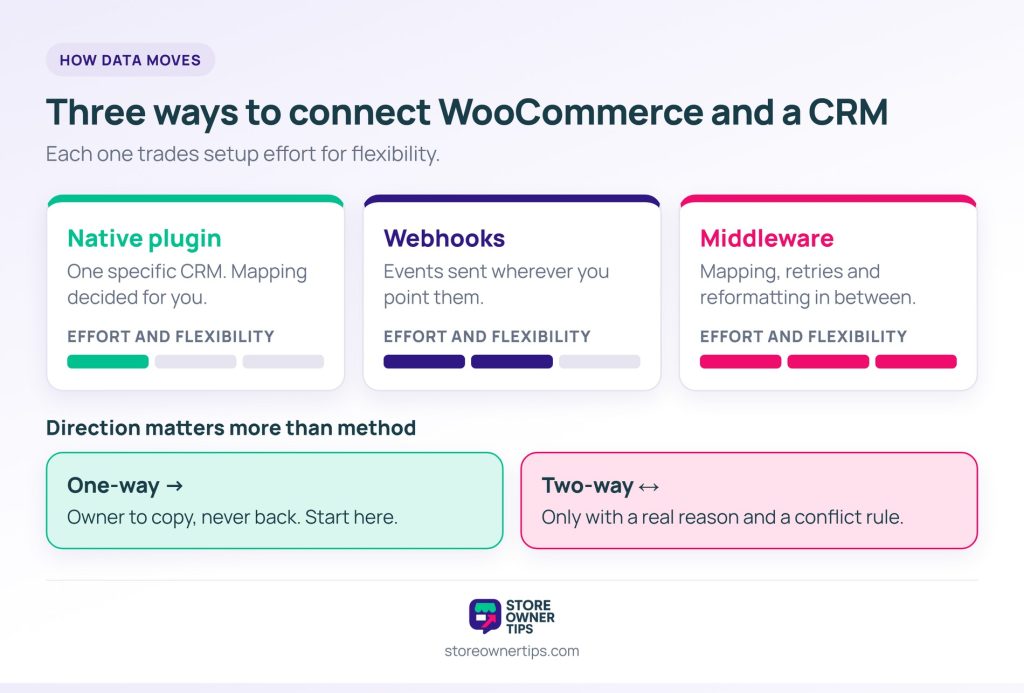
A WooCommerce CRM integration moves data in one of three ways, each trading setup effort for flexibility.
A native integration plugin connects WooCommerce to one specific CRM. It’s the easiest to set up and the least flexible. Field mapping is usually decided for you, and the sync runs on the plugin’s schedule.
Webhooks fire from WooCommerce when something happens and send the data wherever you point them. They’re more flexible but take more work. They also need somewhere to land that understands the data.
Middleware sits between the two systems and handles mapping, retries and reformatting. It usually costs the most and does the most. Once more than two systems are involved, it’s often the right answer.
Direction matters more than method. One-way sync sends data from the owner to the copy and never back. Two-way sync lets both sides update, which sounds better but causes most of the pain.
So only turn on two-way sync when you have a real reason and a conflict rule. Without a rule for when both sides change the same field, whichever writes last wins. That’s not a rule so much as a race.
If you really need a one-off migration rather than an ongoing sync, skip the integration. Exporting store data to CSV and importing it once is simpler and cheaper, with nothing to monitor afterwards.
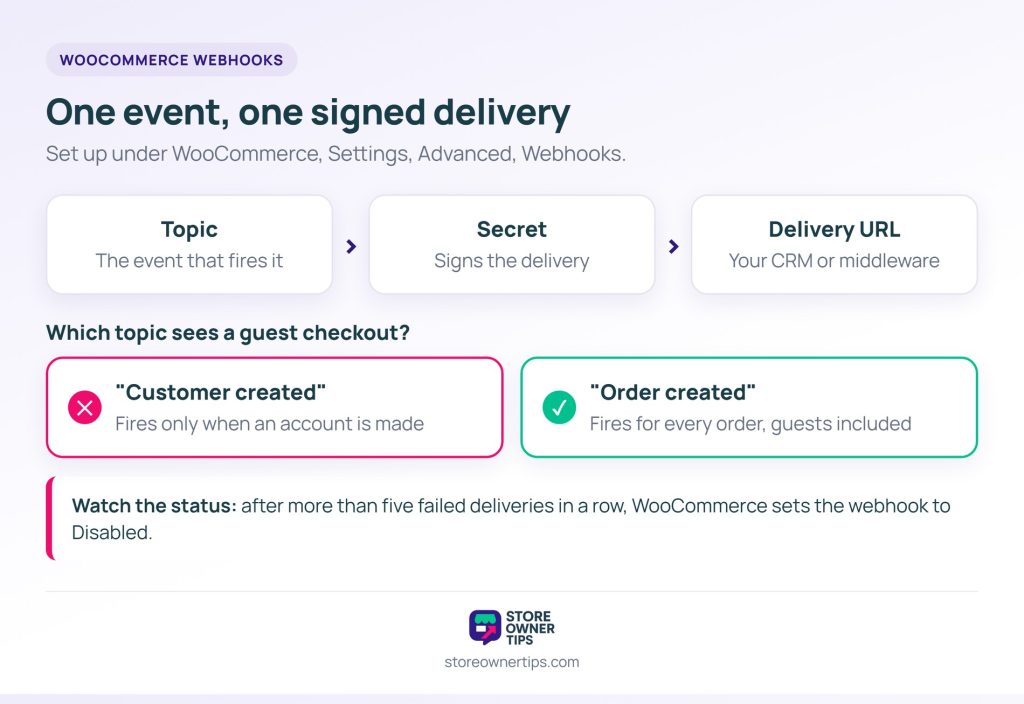
If your WooCommerce CRM integration takes the webhook route, the setup lives under WooCommerce > Settings > Advanced > Webhooks. Each webhook watches one event and posts it to one address.
X-WC-Webhook-Signature header, so the receiving end can check it really came from your store.The topic choice hides a trap for stores with lots of guest checkouts. “Customer created” fires when an account is made, so a guest order never triggers it. If many of your orders come from guests, sync from “Order created” and match people on the billing email.
Webhooks can also switch themselves off. After more than five failed deliveries in a row, WooCommerce sets the webhook to Disabled. So a weekend outage on the CRM side can leave the sync off on Monday. The Webhooks list is the only place that shows it.
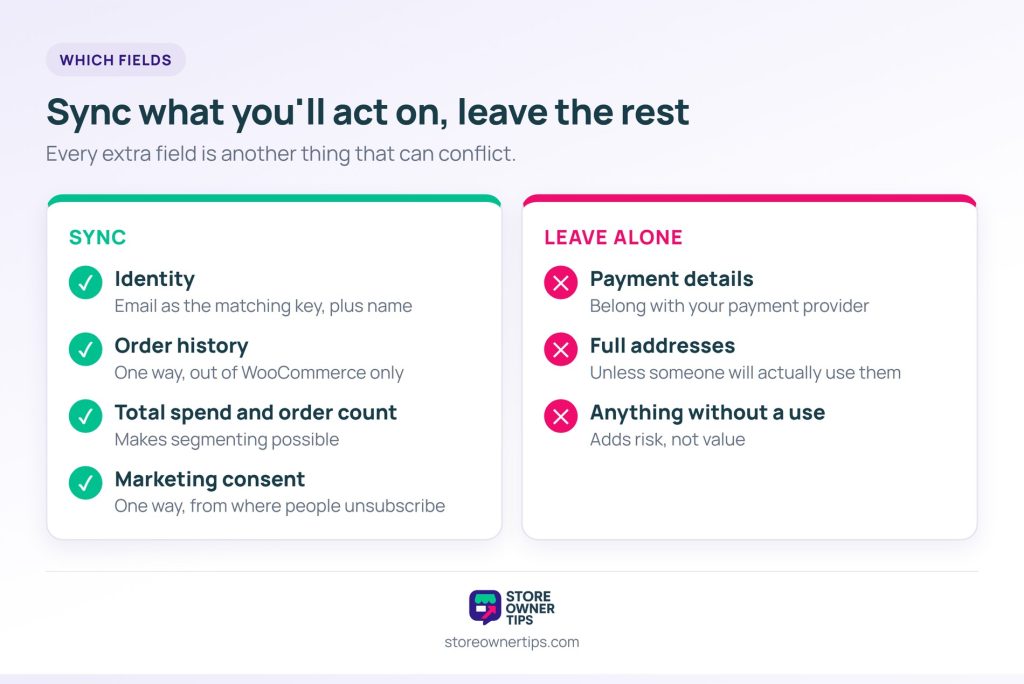
Sync only the fields you’ll act on. Syncing everything is an easy mistake on a first attempt, and every extra field is another thing that can conflict.
These are worth syncing:
Leave these alone:
Consent deserves its own warning. Say a customer unsubscribes in your email platform, then your integration pushes their WooCommerce record back over the top. You’ve just resubscribed someone who asked not to hear from you.
So consent should flow one way, from wherever the unsubscribe happens, and nothing should overwrite it. That’s also why segmentation built on synced data needs a reliable consent field before it’s useful.
Two synced systems will disagree at some point. Plan for three cases, and your WooCommerce CRM integration mostly runs itself.
Duplicates. Two records for one person, usually from a guest order under a different email or a name typed differently. Match on email address, and have a merge process for the rest.
Conflicting updates. Both sides change the same field before a sync runs. Your source-of-truth decision settles it, which is why that decision has to exist before the integration does.
Deletions that don’t carry over. A record removed in one system lives on in the other. That’s often deliberate for accounting reasons, but it should be a decision, not a surprise.
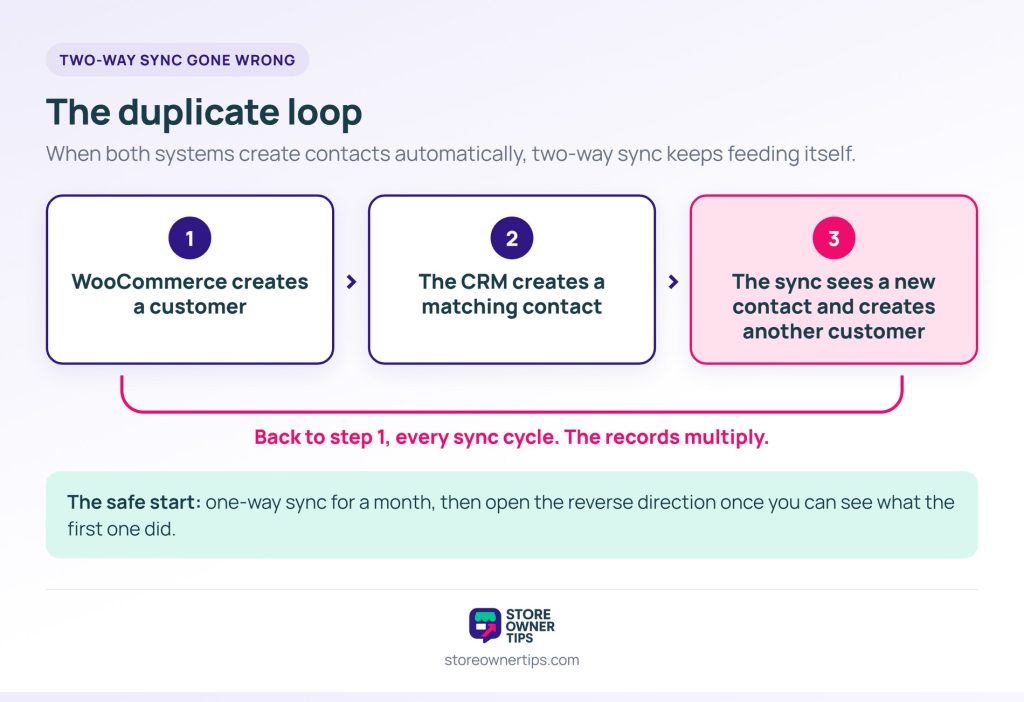
🔍️ What we’ve seen store owners miss: two-way sync between two systems that both create contacts automatically. WooCommerce creates a customer, and the CRM creates a matching contact. Then the sync sees a new contact and creates another customer, so the pair multiply every cycle. By the time anyone notices, the cleanup is bigger than the original problem.
The safest start is one-way sync for a month. Only open the reverse direction once you can see what the first direction actually did.
Run the first sync on a small slice of customers, and check four things before you widen it.
The count check is the one that catches two different customer totals early. Two honest numbers that don’t match usually mean guests and account holders are being matched differently in each system.
Once all four checks pass, open the WooCommerce CRM integration to the rest of your customers.

No. WooCommerce stores customer records, addresses and order history, which covers reporting and basic segmentation. It doesn’t record calls, emails, quotes or support conversations, and that gap is what a CRM fills.
For most retail stores, the store, because that’s where customers are created and orders happen. Choose the CRM when customers exist before orders do, as with trade accounts or a sales process. Pick one, write it down and set everything else up around it.
Match on email address, and decide how guest orders are handled before you start. Clean up existing duplicates before the first sync. Starting one-way also means duplicates can only appear in one place, which makes them far easier to trace.
Usually not. If you handle every customer yourself and the relationship is mostly transactional, WooCommerce plus a good email platform covers it. A CRM earns its place when several people need a customer’s history, or when interactions happen away from the store.
Yes. WooCommerce webhooks can send order and customer events to any address, and the REST API allows scheduled pulls. Both need something to receive and map the data, so this route suits stores with development help.
It’s tempting to start by choosing a CRM, since that’s the decision with the most reviews written about it. But it’s the second decision. The first is which system owns the customer. That decides whether your WooCommerce CRM integration runs quietly or needs constant cleanup.
Here’s what to do next:
Once customer data is in one place, the value comes from acting on it. That usually means better-targeted email workflows, not better reports.
If you need to move data rather than keep two systems in step, a one-off export is often simpler. Visser Labs’ guide to exporting WooCommerce orders walks through that route.
It also helps to make sure the store’s own messages work before you add a CRM on top. Our guide to WooCommerce email customization covers that side. And selling well to the customers you already have is the idea behind a WooCommerce sales funnel too.

Copyright © StoreOwnerTips.com. All Rights Reserved.
