Picture one return: a customer emails asking to swap a medium for a large. You search for the order, check the large is in stock, reply about postage and wait. Next, you refund the medium, create an order for the large and note to restock the medium later. That’s an hour, and nothing about it was hard.
The fix for slow WooCommerce returns is a fixed routine. Write the policy once, take every request through one route and decide with set rules. Then refund from the order screen after the item arrives, and restock only what you can sell again.
In my experience, returns drag because each one gets decided from scratch. The refund, the stock and the reply happen in a different order every time. This guide turns returns management into a process you can repeat. Most of it uses what WooCommerce already gives you.
Jump to:
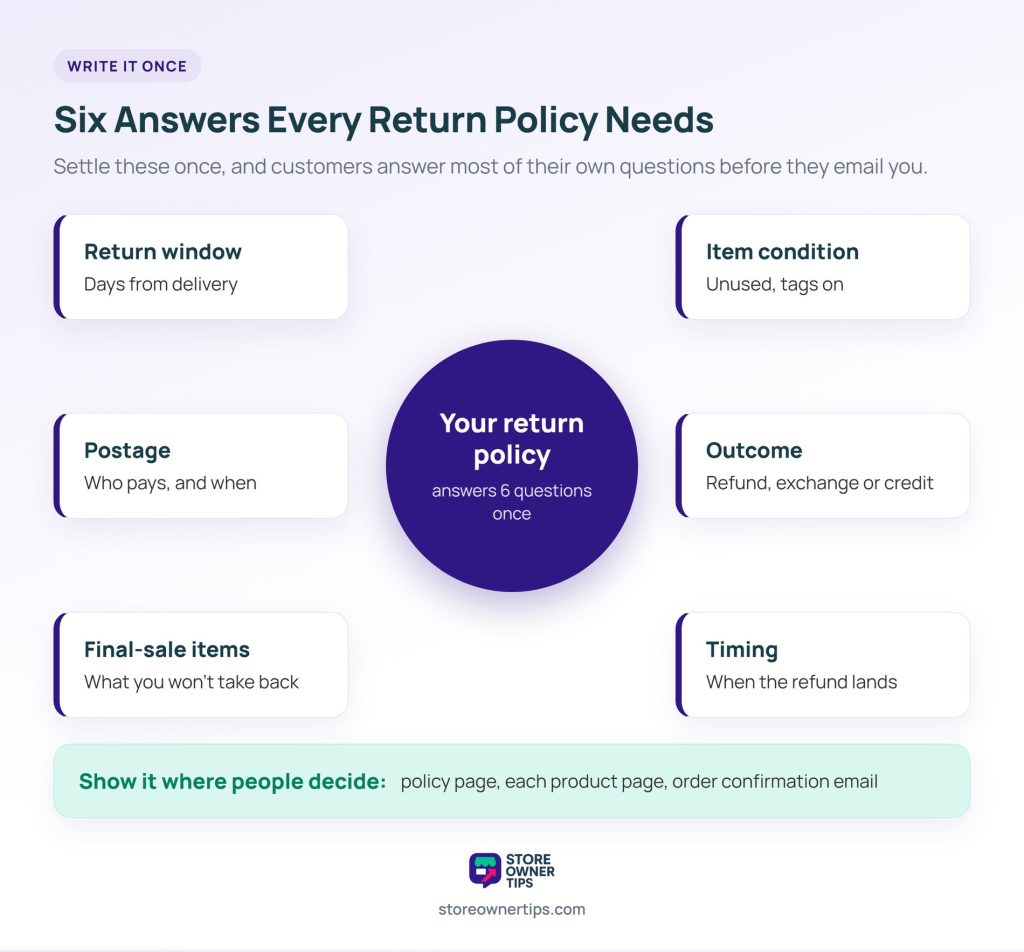
A return policy is the set of answers you’d otherwise type into every email. Write it once, and customers can answer most of their own questions before they contact you.
To cover most WooCommerce returns, it needs to settle six things:
If you sell into the EU, check the legal floor first. Online buyers there can cancel within 14 days of delivery without giving a reason, says the EU’s Your Europe guide. Exceptions include perishable goods and personalised items.
Then show the policy where people decide. That means a policy page, a line on each product page and the order confirmation email. A visible returns policy is also one of the trust signals shoppers look for before they buy. Faulty items under warranty are different, though. Those claims follow your warranty terms, not your return window.
All WooCommerce returns should start in the same place, with the same details: one form or one email address.
Ask for four things up front. You need the order number, the item, a reason from a fixed list, and a photo of any damage. Fixed reasons matter because each one maps to a rule in the next section. By contrast, a free-text reason sends you back to judging each case.
Guests also need to use the route without logging in, since many orders never had an account behind them.
WooCommerce 11.1 added an optional Order Withdrawal form, switched off by default. Its documentation says you enable it under WooCommerce > Settings > Advanced > Features. Customers then reach it at /my-account/withdraw-order/ without signing in.
The form asks for first and last name, email and order number. Customers then choose the full order or specific items, and an Additional details box lets them list which ones. The form also turns away orders outside a fixed 14-day window. So if your policy offers 30 days, take later requests by email.
A matched request adds an order note and a notification. However, it doesn’t cancel, refund or change the order status. It also has no reason list or photo upload, so ask for those in your reply.
When volume outgrows this, a returns plugin adds a request form with reasons, an RMA status and an approval queue.
A decision table turns “let me think about this one” into a lookup. Match the reason and the item’s condition, and the outcome is already written down.
Here’s what this looks like for WooCommerce returns at a typical clothing store (example rules):
| Reason | Item condition | Outcome | Return postage |
|---|---|---|---|
| Wrong size or colour | Unused, within window | Exchange, or refund if the replacement is out of stock | Per your policy |
| Changed mind | Unused, within window | Refund to the original payment, or store credit if the customer prefers | Customer |
| Arrived damaged or wrong item sent | Any | Refund or replacement; accept a photo instead of a return when that’s cheaper | Store |
| Faulty after use | Within warranty terms | Follow the warranty terms | Store |
| Any reason | Used, outside window, or final sale | Decline and cite the rule | None |
Same reason, same answer, whoever handles the email. The table also makes patterns visible. For example, a customer who returns most of what they buy is worth a closer look. That pattern can be an early sign of refund abuse.
Approving means sending return instructions. Declining means naming the rule and offering an alternative, such as a repair or a discount on a new item.
WooCommerce refunds happen on the order itself. You process them from the Edit Order screen, either automatically through a compatible payment gateway or manually.
The steps:
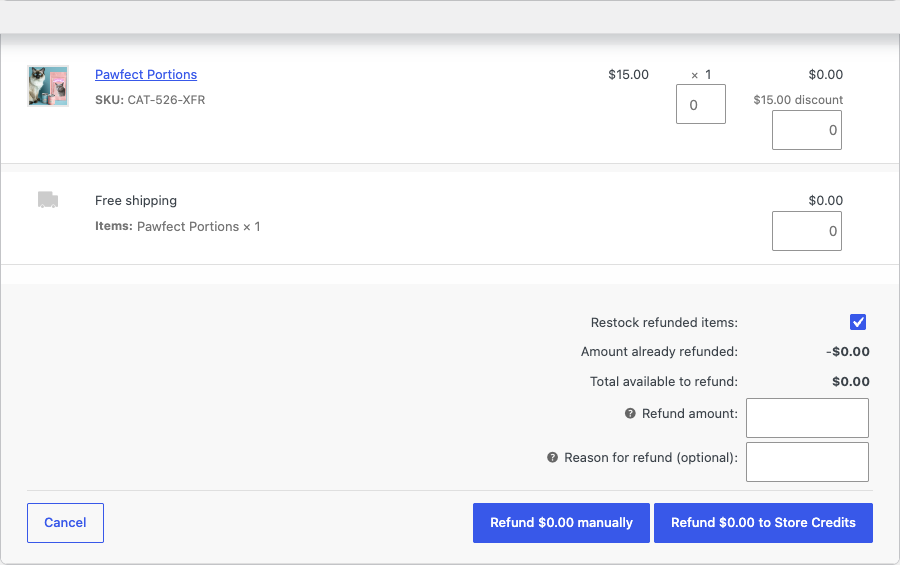
An automatic refund sends the money back through the original payment method. A manual refund only records it, so you still return the money through your gateway’s dashboard or a bank transfer. Also, changing an order’s status to Refunded by hand doesn’t refund anyone, as WooCommerce’s documentation warns.
A full refund moves the order to Refunded, while a partial refund leaves the status alone. Either way, WooCommerce sends the customer its Refunded order email, worded for a full or partial refund.
🔍️ What we’ve seen: the refund goes out the day the request email arrives, with “Restock refunded items” ticked. The jumper shows as in stock and sells again. However, the original is still in the post, or it comes back with a stain. Refund and restock when the parcel is on your bench, unless the EU rule below applies.
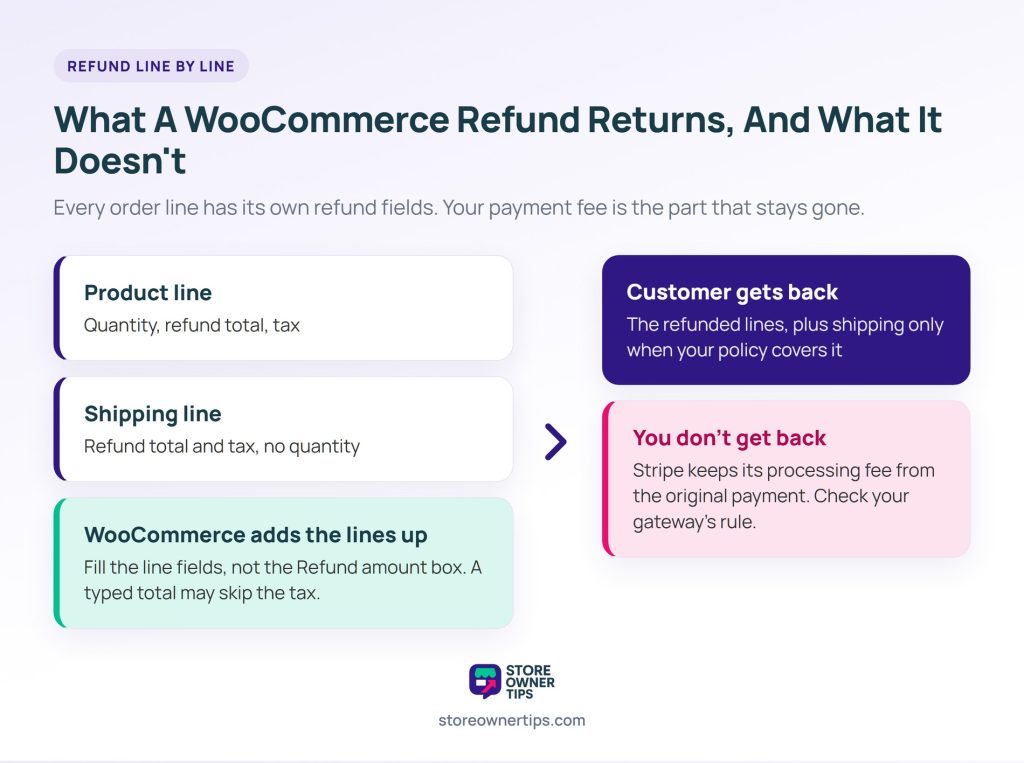
The refund panel gives every line of the order its own fields. Each product line has a quantity, a refund total and a tax field. The shipping line has a refund total and a tax field too, but no quantity.
As a result, refunding postage on WooCommerce returns is a separate decision. Enter an amount on the shipping line only when your policy says you cover it. Sending the wrong item is a common case. EU withdrawals have their own rule, covered in the next section.
You can also type a figure straight into the Refund amount box. With taxes enabled, though, WooCommerce’s own code warns the tax may not be refunded with that figure. Fill in the line fields instead and let WooCommerce add them up.
Refunding the customer doesn’t refund your payment fees, either. Stripe’s refund documentation says its processing fees from the original transaction aren’t returned. Other gateways set their own rules, so check yours.
So every changed-mind return already costs you that fee before postage. Count it when you decide who pays to send items back.
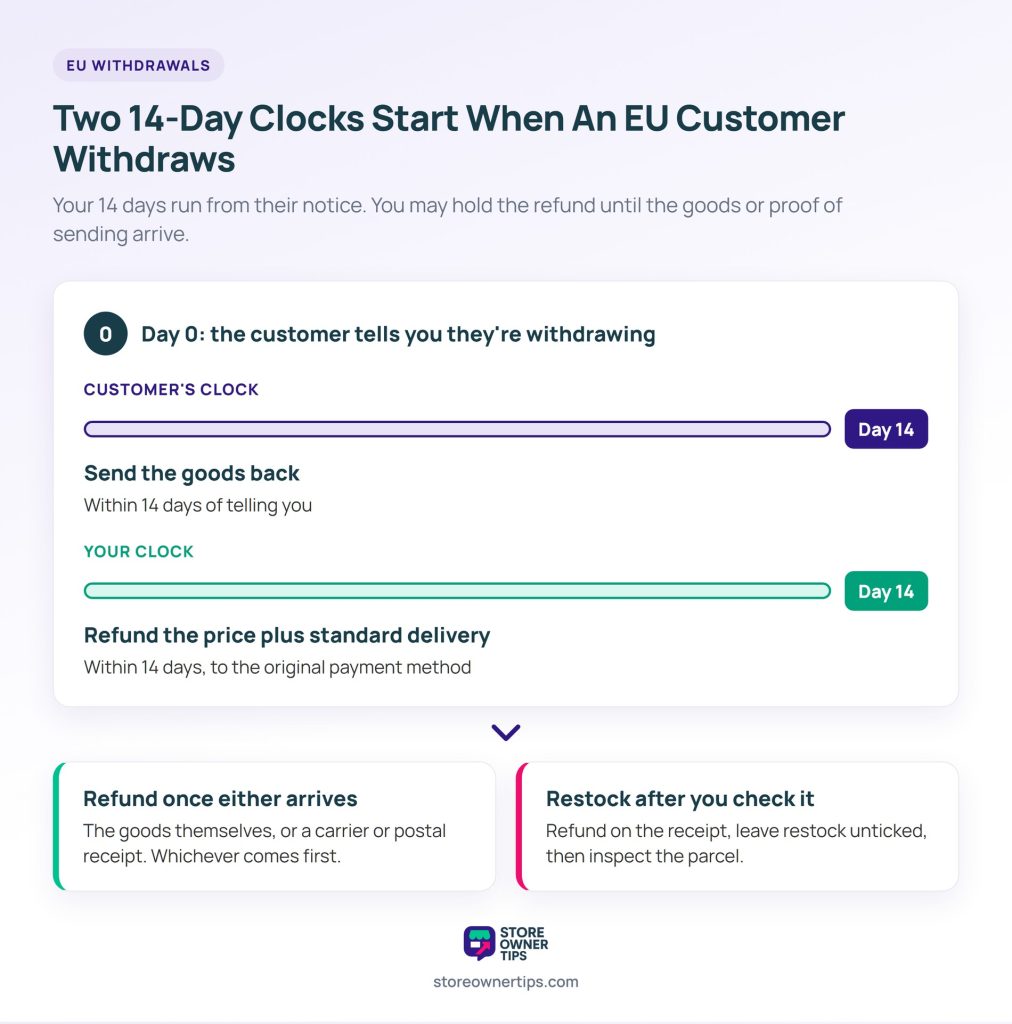
Waiting for the parcel is the right default for most WooCommerce returns. For EU customers who withdraw within 14 days, though, the Consumer Rights Directive adds a deadline and some conditions:
In practice, a carrier receipt is your cue to refund, even if the parcel hasn’t reached you yet. Leave “Restock refunded items” unticked, and restock once you’ve checked the item.
Each country writes the Directive into its own law, and some add detail. So check the rules in the countries you sell to most.
WooCommerce has no exchange function, so an exchange is a refund plus a new order. There are two clean ways to handle these WooCommerce returns.
Check the replacement’s stock before you approve the exchange. If you’re holding the last large for this customer, reduce its stock count so it doesn’t sell in the meantime.
When the right size is out of stock, store credit keeps the money in your store. The free Advanced Coupons plugin adds a “Refund $X to Store Credits” button to the same WooCommerce refund panel. The customer then spends the balance at checkout.
Its guide shows how to refund an order as store credit. The limit: the order must belong to a registered customer account, so guest orders get a normal refund.
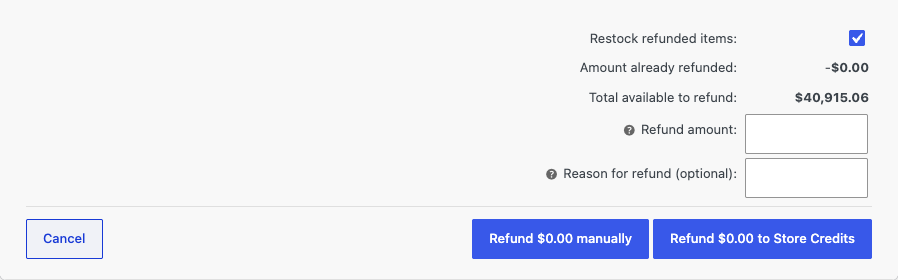
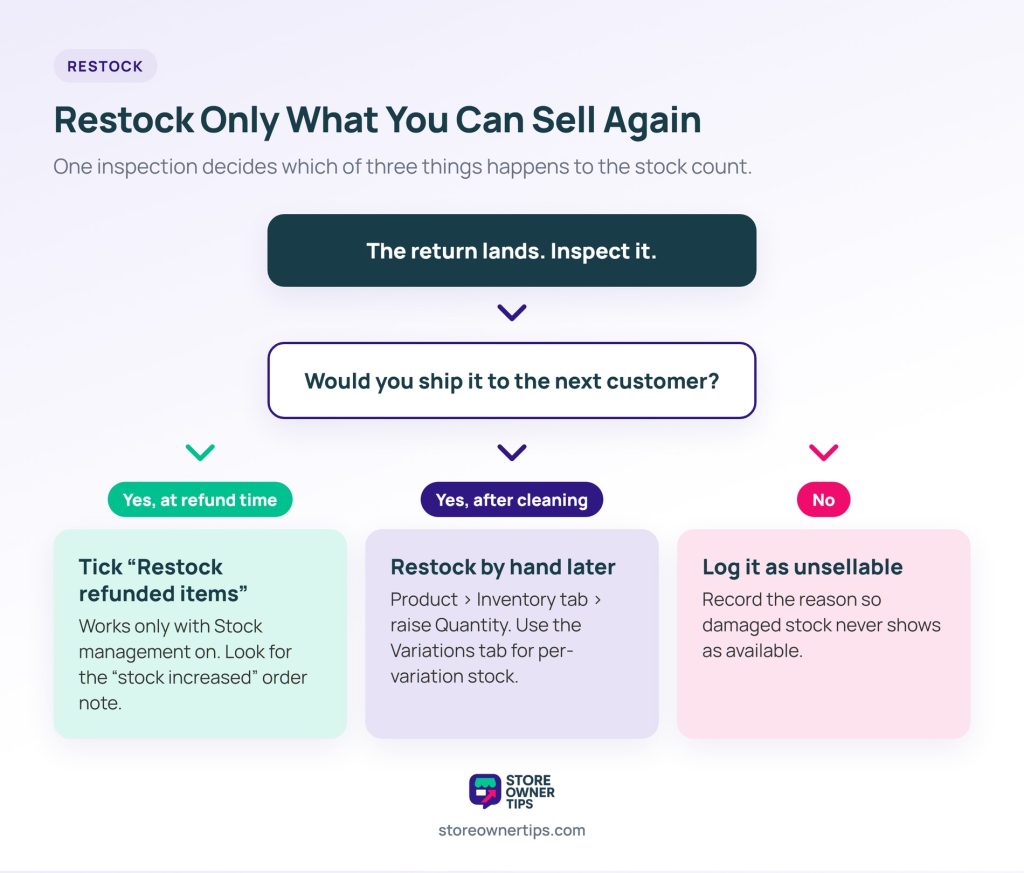
Inspect all WooCommerce returns when they land, then restock only what you’d happily ship to the next customer.
If the item is back and sellable at refund time, tick “Restock refunded items” as you refund. If you refunded earlier, or the item needs cleaning first, adjust the stock by hand once it’s ready. Meanwhile, log unsellable returns separately with the reason, so damaged stock never shows as available.
The checkbox only works on products with Stock management switched on, and only for stock the order actually reduced. When it runs, WooCommerce adds an order note such as “Item #123 stock increased from 4 to 5.” If that note is missing, nothing went back into stock.
To restock by hand, edit the product, open the Inventory tab and raise the Quantity field. For a variable product with stock set per variation, change it on the Variations tab instead.
The log also shows which products come back broken or misdescribed. Plus, it’s a core part of keeping WooCommerce stock counts accurate.
Three messages cover all WooCommerce returns: the decision, the arrival and the result.
Here’s a plain template for message one:
Hi {name}, thanks for letting us know. Your return for {item} on order {number} is approved. Please send it to {address} within 14 days with your order number inside. We’ll refund {method} once it arrives.
Messages one and two follow the same pattern every time, so they’re good candidates for automated WooCommerce email workflows.
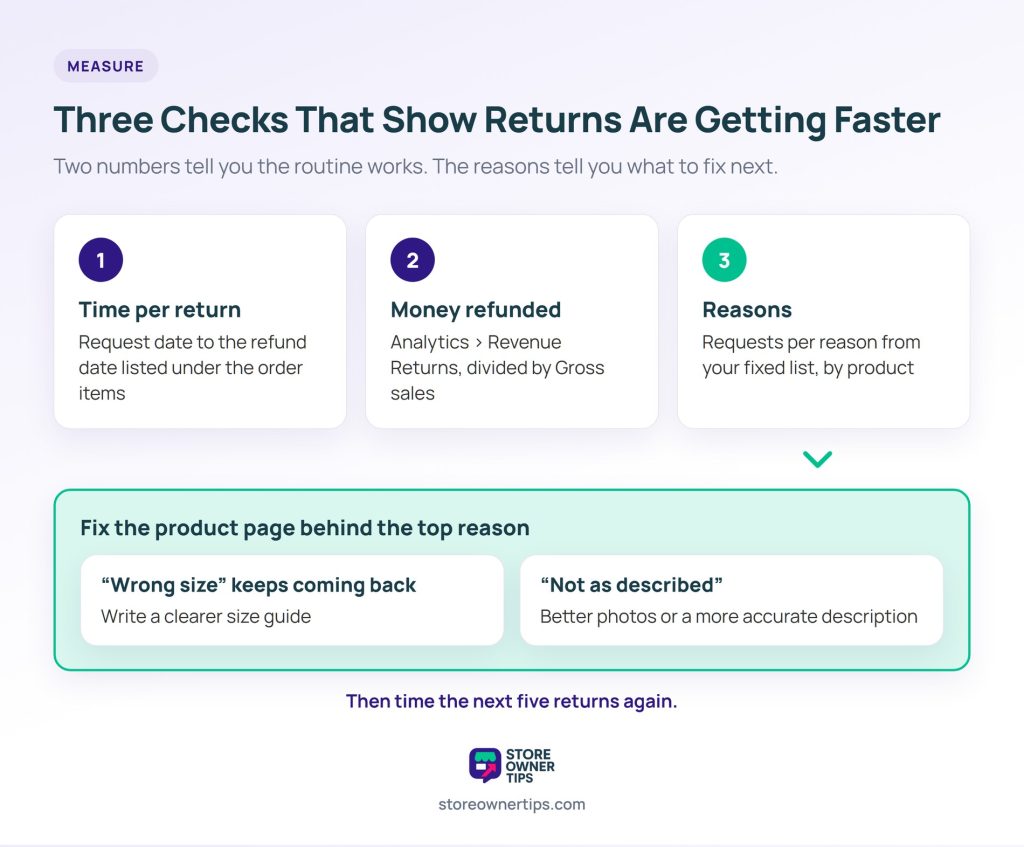
Three checks show whether your WooCommerce returns routine works: time per return, money refunded, and why items come back.
The reason count is where returns start to drop. A product that keeps coming back as the wrong size needs a clearer size guide. Likewise, one returned as “not as described” needs better photos or a more accurate description.
Partly. Core WooCommerce handles refunds from the Edit Order screen and restocking through the “Restock refunded items” checkbox. It also sends the Refunded order email.
Since version 11.1, it has an optional Order Withdrawal form for customer requests too. However, it has no approval queue, RMA status or exchange button.
Refund the returned item once it arrives. Then either let the customer reorder, or create a replacement order yourself, charging nothing or the difference. Check the replacement is in stock before approving.
Yes. Leave “Restock refunded items” unticked when you refund. You can restock by hand later if the item turns out to be sellable.
No. Store credit is held against a customer account, so the order must belong to a registered customer. Guest orders get a normal refund.
Long enough for the customer to receive and try the item, and never shorter than the law where you sell. EU buyers get 14 days from delivery to cancel an online purchase.

The payoff from a WooCommerce returns process is that anyone on your team can run it. Time your next five returns before and after the change. Then track your refund rate to see which products drive returns.
Returns are one part of a customer service setup that scales. Give the rest of your support the same treatment next.

Copyright © StoreOwnerTips.com. All Rights Reserved.
