Weekly ecommerce tips, deals & news.
Picture forty paid orders sitting in your WooCommerce dashboard on a Monday morning. You block out an hour to clear them. Three hours later, you’re still going.
Almost none of that time goes on printing. It goes on tabbing between the order screen, the carrier site, and a spreadsheet of tracking numbers kept by hand.
Most guides to WooCommerce shipping labels answer one question: how do I print a single label? That’s a five-minute problem. The question that costs you a morning is how to get through forty orders.
That’s what this guide covers. I’ve seen plenty of stores buy faster tools and keep the slow process. So we’ll start with where the time actually goes.
Jump to:
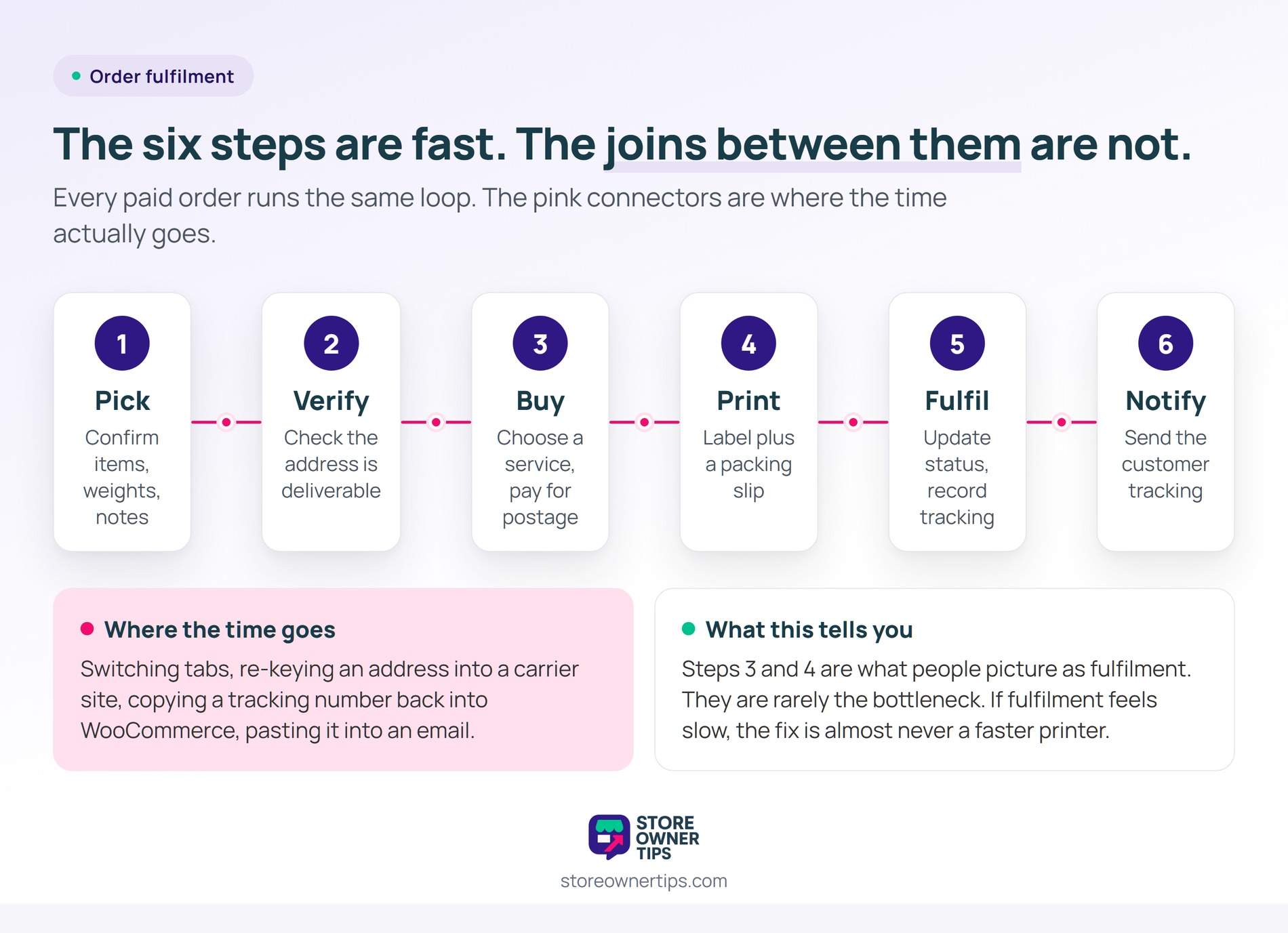
Every paid order runs through the same six steps. Naming them matters, because the time is rarely where people expect.
Steps 3 and 4 are what most people picture when they say fulfilment. But they’re rarely the bottleneck.
The time goes into the joins between the steps. You switch tabs, re-key an address into a carrier site, then copy a tracking number back into WooCommerce. After that you paste it into an email.
In our experience, most of the elapsed time gets spent moving data between systems that aren’t connected. That’s the useful diagnosis. If fulfilment feels slow, the fix is almost never a faster printer.

WooCommerce can buy and print shipping labels without a third-party plugin, through WooCommerce Shipping. You open the order, pick a service, pay for the label, and print it.
So for a store shipping a handful of orders a day, that’s the whole answer. You can also buy and print labels from the Woo mobile apps for iOS and Android. That helps if you fulfil away from a desk.
One constraint is worth checking before you build a process on it. WooCommerce Shipping is only available to stores based in the United States, including US territories, that trade in US dollars. It covers UPS, USPS, DHL Express and FedEx, and it needs a connected WordPress.com account with a card saved.
So if you ship from anywhere else, this route isn’t open to you at all. That’s worth knowing early rather than halfway through a setup.
A second limit applies even inside the US. The native flow is built around one order at a time. That’s exactly the constraint that bites as volume grows.
If your carrier isn’t covered, or you need rules about which service gets used, a shipping plugin earns its place. Our roundup of the best WooCommerce shipping plugins covers the options, including carrier-specific tools.
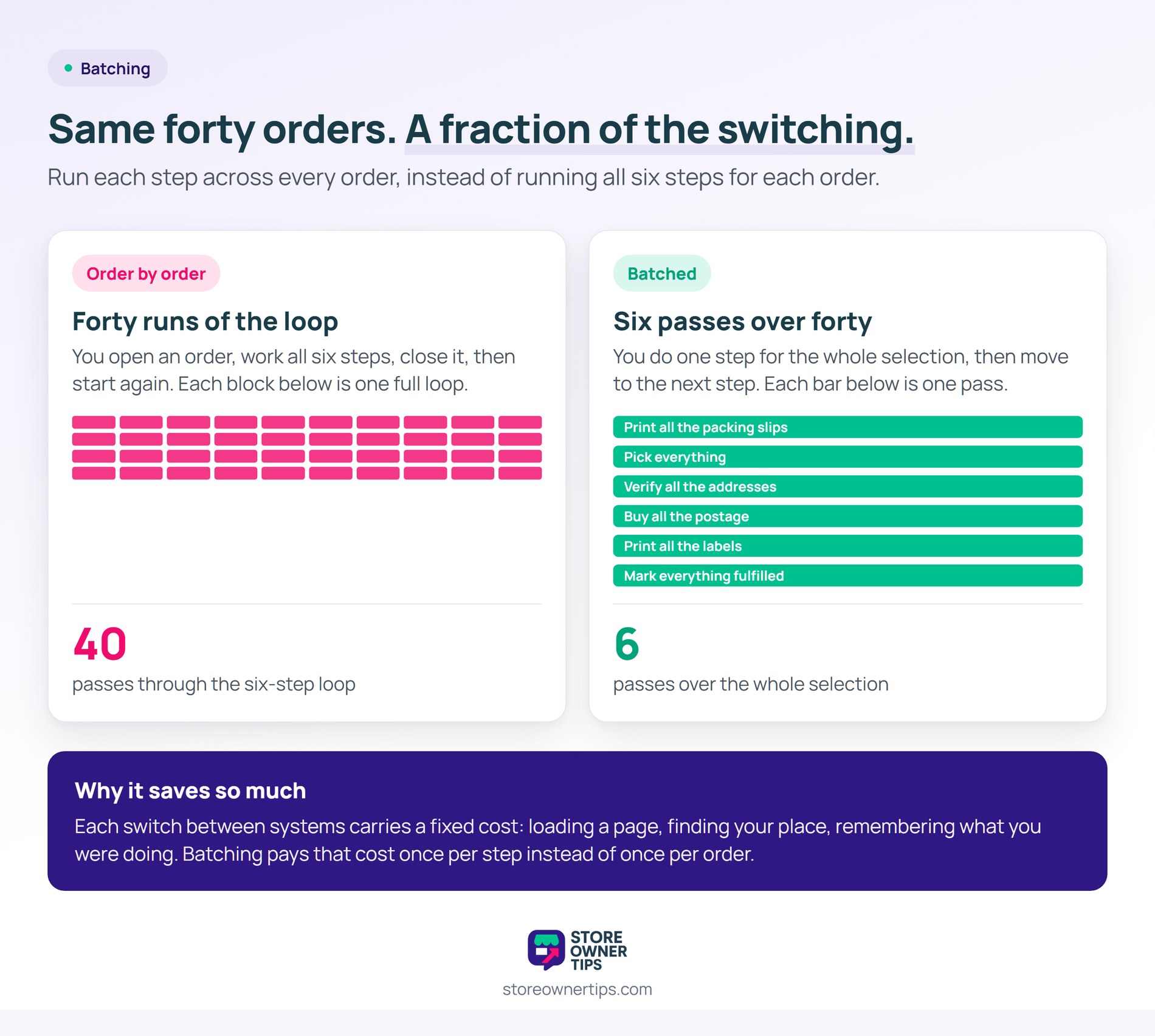
Batching means running each step across all your orders, instead of running all six steps for each order.
Instead of forty repetitions of the loop, you make six passes over forty orders. Print all the packing slips, pick everything, then verify all the addresses. Buy all the postage, print all the labels, and mark everything fulfilled in one action.
The gain isn’t small. Each switch between systems carries a fixed cost: loading a page, finding your place, remembering what you were doing. Batching pays that cost once per step instead of once per order.
Here’s what you need for it:
🔍️ What we’ve seen: stores buy a shipping plugin to make label printing faster, then carry on working order by order. The plugin didn’t fail, the process just never changed. The tell is easy to check. Look at whether your order screen is filtered to processing. Then see if you’re working from a selection, or opening orders one at a time.
Bulk actions may be new to you. Our guide to the best WooCommerce bulk edit plugins applies the same principle to the catalogue side.
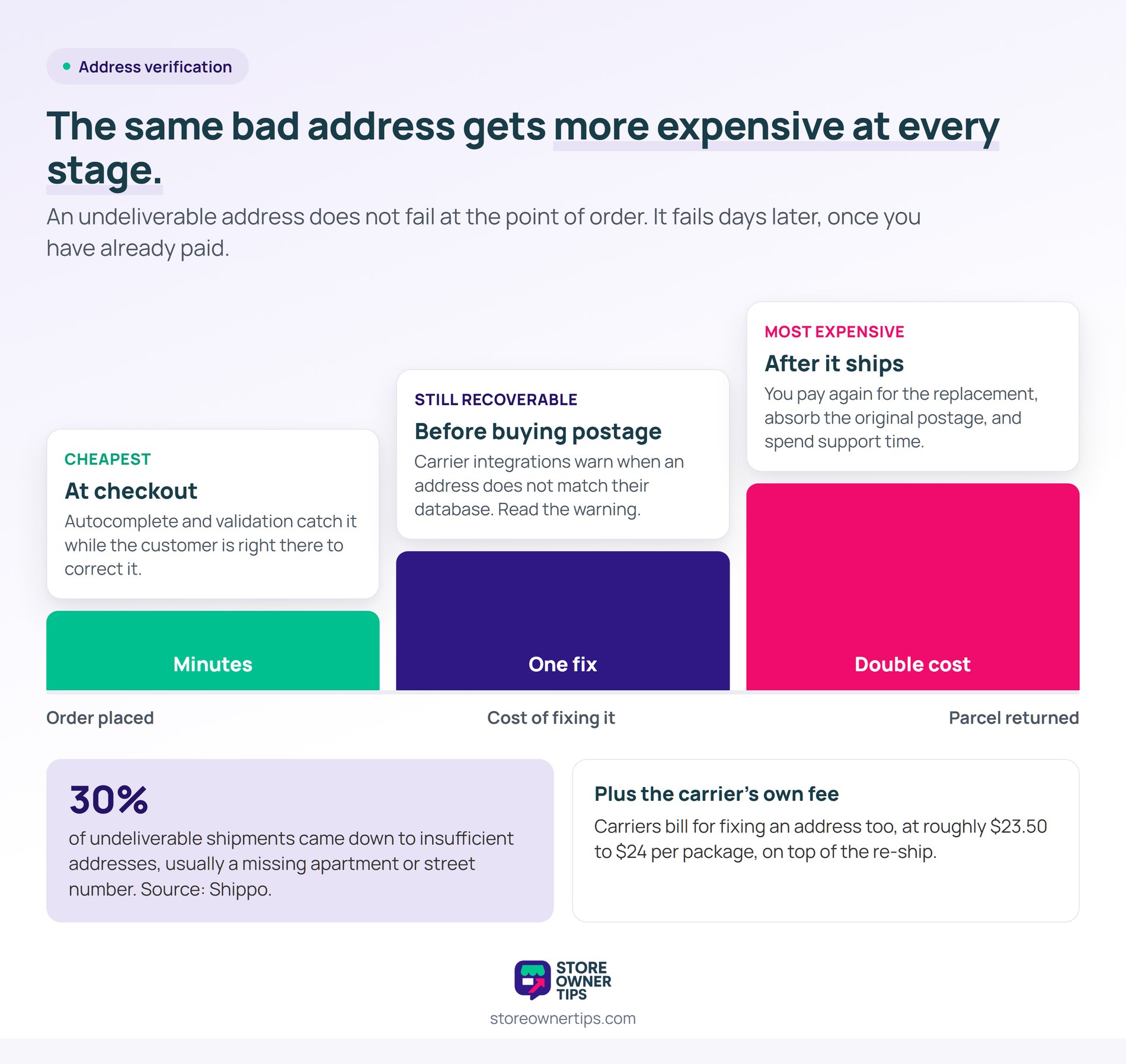
Address verification is the step most stores skip. However, it’s where re-ship costs come from.
An undeliverable address doesn’t fail at the point of order. It fails days later, after you’ve paid for postage, packed the goods, and shipped them. Then you pay again for the replacement, absorb the original postage, and spend support time on an unhappy customer.
The scale is easy to underestimate. Shippo’s analysis of parcels on its own platform found that 30% of undeliverable shipments came down to insufficient addresses. That’s usually a missing apartment or street number. Carriers bill for fixing it too, at roughly $23.50 to $24 per package.
Three habits catch most of it:
So if this keeps happening, check whether your checkout collects address data in a way that suits your market. Address formats differ enough between countries that one free-text field produces predictable failures.
Accurate stock matters here too. A picked order that turns out to be unavailable creates the same re-work. Our guide to WooCommerce inventory management covers the settings that prevent it.
Return labels come up constantly. However, WooCommerce doesn’t handle them natively.
You have three practical options. Generate a return label in your carrier’s own portal and email it. Alternatively, use a shipping plugin that supports return label generation. Or issue returns on request, instead of putting a label in every parcel.
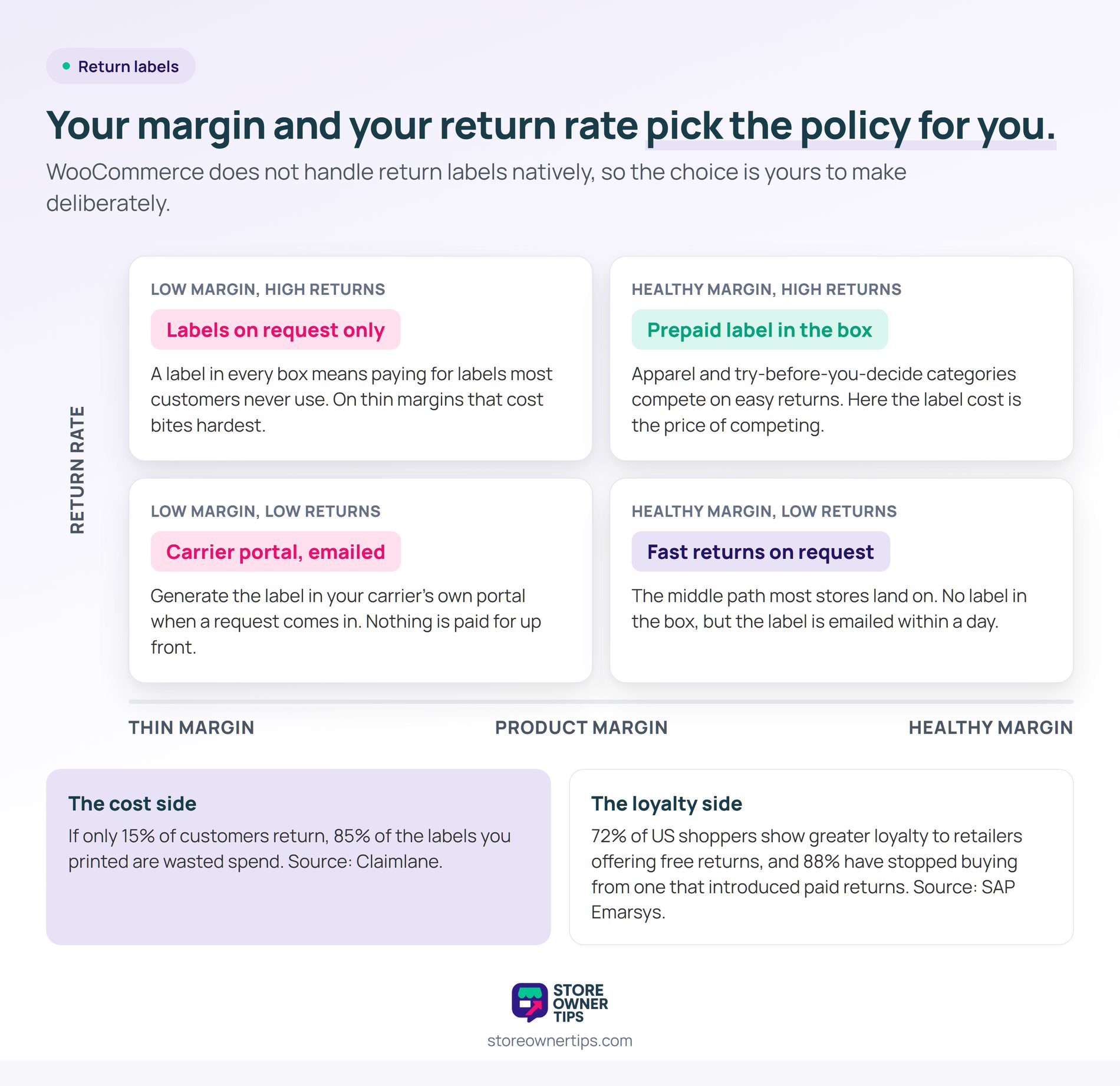
Which one fits depends on your return rate and your margin. Putting a prepaid label in every box means paying for labels that mostly go unused. As returns platform Claimlane puts it, if only 15% of customers return, 85% of those printed labels are wasted spend.
There’s a loyalty argument on the other side of the ledger. Research by SAP Emarsys found that 72% of US shoppers show greater loyalty to retailers offering free returns. The same survey of 2,045 US shoppers found 88% had stopped buying from a retailer that introduced paid returns.
So the trade is real, and it isn’t the same in every category. For low-margin goods, the label cost bites. For apparel, where try-before-you-decide is the norm, free returns are usually the price of competing.
In practice, most stores land on a middle path. No label in the box, but a fast return process on request, with the label emailed within a day.
Shipping cost may be a live question for your store. Our guide to free shipping in WooCommerce covers thresholds and when they make sense. Meanwhile, our shipping zone entry explains the structure that determines what’s offered where.
Yes, you can print WooCommerce shipping labels through WooCommerce Shipping, if your store is based in the United States and trades in US dollars. You can buy and print UPS, USPS, DHL Express and FedEx labels from the order screen. It also works in the Woo mobile apps for iOS and Android.
The native flow is built around one order at a time. Higher-volume stores usually add a plugin for bulk purchase and printing.
You need a plugin that supports bulk label purchase, because the native flow is order by order. Filter your orders list to paid orders awaiting fulfilment, then select them. Use the plugin’s bulk action to buy and print in one pass.
Pair that with WooCommerce’s native bulk status update. Marking orders fulfilled then becomes a single action too.
Usually because the address was incomplete rather than wrong. Missing unit or apartment numbers are the common culprit, since the address still looks valid.
Validating addresses at checkout catches this while the customer can still fix it. That costs far less than finding out after you’ve paid for postage and packed the order.
It depends on your margin and your category. A prepaid label in every box means paying for labels most customers never use, which hurts on low-margin goods.
For apparel and other try-before-you-decide products, easy returns are usually worth the cost. Issuing labels on request is the middle path most stores settle on.
Fulfilment isn’t a printing task with some admin attached. It’s a data-handling task with some printing attached. Once you see it that way, the improvements get obvious. Connect the systems, work in batches, and stop moving numbers by hand.
Visser Labs has a guide to data automation workflows covering scheduled order exports to a 3PL.
Your carrier may not be covered natively, or you may need bulk label purchase. In that case, our roundup of the best WooCommerce shipping plugins compares the options built for high-volume fulfilment.

Copyright © StoreOwnerTips.com. All Rights Reserved.
